gosom/google-maps-scraper
GitHub: gosom/google-maps-scraper
一款开源的高性能 Google Maps 爬虫,支持批量提取商户名称、地址、电话、邮箱等三十余种商业信息。
Stars: 4355 | Forks: 652
# Google Maps Scraper
**自定义输入 ID:** 在输入文件中定义您自己的 ID:
```
Matsuhisa Athens #!#MyCustomID
```
## 配置
### 命令行选项
```
Usage: google-maps-scraper [options]
Core Options:
-input string Path to input file with queries (one per line)
-results string Output file path (default: stdout)
-json Output JSON instead of CSV
-depth int Max scroll depth in results (default: 10)
-c int Concurrency level (default: half of CPU cores)
Email & Reviews:
-email Extract emails from business websites
-extra-reviews Collect extended reviews (up to ~300)
Location Settings:
-lang string Language code, e.g., 'de' for German (default: "en")
-geo string Coordinates for search, e.g., '37.7749,-122.4194'
-zoom int Zoom level 0-21 (default: 15)
-radius float Search radius in meters (default: 10000)
Web Server:
-web Run web server mode
-addr string Server address (default: ":8080")
-data-folder Data folder for web runner (default: "webdata")
Database:
-dsn string PostgreSQL connection string
-produce Produce seed jobs only (requires -dsn)
Proxy:
-proxies string Comma-separated proxy list
Format: protocol://user:pass@host:port
Export:
-leadsdb-api-key Export directly to LeadsDB (get key at getleadsdb.com)
Advanced:
-exit-on-inactivity duration Exit after inactivity (e.g., '5m')
-fast-mode Quick mode with reduced data
-debug Show browser window
-writer string Custom writer plugin (format: 'dir:pluginName')
```
运行 `./google-maps-scraper -h` 获取完整列表。
### 使用代理
对于较大的爬取任务,代理有助于避免速率限制。配置方法如下:
```
./google-maps-scraper \
-input queries.txt \
-results results.csv \
-proxies 'socks5://user:pass@host:port,http://host2:port2' \
-depth 1 -c 2
```
**支持的协议:** `socks5`、`socks5h`、`http`、`https`
#### 代理提供商
### 电子邮件提取
电子邮件提取**默认禁用**。启用后,爬虫将访问每个商业网站以查找电子邮件地址。
```
./google-maps-scraper -input queries.txt -results results.csv -email
```
### 快速模式
快速模式每个查询返回最多 21 个结果,按距离排序。适用于仅包含基本字段的快速数据收集。
```
./google-maps-scraper \
-input queries.txt \
-results results.csv \
-fast-mode \
-zoom 15 \
-radius 5000 \
-geo '37.7749,-122.4194'
```
## 导出到 LeadsDB
跳过 CSV 文件,直接将线索发送到托管数据库。[LeadsDB](https://getleadsdb.com/) 负责去重、过滤,并为您的应用程序提供 API。
**使用 Docker:**
```
docker run \
-v $PWD/example-queries.txt:/example-queries \
gosom/google-maps-scraper \
-depth 1 \
-input /example-queries \
-leadsdb-api-key "your-api-key" \
-exit-on-inactivity 3m
```
**使用二进制文件:**
```
./google-maps-scraper \
-input queries.txt \
-leadsdb-api-key "your-api-key" \
-exit-on-inactivity 3m
```
或通过环境变量:
```
export LEADSDB_API_KEY="your-api-key"
./google-maps-scraper -input queries.txt -exit-on-inactivity 3m
```
注册后在 [getleadsdb.com/settings](https://getleadsdb.com/settings) 获取您的 API 密钥。
## 高级用法
### PostgreSQL 数据库提供者
用于跨多台机器进行分布式爬取:
**1. 启动 PostgreSQL:**
```
docker-compose -f docker-compose.dev.yaml up -d
```
**2. 填充任务:**
```
./google-maps-scraper \
-dsn "postgres://postgres:postgres@localhost:5432/postgres" \
-produce \
-input example-queries.txt \
-lang en
```
**3. 运行爬虫(在多台机器上):**
```
./google-maps-scraper \
-c 2 \
-depth 1 \
-dsn "postgres://postgres:postgres@localhost:5432/postgres"
```
### Kubernetes 部署
```
apiVersion: apps/v1
kind: Deployment
metadata:
name: google-maps-scraper
spec:
replicas: 3 # Adjust based on needs
selector:
matchLabels:
app: google-maps-scraper
template:
metadata:
labels:
app: google-maps-scraper
spec:
containers:
- name: google-maps-scraper
image: gosom/google-maps-scraper:latest
args: ["-c", "1", "-depth", "10", "-dsn", "postgres://user:pass@host:5432/db"]
resources:
requests:
memory: "512Mi"
cpu: "500m"
```
### 自定义写入器插件
使用 Go 插件创建自定义输出处理程序:
**1. 编写插件**(参见 `examples/plugins/example_writer.go`)
**2. 构建:**
```
go build -buildmode=plugin -tags=plugin -o myplugin.so myplugin.go
```
**3. 运行:**
```
./google-maps-scraper -writer ~/plugins:MyWriter -input queries.txt
```
## 性能
**预期吞吐量:** ~120 个地点/分钟(使用 `-c 8 -depth 1`)
| 关键词 | 结果/关键词 | 总任务数 | 预计时间 |
|----------|-----------------|------------|----------------|
| 100 | 16 | 1,600 | ~13 分钟 |
| 1,000 | 16 | 16,000 | ~2.5 小时 |
| 10,000 | 16 | 160,000 | ~22 小时 |
对于大规模爬取,请结合 Kubernetes 使用 PostgreSQL 提供者。
### 遥测
出于改进目的收集匿名使用统计数据。选择退出:
```
export DISABLE_TELEMETRY=1
```
## 支持本项目
本项目是**免费且开源**的,由我在业余时间维护。如果它对您有用,您可以通过以下方式帮助它成长:
### 快速帮助方式
| 操作 | 影响 |
|--------|--------|
| **[给此仓库加星](https://github.com/gosom/google-maps-scraper)** | 帮助他人发现本项目 |
| **[在 GitHub 上赞助](https://github.com/sponsors/gosom)** | 直接资助开发时间 |
| **分享您的成功** | 发推文或写博客介绍您如何使用它 |
| **报告错误并贡献** | 帮助改进代码库 |
### 使用赞助商服务
当您需要代理、API 或云服务时,请考虑使用我们赞助商的服务。您可以获得优质工具,同时推荐有助于资助本项目:
- **需要代理?** [Decodo](https://visit.decodo.com/APVbbx) 或 [Evomi](https://evomi.com?utm_source=github&utm_medium=banner&utm_campaign=gosom-maps)
- **偏好 API?** [SerpApi](https://serpapi.com/?utm_source=google-maps-scraper) 或 [SearchAPI](https://www.searchapi.io/google-maps?via=gosom)
- **无代码解决方案?** [Scrap.io](https://scrap.io?utm_medium=ads&utm_source=github_gosom_gmap_scraper) 或 [G Maps Extractor](https://gmapsextractor.com?utm_source=github&utm_medium=banner&utm_campaign=gosom)
- **管理您的线索?** [LeadsDB](https://getleadsdb.com/) - 使用 AI 进行去重、过滤和导出
- **云托管?** [DigitalOcean](https://www.digitalocean.com/?refcode=c11136c4693c&utm_campaign=Referral_Invite&utm_medium=Referral_Program&utm_source=badge)(200 美元额度)或 [Hetzner](https://hetzner.cloud/?ref=ihtQPa0cT18n)(20 欧元额度)
## 赞助商
衷心感谢让本项目成为可能的赞助商!
### 高级赞助商
#### [Scrap.io](https://scrap.io?utm_medium=ads&utm_source=github_gosom_gmap_scraper)
[](https://scrap.io?utm_medium=ads&utm_source=github_gosom_gmap_scraper)
**2 次点击即可提取国家级的所有 Google Maps 列表。** 无需关键词。无限制。即时导出数百万家企业。
[**免费试用 →**](https://scrap.io?utm_medium=ads&utm_source=github_gosom_gmap_scraper) · [查看演示](scrap_io.md)
#### [G Maps Extractorhttps://gmapsextractor.com?utm_source=github&utm_medium=banner&utm_campaign=gosom]
[](https://gmapsextractor.com?utm_source=github&utm_medium=banner&utm_campaign=gosom)
**无代码 Google Maps 爬虫 Chrome 扩展程序。** 一键提取电子邮件、社交资料、电话号码、评论、图片等。
[**获取 1,000 条免费线索 →**](https://gmapsextractor.com?utm_source=github&utm_medium=banner&utm_campaign=gosom) · [API 文档](https://gmapsextractor.com/google-maps-api?utm_source=github&utm_medium=banner&utm_campaign=gosom)
#### [SerpApi](https://serpapi.com/?utm_source=google-maps-scraper)
[](https://serpapi.com/?utm_source=google-maps-scraper)
**Google Maps API 和 30+ 搜索引擎 API。** 快速、可靠且可扩展。被财富 500 强公司使用。
[**查看所有 API →**](https://serpapi.com/search-api) · [了解更多](serpapi.md)
#### [HasData](https://hasdata.com/scrapers/google-maps?utm_source=github&utm_medium=sponsorship&utm_campaign=gosom)
[](https://hasdata.com/scrapers/google-maps?utm_source=github&utm_medium=sponsorship&utm_campaign=gosom)
**无代码 Google Maps 爬虫和电子邮件提取。** 提取商业线索、电子邮件、地址、电话、评论等。
[**获取 1,000 个免费积分 →**](https://hasdata.com/scrapers/google-maps?utm_source=github&utm_medium=sponsorship&utm_campaign=gosom) · [了解更多](sponsors/hasdata.md)
### 更多赞助商
## 法律声明
请负责任地使用此爬虫,并遵守适用的法律法规。未经授权的爬取可能会违反服务条款。


点击展开所有 33 个数据点
| # | 字段 | 描述 | |---|-------|-------------| | 1 | `input_id` | 输入查询的内部标识符 | | 2 | `link` | Google Maps 列表的直接 URL | | 3 | `title` | 商业名称 | | 4 | `category` | 商业类型(例如:餐厅、酒店) | | 5 | `address` | 街道地址 | | 6 | `open_hours` | 营业时间 | | 7 | `popular_times` | 访客流量模式 | | 8 | `website` | 官方商业网站 | | 9 | `phone` | 联系电话号码 | | 10 | `plus_code` | 位置短代码 | | 11 | `review_count` | 评论总数 | | 12 | `review_rating` | 平均星级评分 | | 13 | `reviews_per_rating` | 按星级分类细目 | | 14 | `latitude` | GPS 纬度 | | 15 | `longitude` | GPS 经度 | | 16 | `cid` | Google 的唯一客户 ID | | 17 | `status` | 商业状态(营业/关闭/临时) | | 18 | `descriptions` | 商业描述 | | 19 | `reviews_link` | 评论的直接链接 | | 20 | `thumbnail` | 缩略图 URL | | 21 | `timezone` | 商业时区 | | 22 | `price_range` | 价格等级($, $$, $$$) | | 23 | `data_id` | Google Maps 内部标识符 | | 24 | `images` | 相关图片 URL | | 25 | `reservations` | 预订链接 | | 26 | `order_online` | 在线订购链接 | | 27 | `menu` | 菜单链接 | | 28 | `owner` | 认领状态 | | 29 | `complete_address` | 完整格式地址 | | 30 | `about` | 其他商业信息 | | 31 | `user_reviews` | 客户评论(文本、评分、时间戳) | | 32 | `emails` | 提取的电子邮件地址(需要 `-email` 标志) | | 33 | `user_reviews_extended` | 最多约 300 条扩展评论(需要 `-extra-reviews`) | | 34 | `place_id` | Google 的唯一地点 ID |字段映射
| Google Maps | LeadsDB | |-------------|---------| | Title | Name | | Category | Category | | Categories | Tags | | Phone | Phone | | Website | Website | | Address | Address, City, State, Country, PostalCode | | Latitude/Longitude | Coordinates | | Review Rating | Rating | | Review Count | ReviewCount | | Emails | Email | | Thumbnail | LogoURL | | CID | SourceID | 其他字段(Google Maps 链接、Plus Code、价格范围等)存储为自定义属性。|
[](https://evomi.com?utm_source=github&utm_medium=banner&utm_campaign=gosom-maps)
**[Evomi](https://evomi.com?utm_source=github&utm_medium=banner&utm_campaign=gosom-maps)**
瑞士品质代理,价格从 $0.49/GB 起 150+ 国家 · 24/7 支持 · 99.9% 正常运行时间 |
[](https://www.searchapi.io/google-maps?via=gosom)
**[SearchAPI](https://www.searchapi.io/google-maps?via=gosom)**
Google Maps API,轻松进行 SERP 爬取 实时数据 · 简单集成 |
|
[](https://getleadsdb.com/)
**[LeadsDB](https://getleadsdb.com/)**
爬取后管理线索 去重 · AI 就绪 · 高级过滤 |
成为赞助商,将您的徽标放在这里并支持开源开发。
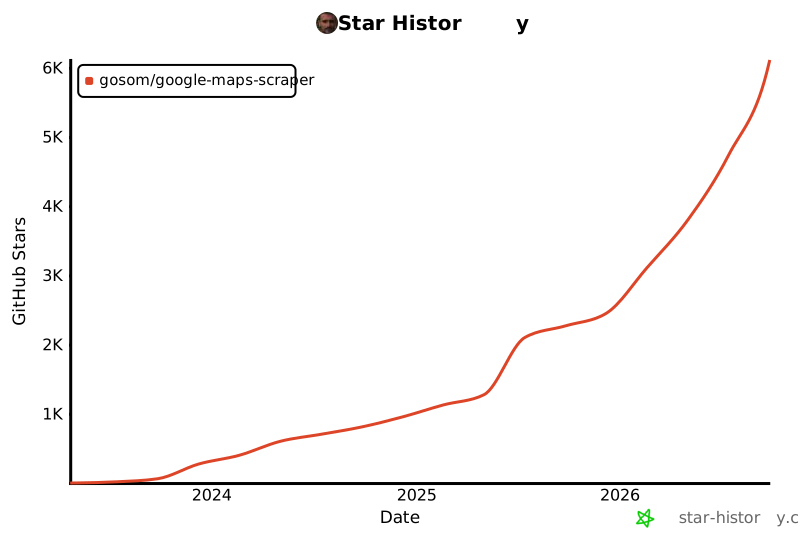
## 社区 [](https://discord.gg/fpaAVhNCCu) 加入我们的 Discord 以: - 获取设置和配置方面的帮助 - 分享您的用例和成功案例 - 请求功能并报告错误 - 与其他用户交流 ## 贡献 欢迎贡献!请: 1. 提交 Issue 以讨论您的想法 2. Fork 本仓库 3. 创建 Pull Request 开发指南请参阅 [AGENTS.md](AGENTS.md)。 ## 参考 - [如何使用 Golang 从 Google Maps 提取数据](https://blog.gkomninos.com/how-to-extract-data-from-google-maps-using-golang) - [分布式 Google Maps 爬取](https://blog.gkomninos.com/distributed-google-maps-scraping) - [scrapemate](https://github.com/gosom/scrapemate) - 底层 Web 爬取框架 - [omkarcloud/google-maps-scraper](https://github.com/omkarcloud/google-maps-scraper) - JS 数据提取的灵感来源 ## 许可证 本项目采用 [MIT 许可证](LICENSE)授权。 ## Star 历史Banner 由 OpenAI 的 DALL-E 生成
标签:ESC4, EVTX分析, EVTX分析, EVTX分析, Geyser, Golang, Kubernetes部署, OSINT, POI数据, Python替代, REST API, TCP SYN 扫描, URL抓取, Web UI, 反爬虫, 命令控制, 商家信息提取, 地图数据, 子域名突变, 安全编程, 密码管理, 数据抓取, 数据清洗, 数据采集, 无头浏览器, 日志审计, 测试用例, 演示模式, 潜在客户生成, 特征检测, 网络测绘, 联系人提取, 请求拦截, 谷歌地图爬虫