suzuki-shunsuke/pinact
GitHub: suzuki-shunsuke/pinact
用于将 GitHub Workflow 中的 Actions 和 Reusable Workflows 固定为 commit SHA 的安全加固工具,保障 CI/CD 供应链完整性。
Stars: 1138 | Forks: 39
# pinact
[](https://deepwiki.com/suzuki-shunsuke/pinact)
[安装](INSTALL.md) | [如何使用](#how-to-use) | [配置](#configuration)
pinact 是一个命令行工具,用于编辑 GitHub Workflow 和 Composite action 文件,并固定 Actions 和 Reusable Workflows 的版本。
pinact 还可以[更新它们的版本](#update-actions)、[验证版本注解](docs/codes/001.md)以及[创建代码审查](#create-reviews)。
```
pinact run
```
```
$ git diff
diff --git a/.github/workflows/test.yaml b/.github/workflows/test.yaml
index 84bd67a..5d92e44 100644
--- a/.github/workflows/test.yaml
+++ b/.github/workflows/test.yaml
@@ -113,17 +113,17 @@ jobs:
needs: path-filter
permissions: {}
steps:
- - uses: actions/checkout@83b7061638ee4956cf7545a6f7efe594e5ad0247 # v3
- - uses: actions/setup-go@v4
+ - uses: actions/checkout@83b7061638ee4956cf7545a6f7efe594e5ad0247 # v3.5.1
+ - uses: actions/setup-go@4d34df0c2316fe8122ab82dc22947d607c0c91f9 # v4.0.0
- name: Cache Primes
id: cache-primes
- uses: actions/cache@v3.3.1
+ uses: actions/cache@88522ab9f39a2ea568f7027eddc7d8d8bc9d59c8 # v3.3.1
with:
path: prime-numbers
key: ${{ runner.os }}-primes
actionlint:
- uses: suzuki-shunsuke/actionlint-workflow/.github/workflows/actionlint.yaml@v0.5.0
+ uses: suzuki-shunsuke/actionlint-workflow/.github/workflows/actionlint.yaml@b6a5f966d4504893b2aeb60cf2b0de8946e48504 # v0.5.0
with:
aqua_version: v2.3.4
permissions:
```
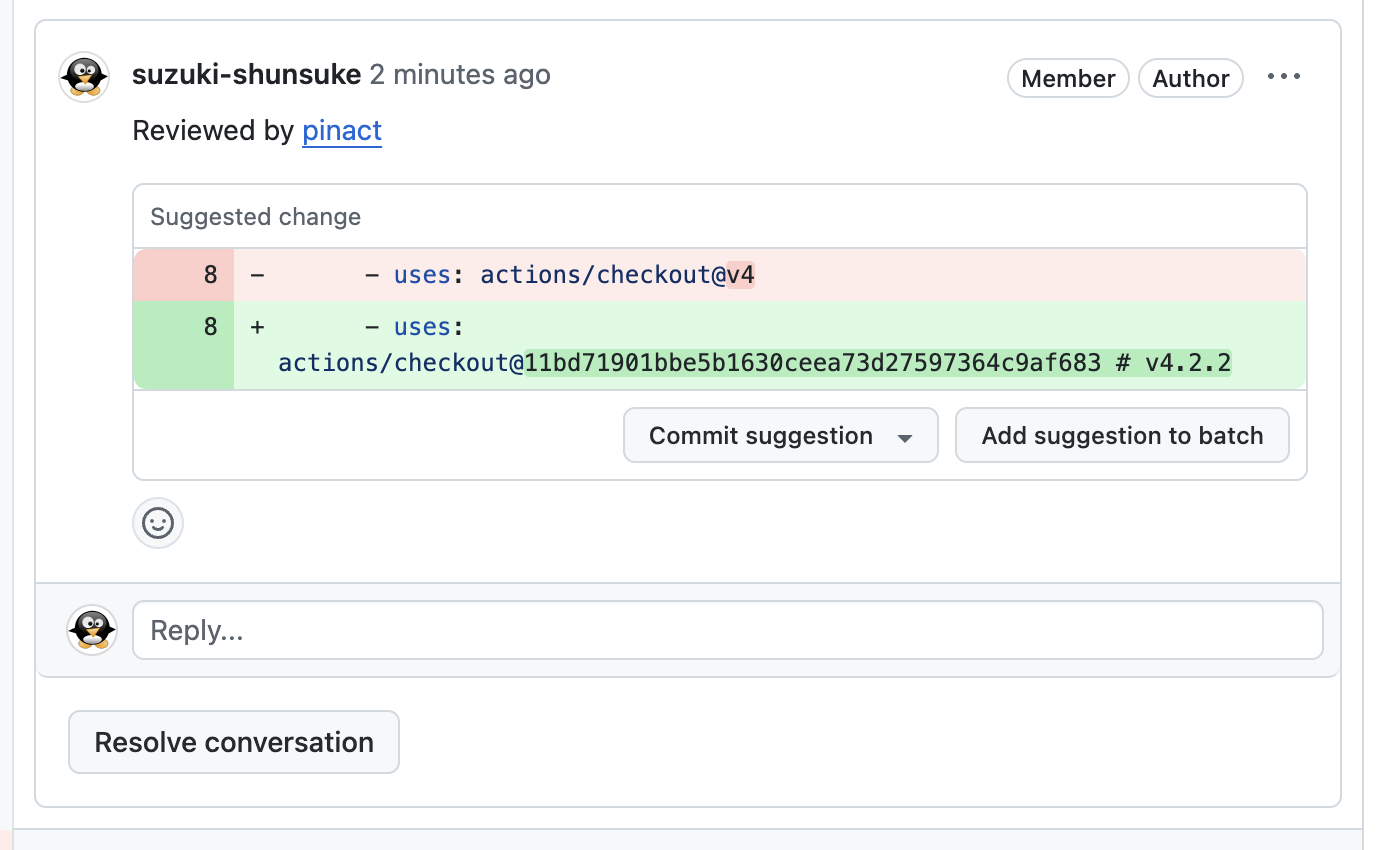
创建审查:
## 动机
通过 commit hash 固定 GitHub Actions 版本是一个好习惯。
GitHub 标签是可变的,因此它们存在重大的安全和可靠性风险。
另请参见 [GitHub Actions 的安全加固 - GitHub Docs](https://docs.github.com/en/actions/security-guides/security-hardening-for-github-actions#using-third-party-actions)
:thumbsup:
```
uses: actions/cache@88522ab9f39a2ea568f7027eddc7d8d8bc9d59c8 # v3.3.1
```
:thumbsdown:
```
uses: actions/cache@v3
```
```
uses: actions/cache@v3.3.1
```
## 为什么不使用 Renovate 的 helpers:pinGitHubActionDigestsToSemver 预设?
Renovate 的预设 [helpers:pinGitHubActionDigestsToSemver](https://docs.renovatebot.com/presets-helpers/#helperspingithubactiondigeststosemver) 很有用,但 pinact 依然有其价值:
1. Renovate 无法在合并 Pull Request 之前固定其中的 actions。
如果您在 CI 中使用 [ghalint](https://github.com/suzuki-shunsuke/ghalint) 等代码检查工具,则需要在合并 Pull Request 之前固定 actions
(参考:[ghalint 强制固定 actions 的策略](https://github.com/suzuki-shunsuke/ghalint/blob/main/docs/policies/008.md))
2. 即使您使用 Renovate,有时也可能需要手动更新 actions
3. pinact 对不使用 Renovate 的用户很有用
4. [pinact 支持验证版本注解](https://github.com/suzuki-shunsuke/pinact/blob/main/docs/codes/001.md)
## GitHub 访问令牌
pinact 会调用 GitHub REST API 来获取 commit hash 和标签。
您可以通过环境变量 `PINACT_GITHUB_TOKEN` 或 `GITHUB_TOKEN` 传递 GitHub 访问令牌。
如果未传递 GitHub 访问令牌,pinact 将在没有访问令牌的情况下调用 GitHub REST API。
关于 GitHub Enterprise Server,另请参见 [适用于 GHES 的 GitHub 访问令牌](#github-access-token-for-ghes)。
### 使用 ghtkn 管理 GitHub 访问令牌
pinact >= v3.8.0
[您可以通过 ghtkn 集成创建 GitHub App 用户访问令牌](https://github.com/suzuki-shunsuke/ghtkn)。
关于 ghtkn,请参阅 ghtkn 的文档。
您需要先设置 ghtkn。
```
export PINACT_GHTKN=true
```
### 使用 Keyring 管理 GitHub 访问令牌
pinact >= v3.1.0
您可以使用[ Windows 凭据管理器](https://support.microsoft.com/en-us/windows/accessing-credential-manager-1b5c916a-6a16-889f-8581-fc16e8165ac0)、[macOS Keychain](https://en.wikipedia.org/wiki/Keychain_(software)) 和 [GNOME Keyring](https://wiki.gnome.org/Projects/GnomeKeyring) 等秘密存储来管理 GitHub 访问令牌。
1. 通过 `pinact token set` 命令配置 GitHub 访问令牌:
```
$ pinact token set
Enter a GitHub access token: # Input GitHub Access token
```
或者您也可以通过标准输入传递 GitHub 访问令牌:
```
echo "" | pinact token set -stdin
```
2. 通过设置环境变量 `PINACT_KEYRING_ENABLED` 来启用此功能:
```
export PINACT_KEYRING_ENABLED=true
```
请注意,如果设置了环境变量 `GITHUB_TOKEN`,此功能将被禁用。
您可以通过 `pinact token rm` 命令从 keyring 中移除 GitHub 访问令牌:
```
pinact token rm
```
## 如何使用
请在 Git 仓库的根目录下运行 `pinact run`,然后目标文件就会被修复。
```
pinact run
```
默认的目标文件为:
```
.github/workflows/*.yml
.github/workflows/*.yaml
action.yml
action.yaml
*/action.yml
*/action.yaml
*/*/action.yml
*/*/action.yaml
*/*/*/action.yml
*/*/*/action.yaml
```
您可以通过命令行参数或配置文件更改目标文件。
例如
```
pinact run example.yaml
```
### 更新 actions
[#663](https://github.com/suzuki-shunsuke/pinact/pull/663) pinact >= v1.1.0
您可以使用 `-update (-u)` 选项来更新 actions:
```
pinact run -u
```
#### 跳过最近发布的版本
[#1266](https://github.com/suzuki-shunsuke/pinact/pull/1266) pinact >= v3.5.0
您可以使用 `--min-age` (`-m`) 选项或环境变量 `PINACT_MIN_AGE` 跳过最近发布的版本。
这有助于避免更新到尚未有时间证明其稳定性的、潜在不稳定的版本。
```
pinact run -u --min-age 7
```
或
```
export PINACT_MIN_AGE=7
pinact run -u
```
此命令会跳过在过去 7 天内发布的版本。
- 对于 GitHub Releases,会检查 `PublishedAt` 日期
- 对于标签,会检查 commit 的 `Committer.Date`(需要额外的 API 调用)
### 修复文档中的示例代码
pinact 也可以修复文档中的示例代码。
```
pinact run README.md
```
### 创建审查

从 pinact v3.3.0 开始,pinact 可以通过 GitHub API 创建审查。
需要具有 `pull_requests:write` 权限的 GitHub 访问令牌。
```
pinact run \
-review \
-repo-owner \
-repo-name \
-pr \
-sha
```
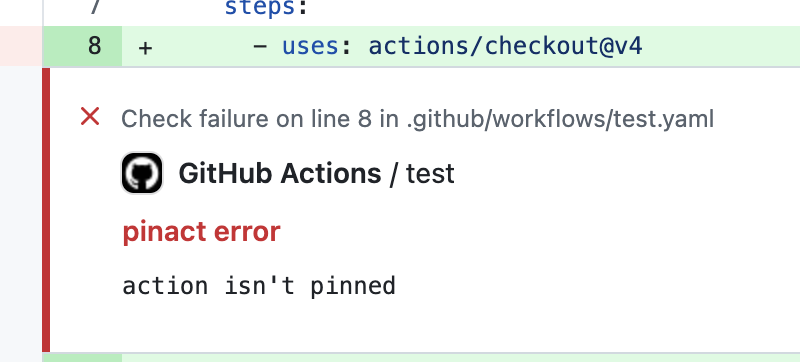
如果 pinact 是通过 GitHub Actions 的 `pull_request` 事件运行的,各项选项将自动补全。
### 生成配置文件 `.pinact.yaml`
配置文件是可选的。
您可以通过 `pinact init` 创建配置文件 `.pinact.yaml`。
```
pinact init
```
您可以更改输出路径。
```
pinact init '.github/pinact.yaml'
```
关于配置,请参阅[配置](#Configuration)。
### 验证
`pinact >= v1.6.0` [#816](https://github.com/suzuki-shunsuke/pinact/pull/816)
除了修复文件外,您可以使用 `--check` 选项验证 actions 是否已被固定:
```
pinact run --check
```
使用此选项时,pinact 不会修复文件。
如果 actions 未被固定,命令将执行失败。
```
$ pinact run --check
ERRO[0000] parse a line action=actions/checkout@v2 error="action isn't pinned" pinact_version= program=pinact workflow_file=testdata/foo.yaml
ERRO[0000] parse a line action=actions/cache@v3.3.1 error="action isn't pinned" pinact_version= program=pinact workflow_file=testdata/foo.yaml
ERRO[0000] parse a line action=rharkor/caching-for-turbo@v1.6 error="action isn't pinned" pinact_version= program=pinact workflow_file=testdata/foo.yaml
ERRO[0000] parse a line action=actions/checkout@v3 error="action isn't pinned" pinact_version= program=pinact workflow_file=testdata/foo.yaml
ERRO[0000] parse a line action=actions/checkout@v3 error="action isn't pinned" pinact_version= program=pinact workflow_file=testdata/foo.yaml
ERRO[0000] parse a line action=suzuki-shunsuke/actionlint-workflow/.github/workflows/actionlint.yaml@v0.5.0 error="action isn't pinned" pinact_version= program=pinact workflow_file=testdata/foo.yaml
$ echo $?
1
```
如果设置了 `-check`,文件将不会被修复,也不会输出差异。
如果您想修复文件,请使用 `-fix` 选项。
```
pinact run -check -fix
```
如果您想输出差异,请使用 `-diff` 选项。
```
pinact run -check -diff
```
### 验证版本注解
请参阅[文档](docs/codes/001.md)。
### 输出差异
```
$ pinact run -diff
INFO[0000] action isn't pinned
.github/workflows/test.yaml:8
- - uses: actions/checkout@v4
+ - uses: actions/checkout@11bd71901bbe5b1630ceea73d27597364c9af683 # v4.2.2
pinact_version=v3.0.0-local program=pinact
```
### -diff, -check, -fix 选项
`pinact run` 命令的行为可以通过命令行选项 `-diff`、`-check` 和 `-fix` 来改变。
默认行为:
- 修复文件
- 如果 actions 未被固定,则以退出码 1 退出
- 不输出更改
每个选项的行为:
- `-check` 禁用文件修复
- 如果 `-check` 与 `-fix` 一起使用,将修复文件。在这种情况下,`-check` 没有意义
- `-diff` 输出更改并禁用文件修复
- `-fix` 与 `-diff` 一起使用以输出更改并修复文件
## 仅修复或排除特定的 actions
[#1082](https://github.com/suzuki-shunsuke/pinact/pull/1082) pinact >= v3.4.0
您可以使用 `-include (-i) <正则表达式>` 选项仅修复特定的 actions。
您也可以使用 `-exclude (-e) <正则表达式>` 选项仅排除特定的 actions。
例如
```
pinact run -i "actions/.*" -i "^aquaproj/aqua-installer$"
```
```
pinact run -e "actions/.*" -e "^aquaproj/aqua-installer$"
```
## SARIF
pinact >= v3.7.0 [#1294](https://github.com/suzuki-shunsuke/pinact/pull/1294)
pinact 可以以 [SARIF 格式](https://sarifweb.azurewebsites.net/) 输出结果。
```
pinact run --format sarif
```
此格式对于集成 [reviewdog](https://github.com/reviewdog/reviewdog) 和 [GitHub SARIF Code Scanning](https://docs.github.com/en/code-security/code-scanning/integrating-with-code-scanning/sarif-support-for-code-scanning) 等工具非常有用。
### Reviewdog
```
pinact run --diff --format sarif |
reviewdog -f sarif -name pinact -reporter github-pr-review
```
### GitHub SARIF Code Scanning
```
- run: pinact run --diff --format sarif > sarif.json || true
- name: Upload SARIF file
uses: github/codeql-action/upload-sarif@5d4e8d1aca955e8d8589aabd499c5cae939e33c7 # v4.31.9
with:
sarif_file: sarif.json
category: pinact
```
## GitHub Actions
https://github.com/suzuki-shunsuke/pinact-action
我们开发了 GitHub Actions,以便通过 pinact 固定 GitHub Actions 和 reusable workflows。
## 配置
配置文件是可选的。
pinact 支持配置文件 `.pinact.yaml`、`.github/pinact.yaml`、`.pinact.yml` 或 `.github/pinact.yml`。
您还可以通过环境变量 `PINACT_CONFIG` 或命令行选项 `-c` 指定配置文件路径。
从 pinact v2.2.0 开始,pinact 配置文件具有 schema 版本。
```
version: 3
```
通常,您应该使用最新的 schema 版本。
### Schema v3 (最新)
pinact v2.2.0 或更高版本支持此版本。
.pinact.yaml
例如
```
version: 3
files:
- pattern: .github/workflows/*.yml
- pattern: .github/workflows/*.yaml
- pattern: .github/actions/*/action.yml
- pattern: .github/actions/*/action.yaml
ignore_actions:
# slsa-framework/slsa-github-generator doesn't support pinning version
# > Invalid ref: 68bad40844440577b33778c9f29077a3388838e9. Expected ref of the form refs/tags/vX.Y.Z
# https://github.com/slsa-framework/slsa-github-generator/issues/722
- name: slsa-framework/slsa-github-generator/.github/workflows/generator_generic_slsa3.yml
ref: "v\\d+\\.\\d+\\.\\d+"
- name: suzuki-shunsuke/.*
ref: main
# GitHub Enterprise Server 支持
ghes:
api_url: https://ghes.example.com
fallback: true # optional, default is false
# 版本和 tag 注释之间的分隔符(可选,默认为 " # ")
# pinact >= v3.9.0
separator: " # "
```
#### `files`
此项为可选。
目标文件列表。
#### `files[].pattern`
此项为必填。
目标文件的 glob 模式。
使用的是 [Go 的 path/filepath#Glob](https://pkg.go.dev/path/filepath#Glob)。
相对于 pinact 配置文件的相对路径。
如果通过位置命令行参数传递了文件,则此配置将被忽略。
例如
```
files:
- pattern: .github/workflows/*.yml
- pattern: .github/workflows/*.yaml
- pattern: README.md
```
#### `ignore_actions`
此项为可选。被忽略的 actions 和 reusable workflows 列表。
#### `ignore_actions[].name`
此项为必填。
被忽略的 actions 和 reusable workflows 的正则表达式。
```
ignore_actions:
- name: actions/.*
ref: main
```
关于正则表达式,[使用的是 Go 的 regexp 包。](https://pkg.go.dev/regexp)
#### `ignore_actions[].ref`
此项为必填。
被忽略的 action 版本(分支、标签或 commit hash)的正则表达式。
#### `ghes`
[参见 GitHub Enterprise 支持](#github-enterprise-server-ghes-support)。
#### `separator`
pinact >= v3.9.0 [#1365](https://github.com/suzuki-shunsuke/pinact/pull/1365) [#1372](https://github.com/suzuki-shunsuke/pinact/pull/1372)
此项为可选。默认值为 ` # `。
action 版本(commit SHA)与版本标签注释之间的分隔符。
它必须包含 `#`。
您也可以通过命令行选项 `--separator (-sep)` 或环境变量 `PINACT_SEPARATOR` 配置分隔符。
例如
```
# 默认分隔符 " # "
separator: " # "
# 结果为: uses: actions/checkout@abc123... # v3.5.0
# 自定义分隔符 " # tag="
separator: " # tag="
# 结果为: uses: actions/checkout@abc123... # tag=v3.5.0
# 在 # 前带有双空格的自定义分隔符
separator: " # "
# 结果为: uses: actions/checkout@abc123... # v3.5.0
```
### 旧版 Schemas
请参阅[此处](docs/old_schema.md)。
### JSON Schema
- [pinact.json](json-schema/pinact.json)
- https://raw.githubusercontent.com/suzuki-shunsuke/pinact/refs/heads/main/json-schema/pinact.json
如果您正在寻找使用 JSON Schema 验证配置的命令行工具,[ajv-cli](https://ajv.js.org/packages/ajv-cli.html) 非常有用。
```
ajv --spec=draft2020 -s json-schema/pinact.json -d pinact.yaml
```
#### 通过 YAML Language Server 进行输入补全
[也请参阅此评论。](https://github.com/szksh-lab/.github/issues/67#issuecomment-2564960491)
版本:`main`
```
# yaml-language-server: $schema=https://raw.githubusercontent.com/suzuki-shunsuke/pinact/main/json-schema/pinact.json
```
或固定版本:
```
# yaml-language-server: $schema=https://raw.githubusercontent.com/suzuki-shunsuke/pinact/v1.1.2/json-schema/pinact.json
```
## 问:为什么 pinact 不固定某些 actions?
在某些情况下,pinact 故意不固定版本,这可能会让您感到困惑。
因此我们在此说明原因。
pinact 不会固定版本不是 semver(例如 `main`、`master`、`release/v1`)的 actions。
这是因为 pinact 被设计为一个安全的工具,因此它不会改变工作流的行为。
pinact 会固定 actions,但在固定版本时不会更改 action 的 SHA。
此设计使您能够安全地接受 pinact 所做的更改。
例如,如果 SHA 相同,pinact 会将版本 `v1` 更改为 `v1.1.0`。
如果没有与 `v1` 的 SHA 相同的 semver 版本,pinact 就不会更改版本。
并且 pinact 不会更改不是 semver 的版本。
例如,pinact 不会更改版本 `main`。
```
uses: actions/checkout@main
```
我们不想将 `main` 固定为如下所示的完整 commit 长度的 SHA,因为我们无法按照语义化版本控制来更新它。
```
uses: actions/checkout@85e6279cec87321a52edac9c87bce653a07cf6c2 # main
```
像 Renovate 这样的工具可以更新 SHA,但这一点也不安全,因为 `main` 分支是不稳定的。
而且我们不想将 `main` 更改为最新的 semver(如下所示),因为 SHA 会发生变化,工作流可能会被破坏。
```
uses: actions/checkout@11bd71901bbe5b1630ceea73d27597364c9af683 # 4.2.2
```
我们不想固定分支,因为分支的 SHA 是会变化的。
pinact 不检查版本是标签还是分支,因为我们希望尽可能减少 API 调用的次数。
如果版本不是 semver,pinact 会判断它可能是一个分支,因此不会将其固定。
另请参见 [#926](https://github.com/suzuki-shunsuke/pinact/issues/926)。
## GitHub Enterprise Server (GHES) 支持
v3.6.0 [#839](https://github.com/suzuki-shunsuke/pinact/issues/839) [#1275](https://github.com/suzuki-shunsuke/pinact/pull/1275)
pinact 还支持固定托管在 GitHub Enterprise Server (GHES) 上的 GitHub Actions 版本。
如果启用了 GHES 支持,pinact 将在 GHES 中搜索 actions。
### 回退到 github.com
默认情况下,回退到 github.com 是被禁用的。
所有 actions 仅在 GHES 实例上进行搜索。
如果启用了回退,则会首先在 GHES 实例上搜索 actions 的仓库。如果未找到仓库 (404),pinact 将回退到 github.com。这适用于[启用了 GitHub Connect](https://docs.github.com/en/enterprise-server@3.19/admin/managing-github-actions-for-your-enterprise/managing-access-to-actions-from-githubcom/enabling-automatic-access-to-githubcom-actions-using-github-connect) 的情况。
### GHES 的 GitHub 访问令牌使用以下任一环境变量(按检查顺序)设置 GHES 的 GitHub 访问令牌:
1. `PINACT_GHES_TOKEN`
2. `GHES_TOKEN`
3. `GITHUB_TOKEN_ENTERPRISE`
4. `GITHUB_ENTERPRISE_TOKEN`
```
export GHES_TOKEN=xxx
```
`GITHUB_TOKEN` 用于 github.com。
### GHES 的配置文件
GHES 配置需要通过配置文件或环境变量提供。
配置文件优先于环境变量。
```
ghes:
api_url: https://ghes.example.com
fallback: true # optional, default is false
```
- `api_url`:GHES 实例的 API URL。也可以通过环境变量设置。
- `fallback`:当在 GHES 上找不到仓库时,是否回退到 github.com。默认值为 `false`。
### GHES 的环境变量
您也可以使用环境变量代替配置文件来配置 GHES。
- `GHES_API_URL`
- `PINACT_GHES_FALLBACK`
```
export GHES_API_URL=https://ghes.example.com
export PINACT_GHES_FALLBACK=true
```
如果未设置 `GHES_API_URL`,将使用 `GITHUB_API_URL` 代替。
这适用于在托管于 GHES 的 GitHub Actions 上运行的情况。
### 启用 GHES 的条件
当满足以下任一条件时,将启用 GHES 模式:
1. 在配置文件中配置了 `ghes.api_url`
2. 设置了 `GHES_API_URL` 环境变量
3. 设置了 `GITHUB_API_URL` 环境变量,且其值不为 `https://api.github.com`
## 另请参见
- [Renovate github-actions Manager - 附加信息](https://docs.renovatebot.com/modules/manager/github-actions/#additional-information)
- [sethvargo/ratchet](https://github.com/sethvargo/ratchet) 是一个很棒的工具,但存在一些[已知问题](https://github.com/sethvargo/ratchet#known-issues)。
## 许可证
[MIT](LICENSE)
标签:CLI, DevSecOps, EVTX分析, GitHub Actions, GitHub Advanced Security, Go语言, WiFi技术, Workflow, 上游代理, 代码审查, 哈希校验, 安全加固, 安全可观测性, 日志审计, 版本固定, 版本控制, 程序破解, 网络调试, 自动化, 自动笔记, 软件开发工具包