steadramon/ESPGeiger
GitHub: steadramon/ESPGeiger
这是一个开源固件项目,用于将ESP8266/ESP32开发板转化为物联网盖革计数器,实现辐射水平的实时收集和上报。
Stars: 53 | Forks: 5
[](https://github.com/steadramon/ESPGeiger/actions) [](https://github.com/steadramon/ESPGeiger/issues) [](https://github.com/steadramon/ESPGeiger/stargazers)
# link or the descriptive text, but here it's just the URL in brackets.
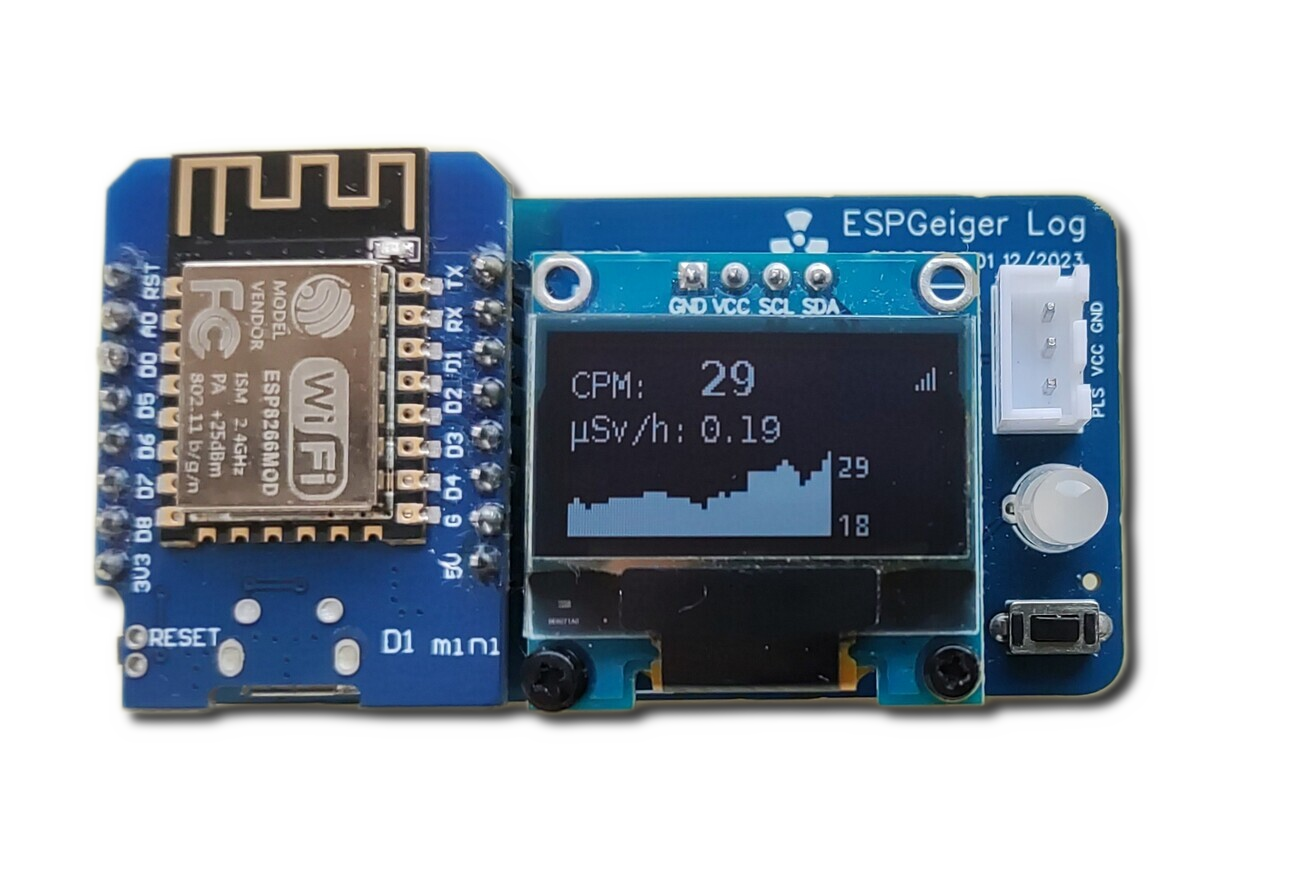
ESPGeiger 是一个开源项目,可将 ESP8266 或 ESP32 转变为物联网连接的盖革计数器。它能够从一系列具备脉冲或串行输出的盖革计数器收集、计算并报告辐射水平。
- 😃 通过网页浏览器轻松安装 - 无需编译器
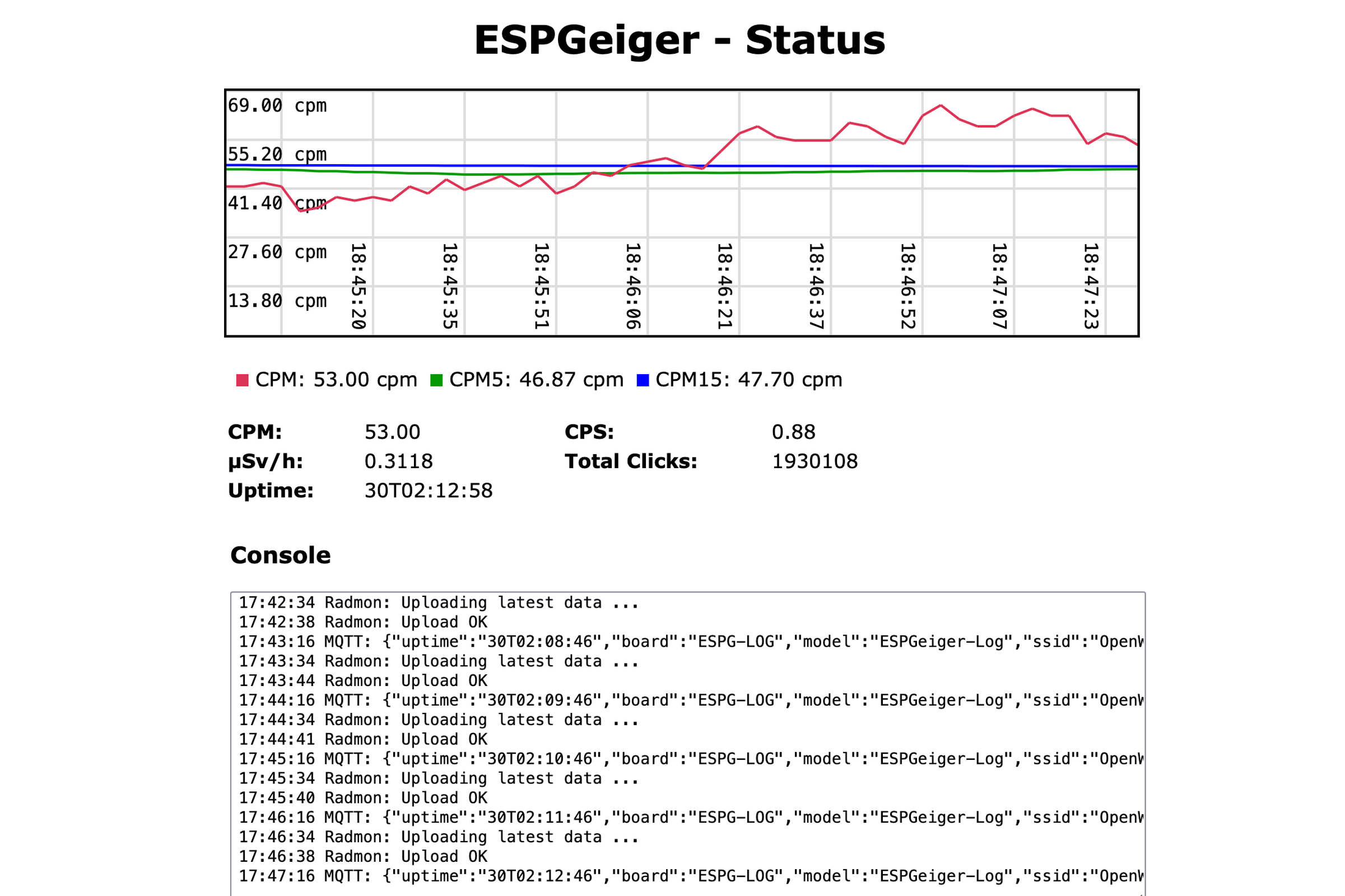
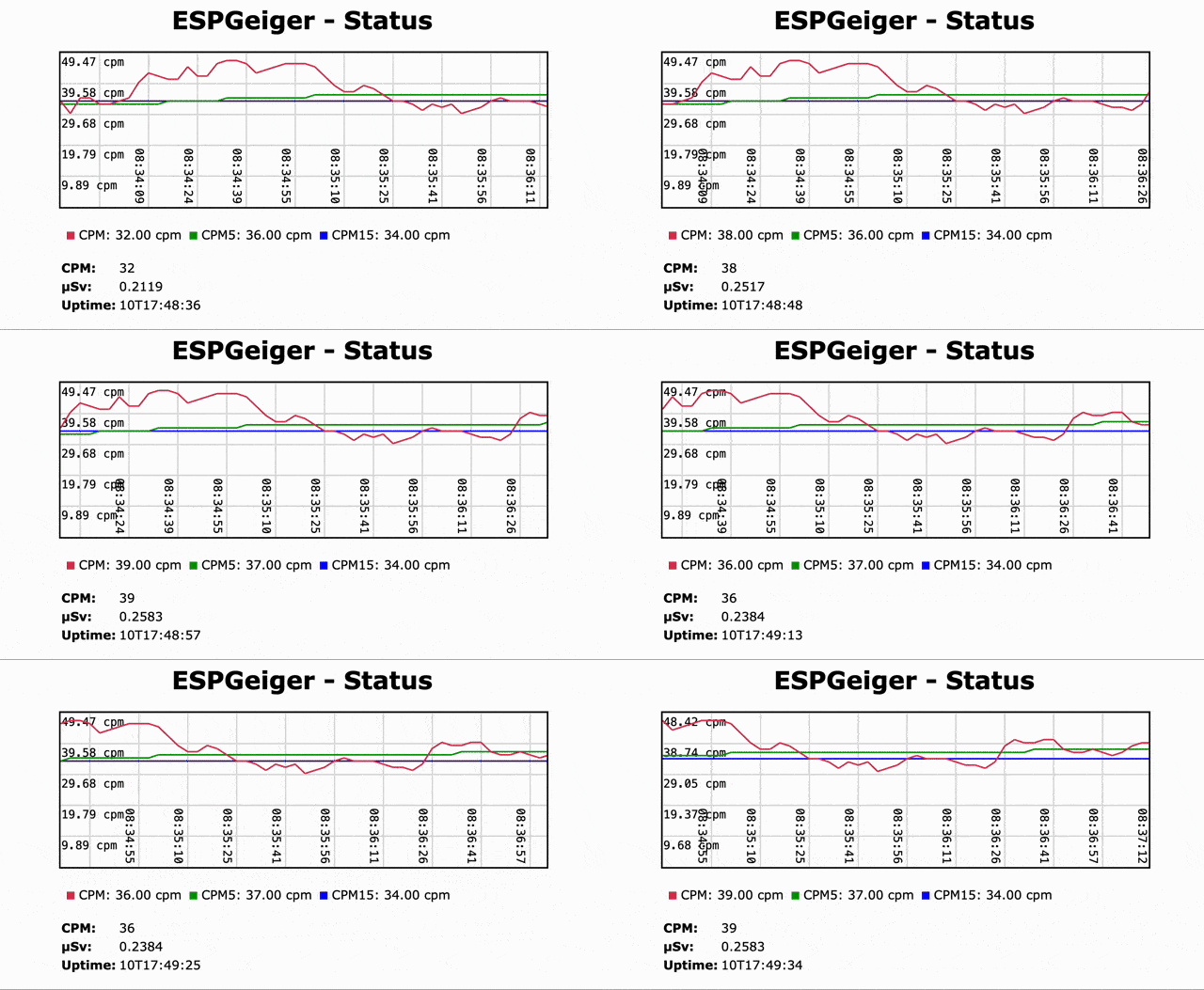
- 📈 内置网络门户,提供实时图表和24小时历史记录
- 🔴 实时 CPM 和 μSv/h,带1、5和15分钟平滑平均值
- 🕰️ 终身跟踪 - 跨重启的持续累计计数和 μSv
- 🖥️ 可选的 SSD1306 / SSD1309 / SH1106 OLED 和 WS2812X NeoPixel 状态灯
- 🌡️ 可选的 BME280 / BMP280 / AHT 环境传感器 - 通过 I2C 自动检测
- ✅ 兼容脉冲和 GC10 / GC10next / MightyOhm 串行计数器
- 📟 通过中断或 ESP32 硬件计数器 (PCNT) 实现精确计数
- 🎛️ 可配置的噪声滤波和防抖
- 🌐 MQTT 和 Home Assistant 自动发现,Radmon.org,GMCMAP,ThingSpeak,GeigerLog,自定义 Webhooks
- 📡 UDP / OSC 广播和接收器版本 - 将计数镜像到无管 ESP,或馈入 PD / TouchDesigner / Node-RED
- 💾 可选的 SD 卡记录
- 🗂️ 便携式配置备份与恢复 - 可在设备间转移
- 🚧 用于模拟脉冲和串行计数器的测试版本
 ### Looking at the emoji "👉", which might be used to indicate a link or action. In translation, emojis are often kept as is or translated descriptively, but since the user said to keep technical jargon in English, and emojis aren't specified, I should probably keep it as is or translate it minimally.
从下拉菜单中选择您的版本,并按照屏幕上的说明操作。安装大约需要两分钟。
## 我需要哪个版本?
选择与您的硬件匹配的版本。如有疑问,请从 **Pulse** 开始 - 它适用于大多数通用盖革计数器。
### 我有一个 ESP + 通用脉冲盖革计数器
### 我有一个 ESP + 串行盖革计数器
单一串行版本支持所有串行计数器类型 (GC10, GC10Next, MightyOhm, ESPGeiger)。刷写后,从 **配置** 页面选择您的计数器类型。
| ESP8266 版本 | ESP32 版本 |
|---|---|
| `esp8266_serial` | `esp32_serial` |
OLED 变体:`esp8266oled_serial` / `esp32oled_serial`。
### 我有一个 ESPGeiger-HW 或 ESPGeiger Log
这些是官方的 ESPGeiger 硬件套件 - 请使用针对特定硬件的版本:
| 硬件 | 脉冲 | 串行 |
|---|---|---|
| ESPGeiger-HW | `espgeigerhw` | - |
| ESPGeiger Log | `espgeigerlog` | `espgeigerlog_serial` |
### 我想在没有真实盖革计数器的情况下进行测试
测试版本在内部模拟盖革计数器。您也可以将一个 ESPGeiger 的 `TXPIN` 连接到另一个的 `RXPIN` 来模拟串行计数器:
| 版本 | 描述 |
|---|---|
| `esp8266_test` / `esp32_test` | 内部计数器,无输出 |
| `esp8266_testpulse` / `esp32_testpulse` | 在 TXPIN 上输出泊松分布的脉冲 |
| `esp8266_testserial` / `esp32_testserial` | 模拟串行计数器(类型可通过配置选择) |
### 我想要一个远程显示器或设备聚合器(无需盖革管)
UDP 接收器版本监听来自其他 ESPGeiger 设备的 OSC 多播广播,并在本地镜像。所有功能(CPM, µSv, OLED, MQTT, 嘟嘟 LED)都如同连接了真实的盖革管一样工作:
| 硬件 | 版本 |
|---|---|
| ESP8266 | `esp8266_udp` / `esp8266oled_udp` |
| ESP32 | `esp32_udp` / `esp32oled_udp` |
生产者通过 配置 → 本地广播 → 模式2 启用广播。完整协议请参见 [UDP / OSC 输出](https://docs.espgeiger.com/output/udp)。
请在[发布页面](https://github.com/steadramon/ESPGeiger/releases/latest)或[构建目标文档](https://docs.espgeiger.com/install/buildtargets)查看可用版本的完整列表。
## 硬件连接
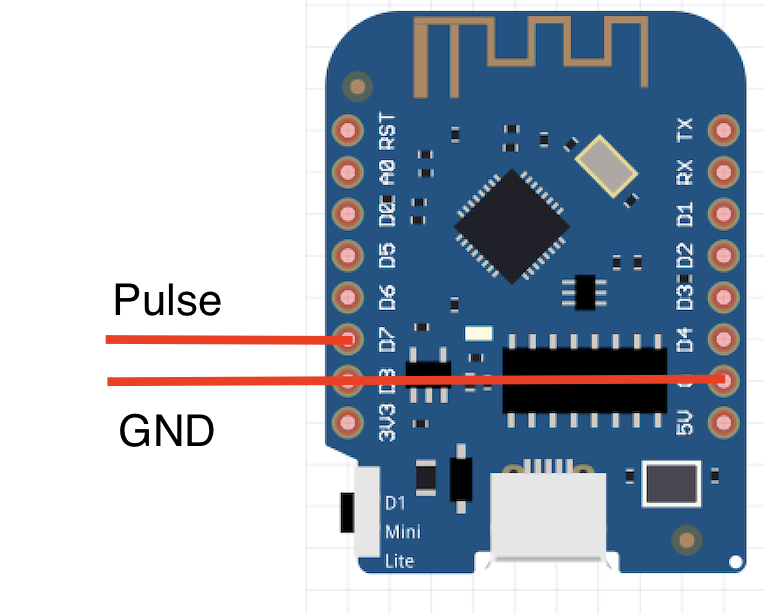
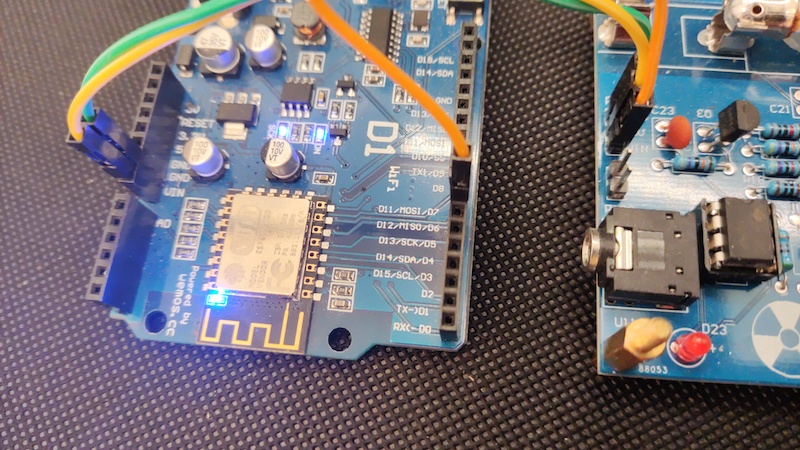
默认情况下,`GEIGER_RXPIN` 设置为 GPIO13。将您的盖革计数器的脉冲或串行 TX 输出连接到此引脚。别忘了共地。
### Looking at the emoji "👉", which might be used to indicate a link or action. In translation, emojis are often kept as is or translated descriptively, but since the user said to keep technical jargon in English, and emojis aren't specified, I should probably keep it as is or translate it minimally.
从下拉菜单中选择您的版本,并按照屏幕上的说明操作。安装大约需要两分钟。
## 我需要哪个版本?
选择与您的硬件匹配的版本。如有疑问,请从 **Pulse** 开始 - 它适用于大多数通用盖革计数器。
### 我有一个 ESP + 通用脉冲盖革计数器
### 我有一个 ESP + 串行盖革计数器
单一串行版本支持所有串行计数器类型 (GC10, GC10Next, MightyOhm, ESPGeiger)。刷写后,从 **配置** 页面选择您的计数器类型。
| ESP8266 版本 | ESP32 版本 |
|---|---|
| `esp8266_serial` | `esp32_serial` |
OLED 变体:`esp8266oled_serial` / `esp32oled_serial`。
### 我有一个 ESPGeiger-HW 或 ESPGeiger Log
这些是官方的 ESPGeiger 硬件套件 - 请使用针对特定硬件的版本:
| 硬件 | 脉冲 | 串行 |
|---|---|---|
| ESPGeiger-HW | `espgeigerhw` | - |
| ESPGeiger Log | `espgeigerlog` | `espgeigerlog_serial` |
### 我想在没有真实盖革计数器的情况下进行测试
测试版本在内部模拟盖革计数器。您也可以将一个 ESPGeiger 的 `TXPIN` 连接到另一个的 `RXPIN` 来模拟串行计数器:
| 版本 | 描述 |
|---|---|
| `esp8266_test` / `esp32_test` | 内部计数器,无输出 |
| `esp8266_testpulse` / `esp32_testpulse` | 在 TXPIN 上输出泊松分布的脉冲 |
| `esp8266_testserial` / `esp32_testserial` | 模拟串行计数器(类型可通过配置选择) |
### 我想要一个远程显示器或设备聚合器(无需盖革管)
UDP 接收器版本监听来自其他 ESPGeiger 设备的 OSC 多播广播,并在本地镜像。所有功能(CPM, µSv, OLED, MQTT, 嘟嘟 LED)都如同连接了真实的盖革管一样工作:
| 硬件 | 版本 |
|---|---|
| ESP8266 | `esp8266_udp` / `esp8266oled_udp` |
| ESP32 | `esp32_udp` / `esp32oled_udp` |
生产者通过 配置 → 本地广播 → 模式2 启用广播。完整协议请参见 [UDP / OSC 输出](https://docs.espgeiger.com/output/udp)。
请在[发布页面](https://github.com/steadramon/ESPGeiger/releases/latest)或[构建目标文档](https://docs.espgeiger.com/install/buildtargets)查看可用版本的完整列表。
## 硬件连接
默认情况下,`GEIGER_RXPIN` 设置为 GPIO13。将您的盖革计数器的脉冲或串行 TX 输出连接到此引脚。别忘了共地。
 ## 首次设置
1. 刷写后,连接到新的 Wi-Fi 网络 (`ESPGeiger-XXXXXX`)
2. 应弹出强制门户 - 如果没有,请访问 http://192.168.4.1/
3. 选择您的家庭 Wi-Fi 网络并输入密码
4. 连接后,访问 `http://ESPGeiger-XXXXXX.local` 或分配的 IP 地址
5. 从配置页面配置 MQTT, Radmon, GMCMAP, ThingSpeak 和其他输出
## 首次设置
1. 刷写后,连接到新的 Wi-Fi 网络 (`ESPGeiger-XXXXXX`)
2. 应弹出强制门户 - 如果没有,请访问 http://192.168.4.1/
3. 选择您的家庭 Wi-Fi 网络并输入密码
4. 连接后,访问 `http://ESPGeiger-XXXXXX.local` 或分配的 IP 地址
5. 从配置页面配置 MQTT, Radmon, GMCMAP, ThingSpeak 和其他输出
 ## 升级
升级可通过网络界面进行无线更新。请小心选择适合您硬件的正确固件。
注意:ESP32 用户在升级时应使用 `firmware` 二进制文件(`merged` 二进制文件用于通过网页安装器进行全新安装)。
## 文档
完整文档可在 **[docs.espgeiger.com](https://docs.espgeiger.com/)** 获取。
## 从源码构建
如果您想自定义固件或为未支持的硬件创建版本,可以使用 PlatformIO 从源码构建。详情请参见 [Platformio 构建文档](https://docs.espgeiger.com/install/platformio)。
## 兼容的盖革计数器
### 脉冲型
- [DIY GeigerKit](https://sites.google.com/site/diygeigercounter/)
- [NetIO GC10](https://www.ebay.co.uk/usr/pelorymate)
- [RHElectronics](https://www.rhelectronics.store/diy-geiger-counter-kit)
- [GeigerHV](https://www.ebay.co.uk/usr/geigerhv)
- [GGreg20](https://www.tindie.com/stores/iotdev/)
- [MightyOhm Kit](https://www.tindie.com/stores/mightyohm/) (也可用作脉冲计数器)
- [DiY-GDC](https://www.ebay.com/usr/impexeris)
- CAJOE (及其克隆版) RadiationD-v1.1
### 串行型
- GC10 / GC10-Next
- MightyOhm
- ESPGeiger-HW
其他基于串行的计数器应能通过小量代码添加得到支持。如果您有未列出的型号,请[提交问题](https://github.com/steadramon/ESPGeiger/issues)。
## 发布 ESPGeiger-HW
## 升级
升级可通过网络界面进行无线更新。请小心选择适合您硬件的正确固件。
注意:ESP32 用户在升级时应使用 `firmware` 二进制文件(`merged` 二进制文件用于通过网页安装器进行全新安装)。
## 文档
完整文档可在 **[docs.espgeiger.com](https://docs.espgeiger.com/)** 获取。
## 从源码构建
如果您想自定义固件或为未支持的硬件创建版本,可以使用 PlatformIO 从源码构建。详情请参见 [Platformio 构建文档](https://docs.espgeiger.com/install/platformio)。
## 兼容的盖革计数器
### 脉冲型
- [DIY GeigerKit](https://sites.google.com/site/diygeigercounter/)
- [NetIO GC10](https://www.ebay.co.uk/usr/pelorymate)
- [RHElectronics](https://www.rhelectronics.store/diy-geiger-counter-kit)
- [GeigerHV](https://www.ebay.co.uk/usr/geigerhv)
- [GGreg20](https://www.tindie.com/stores/iotdev/)
- [MightyOhm Kit](https://www.tindie.com/stores/mightyohm/) (也可用作脉冲计数器)
- [DiY-GDC](https://www.ebay.com/usr/impexeris)
- CAJOE (及其克隆版) RadiationD-v1.1
### 串行型
- GC10 / GC10-Next
- MightyOhm
- ESPGeiger-HW
其他基于串行的计数器应能通过小量代码添加得到支持。如果您有未列出的型号,请[提交问题](https://github.com/steadramon/ESPGeiger/issues)。
## 发布 ESPGeiger-HW
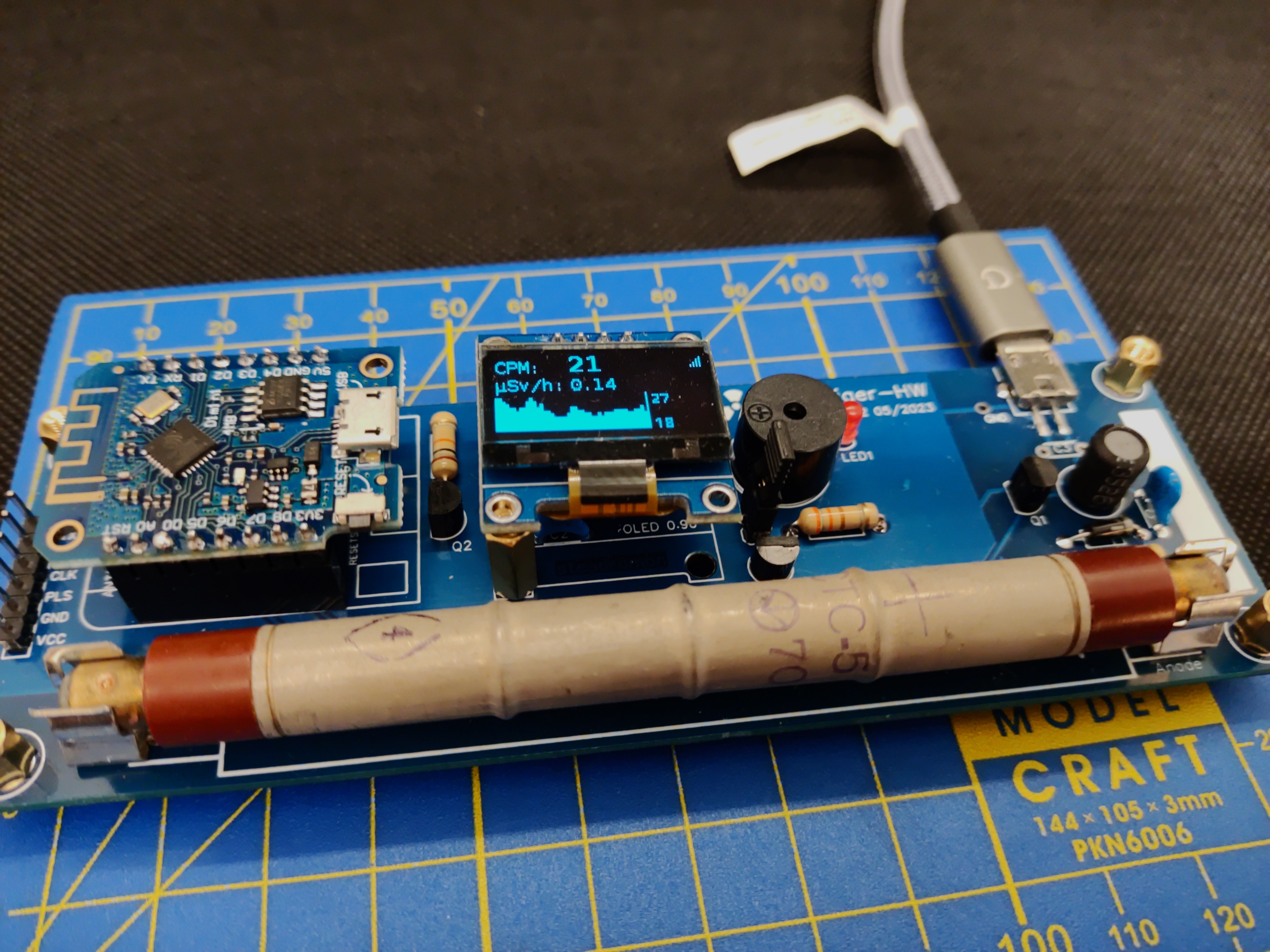 由 ESPGeiger 驱动的官方物联网盖革计数器。更多信息请参见 [docs.espgeiger.com](https://docs.espgeiger.com/hardware/espgeigerhw)。
## 贡献
欢迎贡献 - 请随时提交拉取请求或创建问题。
## 感谢 🙏
支持的库:
- [ArduinoJson](https://github.com/bblanchon/ArduinoJson)
- [AsyncTCP](https://github.com/ESP32Async/AsyncTCP) / [ESPAsyncTCP](https://github.com/ESP32Async/ESPAsyncTCP)
- [async-mqtt-client](https://github.com/marvinroger/async-mqtt-client)
- [AsyncHTTPRequest_Generic](https://github.com/khoih-prog/AsyncHTTPRequest_Generic)
- [U8g2](https://github.com/olikraus/u8g2)
- [JLed](https://github.com/jandelgado/jled)
- [NeoPixelBus](https://github.com/Makuna/NeoPixelBus)
- [EspSoftwareSerial](https://github.com/plerup/espsoftwareserial)
- [SdFat](https://github.com/greiman/SdFat)
- [micro-ecc](https://github.com/kmackay/micro-ecc)
- [CircularBuffer](https://github.com/rlogiacco/CircularBuffer)
- [base64_arduino](https://github.com/Densaugeo/base64_arduino) (内置 EGBase64 的基础)
- [ESPNtpClient](https://github.com/gmag11/ESPNtpClient) (运行时间跟踪,现已内联)
灵感来源:
- [OpenMQTTGateway](https://github.com/1technophile/OpenMQTTGateway)
- [tinyGS](https://github.com/G4lile0/tinyGS/)
- [FreqCountESP](https://github.com/kapraran/FreqCountESP)
感谢:
- [Mr Blinky](https://www.blinkyslab.co.uk/) - 反馈、灵感与支持
- [Jander](https://r.jander.me.uk/) - 高个子机器人爱好者
由 ESPGeiger 驱动的官方物联网盖革计数器。更多信息请参见 [docs.espgeiger.com](https://docs.espgeiger.com/hardware/espgeigerhw)。
## 贡献
欢迎贡献 - 请随时提交拉取请求或创建问题。
## 感谢 🙏
支持的库:
- [ArduinoJson](https://github.com/bblanchon/ArduinoJson)
- [AsyncTCP](https://github.com/ESP32Async/AsyncTCP) / [ESPAsyncTCP](https://github.com/ESP32Async/ESPAsyncTCP)
- [async-mqtt-client](https://github.com/marvinroger/async-mqtt-client)
- [AsyncHTTPRequest_Generic](https://github.com/khoih-prog/AsyncHTTPRequest_Generic)
- [U8g2](https://github.com/olikraus/u8g2)
- [JLed](https://github.com/jandelgado/jled)
- [NeoPixelBus](https://github.com/Makuna/NeoPixelBus)
- [EspSoftwareSerial](https://github.com/plerup/espsoftwareserial)
- [SdFat](https://github.com/greiman/SdFat)
- [micro-ecc](https://github.com/kmackay/micro-ecc)
- [CircularBuffer](https://github.com/rlogiacco/CircularBuffer)
- [base64_arduino](https://github.com/Densaugeo/base64_arduino) (内置 EGBase64 的基础)
- [ESPNtpClient](https://github.com/gmag11/ESPNtpClient) (运行时间跟踪,现已内联)
灵感来源:
- [OpenMQTTGateway](https://github.com/1technophile/OpenMQTTGateway)
- [tinyGS](https://github.com/G4lile0/tinyGS/)
- [FreqCountESP](https://github.com/kapraran/FreqCountESP)
感谢:
- [Mr Blinky](https://www.blinkyslab.co.uk/) - 反馈、灵感与支持
- [Jander](https://r.jander.me.uk/) - 高个子机器人爱好者
### Looking at the emoji "👉", which might be used to indicate a link or action. In translation, emojis are often kept as is or translated descriptively, but since the user said to keep technical jargon in English, and emojis aren't specified, I should probably keep it as is or translate it minimally.
从下拉菜单中选择您的版本,并按照屏幕上的说明操作。安装大约需要两分钟。
## 我需要哪个版本?
选择与您的硬件匹配的版本。如有疑问,请从 **Pulse** 开始 - 它适用于大多数通用盖革计数器。
### 我有一个 ESP + 通用脉冲盖革计数器
### 我有一个 ESP + 串行盖革计数器
单一串行版本支持所有串行计数器类型 (GC10, GC10Next, MightyOhm, ESPGeiger)。刷写后,从 **配置** 页面选择您的计数器类型。
| ESP8266 版本 | ESP32 版本 |
|---|---|
| `esp8266_serial` | `esp32_serial` |
OLED 变体:`esp8266oled_serial` / `esp32oled_serial`。
### 我有一个 ESPGeiger-HW 或 ESPGeiger Log
这些是官方的 ESPGeiger 硬件套件 - 请使用针对特定硬件的版本:
| 硬件 | 脉冲 | 串行 |
|---|---|---|
| ESPGeiger-HW | `espgeigerhw` | - |
| ESPGeiger Log | `espgeigerlog` | `espgeigerlog_serial` |
### 我想在没有真实盖革计数器的情况下进行测试
测试版本在内部模拟盖革计数器。您也可以将一个 ESPGeiger 的 `TXPIN` 连接到另一个的 `RXPIN` 来模拟串行计数器:
| 版本 | 描述 |
|---|---|
| `esp8266_test` / `esp32_test` | 内部计数器,无输出 |
| `esp8266_testpulse` / `esp32_testpulse` | 在 TXPIN 上输出泊松分布的脉冲 |
| `esp8266_testserial` / `esp32_testserial` | 模拟串行计数器(类型可通过配置选择) |
### 我想要一个远程显示器或设备聚合器(无需盖革管)
UDP 接收器版本监听来自其他 ESPGeiger 设备的 OSC 多播广播,并在本地镜像。所有功能(CPM, µSv, OLED, MQTT, 嘟嘟 LED)都如同连接了真实的盖革管一样工作:
| 硬件 | 版本 |
|---|---|
| ESP8266 | `esp8266_udp` / `esp8266oled_udp` |
| ESP32 | `esp32_udp` / `esp32oled_udp` |
生产者通过 配置 → 本地广播 → 模式2 启用广播。完整协议请参见 [UDP / OSC 输出](https://docs.espgeiger.com/output/udp)。
请在[发布页面](https://github.com/steadramon/ESPGeiger/releases/latest)或[构建目标文档](https://docs.espgeiger.com/install/buildtargets)查看可用版本的完整列表。
## 硬件连接
默认情况下,`GEIGER_RXPIN` 设置为 GPIO13。将您的盖革计数器的脉冲或串行 TX 输出连接到此引脚。别忘了共地。
## 首次设置
1. 刷写后,连接到新的 Wi-Fi 网络 (`ESPGeiger-XXXXXX`)
2. 应弹出强制门户 - 如果没有,请访问 http://192.168.4.1/
3. 选择您的家庭 Wi-Fi 网络并输入密码
4. 连接后,访问 `http://ESPGeiger-XXXXXX.local` 或分配的 IP 地址
5. 从配置页面配置 MQTT, Radmon, GMCMAP, ThingSpeak 和其他输出
## 升级
升级可通过网络界面进行无线更新。请小心选择适合您硬件的正确固件。
注意:ESP32 用户在升级时应使用 `firmware` 二进制文件(`merged` 二进制文件用于通过网页安装器进行全新安装)。
## 文档
完整文档可在 **[docs.espgeiger.com](https://docs.espgeiger.com/)** 获取。
## 从源码构建
如果您想自定义固件或为未支持的硬件创建版本,可以使用 PlatformIO 从源码构建。详情请参见 [Platformio 构建文档](https://docs.espgeiger.com/install/platformio)。
## 兼容的盖革计数器
### 脉冲型
- [DIY GeigerKit](https://sites.google.com/site/diygeigercounter/)
- [NetIO GC10](https://www.ebay.co.uk/usr/pelorymate)
- [RHElectronics](https://www.rhelectronics.store/diy-geiger-counter-kit)
- [GeigerHV](https://www.ebay.co.uk/usr/geigerhv)
- [GGreg20](https://www.tindie.com/stores/iotdev/)
- [MightyOhm Kit](https://www.tindie.com/stores/mightyohm/) (也可用作脉冲计数器)
- [DiY-GDC](https://www.ebay.com/usr/impexeris)
- CAJOE (及其克隆版) RadiationD-v1.1
### 串行型
- GC10 / GC10-Next
- MightyOhm
- ESPGeiger-HW
其他基于串行的计数器应能通过小量代码添加得到支持。如果您有未列出的型号,请[提交问题](https://github.com/steadramon/ESPGeiger/issues)。
## 发布 ESPGeiger-HW
由 ESPGeiger 驱动的官方物联网盖革计数器。更多信息请参见 [docs.espgeiger.com](https://docs.espgeiger.com/hardware/espgeigerhw)。
## 贡献
欢迎贡献 - 请随时提交拉取请求或创建问题。
## 感谢 🙏
支持的库:
- [ArduinoJson](https://github.com/bblanchon/ArduinoJson)
- [AsyncTCP](https://github.com/ESP32Async/AsyncTCP) / [ESPAsyncTCP](https://github.com/ESP32Async/ESPAsyncTCP)
- [async-mqtt-client](https://github.com/marvinroger/async-mqtt-client)
- [AsyncHTTPRequest_Generic](https://github.com/khoih-prog/AsyncHTTPRequest_Generic)
- [U8g2](https://github.com/olikraus/u8g2)
- [JLed](https://github.com/jandelgado/jled)
- [NeoPixelBus](https://github.com/Makuna/NeoPixelBus)
- [EspSoftwareSerial](https://github.com/plerup/espsoftwareserial)
- [SdFat](https://github.com/greiman/SdFat)
- [micro-ecc](https://github.com/kmackay/micro-ecc)
- [CircularBuffer](https://github.com/rlogiacco/CircularBuffer)
- [base64_arduino](https://github.com/Densaugeo/base64_arduino) (内置 EGBase64 的基础)
- [ESPNtpClient](https://github.com/gmag11/ESPNtpClient) (运行时间跟踪,现已内联)
灵感来源:
- [OpenMQTTGateway](https://github.com/1technophile/OpenMQTTGateway)
- [tinyGS](https://github.com/G4lile0/tinyGS/)
- [FreqCountESP](https://github.com/kapraran/FreqCountESP)
感谢:
- [Mr Blinky](https://www.blinkyslab.co.uk/) - 反馈、灵感与支持
- [Jander](https://r.jander.me.uk/) - 高个子机器人爱好者标签:ESP32, ESP8266, Home Assistant, I2C通信, IoT平台, OLED显示, Open Sound Control, SD卡日志, ThingSpeak, UDP广播, Web门户, 传感器集成, 固件开发, 嵌入式系统, 开源硬件, 数据报告, 物联网, 环境监测, 盖革计数器, 自动化发现, 辐射检测, 配置备份