skifli/watson
GitHub: skifli/watson
一款基于 Go 构建的社会化媒体账号批量查询工具,通过并发请求快速定位目标用户名在多平台的存在情况。
Stars: 13 | Forks: 0
# watson
[](https://goreportcard.com/report/github.com/skifli/watson)

[](https://github.com/skifli/watson/releases)
- [watson](#watson)
- [安装说明](#installation)
- [使用预编译二进制文件](#using-pre-built-binaries)
- [从源码运行](#running-from-source)
- [用法](#usage)
- [单个用户名](#one-username)
- [多个用户名](#multiple-usernames)
[](assets/cover.png)
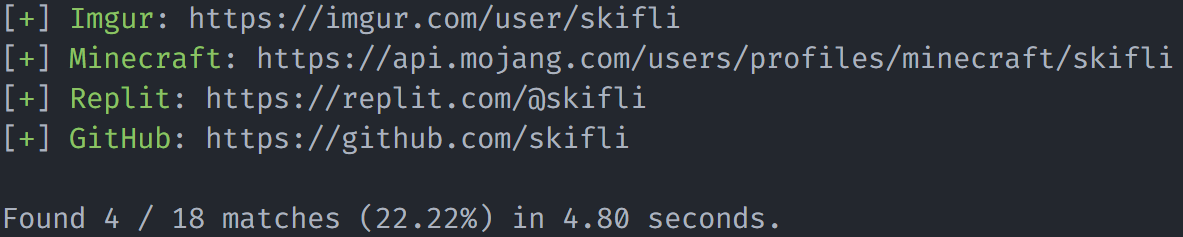
watson 允许你轻松地在众多平台上搜索社交媒体账号。
## 安装说明
### 使用预编译二进制文件
每个 `x.x` 版本都会提供预编译的二进制文件。如果你需要更频繁的更新,请[从源码运行](#running-from-source)。从[最新发布版本](https://github.com/skifli/watson/releases/latest)下载适用于你操作系统的二进制文件。每次发布的顶部都提供了针对流行操作系统的快速下载链接。
### 从源码运行
如果所有预编译的二进制文件都无法在你的系统上运行,或者你需要更频繁的更新,请使用此方法。这可能是由于你的系统架构与编译这些二进制文件所用的架构 **(AMD)** 不同。
* 确保你已安装 [Go](https://go.dev),并且它在你的系统环境变量中配置为 **`go`**。如果你尚未安装 Go,可以从[这里](https://go.dev/dl/)进行安装。
* 从[这里](https://github.com/skifli/watson/archive/refs/heads/master.zip)下载并解压代码仓库。或者,你可以在终端中运行 `git clone https://github.com/skifli/watson`,使用 [Git](https://git-scm.com/) 克隆该仓库。
* 导航到你克隆的此仓库的 `/src` 目录。
* 运行命令 `go build watson.go`。
* 编译后的二进制文件位于同一文件夹中,如果你使用的是 Windows,名称为 `watson.exe`,否则为 `watson`。
## 用法
```
Usage: watson.exe [--colourless] [--outputfolder OUTPUTFOLDER] [--showall] [--readtimeout READTIMEOUT] [--reqsperthread REQSPERTHREAD] [--sites SITES] [--usernames USERNAMES] [--version] [--writetimeout WRITETIMEOUT] [USERNAME]
Positional arguments:
USERNAME The username to check for.
Options:
--colourless Disables coloured output. [default: false]
--outputfolder OUTPUTFOLDER
Folder name in which to dump outputs to. Files will be named according to the account's username. Set to an empty string to disable. [default: results]
--showall Show all sites, even ones which matches are not found for. Also applies to the output file. [default: false]
--readtimeout READTIMEOUT
Timeout for reading request response (in milliseconds). Could slow the program down more, if coupled with a higher 'reqsperthread' value. [default: 1000]
--reqsperthread REQSPERTHREAD
The amount of requests per thread. Can significantly increase or decrease speed. [default: 3]
--sites SITES JSON file to load data from a. Can be local or a URL. [default: https://raw.githubusercontent.com/skifli/watson/main/src/sites.json]
--usernames USERNAMES
Used to check for multiple usernames. Has a high precedence than 'username'.
--version Display the current version of the program and exit.
--writetimeout WRITETIMEOUT
Timeout for writing request (in milliseconds). [default: 1000]
--help, -h display this help and exit
```
### 单个用户名
```
watson.exe skifli
```
### 多个用户名
```
watson.exe --usernames "skifli" "skiflee"
```
标签:EVTX分析, Go, Ruby工具, 信息收集, 安全工具, 实时处理, 开源情报, 社交媒体, 账号搜索