目录↗️
just
`just` 是一种保存和运行项目特定命令的便捷方式。
本自述文件也可以作为一本 [书](https://just.systems/man/en/) 阅读。
该书反映了最新版本,而
[GitHub 上的自述文件](https://github.com/casey/just/blob/master/README.md)
则反映最新的 master 分支。
(中文文档在 [这里](https://github.com/casey/just/blob/master/README.中文.md),
快看过来!)
命令(被称为 recipe)存储在名为 `justfile` 的文件中,其语法
受 `make` 启发:
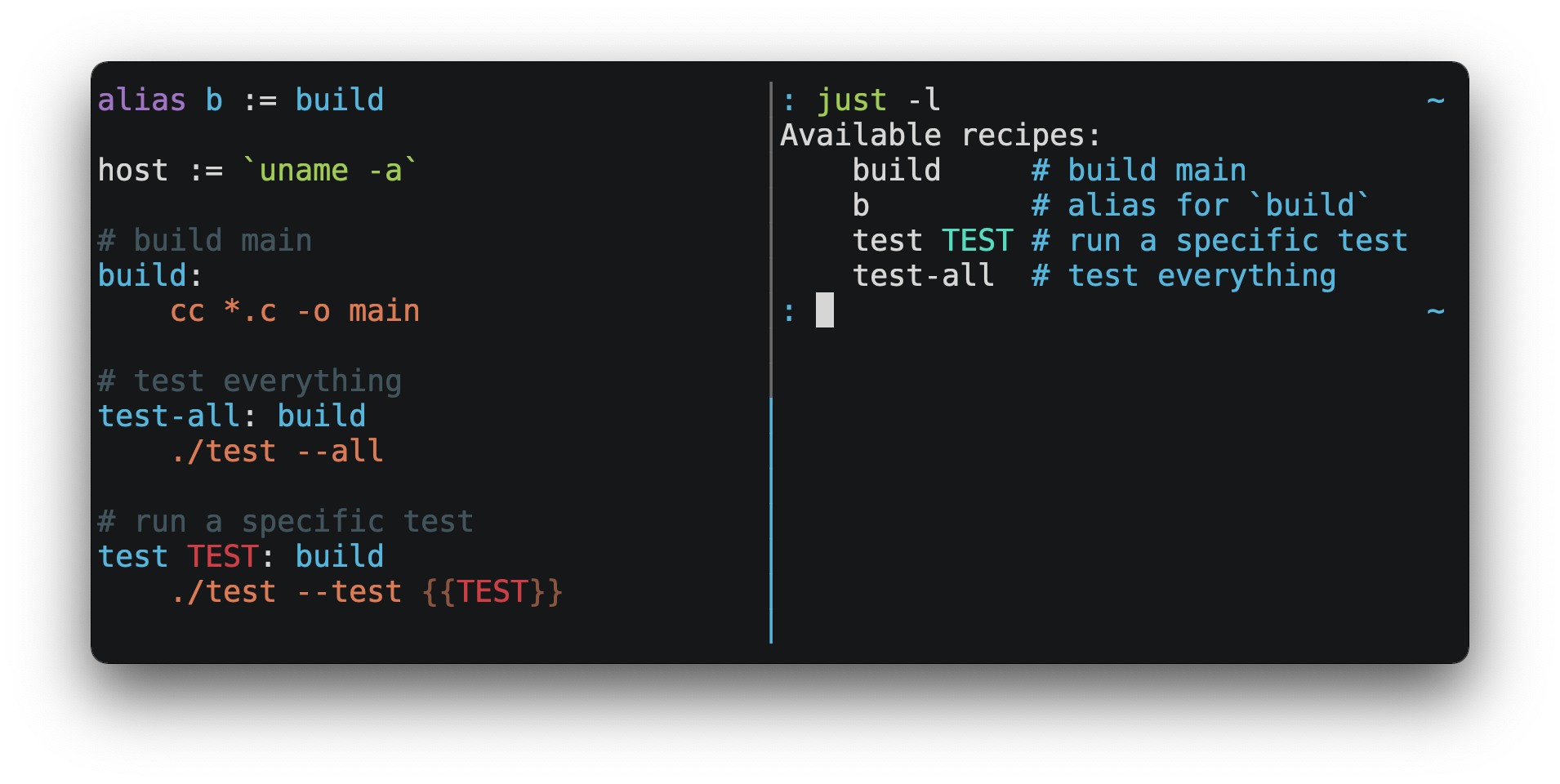
然后你可以使用 `just RECIPE` 来运行它们:
```
$ just test-all
cc *.c -o main
./test --all
Yay, all your tests passed!
```
`just` 有许多有用的功能,并且相比 `make` 有很多改进:
- `just` 是一个命令运行器,而不是构建系统,因此它避免了
[`make` 的复杂性和特性](#what-are-the-idiosyncrasies-of-make-that-just-avoids)。
不需要 `.PHONY` recipe!
- Linux、MacOS、Windows 和其他合理的 Unix 系统都受支持,且
无需额外的依赖项。(尽管如果你的系统没有 `sh`,
你需要[选择一个不同的 shell](#shell)。)
- 错误具体且信息丰富,语法错误会
连同其源上下文一起报告。
- Recipe 可以接受[命令行参数](#recipe-parameters)。
- 在可能的情况下,错误会被静态解析。未知的 recipe 和
循环依赖会在任何操作运行前被报告。
- `just` [加载 `.env` 文件](#dotenv-settings),使得填充
环境变量变得容易。
- Recipe 可以[从命令行列出](#listing-available-recipes)。
- 命令行补全脚本
[适用于大多数流行的 shell](#shell-completion-scripts)。
- Recipe 可以用
[任意语言](#shebang-recipes)编写,比如 Python 或 NodeJS。
- `just` 可以从任何子目录调用,而不仅仅是包含 `justfile` 的目录。
- 还有[更多](https://just.systems/man/en/)!
如果你在使用 `just` 时需要帮助,请随时打开一个 issue 或在
[Discord](https://discord.gg/ezYScXR) 上联系我。功能请求和错误报告
总是受欢迎的!
## 安装
### 前置条件
`just` 应该可以在任何具有合理 `sh` 的系统上运行,包括 Linux、MacOS
和 BSD。
#### Windows
在 Windows 上,`just` 可以与
[Git for Windows](https://git-scm.com)、
[GitHub Desktop](https://desktop.github.com) 或
[Cygwin](http://www.cygwin.com) 提供的 `sh` 一起使用。
安装后,`sh` 必须在你想要调用 `just` 的 shell 的
`PATH` 中可用。
如果你不想安装 `sh`,你可以使用 `shell` 设置来使用
你选择的 shell。
比如 PowerShell:
```
# 使用 PowerShell 代替 sh
set shell := ["powershell.exe", "-c"]
hello:
Write-Host "Hello, world!"
```
……或者 `cmd.exe`:
```
# 使用 cmd.exe 代替 sh
set shell := ["cmd.exe", "/c"]
list:
dir
```
你也可以使用命令行参数来设置 shell。例如,要使用
PowerShell,使用 `--shell powershell.exe --shell-arg -c` 启动 `just`。
(PowerShell 默认安装在 Windows 7 SP1 和 Windows Server 2008 R2
S1 及更高版本上,而且 `cmd.exe` 相当繁琐,因此推荐大多数
Windows 用户使用 PowerShell。)
### 软件包
#### 跨平台
#### BSD
#### Linux
#### Windows
#### macOS

### 预编译二进制文件
Linux、MacOS 和 Windows 的预编译二进制文件可以在
[发布页面](https://github.com/casey/just/releases)找到。
你可以在 Linux、MacOS 或 Windows 上使用以下命令下载
最新版本,只需将 `DEST` 替换为你希望放置 `just` 的目录:
```
curl --proto '=https' --tlsv1.2 -sSf https://just.systems/install.sh | bash -s -- --to DEST
```
例如,要将 `just` 安装到 `~/bin`:
```
# 创建 ~/bin
mkdir -p ~/bin
# 下载并解压 just 到 ~/bin/just
curl --proto '=https' --tlsv1.2 -sSf https://just.systems/install.sh | bash -s -- --to ~/bin
# 将 `~/bin` 添加到您的 shell 搜索可执行文件的路径中
# 这一行应该添加到您的 shell 初始化文件中,
# 例如 `~/.bashrc` 或 `~/.zshrc`
export PATH="$PATH:$HOME/bin"
# just 现在应该是可执行的
just --help
```
请注意,`install.sh` 可能会在 GitHub Actions 上失败,或者在许多机器
共享 IP 地址的其他环境中失败。`install.sh` 调用 GitHub API 以
确定要安装的 `just` 的最新版本,而这些 API 调用
是基于每个 IP 进行速率限制的。为了使 `install.sh` 在这种
情况下更可靠,请使用 `--tag` 传递一个特定的标签来安装。
避免速率限制的另一种方法是将 GitHub 身份验证令牌作为
名为 `GITHUB_TOKEN` 的环境变量传递给 `install.sh`,允许其
验证其请求。
[发布版](https://github.com/casey/just/releases)包含一个 `SHA256SUM` 文件,
可用于验证预编译二进制归档文件的完整性。
要验证发布版,请下载预编译二进制归档文件以及
`SHA256SUM` 文件并运行:
```
shasum --algorithm 256 --ignore-missing --check SHA256SUMS
```
### GitHub Actions
`just` 可以通过几种方式安装在 GitHub Actions 上。
使用 GitHub Actions runner 上预装的包管理器,在 MacOS 上使用
`brew install just`,在 Windows 上使用 `choco install just`。
使用 [extractions/setup-just](https://github.com/extractions/setup-just):
```
- uses: extractions/setup-just@v3
with:
just-version: 1.5.0 # optional semver specification, otherwise latest
```
或者使用 [taiki-e/install-action](https://github.com/taiki-e/install-action):
```
- uses: taiki-e/install-action@just
```
### 发布版 RSS 源
`just` 发布版的 [RSS 源](https://en.wikipedia.org/wiki/RSS) 可在 [此处](https://github.com/casey/just/releases.atom)获取。
### Node.js 安装
[just-install](https://npmjs.com/package/just-install) 可用于在 Node.js 应用程序中自动化
安装 `just`。
`just` 是 npm 脚本的一个绝佳的、更健壮的替代品。如果你想
在 Node.js 应用程序的依赖项中包含 `just`,`just-install`
将作为 `npm install` 命令的一部分安装一个本地的、特定于平台的二进制
文件。这消除了每个开发人员使用上述
过程之一独立安装 `just` 的需要。安装后,
`just` 命令将在 npm 脚本中或与 npx 一起工作。这对于希望
使其项目的设置过程尽可能简单的团队来说非常有用。
有关更多信息,请参阅
[just-install 自述文件](https://github.com/brombal/just-install#readme)。
## 向后兼容性
随着版本 1.0 的发布,`just` 对向后兼容性和稳定性做出了坚定的承诺。
未来的版本不会引入向后不兼容的更改,导致
现有的 `justfile` 停止工作,或破坏命令行界面的工作调用。
但是,这不排除修复明显的错误,即使这样做可能会
破坏依赖其行为的 `justfile`。
永远不会有 `just` 2.0。任何理想的向后不兼容更改
将在每个 `justfile` 的基础上选择加入,因此用户可以
随意迁移。
尚未准备好稳定的功能被标记为不稳定,可能会
随时更改或删除。使用不稳定的功能默认会产生错误,
可以通过传递 `--unstable` 标志、
`set unstable` 或将环境变量 `JUST_UNSTABLE` 设置为除 `false`、`0` 或空字符串以外的任何值来抑制。
## 编辑器支持
`justfile` 语法与 `make` 足够接近,你可能希望告诉你的
编辑器对 `just` 使用 `make` 语法高亮。
### Vim 和 Neovim
得益于
[pbnj](https://github.com/pbnj),Vim 9.1.1042 或更高版本以及 Neovim 0.11 或更高版本
开箱即用地支持 Justfile 语法高亮。
#### `vim-just`
[vim-just](https://github.com/NoahTheDuke/vim-just) 插件为 `justfile` 提供语法高亮。
使用你喜欢的包管理器安装它,比如
[Plug](https://github.com/junegunn/vim-plug):
```
call plug#begin()
Plug 'NoahTheDuke/vim-just'
call plug#end()
```
或者使用 Vim 的内置包支持:
```
mkdir -p ~/.vim/pack/vendor/start
cd ~/.vim/pack/vendor/start
git clone https://github.com/NoahTheDuke/vim-just.git
```
#### `tree-sitter-just`
[tree-sitter-just](https://github.com/IndianBoy42/tree-sitter-just) 是一个用于 Neovim 的
[Nvim Treesitter](https://github.com/nvim-treesitter/nvim-treesitter) 插件。
#### Makefile 语法高亮
Vim 内置的 makefile 语法高亮对 `justfile` 来说并不完美,但
总比没有好。你可以将以下内容放在 `~/.vim/filetype.vim` 中:
```
if exists("did_load_filetypes")
finish
endif
augroup filetypedetect
au BufNewFile,BufRead justfile setf make
augroup END
```
或者将以下内容添加到单个 `justfile` 中,以便在每个文件的
基础上启用 `make` 模式:
```
# vim: set ft=make :
```
### Emacs
[just-mode](https://github.com/leon-barrett/just-mode.el) 提供 `justfile` 的语法高亮和自动缩进。
它可以在 [MELPA](https://melpa.org/) 上作为 [just-mode](https://melpa.org/#/just-mode) 获取。
[justl](https://github.com/psibi/justl.el) 提供执行和列出 recipe 的命令。
你可以将以下内容添加到单个 `justfile` 中,以便在每个文件的
基础上启用 `make` 模式:
```
# Local Variables:
# mode: makefile
# End:
```
### Visual Studio Code
VS Code 扩展可在[此处](https://github.com/nefrob/vscode-just)获取。
无人维护的 VS Code 扩展包括
[skellock/vscode-just](https://github.com/skellock/vscode-just) 和
[sclu1034/vscode-just](https://github.com/sclu1034/vscode-just)。
### JetBrains IDEs
[linux_china](https://github.com/linux-china) 制作的 JetBrains IDEs 插件
[可在此处获取](https://plugins.jetbrains.com/plugin/18658-just)。
### Kakoune
得益于 TeddyDD,Kakoune 开箱即用地支持 `justfile` 语法高亮。
### Helix
[Helix](https://helix-editor.com/) 自 23.05 版本起
开箱即用地支持 `justfile` 语法高亮。
### Sublime Text
[nk9](https://github.com/nk9) 制作的带有 `just` 语法和其他工具的
[Just package](https://github.com/nk9/just_sublime) 可在
[PackageControl](https://packagecontrol.io/packages/Just) 上获取。
### Micro
得益于 [tomodachi94](https://github.com/tomodachi94),[Micro](https://micro-editor.github.io/)
开箱即用地支持 Justfile 语法高亮。
### Zed
[jackTabsCode](https://github.com/jackTabsCode) 制作的 [zed-just](https://github.com/jackTabsCode/zed-just/)
扩展可在 [Zed 扩展页面](https://zed.dev/extensions?query=just)上获取。
### 其他编辑器
请随时发送在
你选择的编辑器中获得语法高亮所需的命令,以便我将它们包含在这里。
### Language Server Protocol
[just-lsp](https://github.com/terror/just-lsp) 提供了 [语言服务器协议](https://en.wikipedia.org/wiki/Language_Server_Protocol)
实现,支持转到定义、内联诊断和代码补全等功能。
### Model Context Protocol
[just-mcp](http://github.com/promptexecution/just-mcp) 提供了一个
[model context protocol](https://en.wikipedia.org/wiki/Model_Context_Protocol)
适配器,允许 LLM 查询 `justfiles` 的内容并运行 recipe。
## 快速开始
请参阅安装部分,了解如何在你的计算机上安装 `just`。尝试
运行 `just --version` 以确保其安装正确。
有关语法的概述,请查看
[此备忘单](https://cheatography.com/linux-china/cheat-sheets/justfile/)。
一旦 `just` 安装并运行正常,请在项目的根目录下创建一个名为 `justfile` 的文件,内容如下:
```
recipe-name:
echo 'This is a recipe!'
# 这是一个注释
another-recipe:
@echo 'This is another recipe.'
```
当你调用 `just` 时,它会在当前目录
及其上级目录中查找 `justfile` 文件,因此你可以从项目的任何子目录调用它。
对 `justfile` 的搜索不区分大小写,所以任何大小写形式,如 `Justfile`、
`JUSTFILE` 或 `JuStFiLe`,都可以工作。`just` 还会查找名为
`.justfile` 的文件,如果你想隐藏 `justfile` 的话。
不带参数运行 `just` 会运行 `justfile` 中的第一个 recipe:
```
$ just
echo 'This is a recipe!'
This is a recipe!
```
一个或多个参数指定要运行的 recipe:
```
$ just another-recipe
This is another recipe.
```
`just` 在运行每条命令之前会将其打印到标准错误,这就是
`echo 'This is a recipe!'` 被打印的原因。对于以 `@` 开头的行,
这种打印会被抑制,这就是 `echo 'This is another recipe.'` 未被打印的原因。
如果命令失败,recipe 会停止运行。这里 `cargo publish` 只会在
`cargo test` 成功时运行:
```
publish:
cargo test
# tests passed, time to publish!
cargo publish
```
Recipe 可以依赖于其他 recipe。这里的 `test` recipe 依赖于
`build` recipe,所以 `build` 会在 `test` 之前运行:
```
build:
cc main.c foo.c bar.c -o main
test: build
./test
sloc:
@echo "`wc -l *.c` lines of code"
```
```
$ just test
cc main.c foo.c bar.c -o main
./test
testing… all tests passed!
```
没有依赖关系的 recipe 将按照它们在命令行上给出的顺序运行:
```
$ just build sloc
cc main.c foo.c bar.c -o main
1337 lines of code
```
依赖项总是会先运行,即使它们是在依赖于它们的 recipe 之后传递的:
```
$ just test build
cc main.c foo.c bar.c -o main
./test
testing… all tests passed!
```
Recipe 可能依赖于子模块中的 recipe:
```
mod foo
baz: foo::bar
```
## 示例
各种 `justfile` 可以在
[examples 目录](https://github.com/casey/just/tree/master/examples) 和
[GitHub](https://github.com/search?q=path%3A**%2Fjustfile&type=code) 上找到。
## 功能
### 默认 Recipe
当 `just` 被调用时没有指定 recipe,它会运行带有 `[default]` 属性的 recipe,如果没有 recipe 具有 `[default]` 属性,则运行 `justfile` 中的第一个 recipe。
这个 recipe 可能是项目中最频繁运行的命令,比如
运行测试:
```
test:
cargo test
```
你还可以使用依赖项默认运行多个 recipe:
```
default: lint build test
build:
echo Building…
test:
echo Testing…
lint:
echo Linting…
```
如果没有 recipe 适合作为默认 recipe,你可以在 `justfile` 的开头添加一个 recipe 来列出可用的 recipe:
```
default:
just --list
```
### 列出可用的 Recipe
可以使用 `just --list` 按字母顺序列出 recipe:
```
$ just --list
Available recipes:
build
test
deploy
lint
```
[子模块](#modules1190)中的 recipe 可以用 `just --list PATH` 列出,
其中 `PATH` 是一个以空格或 `::` 分隔的模块路径:
```
$ cat justfile
mod foo
$ cat foo.just
mod bar
$ cat bar.just
baz:
$ just --list foo bar
Available recipes:
baz
$ just --list foo::bar
Available recipes:
baz
```
`just --summary` 更简洁:
```
$ just --summary
build test deploy lint
```
传递 `--unsorted` 以按 recipe 在 `justfile` 中出现的顺序打印它们:
```
test:
echo 'Testing!'
build:
echo 'Building!'
```
```
$ just --list --unsorted
Available recipes:
test
build
```
```
$ just --summary --unsorted
test build
```
如果你希望 `just` 默认列出 `justfile` 中的 recipe,你可以
将其用作默认 recipe:
```
default:
@just --list
```
请注意,你可能需要在上面的行中添加 `--justfile {{justfile()}}`。
如果没有它,如果你执行 `just -f /some/distant/justfile -d .` 或
`just -f ./non-standard-justfile`,recipe 内部单纯的 `just --list` 不
一定会使用你提供的文件。它会尝试在你的当前路径中查找
justfile,甚至可能导致 `No justfile found` 错误。
标题文本可以用 `--list-heading` 自定义:
```
$ just --list --list-heading $'Cool stuff…\n'
Cool stuff…
test
build
```
缩进可以用 `--list-prefix` 自定义:
```
$ just --list --list-prefix ····
Available recipes:
····test
····build
```
`--list-heading` 的参数会替换标题及其后的换行符,
因此如果非空,它应该包含一个换行符。它的工作方式是
这样,以便你可以通过传递空字符串来完全取消标题行:
```
$ just --list --list-heading ''
test
build
```
### 调用多个 Recipe
可以在命令行上一次调用多个 recipe:
```
build:
make web
serve:
python3 -m http.server -d out 8000
```
```
$ just build serve
make web
python3 -m http.server -d out 8000
```
请记住,带有参数的 recipe 会吞噬参数,即使它们
与其他 recipe 的名称匹配:
```
build project:
make {{project}}
serve:
python3 -m http.server -d out 8000
```
```
$ just build serve
make: *** No rule to make target `serve'. Stop.
```
`--one` 标志可用于将命令行调用限制为单个
recipe:
```
$ just --one build serve
error: Expected 1 command-line recipe invocation but found 2.
```
### 工作目录
默认情况下,recipe 的运行工作目录设置为包含 `justfile` 的目录。
`[no-cd]` 属性可用于使 recipe 的运行工作目录
设置为调用 `just` 的目录。
```
@foo:
pwd
[no-cd]
@bar:
pwd
```
```
$ cd subdir
$ just foo
/
$ just bar
/subdir
```
你可以使用 `set working-directory := '…'` 覆盖所有 recipe 的工作目录:
```
set working-directory := 'bar'
@foo:
pwd
```
```
$ pwd
/home/bob
$ just foo
/home/bob/bar
```
你可以使用 `working-directory` 属性
1.38.0 覆盖特定 recipe 的工作目录:
```
[working-directory: 'bar']
@foo:
pwd
```
```
$ pwd
/home/bob
$ just foo
/home/bob/bar
```
`working-directory` 设置或 `working-directory` 属性的参数可以是绝对路径或相对路径。如果是相对路径,它是相对于默认工作目录解释的。
### 别名
别名允许在命令行上使用替代名称调用 recipe:
```
alias b := build
build:
echo 'Building!'
```
```
$ just b
echo 'Building!'
Building!
```
别名的目标可以是子模块中的 recipe:
```
mod foo
alias baz := foo::bar
```
### 设置
设置控制解释和执行。每个设置在 `justfile` 中最多只能指定一次,位置不限。
例如:
```
set shell := ["zsh", "-cu"]
foo:
# this line will be run as `zsh -cu 'ls **/*.txt'`
ls **/*.txt
```
#### 设置表
| 名称 | 值 | 默认值 | 描述 |
|------|-------|---------|-------------|
| `allow-duplicate-recipes` boolean | `false` | 允许 `justfile` 中较后出现的 recipe 覆盖同名的较早 recipe。 |
| `allow-duplicate-variables` | boolean | `false` | 允许 `justfile` 中较后出现的变量覆盖同名的较早变量。 |
| `dotenv-filename` | string | - | 如果存在,加载具有自定义名称的 `.env` 文件。 |
| `dotenv-load` | boolean | `false` | 如果存在,加载 `.env` 文件。 |
| `dotenv-override` | boolean | `false` | 使用 `.env` 文件中的值覆盖现有环境变量。 |
| `dotenv-path` | string | - | 从自定义路径加载 `.env` 文件,如果不存在则报错。覆盖 `dotenv-filename`。 |
| `dotenv-required` | boolean | `false` | 如果未找到 `.env` 文件则报错。 |
| `export` | boolean | `false` | 将所有变量导出为环境变量。 |
| `fallback` | boolean | `false` | 如果在命令行上找不到第一个 recipe,则在父目录中搜索 `justfile`。 |
| `ignore-comments` | boolean | `false` | 忽略以 `#` 开头的 recipe 行。 |
| `positional-arguments` | boolean | `false` | 传递位置参数。 |
| `quiet` | boolean | `false` | 在执行前禁用回显 recipe 行。 |
| `script-interpreter`
1.33.0 | `[COMMAND, ARGS…]` | `['sh', '-eu']` | 设置用于调用带有空 `[script]` 属性的 recipe 的命令。 |
| `shell` | `[COMMAND, ARGS…]` | - | 设置用于调用 recipe 和评估反引号的命令。 |
| `tempdir` | string | - | 在 `tempdir` 而不是系统默认临时目录中创建临时目录。 |
| `unstable`
1.31.0 | boolean | `false` | 启用不稳定功能。 |
| `windows-powershell` | boolean | `false` | 在 Windows 上使用 PowerShell 作为默认 shell。(已弃用。请改用 `windows-shell`。 |
| `windows-shell` | `[COMMAND, ARGS…]` | - | 设置用于调用 recipe 和评估反引号的命令。 |
| `working-directory`
1.33.0 | string | - | 设置 recipe 和反引号的工作目录,相对于默认工作目录。 |
布尔设置可以写为:
```
set NAME
```
这等同于:
```
set NAME := true
```
非布尔设置可以设置为字符串和
表达式。
1.46.0
然而,因为设置会影响反引号和许多函数的行为,
这些表达式可能不包含反引号或函数调用,无论是
直接还是通过引用间接包含。
#### 允许重复的 Recipe
如果 `allow-duplicate-recipes` 设置为 `true`,定义多个同名的
recipe 不会报错,并且使用最后一个定义。默认为
`false`。
```
set allow-duplicate-recipes
@foo:
echo foo
@foo:
echo bar
```
```
$ just foo
bar
```
#### 允许重复的变量
如果 `allow-duplicate-variables` 设置为 `true`,定义多个同名的
变量不会报错,并且使用最后一个定义。默认为
`false`。
```
set allow-duplicate-variables
a := "foo"
a := "bar"
@foo:
echo {{a}}
```
```
$ just foo
bar
```
#### Dotenv 设置
如果设置了 `dotenv-load`、`dotenv-filename`、`dotenv-override`、`dotenv-path`
或 `dotenv-required` 中的任何一个,`just` 将尝试从文件中加载环境变量。
如果设置了 `dotenv-path`,`just` 将在给定路径查找文件,路径
可以是绝对路径,也可以是相对于工作目录的路径。
命令行选项 `--dotenv-path`,简写形式 `-E`,可用于在运行时
设置或覆盖 `dotenv-path`。
如果设置了 `dotenv-filename`,`just` 将在给定路径查找文件,
该路径相对于工作目录及其每个祖先目录。
如果未设置 `dotenv-filename`,但设置了 `dotenv-load` 或 `dotenv-required`,
just 将查找名为 `.env` 的文件,相对于工作目录
及其每个祖先目录。
`dotenv-filename` 和 `dotenv-path` 类似,但 `dotenv-path` 仅
相对于工作目录检查,而 `dotenv-filename` 相对于
工作目录及其每个祖先目录检查。
如果未找到环境文件,除非设置了
`dotenv-required`,否则不会报错。
加载的变量是环境变量,而不是 `just` 变量,因此
必须在 recipe 和反引号中使用 `$VARIABLE_NAME` 访问。
如果设置了 `dotenv-override`,环境文件中的变量将覆盖
现有环境变量。
例如,如果你的 `.env` 文件包含:
```
# 一个注释,将被忽略
DATABASE_ADDRESS=localhost:6379
SERVER_PORT=1337
```
而你的 `justfile` 包含:
```
set dotenv-load
serve:
@echo "Starting server with database $DATABASE_ADDRESS on port $SERVER_PORT…"
./server --database $DATABASE_ADDRESS --port $SERVER_PORT
```
`just serve` 将输出:
```
$ just serve
Starting server with database localhost:6379 on port 1337…
./server --database $DATABASE_ADDRESS --port $SERVER_PORT
```
#### 导出
`export` 设置会导致所有 `just` 变量作为环境变量导出。
默认为 `false`。
```
set export
a := "hello"
@foo b:
echo $a
echo $b
```
```
$ just foo goodbye
hello
goodbye
```
#### 位置参数
如果 `positional-arguments` 为 `true`,recipe 参数将作为
位置参数传递给命令。对于逐行 recipe,参数 `$0` 将
是 recipe 的名称。
例如,运行此 recipe:
```
set positional-arguments
@foo bar:
echo $0
echo $1
```
将产生以下输出:
```
$ just foo hello
foo
hello
```
当使用 `sh` 兼容的 shell(如 `bash` 或 `zsh`)时,`$@` 展开为
传递给 recipe 的位置参数,从一开始。当在
双引号内作为 `"$@"` 使用时,包含空格的参数将
像被双引号括起来一样被传递。也就是说,`"$@"` 等同于 `"$1" "$2"`…
当没有位置参数时,`"$@"` 和 `$@` 展开为空
(即,它们被移除)。
此示例 recipe 将在单独的行上逐个打印参数:
```
set positional-arguments
@test *args='':
bash -c 'while (( "$#" )); do echo - $1; shift; done' -- "$@"
```
使用 _两个_ 参数运行它:
```
$ just test foo "bar baz"
- foo
- bar baz
```
位置参数也可以使用 `[positional-arguments]` 属性在每个 recipe 的基础上
1.29.0开启:
```
[positional-arguments]
@foo bar:
echo $0
echo $1
```
请注意,PowerShell 处理位置参数的方式与其他 shell 不同,
因此开启位置参数可能会破坏使用 PowerShell 的 recipe。
如果使用 PowerShell 7.4 或更高版本,`-CommandWithArgs` 标志将使
位置参数按预期工作:
```
set shell := ['pwsh.exe', '-CommandWithArgs']
set positional-arguments
print-args a b c:
Write-Output @($args[1..($args.Count - 1)])
```
#### Shell
`shell` 设置控制用于调用 recipe 行和
反引号的命令。Shebang recipe 不受影响。默认 shell 是 `sh -cu`。
```
# 使用 python3 执行配方行和反引号
set shell := ["python3", "-c"]
# 使用 print 捕获评估结果
foos := `print("foo" * 4)`
foo:
print("Snake snake snake snake.")
print("{{foos}}")
```
`just` 将要执行的命令作为参数传递。许多 shell 需要
一个额外的标志,通常是 `-c`,以使它们评估第一个参数。
##### Windows Shell
`just` 在 Windows 上默认使用 `sh`。要在 Windows 上使用不同的 shell,
请使用 `windows-shell`:
```
set windows-shell := ["powershell.exe", "-NoLogo", "-Command"]
hello:
Write-Host "Hello, world!"
```
请参阅
[powershell.just](https://github.com/casey/just/blob/master/examples/powershell.just)
以获取一个在所有平台上使用 PowerShell 的 justfile。
##### Windows PowerShell
*`set windows-powershell` 使用旧的 `powershell.exe` 二进制文件,不再
推荐。请参阅上面的 `windows-shell` 设置,以获取一种更灵活的
控制 Windows 上使用哪个 shell 的方法。*
`just` 在 Windows 上默认使用 `sh`。要改用 `powershell.exe`,请将
`windows-powershell` 设置为 true。
```
set windows-powershell := true
hello:
Write-Host "Hello, world!"
```
##### Python 3
```
set shell := ["python3", "-c"]
```
##### Bash
```
set shell := ["bash", "-uc"]
```
##### Z Shell
```
set shell := ["zsh", "-uc"]
```
##### Fish
```
set shell := ["fish", "-c"]
```
##### Nushell
```
set shell := ["nu", "-c"]
```
如果你想把默认表格模式改为 `light`:
```
set shell := ['nu', '-m', 'light', '-c']
```
*[Nushell](https://github.com/nushell/nushell) 是用 Rust 编写的,并且 **对 Windows / macOS 和 Linux 具有跨平台支持**。*
### 文档注释
紧接在 recipe 之前的注释将出现在 `just --list` 中:
```
# 构建东西
build:
./bin/build
# 测试东西
test:
./bin/test
```
```
$ just --list
Available recipes:
build # build stuff
test # test stuff
```
`[doc]` 属性可用于设置或取消 recipe 的文档注释:
```
# 此注释不会出现
[doc('Build stuff')]
build:
./bin/build
# 这个也不会出现
[doc]
test:
./bin/test
```
```
$ just --list
Available recipes:
build # Build stuff
test
```
### 表达式和替换
表达式中支持各种运算符和函数调用,它们可以
用于赋值、默认 recipe 参数以及 recipe 主体 `{{…}}` 替换。
```
tmpdir := `mktemp -d`
version := "0.2.7"
tardir := tmpdir / "awesomesauce-" + version
tarball := tardir + ".tar.gz"
config := quote(config_dir() / ".project-config")
publish:
rm -f {{tarball}}
mkdir {{tardir}}
cp README.md *.c {{ config }} {{tardir}}
tar zcvf {{tarball}} {{tardir}}
scp {{tarball}} me@server.com:release/
rm -rf {{tarball}} {{tardir}}
```
#### 连接
`+` 运算符返回连接了右参数的左参数:
```
foobar := 'foo' + 'bar'
```
#### 逻辑运算符
逻辑运算符 `&&` 和 `||` 可用于合并字符串
值
1.37.0,类似于 Python 的 `and` 和 `or`。这些运算符
将空字符串 `''` 视为 false,将所有其他字符串视为 true。
这些运算符目前是不稳定的。
如果左参数是空字符串,`&&` 运算符返回空字符串,否则
返回右参数:
```
foo := '' && 'goodbye' # ''
bar := 'hello' && 'goodbye' # 'goodbye'
```
如果左参数非空,`||` 运算符返回左参数,否则
返回右参数:
```
foo := '' || 'goodbye' # 'goodbye'
bar := 'hello' || 'goodbye' # 'hello'
```
#### 连接路径
`/` 运算符可用于用斜杠连接两个字符串:
```
foo := "a" / "b"
```
```
$ just --evaluate foo
a/b
```
请注意,即使已经存在 `/`,也会添加一个 `/`:
```
foo := "a/"
bar := foo / "b"
```
```
$ just --evaluate bar
a//b
```
也可以构造绝对路径
1.5.0:
```
foo := / "b"
```
```
$ just --evaluate foo
/b
```
`/` 运算符使用 `/` 字符,即使在 Windows 上也是如此。因此,在使用
`/` 运算符时,应避免与使用通用命名约定 (UNC)
的路径一起使用,即那些以 `\?` 开头的路径,因为 UNC 路径不支持正斜杠。
#### 转义 `{{`
要编写包含 `{{` 的 recipe,请使用 `{{{{`:
```
braces:
echo 'I {{{{LOVE}} curly braces!'
```
(不匹配的 `}}` 会被忽略,所以不需要转义。)
另一种选择是将所有你想转义的文本放在插值中:
```
braces:
echo '{{'I {{LOVE}} curly braces!'}}'
```
还有一种选择是使用 `{{ "{{" }}`:
```
braces:
echo 'I {{ "{{" }}LOVE}} curly braces!'
```
### 字符串
支持 `'单引号'`、`"双引号"` 和 `'''三引号'''` 引号字符串字面量。
与 recipe 主体不同,字符串内部不支持 `{{…}}` 插值。
双引号字符串支持转义序列:
```
carriage-return := "\r"
double-quote := "\""
newline := "\n"
no-newline := "\
"
slash := "\\"
tab := "\t"
unicode-codepoint := "\u{1F916}"
```
```
$ just --evaluate
"arriage-return := "
double-quote := """
newline := "
"
no-newline := ""
slash := "\"
tab := " "
unicode-codepoint := "🤖"
```
Unicode 字符转义序列 `\u{…}`
1.36.0 接受最多六个十六进制数字。
字符串可以包含换行符:
```
single := '
hello
'
double := "
goodbye
"
```
单引号字符串不识别转义序列:
```
escapes := '\t\n\r\"\\'
```
```
$ just --evaluate
escapes := "\t\n\r\"\\"
```
支持单引号和双引号字符串的缩进版本,由三个单引号或
双引号分隔。缩进字符串行会被去除前导换行符,
以及所有非空行共有的前导空格:
```
# 此字符串将评估为 `foo\nbar\n`
x := '''
foo
bar
'''
# 此字符串将评估为 `abc\n wuv\nxyz\n`
y := """
abc
wuv
xyz
"""
```
与非缩进字符串类似,缩进的双引号字符串处理转义
序列,而缩进的单引号字符串忽略转义序列。转义
序列处理发生在取消缩进之后。取消缩进
算法不考虑转义序列产生的空格或换行符。
#### Shell 展开的字符串
前缀为 `x` 的字符串会进行 shell 展开
1.27.0:
```
foobar := x'~/$FOO/${BAR}'
```
| 值 | 替换 |
|------|-------------|
| `$VAR` | 环境变量 `VAR` 的值 |
| `${VAR}` | 环境变量 `VAR` 的值 |
| `${VAR:-DEFAULT}` | 环境变量 `VAR` 的值,如果未设置 `VAR` 则为 `DEFAULT` |
| 前导 `~` | 当前用户主目录的路径 |
| 前导 `~USER` | 用户 `USER` 的主目录路径 |
此展开在编译时执行,因此来自 `.env` 文件的变量和
导出的 `just` 变量不能使用。但是,这允许在
设置和导入路径等地方使用 shell 展开的字符串,这些地方不能
依赖于 `just` 变量和 `.env` 文件。
#### 格式字符串
前缀为 `f` 的字符串是格式字符串
1.44.0:
```
name := "world"
message := f'Hello, {{name}}!'
```
格式字符串可以包含由 `{{…}}` 分隔的插值,其中包含
表达式。格式字符串计算结果为连接的字符串片段和
计算后的表达式。
使用 `{{{{` 在格式字符串中包含字面 `{{`:
```
foo := f'I {{{{LOVE} curly braces!'
```
### 忽略错误
通常,如果命令返回非零退出状态,执行将停止。要
在命令失败后继续执行,请在命令前加上 `-`:
```
foo:
-cat foo
echo 'Done!'
```
```
$ just foo
cat foo
cat: foo: No such file or directory
echo 'Done!'
Done!
```
### 函数
`just` 提供了许多内置函数用于表达式,包括
recipe 主体 `{{…}}` 替换、赋值和默认参数值。
所有以 `_directory` 结尾的函数都可以缩写为 `_dir`。所以
`home_directory()` 也可以写成 `home_dir()`。此外,
`invocation_directory_native()` 可以缩写为
`invocation_dir_native()`。
#### 系统信息
- `arch()` — 指令集架构。可能的值有:`"aarch64"`、
`"arm"`、`"asmjs"`、`"agon"`、`"mips"`、`"msp430"`、`"powerpc"`、
`"powerpc64"`、`"s390x"`、`"sparc"`、`"wasm32"`、`"x86"`、`"x86_64"` 和
`"xcore"`。
- `num_cpus()`
1.15.0 - 逻辑 CPU 数量。
- `os()` — 操作系统。可能的值有:`"android"`、`"bitrig"`、
`"dragonfly"`、`"emscripten"`、`"freebsd"`、`"haiku"`、`"ios"`、`"linux"`、
`"macos"`、`"netbsd"`、`"openbsd"`、`"solaris"` 和 `"windows"`。
- `os_family()` — 操作系统系列;可能的值有:`"unix"` 和
`"windows"`。
例如:
```
system-info:
@echo "This is an {{arch()}} machine".
```
```
$ just system-info
This is an x86_64 machine
```
`os_family()` 函数可用于创建跨平台的 `justfile`,
以在各种操作系统上工作。有关示例,请参阅
[cross-platform.just](https://github.com/casey/just/blob/master/examples/cross-platform.just)
文件。
#### 外部命令
- `shell(command, args...)`
1.27.0 返回 shell 脚本 `command` 的标准输出,带有零个或多个位置参数 `args`。用于解释 `command` 的 shell 与用于评估 recipe 行的 shell 相同,可以用 `set shell := […]` 更改。
`command` 作为第一个参数传递,所以如果命令是 `'echo $@'`,
完整的命令行,使用默认 shell 命令 `sh -cu` 和参数
`'foo'` 和 `'bar'` 将是:
'sh' '-cu' 'echo $@' 'echo $@' 'foo' 'bar'
这样 `$@` 就能按预期工作,`$1` 指的是第一个
参数。`$@` 不包括第一个位置参数,该参数预期
是正在运行的程序的名称。
```
# 参数可以是变量或表达式
file := '/sys/class/power_supply/BAT0/status'
bat0stat := shell('cat $1', file)
# 命令可以是变量或表达式
command := 'wc -l'
output := shell(command + ' "$1"', 'main.c')
# shell 命令引用的参数必须被使用
empty := shell('echo', 'foo')
full := shell('echo $1', 'foo')
error := shell('echo $1')
```
```
# 使用 python 作为 shell。由于 `python -c` 将 `sys.argv[0]` 设置为 `'-c'`,
# 第一个“真正的”位置参数将是 `sys.argv[2]`。
set shell := ["python3", "-c"]
olleh := shell('import sys; print(sys.argv[2][::-1])', 'hello')
```
#### 环境变量
- `env(key)`
1.15.0 — 检索名为 `key` 的环境变量,如果
不存在则中止。
```
home_dir := env('HOME')
test:
echo "{{home_dir}}"
```
```
$ just
/home/user1
```
- `env(key, default)`
1.15.0 — 检索名为 `key` 的环境变量,如果不存在则返回 `default`。
- `env_var(key)` — `env(key)` 的已弃用别名。
- `env_var_or_default(key, default)` — `env(key, default)` 的已弃用别名。
可以使用 `||` 运算符(目前不稳定)为空的环境变量值替换默认值:
```
set unstable
foo := env('FOO', '') || 'DEFAULT_VALUE'
```
#### 可执行文件
- `require(name)`
1.39.0 — 在 `PATH` 环境变量中搜索目录以查找可执行文件 `name` 并返回其完整路径,如果不存在名为 `name` 的可执行文件则停止并报错。
bash := require("bash")
@test:
echo "bash: '{{bash}}'"
$ just
bash: '/bin/bash'
- `which(name)`
1.39.0 — 在 `PATH` 环境变量中搜索目录以查找可执行文件 `name` 并返回其完整路径,如果不存在名为 `name` 的可执行文件则返回空字符串。目前不稳定。
set unstable
bosh := which("bosh")
@test:
echo "bosh: '{{bosh}}'"
$ just
bosh: ''
#### 调用信息
- `is_dependency()` - 如果当前 recipe 正在作为另一个 recipe 的依赖项运行,而不是直接运行,则返回字符串 `true`,否则返回字符串 `false`。
#### 调用目录
- `invocation_directory()` - 检索调用 `just` 时的当前目录的绝对路径,在 `just` 在执行命令前更改它 (chdir) 之前。在 Windows 上,`invocation_directory()` 使用 `cygpath` 将调用目录转换为 Cygwin 兼容的 `/` 分隔路径。
使用 `invocation_directory_native()` 在所有平台上返回原样的调用目录。
例如,要对“当前目录”下的文件(从用户/调用者的角度来看)调用 `rustfmt`,请使用以下规则:
```
rustfmt:
find {{invocation_directory()}} -name \*.rs -exec rustfmt {} \;
```
或者,如果你的命令需要从当前目录运行,你可以
使用(例如):
```
build:
cd {{invocation_directory()}}; ./some_script_that_needs_to_be_run_from_here
```
- `invocation_directory_native()` - 检索调用 `just` 时的当前目录的绝对路径,在 `just` 在执行命令前更改它 (chdir) 之前。
#### Justfile 和 Justfile 目录
- `justfile()` - 检索当前 `justfile` 的路径。
- `justfile_directory()` - 检索当前 `justfile` 的父目录的路径。
例如,要运行相对于当前 `justfile` 位置的命令:
```
script:
{{justfile_directory()}}/scripts/some_script
```
#### 源文件和源目录
- `source_file()`
1.27.0 - 检索当前源文件的路径。
- `source_directory()`
1.27.0 - 检索当前源文件的父目录的路径。
`source_file()` 和 `source_directory()` 在根 `justfile` 中的行为与 `justfile()` 和
`justfile_directory()` 相同,但在从 import 或子模块中调用时,将分别返回当前 `import` 或 `mod` 源文件的路径和目录。
#### Just 可执行文件
- `just_executable()` - `just` 可执行文件的绝对路径。
例如:
```
executable:
@echo The executable is at: {{just_executable()}}
```
```
$ just
The executable is at: /bin/just
```
#### Just 进程 ID
- `just_pid()` - `just` 可执行文件的进程 ID。
例如:
```
pid:
@echo The process ID is: {{ just_pid() }}
```
```
$ just
The process ID is: 420
```
#### 字符串操作
- `append(suffix, s)`
1.27.0 将 `suffix` 附加到 `s` 中以空格分隔的字符串。`append('/src', 'foo bar baz')` → `'foo/src bar/src baz/src'`
- `prepend(prefix, s)`
1.27.0 将 `prefix` 添加到 `s` 中以空格分隔的字符串之前。`prepend('src/', 'foo bar baz')` →
`'src/foo src/bar src/baz'`
- `encode_uri_component(s)`
1.27.0 - 对 `s` 中的字符进行百分比编码,除了 `[A-Za-z0-9_.!~*'()-]`,与
[JavaScript `encodeURIComponent` 函数](https://developer.mozilla.org/en-US/docs/Web/JavaScript/Reference/Global_Objects/encodeURIComponent)的行为匹配。
- `quote(s)` - 将所有单引号替换为 `'\''`,并在 `s` 的前后添加单引号。这足以转义许多 shell 的特殊字符,包括大多数 Bourne shell 后代。
- `replace(s, from, to)` - 将 `s` 中的所有 `from` 替换为 `to`。
- `replace_regex(s, regex, replacement)` - 将 `s` 中的所有 `regex` 替换为 `replacement`。正则表达式由
[Rust `regex` crate](https://docs.rs/regex/latest/regex/) 提供。有关用法示例,请参阅
[语法文档](https://docs.rs/regex/latest/regex/#syntax)。支持捕获组。`replacement` 字符串使用
[替换字符串语法](https://docs.rs/regex/latest/regex/struct.Regex.html#replacement-string-syntax)。
- `trim(s)` - 删除 `s` 的前导和尾随空格。
- `trim_end(s)` - 删除 `s` 的尾随空格。
- `trim_end_match(s, substring)` - 删除 `s` 的后缀(如果匹配 `substring`)。
- `trim_end_matches(s, substring)` - 重复删除 `s` 的后缀(如果匹配 `substring`)。
- `trim_start(s)` - 删除 `s` 的前导空格。
- `trim_start_match(s, substring)` - 删除 `s` 的前缀(如果匹配 `substring`)。
- `trim_start_matches(s, substring)` - 重复删除 `s` 的前缀(如果匹配 `substring`)。
#### 大小写转换
- `capitalize(s)`
1.7.0 - 将 `s` 的第一个字符转换为大写,其余转换为小写。
- `kebabcase(s)`
1.7.0 - 将 `s` 转换为 `kebab-case`。
- `lowercamelcase(s)`
1.7.0 - 将 `s` 转换为 `lowerCamelCase`。
- `lowercase(s)` - 将 `s` 转换为小写。
- `shoutykebabcase(s)`
1.7.0 - 将 `s` 转换为 `SHOUTY-KEBAB-CASE`。
- `shoutysnakecase(s)`
1.7.0 - 将 `s` 转换为 `SHOUTY_SNAKE_CASE`。
- `snakecase(s)`
1.7.0 - 将 `s` 转换为 `snake_case`。
- `titlecase(s)`
1.7.0 - 将 `s` 转换为 `Title Case`。
- `uppercamelcase(s)`
1.7.0 - 将 `s` 转换为 `UpperCamelCase`。
- `uppercase(s)` - 将 `s` 转换为大写。
#### 路径操作
##### 易错
- `absolute_path(path)` - 工作目录中相对 `path` 的绝对路径。目录 `/foo` 中的 `absolute_path("./bar.txt")` 是 `/foo/bar.txt`。
- `canonicalize(path)`
1.24.0 - 通过解析符号链接并在可能的情况下删除 `.`、`..` 和多余的 `/` 来规范化 `path`。
- `extension(path)` - `path` 的扩展名。`extension("/foo/bar.txt")` 是 `txt`。
- `file_name(path)` - 删除了任何前导目录组件的 `path` 的文件名。`file_name("/foo/bar.txt")` 是 `bar.txt`。
- `file_stem(path)` - 不带扩展名的 `path` 的文件名。
`file_stem("/foo/bar.txt")` 是 `bar`。
- `parent_directory(path)` - `path` 的父目录。
`parent_directory("/foo/bar.txt")` 是 `/foo`。
- `without_extension(path)` - 不带扩展名的 `path`。
`without_extension("/foo/bar.txt")` 是 `/foo/bar`。
这些函数可能会失败,例如,如果路径没有扩展名,
这将停止执行。
##### 不易错
- `clean(path)` - 通过删除额外的路径分隔符、中间 `.` 组件和 `..`(在可能的情况下)来简化 `path`。`clean("foo//bar")` 是 `foo/bar`,`clean("foo/..")` 是 `.`,`clean("foo/./bar")` 是 `foo/bar`。
- `join(a, b…)` - *此函数在 Unix 上使用 `/`,在 Windows 上使用 `\`,这可能会导致不良行为。除非在 Windows 上特别需要 `\`,否则应考虑使用 `/` 运算符(例如 `a / b`)作为替代,因为它始终使用 `/`。* 将路径 `a` 与路径 `b` 连接。`join("foo/bar", "baz")` 是 `foo/bar/baz`。接受两个或更多参数。
#### 文件系统访问
- `path_exists(path)` - 如果路径指向现有实体,则返回 `true`,否则返回 `false`。遍历符号链接,如果路径不可访问或指向损坏的符号链接,则返回 `false`。
- `read(path)`
1.39.0 - 将 `path` 处的文件内容作为字符串返回。
##### 错误报告
- `error(message)` - 中止执行并向用户报告错误 `message`。
#### UUID 和哈希生成
- `blake3(string)`
1.25.0 - 将 `string` 的 [BLAKE3] 哈希作为十六进制字符串返回。
- `blake3_file(path)`
1.25.0 - 将 `path` 处文件的 [BLAKE3] 哈希作为十六进制字符串返回。
- `sha256(string)` - 将 `string` 的 SHA-256 哈希作为十六进制字符串返回。
- `sha256_file(path)` - 将 `path` 处文件的 SHA-256 哈希作为十六进制字符串返回。
- `uuid()` - 生成一个随机的版本 4 UUID。
#### 随机
- `choose(n, alphabet)`
1.27.0 - 从 `alphabet` 中随机选择的字符生成一个长度为 `n` 的字符串,`alphabet` 不能包含重复的字符。例如,`choose('64', HEX)` 将生成一个随机的 64 字符小写十六进制字符串。
#### 日期时间
- `datetime(format)`
1.30.0 - 使用 `format` 返回本地时间。
- `datetime_utc(format)`
1.30.0 - 使用 `format` 返回 UTC 时间。
`datetime` 和 `datetime_utc` 的参数是 `strftime` 风格的格式
字符串,详细信息,请参阅
[`chrono` 库文档](https://docs.rs/chrono/latest/chrono/format/strftime/index.html)。
#### 语义版本
- `semver_matches(version, requirement)`
1.16.0 - 检查语义 `version`](https://semver.org)
(例如 `"0.1.0"`)是否匹配 `requirement`(例如 `">=0.1.0"`),如果匹配则返回 `"true"`,否则返回 `"false"`。
#### 样式
- `style(name)`
1.37.0 - 返回 `just` 使用的命名终端显示属性转义序列。与包含标准颜色和样式的终端显示属性转义序列常量不同,`style(name)` 返回 `just` 本身使用的转义序列,可用于使 recipe 输出与 `just` 自己的输出匹配。
`name` 的可识别值为 `'command'`(用于回显的 recipe 行)、`error` 和 `warning`。
例如,要设置错误消息的样式:
scary:
@echo '{{ style("error") }}OH NO{{ NORMAL }}'
##### 用户目录
1.23.0
这些函数返回用于配置、数据、缓存、可执行文件和用户主目录等内容的用户特定目录的路径。
在 Unix 上,这些函数遵循
[XDG 基本目录规范](https://specifications.freedesktop.org/basedir-spec/basedir-spec-latest.html)。
在 MacOS 和 Windows 上,这些函数返回系统指定的用户特定
目录。例如,`cache_directory()` 在 MacOS 上返回 `~/Library/Caches`,
在 Windows 上返回 `{FOLDERID_LocalAppData}`。
有关更多详细信息,请参阅 [`dirs`](https://docs.rs/dirs/latest/dirs/index.html) crate。
- `cache_directory()` - 用户特定的缓存目录。
- `config_directory()` - 用户特定的配置目录。
- `config_local_directory()` - 本地用户特定的配置目录。
- `data_directory()` - 用户特定的数据目录。
- `data_local_directory()` - 本地用户特定的数据目录。
- `executable_directory()` - 用户特定的可执行文件目录。
- `home_directory()` - 用户的主目录。
如果你想在所有平台上使用 XDG 基本目录,你可以使用带有适当环境变量和回退的 `env(…)` 函数,但请注意 XDG 规范要求忽略非绝对路径,因此为了与符合规范的应用程序完全兼容,你需要这样做:
```
xdg_config_dir := if env('XDG_CONFIG_HOME', '') =~ '^/' {
env('XDG_CONFIG_HOME')
} else {
home_directory() / '.config'
}
```
### 常量
预定义了许多常量:
| 名称 | 值 | Windows 上的值 |
|---|---|---|
| `HEX`
1.27.0 | `"0123456789abcdef"` | |
| `HEXLOWER`
1.27.0 | `"0123456789abcdef"` | |
| `HEXUPPER`
1.27.0 | `"0123456789ABCDEF"` | |
| `PATH_SEP`
1.41.0 | `"/"` | `"\"` |
| `PATH_VAR_SEP`
1.41.0 | `":"` | `";"` |
| `CLEAR`
1.37.0 | `"\ec"` | |
| `NORMAL`
1.37.0 | `"\e[0m"` | |
| `BOLD`
1.37.0 | `"\e[1m"` | |
| `ITALIC`
1.37.0 | `"\e[3m"` | |
| `UNDERLINE`
1.37.0 | `"\e[4m"` | |
| `INVERT`
1.37.0 | `"\e[7m"` | |
| `HIDE`
1.37.0 | `"\e[8m"` | |
| `STRIKETHROUGH`
1.37.0 | `"\e[9m"` | |
| `BLACK`
1.37.0 | `"\e[30m"` | |
| `RED`
1.37.0 | `"\e[31m"` | |
| `GREEN`
1.37.0 | `"\e[32m"` | |
| `YELLOW`
1.37.0 | `"\e[33m"` | |
| `BLUE`
1.37.0 | `"\e[34m"` | |
| `MAGENTA`
1.37.0 | `"\e[35m"` | |
| `CYAN`
1.37.0 | `"\e[36m"` | |
| `WHITE`
1.37.0 | `"\e[37m"` | |
| `BG_BLACK`
1.37.0 | `"\e[40m"` | |
| `BG_RED`
1.37.0 | `"\e[41m"` | |
| `BG_GREEN`
1.37.0 | `"\e[42m"` | |
| `BG_YELLOW`
1.37.0 | `"\e[43m"` | |
| `BG_BLUE`
1.37.0 | `"\e[44m"` | |
| `BG_MAGENTA`
1.37.0 | `"\e[45m"` | |
| `BG_CYAN`
1.37.0 | `"\e[46m"` | |
| `BG_WHITE`
1.37.0 | `"\e[47m"` | |
```
@foo:
echo {{HEX}}
```
```
$ just foo
0123456789abcdef
```
以 `\e` 开头的常量是
[ANSI 转义序列](https://en.wikipedia.org/wiki/ANSI_escape_code)。
`CLEAR` 清除屏幕,类似于 `clear` 命令。其余的格式为 `\e[Nm`,其中 `N` 是整数,用于设置终端显示属性。
终端显示属性转义序列可以组合,例如文本粗细 `BOLD`、文本样式 `STRIKETHROUGH`、前景色 `CYAN` 和背景色 `BG_BLUE`。它们后面应该跟 `NORMAL`,以将终端重置回正常状态。
转义序列应该用引号括起来,因为 `[` 被某些 shell 视为特殊字符。
```
@foo:
echo '{{BOLD + STRIKETHROUGH + CYAN + BG_BLUE}}Hi!{{NORMAL}}'
```
### 属性
Recipe、`mod` 语句和别名可以使用改变其行为的属性进行注释。
| 名称 | 类型 | 描述 |
|------|------|-------------|
| `[arg(ARG, help="HELP")]`
1.46.0 | recipe | 在用法消息中为 `ARG` 打印帮助字符串 `HELP`。 |
| `[arg(ARG, long="LONG")]`
1.46.0 | recipe | 要求参数 `ARG` 的值作为 `--LONG` 选项传递。 |
| `[arg(ARG, short="S")]`
1.46.0 | recipe | 要求参数 `ARG` 的值作为短 `-S` 选项传递。 |
| `[arg(ARG, value="VALUE")]`
1.46.0 | recipe | 使选项 `ARG` 成为一个不接受值的标志。 |
| `[arg(ARG, pattern="PATTERN")]`
1.45.0 | recipe | 要求参数 `ARG` 的值匹配正则表达式 `PATTERN`。 |
| `[confirm]`
1.17.0 | recipe | 在执行 recipe 之前需要确认。 |
| `[confirm(PROMPT)]`
1.23.0 | recipe | 在执行 recipe 之前需要使用自定义提示进行确认。 |
| `[default]`
1.43.0 | recipe | 将 recipe 用作模块的默认 recipe。 |
| `[doc(DOC)]`
1.27.0 | module, recipe | 将 recipe 或模块的 [文档注释](#documentation-comments) 设置为 `DOC`。 |
| `[env(ENV_VAR, VALUE)]`
master | recipe | 为 recipe 设置环境变量。 |
| `[extension(EXT)]`
1.32.0 | recipe | 将 shebang recipe 脚本的文件扩展名设置为 `EXT`。如果需要句点,`EXT` 应包含一个句点。 |
| `[group(NAME)]`
1.27.0 | module, recipe | 将 recipe 或模块放入 [group](#groups) `NAME` 中。 |
| `[linux]`
1.8.0 | recipe | 在 Linux 上启用 recipe。 |
| `[macos]`
1.8.0 | recipe | 在 MacOS 上启用 recipe。 |
| `[metadata(METADATA)]`
1.42.0 | recipe | 将 `METADATA` 附加到 recipe。 |
| `[no-cd]`
1.9.0 | recipe | 在执行 recipe 前不要更改目录。 |
| `[no-exit-message]`
1.7.0 | recipe | 如果 recipe 失败,不要打印错误消息。 |
| `[no-quiet]`
1.23.0 | recipe | 覆盖全局静默 recipe 并始终回显 recipe。 |
| `[openbsd]`
1.38.0 | recipe | 在 OpenBSD 上启用 recipe。 |
| `[parallel]`
1.42.0 | recipe | 并行运行此 recipe 的依赖项。 |
| `[positional-arguments]`
1.29.0 | recipe | 为此 recipe 开启 [位置参数](#positional-arguments)。 |
| `[private]`
1.10.0 | alias, recipe | 使 recipe、别名或变量私有。请参阅 [私有 Recipe](#private-recipes)。 |
| `[script]`
1.33.0 | recipe | 将 recipe 作为脚本执行。有关更多详细信息,请参阅 [script recipes](#script-recipes)。 |
| `[script(COMMAND)]`
1.32.0 | recipe | 将 recipe 作为由 `COMMAND` 解释的脚本执行。有关更多详细信息,请参阅 [script recipes](#script-recipes)。 |
| `[unix]`
1.8.0 | recipe | 在 Unix 上启用 recipe。(包括 MacOS)。 |
| `[windows]`
1.8.0 | recipe | 在 Windows 上启用 recipe。 |
| `[working-directory(PATH)]`
1.38.0 | recipe | 设置 recipe 工作目录。`PATH` 可以是相对路径或绝对路径。如果是相对路径,则相对于默认工作目录解释。 |
一个 recipe 可以有多个属性,可以在多行上:
```
[no-cd]
[private]
foo:
echo "foo"
```
或者用逗号分隔在同一行上
1.14.0:
```
[no-cd, private]
foo:
echo "foo"
```
具有单个参数的属性可以用冒号编写:
```
[group: 'bar']
foo:
```
#### 启用和禁用 Recipe
1.8.0
`[linux]`、`[macos]`、`[unix]` 和 `[windows]` 属性是
配置属性。默认情况下,recipe 始终处于启用状态。带有
一个或多个配置属性的 recipe 仅在其中一个或多个
配置处于活动状态时才会启用。
这可用于编写根据
运行操作系统而表现不同的 `justfile`。此 `justfile` 中的 `run` recipe 将
编译并运行 `main.c`,使用不同的 C 编译器并根据操作系统使用该编译器的正确输出二进制名称:
```
[unix]
run:
cc main.c
./a.out
[windows]
run:
cl main.c
main.exe
```
#### 禁用更改目录
1.9.0
`just` 通常在执行 recipe 时将当前目录设置为包含 `justfile` 的目录。可以使用 `[no-cd]` 属性禁用此功能。这可用于创建使用相对于调用目录的路径或操作当前目录的 recipe。
例如,这个 `commit` recipe:
```
[no-cd]
commit file:
git add {{file}}
git commit
```
可以与相对于当前目录的路径一起使用,因为 `[no-cd]` 阻止 `just` 在执行 `commit` 时更改当前目录。
#### 要求确认 Recipe
1.17.0
`just` 通常会执行所有 recipe,除非出现错误。`[confirm]`
属性允许 recipe 在运行前在终端中要求确认。
这可以通过向 `just` 传递 `--yes` 来覆盖,这将自动
确认任何由此属性标记的 recipe。
依赖于需要确认的 recipe 的 recipe 将不会运行,如果
被依赖的 recipe 未被确认,以及在任何需要确认的 recipe 之后传递的 recipe 也不会运行。
```
[confirm]
delete-all:
rm -rf *
```
#### 自定义确认提示
1.23.0
可以使用 `[confirm(PROMPT)]` 覆盖默认确认提示:
```
[confirm("Are you sure you want to delete everything?")]
delete-everything:
rm -rf *
```
### 组
Recipe 和模块可以使用一个或多个组名进行注释:
```
[group('lint')]
js-lint:
echo 'Running JS linter…'
[group('rust recipes')]
[group('lint')]
rust-lint:
echo 'Running Rust linter…'
[group('lint')]
cpp-lint:
echo 'Running C++ linter…'
# 不在任何组中
email-everyone:
echo 'Sending mass email…'
```
Recipe 按组列出:
```
$ just --list
Available recipes:
email-everyone # not in any group
[lint]
cpp-lint
js-lint
rust-lint
[rust recipes]
rust-lint
```
`just --list --unsorted` 按每个组内的 justfile 顺序打印 recipe:
```
$ just --list --unsorted
Available recipes:
(no group)
email-everyone # not in any group
[lint]
js-lint
rust-lint
cpp-lint
[rust recipes]
rust-lint
```
可以使用 `--groups` 列出组:
```
$ just --groups
Recipe groups:
lint
rust recipes
```
使用 `just --groups --unsorted` 按 justfile 顺序打印。
### 使用反引号的命令评估
反引号可用于存储命令的结果:
```
localhost := `dumpinterfaces | cut -d: -f2 | sed 's/\/.*//' | sed 's/ //g'`
serve:
./serve {{localhost}} 8080
```
由三个反引号分隔的缩进反引号以与
缩进字符串相同的方式取消缩进:
```
# 此反引号评估命令 `echo foo\necho bar\n`,产生的值为 `foo\nbar\n`。
stuff := ```
echo foo
echo bar
```
```
有关取消缩进的详细信息,请参阅 [字符串](#strings) 部分。
反引号不能以 `#!` 开头。此语法保留用于未来的
升级。
[`shell(…)` 函数](#external-commands) 提供了一种更通用的机制
来调用外部命令,包括执行变量
内容作为命令的能力,以及向命令传递参数的能力。
### 条件表达式
`if`/`else` 表达式根据两个表达式是否计算为相同的值来评估不同的分支:
```
foo := if "2" == "2" { "Good!" } else { "1984" }
bar:
@echo "{{foo}}"
```
```
$ just bar
Good!
```
也可以测试不相等:
```
foo := if "hello" != "goodbye" { "xyz" } else { "abc" }
bar:
@echo {{foo}}
```
```
$ just bar
xyz
```
以及匹配正则表达式:
```
foo := if "hello" =~ 'hel+o' { "match" } else { "mismatch" }
bar:
@echo {{foo}}
```
```
$ just bar
match
```
正则表达式由
[regex crate](https://github.com/rust-lang/regex) 提供,其语法记录在
[docs.rs](https://docs.rs/regex/1.5.4/regex/#syntax) 上。由于正则表达式
通常使用反斜杠转义序列,请考虑使用单引号字符串
字面量,它将斜杠原样传递给正则表达式解析器。
条件表达式短路,这意味着它们只评估其
一个分支。这可用于确保反引号表达式在
不应该运行时不运行。
```
foo := if env_var("RELEASE") == "true" { `get-something-from-release-database` } else { "dummy-value" }
```
条件可以在 recipe 内部使用:
```
bar foo:
echo {{ if foo == "bar" { "hello" } else { "goodbye" } }}
```
可以链接多个条件:
```
foo := if "hello" == "goodbye" {
"xyz"
} else if "a" == "a" {
"abc"
} else {
"123"
}
bar:
@echo {{foo}}
```
```
$ just bar
abc
```
### 停止执行并报错
可以使用 `error` 函数停止执行。例如:
```
foo := if "hello" == "goodbye" {
"xyz"
} else if "a" == "b" {
"abc"
} else {
error("123")
}
```
运行时会产生以下错误:
```
error: Call to function `error` failed: 123
|
16 | error("123")
```
### 从命令行设置变量
可以从命令行覆盖变量。
```
os := "linux"
test: build
./test --test {{os}}
build:
./build {{os}}
```
```
$ just
./build linux
./test --test linux
```
可以在 recipe 之前传递任意数量的 `NAME=VALUE` 形式的参数:
```
$ just os=plan9
./build plan9
./test --test plan9
```
或者你可以使用 `--set` 标志:
```
$ just --set os bsd
./build bsd
./test --test bsd
```
### 获取和设置环境变量
#### 导出 `just` 变量
以 `export` 关键字为前缀的赋值将作为环境变量导出到 recipe:
```
export RUST_BACKTRACE := "1"
test:
# will print a stack trace if it crashes
cargo test
```
以 `$` 为前缀的参数将作为环境变量导出:
```
test $RUST_BACKTRACE="1":
# will print a stack trace if it crashes
cargo test
```
你还可以使用 `[env(NAME, VALUE)]` 属性将环境变量导出到特定的 recipe:
```
[env("RUST_BACKTRACE", "1")]
test:
# will print a stack trace if it crashes
cargo test
```
导出的变量和参数不会导出到同一作用域的反引号中。
```
export WORLD := "world"
# 此反引号将失败,提示 "WORLD: unbound variable"
BAR := `echo hello $WORLD`
```
```
# 运行 `just a foo` 将失败,提示 "A: unbound variable"
a $A $B=`echo $A`:
echo $A $B
```
当设置了 [export](#export) 时,所有 `just` 变量都将作为环境变量导出。
#### 取消导出环境变量
1.29.0
可以使用 `unexport keyword` 取消导出环境变量:
```
unexport FOO
@foo:
echo $FOO
```
```
$ export FOO=bar
$ just foo
sh: FOO: unbound variable
```
#### 从环境中获取环境变量
来自环境的环境变量会自动传递给 recipe。
```
print_home_folder:
echo "HOME is: '${HOME}'"
```
```
$ just
HOME is '/home/myuser'
```
#### 从环境变量设置 `just` 变量
可以使用 `env()` 函数将环境变量传播到 `just` 变量。
请参阅
[environment-variables](#environment-variables)。
### Recipe 参数
Recipe 可以有参数。这里的 recipe `build` 有一个名为 `target` 的参数:
```
build target:
@echo 'Building {{target}}…'
cd {{target}} && make
```
要在命令行上传递参数,请将它们放在 recipe 名称之后:
```
$ just build my-awesome-project
Building my-awesome-project…
cd my-awesome-project && make
```
要将参数传递给依赖项,请将依赖项连同参数一起放在括号中:
```
default: (build "main")
build target:
@echo 'Building {{target}}…'
cd {{target}} && make
```
变量也可以作为参数传递给依赖项:
```
target := "main"
_build version:
@echo 'Building {{version}}…'
cd {{version}} && make
build: (_build target)
```
命令的参数可以通过将依赖项连同参数一起放在括号中来传递给依赖项:
```
build target:
@echo "Building {{target}}…"
push target: (build target)
@echo 'Pushing {{target}}…'
```
参数可以有默认值:
```
default := 'all'
test target tests=default:
@echo 'Testing {{target}}:{{tests}}…'
./test --tests {{tests}} {{target}}
```
具有默认值的参数可以省略:
```
$ just test server
Testing server:all…
./test --tests all server
```
或者提供:
```
$ just test server unit
Testing server:unit…
./test --tests unit server
```
默认值可以是任意表达式,但包含 `+`、`&&`、`||` 或 `/` 运算符的表达式必须用括号括起来:
```
arch := "wasm"
test triple=(arch + "-unknown-unknown") input=(arch / "input.dat"):
./test {{triple}}
```
Recipe 的最后一个参数可以是可变参数,用参数名前的 `+` 或 `*` 表示:
```
backup +FILES:
scp {{FILES}} me@server.com:
```
带有 `+` 前缀的可变参数接受 _一个或多个_ 参数,并展开为包含这些由空格分隔的参数的字符串:
```
$ just backup FAQ.md GRAMMAR.md
scp FAQ.md GRAMMAR.md me@server.com:
FAQ.md 100% 1831 1.8KB/s 00:00
GRAMMAR.md 100% 1666 1.6KB/s 00:00
```
带有 `*` 前缀的可变参数接受 _零个或多个_ 参数,并展开为包含这些由空格分隔的参数的字符串,如果不存在参数则为空字符串:
```
commit MESSAGE *FLAGS:
git commit {{FLAGS}} -m "{{MESSAGE}}"
```
可以为可变参数分配默认值。这些值会被命令行上传递的参数覆盖:
```
test +FLAGS='-q':
cargo test {{FLAGS}}
```
如果 `{{…}}` 替换包含空格,可能需要用引号括起来。例如,如果你有以下 recipe:
```
search QUERY:
lynx https://www.google.com/?q={{QUERY}}
```
而你输入:
```
$ just search "cat toupee"
```
`just` 将运行命令 `lynx https://www.google.com/?q=cat toupee`,它
将被 `sh` 解析为 `lynx`、`https://www.google.com/?q=cat` 和
`toupee`,而不是预期的 `lynx` 和 `https://www.google.com/?q=cat toupee`。
你可以通过添加引号来解决这个问题:
1.33.0`,默认为 `sh -eu`,且*不是*
`set shell` 的值。
Recipe 的主体会被评估,写入临时目录的磁盘中,并通过将其路径作为参数传递给 `COMMAND` 来运行。
### Script 和 Shebang Recipe 的临时文件
Script 和 shebang recipe 都会将 recipe 主体写入临时文件以供执行。Script recipe 通过将文件传递给命令来执行,而 shebang recipe 则直接执行该文件。如果包含临时文件的文件系统以 `noexec` 方式挂载或由于其他原因不可执行,Shebang recipe 执行将失败。
`just` 写入临时文件的目录可以通过多种方式配置,优先级从高到低:
- 通过 `--tempdir` 命令行选项或 `JUST_TEMPDIR` 环境变量进行全局配置1.41.0。
- 通过 `tempdir` 设置在每个模块基础上进行配置。
- 在 Linux 上通过 `XDG_RUNTIME_DIR` 环境变量进行全局配置。
- 回退到 [std::env::temp_dir](https://doc.rust-lang.org/std/env/fn.temp_dir.html) 返回的目录。
### 使用 `uv` 的 Python Recipe
[`uv`](https://github.com/astral-sh/uv) 是一个用 Rust 编写的优秀跨平台 Python 项目管理器。
使用 `[script]` 属性和 `script-interpreter` 设置,可以轻松配置 `just` 以使用 `uv` 运行 Python recipe:
```
set unstable
set script-interpreter := ['uv', 'run', '--script']
[script]
hello:
print("Hello from Python!")
[script]
goodbye:
# /// script
# requires-python = ">=3.11"
# dependencies=["sh"]
# ///
import sh
print(sh.echo("Goodbye from Python!"), end='')
```
当然,使用 shebang 也可以:
```
hello:
#!/usr/bin/env -S uv run --script
print("Hello from Python!")
```
### 更安全的 Bash Shebang Recipe
如果你正在编写 `bash` shebang recipe,请考虑添加 `set -euxo pipefail`:
```
foo:
#!/usr/bin/env bash
set -euxo pipefail
hello='Yo'
echo "$hello from Bash!"
```
虽然不是严格必需的,但 `set -euxo pipefail` 开启了一些有用的功能,使 `bash` shebang recipe 的行为更像普通的、逐行执行的 `just` recipe:
- `set -e` 使 `bash` 在命令失败时退出。
- `set -u` 使 `bash` 在变量未定义时退出。
- `set -x` 使 `bash` 在运行每行脚本前打印该行。
- `set -o pipefail` 使 `bash` 在管道中的命令失败时退出。这是 `bash` 特有的,所以在普通的逐行 `just` recipe 中没有开启。
这些设置一起使用可以避免很多 shell 脚本的陷阱。
#### Windows 上的 Shebang Recipe 执行
在 Windows 上,包含 `/` 的 shebang 解释器路径会使用 `cygpath` 从 Unix 风格路径转换为 Windows 风格路径,该工具随 [Cygwin](http://www.cygwin.com) 一起提供。
例如,要在 Windows 上执行此 recipe:
```
echo:
#!/bin/sh
echo "Hello!"
```
解释器路径 `/bin/sh` 将在执行前使用 `cygpath` 转换为 Windows 风格的路径。
如果解释器路径不包含 `/`,则将在不转换的情况下执行。如果 `cygpath` 不可用,或者您希望将 Windows 风格的路径传递给解释器,这很有用。
### 在 Recipe 中设置变量
Recipe 行由 shell 解释,而不是 `just`,因此无法在 recipe 中间设置 `just` 变量:
```
foo:
x := "hello" # This doesn't work!
echo {{x}}
```
可以使用 shell 变量,但还有另一个问题。每个 recipe 行由一个新的 shell 实例运行,因此在一行中设置的变量不会在下一行中设置:
```
foo:
x=hello && echo $x # This works!
y=bye
echo $y # This doesn't, `y` is undefined here!
```
解决此问题的最佳方法是使用 shebang recipe。Shebang recipe 主体会被提取并作为脚本运行,因此单个 shell 实例将运行整个内容:
```
foo:
#!/usr/bin/env bash
set -euxo pipefail
x=hello
echo $x
```
### 在 Recipe 之间共享环境变量
每个 recipe 的每一行都由一个新的 shell 执行,因此无法在 recipe 之间共享环境变量。
#### 使用 Python Virtual Environments
某些工具,如 [Python's venv](https://docs.python.org/3/library/venv.html),需要加载环境变量才能工作,这使得它们很难与 `just` 一起使用。作为一种变通方法,您可以直接执行虚拟环境二进制文件:
```
venv:
[ -d foo ] || python3 -m venv foo
run: venv
./foo/bin/python3 main.py
```
### 在 Recipe 中更改工作目录
每个 recipe 行由一个新的 shell 执行,因此如果您在一行上更改工作目录,它将不会对后续行产生影响:
```
foo:
pwd # This `pwd` will print the same directory…
cd bar
pwd # …as this `pwd`!
```
有几种解决方法。一种是在要运行的命令的同一行上调用 `cd`:
```
foo:
cd bar && pwd
```
另一种是使用 shebang recipe。Shebang recipe 主体会被提取并作为脚本运行,因此单个 shell 实例将运行整个内容,从而在一行上的 `cd` 将影响后续行,就像 shell 脚本一样:
```
foo:
#!/usr/bin/env bash
set -euxo pipefail
cd bar
pwd
```
### 缩进
Recipe 行可以用空格或制表符缩进,但不能混合使用。Recipe 的所有行必须具有相同类型的缩进,但同一个 `justfile` 中的不同 recipe 可以使用不同的缩进。
每个 recipe 必须从 `recipe-name` 开始至少缩进一级,但在此之后可以进一步缩进。
这是一个包含用空格(表示为 `·`)和制表符(表示为 `→`)缩进的 recipe 的 justfile。
```
set windows-shell := ["pwsh", "-NoLogo", "-NoProfileLoadTime", "-Command"]
set ignore-comments
list-space directory:
··#!pwsh
··foreach ($item in $(Get-ChildItem {{directory}} )) {
····echo $item.Name
··}
··echo ""
# 即使转义换行符,缩进嵌套仍然有效
list-tab directory:
→ @foreach ($item in $(Get-ChildItem {{directory}} )) { \
→ → echo $item.Name \
→ }
→ @echo ""
```
```
PS > just list-space ~
Desktop
Documents
Downloads
PS > just list-tab ~
Desktop
Documents
Downloads
```
### 多行结构
没有初始 shebang 的 Recipe 是逐行评估和运行的,这意味着多行结构可能无法按预期工作。
例如,使用以下 `justfile`:
```
conditional:
if true; then
echo 'True!'
fi
```
`conditional` recipe 第二行之前的额外前导空格将产生解析错误:
```
$ just conditional
error: Recipe line has extra leading whitespace
|
3 | echo 'True!'
| ^^^^^^^^^^^^^^^^
```
要解决此问题,您可以将条件写在一行上,使用反斜杠转义换行符,或者在 recipe 中添加 shebang。提供了一些多行结构的示例以供参考。
#### `if` 语句
```
conditional:
if true; then echo 'True!'; fi
```
```
conditional:
if true; then \
echo 'True!'; \
fi
```
```
conditional:
#!/usr/bin/env sh
if true; then
echo 'True!'
fi
```
#### `for` 循环
```
for:
for file in `ls .`; do echo $file; done
```
```
for:
for file in `ls .`; do \
echo $file; \
done
```
```
for:
#!/usr/bin/env sh
for file in `ls .`; do
echo $file
done
```
#### `while` 循环
```
while:
while `server-is-dead`; do ping -c 1 server; done
```
```
while:
while `server-is-dead`; do \
ping -c 1 server; \
done
```
```
while:
#!/usr/bin/env sh
while `server-is-dead`; do
ping -c 1 server
done
```
#### Recipe 主体外部
括号表达式可以跨越多行:
```
abc := ('a' +
'b'
+ 'c')
abc2 := (
'a' +
'b' +
'c'
)
foo param=('foo'
+ 'bar'
):
echo {{param}}
bar: (foo
'Foo'
)
echo 'Bar!'
```
以反斜杠结尾的行会继续到下一行,就像这些行由空格连接一样1.15.0:
```
a := 'foo' + \
'bar'
foo param1 \
param2='foo' \
*varparam='': dep1 \
(dep2 'foo')
echo {{param1}} {{param2}} {{varparam}}
dep1: \
# this comment is not part of the recipe body
echo 'dep1'
dep2 \
param:
echo 'Dependency with parameter {{param}}'
```
反斜杠行继续也可以在插值中使用。反斜杠后面的行必须缩进。
```
recipe:
echo '{{ \
"This interpolation " + \
"has a lot of text." \
}}'
echo 'back to recipe body'
```
### 命令行选项
`just` 支持许多有用的命令行选项,用于列出、转储和调试 recipe 和变量:
```
$ just --list
Available recipes:
js
perl
polyglot
python
ruby
$ just --show perl
perl:
#!/usr/bin/env perl
print "Larry Wall says Hi!\n";
$ just --show polyglot
polyglot: python js perl sh ruby
```
#### 使用环境变量设置命令行选项
某些命令行选项可以用环境变量设置
例如,可以使用 `--unstable` 标志启用不稳定功能:
```
$ just --unstable
```
或者通过设置 `JUST_UNSTABLE` 环境变量:
```
$ export JUST_UNSTABLE=1
$ just
```
由于环境变量是由子进程继承的,因此用环境变量设置的命令行选项会由 `just` 的递归调用继承,而用参数设置的命令行选项则不会。
请参阅 `just --help` 了解哪些选项可以用环境变量设置。
### 私有 Recipe
名称以 `_` 开头的 Recipe 和别名会在 `just --list` 中被省略:
```
test: _test-helper
./bin/test
_test-helper:
./bin/super-secret-test-helper-stuff
```
```
$ just --list
Available recipes:
test
```
以及 `just --summary`:
```
$ just --summary
test
```
也可以使用 `[private]` 属性1.10.0 来隐藏 recipe 或别名,而无需更改名称:
```
[private]
foo:
[private]
alias b := bar
bar:
```
```
$ just --list
Available recipes:
bar
```
这对于仅用作其他 recipe 依赖项的辅助 recipe 很有用。
### 静默 Recipe
Recipe 名称可以以 `@` 为前缀,以反转每行之前 `@` 的含义:
```
@quiet:
echo hello
echo goodbye
@# all done!
```
现在只有以 `@` 开头的行会被回显:
```
$ just quiet
hello
goodbye
# 全部完成!
```
Justfile 中的所有 recipe 都可以使用 `set quiet` 设为静默:
```
set quiet
foo:
echo "This is quiet"
@foo2:
echo "This is also quiet"
```
`[no-quiet]` 属性会覆盖此设置:
```
set quiet
foo:
echo "This is quiet"
[no-quiet]
foo2:
echo "This is not quiet"
```
Shebang recipe 默认是静默的:
```
foo:
#!/usr/bin/env bash
echo 'Foo!'
```
```
$ just foo
Foo!
```
在 shebang recipe 名称中添加 `@` 会使 `just` 在执行之前打印该 recipe:
```
@bar:
#!/usr/bin/env bash
echo 'Bar!'
```
```
$ just bar
#!/usr/bin/env bash
echo 'Bar!'
Bar!
```
当 recipe 行失败时,`just` 通常会打印错误消息。可以使用 `[no-exit-message]`1.7.0 属性抑制这些错误消息。您可能会发现这对于包装工具的 recipe 特别有用:
```
git *args:
@git {{args}}
```
```
$ just git status
fatal: not a git repository (or any of the parent directories): .git
error: Recipe `git` failed on line 2 with exit code 128
```
添加该属性以在工具以非零代码退出时抑制退出错误消息:
```
[no-exit-message]
git *args:
@git {{args}}
```
```
$ just git status
fatal: not a git repository (or any of the parent directories): .git
```
### 使用交互式选择器选择要运行的 Recipe
`--choose` 子命令使 `just` 调用选择器来选择要运行的 recipe。选择器应从标准输入读取包含 recipe 名称的行,并将其中一个或多个由空格分隔的名称打印到标准输出。
由于目前无法使用 `--choose` 运行需要参数的 recipe,因此此类 recipe 不会提供给选择器。私有 recipe 和别名也会被跳过。
可以使用 `--chooser` 标志覆盖选择器。如果未给出 `--chooser`,则 `just` 首先检查是否设置了 `$JUST_CHOOSER`。如果没有,则选择器默认为 `fzf`,这是一个流行的模糊查找器。
参数可以包含在选择器中,即 `fzf --exact`。
选择器的调用方式与 recipe 行相同。例如,如果选择器是 `fzf`,它将使用 `sh -cu 'fzf'` 调用,如果 shell 或 shell 参数被覆盖,选择器调用将遵循这些覆盖。
如果您希望 `just` 默认使用选择器选择 recipe,可以将其用作默认 recipe:
```
default:
@just --choose
```
### 调用其他目录中的 `justfile`
如果传递给 `just` 的第一个参数包含 `/`,则会发生以下情况:
1. 参数在最后一个 `/` 处分割。
2. 最后一个 `/` 之前的部分被视为目录。`just` 将在那里开始搜索 `justfile`,而不是在当前目录中。
3. 最后一个斜杠之后的部分被视为普通参数,或者如果为空则被忽略。
这可能看起来有点奇怪,但如果您希望在子目录中的 `justfile` 中运行命令,它很有用。
例如,如果您在一个包含名为 `foo` 的子目录的目录中,该子目录包含一个带有 `build` recipe 的 `justfile`,该 recipe 也是默认 recipe,那么以下所有内容都是等效的:
```
$ (cd foo && just build)
$ just foo/build
$ just foo/
```
第一个之后的额外 recipe 会在同一个 `justfile` 中查找。例如,以下两者都是等效的:
```
$ just foo/a b
$ (cd foo && just a b)
```
并且都会调用 `foo/justfile` 中的 recipe `a` 和 `b`。
### 导入
一个 `justfile` 可以使用 `import` 语句包含另一个 `justfile` 的内容。
如果您有以下 `justfile`:
```
import 'foo/bar.just'
a: b
@echo A
```
并且 `foo/bar.just` 中有以下文本:
```
b:
@echo B
```
`foo/bar.just` 将包含在 `justfile` 中,并且 recipe `b` 将被定义:
```
$ just b
B
$ just a
B
A
```
`import` 路径可以是绝对路径,也可以是相对于包含它的 justfile 位置的相对路径。导入路径中的前导 `~/` 将替换为当前用户的主目录。
Justfile 对顺序不敏感,因此包含的文件可以引用在 `import` 语句之后定义的变量和 recipe。
导入的文件本身可以包含 `import`,这些 `import` 会被递归处理。
`allow-duplicate-recipes` 和 `allow-duplicate-variables` 分别允许重复的 recipe 和变量相互覆盖,而不是产生错误。
在一个模块内,后面的定义会覆盖前面的定义:
```
set allow-duplicate-recipes
foo:
foo:
echo 'yes'
```
当涉及 `import` 时,不幸的是情况会变得更加复杂且难以解释。
较浅的定义总是覆盖较深的定义,因此顶层的 recipe 将覆盖导入中的 recipe,而导入中的 recipe 将覆盖在该导入本身导入这些 recipe 的导入中的 recipe。
当导入两个重复定义且深度相同时,来自较早导入的定义将覆盖来自较晚导入的定义。
这是因为 `just` 在处理导入时使用堆栈,按源顺序将导入推入堆栈,并始终处理堆栈顶部,因此编译器实际上较晚处理较早的导入。
这绝对是一个 bug,但由于 `just` 具有非常强的向后兼容性保证,并且我们要竭尽全力不破坏任何人的 `justfile`,我们创建了 issue #2540 来讨论我们是否真的可以修复它。
可以通过在 `import` 关键字后放置 `?` 来使导入成为可选的:
```
import? 'foo/bar.just'
```
多次导入同一个源文件不是错误1.37.0。
这允许导入多个 justfile,例如 `foo.just` 和 `bar.just`,它们都导入包含共享 recipe 的第三个 justfile,例如 `baz.just`,而不会因为 `baz.just` 的重复导入而出错:
```
# justfile
import 'foo.just'
import 'bar.just'
```
```
# foo.just
import 'baz.just'
foo: baz
```
```
# bar.just
import 'baz.just'
bar: baz
```
```
# baz
baz:
```
### 模块1.19.0
`justfile` 可以使用 `mod` 语句声明模块。
`mod` 语句在 `just`1.31.0 中已稳定。在早期版本中,您需要使用 `--unstable` 标志、`set unstable` 或设置 `JUST_UNSTABLE` 环境变量才能使用它们。
如果您有以下 `justfile`:
```
mod bar
a:
@echo A
```
并且 `bar.just` 中有以下文本:
```
b:
@echo B
```
`bar` 将作为子模块包含在 `justfile` 中。在一个子模块中定义的 Recipe、别名和变量不能在另一个子模块中使用,并且每个模块使用自己的设置。
子模块中的 recipe 可以作为子命令调用:
```
$ just bar b
B
```
或者使用路径语法:
```
$ just bar::b
B
```
如果模块名为 `foo`,just 将在 `foo.just`、`foo/mod.just`、`foo/justfile` 和 `foo/.justfile` 中搜索模块文件。在后两种情况下,模块文件可以有任何大写形式。
模块语句可以采用以下形式:
```
mod foo 'PATH'
```
这会从 `PATH` 加载模块的源文件,而不是从常规位置。`PATH` 中的前导 `~/` 将替换为当前用户的主目录。`PATH` 可以指向模块源文件本身,也可以指向包含名为 `mod.just`、`justfile` 或 `.justfile` 的模块源文件的目录。在后两种情况下,模块文件可以有任何大写形式。
环境文件仅针对根 justfile 加载,加载的环境变量在子模块中可用。子模块中影响环境文件加载的设置将被忽略。
没有 `[no-cd]` 属性的子模块中的 recipe 在运行时,工作目录设置为包含子模块源文件的目录。
`justfile()` 和 `justfile_directory()` 始终返回根 justfile 的路径及其包含的目录,即使从子模块 recipe 调用时也是如此。
可以通过在 `mod` 关键字后放置 `?` 来使模块成为可选的:
```
mod? foo
```
可选模块的缺失源文件不会产生错误。
没有源文件的可选模块不会冲突,因此您可以拥有多个具有相同名称但具有不同源文件路径的 mod 语句,只要最多存在一个源文件:
```
mod? foo 'bar.just'
mod? foo 'baz.just'
```
可以为模块提供出现在 `--list` 输出中的文档注释1.30.0:
```
# foo 是一个很棒的模块!
mod foo
```
```
$ just --list
Available recipes:
foo ... # foo is a great module!
```
模块仍然缺少许多功能,例如引用其他模块中变量的能力。有关更多信息,请参阅 [module improvement tracking issue](https://github.com/casey/just/issues/2252)。
### 隐藏 `justfile`
`just` 查找名为 `justfile` 和 `.justfile` 的 `justfile`,这可用于保持 `justfile` 隐藏。
### Just 脚本
通过在 `justfile` 顶部添加 shebang 行并使其可执行,`just` 可以用作脚本的解释器:
```
$ cat > script < formatted-justfile
```
`--dump` 命令可以与 `--dump-format json` 一起使用,以打印 `justfile` 的 JSON 表示。
### 回退到父级 `justfile`
如果在 `justfile` 中找不到 recipe 并且设置了 `fallback` 设置,`just` 将在父目录中向上查找 `justfile`,直到到达根目录。`just` 将在到达 `fallback` 设置为 `false` 或未设置的 `justfile` 后停止。
例如,假设当前目录包含此 `justfile`:
```
set fallback
foo:
echo foo
```
并且父目录包含此 `justfile`:
```
bar:
echo bar
```
```
$ just bar
Trying ../justfile
echo bar
bar
```
### 避免参数分割
鉴于此 `justfile`:
```
foo argument:
touch {{argument}}
```
以下命令将创建两个文件,`some` 和 `argument.txt`:
```
$ just foo "some argument.txt"
```
用户的 shell 会将 `"some argument.txt"` 解析为单个参数,但是当 `just` 将 `touch {{argument}}` 替换为 `touch some argument.txt` 时,引号不会被保留,并且 `touch` 将接收两个参数。
有几种方法可以避免这种情况:引用、位置参数和导出参数。
#### 引用
可以在 `{{argument}}` 插值周围添加引号:
```
foo argument:
touch '{{argument}}'
```
这保留了 `just` 在运行之前捕获变量名拼写错误的能力,例如如果您要编写 `{{argument}}`,但如果 `argument` 的值包含单引号,则不会执行您想要的操作。
#### 位置参数
`positional-arguments` 设置导致所有参数作为位置参数传递,允许使用 `$1`、`$2`、... 和 `$@` 访问它们,然后可以用双引号括起来以避免 shell 进一步分割:
```
set positional-arguments
foo argument:
touch "$1"
```
这使 `just` 无法捕获拼写错误,例如如果您输入 `$2` 而不是 `$1`,但适用于 `argument` 的所有可能值,包括那些带有双引号的值。
#### 导出参数
当设置 `export` 设置时,所有参数都会被导出:
```
set export
foo argument:
touch "$argument"
```
或者可以通过在单个参数前加上 `$` 来导出它们:
```
foo $argument:
touch "$argument"
```
这使 `just` 无法捕获拼写错误,例如如果您输入 `$argument`,但适用于 `argument` 的所有可能值,包括那些带有双引号的值。
### 配置 Shell
有多种方法可以为逐行 recipe 配置 shell,这是当 recipe 不以 `#!` shebang 开头时的默认设置。它们的优先级从高到低是:
1. `--shell` 和 `--shell-arg` 命令行选项。传递其中任何一个都将导致 `just` 忽略当前 justfile 中的任何设置。
2. `set windows-shell := [...]`
3. `set windows-powershell`(已弃用)
4. `set shell := [...]`
由于 `set windows-shell` 具有比 `set shell` 更高的优先级,因此您可以使用 `set windows-shell` 在 Windows 上选择 shell,并使用 `set shell` 为所有其他平台选择 shell。
### 时间戳
`just` 可以在每个 recipe 命令之前打印时间戳:
```
recipe:
echo one
sleep 2
echo two
```
```
$ just --timestamp recipe
[07:28:46] echo one
one
[07:28:46] sleep 2
[07:28:48] echo two
two
```
默认情况下,时间戳格式为 `HH:MM:SS`。可以使用 `--timestamp-format` 更改格式:
```
$ just --timestamp recipe --timestamp-format '%H:%M:%S%.3f %Z'
[07:32:11:.349 UTC] echo one
one
[07:32:11:.350 UTC] sleep 2
[07:32:13:.352 UTC] echo two
two
```
`--timestamp-format` 的参数是 `strftime` 风格的格式字符串,有关详细信息,请参阅 [`chrono` library docs](https://docs.rs/chrono/latest/chrono/format/strftime/index.html)。
### 信号处理
[信号](1.41.0,因为与其他致命信号不同,`SIGTERM` 可能仅发送给 `just`。
无论子进程在 `just` 收到致命信号后是否成功终止,`just` 都会停止执行。
#### `SIGINFO`
当用户在 [BSD](https://en.wikipedia.org/wiki/Berkeley_Software_Distribution) 派生的操作系统(包括 MacOS,但不包括 Linux)上键入 `ctrl-t` 时,`SIGINFO` 会发送到前台进程组中的所有进程。
`just` 通过打印所有子进程 ID 和命令列表来响应1.41.0。
#### Windows
在 Windows 上,当用户键入 `ctrl-c` 时,`just` 的行为就像收到了 `SIGINT` 一样。不支持其他信号。
## 更新日志
最新版本的更新日志可在 [CHANGELOG.md](https://raw.githubusercontent.com/casey/just/master/CHANGELOG.md) 中找到。
以前版本的更新日志可在 [the releases page](https://github.com/casey/just/releases) 上找到。`just --changelog` 也可用于使 `just` 二进制文件打印其更新日志。
## 杂项
### 文件更改时重新运行 Recipe
[`watchexec`](https://github.com/mattgreen/watchexec) 可以在文件更改时重新运行任何命令。
要在任何文件更改时重新运行 recipe `foo`:
```
watchexec just foo
```
有关更多信息,包括如何指定应监视哪些文件的更改,请参阅 `watchexec --help`。
### 并行
可以使用 `[parallel]` 属性并行运行依赖项。
在此 `justfile` 中,当运行 `main` 时,`foo`、`bar` 和 `baz` 将并行执行:
```
[parallel]
main: foo bar baz
foo:
sleep 1
bar:
sleep 1
baz:
sleep 1
```
GNU `parallel` 可用于同时运行 recipe 行:
```
parallel:
#!/usr/bin/env -S parallel --shebang --ungroup --jobs {{ num_cpus() }}
echo task 1 start; sleep 3; echo task 1 done
echo task 2 start; sleep 3; echo task 2 done
echo task 3 start; sleep 3; echo task 3 done
echo task 4 start; sleep 3; echo task 4 done
```
### Shell 别名
为了实现闪电般的命令运行速度,请将 `alias j=just` 放在您的 shell 配置文件中。
在 `bash` 中,别名的命令可能无法保留下一节中描述的 shell 补全功能。将以下行添加到您的 `.bashrc` 中,以便为您的别名命令使用与 `just` 相同的补全功能:
```
complete -F _just -o bashdefault -o default j
```
### Shell 补全脚本
Bash、Elvish、Fish、Nushell、PowerShell 和 Zsh 的 Shell 补全脚本可在 [release archives](https://github.com/casey/just/releases) 中找到。
`just` 二进制文件也可以使用 `just --completions SHELL` 在运行时生成相同的补全脚本:
```
$ just --completions zsh > just.zsh
```
请参阅您的 shell 文档以了解如何安装它们。
*macOS 注意事项:* 最新版本的 macOS 使用 zsh 作为默认 shell。如果您使用 Homebrew 安装 `just`,它会自动将 zsh 补全脚本的最新副本安装在 Homebrew zsh 目录中,而内置版本的 zsh 默认不知道该目录。如果可能,最好使用此脚本副本,因为每当您通过 Homebrew 更新 `just` 时,它都会更新。此外,许多其他 Homebrew 包也使用相同的位置存放补全脚本,内置的 zsh 也不知道这些脚本。要在这种情况下在 zsh 中利用 `just` 补全,您可以在调用 `compinit` 之前将 `fpath` 设置为 Homebrew 位置。还要注意,Oh My Zsh 默认运行 `compinit`。因此您的 `.zshrc` 文件可能如下所示:
```
# 初始化 Homebrew,这将添加环境变量
eval "$(brew shellenv)"
fpath=($HOMEBREW_PREFIX/share/zsh/site-functions $fpath)
# 然后选择以下选项之一:
# 1. 如果您使用的是 Oh My Zsh,您可以在此处初始化它
# source $ZSH/oh-my-zsh.sh
# 2. 否则,自行运行 compinit
# autoload -U compinit
# compinit
```
### Man Page
`just` 可以使用 `just --man` 打印自己的 man page。Man page 是用 [`roff`](https://en.wikipedia.org/wiki/Roff_%28software%29) 编写的,这是一种古老的标记语言,也是 Unix 最早的实际应用之一。如果您安装了 [`groff`](https://www.gnu.org/software/groff/),您可以使用 `just --man | groff -mandoc -Tascii | less` 查看 man page。
### 语法
`justfile` 的非规范性语法可以在 [GRAMMAR.md](https://github.com/casey/just/blob/master/GRAMMAR.md) 中找到。
### just.sh
在 `just` 成为一个花哨的 Rust 程序之前,它是一个调用 `make` 的小型 shell 脚本。您可以在 [contrib/just.sh](https://github.com/casey/just/blob/master/contrib/just.sh) 中找到旧版本。
### 全局和用户 `justfile`
如果您希望某些 recipe 随处可用,您有几个选择。
#### 全局 Justfile
`just --global-justfile` 或简称为 `just -g` 按顺序搜索以下路径以查找 justfile:
- `$XDG_CONFIG_HOME/just/justfile`
- `$HOME/.config/just/justfile`
- `$HOME/justfile`
- `$HOME/.justfile`
您可以将跨许多项目使用的 recipe 放在一个全局 justfile 中,以便从任何目录轻松调用它们。
#### 用户 justfile 技巧
您还可以采用以下一些工作流程。这些技巧假设您已在 `~/.user.justfile` 处创建了 `justfile`,但您可以将此 `justfile` 放在系统上任何方便的路径上。
##### Recipe 别名
如果您想按名称调用 `~/.user.justfile` 中的 recipe,不介意为每个 recipe 创建别名,请将以下内容添加到您的 shell 初始化脚本中:
```
for recipe in `just --justfile ~/.user.justfile --summary`; do
alias $recipe="just --justfile ~/.user.justfile --working-directory . $recipe"
done
```
现在,如果您在 `~/.user.justfile` 中有一个名为 `foo` 的 recipe,您只需在命令行中键入 `foo` 即可运行它。
我花了太长时间才意识到您可以像这样创建 recipe 别名。尽管我迟到了,但我很高兴为您带来 `justfile` 技术的这一重大进步。
##### 转发别名
如果您不想为每个 recipe 创建别名,可以创建一个别名:
```
alias .j='just --justfile ~/.user.justfile --working-directory .'
```
现在,如果您在 `~/.user.justfile` 中有一个名为 `foo` 的 recipe,您只需在命令行中键入 `.j foo` 即可运行它。
我很确定实际上没有人使用此功能,但它就在那里。
¯\\\_(ツ)\_/¯
##### 自定义
您可以使用其他选项自定义上述别名。例如,如果您希望 `justfile` 中的 recipe 在您的主目录而不是当前目录中运行:
```
alias .j='just --justfile ~/.user.justfile --working-directory ~'
```
### Node.js `package.json` 脚本兼容性
以下导出语句使 `just` recipe 可以访问本地 Node 模块二进制文件,并使 `just` recipe 命令的行为更像 Node.js `package.json` 文件中的 `script` 条目:
```
export PATH := "./node_modules/.bin:" + env_var('PATH')
```
### Windows 上的路径
在 Windows 上,所有返回路径的函数,除了 `invocation_directory()` 之外,都将返回以 `\` 分隔的路径。当不使用 PowerShell 或 `cmd.exe` 时,应引用这些路径以防止 `\` 被解释为字符转义:
```
ls:
echo '{{absolute_path(".")}}'
```
`cygpath.exe` 是 Windows 的某些 Unix 用户空间发行版中包含的可执行文件,包括 [Cygwin](https://www.cygwin.com/) 和 [Git](https://git-scm.com/downloads) for Windows。
`just` 在两个地方使用 `cygpath.exe`:
为了向后兼容,`invocation_directory()` 使用 `cygpath.exe` 将调用目录转换为 unix 风格的 `/` 分隔路径。使用 `invocation_directory_native()` 获取原生的 Windows 风格路径。在 unix 上,`invocation_directory()` 和 `invocation_directory_native()` 都返回相同的 unix 风格路径。
`cygpath.exe` 还用于将 Unix 风格的 shebang 行转换为 Windows 路径。作为替代方案,可以使用目前不稳定的 `[script]` 属性,它不依赖于 `cygpath.exe`。
如果 `cygpath.exe` 可用,您可以使用它在路径样式之间进行转换:
```
foo_unix := '/hello/world'
foo_windows := shell('cygpath --windows $1', foo_unix)
bar_windows := 'C:\hello\world'
bar_unix := shell('cygpath --unix $1', bar_windows)
```
### 远程 Justfile
如果您希望在许多 `justfile` 中包含 `mod` 或 `import` 源文件而无需复制它,可以使用可选的 `mod` 或 `import`,以及一个获取模块源的 recipe:
```
import? 'foo.just'
fetch:
curl https://raw.githubusercontent.com/casey/just/master/justfile > foo.just
```
鉴於上述 `justfile`,在运行 `just fetch` 后,`foo.just` 中的 recipe 将可用。
### 打印复杂字符串
可以使用 `echo` 打印字符串,但由于它会处理转义序列(如 `\n`),并且 `echo` 的不同实现识别不同的转义序列,因此使用 `printf` 通常是更好的选择。
`printf` 接受 C 风格的格式字符串和任意数量的参数,这些参数会被插值到格式字符串中。
这可以与缩进的三引号字符串结合使用,以模拟 shell heredocs。
使用 `{…}` 将复杂字符串替换到 recipe 主体中也可能会导致麻烦,因为根据空格和引号的存在,它可能会被 shell 拆分为多个参数。将复杂字符串作为环境变量导出并使用 `"$NAME"` 引用它们(注意双引号)也会有所帮助。
综上所述,要将字符串逐字打印到标准输出,并保持其所有各种转义序列和引号不变:
```
export FOO := '''
a complicated string with
some dis\tur\bi\ng escape sequences
and "quotes" of 'different' kinds
'''
bar:
printf %s "$FOO"
```
### 替代方案和先前的艺术
命令运行器并不短缺!一些与 `just` 相似或不同的替代方案包括:
- [make](https://en.wikipedia.org/wiki/Make_(software)):启发 `just` 的 Unix 构建工具。原始 `make` 有几个不同的现代后代,包括 [FreeBSD Make](https://www.freebsd.org/cgi/man.cgi?make(1) 和 [GNU Make](https://www.gnu.org/software/make/)。
- [task](https://github.com/go-task/task):用 Go 编写的基于 YAML 的命令运行器。
- [maid](https://github.com/egoist/maid):用 JavaScript 编写的基于 Markdown 的命令运行器。
- [microsoft/just](https://github.com/microsoft/just):用 JavaScript 编写的基于 JavaScript 的命令运行器。
- [cargo-make](https://github.com/sagiegurari/cargo-make):用于 Rust 项目的命令运行器。
- [mmake](https://github.com/tj/mmake):具有许多改进(包括远程包含)的 `make` 包装器。
- [robo](https://github.com/tj/robo):用 Go 编写的基于 YAML 的命令运行器。
- [mask](https://github.com/jakedeichert/mask):用 Rust 编写的基于 Markdown 的命令运行器。
- [makesure](https://github.com/xonixx/makesure):用 AWK 和 shell 编写的简单且可移植的命令运行器。
- [haku](https://github.com/VladimirMarkelov/haku):用 Rust 编写的类似 make 的命令运行器。
- [mise](https://mise.jdx.dev/):用 Rust 编写的开发环境工具管理器,支持 TOML 文件中的任务和独立脚本。
## 贡献
`just` 欢迎您的贡献!`just` 是在最大许可的 [CC0](https://creativecommons.org/publicdomain/zero/1.0/legalcode.txt) 公共领域专用和后备许可证下发布的,因此您的更改也必须在此许可证下发布。
### 入门
`just` 是用 Rust 编写的。使用 [rustup](https://www.rust-lang.org/tools/install) 安装 Rust 工具链。
`just` 经过广泛测试。所有新功能必须由单元测试或集成测试覆盖。单元测试位于 [src](https://github.com/casey/just/blob/master/src) 下,与被测试的代码并存,并单独测试代码。集成测试位于 [tests directory](https://github.com/casey/just/blob/master/tests) 中,并通过在给定的 `justfile` 和一组命令行参数上调用 `just` 并检查输出,从外部测试 `just` 二进制文件。
您应该编写最容易为您的功能编写的任何类型的测试,同时仍然提供良好的测试覆盖率。
单元测试可用于测试内部使用的新 Rust 函数,并作为开发的辅助。一个很好的例子是覆盖 [`unindent()` function](https://github.com/casey/just/blob/master/src/unindent.rs) 的单元测试,该函数用于取消缩进三引号字符串和反引号。`unindent()` 有许多棘手的边缘情况,很容易通过直接调用 `unindent()` 的单元测试来演练。
集成测试可用于确保 `just` 二进制文件的最终行为是正确的。`unindent()` 也由集成测试覆盖,这些测试确保评估三引号字符串会产生正确的未缩进值。但是,并非所有可能的情况都有集成测试。这些由直接调用 `unindent()` 的更快、更简洁的单元测试覆盖。
集成测试使用 `Test` 结构体,这是一个构建器,允许轻松地使用给定的 `justfile`、参数和环境变量调用 `just`,并检查程序的标准输出、标准错误和退出代码。
### 贡献工作流程
1. 确保该功能是需要的。应该有一个关于该功能的未解决问题,并有来自 [@casey](https://github.com/casey) 的评论说这是一个好主意或似乎合理。如果没有,请提出一个新问题并征求反馈。
有很多很好的功能无法合并,要么是因为它们不向后兼容,要么是实现会使代码库过于复杂,要么是违背了 `just` 的设计哲学。
2. 确定功能的设计。如果该功能有多种可能的实现或语法,请务必在问题中确定细节。
3. 克隆 `just` 并开始修改。最好的工作流程是将您正在处理的代码放在编辑器中,并在文件更改时重新运行测试。您可以通过使用 `cargo install cargo-watch` 安装 [cargo-watch](https://github.com/watchexec/cargo-watch) 并运行 `just watch test` 来运行此类作业。
4. 为您的功能添加失败测试。大多数情况下,这将是一个端到端演练该功能的集成测试。在 [tests](https://github.com/casey/just/blob/master/tests) 中寻找合适的文件放入测试,或者在 [tests](https://github.com/casey/just/blob/master/tests) 中添加新文件,并在 [tests/lib.rs](https://github.com/casey/just/blob/master/tests/lib.rs) 中添加导入该文件的 `mod` 语句。
5. 实现该功能。
6. 运行 `just ci` 以确保所有测试、lint 和检查都通过。需要 [mdBook](https://github.com/rust-lang/mdBook) 和 [mdbook-linkcheck](https://github.com/Michael-F-Bryan/mdbook-linkcheck)。
7. 打开一个维护者可编辑的包含新代码的 PR。PR 通常需要变基和小的调整。如果 PR 不可由维护者编辑,则每次变基和调整都需要一轮代码审查。如果 PR 不可由维护者编辑,可能会被直接关闭。
8. 整合反馈。
9. 享受您的 PR 被合并的甜蜜感觉!
随时可以打开草稿 PR 进行讨论和反馈。
### 提示
以下是一些提示,可帮助您开始使用特定类型的新功能,您可以在上述贡献工作流程之外使用这些提示。
#### 添加新属性
1. 在 [tests/attributes.rs](https://github.com/casey/just/blob/master/tests/attributes.rs) 中编写一个新的集成测试。
2. 将新变体添加到 [`Attribute`](https://github.com/casey/just/blob/master/src/attribute.rs) 枚举。
3. 实现新属性的功能。
4. 运行 `just ci` 确保所有测试通过。
### Janus
[Janus](https://github.com/casey/janus) 是一个用于检查对 `just` 的更改是否破坏或更改了现有 `justfile` 解释的工具。它收集并分析 GitHub 上的公共 `justfile`。
在合并特别大或可怕更改之前,应运行 Janus 以确保没有任何破坏。不用担心自己运行 Janus,Casey 会很乐意在需要的更改上为您运行它。
### 最低支持的 Rust 版本
最低支持的 Rust 版本(或 MSRV)是当前的稳定版 Rust。它可能在较旧版本的 Rust 上构建,但这不受保证。
### 新版本
`just` 的新版本发布频繁,以便用户快速获得新功能。
发布提交消息使用以下模板:
```
Release x.y.z
- Bump version: x.y.z → x.y.z
- Update changelog
- Update changelog contributor credits
- Update dependencies
- Update version references in readme
```
## 常见问题解答
### Just 避免了 Make 的哪些特性?
`make` 有一些令人困惑、复杂的行为,或者使其不适合用作通用命令运行器。
一个例子是,在某些情况下,`make` 实际上不会运行 recipe 中的命令。例如,如果您有一个名为 `test` 的文件和以下 makefile:
```
test:
./test
```
`make` 将拒绝运行您的测试:
```
$ make test
make: `test' is up to date.
```
`make` 假定 `test` recipe 生成一个名为 `test` 的文件。由于此文件存在且 recipe 没有其他依赖项,因此 `make` 认为它没有任何事情可做并退出。
平心而论,在使用 `make` 作为构建系统时,这种行为是可取的,但在将其用作命令运行器时则不然。您可以使用 `make` 的内置 [.PHONY target name](https://www.gnu.org/software/make/manual/html_node/Phony-Targets.html) 对特定目标禁用此行为,但语法冗长且难以记住。显式的虚假目标列表(与 recipe 定义分开编写)也引入了意外定义新的非虚假目标的风险。在 `just` 中,所有 recipe 都被视为虚假的。
`make` 的特性的其他例子包括赋值中 `=` 和 `:=` 之间的区别、如果您弄乱 makefile 时产生的令人困惑的错误消息、在 recipe 中需要 `$$` 才能使用环境变量,以及不同版本的 `make` 之间的不兼容性。
### Just 和 Cargo build scripts 有什么关系?
[`cargo` build scripts](http://doc.crates.io/build-script.html) 有一个非常具体的用途,即控制 `cargo` 如何构建您的 Rust 项目。这可能包括向 `rustc` 调用添加标志、构建外部依赖项或运行某种代码生成步骤。
另一方面,`just` 用于您作为开发一部分可能运行的所有其他杂项命令。诸如在不同配置中运行测试、lint 您的代码、将构建工件推送到服务器、删除临时文件等。
此外,尽管 `just` 是用 Rust 编写的,但无论您的项目使用何种语言或构建系统,都可以使用它。
## 进一步的闲聊
我个人发现为几乎每个项目(无论大小)编写 `justfile` 都非常有用。
在具有多个贡献者的大型项目中,拥有一个包含处理该项目所需的所有命令的文件非常有用。
可能有不同的命令用于测试、构建、lint、部署等,将它们全部放在一个地方很有用,并且可以减少您必须花费在告诉人们运行哪些命令以及如何键入它们的时间。
而且,有了一个放置命令的简单地方,您可能会想出其他有用的东西,这些东西是项目集体智慧的一部分,但没有写在任何地方,比如修订控制工作流程的某些部分所需的神密命令、安装项目的所有依赖项,或者您可能需要传递给构建系统的所有随机标志。
Recipe 的一些想法:
- 部署/发布项目
- 在发布模式与调试模式下构建
- 在调试模式下或启用日志记录的情况下运行
- 复杂的 git 工作流程
- 更新依赖项
- 运行不同的测试集,例如快速测试与慢速测试,或使用详细输出运行它们
- 您真的应该写在某处的任何复杂的命令集,哪怕只是为了能够记住它们
即使对于小型的个人项目,能够通过名称记住命令而不是反向搜索您的 shell 历史记录也很好,并且能够进入一个使用神密构建系统以任意语言编写的旧项目,并您需要做任何事情所需的所有命令都在 `justfile` 中,如果您键入 `just`,可能会发生一些有用(或至少有趣!)的事情,这是一个巨大的福音。
有关 recipe 的想法,请查看 [this project's `justfile`](https://github.com/casey/just/blob/master/justfile) 或 [out in the wild](https://github.com/search?q=path%3A**%2Fjustfile&type=code) 的一些 `justfile`。
无论如何,我想这就是这个极其冗长的 README 的全部内容。
我希望您喜欢使用 `just`,并在您的所有计算工作中取得巨大的成功和满足感!
😸
[🔼 回到顶部!](#just)



