OSINT-mindset/lingolens
GitHub: OSINT-mindset/lingolens
一款利用多语言环境差异在 Google Lens 中进行反向图像搜索并生成报告的工具。
Stars: 86 | Forks: 12
# lingolens
用特定的语言在 Google Lens 中搜索!
厌倦了反向图像搜索中出现的不相关结果?没错,因为你的语言环境不同,搜索结果可能会有天壤之别!
Lingolens 支持:
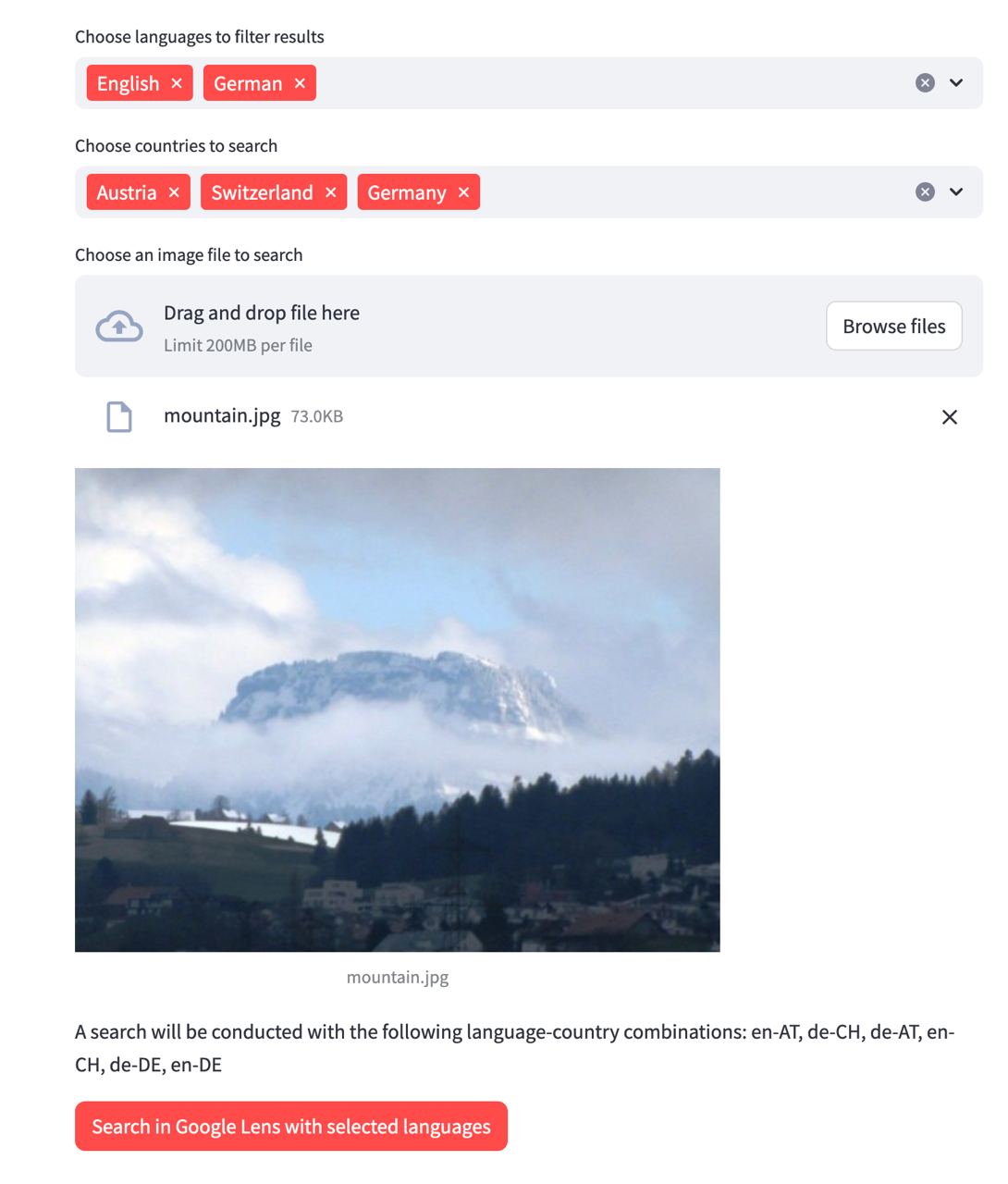
- 使用特定的语言和国家在 Google Lens 中搜索图像,并排除已知结果
- 可视化选择图像的特定区域进行搜索(可选)
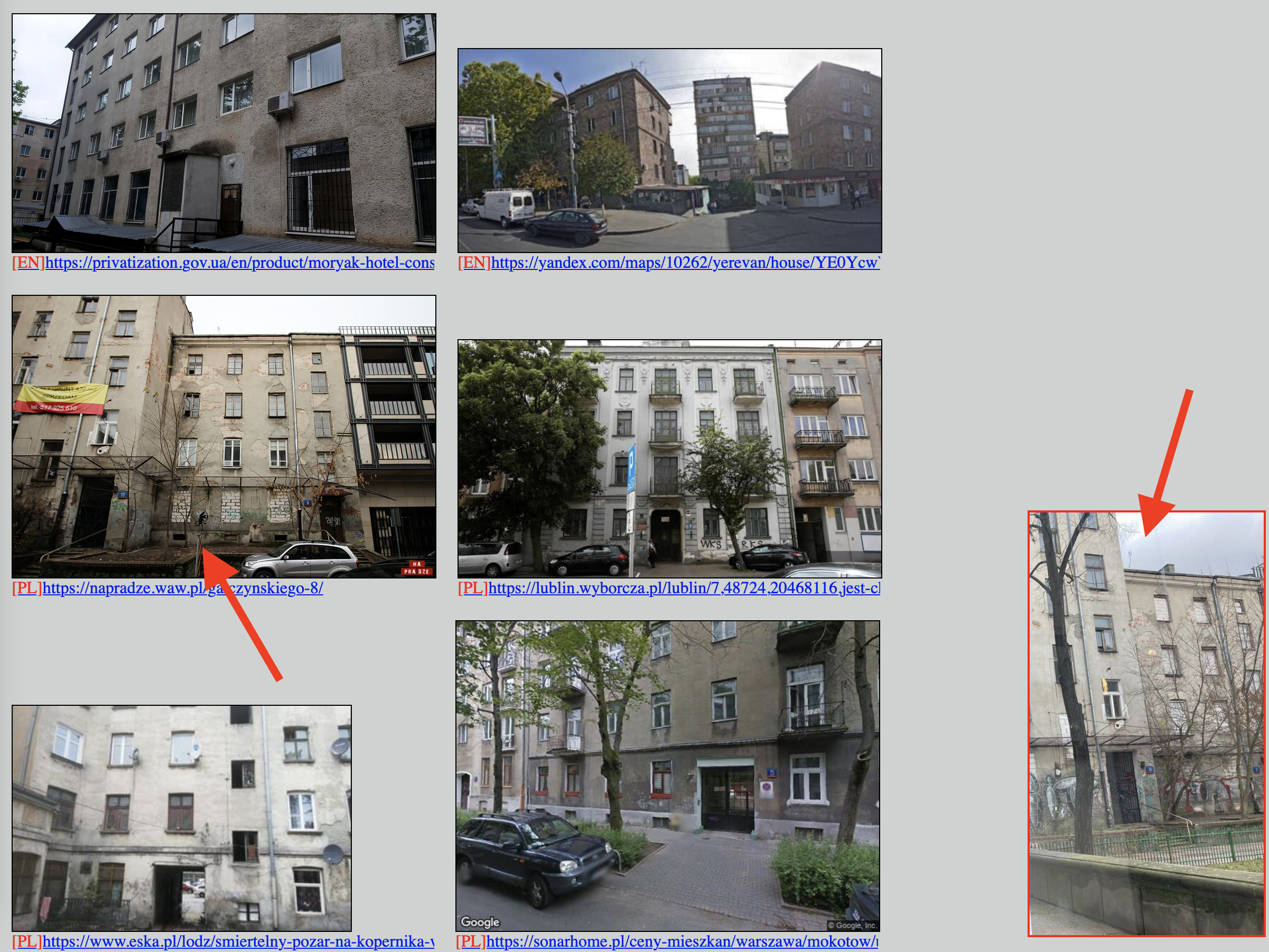
- 生成包含所有结果的单个 HTML 报告
- 通过悬浮预览对比目标图像和结果图像
- 提供美观的用户界面!
支持的语言和国家的完整列表请见[这里](https://developers.google.com/custom-search/docs/xml_results_appendices?hl=en#interfaceLanguages)。
## 工作原理
Google Lens 曾经为上传 endpoint 返回服务端渲染的 HTML,因此只需一个简单的 `requests.post` 就足够了。现在情况不再如此——Lens 现在需要支持 JavaScript 的客户端,并且会积极检测机器人。因此,lingolens 通过 [Playwright](https://playwright.dev/python/) 驱动一个真实的 Chromium 实例,并应用了 stealth 补丁和持久化 profile(cookie 会被复用,验证码状态也会在多次运行间保留)。
对于每种选定的语言,都会打开一个带有该 `locale=` 的全新浏览器上下文。这使得 JS 上传请求会遵循该 locale(`hl=ko`、`Accept-Language: ko-KR`、`navigator.language` 等),并且 Google 确实会针对不同的语言返回不同的结果集。
## 用户界面
 ## 报告示例
查看搜索结果示例:[report.html](report.html)。
## 报告示例
查看搜索结果示例:[report.html](report.html)。
 ## 安装说明
```
pip3 install -r requirements.txt
playwright install chromium
```
第二条命令会下载 Playwright 驱动的 Chromium 构建(约 150 MB,仅需下载一次)。
## 使用说明
### 作为基于浏览器的工具
```
streamlit run web_search.py
```
Streamlit 会在 http://localhost:8501/ 提供用户界面。选择语言(必填)和国家/地区(选填),上传图片。可以选择开启**选择图像的搜索区域**——在图片上拖拽出一个选框,然后**在选框内部双击**即可应用裁剪。接着点击**使用选定语言在 Google Lens 中搜索**。
在搜索运行期间,你会看到一个实时状态面板,显示每种语言的进度(例如 `KO: 33 total on page, 15 new (rest already seen)`)。完成后你将获得:
- 一个**下载报告**按钮(完整的 HTML 报告),
- 一个 3 列的结果缩略图画廊,带有 `[LANG]` 标签和指向源页面的链接,
- 右下角会有原始/裁剪后图片的悬浮预览,方便你在滚动时进行视觉对比。
#### 首次运行时的验证码
Lens 在首次运行时可能会显示验证码。如果发生这种情况,请运行一次:
```
LINGOLENS_HEADLESS=0 streamlit run web_search.py
```
这会使 Chromium 窗口可见——你可以手动解决验证码。cookie 会存储在 `~/.lingolens-profile` 中,因此后续在默认(headless)模式下的运行会复用它们,并且不应再次触发验证码。
### 作为 CLI 工具
```
./lingolens.py example.jpg
```
你会在同一文件夹下获得 `report.html` 文件。
语言配置会从 `langs.txt` 中读取,每行一个:
```
ru
en
pl
```
### 环境变量
| 变量 | 默认值 | 作用 |
| --- | --- | --- |
| `LINGOLENS_HEADLESS` | `1` | 设为 `0` 以显示 Chromium 窗口(适用于解决验证码) |
| `LINGOLENS_PROFILE_DIR` | `~/.lingolens-profile` | Playwright 存储其持久化 profile 的位置(cookie、验证码状态) |
## 待办事项
- [x] 自定义搜索的语言列表(简单的配置文件)
- [x] 报告中的语言过滤器
- [x] 可视化区域选择(裁剪)
- [x] Streamlit 用户界面中的内联画廊和固定的原始图像预览
- [ ] 适用于 Windows 的独立 exe 文件
- [ ] 用于切换显示缩略图而非完整图像的复选框
- [ ] 语言与国家/地区组合的合法性验证
- [ ] 自动处理验证码的兜底方案
## 鸣谢
感谢 BLACK 提供的灵感与支持!
专为解决 [OSINT 调查论坛](https://t.me/+GMxoDCvLO0k0MWRi) 上的任务而设计和开发。
## 安装说明
```
pip3 install -r requirements.txt
playwright install chromium
```
第二条命令会下载 Playwright 驱动的 Chromium 构建(约 150 MB,仅需下载一次)。
## 使用说明
### 作为基于浏览器的工具
```
streamlit run web_search.py
```
Streamlit 会在 http://localhost:8501/ 提供用户界面。选择语言(必填)和国家/地区(选填),上传图片。可以选择开启**选择图像的搜索区域**——在图片上拖拽出一个选框,然后**在选框内部双击**即可应用裁剪。接着点击**使用选定语言在 Google Lens 中搜索**。
在搜索运行期间,你会看到一个实时状态面板,显示每种语言的进度(例如 `KO: 33 total on page, 15 new (rest already seen)`)。完成后你将获得:
- 一个**下载报告**按钮(完整的 HTML 报告),
- 一个 3 列的结果缩略图画廊,带有 `[LANG]` 标签和指向源页面的链接,
- 右下角会有原始/裁剪后图片的悬浮预览,方便你在滚动时进行视觉对比。
#### 首次运行时的验证码
Lens 在首次运行时可能会显示验证码。如果发生这种情况,请运行一次:
```
LINGOLENS_HEADLESS=0 streamlit run web_search.py
```
这会使 Chromium 窗口可见——你可以手动解决验证码。cookie 会存储在 `~/.lingolens-profile` 中,因此后续在默认(headless)模式下的运行会复用它们,并且不应再次触发验证码。
### 作为 CLI 工具
```
./lingolens.py example.jpg
```
你会在同一文件夹下获得 `report.html` 文件。
语言配置会从 `langs.txt` 中读取,每行一个:
```
ru
en
pl
```
### 环境变量
| 变量 | 默认值 | 作用 |
| --- | --- | --- |
| `LINGOLENS_HEADLESS` | `1` | 设为 `0` 以显示 Chromium 窗口(适用于解决验证码) |
| `LINGOLENS_PROFILE_DIR` | `~/.lingolens-profile` | Playwright 存储其持久化 profile 的位置(cookie、验证码状态) |
## 待办事项
- [x] 自定义搜索的语言列表(简单的配置文件)
- [x] 报告中的语言过滤器
- [x] 可视化区域选择(裁剪)
- [x] Streamlit 用户界面中的内联画廊和固定的原始图像预览
- [ ] 适用于 Windows 的独立 exe 文件
- [ ] 用于切换显示缩略图而非完整图像的复选框
- [ ] 语言与国家/地区组合的合法性验证
- [ ] 自动处理验证码的兜底方案
## 鸣谢
感谢 BLACK 提供的灵感与支持!
专为解决 [OSINT 调查论坛](https://t.me/+GMxoDCvLO0k0MWRi) 上的任务而设计和开发。
## 报告示例
查看搜索结果示例:[report.html](report.html)。
## 安装说明
```
pip3 install -r requirements.txt
playwright install chromium
```
第二条命令会下载 Playwright 驱动的 Chromium 构建(约 150 MB,仅需下载一次)。
## 使用说明
### 作为基于浏览器的工具
```
streamlit run web_search.py
```
Streamlit 会在 http://localhost:8501/ 提供用户界面。选择语言(必填)和国家/地区(选填),上传图片。可以选择开启**选择图像的搜索区域**——在图片上拖拽出一个选框,然后**在选框内部双击**即可应用裁剪。接着点击**使用选定语言在 Google Lens 中搜索**。
在搜索运行期间,你会看到一个实时状态面板,显示每种语言的进度(例如 `KO: 33 total on page, 15 new (rest already seen)`)。完成后你将获得:
- 一个**下载报告**按钮(完整的 HTML 报告),
- 一个 3 列的结果缩略图画廊,带有 `[LANG]` 标签和指向源页面的链接,
- 右下角会有原始/裁剪后图片的悬浮预览,方便你在滚动时进行视觉对比。
#### 首次运行时的验证码
Lens 在首次运行时可能会显示验证码。如果发生这种情况,请运行一次:
```
LINGOLENS_HEADLESS=0 streamlit run web_search.py
```
这会使 Chromium 窗口可见——你可以手动解决验证码。cookie 会存储在 `~/.lingolens-profile` 中,因此后续在默认(headless)模式下的运行会复用它们,并且不应再次触发验证码。
### 作为 CLI 工具
```
./lingolens.py example.jpg
```
你会在同一文件夹下获得 `report.html` 文件。
语言配置会从 `langs.txt` 中读取,每行一个:
```
ru
en
pl
```
### 环境变量
| 变量 | 默认值 | 作用 |
| --- | --- | --- |
| `LINGOLENS_HEADLESS` | `1` | 设为 `0` 以显示 Chromium 窗口(适用于解决验证码) |
| `LINGOLENS_PROFILE_DIR` | `~/.lingolens-profile` | Playwright 存储其持久化 profile 的位置(cookie、验证码状态) |
## 待办事项
- [x] 自定义搜索的语言列表(简单的配置文件)
- [x] 报告中的语言过滤器
- [x] 可视化区域选择(裁剪)
- [x] Streamlit 用户界面中的内联画廊和固定的原始图像预览
- [ ] 适用于 Windows 的独立 exe 文件
- [ ] 用于切换显示缩略图而非完整图像的复选框
- [ ] 语言与国家/地区组合的合法性验证
- [ ] 自动处理验证码的兜底方案
## 鸣谢
感谢 BLACK 提供的灵感与支持!
专为解决 [OSINT 调查论坛](https://t.me/+GMxoDCvLO0k0MWRi) 上的任务而设计和开发。标签:ESC4, Kubernetes, OSINT, Playwright, Streamlit, 后端开发, 图像搜索, 多语言, 特征检测, 访问控制, 逆向工具