DamRsn/NeuralNote
GitHub: DamRsn/NeuralNote
NeuralNote 是一款将音频通过深度学习自动转录为 MIDI 的 DAW 插件,解决了音乐制作中从音频提取音符旋律的需求。
Stars: 2831 | Forks: 186
# NeuralNote  NeuralNote 是一款音频插件,它将**最先进的音频转 MIDI 技术**带入了
你最喜欢的数字音频工作站(DAW)。
- 支持任何调性乐器(包括人声)
- 支持复音转录
- 支持音高弯曲检测
- 轻量级且极快的转录速度
- 允许在聆听转录结果的同时调整参数
- 允许直接在插件中对转录的 MIDI 进行缩放和时间量化
## 安装 NeuralNote
在[这里](https://github.com/DamRsn/NeuralNote/releases)下载适用于您平台的最新版本(支持 Windows、macOS (
Universal) 和 Linux)!
Windows 和 Mac 均提供安装程序,包括 Standalone、VST3 和 AU(仅限 Mac)版本。安装程序允许用户选择他们想要安装的格式。在 macOS 上,代码是经过签名的,而在 Windows 上则没有。这意味着在 Windows 上使用 NeuralNote 可能需要执行一些额外的步骤。
对于 Linux,提供了 VST3 和 Standalone 的原始二进制文件。你可以通过将文件复制到适当的位置来安装它们。
## 用法
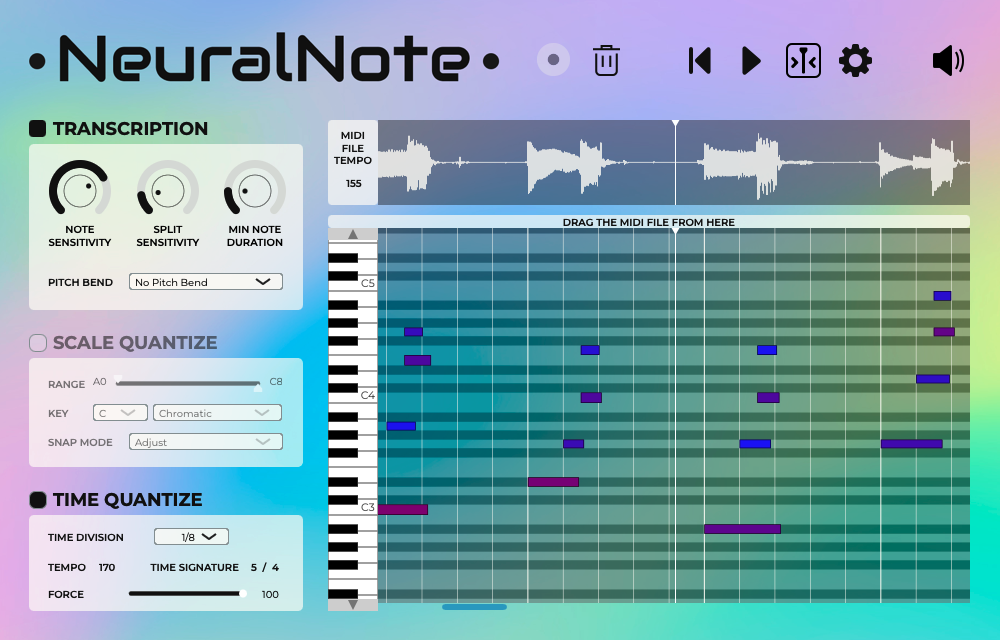
NeuralNote 是一个简单的 AudioFX 插件(VST3/AU/Standalone 应用程序),可应用于需要转录的音轨。
工作流程非常简单:
- 准备一些音频
- 点击录制。无论是进行真实录制还是在 DAW 中播放音轨都可以工作。
- 或者将音频文件拖放到插件上。(支持 .wav、.aiff、.flac、.mp3 和 .ogg (vorbis) 格式)
- MIDI 转录结果会立即显示在钢琴卷帘窗区域。
- 点击播放按钮聆听结果。
- 调整不同的设置来微调转录,甚至在聆听时也可以调整
- 单独调整源音频和合成转录的音量级别
- 一旦你满意了,只需从插件拖放到 MIDI 轨道即可导出 MIDI 转录。
**点击[此处](https://www.youtube.com/watch?v=6_MC0_aG_DQ)观看我们为 Neural Audio 插件
竞赛制作的演示视频**。
NeuralNote 内部使用了 Spotify 的 [basic-pitch](https://github.com/spotify/basic-pitch) 模型。请参阅
他们的[博客文章](https://engineering.atspotify.com/2022/06/meet-basic-pitch/)
和[论文](https://arxiv.org/abs/2203.09893)了解更多信息。在 NeuralNote 中,basic-pitch 是使用
[RTNeural](https://github.com/jatinchowdhury18/RTNeural) 运行 CNN 部分,
并使用 [ONNXRuntime](https://github.com/microsoft/onnxruntime) 运行特征部分(Constant-Q transform 计算 +
Harmonic Stacking)。
作为本项目的一部分,[我们为 RTNeural 做出了贡献](https://github.com/jatinchowdhury18/RTNeural/pull/89),添加了二维
卷积支持。
## 从源代码编译
要求包括:`git`、`cmake` 以及你操作系统的首选编译器套件。
克隆时请使用以下命令:
```
git clone --recurse-submodules --shallow-submodules https://github.com/DamRsn/NeuralNote
```
在能够将项目作为普通 CMake 项目使用之前,必须至少执行一次以下针对特定操作系统的构建脚本。该脚本会在调用 CMake 之前下载 onnxruntime 静态库(我们使用
[ort-builder](https://github.com/olilarkin/ort-builder) 创建)。
#### macOS
```
$ ./build.sh
```
#### Windows
由于[一个已知问题](https://github.com/DamRsn/NeuralNote/issues/21),如果你没有使用 Visual Studio 2022(MSVC
版本:19.35.x,请检查 `cl` 输出),那么你需要像这样手动构建 onnxruntime.lib:
1. 确保你已安装 Python;如果没有,请在 https://www.python.org/downloads/windows/ 下载(目前
不适用于 Python 3.11,建议使用 Python 3.10)。
2. 在命令提示符中逐行执行以下命令:
```
git clone --depth 1 --recurse-submodules --shallow-submodules https://github.com/tiborvass/libonnxruntime-neuralnote ThirdParty\onnxruntime
cd ThirdParty\onnxruntime
python3 -m venv venv
.\venv\Scripts\activate.bat
pip install -r requirements.txt
.\convert-model-to-ort.bat model.onnx
.\build-win.bat model.required_operators_and_types.with_runtime_opt.config
copy model.with_runtime_opt.ort ..\..\Lib\ModelData\features_model.ort
cd ..\..
```
现在你可以按如下方式继续构建 NeuralNote:
```
> .\build.bat
```
#### IDE
一旦构建脚本至少执行过一次,你就可以在你喜欢的 IDE
(CLion/Visual Studio/VSCode 等)中加载此项目,并点击其中一个目标的 'build'。
## 复用 NeuralNote 转录引擎的代码
所有用于执行转录的代码都在 `Lib/Model` 中,所有模型权重都在 `Lib/ModelData/` 中。请随意
在你自己的项目中仅使用这部分代码!我们未来会尝试将其与仓库的其他部分进一步隔离,并将其制作成一个库。
生成 `Lib/ModelData/` 中文件的代码目前暂不可用,因为这需要大量的手动操作。
但以下是我们创建这些文件所遵循过程的描述:
- `features_model.onnx` 是通过使用 `tf2onnx` 转换一个 keras 模型生成的,该模型仅包含完整 basic-pitch 计算图中的 CQT + Harmonic Stacking 部分(手动添加了用于 batch normalization 的权重)。
- 包含 basic-pitch cnn 权重的 `.json` 文件是从 [basic-pitch-ts repository](https://github.com/spotify/basic-pitch-ts) 中可用的 tensorflow-js 模型生成的,然后使用 `tf2onnx` 转换为 onnx。
最后,借助 [Netron](https://netron.app/) 手动收集权重并保存为 `.npy` 格式,最终应用到一个
使用 [basic-pitch](https://github.com/spotify/basic-pitch) 代码创建的拆分后的 keras 模型中。
原始的 basic-pitch CNN 被拆分为 4 个连接在一起的顺序模型,以便它们可以使用 RTNeural 运行。
## Bug 报告和功能请求
如果您对该插件有任何请求/建议或遇到 bug,请提交 GitHub issue。
## 许可证
NeuralNote 软件和代码在 Apache-2.0 许可证下发布。请参阅[许可证文件](LICENSE)。
#### 使用的第三方库及许可证
以下是 NeuralNote 中使用的所有第三方库及其使用许可证的列表。
- [JUCE](https://juce.com/) (JUCE Starter)
- [RTNeural](https://github.com/jatinchowdhury18/RTNeural) (BSD-3-Clause license)
- [ONNXRuntime](https://github.com/microsoft/onnxruntime) (MIT License)
- [ort-builder](https://github.com/olilarkin/ort-builder) (MIT License)
- [basic-pitch](https://github.com/spotify/basic-pitch) (Apache-2.0 license)
- [basic-pitch-ts](https://github.com/spotify/basic-pitch-ts) (Apache-2.0 license)
- [minimp3](https://github.com/lieff/minimp3) (CC0-1.0 license)
## NeuralNote 能实时转录音频吗?
不幸的是,不能,原因如下:
- Basic Pitch 使用 Constant-Q transform (CQT) 作为输入特征。CQT 需要非常长的音频块(> 1s)才能
获得最低频率范围的振幅。这使得延迟太高,无法进行实时转录。
- basic pitch CNN 有大约 120ms 的额外延迟。
- 音符事件创建算法向后处理后验图(从未来到过去),因此是
非因果的。
但如果你有想法,请分享!
## 致谢
NeuralNote 由 [Damien Ronssin](https://github.com/DamRsn) 和 [Tibor Vass](https://github.com/tiborvass) 开发。
插件用户界面由 Perrine Morel 设计。
#### 贡献者
非常感谢各位贡献者!
- [jatinchowdhury18](https://github.com/jatinchowdhury18):文件浏览器。
- [trirpi](https://github.com/trirpi)
- `SCALE QUANTIZE` 中更多的缩放选项。
- 音频波形和钢琴卷帘窗的水平缩放。
- [polygon](https://github.com/polygon) 和 [SamuMazzi](https://github.com/SamuMazzi):Linux 支持。
NeuralNote 是一款音频插件,它将**最先进的音频转 MIDI 技术**带入了
你最喜欢的数字音频工作站(DAW)。
- 支持任何调性乐器(包括人声)
- 支持复音转录
- 支持音高弯曲检测
- 轻量级且极快的转录速度
- 允许在聆听转录结果的同时调整参数
- 允许直接在插件中对转录的 MIDI 进行缩放和时间量化
## 安装 NeuralNote
在[这里](https://github.com/DamRsn/NeuralNote/releases)下载适用于您平台的最新版本(支持 Windows、macOS (
Universal) 和 Linux)!
Windows 和 Mac 均提供安装程序,包括 Standalone、VST3 和 AU(仅限 Mac)版本。安装程序允许用户选择他们想要安装的格式。在 macOS 上,代码是经过签名的,而在 Windows 上则没有。这意味着在 Windows 上使用 NeuralNote 可能需要执行一些额外的步骤。
对于 Linux,提供了 VST3 和 Standalone 的原始二进制文件。你可以通过将文件复制到适当的位置来安装它们。
## 用法

NeuralNote 是一个简单的 AudioFX 插件(VST3/AU/Standalone 应用程序),可应用于需要转录的音轨。
工作流程非常简单:
- 准备一些音频
- 点击录制。无论是进行真实录制还是在 DAW 中播放音轨都可以工作。
- 或者将音频文件拖放到插件上。(支持 .wav、.aiff、.flac、.mp3 和 .ogg (vorbis) 格式)
- MIDI 转录结果会立即显示在钢琴卷帘窗区域。
- 点击播放按钮聆听结果。
- 调整不同的设置来微调转录,甚至在聆听时也可以调整
- 单独调整源音频和合成转录的音量级别
- 一旦你满意了,只需从插件拖放到 MIDI 轨道即可导出 MIDI 转录。
**点击[此处](https://www.youtube.com/watch?v=6_MC0_aG_DQ)观看我们为 Neural Audio 插件
竞赛制作的演示视频**。
NeuralNote 内部使用了 Spotify 的 [basic-pitch](https://github.com/spotify/basic-pitch) 模型。请参阅
他们的[博客文章](https://engineering.atspotify.com/2022/06/meet-basic-pitch/)
和[论文](https://arxiv.org/abs/2203.09893)了解更多信息。在 NeuralNote 中,basic-pitch 是使用
[RTNeural](https://github.com/jatinchowdhury18/RTNeural) 运行 CNN 部分,
并使用 [ONNXRuntime](https://github.com/microsoft/onnxruntime) 运行特征部分(Constant-Q transform 计算 +
Harmonic Stacking)。
作为本项目的一部分,[我们为 RTNeural 做出了贡献](https://github.com/jatinchowdhury18/RTNeural/pull/89),添加了二维
卷积支持。
## 从源代码编译
要求包括:`git`、`cmake` 以及你操作系统的首选编译器套件。
克隆时请使用以下命令:
```
git clone --recurse-submodules --shallow-submodules https://github.com/DamRsn/NeuralNote
```
在能够将项目作为普通 CMake 项目使用之前,必须至少执行一次以下针对特定操作系统的构建脚本。该脚本会在调用 CMake 之前下载 onnxruntime 静态库(我们使用
[ort-builder](https://github.com/olilarkin/ort-builder) 创建)。
#### macOS
```
$ ./build.sh
```
#### Windows
由于[一个已知问题](https://github.com/DamRsn/NeuralNote/issues/21),如果你没有使用 Visual Studio 2022(MSVC
版本:19.35.x,请检查 `cl` 输出),那么你需要像这样手动构建 onnxruntime.lib:
1. 确保你已安装 Python;如果没有,请在 https://www.python.org/downloads/windows/ 下载(目前
不适用于 Python 3.11,建议使用 Python 3.10)。
2. 在命令提示符中逐行执行以下命令:
```
git clone --depth 1 --recurse-submodules --shallow-submodules https://github.com/tiborvass/libonnxruntime-neuralnote ThirdParty\onnxruntime
cd ThirdParty\onnxruntime
python3 -m venv venv
.\venv\Scripts\activate.bat
pip install -r requirements.txt
.\convert-model-to-ort.bat model.onnx
.\build-win.bat model.required_operators_and_types.with_runtime_opt.config
copy model.with_runtime_opt.ort ..\..\Lib\ModelData\features_model.ort
cd ..\..
```
现在你可以按如下方式继续构建 NeuralNote:
```
> .\build.bat
```
#### IDE
一旦构建脚本至少执行过一次,你就可以在你喜欢的 IDE
(CLion/Visual Studio/VSCode 等)中加载此项目,并点击其中一个目标的 'build'。
## 复用 NeuralNote 转录引擎的代码
所有用于执行转录的代码都在 `Lib/Model` 中,所有模型权重都在 `Lib/ModelData/` 中。请随意
在你自己的项目中仅使用这部分代码!我们未来会尝试将其与仓库的其他部分进一步隔离,并将其制作成一个库。
生成 `Lib/ModelData/` 中文件的代码目前暂不可用,因为这需要大量的手动操作。
但以下是我们创建这些文件所遵循过程的描述:
- `features_model.onnx` 是通过使用 `tf2onnx` 转换一个 keras 模型生成的,该模型仅包含完整 basic-pitch 计算图中的 CQT + Harmonic Stacking 部分(手动添加了用于 batch normalization 的权重)。
- 包含 basic-pitch cnn 权重的 `.json` 文件是从 [basic-pitch-ts repository](https://github.com/spotify/basic-pitch-ts) 中可用的 tensorflow-js 模型生成的,然后使用 `tf2onnx` 转换为 onnx。
最后,借助 [Netron](https://netron.app/) 手动收集权重并保存为 `.npy` 格式,最终应用到一个
使用 [basic-pitch](https://github.com/spotify/basic-pitch) 代码创建的拆分后的 keras 模型中。
原始的 basic-pitch CNN 被拆分为 4 个连接在一起的顺序模型,以便它们可以使用 RTNeural 运行。
## Bug 报告和功能请求
如果您对该插件有任何请求/建议或遇到 bug,请提交 GitHub issue。
## 许可证
NeuralNote 软件和代码在 Apache-2.0 许可证下发布。请参阅[许可证文件](LICENSE)。
#### 使用的第三方库及许可证
以下是 NeuralNote 中使用的所有第三方库及其使用许可证的列表。
- [JUCE](https://juce.com/) (JUCE Starter)
- [RTNeural](https://github.com/jatinchowdhury18/RTNeural) (BSD-3-Clause license)
- [ONNXRuntime](https://github.com/microsoft/onnxruntime) (MIT License)
- [ort-builder](https://github.com/olilarkin/ort-builder) (MIT License)
- [basic-pitch](https://github.com/spotify/basic-pitch) (Apache-2.0 license)
- [basic-pitch-ts](https://github.com/spotify/basic-pitch-ts) (Apache-2.0 license)
- [minimp3](https://github.com/lieff/minimp3) (CC0-1.0 license)
## NeuralNote 能实时转录音频吗?
不幸的是,不能,原因如下:
- Basic Pitch 使用 Constant-Q transform (CQT) 作为输入特征。CQT 需要非常长的音频块(> 1s)才能
获得最低频率范围的振幅。这使得延迟太高,无法进行实时转录。
- basic pitch CNN 有大约 120ms 的额外延迟。
- 音符事件创建算法向后处理后验图(从未来到过去),因此是
非因果的。
但如果你有想法,请分享!
## 致谢
NeuralNote 由 [Damien Ronssin](https://github.com/DamRsn) 和 [Tibor Vass](https://github.com/tiborvass) 开发。
插件用户界面由 Perrine Morel 设计。
#### 贡献者
非常感谢各位贡献者!
- [jatinchowdhury18](https://github.com/jatinchowdhury18):文件浏览器。
- [trirpi](https://github.com/trirpi)
- `SCALE QUANTIZE` 中更多的缩放选项。
- 音频波形和钢琴卷帘窗的水平缩放。
- [polygon](https://github.com/polygon) 和 [SamuMazzi](https://github.com/SamuMazzi):Linux 支持。
NeuralNote 是一款音频插件,它将**最先进的音频转 MIDI 技术**带入了
你最喜欢的数字音频工作站(DAW)。
- 支持任何调性乐器(包括人声)
- 支持复音转录
- 支持音高弯曲检测
- 轻量级且极快的转录速度
- 允许在聆听转录结果的同时调整参数
- 允许直接在插件中对转录的 MIDI 进行缩放和时间量化
## 安装 NeuralNote
在[这里](https://github.com/DamRsn/NeuralNote/releases)下载适用于您平台的最新版本(支持 Windows、macOS (
Universal) 和 Linux)!
Windows 和 Mac 均提供安装程序,包括 Standalone、VST3 和 AU(仅限 Mac)版本。安装程序允许用户选择他们想要安装的格式。在 macOS 上,代码是经过签名的,而在 Windows 上则没有。这意味着在 Windows 上使用 NeuralNote 可能需要执行一些额外的步骤。
对于 Linux,提供了 VST3 和 Standalone 的原始二进制文件。你可以通过将文件复制到适当的位置来安装它们。
## 用法

NeuralNote 是一个简单的 AudioFX 插件(VST3/AU/Standalone 应用程序),可应用于需要转录的音轨。
工作流程非常简单:
- 准备一些音频
- 点击录制。无论是进行真实录制还是在 DAW 中播放音轨都可以工作。
- 或者将音频文件拖放到插件上。(支持 .wav、.aiff、.flac、.mp3 和 .ogg (vorbis) 格式)
- MIDI 转录结果会立即显示在钢琴卷帘窗区域。
- 点击播放按钮聆听结果。
- 调整不同的设置来微调转录,甚至在聆听时也可以调整
- 单独调整源音频和合成转录的音量级别
- 一旦你满意了,只需从插件拖放到 MIDI 轨道即可导出 MIDI 转录。
**点击[此处](https://www.youtube.com/watch?v=6_MC0_aG_DQ)观看我们为 Neural Audio 插件
竞赛制作的演示视频**。
NeuralNote 内部使用了 Spotify 的 [basic-pitch](https://github.com/spotify/basic-pitch) 模型。请参阅
他们的[博客文章](https://engineering.atspotify.com/2022/06/meet-basic-pitch/)
和[论文](https://arxiv.org/abs/2203.09893)了解更多信息。在 NeuralNote 中,basic-pitch 是使用
[RTNeural](https://github.com/jatinchowdhury18/RTNeural) 运行 CNN 部分,
并使用 [ONNXRuntime](https://github.com/microsoft/onnxruntime) 运行特征部分(Constant-Q transform 计算 +
Harmonic Stacking)。
作为本项目的一部分,[我们为 RTNeural 做出了贡献](https://github.com/jatinchowdhury18/RTNeural/pull/89),添加了二维
卷积支持。
## 从源代码编译
要求包括:`git`、`cmake` 以及你操作系统的首选编译器套件。
克隆时请使用以下命令:
```
git clone --recurse-submodules --shallow-submodules https://github.com/DamRsn/NeuralNote
```
在能够将项目作为普通 CMake 项目使用之前,必须至少执行一次以下针对特定操作系统的构建脚本。该脚本会在调用 CMake 之前下载 onnxruntime 静态库(我们使用
[ort-builder](https://github.com/olilarkin/ort-builder) 创建)。
#### macOS
```
$ ./build.sh
```
#### Windows
由于[一个已知问题](https://github.com/DamRsn/NeuralNote/issues/21),如果你没有使用 Visual Studio 2022(MSVC
版本:19.35.x,请检查 `cl` 输出),那么你需要像这样手动构建 onnxruntime.lib:
1. 确保你已安装 Python;如果没有,请在 https://www.python.org/downloads/windows/ 下载(目前
不适用于 Python 3.11,建议使用 Python 3.10)。
2. 在命令提示符中逐行执行以下命令:
```
git clone --depth 1 --recurse-submodules --shallow-submodules https://github.com/tiborvass/libonnxruntime-neuralnote ThirdParty\onnxruntime
cd ThirdParty\onnxruntime
python3 -m venv venv
.\venv\Scripts\activate.bat
pip install -r requirements.txt
.\convert-model-to-ort.bat model.onnx
.\build-win.bat model.required_operators_and_types.with_runtime_opt.config
copy model.with_runtime_opt.ort ..\..\Lib\ModelData\features_model.ort
cd ..\..
```
现在你可以按如下方式继续构建 NeuralNote:
```
> .\build.bat
```
#### IDE
一旦构建脚本至少执行过一次,你就可以在你喜欢的 IDE
(CLion/Visual Studio/VSCode 等)中加载此项目,并点击其中一个目标的 'build'。
## 复用 NeuralNote 转录引擎的代码
所有用于执行转录的代码都在 `Lib/Model` 中,所有模型权重都在 `Lib/ModelData/` 中。请随意
在你自己的项目中仅使用这部分代码!我们未来会尝试将其与仓库的其他部分进一步隔离,并将其制作成一个库。
生成 `Lib/ModelData/` 中文件的代码目前暂不可用,因为这需要大量的手动操作。
但以下是我们创建这些文件所遵循过程的描述:
- `features_model.onnx` 是通过使用 `tf2onnx` 转换一个 keras 模型生成的,该模型仅包含完整 basic-pitch 计算图中的 CQT + Harmonic Stacking 部分(手动添加了用于 batch normalization 的权重)。
- 包含 basic-pitch cnn 权重的 `.json` 文件是从 [basic-pitch-ts repository](https://github.com/spotify/basic-pitch-ts) 中可用的 tensorflow-js 模型生成的,然后使用 `tf2onnx` 转换为 onnx。
最后,借助 [Netron](https://netron.app/) 手动收集权重并保存为 `.npy` 格式,最终应用到一个
使用 [basic-pitch](https://github.com/spotify/basic-pitch) 代码创建的拆分后的 keras 模型中。
原始的 basic-pitch CNN 被拆分为 4 个连接在一起的顺序模型,以便它们可以使用 RTNeural 运行。
## Bug 报告和功能请求
如果您对该插件有任何请求/建议或遇到 bug,请提交 GitHub issue。
## 许可证
NeuralNote 软件和代码在 Apache-2.0 许可证下发布。请参阅[许可证文件](LICENSE)。
#### 使用的第三方库及许可证
以下是 NeuralNote 中使用的所有第三方库及其使用许可证的列表。
- [JUCE](https://juce.com/) (JUCE Starter)
- [RTNeural](https://github.com/jatinchowdhury18/RTNeural) (BSD-3-Clause license)
- [ONNXRuntime](https://github.com/microsoft/onnxruntime) (MIT License)
- [ort-builder](https://github.com/olilarkin/ort-builder) (MIT License)
- [basic-pitch](https://github.com/spotify/basic-pitch) (Apache-2.0 license)
- [basic-pitch-ts](https://github.com/spotify/basic-pitch-ts) (Apache-2.0 license)
- [minimp3](https://github.com/lieff/minimp3) (CC0-1.0 license)
## NeuralNote 能实时转录音频吗?
不幸的是,不能,原因如下:
- Basic Pitch 使用 Constant-Q transform (CQT) 作为输入特征。CQT 需要非常长的音频块(> 1s)才能
获得最低频率范围的振幅。这使得延迟太高,无法进行实时转录。
- basic pitch CNN 有大约 120ms 的额外延迟。
- 音符事件创建算法向后处理后验图(从未来到过去),因此是
非因果的。
但如果你有想法,请分享!
## 致谢
NeuralNote 由 [Damien Ronssin](https://github.com/DamRsn) 和 [Tibor Vass](https://github.com/tiborvass) 开发。
插件用户界面由 Perrine Morel 设计。
#### 贡献者
非常感谢各位贡献者!
- [jatinchowdhury18](https://github.com/jatinchowdhury18):文件浏览器。
- [trirpi](https://github.com/trirpi)
- `SCALE QUANTIZE` 中更多的缩放选项。
- 音频波形和钢琴卷帘窗的水平缩放。
- [polygon](https://github.com/polygon) 和 [SamuMazzi](https://github.com/SamuMazzi):Linux 支持。标签:Apex, Bash脚本, VST插件, 信号处理, 机器学习, 音乐制作, 音频处理, 音频转MIDI