topscoder/nuclei-wordfence-cve
GitHub: topscoder/nuclei-wordfence-cve
基于 Wordfence 威胁情报的 WordPress 专用 Nuclei 模板合集,支持一键扫描核心、插件和主题漏洞。
Stars: 1250 | Forks: 152

Nuclei + Wordfence = ♥
70,312 Nuclei Templates for WordPress Security Scanning 🥳



提升您的 WordPress 安全防护水平!本项目包含大量全新的 [Nuclei](https://github.com/projectdiscovery/nuclei) 模板,专为 WordPress 设计。基于 [Wordfence.com](https://www.wordfence.com/threat-intel/vulnerabilities/) 的最新情报,扫描 Core、插件 和 主题 中的弱点。
这就是为什么它会成为您的得力助手:
* **海量合集**:无需再四处寻找单个模板,您已拥有触手可及的完整武器库。
* **始终保持最新**:这些模板会随着最新威胁持续更新,让您永远快人一步。
* **开源魔力**:需要针对特定情况调整模板?没问题,您拥有完全的控制权。
如果您正在守护 WordPress 站点,本项目就是您在坏人动手之前识别漏洞的秘密武器。别再浪费时间,像专业人士一样保护您的站点吧!
### ✨ 包含什么内容?!
## 🚀 快速开始
要安装此 `nuclei-wordfence-cve` 仓库以便与 Nuclei 配合使用,您可以使用以下命令:
```
export GITHUB_TEMPLATE_REPO=topscoder/nuclei-wordfence-cve
nuclei -update-templates
```
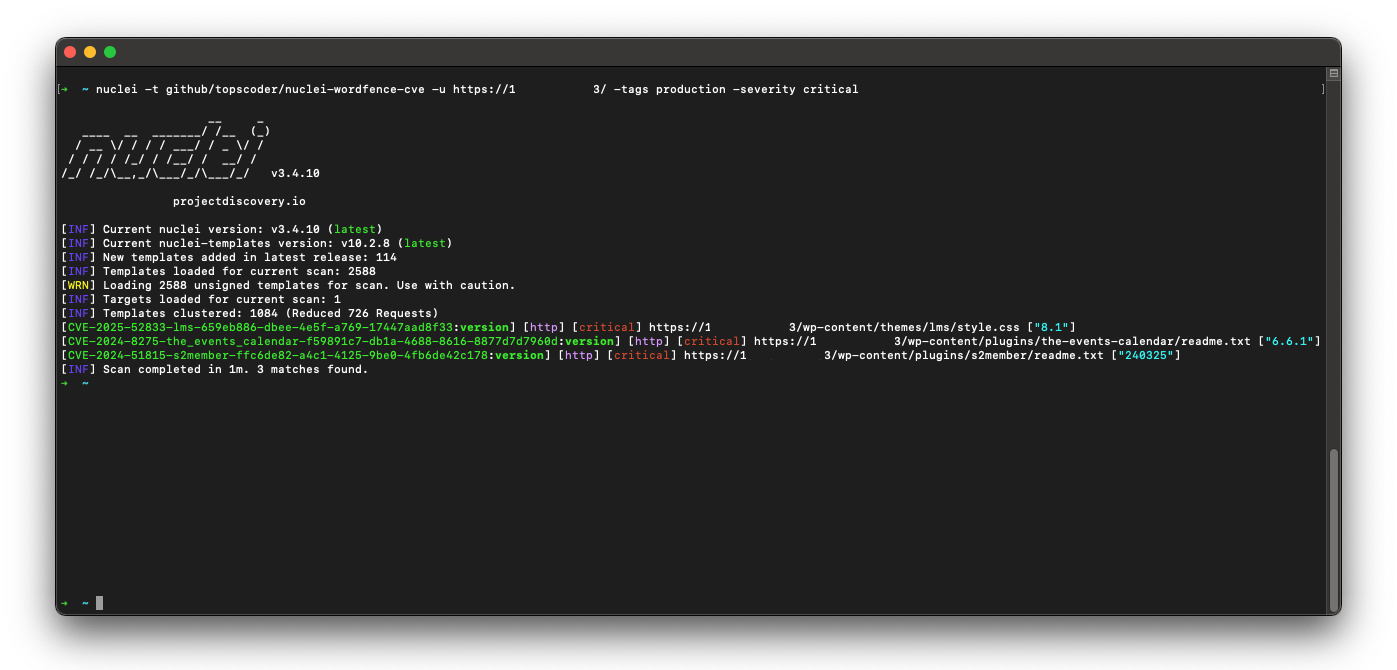
使用上述命令安装此模板仓库后,您可以运行以下命令来使用 Nuclei 扫描漏洞:
```
nuclei -t github/topscoder/nuclei-wordfence-cve -u https://target.com
```
Wordfence 提供两个独立的漏洞数据源。第一个数据源仅包含生产环境漏洞,每个漏洞都已分配 CVE。第二个数据源包含候选漏洞,这些漏洞尚未分配 CVE,可能会也可能不会升级为生产环境数据源。为了区分从这些数据源生成的模板,每个模板都被分配了一个标签——production 或 candidate——允许您使用标签过滤器进行针对性扫描。在 https://www.wordfence.com/help/wordfence-intelligence/v2-accessing-and-consuming-the-vulnerability-data-feed/ 阅读更多关于数据源的信息。
_仅包含 production 模板:_
```
nuclei -t github/topscoder/nuclei-wordfence-cve -tags production -u https://target.com
```
_仅包含 candidate 模板:_
```
nuclei -t github/topscoder/nuclei-wordfence-cve -tags candidate -u https://target.com
```
### 💻 示例
以下是如何使用这些模板的一些示例:
* 要扫描 WordPress 中的**所有已知漏洞**,您可以运行以下命令:
```
nuclei -t github/topscoder/nuclei-wordfence-cve -u https://target.com
```
* 要扫描**特定 CVE 漏洞**,您可以运行以下命令:
```
nuclei -t github/topscoder/nuclei-wordfence-cve -template-id cve-2023-32961 -u https://target.com
```
* 要**仅扫描 critical(关键)漏洞**,您可以运行以下命令:
```
nuclei -t github/topscoder/nuclei-wordfence-cve -severity critical -u https://target.com
```
* 要**仅扫描 WordPress core(核心)漏洞**,您可以运行以下命令:
```
nuclei -t github/topscoder/nuclei-wordfence-cve -tags wp-core -u https://target.com
```
* 要**仅扫描 WordPress plugin(插件)漏洞**,您可以运行以下命令:
```
nuclei -t github/topscoder/nuclei-wordfence-cve -tags wp-plugin -u https://target.com
```
* 要**仅扫描 WordPress theme(主题)漏洞**,您可以运行以下命令:
```
nuclei -t github/topscoder/nuclei-wordfence-cve -tags wp-theme -u https://target.com
```
* 想要更疯狂一点,您可以不断组合、组合、再组合:
```
nuclei -t github/topscoder/nuclei-wordfence-cve -tags wp-plugin,wp-theme -severity critical,high
```
* 想要更加疯狂,您可以使用模板条件标志(`-tc`),它允许如下所示的复杂表达式:
```
nuclei -t github/topscoder/nuclei-wordfence-cve -template-condition "contains(to_lower(name),'cross-site scripting') || contains(to_upper(name),'XSS')" -u https://target.com
nuclei -t github/topscoder/nuclei-wordfence-cve -template-condition "contains(to_lower(name),'sql injection') || contains(to_lower(description),'sql injection')" -u https://target.com
nuclei -t github/topscoder/nuclei-wordfence-cve -template-condition "contains(to_lower(name),'file inclusion') || contains(to_lower(description),'file inclusion')" -u https://target.com
nuclei -t github/topscoder/nuclei-wordfence-cve -template-condition "contains(to_upper(name),'CSRF') || contains(to_upper(description),'CSRF')" -u https://target.com
```
## 🤖 严重等级重新计算
模板的严重等级经过解析器调整,以更好地反映实际影响。`src/lib/wordfence_api_parser.py` 中的 `determine_severity` 函数会检查漏洞标题和描述,并降低那些仅限于 authenticated user(例如,需要登录或提升权限)的问题等级。
示例(简化版):
- 如果标题或描述包含单词 `authenticated`(且不包含 `unauthenticated`),该函数会将该问题视为较低风险,并返回 `Low` 而不是更高的 CVSS 标签。
这有助于避免将 `Medium`/`High` 严重等级分配给仅影响已登录用户的漏洞,从而减少扫描公开访问站点时的噪音。
## 👥 贡献
如果您想为本项目做出贡献,请随时 fork 本仓库并提交 pull request。
## 📚 许可证
本项目基于 MIT 许可证授权。
标签:C2日志可视化, CISA项目, CVE, Google, Nuclei, Web安全, Wordfence, WordPress安全, 主题漏洞, 威胁情报, 密码管理, 对称加密, 开发者工具, 指纹识别, 插件漏洞, 插件系统, 操作系统监控, 数字签名, 网络安全, 网络安全审计, 自动化审计, 蓝队分析, 逆向工具, 隐私保护, 风险识别