docker/scout-action
GitHub: docker/scout-action
用于在 CI/CD 流水线中自动化分析 Docker 镜像漏洞、生成 SBOM 及对比镜像差异的 GitHub Action。
Stars: 138 | Forks: 52
# 关于
作为工作流的一部分运行 Docker Scout CLI 的 GitHub Action。
您可以选择运行以下命令之一:
- `quickview`:快速获取 image、基础 image 及可用建议的概览
- `compare`:将 image 与第二个 image 进行比较(例如与 `latest` 比较)
- `cves`:显示 image 的漏洞
- `recommendations`:显示可用的基础 image 更新和修复建议
- `sbom`:生成 image 的 SBOM
- `environment`:将 image 记录到一个 environment
- `attestation-add`:向现有 image 添加 attestation
[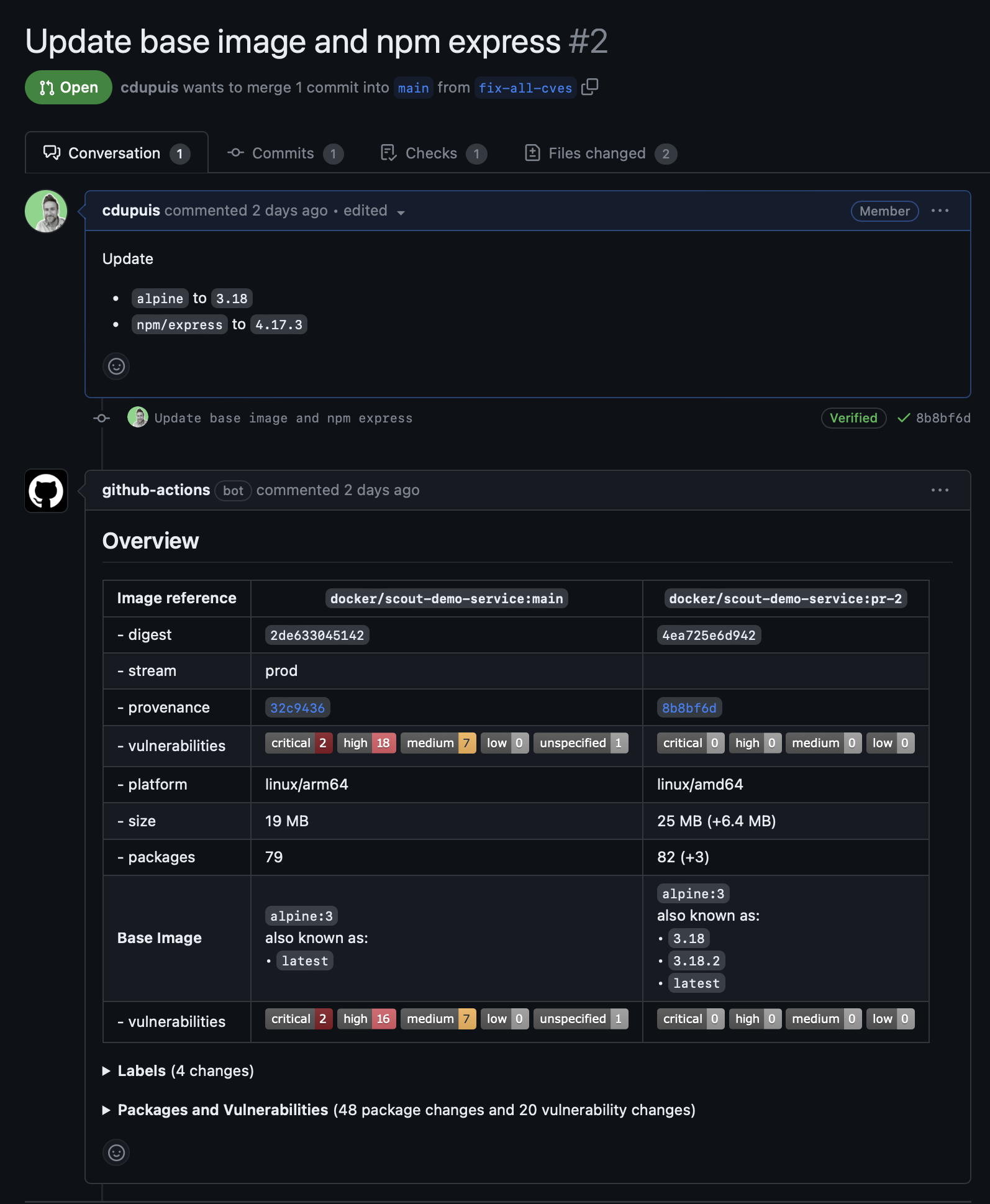](https://github.com/docker/scout-demo-service/pull/2)
# 输入
## Command
您可以在同一个 GitHub Action 运行中执行一个或多个命令。使用逗号分隔的列表来运行多个命令。
| | | | |
|:----------|:-------------|:---------|:----------------------------------------------------------------------------------------------------------------------------------------------------------------------------------------------------------------------------------|
| `command` | **required** | `string` | 要运行的单个命令,或按顺序运行的逗号分隔命令列表。
可选值:
**required** to manage environments
**optional** in other cases, default empty | `string` | Docker organization 的命名空间 | ## Step 摘要 默认情况下,命令的 Markdown 输出(如果支持)将显示为 [Job Summary](https://github.blog/2022-05-09-supercharging-github-actions-with-job-summaries/)。 如果需要,可以禁用此功能。 | | | | | |:----------|:-------------------------------|:----------|:------------------------------| | `summary` | **optional** default is `true` | `boolean` | 将输出显示为 Job Summary | ## Pull Request 评论 当由 `pull_request` 事件触发时,scout 命令的输出可以作为评论写入。 此行为默认为**启用**。 默认情况下,每个 job 步骤将保留并更新一条评论。 如果您希望保留以前的评论但将其隐藏,请将 `keep-previous-comments` 参数设置为 `true`。 需要 `pull-requests: write` 权限才能允许 GitHub action 创建评论。 | | | | | |:-------------------------|:---------------------------------------|:----------|:-----------------------------------------------------------------------------------------------| | `github-token` | **optional** default is `github.token` | `string` | 用于创建评论的 GitHub Token | | `write-comment` | **optional** default is `true` | `boolean` | 布尔值,写入带有 scout 输出的评论 | | `keep-previous-comments` | **optional** default is `false` | `boolean` | 如果设置,保留但隐藏以前的评论。如果未设置,每个 job 保留并更新一条评论 | ## 输出 命令输出的文本版本将显示在日志中。命令输出的 Markdown 版本(如果存在)将设置为步骤的输出,使用命令名称作为标识符,并显示为 Pull Request 评论或 Step Summary。 ## `compare` 输入 ### 与镜像对比 | | | | | |:---------|:------------------------------|:---------|:----------------------------------------------------------------------------------------| | `to` | **required** | `string` | 要比较的 image、目录或归档文件的前缀名称 | | `to-ref` | **optional** default is empty | `string` | 如果提供的 tarball 包含多个 image 时使用的引用,仅适用于归档文件 | 有关 `to` 参数的可用前缀,请参阅上方的 [Prefix](#prefix)。 ### 与环境对比 | | | | | |:------------|:-------------------|:----------|:----------------------------------------| | `to-env` | (*) | `string` | 要比较的 environment 名称 | | `to-stream` | **deprecated** (*) | `string` | 要比较的 stream 名称 | | `to-latest` | (*) | `boolean` | 与最新索引的 image 进行比较 | (*) 必须定义其中一个且仅限一个。 ### 通用输入 | | | | | |:---------------------|:-----------------------------------------------|:----------|:------------------------------------------------------------------------------------------------------------------------------| | `ignore-unchanged` | **optional** default is `false` | `boolean` | 过滤掉未更改的包 | | `only-severities` | **optional** default is empty (all severities) | `string` | 以逗号分隔的严重级别列表(`critical`, `high`, `medium`, `low`, `unspecified`)用于过滤 CVE | | `only-package-types` | **optional** default is empty (all types) | `string` | 以逗号分隔的包类型列表(如 `apk`, `deb`, `rpm`, `npm`, `pypi`, `golang` 等) | | `only-fixed` | **optional** default is `false` | `boolean` | 过滤出可修复的 CVE | | `only-unfixed` | **optional** default is `false` | `boolean` | 过滤出未修复的 CVE | | `only-cisa-kev` | **optional** default is `false` | `boolean` | 过滤出 CISA 已知被利用漏洞目录中列出的 CVE | | `exit-code` | **optional** default is `false` | `boolean` | 如果检测到漏洞更改,返回退出代码 `2` | | `exit-on` | **optional** default is empty | `string` | "(`compare` only) 以逗号分隔的条件列表,如果情况恶化则使 action 步骤失败,选项包括:vulnerability, policy" | ## `cves` 输入 | | | | | |:---------------------|:-----------------------------------------------|:----------|:----------------------------------------------------------------------------------------------------------| | `only-severities` | **optional** default is empty (all severities) | `string` | 以逗号分隔的严重级别列表(`critical`, `high`, `medium`, `low`, `unspecified`)用于过滤 CVE | | `only-package-types` | **optional** default is empty (all types) | `string` | 以逗号分隔的包类型列表(如 `apk`, `deb`, `rpm`, `npm`, `pypi`, `golang` 等) | | `only-fixed` | **optional** default is `false` | `boolean` | 过滤出可修复的 CVE | | `only-unfixed` | **optional** default is `false` | `boolean` | 过滤出未修复的 CVE | | `ignore-base` | **optional** default is `false` | `boolean` | 忽略基础 image 漏洞 | | `sarif-file` | **optional** default is empty (no output file) | `string` | 将输出写入 SARIF 文件以进行进一步处理或上传到 GitHub code scanning | | `only-vex-affected` | **optional** default is `false` | `boolean` | 过滤掉被 VEX 声明标记为不受影响的 CVE | | `vex-author` | **optional** default is empty | `string` | 接受的 VEX 声明作者列表 | | `vex-location` | **optional** default is empty | `string` | 包含 VEX 声明的目录或文件的文件位置 | | `ignore-suppressed` | **optional** default is `false` | `boolean` | 过滤掉受 Scout suppressions 影响的 CVE | ## `sbom` 输入 | | | | | |:----------|:--------------------------------|:----------|:---------------------------------------------------------------------| | `format` | **optional** default is `json` | `string` | 要生成的 SBOM 格式(`json`, `list`, `spdx`, `cyclonedx`) | | `output` | **optional** default is empty | `string` | 写入 SBOM 的输出文件路径 | | `secrets` | **optional** default is `false` | `boolean` | 在 SBOM 索引中启用 secret 扫描 | ## `recommendations` 输入 | | | | | |:---------------|:--------------------------------|:----------|:------------------------------------------------| | `only-refresh` | **optional** default is `false` | `boolean` | 仅显示基础 image 刷新建议 | | `only-update` | **optional** default is `false` | `boolean` | 仅显示基础 image 更新建议 | ## `environment` 输入 `image` 输入必须是本地 image 存储或 registry 中的 image。 您可以使用 [prefixes](#prefixes) 来控制是使用本地还是远程 image。 支持以下前缀: - `image://`(可选) - `local://` - `registry://` | | | | | |:--------------|:-------------|:---------|:--------------------------------------------| | `environment` | **required** | `` | 记录 image 的 environment 名称 | [查看 Environment 示例](#record-an-image-deployed-to-an-environment) ## `attestation-add` 输入 | | | | | |:----------------------|:----------------------------------------------------|:----------|:---------------------------------------------| | `tags` | **optional** default is empty | `string` | attestation 的附加标签 | | `file` | **optional** default is empty | `string` | attestation 文件的文件路径 | | `predicate-type` | **optional** default is empty | `string` | attestation 的 Predicate 类型 | | `referrer` | **optional** default is `false` | `boolean` | 使用 OCI referrer API 推送 attestation | | `referrer-repository` | **optional** default is `registry.scout.docker.com` | `string` | 推送 referrer 的 Repository | ## 示例用法 ### 构建镜像、推送并比较 ``` name: Docker on: push: tags: [ "*" ] branches: - 'main' pull_request: branches: [ "**" ] env: # Use docker.io for Docker Hub if empty REGISTRY: docker.io IMAGE_NAME: ${{ github.repository }} SHA: ${{ github.event.pull_request.head.sha || github.event.after }} # Use `latest` as the tag to compare to if empty, assuming that it's already pushed COMPARE_TAG: latest jobs: build: runs-on: ubuntu-latest permissions: contents: read packages: write pull-requests: write steps: - name: Checkout repository uses: actions/checkout@v3 with: ref: ${{ env.SHA }} - name: Setup Docker buildx uses: docker/setup-buildx-action@v2.5.0 with: driver-opts: | image=moby/buildkit:v0.10.6 # Login against a Docker registry except on PR # https://github.com/docker/login-action - name: Log into registry ${{ env.REGISTRY }} uses: docker/login-action@v2.1.0 with: registry: ${{ env.REGISTRY }} username: ${{ secrets.DOCKER_USER }} password: ${{ secrets.DOCKER_PAT }} # Extract metadata (tags, labels) for Docker # https://github.com/docker/metadata-action - name: Extract Docker metadata id: meta uses: docker/metadata-action@v4.4.0 with: images: ${{ env.REGISTRY }}/${{ env.IMAGE_NAME }} labels: | org.opencontainers.image.revision=${{ env.SHA }} tags: | type=edge,branch=$repo.default_branch type=semver,pattern=v{{version}} type=sha,prefix=,suffix=,format=short # Build and push Docker image with Buildx (don't push on PR) # https://github.com/docker/build-push-action - name: Build and push Docker image id: build-and-push uses: docker/build-push-action@v4.0.0 with: context: . push: true tags: ${{ steps.meta.outputs.tags }} labels: ${{ steps.meta.outputs.labels }} cache-from: type=gha cache-to: type=gha,mode=max - name: Docker Scout id: docker-scout if: ${{ github.event_name == 'pull_request' }} uses: docker/scout-action@v1 with: command: compare image: ${{ steps.meta.outputs.tags }} to: ${{ env.REGISTRY }}/${{ env.IMAGE_NAME }}:${{ env.COMPARE_TAG }} ignore-unchanged: true only-severities: critical,high write-comment: true github-token: ${{ secrets.GITHUB_TOKEN }} # to be able to write the comment ``` ### All-in-one 对于最新构建的 image,显示: - 漏洞(忽略基础 image,仅显示有可用修复的漏洞) - 可用的建议 - 将其与同一仓库的最新索引 image 进行比较(仅显示未更改的包和已有修复的漏洞) ``` - name: Docker Scout id: docker-scout uses: docker/scout-action@v1 with: command: cves,recommendations,compare to-latest: true ignore-base: true ignore-unchanged: true only-fixed: true ``` ### 分析漏洞并将报告上传到 GitHub code scanning 当启用 GitHub code scanning 时,可以使用 `sarif-file` 输入将漏洞上传到 GitHub。 ``` - name: Analyze for critical and high CVEs id: docker-scout-cves if: ${{ github.event_name != 'pull_request_target' }} uses: docker/scout-action@v1 with: command: cves image: ${{ steps.meta.outputs.tags }} sarif-file: sarif.output.json summary: true - name: Upload SARIF result id: upload-sarif if: ${{ github.event_name != 'pull_request_target' }} uses: github/codeql-action/upload-sarif@v2 with: sarif_file: sarif.output.json ``` ### 记录部署到环境的镜像 ``` - name: Build and push Docker image id: build-and-push uses: docker/build-push-action@v4.0.0 with: context: . push: true tags: ${{ steps.meta.outputs.tags }} labels: ${{ steps.meta.outputs.labels }} cache-from: type=gha cache-to: type=gha,mode=max - name: Docker Scout id: docker-scout-environment uses: docker/scout-action@v1 with: command: environment image: ${{ steps.meta.outputs.tags }} environment: prod organization: my-docker-org ``` # 许可证 Docker Scout CLI 根据以下条款和条件授权: [Docker Subscription Service Agreement](https://www.docker.com/legal/docker-subscription-service-agreement/)。
可选值:
- `quickview`
- `compare`
- `cves`
- `recommendations`
- `sbom`
- `environment`
- `attestation-add`
**required** to manage environments
**optional** in other cases, default empty | `string` | Docker organization 的命名空间 | ## Step 摘要 默认情况下,命令的 Markdown 输出(如果支持)将显示为 [Job Summary](https://github.blog/2022-05-09-supercharging-github-actions-with-job-summaries/)。 如果需要,可以禁用此功能。 | | | | | |:----------|:-------------------------------|:----------|:------------------------------| | `summary` | **optional** default is `true` | `boolean` | 将输出显示为 Job Summary | ## Pull Request 评论 当由 `pull_request` 事件触发时,scout 命令的输出可以作为评论写入。 此行为默认为**启用**。 默认情况下,每个 job 步骤将保留并更新一条评论。 如果您希望保留以前的评论但将其隐藏,请将 `keep-previous-comments` 参数设置为 `true`。 需要 `pull-requests: write` 权限才能允许 GitHub action 创建评论。 | | | | | |:-------------------------|:---------------------------------------|:----------|:-----------------------------------------------------------------------------------------------| | `github-token` | **optional** default is `github.token` | `string` | 用于创建评论的 GitHub Token | | `write-comment` | **optional** default is `true` | `boolean` | 布尔值,写入带有 scout 输出的评论 | | `keep-previous-comments` | **optional** default is `false` | `boolean` | 如果设置,保留但隐藏以前的评论。如果未设置,每个 job 保留并更新一条评论 | ## 输出 命令输出的文本版本将显示在日志中。命令输出的 Markdown 版本(如果存在)将设置为步骤的输出,使用命令名称作为标识符,并显示为 Pull Request 评论或 Step Summary。 ## `compare` 输入 ### 与镜像对比 | | | | | |:---------|:------------------------------|:---------|:----------------------------------------------------------------------------------------| | `to` | **required** | `string` | 要比较的 image、目录或归档文件的前缀名称 | | `to-ref` | **optional** default is empty | `string` | 如果提供的 tarball 包含多个 image 时使用的引用,仅适用于归档文件 | 有关 `to` 参数的可用前缀,请参阅上方的 [Prefix](#prefix)。 ### 与环境对比 | | | | | |:------------|:-------------------|:----------|:----------------------------------------| | `to-env` | (*) | `string` | 要比较的 environment 名称 | | `to-stream` | **deprecated** (*) | `string` | 要比较的 stream 名称 | | `to-latest` | (*) | `boolean` | 与最新索引的 image 进行比较 | (*) 必须定义其中一个且仅限一个。 ### 通用输入 | | | | | |:---------------------|:-----------------------------------------------|:----------|:------------------------------------------------------------------------------------------------------------------------------| | `ignore-unchanged` | **optional** default is `false` | `boolean` | 过滤掉未更改的包 | | `only-severities` | **optional** default is empty (all severities) | `string` | 以逗号分隔的严重级别列表(`critical`, `high`, `medium`, `low`, `unspecified`)用于过滤 CVE | | `only-package-types` | **optional** default is empty (all types) | `string` | 以逗号分隔的包类型列表(如 `apk`, `deb`, `rpm`, `npm`, `pypi`, `golang` 等) | | `only-fixed` | **optional** default is `false` | `boolean` | 过滤出可修复的 CVE | | `only-unfixed` | **optional** default is `false` | `boolean` | 过滤出未修复的 CVE | | `only-cisa-kev` | **optional** default is `false` | `boolean` | 过滤出 CISA 已知被利用漏洞目录中列出的 CVE | | `exit-code` | **optional** default is `false` | `boolean` | 如果检测到漏洞更改,返回退出代码 `2` | | `exit-on` | **optional** default is empty | `string` | "(`compare` only) 以逗号分隔的条件列表,如果情况恶化则使 action 步骤失败,选项包括:vulnerability, policy" | ## `cves` 输入 | | | | | |:---------------------|:-----------------------------------------------|:----------|:----------------------------------------------------------------------------------------------------------| | `only-severities` | **optional** default is empty (all severities) | `string` | 以逗号分隔的严重级别列表(`critical`, `high`, `medium`, `low`, `unspecified`)用于过滤 CVE | | `only-package-types` | **optional** default is empty (all types) | `string` | 以逗号分隔的包类型列表(如 `apk`, `deb`, `rpm`, `npm`, `pypi`, `golang` 等) | | `only-fixed` | **optional** default is `false` | `boolean` | 过滤出可修复的 CVE | | `only-unfixed` | **optional** default is `false` | `boolean` | 过滤出未修复的 CVE | | `ignore-base` | **optional** default is `false` | `boolean` | 忽略基础 image 漏洞 | | `sarif-file` | **optional** default is empty (no output file) | `string` | 将输出写入 SARIF 文件以进行进一步处理或上传到 GitHub code scanning | | `only-vex-affected` | **optional** default is `false` | `boolean` | 过滤掉被 VEX 声明标记为不受影响的 CVE | | `vex-author` | **optional** default is empty | `string` | 接受的 VEX 声明作者列表 | | `vex-location` | **optional** default is empty | `string` | 包含 VEX 声明的目录或文件的文件位置 | | `ignore-suppressed` | **optional** default is `false` | `boolean` | 过滤掉受 Scout suppressions 影响的 CVE | ## `sbom` 输入 | | | | | |:----------|:--------------------------------|:----------|:---------------------------------------------------------------------| | `format` | **optional** default is `json` | `string` | 要生成的 SBOM 格式(`json`, `list`, `spdx`, `cyclonedx`) | | `output` | **optional** default is empty | `string` | 写入 SBOM 的输出文件路径 | | `secrets` | **optional** default is `false` | `boolean` | 在 SBOM 索引中启用 secret 扫描 | ## `recommendations` 输入 | | | | | |:---------------|:--------------------------------|:----------|:------------------------------------------------| | `only-refresh` | **optional** default is `false` | `boolean` | 仅显示基础 image 刷新建议 | | `only-update` | **optional** default is `false` | `boolean` | 仅显示基础 image 更新建议 | ## `environment` 输入 `image` 输入必须是本地 image 存储或 registry 中的 image。 您可以使用 [prefixes](#prefixes) 来控制是使用本地还是远程 image。 支持以下前缀: - `image://`(可选) - `local://` - `registry://` | | | | | |:--------------|:-------------|:---------|:--------------------------------------------| | `environment` | **required** | `` | 记录 image 的 environment 名称 | [查看 Environment 示例](#record-an-image-deployed-to-an-environment) ## `attestation-add` 输入 | | | | | |:----------------------|:----------------------------------------------------|:----------|:---------------------------------------------| | `tags` | **optional** default is empty | `string` | attestation 的附加标签 | | `file` | **optional** default is empty | `string` | attestation 文件的文件路径 | | `predicate-type` | **optional** default is empty | `string` | attestation 的 Predicate 类型 | | `referrer` | **optional** default is `false` | `boolean` | 使用 OCI referrer API 推送 attestation | | `referrer-repository` | **optional** default is `registry.scout.docker.com` | `string` | 推送 referrer 的 Repository | ## 示例用法 ### 构建镜像、推送并比较 ``` name: Docker on: push: tags: [ "*" ] branches: - 'main' pull_request: branches: [ "**" ] env: # Use docker.io for Docker Hub if empty REGISTRY: docker.io IMAGE_NAME: ${{ github.repository }} SHA: ${{ github.event.pull_request.head.sha || github.event.after }} # Use `latest` as the tag to compare to if empty, assuming that it's already pushed COMPARE_TAG: latest jobs: build: runs-on: ubuntu-latest permissions: contents: read packages: write pull-requests: write steps: - name: Checkout repository uses: actions/checkout@v3 with: ref: ${{ env.SHA }} - name: Setup Docker buildx uses: docker/setup-buildx-action@v2.5.0 with: driver-opts: | image=moby/buildkit:v0.10.6 # Login against a Docker registry except on PR # https://github.com/docker/login-action - name: Log into registry ${{ env.REGISTRY }} uses: docker/login-action@v2.1.0 with: registry: ${{ env.REGISTRY }} username: ${{ secrets.DOCKER_USER }} password: ${{ secrets.DOCKER_PAT }} # Extract metadata (tags, labels) for Docker # https://github.com/docker/metadata-action - name: Extract Docker metadata id: meta uses: docker/metadata-action@v4.4.0 with: images: ${{ env.REGISTRY }}/${{ env.IMAGE_NAME }} labels: | org.opencontainers.image.revision=${{ env.SHA }} tags: | type=edge,branch=$repo.default_branch type=semver,pattern=v{{version}} type=sha,prefix=,suffix=,format=short # Build and push Docker image with Buildx (don't push on PR) # https://github.com/docker/build-push-action - name: Build and push Docker image id: build-and-push uses: docker/build-push-action@v4.0.0 with: context: . push: true tags: ${{ steps.meta.outputs.tags }} labels: ${{ steps.meta.outputs.labels }} cache-from: type=gha cache-to: type=gha,mode=max - name: Docker Scout id: docker-scout if: ${{ github.event_name == 'pull_request' }} uses: docker/scout-action@v1 with: command: compare image: ${{ steps.meta.outputs.tags }} to: ${{ env.REGISTRY }}/${{ env.IMAGE_NAME }}:${{ env.COMPARE_TAG }} ignore-unchanged: true only-severities: critical,high write-comment: true github-token: ${{ secrets.GITHUB_TOKEN }} # to be able to write the comment ``` ### All-in-one 对于最新构建的 image,显示: - 漏洞(忽略基础 image,仅显示有可用修复的漏洞) - 可用的建议 - 将其与同一仓库的最新索引 image 进行比较(仅显示未更改的包和已有修复的漏洞) ``` - name: Docker Scout id: docker-scout uses: docker/scout-action@v1 with: command: cves,recommendations,compare to-latest: true ignore-base: true ignore-unchanged: true only-fixed: true ``` ### 分析漏洞并将报告上传到 GitHub code scanning 当启用 GitHub code scanning 时,可以使用 `sarif-file` 输入将漏洞上传到 GitHub。 ``` - name: Analyze for critical and high CVEs id: docker-scout-cves if: ${{ github.event_name != 'pull_request_target' }} uses: docker/scout-action@v1 with: command: cves image: ${{ steps.meta.outputs.tags }} sarif-file: sarif.output.json summary: true - name: Upload SARIF result id: upload-sarif if: ${{ github.event_name != 'pull_request_target' }} uses: github/codeql-action/upload-sarif@v2 with: sarif_file: sarif.output.json ``` ### 记录部署到环境的镜像 ``` - name: Build and push Docker image id: build-and-push uses: docker/build-push-action@v4.0.0 with: context: . push: true tags: ${{ steps.meta.outputs.tags }} labels: ${{ steps.meta.outputs.labels }} cache-from: type=gha cache-to: type=gha,mode=max - name: Docker Scout id: docker-scout-environment uses: docker/scout-action@v1 with: command: environment image: ${{ steps.meta.outputs.tags }} environment: prod organization: my-docker-org ``` # 许可证 Docker Scout CLI 根据以下条款和条件授权: [Docker Subscription Service Agreement](https://www.docker.com/legal/docker-subscription-service-agreement/)。
标签:Claude, CVE检测, DevOps工具, DevSecOps, Docker, Docker Scout, GitHub Action, LLM防护, SBOM, Web截图, 上游代理, 制品签名, 基线比对, 安全合规, 安全防御评估, 容器安全, 开源框架, 持续集成, 硬件无关, 网络代理, 自定义脚本, 请求拦截, 跌倒检测, 软件物料清单, 镜像分析