jge162/verilog_compiler
GitHub: jge162/verilog_compiler
一个基于 GitHub Actions 的 Verilog 编译器,用于自动化编译和测试硬件描述代码。
Stars: 15 | Forks: 0
## GitHub Verilog-Compiler:


[](https://github.com/jge162/verilog_compiler/actions/workflows/verilog_compiler.yml)

 ## Verilog 编译器的目的:
能够快速将您的 .v 文件加载到 GitHub 并进行运行和测试。它会像编译器应有的那样通知您代码中的错误。运行它需要两个文件。首先,您需要创建一个 script/sh 目录来运行脚本。然后,您选择要运行的 .v 文件。
## veriflog_compiler.v
```
name: Verilog Build and Analysis
on:
schedule:
- cron: '0 0,12 * * *'
# action will run everyday at 12 am and 12 pm
workflow_dispatch:
jobs:
build-and-analyze:
runs-on: ubuntu-latest
steps:
- name: Verilog Compiler
uses: jge162/verilog_compiler@1.0.0
- run: |
echo "Install required dependencies"
sudo apt-get update
sudo apt-get install iverilog
sudo apt-get install verilator
- run: |
echo "Set executable permission on script file"
chmod +x script/sh
chmod +x ./verilog_test_case.v
- run: |
echo "Run, Build Application using script"
./script/sh
```
## 运行您的 .v 文件所需的脚本文件:
```
#!/bin/bash
# 定义项目名称
PROJECT_NAME="verilog_test_case"
# 定义要包含在项目中的 Verilog 文件列表
VERILOG_FILES="verilog_test_case.v"
# 将 Verilog 文件编译成可执行文件
iverilog -o $PROJECT_NAME $VERILOG_FILES
# 运行针对脚本的仿真
vvp $PROJECT_NAME
# 打印一条消息指示脚本已完成运行
echo "Success! Script has finished running."
```
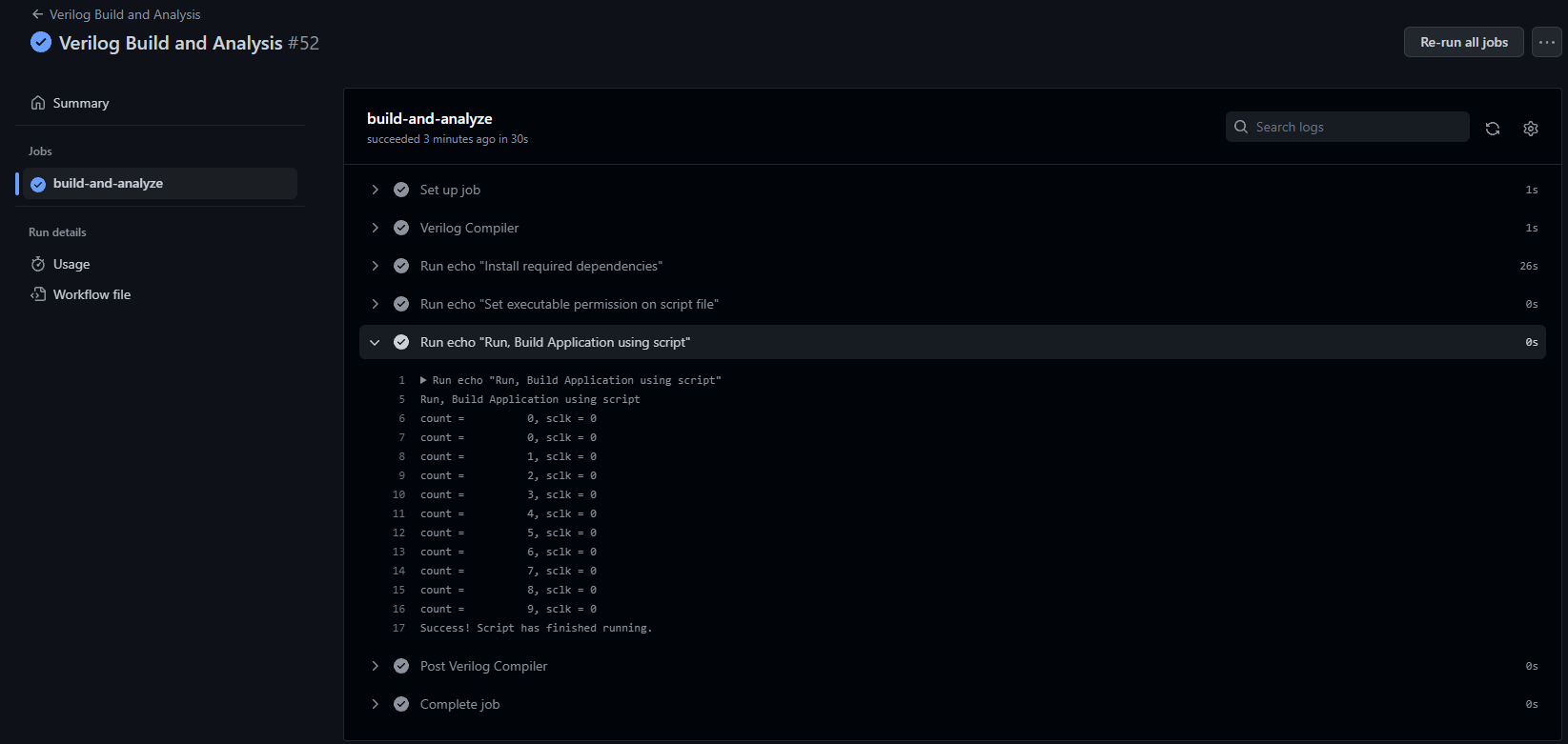
## Verilog 在操作控制台中编译的屏幕截图。
## 问题和/或错误,请创建一个 issue 来帮助我解决它们:
请在此处报告 [issues](https://github.com/jge162/verilog_compiler/issues) 以便讨论和解决。
## 许可证信息:
jge162/verilog_compiler 根据 [GNU General Public License v3.0](https://github.com/jge162/verilog_compiler/blob/main/LICENSE) 授权。
由 [@jermyiah™](https://github.com/jge162) 用 💙 设计。
## Verilog 编译器的目的:
能够快速将您的 .v 文件加载到 GitHub 并进行运行和测试。它会像编译器应有的那样通知您代码中的错误。运行它需要两个文件。首先,您需要创建一个 script/sh 目录来运行脚本。然后,您选择要运行的 .v 文件。
## veriflog_compiler.v
```
name: Verilog Build and Analysis
on:
schedule:
- cron: '0 0,12 * * *'
# action will run everyday at 12 am and 12 pm
workflow_dispatch:
jobs:
build-and-analyze:
runs-on: ubuntu-latest
steps:
- name: Verilog Compiler
uses: jge162/verilog_compiler@1.0.0
- run: |
echo "Install required dependencies"
sudo apt-get update
sudo apt-get install iverilog
sudo apt-get install verilator
- run: |
echo "Set executable permission on script file"
chmod +x script/sh
chmod +x ./verilog_test_case.v
- run: |
echo "Run, Build Application using script"
./script/sh
```
## 运行您的 .v 文件所需的脚本文件:
```
#!/bin/bash
# 定义项目名称
PROJECT_NAME="verilog_test_case"
# 定义要包含在项目中的 Verilog 文件列表
VERILOG_FILES="verilog_test_case.v"
# 将 Verilog 文件编译成可执行文件
iverilog -o $PROJECT_NAME $VERILOG_FILES
# 运行针对脚本的仿真
vvp $PROJECT_NAME
# 打印一条消息指示脚本已完成运行
echo "Success! Script has finished running."
```
## Verilog 在操作控制台中编译的屏幕截图。

## 问题和/或错误,请创建一个 issue 来帮助我解决它们:
请在此处报告 [issues](https://github.com/jge162/verilog_compiler/issues) 以便讨论和解决。
## 许可证信息:
jge162/verilog_compiler 根据 [GNU General Public License v3.0](https://github.com/jge162/verilog_compiler/blob/main/LICENSE) 授权。
由 [@jermyiah™](https://github.com/jge162) 用 💙 设计。
## Verilog 编译器的目的:
能够快速将您的 .v 文件加载到 GitHub 并进行运行和测试。它会像编译器应有的那样通知您代码中的错误。运行它需要两个文件。首先,您需要创建一个 script/sh 目录来运行脚本。然后,您选择要运行的 .v 文件。
## veriflog_compiler.v
```
name: Verilog Build and Analysis
on:
schedule:
- cron: '0 0,12 * * *'
# action will run everyday at 12 am and 12 pm
workflow_dispatch:
jobs:
build-and-analyze:
runs-on: ubuntu-latest
steps:
- name: Verilog Compiler
uses: jge162/verilog_compiler@1.0.0
- run: |
echo "Install required dependencies"
sudo apt-get update
sudo apt-get install iverilog
sudo apt-get install verilator
- run: |
echo "Set executable permission on script file"
chmod +x script/sh
chmod +x ./verilog_test_case.v
- run: |
echo "Run, Build Application using script"
./script/sh
```
## 运行您的 .v 文件所需的脚本文件:
```
#!/bin/bash
# 定义项目名称
PROJECT_NAME="verilog_test_case"
# 定义要包含在项目中的 Verilog 文件列表
VERILOG_FILES="verilog_test_case.v"
# 将 Verilog 文件编译成可执行文件
iverilog -o $PROJECT_NAME $VERILOG_FILES
# 运行针对脚本的仿真
vvp $PROJECT_NAME
# 打印一条消息指示脚本已完成运行
echo "Success! Script has finished running."
```
## Verilog 在操作控制台中编译的屏幕截图。

## 问题和/或错误,请创建一个 issue 来帮助我解决它们:
请在此处报告 [issues](https://github.com/jge162/verilog_compiler/issues) 以便讨论和解决。
## 许可证信息:
jge162/verilog_compiler 根据 [GNU General Public License v3.0](https://github.com/jge162/verilog_compiler/blob/main/LICENSE) 授权。
由 [@jermyiah™](https://github.com/jge162) 用 💙 设计。标签:GitHub Actions, iverilog, SOC Prime, verilator, Verilog编译, 二进制发布, 代码分析, 凭证管理, 工具链, 应用安全, 开发工具, 开源工具, 电子设计自动化, 硬件描述语言, 自动笔记, 软件开发, 错误检查