arc53/DocsGPT

GitHub: arc53/DocsGPT

一个支持多格式文档导入和多模型接入的开源私有 AI 平台,用于构建企业文档智能搜索与自动化 Agent 助手。

Stars: 18110 | Forks: 2091

DocsGPT 🦖

面向 agent、助手和企业搜索的私有 AI

DocsGPT 是一个用于构建智能 agent 和助手的开源 AI 平台。功能包括 Agent Builder、深度研究工具、文档分析(PDF、Office、网页内容和音频)、多模型支持(选择您的提供商或在本地运行),以及为 agent 提供的丰富 API 连接性,支持可操作的工具和集成。可随时随地部署,并拥有完全的隐私控制。

![显示星标数量的 GitHub 主仓库链接](https://img.shields.io/github/stars/arc53/docsgpt?style=social) ![显示复刻数量的 GitHub 主仓库链接](https://img.shields.io/github/forks/arc53/docsgpt?style=social) ![许可证文件链接](https://img.shields.io/github/license/arc53/docsgpt) ![Discord 链接](https://img.shields.io/discord/1070046503302877214) ![X(原 Twitter)链接](https://img.shields.io/twitter/follow/docsgptai) ⚡️ 快速入门☁️ 云端版本💬 Discord
📖 文档👫 贡献🗞 博客

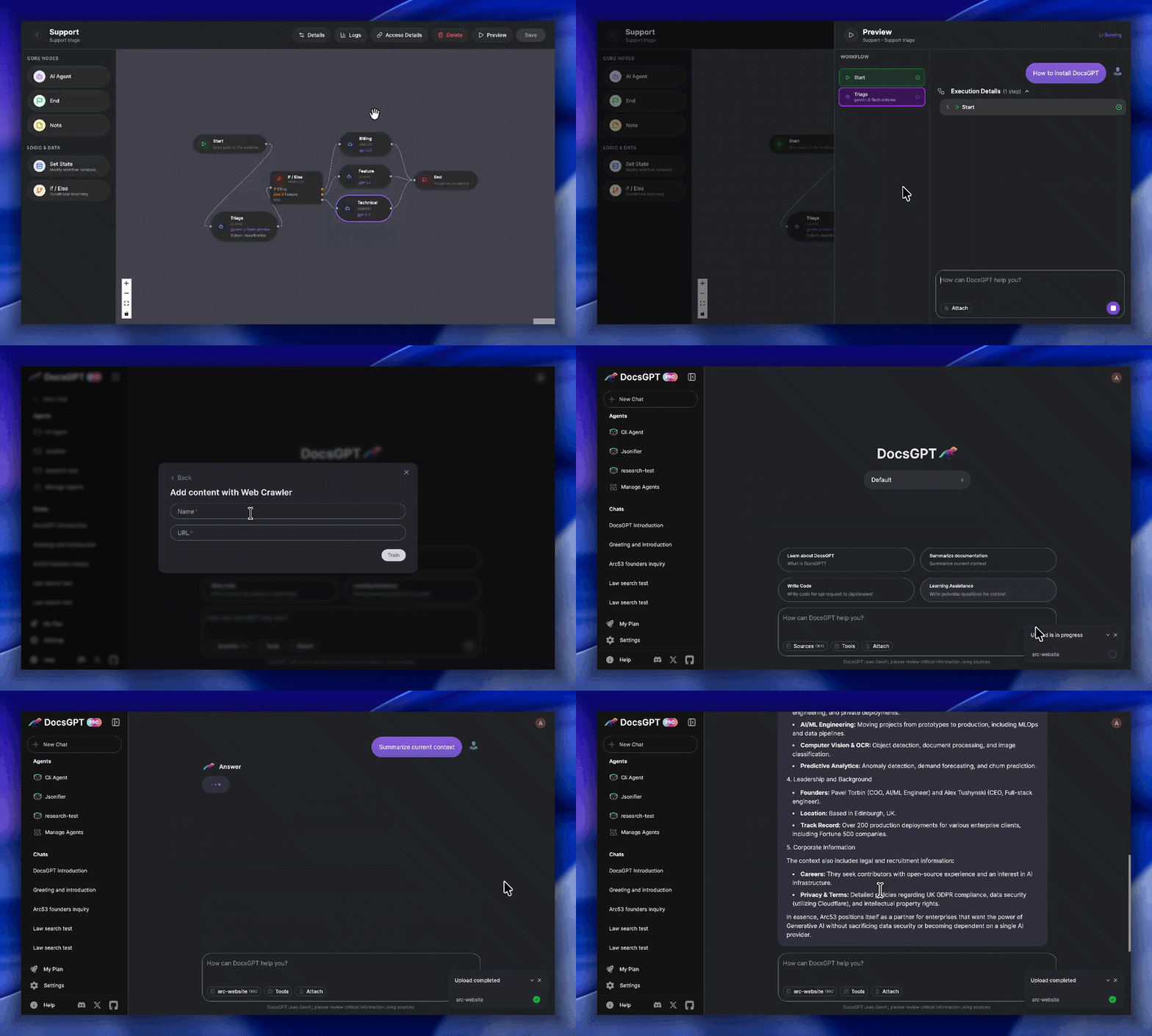
video-example-of-docs-gpt

Key Features:

  • 🗂️ Wide Format Support: Reads PDF, DOCX, CSV, XLSX, EPUB, MD, RST, HTML, MDX, JSON, PPTX, images, and audio files such as MP3, WAV, M4A, OGG, and WebM.
  • 🎙️ Speech Workflows: Record voice input into chat, transcribe audio on the backend, and ingest meeting recordings or voice notes as searchable knowledge.
  • 🌐 Web & Data Integration: Ingests from URLs, sitemaps, Reddit, GitHub and web crawlers.
  • ✅ Reliable Answers: Get accurate, hallucination-free responses with source citations viewable in a clean UI.
  • 🔑 Streamlined API Keys: Generate keys linked to your settings, documents, and models, simplifying chatbot and integration setup.
  • 🔗 Actionable Tooling: Connect to APIs, tools, and other services to enable LLM actions.
  • 🧩 Pre-built Integrations: Use readily available HTML/React chat widgets, search tools, Discord/Telegram bots, and more.
  • 🔌 Flexible Deployment: Works with major LLMs (OpenAI, Google, Anthropic) and local models (Ollama, llama_cpp).
  • 🏢 Secure & Scalable: Run privately and securely with Kubernetes support, designed for enterprise-grade reliability.
## 路线图 - [x] 带有条件节点的 Agent 工作流构建器 ( 2026 年 2 月 ) - [x] 研究模式 ( 2026 年 3 月 ) - [x] SharePoint 与 Confluence 连接器 ( 2026 年 3 月 – 4 月 ) - [x] 用于用户数据的 Postgres 迁移 ( 2026 年 4 月 ) - [x] OpenTelemetry 可观测性 ( 2026 年 4 月 ) - [x] 自带模型 (BYOM) ( 2026 年 4 月 ) - [x] Agent 调度(基于 RedBeat)( 2026 年 4 月 ) - [x] 通知与对话搜索 ( 2026 年 5 月 ) - [x] 带有按 Agent 归因的分析与日志改进 ( 2026 年 6 月 ) - [x] 带有 SCIM 配置和组的 OIDC / SSO 登录 ( 2026 年 6 月 ) - [x] 管理面板和基于角色的访问控制 (RBAC) ( 2026 年 6 月 ) - [x] Agent 导入 / 导出 ( 2026 年 6 月 ) - [x] 具有团队范围共享和角色的团队 ( 2026 年 6 月 ) ### 面向公司的生产支持 / 帮助: 我们非常乐意在您将 DocsGPT 部署到生产环境时提供个性化的协助。 [获取演示 :wave:](https://www.docsgpt.cloud/contact)⁠ [发送邮件 :email:](mailto:support@docsgpt.cloud?subject=DocsGPT%20support%2Fsolutions) ## 加入 Lighthouse 项目 🌟 致所有开发者和 GenAI 创新者!**DocsGPT Lighthouse 项目** 旨在联系那些正在实际场景中积极部署或扩展 DocsGPT 的技术领导者。与我们的团队直接合作,规划路线图,获取优先支持,并利用独家的社区见解构建企业级解决方案。 [了解更多并申请 →](https://docs.google.com/forms/d/1KAADiJinUJ8EMQyfTXUIGyFbqINNClNR3jBNWq7DgTE) ## 快速入门 我们的文档中提供了更详细的[快速入门](https://docs.docsgpt.cloud/quickstart) 1. **克隆代码库:** git clone https://github.com/arc53/DocsGPT.git cd DocsGPT **对于 macOS 和 Linux:** 2. **运行设置脚本:** ./setup.sh **对于 Windows:** 2. **运行 PowerShell 设置脚本:** PowerShell -ExecutionPolicy Bypass -File .\setup.ps1 这两个脚本都会引导您完成 DocsGPT 的设置。共有五个选项可用:使用公共 API、在本地运行、连接到本地推理引擎、使用云 API 提供商,或者在本地构建 Docker 镜像。脚本会自动配置您的 `.env` 文件,并根据您选择的选项处理必要的下载和安装。 **导航至 http://localhost:5173/** 要停止 DocsGPT,请在 `DocsGPT` 目录中打开终端并运行: ``` docker compose -f deployment/docker-compose.yaml down ``` (或者使用运行设置脚本后显示的特定 `docker compose down` 命令)。 ## 架构 ![架构图](https://static.pigsec.cn/wp-content/uploads/repos/cas/e9/e9cfd1cc638db8d880101f6246e4e52b187b8fcb71966ecb5e042676b328d60c.png) ## 项目结构 - **Application** - 后端 Flask 应用。 - **Extensions** - 集成和小部件(例如 Chatwoot、React 小部件)。 - **Frontend** - 使用 [Vite](https://vitejs.dev/) 和 [React](https://react.dev/) 构建的 Web UI。 - **Scripts** - 杂项实用脚本。 ## 许可证 源代码许可证为 [MIT](https://opensource.org/license/mit/),如 [LICENSE](LICENSE) 文件中所述。 ## 本项目由以下机构提供支持:

color

标签:人工智能, 企业搜索, 多模型支持, 子域名突变, 文档分析, 智能助手, 测试用例, 用户代理, 用户模式Hook绕过, 请求拦截, 逆向工具