winfsp/winfsp
GitHub: winfsp/winfsp
WinFsp 是一个让开发者在 Windows 上以用户态方式创建自定义文件系统的开发框架,类似 Linux 的 FUSE。
Stars: 8696 | Forks: 610
WinFsp · Windows File System Proxy

WinFsp enables developers to write their own file systems (i.e. "Windows drives") as user mode programs and without any knowledge of Windows kernel programming. It is similar to FUSE (Filesystem in Userspace) for Linux and other UNIX-like computers.
winfsp.dev



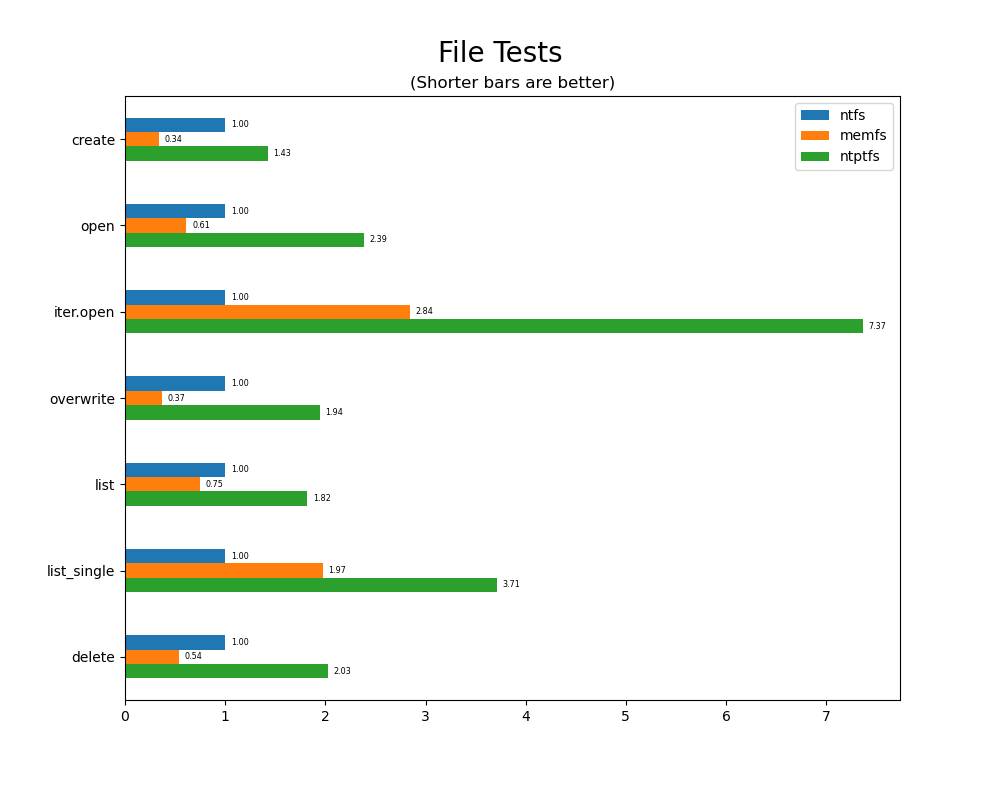
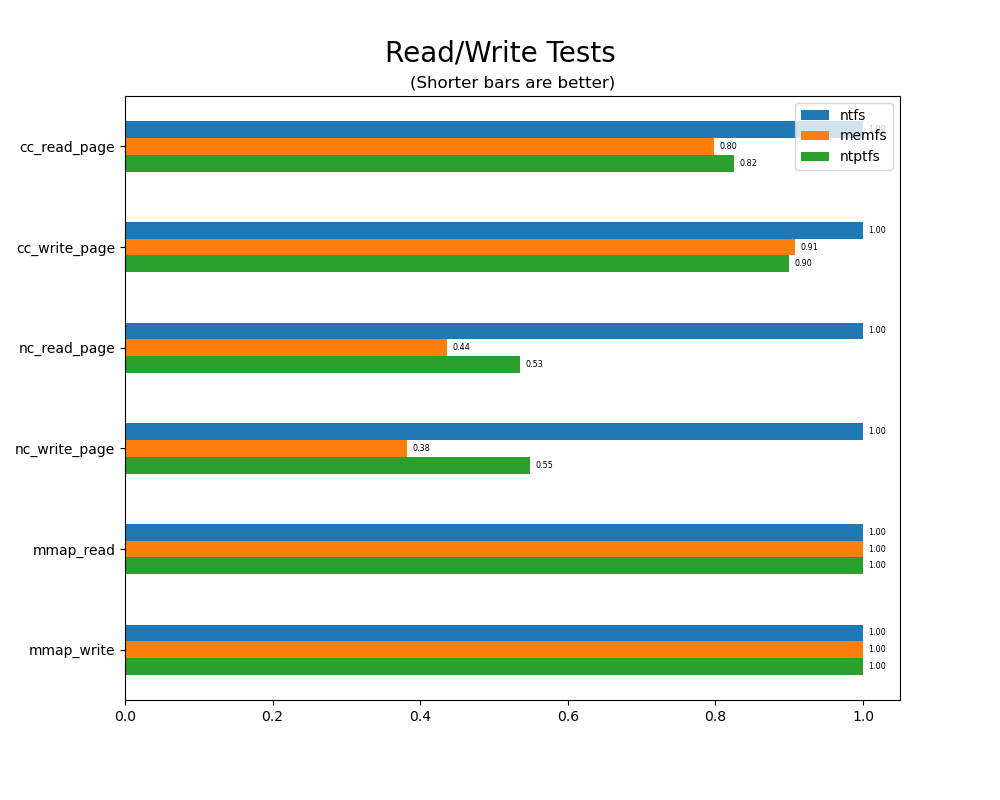
## 概述 WinFsp 是一个为 Windows 计算机上的自定义文件系统提供开发和运行时支持的平台。通常,任何信息或存储都可以通过 WinFsp 组织并呈现为文件系统,其优势在于任何 Windows 应用程序都可以通过标准的 Windows 文件 API 来访问这些信息。 WinFsp 的核心由一个内核模式文件系统驱动程序 (FSD) 和一个用户模式 DLL 组成。FSD 与 Windows 内核交互,并处理将自己呈现为文件系统驱动程序所需的所有交互。DLL 与 FSD 交互,并提供一个可用于处理文件系统函数的 API。例如,当应用程序尝试打开文件时,文件系统会接收到一个包含必要信息的 `Open` 调用。 使用 WinFsp 构建文件系统有诸多好处: **易于开发**:为 Windows 开发内核模式文件系统是一项众所周知的困难任务。WinFsp 使得文件系统开发变得相对轻松。这篇[教程](doc/WinFsp-Tutorial.asciidoc)解释了如何构建文件系统。 **稳定性**:稳定的软件,没有任何已知的内核模式崩溃、资源泄漏或类似问题。WinFsp 的这种稳定性归功于其[设计](doc/WinFsp-Design.asciidoc)和严格的[测试机制](doc/WinFsp-Testing.asciidoc)。 **正确性**:力求文件系统的正确性以及与 NTFS 的兼容性。有关详细信息,请参阅[兼容性](doc/NTFS-Compatibility.asciidoc)文档。 **性能**:在许多文件系统场景中具有出色的性能,可与 NTFS 媲美甚至超越 NTFS。阅读更多关于其[性能](doc/WinFsp-Performance-Testing.asciidoc)的信息。
 ### 启动文件系统进行测试
您可以通过从命令行启动 MEMFS 来测试 WinFsp:
```
billziss@xps ⟩ ~ ⟩ net use X: \\memfs64\test
The command completed successfully.
billziss@xps ⟩ ~ ⟩ X:
billziss@xps ⟩ X:\ ⟩ echo "hello world" > hello.txt
billziss@xps ⟩ X:\ ⟩ dir
Directory: X:\
Mode LastWriteTime Length Name
---- ------------- ------ ----
-a---- 6/12/2022 5:15 PM 28 hello.txt
billziss@xps ⟩ X:\ ⟩ type hello.txt
hello world
billziss@xps ⟩ X:\ ⟩ cd ~
billziss@xps ⟩ ~ ⟩ net use X: /delete
X: was deleted successfully.
```
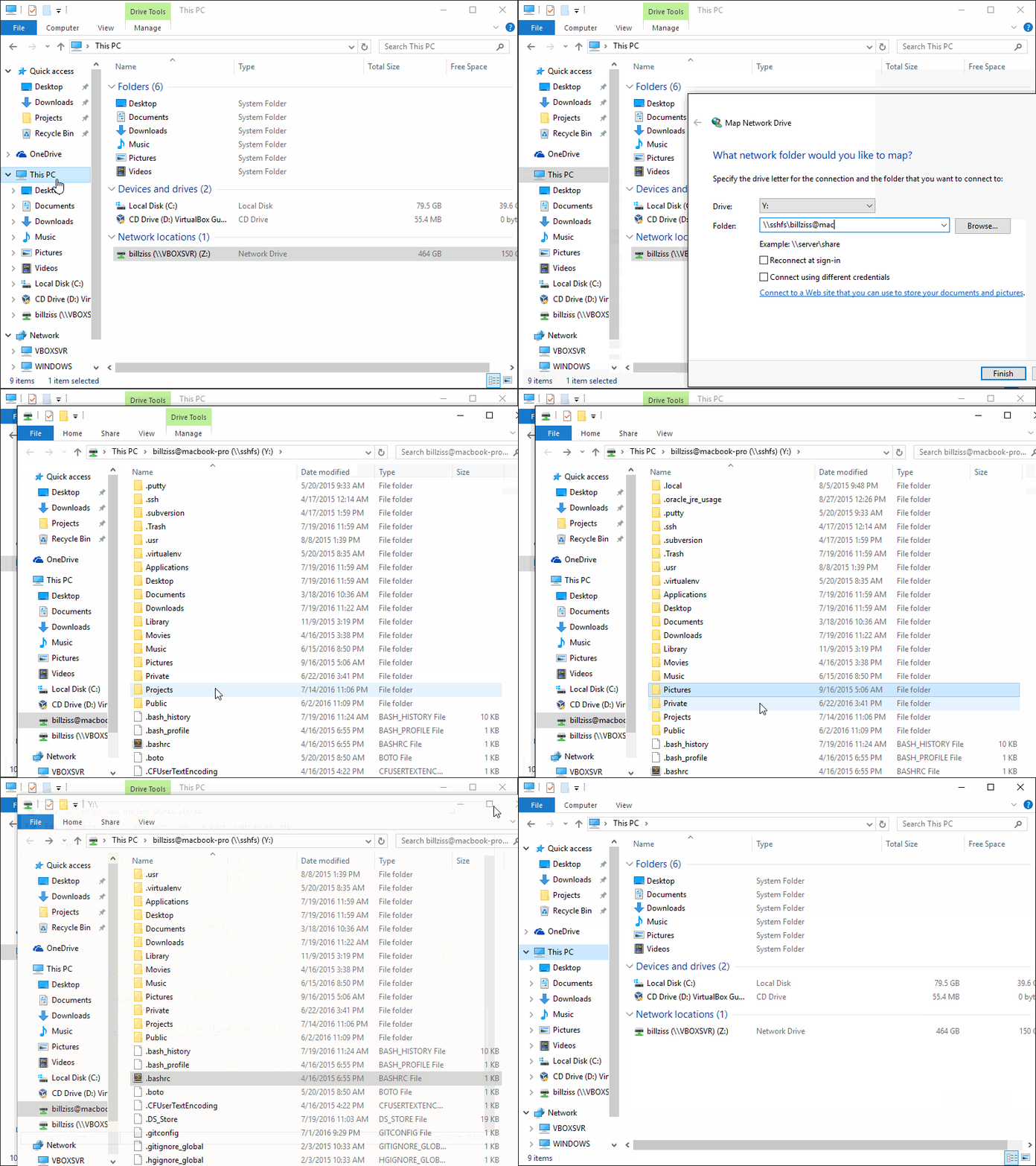
也可以使用“映射网络驱动器”功能从资源管理器中启动 MEMFS(以及所有使用 WinFsp Launcher 的文件系统,如 [服务架构](doc/WinFsp-Service-Architecture.asciidoc)文档中所述)。
## 资源
**文档**:
- [教程](doc/WinFsp-Tutorial.asciidoc)
- [API 参考](doc/WinFsp-API-winfsp.h.md)
- [构建](doc/WinFsp-Building.asciidoc)
- [项目 Wiki](https://github.com/winfsp/winfsp/wiki)
**讨论**:
- [WinFsp Google Group](https://groups.google.com/forum/#!forum/winfsp)
- [作者的 Twitter](https://twitter.com/BZissimopoulos)
### 启动文件系统进行测试
您可以通过从命令行启动 MEMFS 来测试 WinFsp:
```
billziss@xps ⟩ ~ ⟩ net use X: \\memfs64\test
The command completed successfully.
billziss@xps ⟩ ~ ⟩ X:
billziss@xps ⟩ X:\ ⟩ echo "hello world" > hello.txt
billziss@xps ⟩ X:\ ⟩ dir
Directory: X:\
Mode LastWriteTime Length Name
---- ------------- ------ ----
-a---- 6/12/2022 5:15 PM 28 hello.txt
billziss@xps ⟩ X:\ ⟩ type hello.txt
hello world
billziss@xps ⟩ X:\ ⟩ cd ~
billziss@xps ⟩ ~ ⟩ net use X: /delete
X: was deleted successfully.
```
也可以使用“映射网络驱动器”功能从资源管理器中启动 MEMFS(以及所有使用 WinFsp Launcher 的文件系统,如 [服务架构](doc/WinFsp-Service-Architecture.asciidoc)文档中所述)。
## 资源
**文档**:
- [教程](doc/WinFsp-Tutorial.asciidoc)
- [API 参考](doc/WinFsp-API-winfsp.h.md)
- [构建](doc/WinFsp-Building.asciidoc)
- [项目 Wiki](https://github.com/winfsp/winfsp/wiki)
**讨论**:
- [WinFsp Google Group](https://groups.google.com/forum/#!forum/winfsp)
- [作者的 Twitter](https://twitter.com/BZissimopoulos)标签:FUSE, Hakrawler, UML, 多人体追踪, 客户端加密, 文件系统, 用户态, 系统开发, 网络安全监控, 驱动开发