emanuele-em/proxelar
GitHub: emanuele-em/proxelar
Proxelar 是一款基于 Rust 的可编程 MITM 代理,支持拦截、检查并通过 Lua 脚本实时修改 HTTP/HTTPS 流量,配备终端、TUI 及 Web 界面。
Stars: 1006 | Forks: 62
## 什么是 Proxelar?
Proxelar 驻留在您的应用程序和互联网之间,让您对每一个 HTTP/HTTPS 请求拥有完全的可见性,并能够使用 Lua 在运行时对其进行转换。
```
Your App ──► Proxelar :8080 ──► Internet
│
Inspect · Modify · Mock
```
适用于调试 API、逆向工程第三方服务、测试移动应用、注入 Header、Mock 响应,或无需接触源代码即可自动化任何请求/响应转换。
## 功能
- **Lua 脚本** — 编写 `on_request` / `on_response` 钩子以在运行时修改、阻止或 Mock 流量
- **HTTPS 拦截** — 自动生成 CA 并按主机 mint 证书
- **正向与反向代理** — CONNECT 隧道或上游 URI 重写
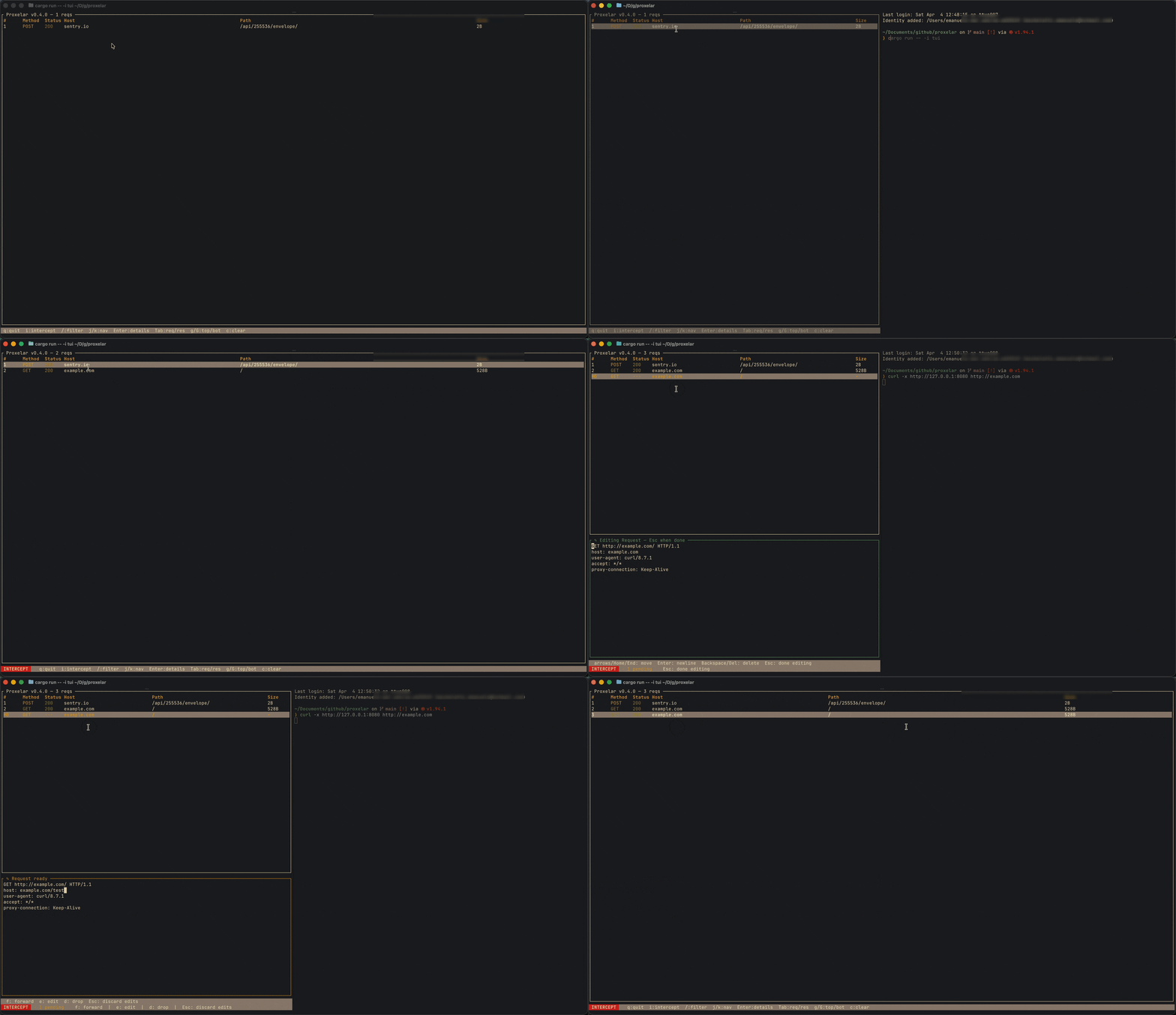
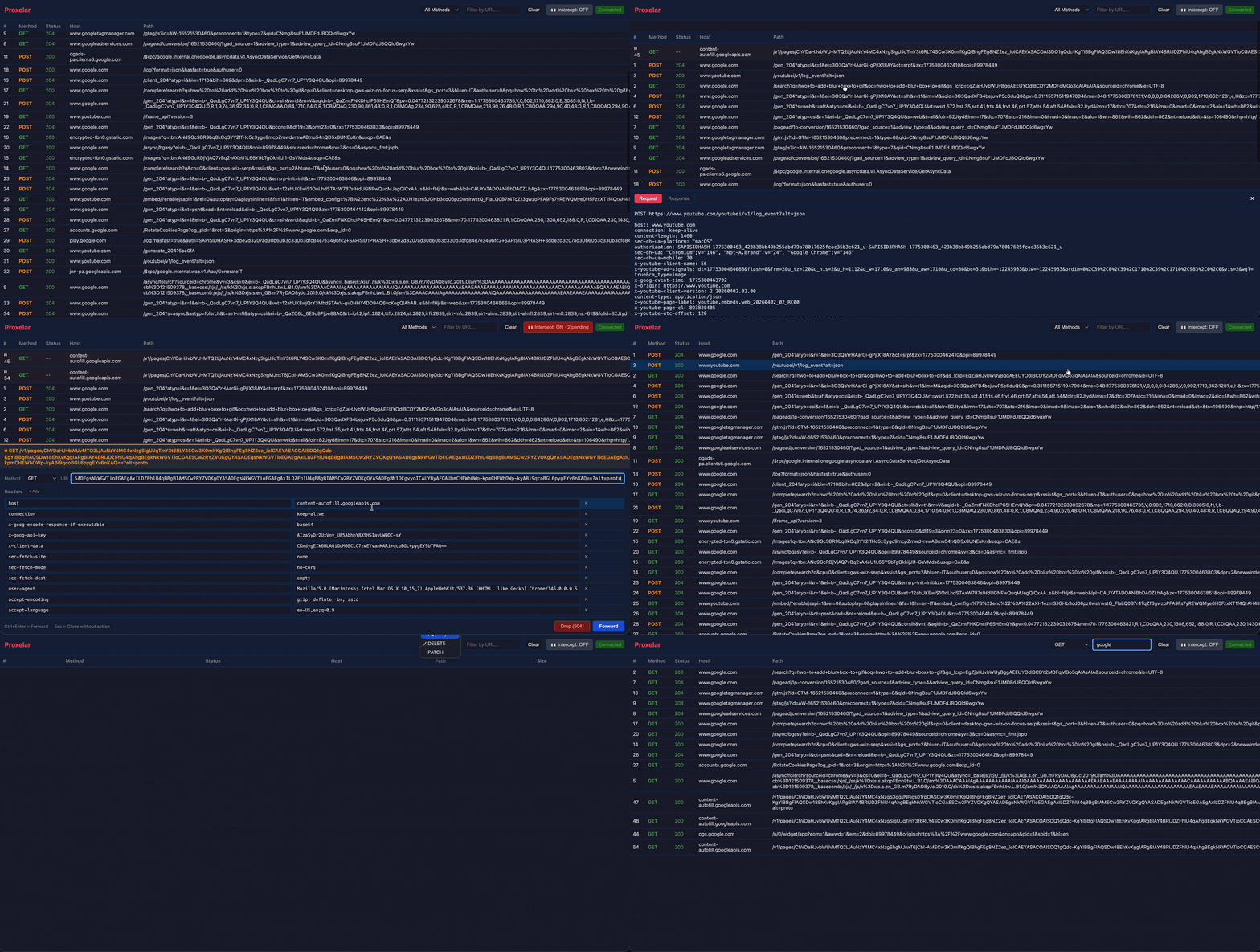
- **三种界面** — 终端、交互式 TUI (ratatui)、Web GUI (axum + WebSocket)
- **WebSocket 检查** — 与 HTTP 流量一起捕获连接;按方向、opcode 和 payload 浏览帧
- **列作用域过滤** — `time:14:`、`proto:https`、`method:POST`、`host:github`、`path:/api`、`status:404`、`type:json`、`size:1KB`、`duration:slow` 或纯文本搜索
- **轻松安装 CA** — 通过代理访问 `http://proxel.ar` 以下载并安装根证书
## 安装
### Homebrew (macOS / Linux)
```
brew install proxelar
```
### Cargo
```
cargo install proxelar
```
### Docker / Podman
```
# Web GUI
docker run --rm -it -v ~/.proxelar:/root/.proxelar -p 8080:8080 -p 127.0.0.1:8081:8081 ghcr.io/emanuele-em/proxelar --interface gui --addr 0.0.0.0
# Terminal
docker run --rm -it -v ~/.proxelar:/root/.proxelar -p 8080:8080 ghcr.io/emanuele-em/proxelar --interface terminal --addr 0.0.0.0
```
`-v ~/.proxelar:/root/.proxelar` 挂载会复用您现有的受信任 CA 证书,这样您就不会收到浏览器警告。
## 快速开始
**1. 启动代理**
```
proxelar
```
**2. 安装 CA 证书**
在通过代理路由流量时访问 `http://proxel.ar` — 它会提供包含安装说明的证书。
或者手动安装:`~/.proxelar/proxelar-ca.pem`
**3. 配置您的系统代理**
在您的操作系统、浏览器或所选工具中将 HTTP 和 HTTPS 代理设置为 `127.0.0.1:8080`。
流量将立即开始显示在 TUI 中。
## 界面
```
proxelar # interactive TUI (default)
proxelar -i terminal # plain terminal output
proxelar -i gui # web GUI at http://localhost:8081
```
## 用法
```
proxelar -m reverse --target http://localhost:3000 # reverse proxy
proxelar -b 0.0.0.0 -p 9090 # custom bind/port
proxelar --script examples/scripts/block_domain.lua # with a Lua script
```
所有 CLI 选项
| Flag | 描述 | 默认值 |
|------|-------------|---------|
| `-i, --interface` | `terminal` · `tui` · `gui` | `tui` |
| `-m, --mode` | `forward` · `reverse` | `forward` |
| `-p, --port` | 监听端口 | `8080` |
| `-b, --addr` | 绑定地址 | `127.0.0.1` |
| `-t, --target` | 上游目标(reverse 模式必需) | — |
| `--gui-port` | Web GUI 端口 | `8081` |
| `--ca-dir` | CA 证书目录 | `~/.proxelar` |
| `-s, --script` | 用于请求/响应钩子的 Lua 脚本 | — |
TUI 键绑定
| 按键 | 操作 |
|-----|--------|
| `j` / `k` / 方向键 | 导航 |
| `Enter` | 打开详情面板;再次按下以聚焦并滚动 |
| `Tab` | 切换 Request / Response / Frames 标签页 |
| `/` | 过滤(纯文本或 `column:value`) |
| `r` | 重放选中的请求 |
| `Esc` | 关闭面板 / 清除过滤 |
| `g` / `G` | 顶部 / 底部 |
| `c` | 清除请求 |
| `?` | 键绑定帮助 |
| `q` / `Ctrl+C` | 退出 |
## 脚本
编写 Lua 脚本来拦截和转换流量。定义 `on_request` 和/或 `on_response` 钩子:
```
function on_request(request)
-- request.method, request.url, request.headers, request.body
-- Return the request to forward it (modified or not)
-- Return a response table to short-circuit: { status = 403, headers = {}, body = "Blocked" }
-- Return nil to pass through unchanged
end
function on_response(request, response)
-- response.status, response.headers, response.body
-- Return the response (modified or not), or nil to pass through
end
```
示例:阻止域名
```
local blocked = { "ads%.example%.com", "tracker%.example%.com" }
function on_request(request)
for _, pattern in ipairs(blocked) do
if string.find(request.url, pattern) then
return { status = 403, headers = {}, body = "Blocked" }
end
end
end
```
示例:添加 CORS headers
```
function on_response(request, response)
response.headers["Access-Control-Allow-Origin"] = "*"
response.headers["Access-Control-Allow-Methods"] = "GET, POST, PUT, DELETE, OPTIONS"
return response
end
```
示例:Mock API endpoints
```
function on_request(request)
if request.method == "GET" and string.find(request.url, "/api/user/me") then
return {
status = 200,
headers = { ["Content-Type"] = "application/json" },
body = '{"id": 1, "name": "Test User"}',
}
end
end
```
更多示例请见 [`examples/scripts/`](examples/scripts/) — header 注入、Cookie 剥离、HTML 重写、请求体修改、流量日志记录等。完整的脚本 API 参考文档位于 [proxelar.micheletti.io](https://proxelar.micheletti.io/scripting/api-reference.html)。
## 文档
最新发布版本:**[Proxelar 0.4.3 — 更丰富的请求表格和统一的列过滤](https://micheletti.io/proxelar-043/)**
完整文档请见 **[proxelar.micheletti.io](https://proxelar.micheletti.io)**:
- [入门指南](https://proxelar.micheletti.io/quick-start.html)
- [正向与反向代理模式](https://proxelar.micheletti.io/proxy-modes/forward.html)
- [Lua 脚本 API 参考](https://proxelar.micheletti.io/scripting/api-reference.html)
- [CA 证书安装](https://proxelar.micheletti.io/ca-certificate.html)
## 贡献
欢迎贡献。请提交 issue 或 pull request。
## 许可证
[MIT](LICENSE-MIT)
标签:API测试, HTTP/HTTPS, IP 地址批量处理, Lua脚本, rizin, Rust, SSL证书, TLS拦截, TUI终端界面, Web界面, 中间人攻击, 云资产清单, 代理工具, 代码生成, 反向代理, 可视化界面, 响应Mock, 正向代理, 流量拦截, 渗透测试工具, 网络安全, 网络安全测试, 网络流量审计, 请求修改, 逆向工程, 通知系统, 隐私保护