MustardChef/WSABuilds
GitHub: MustardChef/WSABuilds
提供预集成了 Google Play 服务和 Magisk/KernelSU root 权限的 Windows Subsystem for Android 预构建包,支持 Windows 10 和 11 一键安装。
Stars: 17980 | Forks: 2405



WSABuilds
MagiskOnWSA (For Windows™ 10 and 11)
Windows Subsystem For Android™ (WSA) with Google Play Services and Magisk and KernelSU


Downloads

WSABuilds Project Status
⚠️❗IMPORTANT: Read Before Downloading❗⚠️
## WSABuilds Repo 信息
#### 可能影响你 WSA 体验的已知问题:
- ***GApps 问题:https://github.com/LSPosed/MagiskOnWSALocal/issues/595***
- ***文件夹问题:WSA 文件夹过长的名称(由 MagiskOnWSALocal 脚本自动生成)可能导致 WSA 无法启动。请在解压后且安装 WSA 之前,将该文件夹重命名为 ``WSA``。***
- ***安装并重启后已安装的 Magisk 模块消失(WSA v2307):*** https://github.com/MustardChef/WSABuilds/issues/154
| WSA Version: |  |
 |
|---|---|---|
| v2210.40000.7.0 | ✅ | ✅ |
| v2211.40000.10.0 | ✅ | ✅ |
| v2211.40000.11.0 | ✅ | ✅ |
| v2301.40000.4.0 | ✅ | ✅ |
| v2301.40000.7.0 | ✅ | ✅ |
| v2302.40000.6.0 | ✅ | ✅ |
| v2302.40000.8.0 | ✅ | ✅ |
| v2302.40000.9.0 | ✅ | ✅ |
| v2303.40000.2.0 | ✅ | ✅ |
| v2303.40000.3.0 | ✅ | ✅ |
| v2303.40000.4.0 | ✅ | ✅ |
| v2303.40000.5.0 | ✅ | ✅ |
| v2304.40000.5.0 | ⚠️ | ⛔ |
| v2304.40000.6.0 | ⚠️ | ⛔ |
| v2304.40000.7.0 | ✅ | ⛔ |
| v2304.40000.10.0 | ✅ | ⛔ |
| v2305.40000.2.0 | ✅ | ⛔ |
| v2305.40000.3.0 | ✅ | ✅ |
| v2305.40000.4.0 | ✅ | ✅ |
| v2305.40000.5.0 | ✅ | ✅ |
| v2305.40000.6.0 | ✅ | ✅ |
| v2306.40000.1.0 | ✅ | ✅ |
| v2306.40000.2.0 | ✅ | ✅ |
| v2306.40000.3.0 | ✅ | ✅ |
| v2306.40000.4.0 | ✅ | ✅ |
| v2307.40000.2.0 | ✅ | ✅ |
| v2307.40000.3.0 | ✅ | ✅ |
| v2307.40000.5.0 | ✅ | ✅ |
| v2307.40000.6.0 | ✅ | ✅ |
| v2308.40000.1.0 | ✅ | ✅ |
| v2308.40000.2.0 | Update Skipped to allow time for adjusting the Docs and the build script (MagiskOnWSALocal). Sorry for any Inconvenence. Updates will resume as normal after this. |
|
| v2308.40000.3.0 | ✅ | ✅ |
| v2309.40000.2.0 | ✅ | ✅ |
| v2309.40000.4.0 to 2310.40000.1.0 and 2311.40000.3.0 | "Updates have been skipped, in order to allow time to switch to GitHub Actions from my Linux Server, which I have been using since the start of the GitHub repo. Rest assure that this will likely be the last disruption. Once again I appologise and would also like to thank you for using this repo." MustardChef |
|
| v2310.40000.2.0 | ✅ | ✅ |
| v2311.40000.4.0 | ✅ | ✅ |
| v2311.40000.5.0 | ✅ | ✅ |
| v2311.40000.5.0_LTS_1 | ✅ | ✅ |
| v2311.40000.5.0_LTS_2 | ✅ | ✅ | v2311.40000.5.0_LTS_3 | ✅ | ✅ | v2407.40000.0.0_LTS_4 | ✅ | ✅ | v2407.40000.0.0_LTS_5 | ✅ | ✅ | v2407.40000.0.0_LTS_6 | ✅ | ✅ | v2407.40000.4.0 | ✅ | ✅ | v2407.40000.0.0_LTS_7 | ➖ | ➖ | v2407.40000.4.0_v2 | ➖ | ➖ |
| Indicator Keys | |||
|---|---|---|---|
| ✅ | Stable | Everything works as intended. If you think that the build is not stable, please open a GitHub Issue or report the issue in our Discord |
|
| ⚠️ | Unstable | Experience may not be smooth due to known bugs or issues | Click on the Emoji for more information |
| ⛔ | Not Working | Build is not working. DO NOT DOWNLOAD! | Click on the Emoji for more information |
| ➖ | No Information Yet | Not enough information to confirm status. Please join the Discord and confirm whether or not the builds are working. | |
| Download Variant |  |
 |
|
|---|---|---|---|
| Differences: | WSABuilds LTS Releases |
||
| Current Version: | v2407.40000.0.0_LTS_7 | v2407.40000.4.0_v2 | |
| Release Date: | 02/06/2025 | 02/06/2025 | |
| Update Frequency: | |||
| Operating System | Download Page |
|---|---|
|
|
|
|
|
|
|
Custom Builds: |
|
|












Requirements
|
|
|
|---|---|---|
 Windows Build Number |
Windows™ 11: Build 22000.526 or higher. | Windows™ 10: 22H2 10.0.19045.2311 or higher. May work on Windows™ 10: 20H1 10.0.19041.264 or higher.1 1. You may need to install KB5014032 then install KB5022834 to use WSA on these older Windows 10 builds |
Custom/modfied Windows OS installations (such as ReviOS, Tiny 10/11 and Ghost Spectre etc.) may have issues with running WSA. |
||
 RAM |
|
|
 Processor |
CPU Architecture: x86_64 or arm64 | |
| Your PC should meet the basic Windows™ 11 requirements i.e Core i3 8th Gen, Ryzen 3000, Snapdragon 8c, or above | N/A This is a bit of a hit or miss, but it is highly recommended that your processor is listed in the supported CPU lists for Windows 11 requirements |
|
 GPU |
Any compatible Intel, AMD or Nvidia GPU. GPU Performance may vary depending on its compatibility with Windows Subsystem For Android™
|
|
 Storage |
Solid-state drive (RECOMMENDED) OR Hard Disk Drive (HDD) (NOT RECOMMENDED) |
|
| Minimum Storage Requirements: You must have at least 10GB free on the system drive (C:\) | ||
 Partition |
NTFS ONLY Windows Subsystem For Android™ can only be installed on a NTFS partition, not on an exFAT partition |
|
 Windows Features Needed |
Virtual Machine Platform Enabled | |
| Windows Hypervisor Platform Enabled | ||
| These optional settings are for virtualization and provide components that are needed to run WSA. You can enable these settings by pressing the Windows Key + R on your keyboard and typing "OptionalFeatures.exe" into the box, pressing enter and selecting the features above followed by pressing apply | ||
 Virtualization |
The Computer must support virtualization and be enabled in BIOS/UEFI and Optional Features. Guide on how to enable |
|

Installation
### 视频指南:
##### 特别感谢 kilObit(视频创作者)
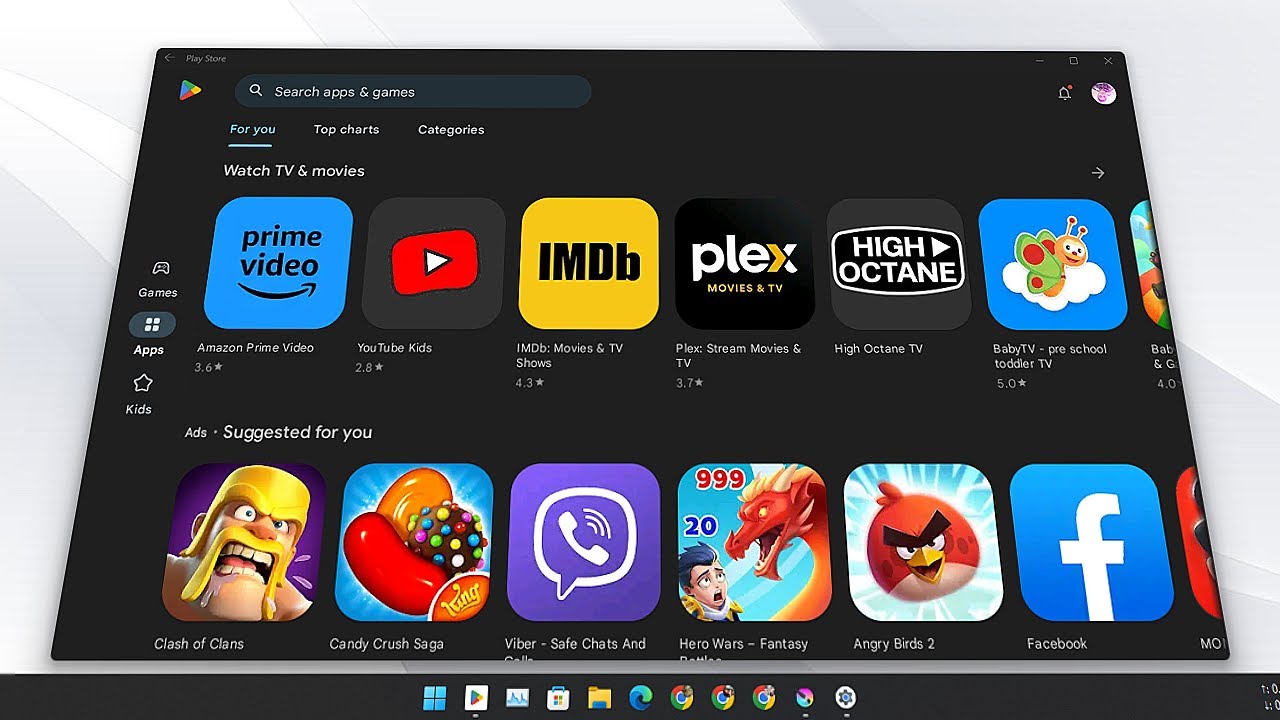 ### 图文指南:
1. 前往 [Releases 页面](https://github.com/MustardChef/WSABuilds/releases/latest)
2. 在最新版的 Release 中,找到 Assets 部分,下载你选择的 Windows Subsystem For Android™ 版本(请勿下载 "Source code")
3. 解压 .7z 压缩包,并将你解压出来的文件夹重命名为 ``WSA``
4. 删除 .7z 压缩包
5. 将新解压出来的文件夹移动到一个合适的位置(文档文件夹是个不错的选择),因为你需要将该文件夹保留在电脑上才能使用 MagiskOnWSA
6. 打开 Windows Subsystem For Android™ 文件夹:找到并双击 `Run.bat`
- 如果你之前已经安装过 MagiskOnWSA,它会在保留所有用户数据的前提下自动卸载旧版本并安装新版本,因此不用担心数据丢失。
- 如果弹窗在没有请求管理员权限的情况下就消失了,并且 Windows Subsystem For Android™ 未能成功安装,你需要以管理员身份手动运行 Install.ps1:
- 按 Win+x 并选择 Windows™ Terminal (管理员)
- 输入以下命令并按回车,将 `{X:\path\to\your\extracted\folder}`(包含大括号)替换为你解压文件夹的实际路径
cd "{X:\path\to\your\extracted\folder}"
- 输入以下命令并按回车
PowerShell.exe -ExecutionPolicy Bypass -File .\Install.ps1
- 脚本将开始运行,随后会安装 Windows Subsystem For Android™
- 如果此方法仍然无效,说明你的电脑不支持 WSA
7. 安装过程完成后,Windows Subsystem For Android™ 将会启动(如果是首次安装,则会显示一个征询诊断信息同意的窗口。有时会弹出两个一模一样的窗口,这属于正常情况,在这两个窗口中点击“确定”都不会有任何负面影响)
8. 点击 PowerShell 窗口,然后按键盘上的任意键,PowerShell 窗口应该会关闭
9. 关闭文件资源管理器
10. **尽情享受吧**
---
### 注意事项(适用于 Windows 10 和 11):
1. 你不能删除 Windows Subsystem For Android™ 的安装文件夹。
`Add-AppxPackage -Register .\AppxManifest.xml` 的作用是注册一个包含现有未打包文件的 appx 包,
因此只要你还在使用 Windows Subsystem For Android™,就需要保留这些文件。
查看 https://learn.microsoft.com/en-us/powershell/module/appx/add-appxpackage?view=windowsserver2022-ps 了解更多详情。
2. 在运行 Windows Subsystem For Android™ 之前,你需要先注册其 appx 包。
对于 [WSABuilds](https://github.com/MustardChef/WSABuilds) 和 [MagiskOnWSALocal](https://github.com/LSPosed/MagiskOnWSALocal) 用户,你需要运行解压目录中的 `Run.bat`。
如果脚本运行失败,你可以按照以下步骤进行排查(需要管理员权限):
1. 打开 PowerShell 窗口,并将工作目录切换到你的 Windows Subsystem For Android™ 目录。
2. 在 PowerShell 中运行以下命令。这应当会执行失败并附带一个 ActivityID,这是一个下一步所需的 UUID。
Add-AppxPackage -ForceApplicationShutdown -ForceUpdateFromAnyVersion -Register .\AppxManifest.xml
3. 在 PowerShell 中运行以下命令。这将会打印出失败操作的日志。
Get-AppPackageLog -ActivityID
### 图文指南:
1. 前往 [Releases 页面](https://github.com/MustardChef/WSABuilds/releases/latest)
2. 在最新版的 Release 中,找到 Assets 部分,下载你选择的 Windows Subsystem For Android™ 版本(请勿下载 "Source code")
3. 解压 .7z 压缩包,并将你解压出来的文件夹重命名为 ``WSA``
4. 删除 .7z 压缩包
5. 将新解压出来的文件夹移动到一个合适的位置(文档文件夹是个不错的选择),因为你需要将该文件夹保留在电脑上才能使用 MagiskOnWSA
6. 打开 Windows Subsystem For Android™ 文件夹:找到并双击 `Run.bat`
- 如果你之前已经安装过 MagiskOnWSA,它会在保留所有用户数据的前提下自动卸载旧版本并安装新版本,因此不用担心数据丢失。
- 如果弹窗在没有请求管理员权限的情况下就消失了,并且 Windows Subsystem For Android™ 未能成功安装,你需要以管理员身份手动运行 Install.ps1:
- 按 Win+x 并选择 Windows™ Terminal (管理员)
- 输入以下命令并按回车,将 `{X:\path\to\your\extracted\folder}`(包含大括号)替换为你解压文件夹的实际路径
cd "{X:\path\to\your\extracted\folder}"
- 输入以下命令并按回车
PowerShell.exe -ExecutionPolicy Bypass -File .\Install.ps1
- 脚本将开始运行,随后会安装 Windows Subsystem For Android™
- 如果此方法仍然无效,说明你的电脑不支持 WSA
7. 安装过程完成后,Windows Subsystem For Android™ 将会启动(如果是首次安装,则会显示一个征询诊断信息同意的窗口。有时会弹出两个一模一样的窗口,这属于正常情况,在这两个窗口中点击“确定”都不会有任何负面影响)
8. 点击 PowerShell 窗口,然后按键盘上的任意键,PowerShell 窗口应该会关闭
9. 关闭文件资源管理器
10. **尽情享受吧**
---
### 注意事项(适用于 Windows 10 和 11):
1. 你不能删除 Windows Subsystem For Android™ 的安装文件夹。
`Add-AppxPackage -Register .\AppxManifest.xml` 的作用是注册一个包含现有未打包文件的 appx 包,
因此只要你还在使用 Windows Subsystem For Android™,就需要保留这些文件。
查看 https://learn.microsoft.com/en-us/powershell/module/appx/add-appxpackage?view=windowsserver2022-ps 了解更多详情。
2. 在运行 Windows Subsystem For Android™ 之前,你需要先注册其 appx 包。
对于 [WSABuilds](https://github.com/MustardChef/WSABuilds) 和 [MagiskOnWSALocal](https://github.com/LSPosed/MagiskOnWSALocal) 用户,你需要运行解压目录中的 `Run.bat`。
如果脚本运行失败,你可以按照以下步骤进行排查(需要管理员权限):
1. 打开 PowerShell 窗口,并将工作目录切换到你的 Windows Subsystem For Android™ 目录。
2. 在 PowerShell 中运行以下命令。这应当会执行失败并附带一个 ActivityID,这是一个下一步所需的 UUID。
Add-AppxPackage -ForceApplicationShutdown -ForceUpdateFromAnyVersion -Register .\AppxManifest.xml
3. 在 PowerShell 中运行以下命令。这将会打印出失败操作的日志。
Get-AppPackageLog -ActivityID 
Updating
### 如何在 Windows Subsystem for Android (WSA) 中更新且不丢失任何应用和数据
1. [下载最新版构建](https://github.com/MustardChef/WSABuilds#downloads)(你想更新到的版本)
2. 确保 Windows Subsystem For Android 没有在运行(在 WSA 设置中点击 "Turn off",并等待旋转加载图标消失)
3. 使用 7-Zip、WinRAR 或其他任何工具打开 .7z 压缩包
4. 在 .7z 压缩包内,打开子文件夹
- 示例:
- WSA_2xxx.xxxxx.xx.x_xx
或者
- WSA_2xxx.xxxxx.xx.x_xx_Release-Nightly-with-magisk-xxxxxxx-MindTheGapps-xx.x-RemovedAmazon)
5. 选中该子文件夹内的所有文件,并将其解压到当前存放 Windows Subsystem For Android(你之前解压并用于安装 WSA 的文件夹)的路径中
6. 当提示替换文件夹时,勾选“为所有当前项目执行此操作”,然后点击“是”
7. 当提示替换文件时,点击“替换目标位置中的文件”
8. 运行 ``Run.bat`` 文件
9. 启动 Windows Subsystem For Android 设置应用,并使用侧边栏转到 ``About``(关于)选项卡
10. 检查 WSA 版本是否与最新版本/你想更新到的版本号一致
**如果你遇到任何困难,请加入 Discord**
[
Uninstallation
### 卸载通过 WSABuild 安装的 WSA:
- **1.)** 确保 Windows Subsystem For Android™ 没有在运行
- **2.)** 使用 Windows 内置的搜索功能,或通过“添加或删除程序”搜索 ``Windows Subsystem For Android™ Settings``,然后点击卸载
- **3.)** 删除你之前解压并运行过 Run.bat 以安装 WSA 的那个文件夹(MagiskOnWSA 文件夹)
- **4.)** 转到 ``%LOCALAPPDATA%/Packages/`` 并检查文件夹 ``MicrosoftCorporationII.WindowsSubsystemForAndroid_8wekyb3d8bbwe`` 是否依然存在: - 如果该文件夹依然存在:****将其删除**** - 如果出现错误提示文件无法删除,请确保 WSA 已关闭 - 如果该文件夹不存在:****跳过此步骤****
### 卸载通过 Microsoft Store 安装的 WSA: - **1.)** 使用 Windows 内置的搜索功能,或通过“添加或删除程序”搜索 ``Windows Subsystem For Android™ Settings``,然后点击卸载

Backup and Restore Userdata
## 备份你的用户数据
为了备份你的 WSA 数据,你必须将 ``Userdata.vhdx``(包括但不限于 Android 应用及其数据、设置等)复制到一个安全的位置。该文件位于 ``%LOCALAPPDATA%\Packages\MicrosoftCorporationII.WindowsSubsystemForAndroid_8wekyb3d8bbwe\LocalCache\userdata.vhdx``
## 恢复你的备份
在尝试恢复备份之前,如果已经安装了 WSA,你必须先将其卸载。然后,在运行 ``Run.bat`` 脚本(以便在卸载后重新安装 WSA)之前,你需要从位于解压后的 WSA 文件夹中的 ``Install.ps1`` 文件里删除以下几行内容:
#### Android Settings:
```
Start-Process "wsa://com.android.settings"
```
#### Official Magisk:
```
Start-Process "wsa://com.topjohnwu.magisk"
```
#### Magisk Delta:
```
Start-Process "wsa://io.github.huskydg.magisk"
```
#### Magisk Alpha:
```
Start-Process "wsa://io.github.vvb2060.magisk"
```
#### Google Play Store:
```
Start-Process "wsa://com.android.vending"
```
#### Amazon Appstore:
```
Start-Process "wsa://com.amazon.venezia"
```
删除上述代码行后,运行该脚本。
当 PowerShell 窗口提示“Press any key to quit”时,此时会弹出多个对话框:
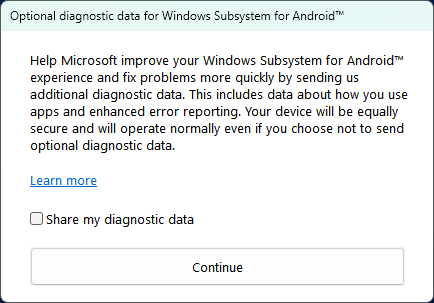
转到 ``%localappdata%\Packages`` 并(如果这些文件夹/目录不存在,请先创建它们)在 ``MicrosoftCorporationII.WindowsSubsystemForAndroid_8wekyb3d8bbwe\LocalCache\`` 中粘贴 userdata.vhdx
现在关闭所有弹窗并运行 WSA,你的用户数据应该就能成功恢复了

FAQ
**救命,我在使用 MagiskOnWSA 构建版时遇到了问题**
- 在 Github 中提交一个 [Issue](https://github.com/MustardChef/WSABuilds/issues),或者[加入 Discord](https://github.com/MustardChef/WSABuilds#join-the-discord),并尽可能详细地描述你遇到的问题
**救命,我在 Windows™ 10 上安装 Windows Subsystem For Android™ 时遇到了问题**
- 我没有参与制作该补丁,也并未声明这是我所为。请在 Discord 或 Github 上提交一个 Issue,如果可能的话,我会尽力协助你解决问题。如需获取完整支持,请访问该项目主页并在那里提交 Issue:https://github.com/cinit/WSAPatch/issues/
**如何获取 logcat 日志?**
- 有两种方法:
adb logcat
或者
- Windows 中的位置 --->`%LOCALAPPDATA%\Packages\MicrosoftCorporationII.WindowsSubsystemForAndroid_8wekyb3d8bbwe\LocalState\diagnostics\logcat` **我可以删除已安装的文件夹吗?** - 不可以。 **如何将 Windows Subsystem For Android™ 更新到新版本?** - 按照[安装说明](#installation)进行操作。下载[最新版 Windows Subsystem For Android™](#downloads),替换原有安装目录中的内容,然后重新运行 Install.ps1。不用担心,你的数据会被保留 **如何更新 Magisk?** - 与更新 Windows Subsystem For Android™ 的操作相同。等待包含新版 Magisk 的 MagiskOnWSA 发布,然后按照[安装说明](#installation)进行更新 **我能通过 SafetyNet/Play Integrity 认证吗?** - 不能。像 Windows Subsystem For Android™ 这样的虚拟机,由于缺乏 Google 的签名,无法自行通过这些验证机制。要想通过验证,需要更复杂(且未经测试)的解决方案,例如:

App Compatibility
## 最后更新于 2024 年 03 月 05 日
## 图例
本页面目前使用了来自 [Unicode Emoji (1.0)](https://unicode.org/Public/emoji/1.0/emoji-data.txt) 的 Unicode 字符。如果你无法看到这些字符,请提交一个 Issue。
- ✅ 正常运行
- 🆖 正常运行,但需要 Google Mobile Services
- ⚠️ 可以运行,但存在一些明显问题
- ❌ 无法使用
## 支持表格(操作系统特性)
| 功能 | 支持级别 | 备注 |
|---------|---------------|-------|
| 多点触控 | ✅ | 示例:[Arcaea](https://www.bilibili.com/video/BV1Ph411n7M5)
| 虚拟 Wi-Fi (VirtWifi) | ✅
| 蓝牙 | ❌ ([GitHub issue](https://github.com/microsoft/WSA/issues/103))
| IPv6 | ✅ | 在支持 IPv6 的 PC 上,使用 Fennec F-Droid 加载 `ipv6.google.com` 表现良好
| 指纹读取器 | ❌ | 在 ROG Flow X13 上使用 SATRIA 应用测试失败
| VPN | ❌ | VPN 连接请求对话框不会弹出
| OpenGL ES 3.1 | ❌
| Vulkan | ✅ | 在 [2307.40000.2.0](https://github.com/microsoft/WSA/discussions/374) 中作为实验性功能加入
### 临时解决方案
#### VPN
WSA 中没有 `com.android.vpndialogs`。不过,可以通过 `adb shell` 使用 AppOps 手动授予 VPN 激活权限:
```
appops set [package name] ACTIVATE_VPN allow
```
#### 使用 URI scheme 启动 Android 应用
微软为 WSA 提供了一个自定义的 URI scheme,让启动应用变得更加便捷:
```
wsa://[App Package Name]
```
例如,要在 WSA 中启动 Apple Music,请使用:
```
wsa://com.apple.android.music
```
## 支持表格
* [应用](#apps)
* [游戏](#games)
### 应用
| 应用程序 | 最新测试版本 | Android 版本 | 支持级别 | 已知问题 | 备注 |
|-------------|-----------------------|------------------|---------------|--------------|-------|
| 23andMe | 5.114.0 | 11 | ✅ |
| 4PDA | 1.9.35 | 11 | ✅ |
| A+ Gallery | 2.2.55.4 | 11 | ✅ | 在使用深色主题时可能会遇到图形故障,因此建议改用浅色主题。
| Activity Launcher | 1.14.6 | 13, 12 | ⚠️ | 自 WSA 版本 2209.40000.28.0 起,你无法将快捷方式固定到启动器(如 Lawnchair 或 Rootless Pixel Launcher)的主屏幕区域,系统会提示错误 `Current launcher does not support PinShortcut. Unable to create shortcut.` | 你依然可以在任何应用中启动特定的 Activity
| AdGuard | 3.6.10 | 12 | ⚠️ | 即使使用了上述的临时解决方案,“本地 VPN”也无法工作。由于手动安装的证书识别存在问题,“HTTPS Filtering”也无法工作。 | 请勿与“AdGuard Content Blocker”混淆
| ADM | 12.5.4 | 11 | ✅ |
| ADM Pro | 6.4.0 | 11 | ✅ |
| Aegis | 2.0.2 | 11 | ✅ |
| AIDE | 3.2.210316 | 11 | ✅ || 可能需要 GMS
| AIMP | 3.10.1052 | 11 | ✅
| Aliexpress | 8.76.5 | 13 | ⚠️ | 主页和搜索页面存在严重的缩放问题,导致几乎无法在应用内正常导航。
| Amaze File Manager | 3.5.3 | 11 | ✅ || 避免更新此应用
| Amazon Alexa | 2.2.466191.0 | 12 | ✅ |
| Android System Info | 1.4.2 | 11 | ✅ ||
| Android System Webview | 118.0.5993.111 | 13, 12 | ✅ ||
| Android System Webview Dev | 103.0.5060.22 | 11 | ✅ || 应用可正常安装
| AniLabX | 3.8.12 (Iridium) - Beta | 11 | ✅
| Animiru | 0.16.0.0 | 13 | ✅ |
| Aniyomi | 0.15.2.1 | 13, 12 | ✅ |
| AntennaPod | 2.5.0 | 11 | ✅
| APKMirror Installer (Beta) | 1.3.2 | 11 | ⚠️ | 如果不购买订阅则无法移除广告,而购买订阅又需要开启位置服务。除此之外,偶尔会出现闪退现象
| APKPure | 3.17.26 | 11 | ✅ | 有时可能需要多次尝试才能成功安装应用
| Apple Music | 3.7.1 | 11 | ✅
| App分享 (AppShare) | 2.1.1 (164) | 11 | ❌ | 无法登录
| Aptoide App Store | 9.20.2.1 | 11 | ✅ | 有时下载可能会卡住不动
| AquaMail (Pro) | 1.34.0-118 | 11 | ✅
| ASUS Router | 1.0.0.7.35 | 12 | ✅ | 底部栏的文字比正常情况更窄,导致最后一个字母被截断或显示为两行。 |
| AtB | 1.23 | 12 | ❌ | 在加载时会崩溃,因为它依赖于 Google Services Framework,且需要后者获得 `read_device_config` 权限,而这似乎是无法被授予的。
| Audible | 3.15.0 | 11 | ✅
| Aurora Store | 4.1.1 | 12, 11 | ✅
| Authy | 24.8.5 (139) | 11 | ✅ || 会产生有关 GMS 的警告,这些警告可以安全地忽略。
| BandLab | 10.45.0 | 13, 12 | 🆖 | 在 Android 12 上有轻微的音频延迟,在微软的 2303.40000.3.0 更新中已修复 | 仅在带有 Google 服务的 Google Play 商店安装测试过,否则该应用没有任何问题。响应速度很快,在 Android 13 上没有音频延迟。 |
| BankID (Norway) | 2.1 | 12 | ❌ | 会不断在桌面浏览器中打开新标签页,提示该应用认为手机已 root。
| BBC iPlayer | 4.137.0.25403 | 11 | ✅ | 侧载安装
| BBC Sounds | 2.13.0.19989 | 13 | ✅
| Berry Browser | 3.57.8 | 12, 11 | ✅
| Binance | 2.36.5 | 11 | ✅
| Bondee | 2.0.0.636 | 12 | ⚠️ | 存在缩放问题。具体来说,在介绍部分之后,应用会使用异常巨大的界面元素,导致完全无法导航。
| Boost for Reddit | 1.12.5 | 12 | ✅
| Bouncer | 1.26.3 | 11 | ⚠️
| Brave Browser | 1.30.87 | 11 | ✅
| Brawl Stars | | 13 | ❌ | 应用卡在加载画面
| BritBox by BBC & ITV | 2.1.2 (20043) | 11 | ❌ | 应用在启动时崩溃
| Bromite | 94.0.4606.94 | 11 | ✅ || 请使用 x64 版本
| Camera | 2.0.002 | 13 | ⚠️ | 虽然拍照或录制视频正常工作,但切换摄像头(切换至未激活的虚拟摄像头)会导致应用卡死。 | 包含在子系统中
| CamScanner | 6.3.0.2110240000 | 11 | ❌ | 拍照后 WSA 会卡死
| Canvas Student | 6.14.1 | 11 | ✅
| Character.AI | 1.7.5 | 13 | ✅ | 有时调整窗口大小后输入 prompt 的文本框会错位。重启应用即可恢复正常文本框。
| ChMate | 0.8.10.153 | 11 | ✅
| Clubhouse | 1.0.11 | 11 | ⚠️ | 无法通过手机号码登录,输入一次性密码 (OTP) 后会报错
| Comixology | 3.10.18.310421 | 11 | ✅
| Cignal Play | 2.2-play | 13 | ⚠️ | 在观看直播电视时卡在加载动画
| Coop Medlem | 3.4.30 | 12 | ⚠️ | Coopay 激活失败,因为该应用会检测是否启用了锁屏 | 核心功能可用,尽管运行速度有点慢。
| CPU-Z | 1.41 | 11 | ✅
| Cronometer | 3.13.1 | 11 | ✅
| Cryptography | 1.24.0 | 12 | ✅
| CX File Explorer | 2.0.0 | 13, 12 | ✅
| Dantotsu | 2.0.0 | 13 | ✅ | 要登录 anilist 集成,请将默认浏览器设置为使用 WSA 中的浏览器应用(例如 Firefox),因为它会打开 Windows 中的默认浏览器。点击链接时也会出现同样的情况。 | 将鼠标指针悬停时会高亮显示输入元素。漫画阅读器和媒体播放器支持键盘操作。
| Dcoder | 4.0.76 | 11 | ✅
| Decibel X | 6.4.2 | 11 | ⚠️ | 应用崩溃
| Decrypto | 1.4.7 | 12 | ✅
| Delivery Club | 4.64.0 | 11 | ❌ | 选择送货地址后应用会崩溃
| DevCheck | 3.39 | 11 | ❌ | 启动时屏幕空白
| Device Info HW | 5.4.1 | 11 | ✅
| Deezer | 7.0.14.1 beta | 12 | ✅ | 截至 2022 年 9 月,Deezer Labs 的交叉淡入淡出功能似乎不起作用 | 音乐和菜单似乎运行得非常好,即使在 HiFi 比特率下也是如此。
| Digital Wellness | 1.5.500315346 (471337) | 13 | ✅ | 默认情况下在设置应用中不可用,需要使用 Activity Launcher 来启动它。 | 如果你启用“在应用列表中显示图标”,你可以让它显示在启动器中。
| DirecTV for Tablet | 5.29.001 | 11 | ⚠️ || 频繁崩溃,其他功能表现正常。
| Discord | 98.6 | 11 | ✅
| DMM Games Store | 2.8.0 | 11 | 🆖 | 需要 GMS
| Duolingo | 5.2.35 | 11 | ✅
| DuckDuckGo Privacy Browser+ | 5.142.2 | 12 | ✅
| Easybell | 2.1.30 | 11 | ✅
| EDS Lite | 2.0.0.237 | 12 | ✅ || 在 Intel x86-64 CPU 上测试通过(可能在 AMD64 或 ARM64 上也能运行)。如果你有使用 exFAT 文件系统的容器,建议添加 exFAT 模块。
| eGovPH | 2.0.4 | 13 | ⚠️ | 在安装了 GMS 的 WSA 上进行了测试,建议在启动此应用前关闭开发者选项。如果你没有事先在 Android 设置中授予权限,应用将无法正常启动。对于 eReport,应用无法通过当前的“位置”权限提示,因为点击“启用位置”没有任何反应(即使在 Windows 中为 WSA 授予了位置权限);解决办法是通过 Suggested eGovPH Services 部分(位于 Home 标签页中)进行访问。由于笔记本电脑内置摄像头与 eGovPH 的图像处理机制存在问题,会影响验证过程,导致 eKYC 验证十分麻烦(如果你在同一设备上注册账号进行人脸验证,这也同样适用)。某些页面不显示任何内容(特别是常见问题解答和某些情况下的应用程序详情) | 诸如在应用功能/页面之间导航等基本功能可以正常运行。PhilSys Digital ID 页面也能正常工作,并且能够被其他设备的验证网站识别。建议使用最新版本的 Android System WebView,因为该应用主要依赖它运行。
| Emby | 2.0.48g | 11 | ✅
| ES File Explorer | 4..1.8 | 11 | ✅ || 避免更新此应用
| Excel | 16.0.14527.20162 | 11 | ✅
| F-Droid | 1.15.6 | 13, 12, 11 | ✅
| F1 TV | 2.0.5 | 11 | ⚠️ | 极差的应用体验,包括在观看视频时会出现屏幕闪烁和崩溃现象
| FaceApp: Face Editor || 11 | ❌
| Facebook | 377.0.0.22.107 | 12 | ✅ |
| Facebook Lite | 339.0.0.10.100 | 12 | ✅ |
| Facebook Messenger | 330.0.0.12.116 (x86_64) | 11 | ⚠️ | Chat Heads 功能无法使用
| Facebook Messenger Lite | 334.0.0.10.101 | 12 | ✅ |
| FAST Speed Test | 1.0.8 (88) | 11 | ✅
| FDM (Free Download Manager) (Play Store) | 6.18.1.4896 | 13 | ✅ | 在某些子系统版本中(由于 libhoudini 原因),应用在闪屏(授予所需权限后)后发生崩溃。在 WSA 2301.40000.7.0 之后恢复正常运行 | 在 Intel x86_64 CPU 上测试通过
| Fennec F-Droid | 105.1.0 | 12 | ❌ | 虽然应用能正确安装,但崩溃非常频繁,且与 Firefox Nightly 相比,网站加载极其缓慢。
| Files by Google | Unknown | 11 | ✅ || 运行良好
| Firefox | 123.0 (2016003223) | 13, 12, 11 | ✅ | 在 Android 11 上虽然可用,但网页渲染会出现错误。在 Android 12 上运行良好(在将 WSA 更新至 2205.40000.21.0 后不再有白块现象) | 在 Intel HD 集成显卡上测试通过。
| Firefox Nightly | 95.0a1 | 11 | ✅
| Firefox Focus | 106.1 | 12 | ✅
| foobar2000 | 1.2.30 | 11 | ✅
| Formula 1 | 11.0.1533 | 11 | ⚠️ | Live(实时)数据功能损坏,在初始化时不断崩溃
| FX File Explorer | 9.0.1.2 (r9012) | 13, 12, 11 | ✅ | 仅测试了基础版本(未安装 FX Plus)
| Game Pass | 2110.17.1005 | 11 | ✅ | 可能会弹出 GMS 警告,但这些警告可以安全地忽略 | 可以启动云游戏,但尚未测试使用控制器或触控操作游玩的效果。
| GBoard | Unknown | 12, 11 | ⚠️ | 在最新的 WSA (2204.x) 中无法如预期般正常工作
| GCash | 5.62.0 | 13, 12, 11 | 🆖 | 需要 GMS。如果没有 GMS,将警告“功能受限”;如果有,则正常运行。首次启动时会因为缺少以前版本(5.61.0 及更低版本)中授予的权限而崩溃。自 5.62.0 起,会弹出警告提示 `We have detected that you are running the GCash app on emulator. You will not be able to proceed.`
| Geekbench | 5.4.1 | 11 | ✅
| GeoGebra | 5.0.674.0 | 11 | ✅
| GitHub | 1.146.0 | 13 | ✅ | 使用“Windows 默认应用”打开任何网页链接无效(包括登录功能)。 | 如果你想在应用内使用外部链接,请先设置一个默认的浏览器应用(如 Chrome)
| Globe2Go | 4.7.4.20.0810/3890 | 11 | ✅
| GlobeOne | 1.8.37 | 12 | ✅ || 可能需要 GMS(否则请使用应用中提供的其他登录方式)
| Gmail | 2022.05.01.440951655.Release | 11 | ✅ || 可能需要 GMS
| Gojek | 4.30.1 | 11 | 🆖 | 需要 GMS
| Google | 14.44.29.28.x86_64 | 13 | 🆖 | 需要 GMS
| Google Calendar | 2022.18.2-448173739-release | 11 | ✅ | 需要 GMS | 运行良好
| Google Camera | Unknown | 11 | ✅ || 运行良好
| Google Chrome | 119.0.6045.66 | 13, 12, 11 | ✅ | 需要 microG 或 GMS 才能与 Google 账号同步 |
| Google Classroom | 8.0.181.20.90.3 | 11 | ✅ || 通知内容非常笼统(不显示详细内容),点击它们可能无法打开应用。无法从本地上传附件。
| Google Contacts | 3.68.0.445910596 | Unknown | ✅ || 应用偶尔可能出现故障,如果发生这种情况,请重启应用
| Google Drive | 2.22.197.0.all.alldpi | 11 | ✅ | 运行良好,可能需要 GMS
| Google Home | 2.58.1.7 | 12 | ❌ | 启动时提示错误信息“Home 无法在没有 Google Play 服务的情况下运行,而你的设备不支持该服务。”
| Google Meet | 2021.10.03.404303734.Release | 11 | 🆖 | 需要 GMS,由于 WSA 的窗口化特性,共享屏幕功能无法使用
| Google Photos | 5.91.0.448844219 | 11 | ✅ | 需要 GMS |
| Google Play Games | 2023.08.46243 | 13 | 🆖 | 需要 GMS
| Google Play Store | 37.4.24-29 [0] [PR] 56388002 | 13 | 🆖 | 需要 GMS。如果你在应用中频繁切换语言,会有提示要求重启应用以完成更新。等待几秒钟,然后点击/单击重启以继续(有时有效,有时无效)。 | Play Protect 认证状态将为 `Device is uncertified`
| Google Services Framework (APK) | 12, API 32 | 12 | ❌ | 虽然安装成功且应用也能识别到它,但它缺乏大部分功能所需的诸多权限,例如 `read_device_config`,即使使用设置应用也无法授予该权限。
| Google Translate | 6.45.0.474938783.2-release | 12 | ❌ | 由于依赖 Google Services Framework,启动时崩溃
| Grab | 5.172.200 | 11 | ✅
| Gycso | 1.1.0 | 12, 11 | ✅ |
| HBO Max | 52.15.0.53 | 11 | ⚠️ | 视频播放失败(内置播放器无法显示画面和播放声音)。
| Hidden Settings | 1.7.5 | 12 | ✅
| Hiragana Pro | 1.4.4 | 12 | ✅ | 当应用处于横屏模式时会出现缩放问题。
| Hobi | 2.1.7 | 11 | 🆖 | 需要 GMS
| Home Assistant | 2022.3.0-full | 11 | ✅ | 基本功能正常运行,附加/扩展功能尚未经过测试。
| Housesigma Canada Real Estate | 4.3.6 (121) | 11 | ✅
| HTV (hanime tv) | 3.6.7 | 11 | ⚠️ | 视频播放失败 | 内置播放器无法工作,要求使用外部播放器但同样会播放失败
| huaCtrl PRO | 1.0.27 | 11 | ✅
| Huawei AppGallery | 11.4.2.300 | 11 | ✅ | 曾经历频繁崩溃,但除此之外应用功能一切正常
| Hyper Square | 3.0.1 | 11 | ✅
| IFTTT | 4.29.2 | 12 | 🆖 | 需要 GMS 才能接收通知。忽略通知读取器访问错误即可。 | 为了避免 Play Protect 阻止登录 Google 商店,请使用 GMS 版本 open_gapps-x86_64-11.0-pico-20220215。(另请参阅:WSAGAScript issue #213)。
| Instagram | 244.0.0.17.110 | 12, 11 | ⚠️ || 需要使用 Android 键盘(如 MS SwiftKey)才能回复快拍(仅在 Android 11 中有效。Android 12 中的键盘应用支持已损坏。
| Instagram Lite | 339.0.0.10.100 | 12 | ✅
| Intra | 1.3.8 | 12 | ✅ || 安装后需要使用 VPN 临时解决方案,以允许应用创建 VPN 连接。
| iOS app (any) || 11 | ❌ | 感谢你的测试,Brad。
| Ipsos MediaLink | 5.2.20 | 13 | ✅ || 需要使用 VPN 临时解决方案,并且需要无障碍权限,还需安装 CA 证书
| iPusnas | 1.5.1 | 11 | ✅
| iRobot | 5.2.4-release | 12 | ❌ | 错误信息 `java.lang.UnsatisfiedLinkError: dlopen failed: library "libcore_jni.so" not found`
| Insta360 | 1.49.0 | 12 | ❌ | 错误信息 `Sorry, Insta360 app is temporarily incompatible with your device.`
| J2ME Loader | 1.7.9-open | 13, 12, 11 | ✅
| JAKI - Jakarta Kini | 1.2.34 | 11 | 🆖 | 部分功能需要 GMS
| JioSaavn | 8.2.1 | 11 | ✅ | 不支持全屏且偶尔会崩溃,但整体运行良好
| Jiocinema | 3.0.2.7 | 11 | ✅ | 初次运行可能会崩溃,但随后的运行应该会恢复正常。
| Jlpt | 4.7 | 12 | ✅ ||
| Joey (Reddit client) | 2.0.0.1 | 11 | ✅
| Jolibee | 1.21.1 | 13 | ✅
| Joplin | 2.4.3 (2097651) | 11 | ✅
| JuiceSSH | 3.2.2 | 11 | ⚠️ | 需要多次尝试才能连接到 SSH 服务器
| Kahoot || 11 | ✅
| Katakana Pro | 1.4.4 | 12 | ✅
| KawaiiNihongo | 3.10.9 | 12 | ✅
| KernelSU | v0.7.0 | 13 | ✅ || 安装 KernelSU root 后请下载此管理器应用
| Khan Academy | 7.3.3 | 11 | ✅
| Kik | 7.10.1.176 (82) | 11 | ✅
| Kindle | 8.47.1.3370 | 11 | ✅
| Kiwi Browser | 107.0.5304.74 | 13, 12 | ✅ |
| Kobo Books | 8.40.29843 | 11 | ⚠️ | 宽高比和分辨率是固定的,调整窗口大小时会显得模糊
| Kotatsu | 6.5.4 | 13 | ✅ | | 支持键盘导航
| KRL Access | 4.1.0 | 11 | ❌ | 应用崩溃
| Lawnchair | 12 Alpha 5 | 13, 12, 11 | ⚠️ | 如果你运行的是 Android 13 版本的子系统 (2211.40000.11.0),当你从主屏幕或应用抽屉启动任何应用时,都会崩溃并显示错误:`java.lang.NoSuchMethodError: No virtual method setSplashscreen(I)V in class Landroid/app/ActivityOptions; or is superclasses (declaration of 'android.app.ActivityOption'...` | 在 Android 11 或 12 版本的子系统上运行良好。
| Lazada | 7.37.0 | 13 | ⚠️ | Google 登录需要安装 GMS(可使用电子邮件或 Facebook 登录作为替代方式)。如果登录,`滑动验证` 出现的频率会过高。奇怪的缩放选项(界面元素过大) | 请保持竖屏模式以便使用该应用。
| Libby | 4.3.1 | 11 | ✅
| LINE | 12.0.1 | 11 | ✅
| Line Rangers | 7.6.3 | 11 | ✅
| LinkedIn | 4.1.632 | 11 | ✅
| Logcat Reader | 1.7.2 | 13 | ✅ |
| LNReader | 1.1.18 | 13, 12 | ✅ || 阅读轻小说时提供部分键盘导航支持(例如:使用上下方向键进行滚动)。
| LSPosed | 1.8.6 | 13, 11 | ✅
| Magisk | 25.2 | 13, 11 | ✅ || Magisk 开发者确认能够获得 root 权限 - [推文链接](https://twitter.com/topjohnwu/status/1451282578514735131)
| ManCityApp | 2.1.11 | 11 | 🆖 || 可能需要 GMS
| MangaYomi | 0.1.65 | 13 | ✅ | 媒体播放器不支持键盘(媒体)控制 | 漫画阅读器支持键盘导航
| Manzur's Study Circle (MSC) | 1.0.2 | 11 | ✅
| Material Files | 1.5.2 | 12, 11 | ✅
| Maya (Paymaya) | 2.85.1 | 13 | ❌ | 启动应用后立即崩溃
| McDonald's | 2.76.0 | 13 | ❌ | 在第一个欢迎界面上设备验证失败,并显示“Your device did not pass our security check. Please check that you run a Google trusted OS version, that the device is not rooted, and that you have no harmful apps installed.
| Meta Quest (Oculus) | 181.1.0.81.114 | 12 | ⚠️ | 无法使用 Meta 账号登录,但你可以安装 Facebook 或 Instagram 应用,并在 Meta 账号中心启用“Logging in with accounts”,然后使用应用内登录。由于不支持蓝牙,无法检测到附近的 Quest 2 设备。
| microG Settings | N/A | 11 | ❌ | 应用崩溃,无法加载
| Microsoft Authenticator | 6.2112.8213 | 11 | ✅ || 某些功能可能需要 GMS
| Microsoft Azure | 3.9.2.2021.09.30-19.35.50 | 11 | ✅
| Microsoft Bing - Search & earn | 23.5.401109307 | 12 | ✅
| Microsoft Edge | 120.0.2210.157 | 13,11 | ❌ | 总是卡在 Microsoft Edge 首次运行体验界面,几秒钟后便会崩溃退出
| Microsoft Edge Canary | 103.0.1264.1 | 11 | ❌ || 无法加载网站
| Microsoft Launcher | 6.230703.0.1122680 | 13, 11 | ✅ | 无法设置壁纸
| Microsoft PowerApps | 3.21124.20 | 11 | ✅
| Microsoft Swiftkey Keyboard | 8.10.12.4 | 12, 11 | ✅ | 在 WSA 2203 (Android 11) 上运行良好,但在 WSA 2204(Dev) (Android 12.1) 中屏幕键盘完全损坏
| Microsoft Teams | 1416/1.0.0 | 12 | ✅
| Mic Test | 5.2 | 12 | ✅ || lauresprojects.com.mictest
| Mihon (Beta) | 0.16.3-6530 | 13 | ✅ | 像“Large updates harm sources...”这样的通知会被截断。直到你清除 Mihon 通知前,可能都看不到“Updating Library”的进度条。在新手引导期间(即首次启动 Mihon 时出现的界面),按键盘上的任何键都会导致应用崩溃。 | 由于 Windows 操作中心存在 20 条通知的限制,部分通知可能会缺失。在设置 tracker 时,请确保设置默认浏览器(如 Firefox)以供登录。
| Mihon (Stable) | 0.16.4 | 13 | ✅ |像“Large updates harm sources...”这样的通知会被截断。直到你清除 Mihon 通知前,可能都看不到“Updating Library”的进度条。在新手引导期间(即首次启动 Mihon 时出现的界面),按键盘上的任何键都会导致应用崩溃。 | 由于 Windows 操作中心存在 20 条通知的限制,部分通知可能会缺失。在设置 tracker 时,请确保设置默认浏览器(如 Firefox)以供登录。
| MiX | 6.57.0-Beta_B21070510 | 11 | ✅
| Mobile JKN | 3.7.1 | 11 | ✅ || 某些功能可能需要 GMS
| MOLA | 2.1.3 | 11 | ❌ | 应用崩溃
| Monogolf | 3.4.10 | 13 | ✅ |
| Monument Browser | 1.0.333 | 12 | ✅
| Moodle | 3.9.5 | 11 | ✅
| MPV | 2023-11-30-release | 13, 12 | ✅ | 画中画功能无法使用 | 媒体播放器支持键盘导航
| MT File Manager | 2.10.0 | 11 | ✅
| Musically (TikTok) | 7.8.0 | 11 | ✅
| Muslim Pro | 1.2.3 | 11 | 🆖 | 需要 GMS
| MX Player | 1.40.9 | 11 | ✅
| MX Player Pro | 1.39.13 | 11 | ⚠️ | 应用崩溃,但可以通过外部来源播放视频
| myPLDT Smart | 2.0.1 | 13 | ✅ | 仅在使用 Google 账号登录时需要 GMS。你可以尝试使用电子邮箱登录。 | 侧载安装
| MyPostNord (Norway) | 3.12 | 12 | ✅
| My Verizon | 16.4.2 | 11 | ✅ || 应用刚启动时页面可能会横向显示极短的一段时间。应用会在一秒钟内自动恢复到正确的方向。
| NClientV2 (Release)| 3.0.5 | 13 | ✅ | 阅读时不支持键盘导航。 | 你可以尝试启用 `Disguise app in drawer`,但这在 Windows 开始菜单中不起作用,不过在安装了诸如 Lawnchair 或 Rootless Pixel Launcher 等启动器的情况下是有效的。
| Neko | 2.16.0 | 13, 12, 11 | ✅
| Nekogram X | 8.1.2-1-rc01 | 11 | ✅ || 请使用 NoGcm 变体
| Netflix (Aurora Store) | 8.4.0 | 11 | ❌ | 提示“设备不支持”错误
| Nettfart Mobile | 3.6.8 | 12 | ✅ | 必须在应用设置中授予该应用网络权限
| Network IP Scanner | 3.2 | 11 | ⚠️ | 仅扫描 WSA 自身的 VirtWifi 网络
| NewPipe | 0.22.1 | 11 | ✅
| NextDNS | 1.2 | 12 | ✅ || 安装后需要使用 VPN 临时解决方案,以允许应用创建 VPN 连接。
| NFL | 57.0.7 | 11 | ⚠️ | 视频/流媒体无法播放或加载。如果嵌入在文章中,则只能播放且没有声音。
| Nintendo Switch Online | 2.2.0 | 12 | ✅ | 仅以竖屏模式显示
| Nova Launcher | 7.0.49 (7049) | 11 | ⚠️ | 界面有些杂乱,但应用抽屉正常
| Nova Launcher Beta | 8.0.2 | 12 | ⚠️ | 界面有些杂乱,但应用抽屉正常
| Nu Carnival | 1.0.2-erolabs | 11 | ❌ | 应用卡在黑屏
| Octopath Traveler: Champions of the Continent (CotC) | 1.5.0 (753410) | 12 | ❌ | 不支持 OpenGL ES 3.1(或更高版本) | 安全策略违规:32 (很可能是由于 OpenGL 问题引起的)
| Office | 16.0.14527.20162 | 11 | ✅ || 可能需要 microG
| Office Lens | 16.0.14527.20178 | 11 | ❌ | 可能需要 GMS,无法登录
| Okay? | 4.08 | 11 | ✅
| One Store | 7.6.0 | 11 | ✅
| Open Camera (F-droid) | 1.52 | 13 | ❌ | 启动应用时崩溃
| Opera Browser Beta | 65.1.3381.61349 (x86_64) | 11 | ✅ || 将应用布局更改为平板模式以获得更好的体验
| Opera GX : Gaming Browser | 1.3.6 | 11 | ✅
| Opera Mini Beta | 61.0.2254.59921 | 11 | 🆖 | 需要 GMS
| Opera Touch Browser | 2.9.6 | 11 | ⚠️ | My Flow 功能需要 GMS | 可能会弹出 GMS 警告,但这些警告可以安全地忽略
| Oppo App Store (China) | 8.6.4 Beta 1 | 11 | ❌ | 应用卡在空白屏幕
| Oppo Game Center (China) | 9.7.0_14b2c0c_210521 | 11 | ✅
| Oreo: Twist, Lick, Dunk | 1.5.6 | 11 | ✅ | 轻微的图形小故障
| OsmAnd~ | 3.9.10 | 11 | ✅
| Oss (Norway) | 2.9.2 | 12 | ❌ | 启动时崩溃。错误日志显示 `java.lang.UnsatisfiedLinkError: couldn't find DSO to load: libhermes.so`
| Oto Music | 3.0.2 | 11 | ✅ || 需要重启应用以刷新列表
| OTT Navigator | 1.6.7.7 | ❌ | 视频播放时崩溃
| OurGroceries | 4.0.10 | 11 | ✅ | 高级密钥需要 Google Play 商店支持
| Outlook | 4.2138.0 | 11 | ⚠️ | 无法使用 Outlook 激活设备管理员,这会阻止其激活。
| Package Manager | v7.0 | 13,12 | ✅ || 推荐配合 Shizuku 使用以进行多应用安装
| PalawanPay | 1.0.400396 | 13 | ✅ | 该应用可用,但在打开应用之前应禁用 WSA 的开发者选项,因为如果检测到开发者选项被开启,应用会将你锁定在外
| Phigros || 11 | ✅
| Philips Hue | 4.29.0 | 12 | ✅
| Pixel People | 4.7 | 11 | ✅ | 改变窗口大小会导致游戏崩溃。运行时的 FPS 较低,但依然可以游玩。
| Playstation App | 21.11.2 | 11 | ⚠️ | 运行速度非常慢,连接语音聊天需要耗费一些时间,但除此之外功能正常
| Plex | 8.26.2.29389 | 11 | ✅
| Plex Dash | 1.1.1 | 11 | ❌ | 应用在闪屏过后崩溃
| Plexamp | 3.8.2 | 11 | ⚠️ | 布局和应用方向存在问题
| Pocket | 7.56.0.0 | 11 | ⚠️ | 无法使用 Firefox 账号登录,即时(推送)同步不可用
| Polar Flow | 6.12.0 | 12 | ✅ | 由于 WSA 不支持蓝牙,因此无法通过蓝牙同步。 | 通过网络同步和交互的其他方面则一切正常。
| PornHub || 11 | ✅
| Solitaire (Play Games) | 2023.08.46243 | 13 | 🆖 || 需要 GMS,支持键盘
| Standoff 2 | 0.16.6 | 11 | ⚠️ | 战斗体验极差,包含微卡顿
| Stardew Valley | 1.4.5.151 | 11 | ✅
| State of Survival | 1.13.40 | 11 | ✅
| Stickman Hook | 7.2.8 | 11 | ❌ | 游戏初始化失败
| Strawberry Shortcake Dress Up Dreams | 1.4 | 12 | ❌ | 启动时出现错误提示“下载失败 - 发生意外错误。(错误代码:15)”。错误日志表明它依赖于 Google Services Framework。 |
| Subway Surfers | 2.24.2 | 11 | ✅ | 不支持键盘控制
| Suzy Cube | 1.0.12 | 12 | ❌ | 在开发者标志画面之后显示黑屏。错误日志显示 `Unity: NullReferenceException: A null value was found where an object instance was required.`
| Sword Art Online: Integral Factor| 1.9.2 | 11 | ✅ | 不支持键盘
| Sword Art Online: Memory Defrag | 3.0.2 | 11 | ✅ | 不支持键盘
| Sword Art Online: Unleash Blading | 3.2.0 | 11 | ⚠️ | 无法检测设备
| Teamfight Tactics | 12.5.4259171 | 11 | ⚠️ | 在进入游戏前经常崩溃,但进入后问题不多。有时会卡顿,但尚可游玩。
| Terraria | 1.4.3.2.2 | 11 | ✅ || 支持键盘
| The Battle Cats | 11.2.1 | 11 | ✅
| The Battle of Polytopia | 2.0.59.5719 | 11 | ❌ | 验证错误
| The King Of Fighters Allstar | 1.9.3 | 11 | ✅ | 首次启动时会出现白屏或应用崩溃,第二次及之后的启动即可正常运行
| This War of Mine | 1.0 | 11 | ❌ | 在启动画面无限循环
| Traffic Racer | 3.5 | 13, 12, 11 | ✅ || 支持键盘
| Toca Kitchen 2 | 2.2-play | 13 | ⚠️ | 即使使用触控板手势,也无法通过键盘和鼠标访问游戏设置(或任何滑动操作) | 建议使用触摸屏,但也可以仅使用鼠标进行游戏。
| True Skate | 1.5.39 | 11 | ✅ | 轻微的图形故障
| Uma Musume: Pretty Derby (ウマ娘 プリティーダービー; JP) | 1.16.0 | 11 | ⚠️ | 在 Nvidia GeForce GTX 1660 上无法运行。在使用 Microsoft Basic Render Driver 时可运行,但存在图形问题。 | 某些功能可能需要 GMS。
| Uma Musume: Pretty Derby (ウマ娘 プリティーダービー; JP) | 1.20.0 | 12 | ❌ | 显示开发者标志后只有触摸效果有效
| Uma Musume: Pretty Derby (Korean) | 1.0.1 | 12 | ❌ | 显示开发者标志后只有触摸效果有效
| War Robots | 7.7.7 (134783) | 11 | ✅ | 可能会出现 GMS 警告,但可以安全忽略
| Warfare Incorporated | 1.63 | 11 | ✅ | 选择框无效。
| Where is my Water? || 11 | ⚠️ | 许多图像被白色矩形替代
| Where is my Water? 2 || 11 | ⚠️ | 大部分图像被白色矩形替代,暗角遮罩变为全白并覆盖了整个游戏区域。地面纹理显示不正确。
| Where is my Water? Featuring XYY || 11 | ⚠️ | 铃铛不可见
| Whirlybird (Play Games) | 2023.08.46243 | 13 | ❌ | 按下“START”后游戏完全无法控制 | 需要 GMS
| Wordament | 3.9.10260 | 11 | ✅
| Дурак Онлайн (Durak Online) | 1.9.2 | 11 | 🆖 | 需要 GMS
| 白夜極光 (Alchemy Stars) | 1.2.2 | 11 | ⚠️ | 游戏内性能较差
| 公主连结R (Princess Connect! Re: Dive (Simplified Chinese) | 3.4.10 | 11 | ✅
| 神魔之塔 (Tower of Saviors) | 2022.600 | 12 | ✅ | 玩法和图形极佳,但在下载游戏数据时会随机崩溃。 | 首次打开时,由于会随机崩溃,下载游戏数据会比较困难;请保持耐心并不断重启即可。
| 云·原神 (Genshin Impact (Cloud app)) || 11 | ✅
| 原神(Genshin Impact)| 2.2.0 | 11 | ⚠️ | 可运行但存在严重图形故障 - [视频](https://www.bilibili.com/video/BV1zT4y1o73D?)
| 崩坏学园2 (Honkai Gakuen 2) | 8.5 | 11 | ✅ || 游戏内置对 WASD 的键盘控制功能
| 東方LostWord (Touhou: Lost Word) | 1.16.0 | 11 | ❌
| 战双帕弥什 (Punishing: Gray Raven) || 11 | ✅ || 支持键盘
| プロジェクトセカイ カラフルステージ! feat. 初音ミク (Project Sekai Colorful Stage JP) | 3.3.1.Luna | 13, 12, 11 | ⚠️ | 运行良好,但在出现大量音符时偶尔会出现 FPS 激增 | 需要一个已有游戏进度的账号才能跳过教程(在初始界面点击右上角的三条线进入账户设置),否则游戏会在黑屏时崩溃或卡死。需要多点触控显示屏。在性能较低的机器上启动 LIVE 需要较长时间。
| 世界計畫 繽紛舞台! feat. 初音未來 (Project Sekai Colorful Stage TW) | 2.3.1.10995 | 13, 12 | ❌ | 在加载 LIVE 时应用会卡住或崩溃。存在 FPS 激增、卡顿等性能问题。纹理和动画损坏。
| Subtransit Drive | 1.0.7.2 | 11 | ❌ | 启动时崩溃,因为需要 Vulkan 或 OpenGL ES 3.1

Usage Guides
### GPU 指南:
[ ](https://github.com/MustardChef/WSABuilds/blob/master/Documentation/Usage%20Guides/General%20Usage%20Guides/ChangingGPU.md)
### 侧载指南/安装 APK:
[
](https://github.com/MustardChef/WSABuilds/blob/master/Documentation/Usage%20Guides/General%20Usage%20Guides/ChangingGPU.md)
### 侧载指南/安装 APK:
[ ](https://github.com/MustardChef/WSABuilds/blob/master/Documentation/Usage%20Guides/Sideloading%20Guides/Sideloading.md)
### 将 WSA 移动到其他驱动器或分区:
[
](https://github.com/MustardChef/WSABuilds/blob/master/Documentation/Usage%20Guides/Sideloading%20Guides/Sideloading.md)
### 将 WSA 移动到其他驱动器或分区:
[ ](https://github.com/MustardChef/WSABuilds/blob/master/Documentation/Usage%20Guides/General%20Usage%20Guides/MoveToExtDrive.md)
### 安装 KernelSU:
[
](https://github.com/MustardChef/WSABuilds/blob/master/Documentation/Usage%20Guides/General%20Usage%20Guides/MoveToExtDrive.md)
### 安装 KernelSU:
[ ](https://github.com/MustardChef/WSABuilds/blob/master/Documentation/Usage%20Guides/General%20Usage%20Guides/KernelSU.md)
### 安装 BusyBox:
[
](https://github.com/MustardChef/WSABuilds/blob/master/Documentation/Usage%20Guides/General%20Usage%20Guides/KernelSU.md)
### 安装 BusyBox:
[ ](https://github.com/MustardChef/WSABuilds/blob/master/Documentation/Usage%20Guides/General%20Usage%20Guides/BusyBox.md)
### Localhost Loopback 指南:
[
](https://github.com/MustardChef/WSABuilds/blob/master/Documentation/Usage%20Guides/General%20Usage%20Guides/BusyBox.md)
### Localhost Loopback 指南:
[ ](https://github.com/MustardChef/WSABuilds/blob/master/Documentation/Usage%20Guides/General%20Usage%20Guides/LocalHostLoopback.md)
### 移除不存在的应用条目:
[
](https://github.com/MustardChef/WSABuilds/blob/master/Documentation/Usage%20Guides/General%20Usage%20Guides/LocalHostLoopback.md)
### 移除不存在的应用条目:
[ ](https://github.com/MustardChef/WSABuilds/blob/master/Documentation/Usage%20Guides/General%20Usage%20Guides/Remove%20Non%20Existent%20Entries.md)

Having Issues?
### 常见问题:
[ ](https://github.com/MustardChef/WSABuilds/blob/master/Documentation/Fix%20Guides/Pre-Install%20Issues/Extraction%20Errors.md)
[
](https://github.com/MustardChef/WSABuilds/blob/master/Documentation/Fix%20Guides/Pre-Install%20Issues/Extraction%20Errors.md)
[ ](https://github.com/MustardChef/WSABuilds/blob/master/Documentation/Fix%20Guides/Pre-Install%20Issues/FixInstallps1.md)
[
](https://github.com/MustardChef/WSABuilds/blob/master/Documentation/Fix%20Guides/Pre-Install%20Issues/FixInstallps1.md)
[ ](https://github.com/MustardChef/WSABuilds/blob/master/Documentation/Fix%20Guides/Post-Install%20Issues/FixVirtError.md)
[
](https://github.com/MustardChef/WSABuilds/blob/master/Documentation/Fix%20Guides/Post-Install%20Issues/FixVirtError.md)
[ ](https://github.com/MustardChef/WSABuilds/blob/master/Documentation/Fix%20Guides/Pre-Install%20Issues/Fix%20Error%200x80073CF0.md)
[
](https://github.com/MustardChef/WSABuilds/blob/master/Documentation/Fix%20Guides/Pre-Install%20Issues/Fix%20Error%200x80073CF0.md)
[ ](https://github.com/MustardChef/WSABuilds/blob/master/Documentation/Fix%20Guides/Pre-Install%20Issues/Fix%20Error%200x80073CFB.md)
[
](https://github.com/MustardChef/WSABuilds/blob/master/Documentation/Fix%20Guides/Pre-Install%20Issues/Fix%20Error%200x80073CFB.md)
[ ](https://github.com/MustardChef/WSABuilds/blob/master/Documentation/Fix%20Guides/Pre-Install%20Issues/Fix%20Error%200x80073CFD.md)
[
](https://github.com/MustardChef/WSABuilds/blob/master/Documentation/Fix%20Guides/Pre-Install%20Issues/Fix%20Error%200x80073CFD.md)
[ ](https://github.com/MustardChef/WSABuilds/blob/master/Documentation/Fix%20Guides/Pre-Install%20Issues/Fix%20Error%200x80073CF6.md)
[
](https://github.com/MustardChef/WSABuilds/blob/master/Documentation/Fix%20Guides/Pre-Install%20Issues/Fix%20Error%200x80073CF6.md)
[ ](https://github.com/MustardChef/WSABuilds/blob/master/Documentation/Fix%20Guides/Pre-Install%20Issues/Fix%20Error%200x80073CF9.md)
[
](https://github.com/MustardChef/WSABuilds/blob/master/Documentation/Fix%20Guides/Pre-Install%20Issues/Fix%20Error%200x80073CF9.md)
[ ](https://github.com/MustardChef/WSABuilds/blob/master/Documentation/Fix%20Guides/Pre-Install%20Issues/Fix%20Error%200x80073D10.md)
[
](https://github.com/MustardChef/WSABuilds/blob/master/Documentation/Fix%20Guides/Pre-Install%20Issues/Fix%20Error%200x80073D10.md)
[ ](https://github.com/MustardChef/WSABuilds/blob/master/Documentation/Fix%20Guides/Pre-Install%20Issues/NamedResource%20Not%20Found%20-%20Fix%20Error%200x80073B17.md)
[
](https://github.com/MustardChef/WSABuilds/blob/master/Documentation/Fix%20Guides/Pre-Install%20Issues/NamedResource%20Not%20Found%20-%20Fix%20Error%200x80073B17.md)
[ ](https://github.com/MustardChef/WSABuilds/blob/master/Documentation/Fix%20Guides/Pre-Install%20Issues/InternetSecuritySettingsBlock.md)
[
](https://github.com/MustardChef/WSABuilds/blob/master/Documentation/Fix%20Guides/Pre-Install%20Issues/InternetSecuritySettingsBlock.md)
[ ](https://github.com/MustardChef/WSABuilds/blob/master/Documentation/Fix%20Guides/Post-Install%20Issues/Keyboard%20Is%20Not%20Working.md)
[
](https://github.com/MustardChef/WSABuilds/blob/master/Documentation/Fix%20Guides/Post-Install%20Issues/Keyboard%20Is%20Not%20Working.md)
[ ](https://github.com/MustardChef/WSABuilds/blob/master/Documentation/Fix%20Guides/Pre-Install%20Issues/FixPathTooLong.md)
[
](https://github.com/MustardChef/WSABuilds/blob/master/Documentation/Fix%20Guides/Pre-Install%20Issues/FixPathTooLong.md)
[ ](https://github.com/MustardChef/WSABuilds/blob/master/Documentation/Fix%20Guides/Post-Install%20Issues/MissingIcons.md)
[
](https://github.com/MustardChef/WSABuilds/blob/master/Documentation/Fix%20Guides/Post-Install%20Issues/MissingIcons.md)
[ ](https://github.com/MustardChef/WSABuilds/blob/master/Documentation/Fix%20Guides/Post-Install%20Issues/TargetMachineActivelyRefusedConnection.md)
[
](https://github.com/MustardChef/WSABuilds/blob/master/Documentation/Fix%20Guides/Post-Install%20Issues/TargetMachineActivelyRefusedConnection.md)
[ ](https://github.com/MustardChef/WSABuilds/blob/master/Documentation/Fix%20Guides/Post-Install%20Issues/Google%20Play%20Issues.md)
[
](https://github.com/MustardChef/WSABuilds/blob/master/Documentation/Fix%20Guides/Post-Install%20Issues/Google%20Play%20Issues.md)
[ ](https://github.com/MustardChef/WSABuilds/blob/master/Documentation/Fix%20Guides/Post-Install%20Issues/WSA%20Settings%20App%20Crashes%20%2B%20Android%20Apps%20Do%20Not%20Load%20After%20Installation.md)
[
](https://github.com/MustardChef/WSABuilds/blob/master/Documentation/Fix%20Guides/Post-Install%20Issues/WSA%20Settings%20App%20Crashes%20%2B%20Android%20Apps%20Do%20Not%20Load%20After%20Installation.md)
[ ](https://github.com/MustardChef/WSABuilds/blob/master/Documentation/Fix%20Guides/Post-Install%20Issues/WSA%20Does%20Not%20Load%20After%20Install%20%2B%20No%20Splashscreen.md)
[
](https://github.com/MustardChef/WSABuilds/blob/master/Documentation/Fix%20Guides/Post-Install%20Issues/WSA%20Does%20Not%20Load%20After%20Install%20%2B%20No%20Splashscreen.md)
[ ](https://github.com/MustardChef/WSABuilds/blob/master/Documentation/Fix%20Guides/Post-Install%20Issues/WSA%20Stopped%20Working!.md)
[
](https://github.com/MustardChef/WSABuilds/blob/master/Documentation/Fix%20Guides/Post-Install%20Issues/WSA%20Stopped%20Working!.md)
[ ](https://github.com/MustardChef/WSABuilds/blob/master/Documentation/Fix%20Guides/Pre-Install%20Issues/InstallPs1FailedToUpdate.md)
[
](https://github.com/MustardChef/WSABuilds/blob/master/Documentation/Fix%20Guides/Pre-Install%20Issues/InstallPs1FailedToUpdate.md)
[ ](https://github.com/MustardChef/WSABuilds/blob/master/Documentation/Fix%20Guides/Pre-Install%20Issues/Appx%20Module%20Cannot%20Be%20Loaded.md)
[
](https://github.com/MustardChef/WSABuilds/blob/master/Documentation/Fix%20Guides/Pre-Install%20Issues/Appx%20Module%20Cannot%20Be%20Loaded.md)
[ ](https://github.com/MustardChef/WSABuilds/blob/master/Documentation/Fix%20Guides/Pre-Install%20Issues/Specified%20Logon%20Error.md)
[
](https://github.com/MustardChef/WSABuilds/blob/master/Documentation/Fix%20Guides/Pre-Install%20Issues/Specified%20Logon%20Error.md)
[ ](https://github.com/MustardChef/WSABuilds/blob/master/Documentation/Fix%20Guides/Post-Install%20Issues/FixInternet.md)

Custom Builds Requests
❓Want to request a prebuilt custom build❓
If you can't find the build that you are looking for, I will be happy to fufill any custom build requests.
Open an issue in the [Issues page](https://github.com/MustardChef/WSABuilds/issues) with the information below.
If you can't find the build that you are looking for, I will be happy to fufill any custom build requests.
Open an issue in the [Issues page](https://github.com/MustardChef/WSABuilds/issues) with the information below.
Open an issue in the [Issues page](https://github.com/MustardChef/WSABuilds/issues) with the information below.

Credits
| Resource | Authors | Description of resource used |
License | In Use? |
|---|---|---|---|---|
| MagiskOnWSALocal | LSPosed and contributors | Set of scripts and utilities used by this project to integrate Magisk root and Google Apps into WSA. | AGPLv3 | ✅ |
| WSA-Script | YT-Advanced and contributors | Github Action workflow implementation of MagiskOnWSALocal, similar to the original MagiskOnWSA repo (taken-down). The GitHub workflows used in this repo are based on the workflows avaliable in this project. | AGPLv3 | ✅ |
| WSAPatch | Cinit | Patches for WSA to enable WSA (Windows Subsystem for Android) to run on Windows 10, used in the WSA builds for Windows 10. | Unlicenced License | ✅ |
| Windows 10 Logo | Microsoft (Original Author), AkshayAnand (Image) | WIndows 10 Logo used in this repo. Follows Microsoft's Brand/Trademark Guidelines. | Public Domain | ✅ |
| Windows 11 Logo | Microsoft (Original Author), OAOV (Image) | WIndows 11 Logo used in this repo. Follows Microsoft's Brand/Trademark Guidelines. | Public Domain | ✅ |
| WIndows 10 Logo with "Windows" wordmark | Microsoft | WIndows 10 Logo used in this repo. Follows Microsoft's Brand/Trademark Guidelines. |
CC-BY-SA 4.0 |
✅ |
| WIndows 11 Logo with "Windows" wordmark | Microsoft | WIndows 11 Logo used in this repo. Follows Microsoft's Brand/Trademark Guidelines. | Public Domain | ✅ |
| Icons8 | Icons8 | Some icons used in this repo were obtained from Icons8. To view the specific icons used, check the raw Markdown and HTML files, | Icons8 License | ✅ | wsa-app-compatibility | riverar and contributors | App compatibility table has been obtained from this repo | No License | ✅ |
### 这个 GitHub 仓库隶属于 Microsoft™ 吗?
不!
不!
标签:AI合规, CSV导出, GMS, KernelSU, Magisk, MindTheGapps, Root, Windows 10, Windows 11, WSA, Xposed, 安卓子系统, 开源, 提权, 生成式AI安全, 目录枚举, 移动安全, 系统镜像, 虚拟机, 谷歌服务, 预编译包