karpathy/nanoGPT
GitHub: karpathy/nanoGPT
一个以极简和可读为核心设计目标的 GPT 训练与微调代码库,支持从字符级小模型到 GPT-2 级别的完整复现。
Stars: 61167 | Forks: 10516
# nanoGPT
**2025年11月更新** nanoGPT 有了一个全新且改进的表亲项目,名为 [nanochat](https://github.com/karpathy/nanochat)。你很有可能是想使用/寻找 nanochat。nanoGPT(此仓库)现在已经非常老旧且被废弃了,但我会将其保留供后人参考。
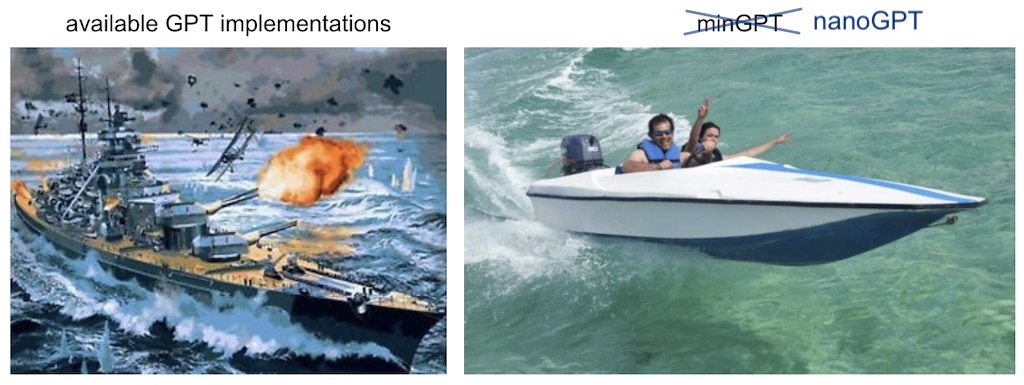
用于训练/微调中型 GPT 的最简单、最快速的代码库。它是 [minGPT](https://github.com/karpathy/minGPT) 的重写版本,优先考虑实用性而非教学性。目前仍在积极开发中,但现在 `train.py` 文件已经可以在 OpenWebText 上重现 GPT-2 (124M),在单个 8XA100 40GB 节点上运行大约需要 4 天的训练时间。代码本身简单易读:`train.py` 是一个约 300 行的样板训练循环,而 `model.py` 是一个约 300 行的 GPT 模型定义,可以选择从 OpenAI 加载 GPT-2 权重。就是这样。
因为代码非常简单,所以你可以非常容易地根据自己的需求进行修改、从头训练新模型,或者微调预训练的 checkpoint(例如,目前可作为起点的最大模型是 OpenAI 的 GPT-2 1.3B 模型)。
## 安装说明
```
pip install torch numpy transformers datasets tiktoken wandb tqdm
```
依赖项:
- [pytorch](https://pytorch.org) <3
- [numpy](https://numpy.org/install/) <3
- `transformers` 用于 huggingface transformers <3(用于加载 GPT-2 checkpoint)
- `datasets` 用于 huggingface datasets <3(如果你想下载并预处理 OpenWebText)
- `tiktoken` 用于 OpenAI 的快速 BPE 代码 <3
- `wandb` 用于可选的日志记录 <3
- `tqdm` 用于显示进度条 <3
## 快速开始
如果你不是深度学习专业人士,只是想感受一下魔法并初步尝试,最快的入门方法是在莎士比亚的作品上训练一个字符级的 GPT。首先,我们将其下载为一个单独的 (1MB) 文件,并将原始文本转换为一大串整数:
```
python data/shakespeare_char/prepare.py
```
这会在该数据目录中创建 `train.bin` 和 `val.bin`。现在是时候训练你的 GPT 了。它的大小在很大程度上取决于你系统的计算资源:
**我有一块 GPU**。太好了,我们可以使用 [config/train_shakespeare_char.py](config/train_shakespeare_char.py) 配置文件中提供的设置,快速训练一个小型 GPT:
```
python train.py config/train_shakespeare_char.py
```
如果你查看该文件,你会发现我们正在训练一个上下文大小最多为 256 个字符、包含 384 个特征通道的 GPT,它是一个 6 层的 Transformer,每层有 6 个头。在单块 A100 GPU 上,这次训练大约需要 3 分钟,最佳验证损失为 1.4697。根据配置,模型 checkpoint 会被写入 `--out_dir` 目录 `out-shakespeare-char` 中。因此,一旦训练完成,我们就可以通过让采样脚本指向该目录,来从最佳模型中进行采样:
```
python sample.py --out_dir=out-shakespeare-char
```
这会生成几个样本,例如:
```
ANGELO:
And cowards it be strawn to my bed,
And thrust the gates of my threats,
Because he that ale away, and hang'd
An one with him.
DUKE VINCENTIO:
I thank your eyes against it.
DUKE VINCENTIO:
Then will answer him to save the malm:
And what have you tyrannous shall do this?
DUKE VINCENTIO:
If you have done evils of all disposition
To end his power, the day of thrust for a common men
That I leave, to fight with over-liking
Hasting in a roseman.
```
哈哈 `¯\_(ツ)_/¯`。对于在 GPU 上训练了 3 分钟的字符级模型来说,这还不赖。如果在这个数据集上微调预训练的 GPT-2 模型,很可能会获得更好的结果(参见后面的微调章节)。
**我只有一台 macbook**(或其他低配置电脑)。别担心,我们仍然可以训练 GPT,但我们想把参数调低一些。我建议获取最前沿的 PyTorch nightly 版本(安装时在[这里选择](https://pytorch.org/get-started/locally/)),因为它目前很有可能让你的代码更高效。但即使没有它,一个简单的训练运行也可能如下所示:
```
python train.py config/train_shakespeare_char.py --device=cpu --compile=False --eval_iters=20 --log_interval=1 --block_size=64 --batch_size=12 --n_layer=4 --n_head=4 --n_embd=128 --max_iters=2000 --lr_decay_iters=2000 --dropout=0.0
```
在这里,由于我们是在 CPU 而不是 GPU 上运行,我们必须设置 `--device=cpu`,同时还要通过 `--compile=False` 关闭 PyTorch 2.0 编译。然后当我们进行评估时,我们会得到稍微有些噪音但更快的估算值(`--eval_iters=20`,从 200 降下来),我们的上下文大小只有 64 个字符而不是 256 个字符,并且每次迭代的 batch size 只有 12 个样本,而不是 64 个。我们还将使用一个更小的 Transformer(4 层,4 个头,128 的 embedding 大小),并将迭代次数减少到 2000 次(并且通常相应地通过 `--lr_decay_iters` 将学习率衰减到与 max_iters 相近的值)。因为我们的网络太小了,我们也减轻了正则化(`--dropout=0.0`)。这仍然只需要大约 3 分钟就能运行完,但我们的损失只有 1.88,因此生成的样本也更糟,但这仍然很有趣:
```
python sample.py --out_dir=out-shakespeare-char --device=cpu
```
生成这样的样本:
```
GLEORKEN VINGHARD III:
Whell's the couse, the came light gacks,
And the for mought you in Aut fries the not high shee
bot thou the sought bechive in that to doth groan you,
No relving thee post mose the wear
```
对于在 CPU 上跑了大约 3 分钟的结果来说还不赖,大致抓住了字符分布的神韵。如果你愿意多等一会儿,请随意微调超参数,增加网络的大小、上下文长度(`--block_size`)、训练时间等等。
最后,在 Apple Silicon Macbooks 上,配合最新版本的 PyTorch,请务必添加 `--device=mps`(“Metal Performance Shaders”的缩写);这样 PyTorch 就会使用片上 GPU,这可以*显著*加速训练(2-3 倍)并允许你使用更大的网络。有关更多信息,请参见 [Issue 28](https://github.com/karpathy/nanoGPT/issues/28)。
## 复现 GPT-2
一个更严谨的深度学习专业人士可能会对复现 GPT-2 的结果更感兴趣。那么我们开始吧——首先我们对数据集进行分词,在这个例子中是 [OpenWebText](https://openwebtext2.readthedocs.io/en/latest/),它是 OpenAI(私有的)WebText 的开源复刻版:
```
python data/openwebtext/prepare.py
```
这会下载并对 [OpenWebText](https://huggingface.co/datasets/openwebtext) 数据集进行分词。它将创建一个 `train.bin` 和 `val.bin`,以原始的 uint16 字节形式按一维序列存储 GPT2 BPE token id。然后我们就可以开始训练了。要复现 GPT-2 (124M),你至少需要一个 8X A100 40GB 的节点,并运行:
```
torchrun --standalone --nproc_per_node=8 train.py config/train_gpt2.py
```
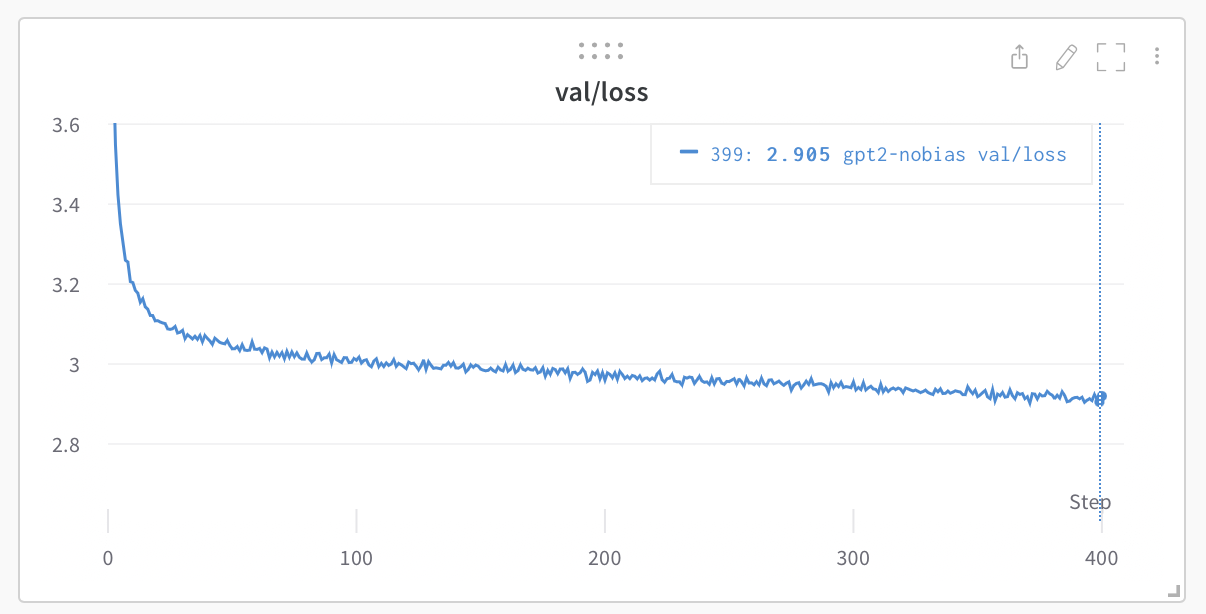
这将使用 PyTorch Distributed Data Parallel (DDP) 运行大约 4 天,损失会降至 ~2.85。现在,仅在 OWT 上进行评估的 GPT-2 模型获得的验证损失约为 3.11,但如果你对其进行微调,损失会降至 ~2.85 左右(由于明显的领域差异),从而使这两个模型的效果大致匹配。
如果你处于集群环境中,并且幸运地拥有多个 GPU 节点,你可以让 GPU 满载运行,例如跨 2 个节点运行:
```
# 在第一个(master)节点上运行,示例 IP 为 123.456.123.456:
torchrun --nproc_per_node=8 --nnodes=2 --node_rank=0 --master_addr=123.456.123.456 --master_port=1234 train.py
# 在 worker 节点上运行:
torchrun --nproc_per_node=8 --nnodes=2 --node_rank=1 --master_addr=123.456.123.456 --master_port=1234 train.py
```
对你的网络互联进行基准测试(例如使用 iperf3)是个好主意。特别是,如果你没有 Infiniband,请在上面的启动命令前加上 `NCCL_IB_DISABLE=1`。你的多节点训练可以运行,但极大概率会_像爬行一样慢_。默认情况下,checkpoint 会定期写入 `--out_dir`。我们可以简单地通过 `python sample.py` 来从模型中采样。
最后,要在单个 GPU 上进行训练,只需运行 `python train.py` 脚本。查看它所有的参数,该脚本力求非常易读、易修改且透明。你很可能需要根据自己的需求调整其中的一些变量。
## 基准测试
OpenAI GPT-2 的 checkpoint 让我们能够为 openwebtext 设定一些基准。我们可以通过以下方式获取数据:
```
$ python train.py config/eval_gpt2.py
$ python train.py config/eval_gpt2_medium.py
$ python train.py config/eval_gpt2_large.py
$ python train.py config/eval_gpt2_xl.py
```
并观察到训练集和验证集上的以下损失:
| model | params | train loss | val loss |
| ------| ------ | ---------- | -------- |
| gpt2 | 124M | 3.11 | 3.12 |
| gpt2-medium | 350M | 2.85 | 2.84 |
| gpt2-large | 774M | 2.66 | 2.67 |
| gpt2-xl | 1558M | 2.56 | 2.54 |
然而,我们必须注意到 GPT-2 是在(封闭的、从未公开发布的)WebText 上训练的,而 OpenWebText 只是该数据集尽力而为的开源复刻版。这意味着存在数据集领域差异。实际上,采用 GPT-2 (124M) 的 checkpoint 并直接在 OWT 上微调一段时间,损失会降至 ~2.85 左右。这便成为了复现方面更合适的基准。
## 微调
微调与训练没有什么不同,我们只需确保从预训练模型进行初始化,并使用较小的学习率进行训练。有关如何在新文本上微调 GPT 的示例,请转到 `data/shakespeare` 并运行 `prepare.py` 以下载微小的 shakespeare 数据集,并使用来自 GPT-2 的 OpenAI BPE tokenizer 将其渲染为 `train.bin` 和 `val.bin`。与 OpenWebText 不同,这将在几秒钟内运行完成。微调只需很少的时间,例如在单块 GPU 上只需几分钟。运行如下的微调示例:
```
python train.py config/finetune_shakespeare.py
```
这将加载 `config/finetune_shakespeare.py` 中的配置参数覆盖(不过我并没有对它们进行太多微调)。基本上,我们使用 `init_from` 从 GPT2 checkpoint 进行初始化,并像平常一样进行训练,只是训练时间更短,学习率更小。如果你遇到了内存不足的情况,请尝试减小模型大小(它们是 `{'gpt2', 'gpt2-medium', 'gpt2-large', 'gpt2-xl'}`)或者尝试减小 `block_size`(上下文长度)。最好的 checkpoint(最低的验证损失)将存放在 `out_dir` 目录中,例如根据配置文件,默认是在 `out-shakespeare`。然后你可以运行 `sample.py --out_dir=out-shakespeare` 中的代码:
```
THEODORE:
Thou shalt sell me to the highest bidder: if I die,
I sell thee to the first; if I go mad,
I sell thee to the second; if I
lie, I sell thee to the third; if I slay,
I sell thee to the fourth: so buy or sell,
I tell thee again, thou shalt not sell my
possession.
JULIET:
And if thou steal, thou shalt not sell thyself.
THEODORE:
I do not steal; I sell the stolen goods.
THEODORE:
Thou know'st not what thou sell'st; thou, a woman,
Thou art ever a victim, a thing of no worth:
Thou hast no right, no right, but to be sold.
```
哇哦,GPT 在那边进入了一个黑暗的地方。我真的没有太仔细地调整配置中的超参数,请随意尝试!
## 采样 / 推理
使用 `sample.py` 脚本可以从 OpenAI 发布的预训练 GPT-2 模型中进行采样,或者从你自己训练的模型中进行采样。例如,这里有一种从可用的最大模型 `gpt2-xl` 中进行采样的方法:
```
python sample.py \
--init_from=gpt2-xl \
--start="What is the answer to life, the universe, and everything?" \
--num_samples=5 --max_new_tokens=100
```
如果你想从你训练的模型中采样,请使用 `--out_dir` 将代码指向相应的路径。你还可以使用文件中的文本来提示模型,例如 ```python sample.py --start=FILE:prompt.txt```。
## 效率说明
对于简单的模型基准测试和性能分析,`bench.py` 可能会很有用。它与 `train.py` 训练循环核心中发生的事情完全相同,但省去了许多其他复杂性。
请注意,该代码默认使用 [PyTorch 2.0](https://pytorch.org/get-started/pytorch-2.0/)。在撰写本文时(2022年12月29日),这使得 `torch.compile()` 在 nightly 版本中可用。这一行代码带来的改进是显而易见的,例如将迭代时间从 ~250毫秒 / iter 缩短到了 135毫秒 / iter。PyTorch 团队干得漂亮!
## 待办事项
- 研究并添加 FSDP 替代 DDP
- 在标准评估上进行零样本困惑度评估(例如 LAMBADA?HELM?等)
- 完善微调脚本,我认为目前的超参数不够好
- 设定训练期间线性增加 batch size 的调度计划
- 融合其他的 embedding 方案(rotary, alibi)
- 我觉得应该把 checkpoint 中的优化器缓存和模型参数分离开来
- 增加关于网络健康状况的日志记录(例如梯度截断事件、幅度)
- 针对更好的初始化等进行更多研究
## 故障排除
请注意,该仓库默认使用 PyTorch 2.0(即 `torch.compile`)。这还相当新颖且处于实验阶段,并且并非在所有平台上都可用(例如 Windows)。如果你遇到相关的错误信息,请尝试通过添加 `--compile=False` 标志来禁用它。这会减慢代码的运行速度,但至少它能够运行。
要了解关于此代码库、GPT 和语言建模的更多背景信息,观看我的 [Zero To Hero 系列](https://karpathy.ai/zero-to-hero.html) 可能会有所帮助。具体来说,如果你有一定的语言建模基础,那么这个 [GPT 视频](https://www.youtube.com/watch?v=kCc8FmEb1nY)非常受欢迎。
如果有更多问题/讨论,欢迎加入 Discord 上的 **#nanoGPT** 频道:
[](https://discord.gg/3zy8kqD9Cp)
## 致谢
所有 nanoGPT 实验都由 [Lambda labs](https://lambdalabs.com) 提供的 GPU 驱动,这是我最喜欢的云 GPU 提供商。感谢 Lambda labs 赞助 nanoGPT!
标签:DLL 劫持, GPT, PyTorch, 人工智能, 凭据扫描, 大语言模型, 模型训练, 深度学习, 漏洞管理, 用户模式Hook绕过, 逆向工具