secutils-dev/secutils
GitHub: secutils-dev/secutils
一款面向工程师和研究者的开源安全工具箱,整合了 Webhook 模拟、证书管理、CSP 配置和网页追踪等常用安全实用功能。
Stars: 100 | Forks: 3
#  [Secutils.dev](https://secutils.dev) · [](https://github.com/secutils-dev/secutils/blob/main/LICENSE) [](https://github.com/secutils-dev/secutils/actions)
Secutils.dev 是一款开源、多功能且简单易用的安全工具箱,由应用安全工程师为工程师和研究人员打造。
## 为什么选择 Secutils.dev?
大型安全解决方案令人印象深刻,但对于我们普通工程师来说,往往价格昂贵、复杂且有些大材小用。
另一方面,有大量方便的工具和脚本可以解决特定的安全问题——它们简单且
实惠,但试图同时应付它们既困难又混乱。Secutils.dev 旨在成为重量级解决方案
和分散工具之间的“甜蜜点”。它是开放的、用户友好的,也是您在日常工作中常用的
精选实用程序工具箱,无论您是单打独斗还是大团队的一员。
Secutils.dev 遵循[开放安全原则](https://en.wikipedia.org/wiki/Open_security)并提供:
* 针对复杂安全概念的引导式体验
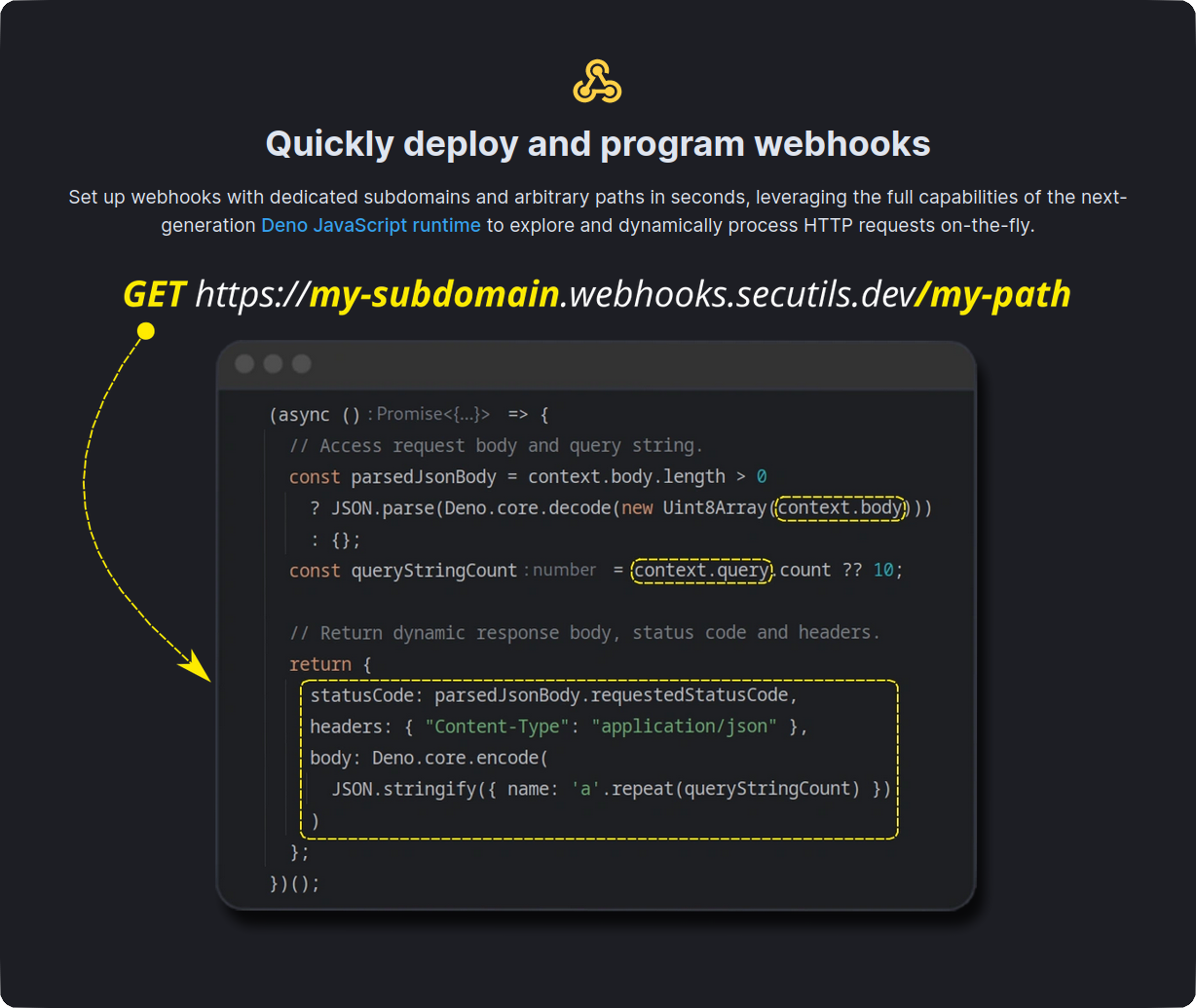
* 用于快速模拟 HTTP API 和 webhook 的[请求响应器](https://secutils.dev/docs/guides/webhooks)
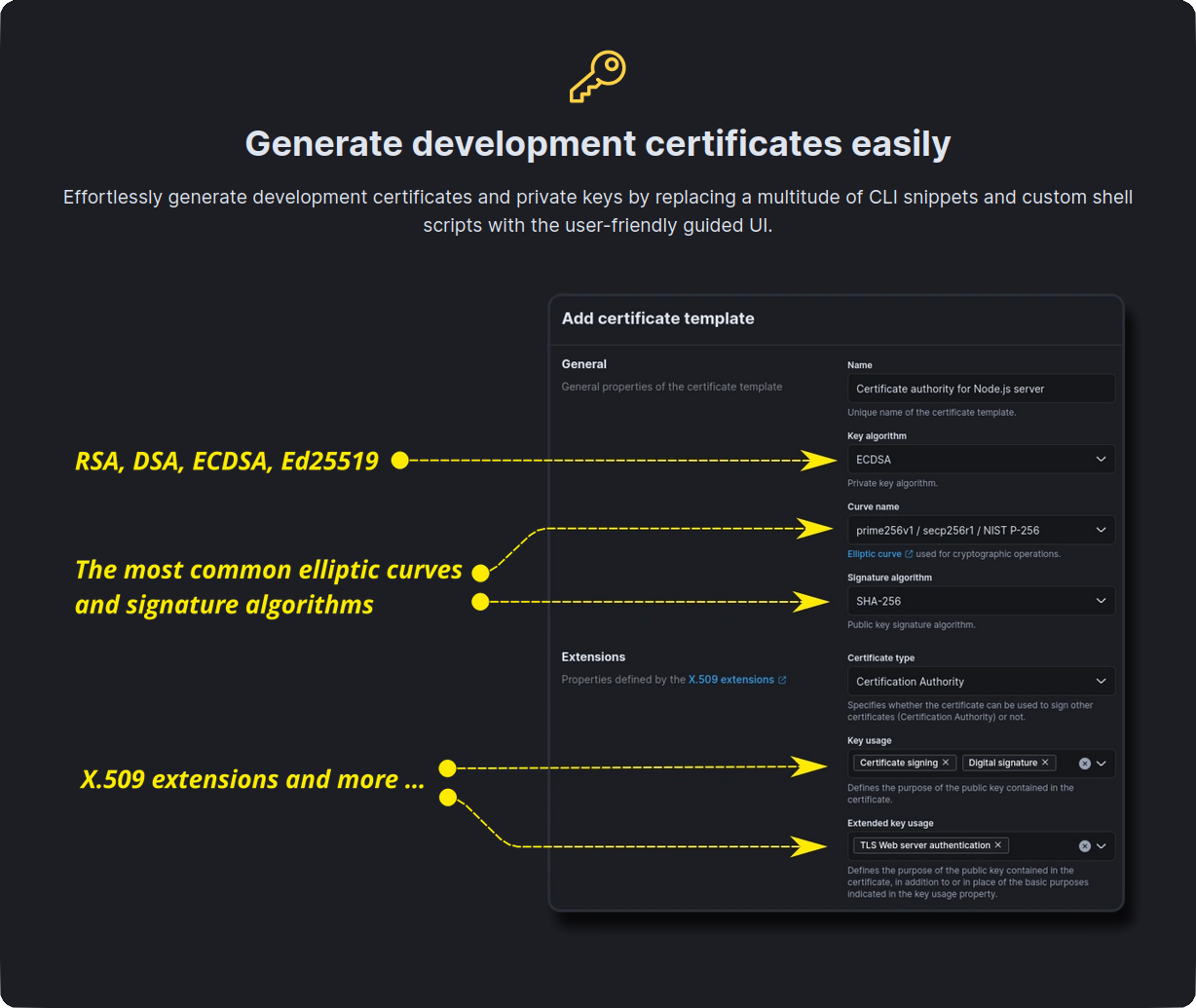
* 用于测试加密安全协议的证书和私钥[模板](https://secutils.dev/docs/guides/digital_certificates/certificate_templates)
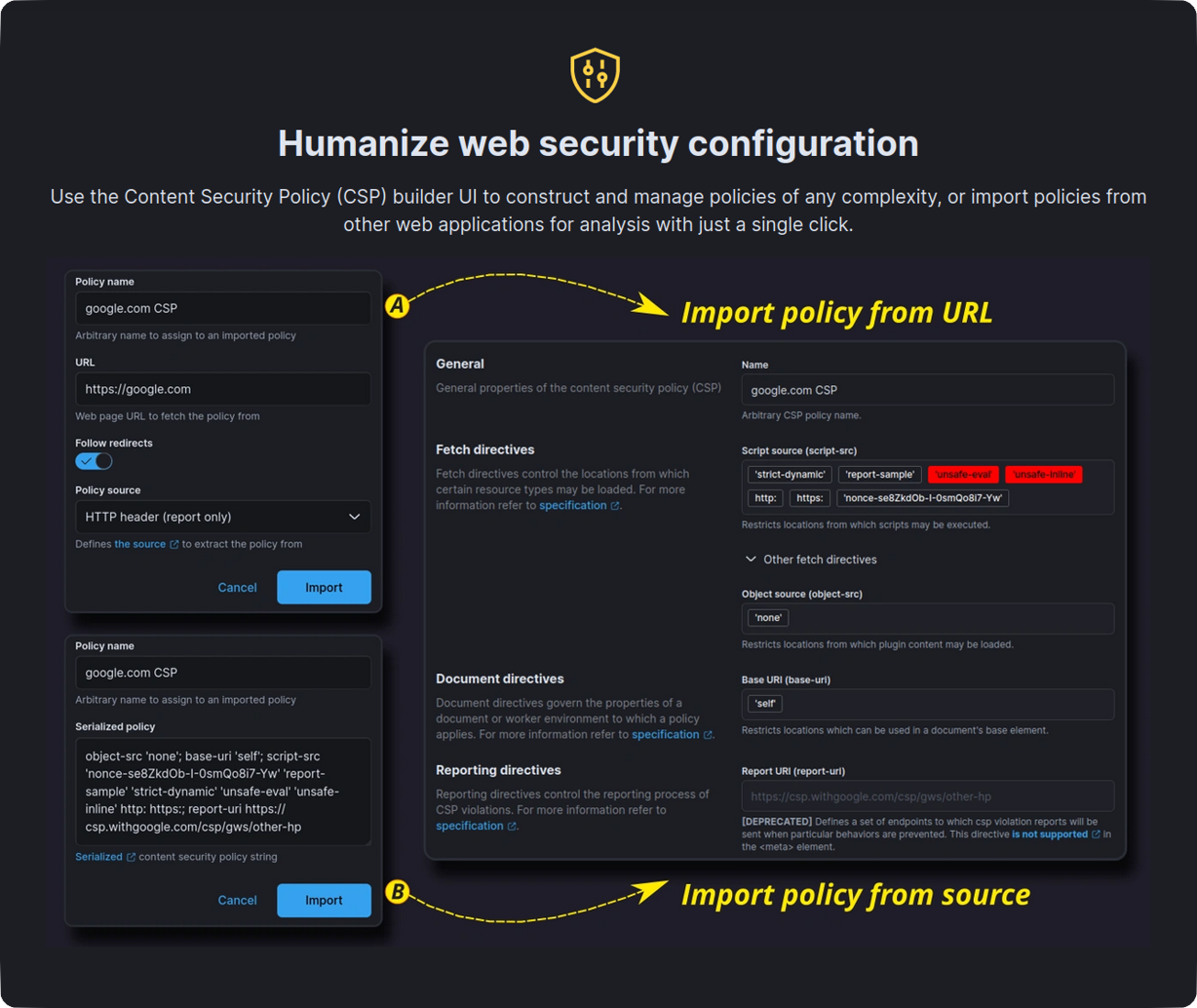
* [内容安全策略 (CSP) 管理](https://secutils.dev/docs/guides/web_security/csp),支持从头导入和
创建策略
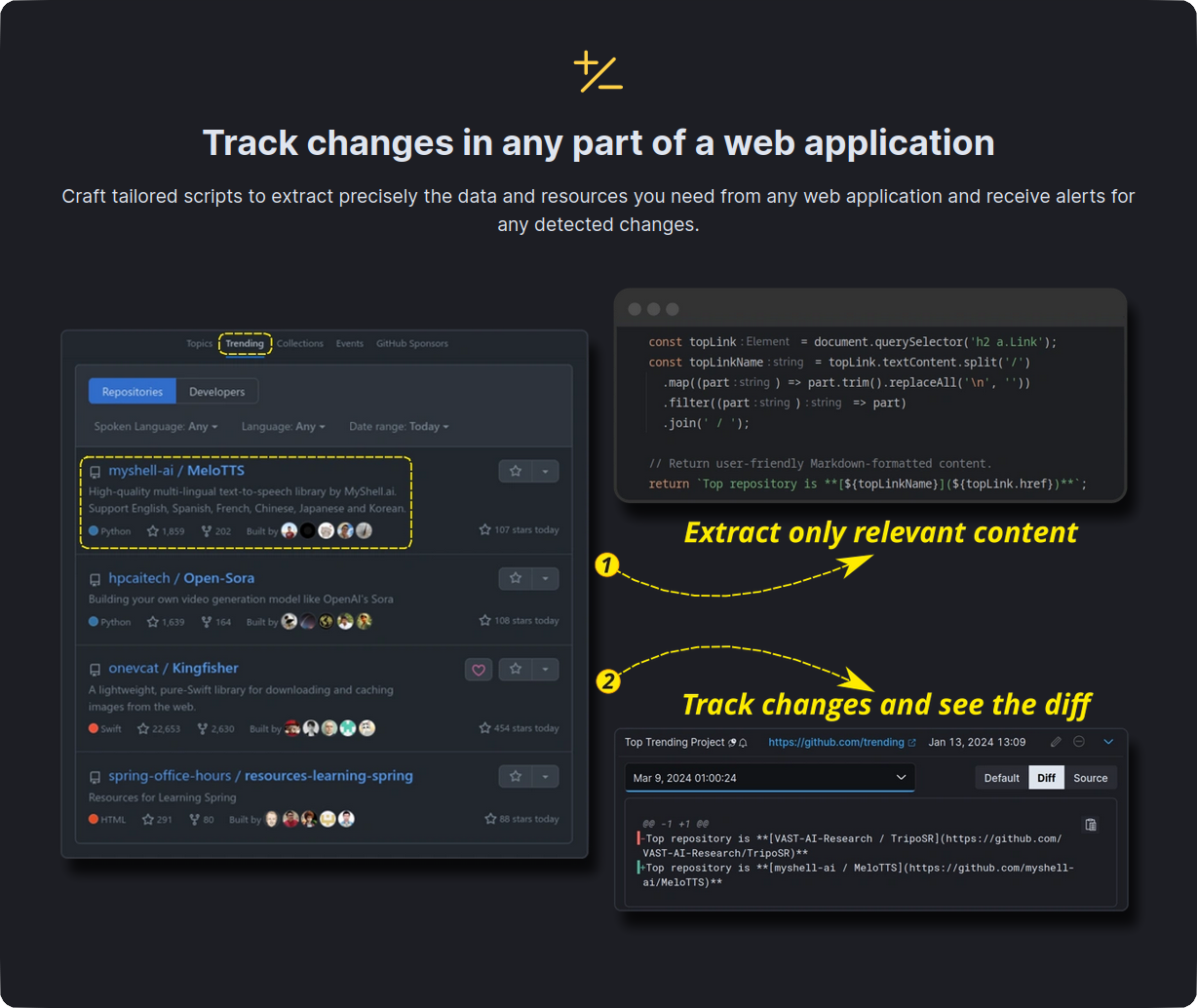
* 用于[网页内容和资源跟踪](https://secutils.dev/docs/guides/web_scraping/page)、内容跟踪等
的工具
## 前置条件
- [Rust](https://www.rust-lang.org/tools/install) (stable toolchain)
- [Node.js](https://nodejs.org/) 22+ (见 `.nvmrc`)
- [Docker](https://docs.docker.com/get-docker/) 和 [Docker Compose](https://docs.docker.com/compose/install/)
## 入门指南
### 1. 使用子模块克隆仓库
```
git clone --recurse-submodules https://github.com/secutils-dev/secutils.git
cd secutils
```
如果您在克隆时未使用 `--recurse-submodules`,请使用以下命令初始化子模块:
```
git submodule update --init --recursive
```
### 2. 设置环境
复制示例环境文件并进行自定义:
```
cp .env.example .env
```
生成用于 Kratos webhook 认证的 JWT token:
```
# Replace the secret with your own (openssl rand -hex 16)
cargo run -p secutils-jwt-tools -- generate \
--secret
[Secutils.dev](https://secutils.dev) · [](https://github.com/secutils-dev/secutils/blob/main/LICENSE) [](https://github.com/secutils-dev/secutils/actions)
Secutils.dev 是一款开源、多功能且简单易用的安全工具箱,由应用安全工程师为工程师和研究人员打造。
## 为什么选择 Secutils.dev?
大型安全解决方案令人印象深刻,但对于我们普通工程师来说,往往价格昂贵、复杂且有些大材小用。
另一方面,有大量方便的工具和脚本可以解决特定的安全问题——它们简单且
实惠,但试图同时应付它们既困难又混乱。Secutils.dev 旨在成为重量级解决方案
和分散工具之间的“甜蜜点”。它是开放的、用户友好的,也是您在日常工作中常用的
精选实用程序工具箱,无论您是单打独斗还是大团队的一员。
Secutils.dev 遵循[开放安全原则](https://en.wikipedia.org/wiki/Open_security)并提供:
* 针对复杂安全概念的引导式体验
* 用于快速模拟 HTTP API 和 webhook 的[请求响应器](https://secutils.dev/docs/guides/webhooks)
* 用于测试加密安全协议的证书和私钥[模板](https://secutils.dev/docs/guides/digital_certificates/certificate_templates)
* [内容安全策略 (CSP) 管理](https://secutils.dev/docs/guides/web_security/csp),支持从头导入和
创建策略
* 用于[网页内容和资源跟踪](https://secutils.dev/docs/guides/web_scraping/page)、内容跟踪等
的工具




## 前置条件
- [Rust](https://www.rust-lang.org/tools/install) (stable toolchain)
- [Node.js](https://nodejs.org/) 22+ (见 `.nvmrc`)
- [Docker](https://docs.docker.com/get-docker/) 和 [Docker Compose](https://docs.docker.com/compose/install/)
## 入门指南
### 1. 使用子模块克隆仓库
```
git clone --recurse-submodules https://github.com/secutils-dev/secutils.git
cd secutils
```
如果您在克隆时未使用 `--recurse-submodules`,请使用以下命令初始化子模块:
```
git submodule update --init --recursive
```
### 2. 设置环境
复制示例环境文件并进行自定义:
```
cp .env.example .env
```
生成用于 Kratos webhook 认证的 JWT token:
```
# Replace the secret with your own (openssl rand -hex 16)
cargo run -p secutils-jwt-tools -- generate \
--secret --sub @kratos --exp 1year
```
使用生成的 token 更新 `.env` 中的 `SELFSERVICE_FLOWS_*` 和 `COURIER_*` 值。
### 3. 启动基础设施
使用 Docker Compose 启动 PostgreSQL、Ory Kratos、Retrack API 和 Retrack Web Scraper:
```
make dev-up
```
或者直接运行:
```
docker compose -f dev/docker/docker-compose.yml --env-file .env up --build
```
要拆除所有内容并重新开始:
```
make dev-down
```
### 4. 启动 Secutils API
```
cargo run
```
API 将在 http://localhost:7070 上可用。验证其是否正在运行:
```
curl -s http://localhost:7070/api/status
# {"version":"1.0.0-beta.2","level":"available"}
```
### 5. 启动 Web UI
```
npm --prefix components/secutils-webui i
npm --prefix components/secutils-webui run watch
```
UI 将在 http://localhost:7171 上可用。
## 配置
服务器使用 TOML 文件 (`secutils.toml`) 进行配置。请参阅以下示例:
```
port = 7070
[db]
name = 'secutils'
host = 'localhost'
port = 5432
username = 'postgres'
password = 'password'
[components]
kratos_url = 'http://localhost:4433/'
kratos_admin_url = 'http://localhost:4434/'
[retrack]
host = 'http://localhost:7676/'
[security.preconfigured_users]
"admin@mydomain.dev" = { handle = "admin", tier = "ultimate" }
[smtp]
address = "xxx"
username = "xxx"
password = "xxx"
[utils]
webhook_url_type = "path"
```
您还可以通过带有 `SECUTILS_` 前缀的环境变量覆盖配置值
(嵌套键使用 `__`,例如 `SECUTILS_DB__HOST=localhost`)。
## 更新 Retrack 子模块
[Retrack](https://github.com/secutils-dev/retrack) 项目作为 git 子模块包含在
`components/retrack` 中。要将其更新到最新提交:
```
git submodule update --remote components/retrack
```
或固定到特定提交:
```
cd components/retrack
git checkout
cd ../..
git add components/retrack
```
## 文档
安装依赖项并在监视模式下运行文档 UI:
```
npm --prefix components/secutils-docs i
npm --prefix components/secutils-docs run watch
```
文档 UI 将在 http://localhost:7373 上可用。文档也托管在
[secutils.dev/docs](https://secutils.dev/docs)。
## 端到端测试
E2E 测试使用 [Playwright](https://playwright.dev/) 并针对 Docker 中的完整堆栈运行。
### 本地运行
```
# Install Playwright and browsers (once)
cd e2e && npm ci && npx playwright install --with-deps chromium && cd ..
# Start the full stack
make e2e-up
# Wait for services to be ready, then run tests
make e2e-test
# Run in interactive UI mode
make e2e-test ARGS="--ui"
# Run in headed mode (visible browser)
make e2e-test ARGS="--headed"
# Run a specific test file
make e2e-test ARGS="tests/app.spec.ts"
# View the HTML report
make e2e-report
# Tear down
make e2e-down
```
### 配合 API 使用
生成 JSON Web Token 并通过 `curl` 直接使用 API:
```
cargo run -p secutils-jwt-tools -- generate \
--secret --sub user@secutils.dev --exp 30days
curl -XGET --header \
"Authorization: Bearer " \
http://localhost:7070/api/status
```
## 重新初始化本地数据库
要管理 **开发** 数据库,请安装
[SQLx 的命令行工具](https://github.com/launchbadge/sqlx/tree/main/sqlx-cli):
```
cargo install --force sqlx-cli
# Drops, creates, and migrates the database referenced
# in the DATABASE_URL from the .env file.
sqlx database drop
sqlx database create
sqlx migrate run
```
## Docker
使用以下命令构建镜像:
```
# Host architecture
docker build --tag secutils-api:latest .
docker build --tag secutils-webui:latest -f Dockerfile.webui .
docker build --tag secutils-docs:latest -f Dockerfile.docs .
# Cross-compile to ARM64 architecture
docker build --platform linux/arm64 --tag secutils-api:latest .
docker build --platform linux/arm64 --tag secutils-webui:latest -f Dockerfile.webui .
docker build --platform linux/arm64 --tag secutils-docs:latest -f Dockerfile.docs .
# Cross-compile to ARM64 musl architecture
docker build --platform linux/arm64 --tag secutils-api:latest -f Dockerfile.aarch64-unknown-linux-musl .
```
## 可用的 Make 目标
| 命令 | 描述 |
|------------------------------|--------------------------------------------------------------------------|
| `make dev-up` | 启动开发基础设施 (`BUILD=1` 以重新构建镜像) |
| `make dev-down` | 停止开发基础设施并移除卷 |
| `make dev-logs` | 查看开发基础设施的尾部日志 |
| `make api` | 运行 Secutils API (`cargo run`) |
| `make webui` | 运行 Web UI 开发服务器 |
| `make webui-test` | 运行 Web UI 单元测试 (`ARGS="--watch"` 用于监视模式) |
| `make docs` | 运行文档开发服务器 |
| `make dev-debug-scraper` | 启动基础设施,并将 web scraper 路由到主机 (用于有头浏览器) |
| `make scraper-setup` | 安装 web scraper npm 依赖项 (运行一次) |
| `make scraper` | 在主机上运行带有可见浏览器的 web scraper (默认使用 Chrome) |
| `make e2e-up` | 启动完整的 e2e 堆栈 (`BUILD=1` 以重新构建镜像) |
| `make e2e-down` | 停止 e2e 堆栈并移除卷 |
| `make e2e-test` | 运行 Playwright e2e 测试 (`ARGS="--ui"` 用于交互模式) |
| `make e2e-test-loop` | 重复运行 e2e 测试 (`RUNS=N` 默认为 10, `ARGS=...`) |
| `make e2e-report` | 打开 Playwright HTML 报告 |
| `make e2e-logs` | 查看 e2e 堆栈的尾部日志 |
| `make docs-screenshots` | 重新生成文档截图 (需要运行 e2e 堆栈, 支持 `ARGS`) |
| `make docs-screenshots-loop` | 重复运行文档截图测试 (`RUNS=N` 默认为 10, `ARGS=...`) |
| `make db-reset` | 删除、创建并迁移开发数据库 |
| `make docker-api` | 构建 Secutils API Docker 镜像 |
| `make docker-webui` | 构建 Web UI Docker 镜像 |
| `make docker-docs` | 构建 Docs Docker 镜像 |
| `make clean` | 移除构建产物 |
| `make help` | 显示所有可用目标 |
### 使用可见浏览器调试 web scraper
要在页面跟踪器运行时查看 Chromium,请使用有头 scraper 模式,而不是
基于 Docker 的模式:
```
make scraper-setup # once: install npm dependencies
make dev-debug-scraper # start infra (scraper routed to host)
make scraper # run web scraper with visible Chrome
```
默认情况下,`make scraper` 在 macOS 上使用 Google Chrome。覆盖使用:
```
make scraper CHROME_PATH="/path/to/chromium"
```
要切换回正常的全 Docker 设置:`make dev-down && make dev-up`。
## 致谢
如果没有以下出色的项目和工具,Secutils.dev 将无法实现:
| 名称 | 描述 |
|-------------------------------------------------------------------------------------------------------|-----------------------------------------------------------------------------------------------------------------------------------------------------------------------------------------------------------|
|  | [Ory Kratos](https://github.com/ory/kratos) 是 Auth0、Okta 或 Firebase 的开源替代品,具有强化的安全性和 PassKeys、SMS、OIDC、Social Sign In、MFA、FIDO、TOTP 和 OTP、WebAuthn、无密码等功能。 |
| 待续... | |
## 社区
- ❓ 在 [GitHub Discussions](https://github.com/secutils-dev/secutils/discussions) 上提问
- 🐛 在 [GitHub Issues](https://github.com/secutils-dev/secutils/issues) 上报告错误
- 📣 在 [Twitter](https://twitter.com/secutils) 或 [Mastodon](https://fosstodon.org/@secutils) 上关注新功能和公告的最新动态
[Secutils.dev](https://secutils.dev) · [](https://github.com/secutils-dev/secutils/blob/main/LICENSE) [](https://github.com/secutils-dev/secutils/actions)
Secutils.dev 是一款开源、多功能且简单易用的安全工具箱,由应用安全工程师为工程师和研究人员打造。
## 为什么选择 Secutils.dev?
大型安全解决方案令人印象深刻,但对于我们普通工程师来说,往往价格昂贵、复杂且有些大材小用。
另一方面,有大量方便的工具和脚本可以解决特定的安全问题——它们简单且
实惠,但试图同时应付它们既困难又混乱。Secutils.dev 旨在成为重量级解决方案
和分散工具之间的“甜蜜点”。它是开放的、用户友好的,也是您在日常工作中常用的
精选实用程序工具箱,无论您是单打独斗还是大团队的一员。
Secutils.dev 遵循[开放安全原则](https://en.wikipedia.org/wiki/Open_security)并提供:
* 针对复杂安全概念的引导式体验
* 用于快速模拟 HTTP API 和 webhook 的[请求响应器](https://secutils.dev/docs/guides/webhooks)
* 用于测试加密安全协议的证书和私钥[模板](https://secutils.dev/docs/guides/digital_certificates/certificate_templates)
* [内容安全策略 (CSP) 管理](https://secutils.dev/docs/guides/web_security/csp),支持从头导入和
创建策略
* 用于[网页内容和资源跟踪](https://secutils.dev/docs/guides/web_scraping/page)、内容跟踪等
的工具




## 前置条件
- [Rust](https://www.rust-lang.org/tools/install) (stable toolchain)
- [Node.js](https://nodejs.org/) 22+ (见 `.nvmrc`)
- [Docker](https://docs.docker.com/get-docker/) 和 [Docker Compose](https://docs.docker.com/compose/install/)
## 入门指南
### 1. 使用子模块克隆仓库
```
git clone --recurse-submodules https://github.com/secutils-dev/secutils.git
cd secutils
```
如果您在克隆时未使用 `--recurse-submodules`,请使用以下命令初始化子模块:
```
git submodule update --init --recursive
```
### 2. 设置环境
复制示例环境文件并进行自定义:
```
cp .env.example .env
```
生成用于 Kratos webhook 认证的 JWT token:
```
# Replace the secret with your own (openssl rand -hex 16)
cargo run -p secutils-jwt-tools -- generate \
--secret 标签:AD攻击面, API Mock, CSP策略, DevSecOps, HTTP模拟, MITM代理, Webhook回调, Web安全, 上游代理, 内容安全策略, 加密协议, 可视化界面, 安全工具箱, 安全工具集, 安全测试, 安全研发, 攻击性安全, 敏捷安全, 数字证书, 测试用例, 渗透测试辅助, 特征检测, 网络情报, 蓝队分析, 规则仓库, 请求拦截, 资源追踪, 通知系统, 通知系统