M3hank/ExplorerPy
GitHub: M3hank/ExplorerPy
ExplorerPy 是一个 Python 编写的多功能侦测工具包,集成子域名枚举、目录暴力和端口扫描,用于安全测试中的目标信息收集。
Stars: 10 | Forks: 3
# ExplorerPy
ExplorerPy 是一个用于信息收集的侦测工具包。它旨在通过执行各种任务(如子域名枚举、目录暴力破解和端口扫描)来收集有关域名的信息。
## 安装
```
git clone https://github.com/M3hank/ExplorerPy.git
```
```
cd ExplorerPy
```
```
pip3 install -r requirements.txt
```
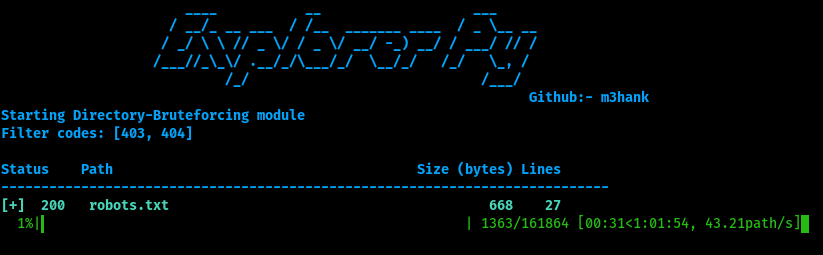
## 截图

### 目录暴力破解模块
## 功能
- 使用暴力破解或 OSINT(开源情报)方法进行子域名枚举
- 目录暴力破解
- 端口扫描
- 多线程执行以获得更快的性能
- 支持指定用于扫描的线程数
- 支持为暴力破解指定自定义字典
- 支持为请求指定超时时间
- 可选择将结果输出到文件
- User-Agent 伪造,在请求中模拟网络浏览器
- HTTP 标头伪造,为请求添加接受语言和编码类型
## 要求
ExplorerPy 具有以下要求:
- Python 3.x 或更高版本
- requests 库
## 用法/示例
```
usage: ExplorerPy [-h] [-d DOMAIN] [-t THREADCOUNT] [-w WORDLIST] [-o OUTPUT_FILE]
[-time TIME]
[-se] [-osint] [-dir] [-ps] [-p PORTRANGE]
optional arguments:
-h, --help show this help message and exit
-d DOMAIN, DOMAIN
Domain name to scan
-t THREADCOUNT
Number of threads to use for scanning (default: 20)
-w WORDLIST
Wordlist to use for brute-forcing
-o OUTPUT_FILE
Output file to write results to (default: None)
-time TIME
Timeout for requests in seconds (default: 15)
Subdomain-Enumeration Arguments:
-se Enable subdomain enumeration module
-osint Use OSINT (Open Source Intelligence) methods instead of
brute-forcing for subdomain enumeration
Directory-Enumeration Arguments:
-dir Enable directory brute-forcing module
-fc, --filter_code FILTER_CODE
Status codes to filter out (comma separated)
-fs, --filter_size FILTER_SIZE
Filter out directories with a response size equal to this value
Port-Scanner Arguments:
-ps Enable port scanning module
-p Range of ports to scan (default: 1024)
```
## 示例
使用暴力破解执行子域名枚举:
```python3 ExplorerPy -d example.com -se -w wordlist.txt```
使用 OSINT 方法执行子域名枚举:
```python3 ExplorerPy -d example.com -se -osint```
执行目录暴力破解:
```python3 ExplorerPy -d example.com -dir -w wordlist.txt```
执行端口扫描:
```python3 ExplorerPy -d example.com -ps```
扫描特定范围的端口:
```python3 ExplorerPy -d example.com -ps -p 1000```
## 免责声明
免责声明
此脚本仅供教育和测试目的使用。不得用于恶意目的,本脚本作者对因使用本脚本而造成的任何滥用或损害概不负责。使用本脚本的风险由您自行承担。
## 许可证
[GNU General Public License v3.0](https://choosealicense.com/licenses/gpl-3.0/)
## 贡献者
- [@M3hank](https://www.github.com/M3hank)
- [@Paresh-Maheshwari](https://www.github.com/Paresh-Maheshwari)
- [@7uyash](https://www.github.com/7uyash)
## 贡献
欢迎随时贡献代码!
标签:Python, 主机安全, 子域名枚举, 实时处理, 密码管理, 数据统计, 无后门, 目录爆破, 端口扫描, 系统安全, 系统独立性, 逆向工具