OpenTalker/SadTalker
GitHub: OpenTalker/SadTalker
SadTalker 是一个基于深度学习的音频驱动单图说话人脸动画生成工具,通过学习真实的 3D 运动系数,仅需一张肖像照和一段音频即可生成逼真的说话人视频。
Stars: 13958 | Forks: 2663


 [](https://colab.research.google.com/github/Winfredy/SadTalker/blob/main/quick_demo.ipynb) [](https://huggingface.co/spaces/vinthony/SadTalker) [](https://colab.research.google.com/github/camenduru/stable-diffusion-webui-colab/blob/main/video/stable/stable_diffusion_1_5_video_webui_colab.ipynb)
[](https://colab.research.google.com/github/Winfredy/SadTalker/blob/main/quick_demo.ipynb) [](https://huggingface.co/spaces/vinthony/SadTalker) [](https://colab.research.google.com/github/camenduru/stable-diffusion-webui-colab/blob/main/video/stable/stable_diffusion_1_5_video_webui_colab.ipynb) [](https://replicate.com/cjwbw/sadtalker) [](https://discord.gg/rrayYqZ4tf)
Wenxuan Zhang *,1,2
Xiaodong Cun *,2
Xuan Wang 3
Yong Zhang 2
Xi Shen 2
Yu Guo1
Ying Shan 2
Fei Wang 1
1 西安交通大学 2 腾讯 AI Lab 3 蚂蚁集团
CVPR 2023
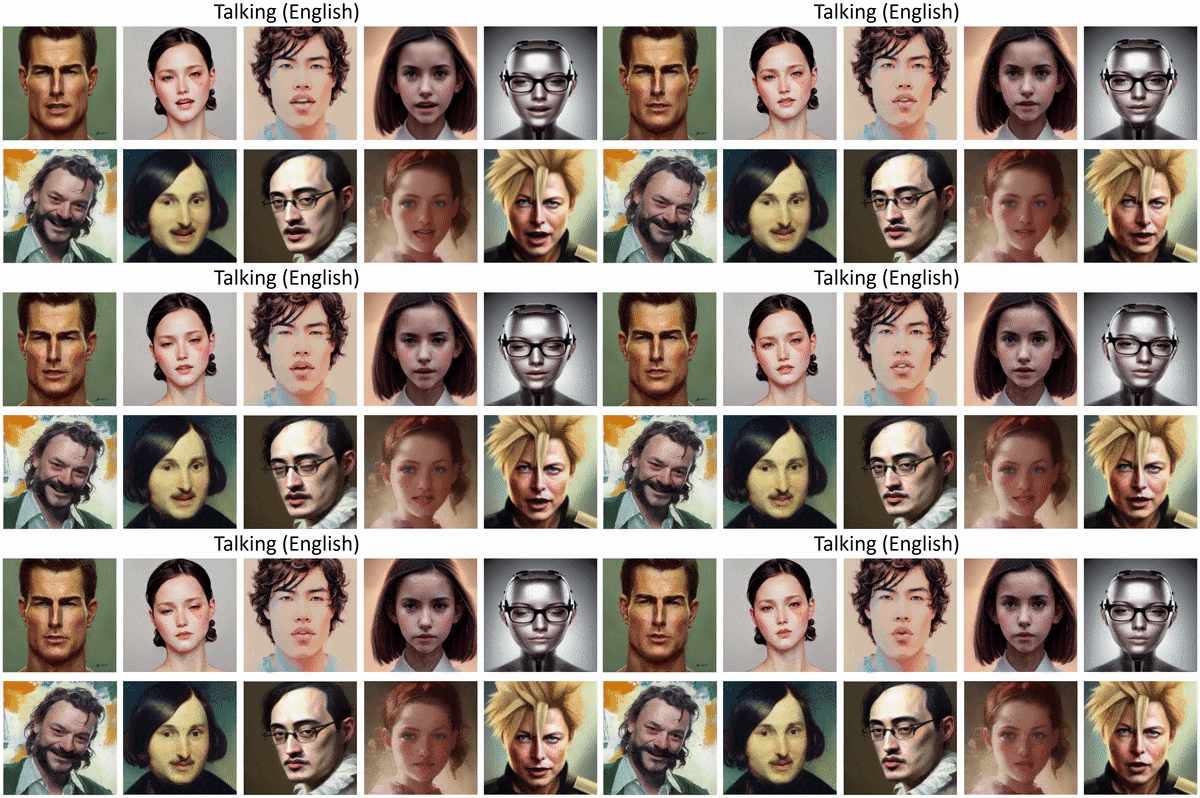 太长不看: 单张肖像图 🙎♂️ + 音频 🎤 = 会说话的头部视频 🎞。
 - 几种新模式(静止模式、参考模式和缩放模式)现已推出!
- 我们很高兴在 [bilibili](https://search.bilibili.com/all?keyword=sadtalker)、[YouTube](https://www.youtube.com/results?search_query=sadtalker) 和 [X (#sadtalker)](https://twitter.com/search?q=%23sadtalker&src) 上看到更多的社区演示。
## 更新日志
以前的更新日志可以在[这里](docs/changlelog.md)找到。
- __[2023.06.12]__:在 WebUI 扩展中添加了更多新功能,请参阅[此处](https://github.com/OpenTalker/SadTalker/discussions/386)的讨论。
- __[2023.06.05]__:发布了新的 512x512 像素(beta)人脸模型。修复了一些 bug 并提升了性能。
- __[2023.04.15]__:添加了由 [@camenduru](https://github.com/camenduru/) 提供的 WebUI Colab notebook:[](https://colab.research.google.com/github/camenduru/stable-diffusion-webui-colab/blob/main/video/stable/stable_diffusion_1_5_video_webui_colab.ipynb)
- __[2023.04.12]__:添加了更详细的 WebUI 安装文档,并修复了重新安装时的问题。
- __[2023.04.12]__:修复了由于第三方包引起的 WebUI 安全问题,并优化了 `sd-webui-extension` 中的输出路径。
- __[2023.04.08]__:在 v0.0.2 版本中,我们在生成的视频中添加了 logo 水印以防止滥用。_该水印已在后续版本中移除。_
- __[2023.04.08]__:在 v0.0.2 版本中,我们添加了全图动画功能以及从百度网盘下载 checkpoint 的链接。我们还优化了 enhancer 的逻辑。
## 待办事项
我们正在 [issue #280](https://github.com/OpenTalker/SadTalker/issues/280) 中跟进新的更新。
## 故障排除
如果你遇到任何问题,请在提出 issue 之前阅读我们的 [常见问题解答](docs/FAQ.md)。
## 1. 安装
社区教程:[中文Windows教程 (Chinese Windows tutorial)](https://www.bilibili.com/video/BV1Dc411W7V6/) | [日本語コース (Japanese tutorial)](https://br-d.fanbox.cc/posts/5685086)。
### Linux/Unix
1. 安装 [Anaconda](https://www.anaconda.com/)、Python 和 `git`。
2. 创建环境并安装依赖项。
```
git clone https://github.com/OpenTalker/SadTalker.git
cd SadTalker
conda create -n sadtalker python=3.8
conda activate sadtalker
pip install torch==1.12.1+cu113 torchvision==0.13.1+cu113 torchaudio==0.12.1 --extra-index-url https://download.pytorch.org/whl/cu113
conda install ffmpeg
pip install -r requirements.txt
### Coqui TTS 对于 gradio demo 是可选的。
### pip install TTS
```
### Windows
中文视频教程可在[此处](https://www.bilibili.com/video/BV1Dc411W7V6/)查看。你也可以按照以下说明进行操作:
1. 安装 [Python 3.8](https://www.python.org/downloads/windows/) 并勾选“Add Python to PATH”。
2. 手动安装 [git](https://git-scm.com/download/win) 或使用 [Scoop](https://scoop.sh/):`scoop install git`。
3. 安装 `ffmpeg`,请遵循[此教程](https://www.wikihow.com/Install-FFmpeg-on-Windows)或使用 [scoop](https://scoop.sh/):`scoop install ffmpeg`。
4. 运行 `git clone https://github.com/Winfredy/SadTalker.git` 下载 SadTalker 仓库。
5. 在[下载部分](#2-download-models)下载 checkpoint 和 gfpgan 模型。
6. 以普通非管理员用户身份从 Windows 资源管理器中运行 `start.bat`,一个基于 Gradio 的 WebUI 演示将会启动。
### macOS
关于在 macOS 上安装 SadTalker 的教程可以在[这里](docs/install.md)找到。
### Docker、WSL 等
请在[这里](docs/install.md)查看更多教程。
## 2. 下载模型
你可以在 Linux/macOS 上运行以下脚本以自动下载所有模型:
```
bash scripts/download_models.sh
```
我们还提供了离线补丁 (`gfpgan/`),因此在生成时不会下载任何模型。
### 预训练模型
* [Google Drive](https://drive.google.com/file/d/1gwWh45pF7aelNP_P78uDJL8Sycep-K7j/view?usp=sharing)
* [GitHub Releases](https://github.com/OpenTalker/SadTalker/releases)
* [百度网盘](https://pan.baidu.com/s/1kb1BCPaLOWX1JJb9Czbn6w?pwd=sadt) (密码: `sadt`)
### GFPGAN 离线补丁
* [Google Drive](https://drive.google.com/file/d/19AIBsmfcHW6BRJmeqSFlG5fL445Xmsyi?usp=sharing)
* [GitHub Releases](https://github.com/OpenTalker/SadTalker/releases)
* [百度网盘](https://pan.baidu.com/s/1P4fRgk9gaSutZnn8YW034Q?pwd=sadt) (密码: `sadt`)
- 几种新模式(静止模式、参考模式和缩放模式)现已推出!
- 我们很高兴在 [bilibili](https://search.bilibili.com/all?keyword=sadtalker)、[YouTube](https://www.youtube.com/results?search_query=sadtalker) 和 [X (#sadtalker)](https://twitter.com/search?q=%23sadtalker&src) 上看到更多的社区演示。
## 更新日志
以前的更新日志可以在[这里](docs/changlelog.md)找到。
- __[2023.06.12]__:在 WebUI 扩展中添加了更多新功能,请参阅[此处](https://github.com/OpenTalker/SadTalker/discussions/386)的讨论。
- __[2023.06.05]__:发布了新的 512x512 像素(beta)人脸模型。修复了一些 bug 并提升了性能。
- __[2023.04.15]__:添加了由 [@camenduru](https://github.com/camenduru/) 提供的 WebUI Colab notebook:[](https://colab.research.google.com/github/camenduru/stable-diffusion-webui-colab/blob/main/video/stable/stable_diffusion_1_5_video_webui_colab.ipynb)
- __[2023.04.12]__:添加了更详细的 WebUI 安装文档,并修复了重新安装时的问题。
- __[2023.04.12]__:修复了由于第三方包引起的 WebUI 安全问题,并优化了 `sd-webui-extension` 中的输出路径。
- __[2023.04.08]__:在 v0.0.2 版本中,我们在生成的视频中添加了 logo 水印以防止滥用。_该水印已在后续版本中移除。_
- __[2023.04.08]__:在 v0.0.2 版本中,我们添加了全图动画功能以及从百度网盘下载 checkpoint 的链接。我们还优化了 enhancer 的逻辑。
## 待办事项
我们正在 [issue #280](https://github.com/OpenTalker/SadTalker/issues/280) 中跟进新的更新。
## 故障排除
如果你遇到任何问题,请在提出 issue 之前阅读我们的 [常见问题解答](docs/FAQ.md)。
## 1. 安装
社区教程:[中文Windows教程 (Chinese Windows tutorial)](https://www.bilibili.com/video/BV1Dc411W7V6/) | [日本語コース (Japanese tutorial)](https://br-d.fanbox.cc/posts/5685086)。
### Linux/Unix
1. 安装 [Anaconda](https://www.anaconda.com/)、Python 和 `git`。
2. 创建环境并安装依赖项。
```
git clone https://github.com/OpenTalker/SadTalker.git
cd SadTalker
conda create -n sadtalker python=3.8
conda activate sadtalker
pip install torch==1.12.1+cu113 torchvision==0.13.1+cu113 torchaudio==0.12.1 --extra-index-url https://download.pytorch.org/whl/cu113
conda install ffmpeg
pip install -r requirements.txt
### Coqui TTS 对于 gradio demo 是可选的。
### pip install TTS
```
### Windows
中文视频教程可在[此处](https://www.bilibili.com/video/BV1Dc411W7V6/)查看。你也可以按照以下说明进行操作:
1. 安装 [Python 3.8](https://www.python.org/downloads/windows/) 并勾选“Add Python to PATH”。
2. 手动安装 [git](https://git-scm.com/download/win) 或使用 [Scoop](https://scoop.sh/):`scoop install git`。
3. 安装 `ffmpeg`,请遵循[此教程](https://www.wikihow.com/Install-FFmpeg-on-Windows)或使用 [scoop](https://scoop.sh/):`scoop install ffmpeg`。
4. 运行 `git clone https://github.com/Winfredy/SadTalker.git` 下载 SadTalker 仓库。
5. 在[下载部分](#2-download-models)下载 checkpoint 和 gfpgan 模型。
6. 以普通非管理员用户身份从 Windows 资源管理器中运行 `start.bat`,一个基于 Gradio 的 WebUI 演示将会启动。
### macOS
关于在 macOS 上安装 SadTalker 的教程可以在[这里](docs/install.md)找到。
### Docker、WSL 等
请在[这里](docs/install.md)查看更多教程。
## 2. 下载模型
你可以在 Linux/macOS 上运行以下脚本以自动下载所有模型:
```
bash scripts/download_models.sh
```
我们还提供了离线补丁 (`gfpgan/`),因此在生成时不会下载任何模型。
### 预训练模型
* [Google Drive](https://drive.google.com/file/d/1gwWh45pF7aelNP_P78uDJL8Sycep-K7j/view?usp=sharing)
* [GitHub Releases](https://github.com/OpenTalker/SadTalker/releases)
* [百度网盘](https://pan.baidu.com/s/1kb1BCPaLOWX1JJb9Czbn6w?pwd=sadt) (密码: `sadt`)
### GFPGAN 离线补丁
* [Google Drive](https://drive.google.com/file/d/19AIBsmfcHW6BRJmeqSFlG5fL445Xmsyi?usp=sharing)
* [GitHub Releases](https://github.com/OpenTalker/SadTalker/releases)
* [百度网盘](https://pan.baidu.com/s/1P4fRgk9gaSutZnn8YW034Q?pwd=sadt) (密码: `sadt`)
模型详情
模型说明: ##### 新版本 | 模型 | 描述 | :--- | :---------- |checkpoints/mapping_00229-model.pth.tar | SadTalker 中预训练的 MappingNet。 |checkpoints/mapping_00109-model.pth.tar | SadTalker 中预训练的 MappingNet。 |checkpoints/SadTalker_V0.0.2_256.safetensors | 打包的旧版 SadTalker checkpoint,256 人脸渲染)。 |checkpoints/SadTalker_V0.0.2_512.safetensors | 打包的旧版 SadTalker checkpoint,512 人脸渲染)。 |gfpgan/weights | `facexlib` 和 `gfpgan` 中使用的人脸检测和增强模型。 ##### 旧版本 | 模型 | 描述 | :--- | :---------- |checkpoints/auido2exp_00300-model.pth | SadTalker 中预训练的 ExpNet。 |checkpoints/auido2pose_00140-model.pth | SadTalker 中预训练的 PoseVAE。 |checkpoints/mapping_00229-model.pth.tar | SadTalker 中预训练的 MappingNet。 |checkpoints/mapping_00109-model.pth.tar | SadTalker 中预训练的 MappingNet。 |checkpoints/facevid2vid_00189-model.pth.tar | 来自 [face-vid2vid 复现](https://github.com/zhanglonghao1992/One-Shot_Free-View_Neural_Talking_Head_Synthesis)的预训练 face-vid2vid 模型。 |checkpoints/epoch_20.pth | [Deep3DFaceReconstruction](https://github.com/microsoft/Deep3DFaceReconstruction) 中预训练的 3DMM 提取器。 |checkpoints/wav2lip.pth | [Wav2lip](https://github.com/Rudrabha/Wav2Lip) 中的高精度唇形同步模型。 |checkpoints/shape_predictor_68_face_landmarks.dat | [dilb](http://dlib.net/) 中使用的人脸关键点模型。 |checkpoints/BFM | 3DMM 库文件。 |checkpoints/hub | [人脸对齐](https://github.com/1adrianb/face-alignment)中使用的人脸检测模型。 |gfpgan/weights | `facexlib` 和 `gfpgan` 中使用的人脸检测和增强模型。 最终的文件夹将显示为: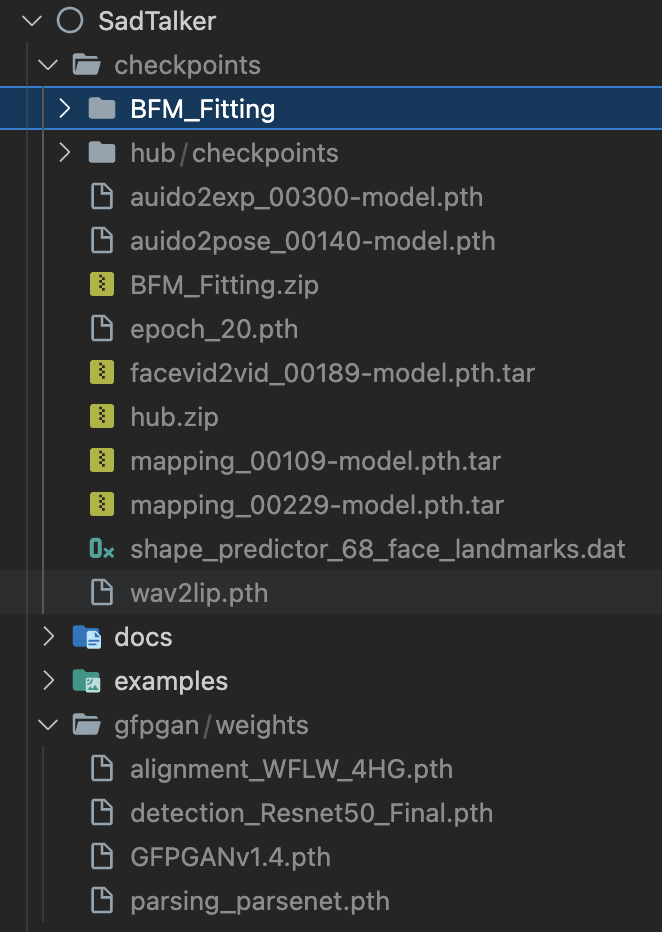
标签:3DMM, 3D人脸, AIGC, CVPR 2023, Deepfake, DNS解析, Lip Sync, PyTorch, Stylized Animation, Talking Face, 人工智能, 凭据扫描, 口型同步, 图像动画, 头像说话, 开源项目, 数字人, 深度学习, 用户模式Hook绕过, 虚拟人, 表情迁移, 视频生成, 计算机视觉, 逆向工具, 面部动画, 音频驱动