HotCakeX/Harden-Windows-Security
GitHub: HotCakeX/Harden-Windows-Security
一款基于微软官方方法的安全加固工具集,通过 Harden System Security 和 AppControl Manager 为个人、企业及政府机构提供从系统加固到应用控制的全方位 Windows 端点防护方案。
Stars: 4510 | Forks: 322
 
 # 强化 Windows 安全 | 恶意软件的新威胁
## 安全地强化 Windows,仅使用 Microsoft 官方方法
# 强化 Windows 安全 | 恶意软件的新威胁
## 安全地强化 Windows,仅使用 Microsoft 官方方法





How To Use  Related
Trust
Support
Security Recommendations
Resources
License
Wiki
Basic FAQs Roadmap Donation
Related
Trust
Support
Security Recommendations
Resources
License
Wiki
Basic FAQs Roadmap Donation 


## 如何使用 ###
 [从 Microsoft Store 安装 Harden System Security](https://apps.microsoft.com/detail/9p7ggfl7dx57)
 * [**文档**](https://github.com/HotCakeX/Harden-Windows-Security/wiki/Harden-System-Security)

###
 [从 Microsoft Store 安装 AppControl Manager](https://apps.microsoft.com/detail/9PNG1JDDTGP8)
* [**YouTube 演示**](https://www.youtube.com/watch?v=SzMs13n7elE)
* [**文档**](https://github.com/HotCakeX/Harden-Windows-Security/wiki/AppControl-Manager)
[从 Microsoft Store 安装 AppControl Manager](https://apps.microsoft.com/detail/9PNG1JDDTGP8)
* [**YouTube 演示**](https://www.youtube.com/watch?v=SzMs13n7elE)
* [**文档**](https://github.com/HotCakeX/Harden-Windows-Security/wiki/AppControl-Manager)
##
 理念依据
欢 迎 来 到 𝙷𝚊𝚛𝚍𝚎𝚗 𝚆𝚒𝚗𝚍𝚘𝚠𝚜 𝚂𝚎𝚌𝚞𝚛𝚒𝚝𝚢 仓 库
理念依据
欢 迎 来 到 𝙷𝚊𝚛𝚍𝚎𝚗 𝚆𝚒𝚗𝚍𝚘𝚠𝚜 𝚂𝚎𝚌𝚞𝚛𝚒𝚝𝚢 仓 库  本部分介绍了此 GitHub 仓库及其内容的目的和目标。概述了它如何应对各种威胁,以及如何针对不同场景和环境调整您的期望。此外,还提供了许多有用的额外资源。
此仓库目前有 2 个***主要***产品。
本部分介绍了此 GitHub 仓库及其内容的目的和目标。概述了它如何应对各种威胁,以及如何针对不同场景和环境调整您的期望。此外,还提供了许多有用的额外资源。
此仓库目前有 2 个***主要***产品。  1. [**Harden System Security 应用程序**](https://github.com/HotCakeX/Harden-Windows-Security/wiki/Harden-System-Security)
2. [**AppControl Manager**](https://github.com/HotCakeX/Harden-Windows-Security/wiki/AppControl-Manager)
1. [**Harden System Security 应用程序**](https://github.com/HotCakeX/Harden-Windows-Security/wiki/Harden-System-Security)
2. [**AppControl Manager**](https://github.com/HotCakeX/Harden-Windows-Security/wiki/AppControl-Manager)
让我们在下面详细探讨它们中的每一个
##
 Harden System Security 应用程序
使用 [Harden System Security 应用程序](https://github.com/HotCakeX/Harden-Windows-Security/wiki/Harden-System-Security) 来保护您的个人和企业设备免受大多数高级威胁。该应用程序适合所有人使用。
如果您是个人用户,您可以使用 Harden System Security 来强化您的操作系统,删除不必要的功能或应用程序,并深入了解系统的安全结构。
如果您是企业用户或管理员,您可以使用[提供的 Intune 安全策略](https://github.com/HotCakeX/Harden-Windows-Security/wiki/Intune-%7C-Harden-System-Security),并使用 Harden System Security 应用程序将它们应用到您的所有工作站。然后,您可以使用该应用程序验证工作站是否符合应用的策略,并获得安全评分。
它使用您的设备和 Windows 操作系统内置的相同安全功能,将其微调至最高安全性和锁定状态。它不会安装任何外部组件,也不会增加您的攻击面。
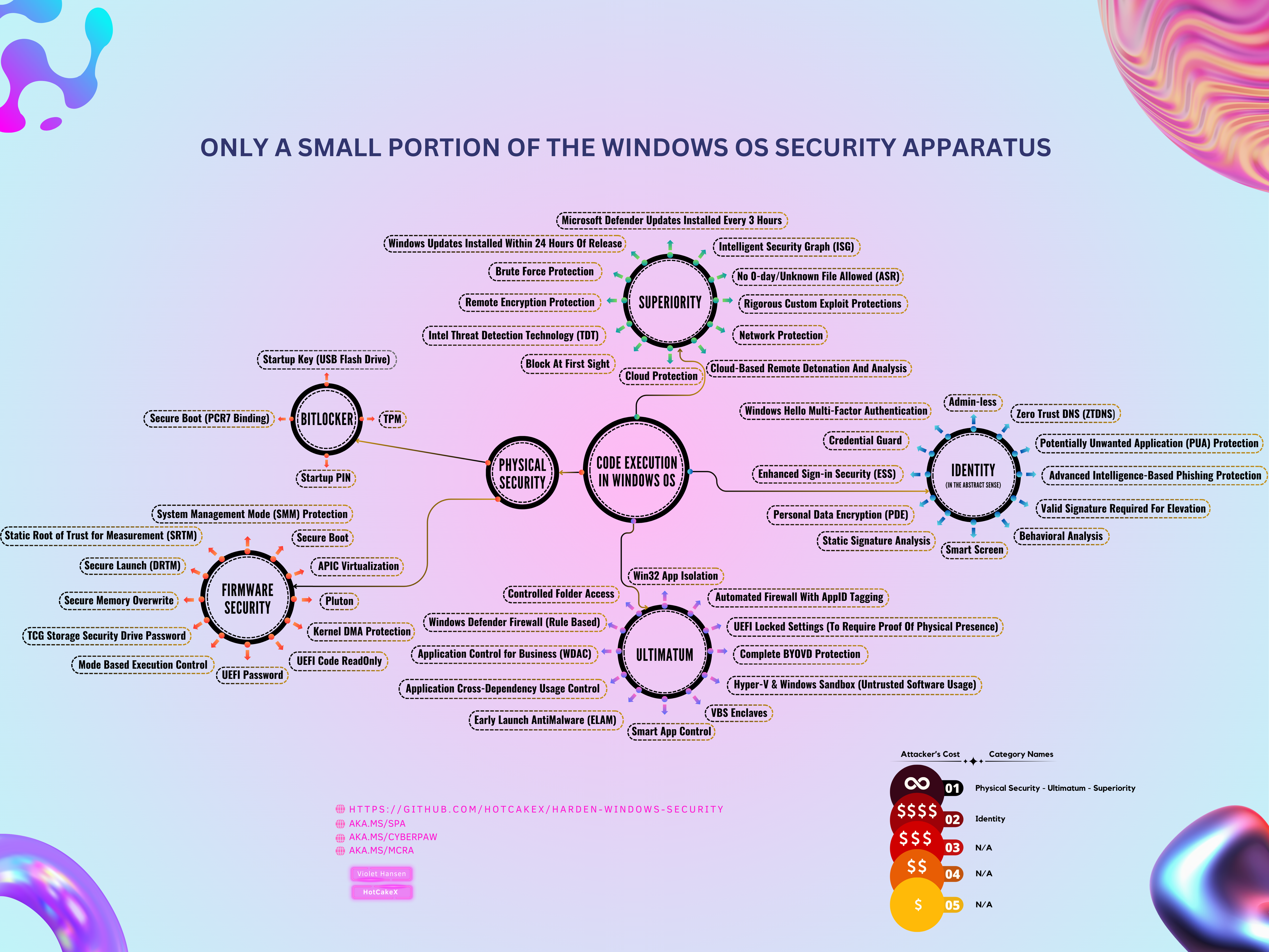
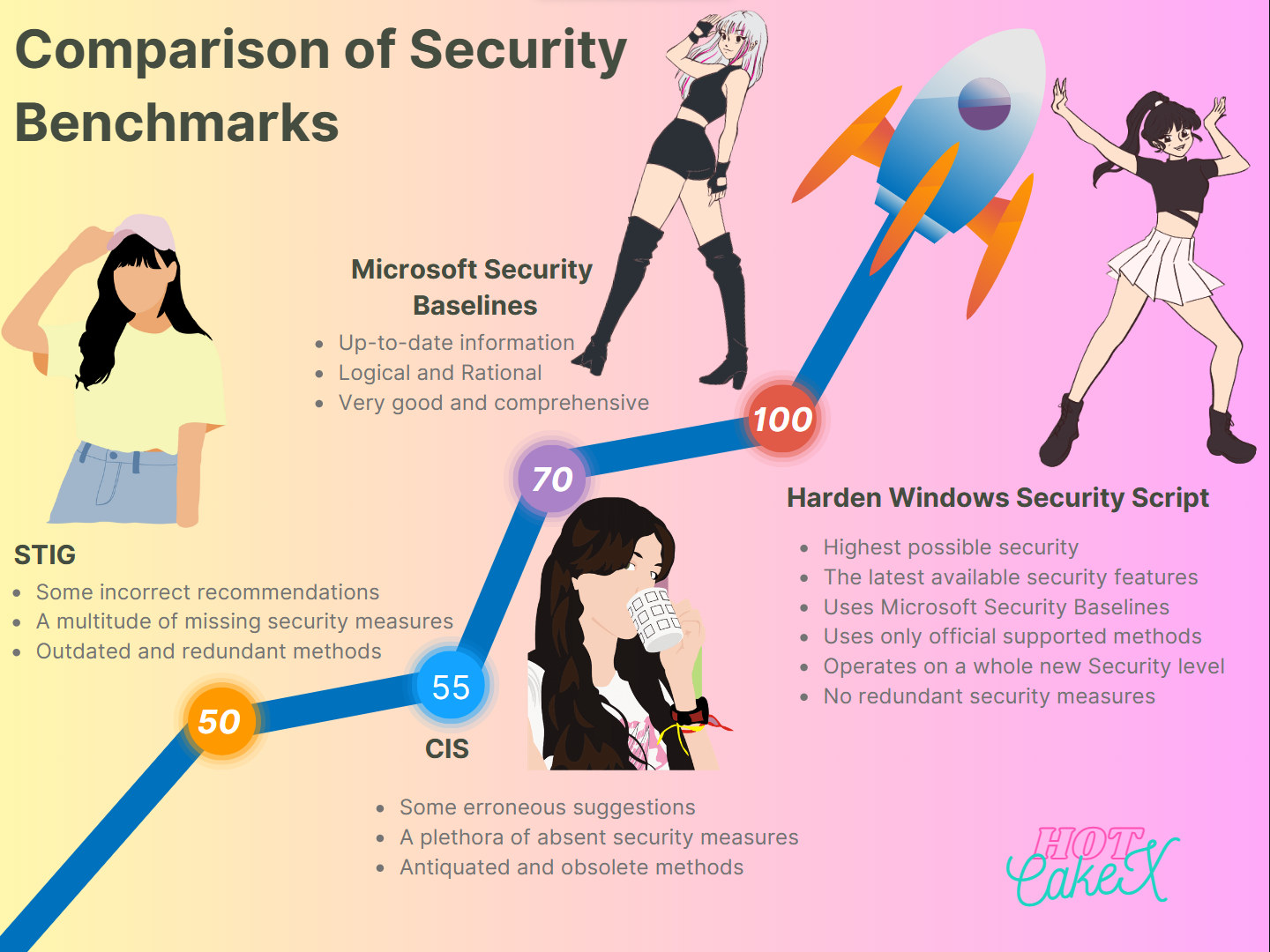
让我们看看下面的信息图:
Harden System Security 应用程序
使用 [Harden System Security 应用程序](https://github.com/HotCakeX/Harden-Windows-Security/wiki/Harden-System-Security) 来保护您的个人和企业设备免受大多数高级威胁。该应用程序适合所有人使用。
如果您是个人用户,您可以使用 Harden System Security 来强化您的操作系统,删除不必要的功能或应用程序,并深入了解系统的安全结构。
如果您是企业用户或管理员,您可以使用[提供的 Intune 安全策略](https://github.com/HotCakeX/Harden-Windows-Security/wiki/Intune-%7C-Harden-System-Security),并使用 Harden System Security 应用程序将它们应用到您的所有工作站。然后,您可以使用该应用程序验证工作站是否符合应用的策略,并获得安全评分。
它使用您的设备和 Windows 操作系统内置的相同安全功能,将其微调至最高安全性和锁定状态。它不会安装任何外部组件,也不会增加您的攻击面。
让我们看看下面的信息图:
##
 AppControl Manager

[AppControl Manager](https://github.com/HotCakeX/Harden-Windows-Security/wiki/AppControl-Manager) 是一款安全的[开源](https://github.com/HotCakeX/Harden-Windows-Security/tree/main/AppControl%20Manager) Windows 应用程序,旨在帮助您轻松配置系统中的应用程序控制。它适合个人用户以及企业、商业和高度安全的工作站使用。
正确使用应用程序控制,再加上 Harden System Security 应用程序的策略,[可以提供 99% 的保护以抵御各种威胁](https://github.com/HotCakeX/Harden-Windows-Security/wiki/The-Strength-of-Signed-App-Control-Policies),无论是来自互联网还是物理上的威胁。确实没有绝对的安全,但宇宙中也没有任何绝对的事物。一切,即使是最基本的物理定律,也都一直在改变并受条件制约。
* [以下是 AppControl Manager 的演示视频](https://www.youtube.com/watch?v=SzMs13n7elE)
* [以下是 AppControl Manager 在此仓库的登录页面](https://github.com/HotCakeX/Harden-Windows-Security/wiki/AppControl-Manager)
AppControl Manager
[AppControl Manager](https://github.com/HotCakeX/Harden-Windows-Security/wiki/AppControl-Manager) 是一款安全的[开源](https://github.com/HotCakeX/Harden-Windows-Security/tree/main/AppControl%20Manager) Windows 应用程序,旨在帮助您轻松配置系统中的应用程序控制。它适合个人用户以及企业、商业和高度安全的工作站使用。
正确使用应用程序控制,再加上 Harden System Security 应用程序的策略,[可以提供 99% 的保护以抵御各种威胁](https://github.com/HotCakeX/Harden-Windows-Security/wiki/The-Strength-of-Signed-App-Control-Policies),无论是来自互联网还是物理上的威胁。确实没有绝对的安全,但宇宙中也没有任何绝对的事物。一切,即使是最基本的物理定律,也都一直在改变并受条件制约。
* [以下是 AppControl Manager 的演示视频](https://www.youtube.com/watch?v=SzMs13n7elE)
* [以下是 AppControl Manager 在此仓库的登录页面](https://github.com/HotCakeX/Harden-Windows-Security/wiki/AppControl-Manager)
##
 您如何做出正确的选择?
首 先 最 重 要 的 是 使用 [Harden System Security 应用程序](https://github.com/HotCakeX/Harden-Windows-Security/wiki/Harden-System-Security)来应用它提供的强化措施,当您在日常工作中使用标准(非特权)账户时,您的系统将安全免受至少约 98% 的威胁。这些威胁不是普通的计算机病毒,它们是***有动机的民族国家威胁行为者***。
然 后 使用 [AppControl Manager](https://spynetgirl.github.io/AppControl%20Manager/AppControl%20Manager/) 部署应用程序控制策略,以对 Windows 应用程序控制的操作拥有更多控制权。
这些方法将创建多层安全;也称为深度防御。此外,您可以为您的系统创建 [**内核级零信任策略**](https://github.com/HotCakeX/Harden-Windows-Security/wiki/WDAC-policy-for-BYOVD-Kernel-mode-only-protection)。
如果一个甚至多个安全层中同时出现零日漏洞,仍然会有足够的剩余层来保护您的设备。一次性穿透所有这些层实际上是不可能的。
此外,零日漏洞修复得很快,因此无论您使用什么操作系统,保持您的设备和操作系统最新是您必须遵循的最基本安全建议和最佳实践之一。
您如何做出正确的选择?
首 先 最 重 要 的 是 使用 [Harden System Security 应用程序](https://github.com/HotCakeX/Harden-Windows-Security/wiki/Harden-System-Security)来应用它提供的强化措施,当您在日常工作中使用标准(非特权)账户时,您的系统将安全免受至少约 98% 的威胁。这些威胁不是普通的计算机病毒,它们是***有动机的民族国家威胁行为者***。
然 后 使用 [AppControl Manager](https://spynetgirl.github.io/AppControl%20Manager/AppControl%20Manager/) 部署应用程序控制策略,以对 Windows 应用程序控制的操作拥有更多控制权。
这些方法将创建多层安全;也称为深度防御。此外,您可以为您的系统创建 [**内核级零信任策略**](https://github.com/HotCakeX/Harden-Windows-Security/wiki/WDAC-policy-for-BYOVD-Kernel-mode-only-protection)。
如果一个甚至多个安全层中同时出现零日漏洞,仍然会有足够的剩余层来保护您的设备。一次性穿透所有这些层实际上是不可能的。
此外,零日漏洞修复得很快,因此无论您使用什么操作系统,保持您的设备和操作系统最新是您必须遵循的最基本安全建议和最佳实践之一。
##
 零日漏洞等漏洞以 3 种不同方式被披露
1. 漏洞被负责任地披露。它首先与软件供应商/开发者私下沟通,以便他们有时间在漏洞公开披露之前为其修复并发布更新/补丁。这样,人们总是安全的,因为所需做的只是保持您的操作系统和软件最新以接收最新的安全补丁。
2. 漏洞被不负责任地披露。它通过社交媒体公开披露,或通过创建 PoC(概念验证)让每个人都可以使用和滥用它。
3. 漏洞被恶意行为者滥用。它在网络攻击中被威胁行为者私下利用。这些漏洞要么由威胁行为者自己发现,要么从首先发现它们的安全研究人员那里购买,所有这些都是非法的并会产生后果。
零日漏洞等漏洞以 3 种不同方式被披露
1. 漏洞被负责任地披露。它首先与软件供应商/开发者私下沟通,以便他们有时间在漏洞公开披露之前为其修复并发布更新/补丁。这样,人们总是安全的,因为所需做的只是保持您的操作系统和软件最新以接收最新的安全补丁。
2. 漏洞被不负责任地披露。它通过社交媒体公开披露,或通过创建 PoC(概念验证)让每个人都可以使用和滥用它。
3. 漏洞被恶意行为者滥用。它在网络攻击中被威胁行为者私下利用。这些漏洞要么由威胁行为者自己发现,要么从首先发现它们的安全研究人员那里购买,所有这些都是非法的并会产生后果。
##
 规模化的更高级安全呢?
为了为企业、商业和军事场景实现**规模化**的最高安全级别,您可以使用以下服务来创建坚不可摧的设备和环境。 * [Microsoft Defender for Endpoint](https://www.microsoft.com/en-us/security/business/endpoint-security/microsoft-defender-endpoint) - 发现并保护您多平台企业中的端点设备。 * [Microsoft Security Copilot](https://www.microsoft.com/en-us/security/business/ai-machine-learning/microsoft-copilot-security) - 建立[如此自动化](https://learn.microsoft.com/security-copilot/microsoft-security-copilot)的防御,连您的实习生都能成为网络安全专家。 * [Azure 上的 Confidential Computing](https://learn.microsoft.com/azure/confidential-computing/overview-azure-products) - 在使用时保护您高度敏感的数据 * [Confidential AI](https://learn.microsoft.com/azure/confidential-computing/confidential-ai) - 在最先进的 AI 超级计算机上私密安全地训练您的数据 * [Microsoft Entra 条件访问](https://www.microsoft.com/en-us/security/business/identity-access/microsoft-entra-conditional-access) - 在不损害生产力的情况下提高保护 * [Microsoft Sentinel](https://azure.microsoft.com/en-us/products/microsoft-sentinel/) - 可扩展的云原生解决方案,提供 SIEM、SOAR 等功能! * [Key Vault](https://azure.microsoft.com/en-us/products/key-vault/) - 保护云应用和服务使用的加密密钥和其他机密。此 [Azure 服务使用了世界上最好的产品](https://cpl.thalesgroup.com/partners/microsoft)来完成这项工作,例如 [Thales HSMs](https://cpl.thalesgroup.com/encryption/hardware-security-modules/network-hsms)。更多信息请访问[此处](https://learn.microsoft.com/windows-hardware/manufacture/desktop/secure-boot-key-generation-and-signing-using-hsm--example)。 * [Microsoft Defender for Cloud](https://azure.microsoft.com/en-us/products/defender-for-cloud) - 使用从代码到云的集成安全保护多云和混合环境 * [Microsoft Defender for Cloud Apps]() - 实现应用程序安全的现代化,保护您的数据,并通过软件即服务 (SaaS) 安全提升您的应用安全态势。 * [Microsoft Defender for Identity](https://www.microsoft.com/en-us/security/business/siem-and-xdr/microsoft-defender-for-identity) - 利用云端智能保护您的本地身份。 * [Azure Active Directory 的无密码身份验证选项](https://learn.microsoft.com/azure/active-directory/authentication/concept-authentication-passwordless) - 多因素和无密码身份验证,最安全、最便捷的身份验证方式。 * [PIM (PAM)](https://www.microsoft.com/en-us/security/business/security-101/what-is-privileged-access-management-pam) - 特权访问管理 * [PAW](https://learn.microsoft.com/security/privileged-access-workstations/privileged-access-devices) - 特权访问工作站 * [SAW](https://www.microsoft.com/insidetrack/blog/improving-security-by-protecting-elevated-privilege-accounts-at-microsoft/) - 安全管理员工作站 * [适用于企业、商业等的所有 Azure 安全服务列表](https://learn.microsoft.com/azure/security/fundamentals/services-technologies)
##
 重要注意事项
* 使用 Harden System Security 应用程序或 App Control for Business 时,请避免使用任何第三方安全解决方案。第三方解决方案薄弱、不兼容且不必要,**它们还会增加您的攻击面**。
* 对于任何可疑或不安全的软件,请使用虚拟机。使用 [Windows Sandbox 或 Hyper-V 虚拟机](https://github.com/HotCakeX/Privacy-Anonymity-Compartmentalization)。
重要注意事项
* 使用 Harden System Security 应用程序或 App Control for Business 时,请避免使用任何第三方安全解决方案。第三方解决方案薄弱、不兼容且不必要,**它们还会增加您的攻击面**。
* 对于任何可疑或不安全的软件,请使用虚拟机。使用 [Windows Sandbox 或 Hyper-V 虚拟机](https://github.com/HotCakeX/Privacy-Anonymity-Compartmentalization)。
##
 [使用哪种设备?](#-which-device-to-use-)
使用 Microsoft Surface 产品以获得最佳的设备和固件安全性。它们支持 [Secured-core PC 规范](https://www.microsoft.com/en-us/windows/business/windows-11-secured-core-computers),其制造过程和平台是可信且安全的。
确保使用支持 [Device Firmware Configuration Interface (DFCI)](https://learn.microsoft.com/mem/autopilot/dfci-management) 的 Surface 产品,以获得额外的保护和安全性。以下是支持它的 [Surface 产品列表](https://learn.microsoft.com/surface/surface-manage-dfci-guide#dfci-policy-settings-reference-for-surface-devices)。
* [如何将 Device Firmware Configuration Interface (DFCI) 与 Intune 配合用于 Surface 设备](https://techcommunity.microsoft.com/t5/intune-customer-success/how-to-use-device-firmware-configuration-interface-dfci-for/ba-p/3041293)
* 在其他功能中,通过 DFCI 设置的设备可以被设置为禁止从 USB 设备启动,并且无法直接绕过芯片级别的安全性,即使是清除 CMOS 也无法绕过它,因为它使用非易失性存储器(即闪存)。它设置了 BIOS 证书身份验证,而私钥位于 Intune 的云端边缘之后,即使是 Microsoft 支持也无法获取该密钥。
* 在该文档中支持 DFCI 的 Surface 产品列表可能不会很快更新,但请不要担心,这是一个活跃的项目,所有新的 Surface 设备都内置了此功能,文档团队可能只是有些滞后。
* Microsoft Surface 设备使用 [Project Mu](https://microsoft.github.io/mu/) 作为其固件的源代码。
* Surface 设备可以使用证书代替 UEFI 的密码。它们也没有像其他设备那样的重置开关。您可以使用 [Surface Management Toolkit](https://www.microsoft.com/en-us/download/details.aspx?id=46703) 创建并安装您自己的证书。您可以构建一个包含证书的配置包并将其安装到固件中,然后如果没有签名证书授权更改(即证书身份验证),该包就无法被删除或更改,或者您可以如前所述直接使用 DFCI,而不必担心,因为这些包是使用 Microsoft 的私钥签名的,并且没有您必须自行托管的 PKI。
* 商务级 Surface 设备具有专用的 TPM 芯片。
* 查看[关于 Secured-core 规范的 Device Guard 类别](https://github.com/HotCakeX/Harden-Windows-Security?tab=readme-ov-file#device-guard)。
* Pluton 安全芯片**不是** Secured-core 认证的要求。
* Pluton 安全芯片包含在 [Qualcomm Snapdragon ARM CPUs](https://www.qualcomm.com/products/mobile/snapdragon/pcs-and-tablets/snapdragon-x-elite)、[AMD](https://blogs.windows.com/windowsexperience/2024/04/16/amds-commercial-ai-pc-portfolio-integrates-microsoft-pluton-includes-microsoft-copilot/) 和 [Intel CPUs](https://www.theverge.com/2024/6/3/24169115/intel-lunar-lake-architecture-platform-feature-reveal) 中。
* [Copilot+](https://www.microsoft.com/en-us/windows/copilot-plus-pcs) PC 属于[最安全的消费级设备](https://blogs.windows.com/windowsexperience/2024/09/27/update-on-recall-security-and-privacy-architecture/)之列。它们是 Secured-core 并集成了 Pluton 安全芯片。
[使用哪种设备?](#-which-device-to-use-)
使用 Microsoft Surface 产品以获得最佳的设备和固件安全性。它们支持 [Secured-core PC 规范](https://www.microsoft.com/en-us/windows/business/windows-11-secured-core-computers),其制造过程和平台是可信且安全的。
确保使用支持 [Device Firmware Configuration Interface (DFCI)](https://learn.microsoft.com/mem/autopilot/dfci-management) 的 Surface 产品,以获得额外的保护和安全性。以下是支持它的 [Surface 产品列表](https://learn.microsoft.com/surface/surface-manage-dfci-guide#dfci-policy-settings-reference-for-surface-devices)。
* [如何将 Device Firmware Configuration Interface (DFCI) 与 Intune 配合用于 Surface 设备](https://techcommunity.microsoft.com/t5/intune-customer-success/how-to-use-device-firmware-configuration-interface-dfci-for/ba-p/3041293)
* 在其他功能中,通过 DFCI 设置的设备可以被设置为禁止从 USB 设备启动,并且无法直接绕过芯片级别的安全性,即使是清除 CMOS 也无法绕过它,因为它使用非易失性存储器(即闪存)。它设置了 BIOS 证书身份验证,而私钥位于 Intune 的云端边缘之后,即使是 Microsoft 支持也无法获取该密钥。
* 在该文档中支持 DFCI 的 Surface 产品列表可能不会很快更新,但请不要担心,这是一个活跃的项目,所有新的 Surface 设备都内置了此功能,文档团队可能只是有些滞后。
* Microsoft Surface 设备使用 [Project Mu](https://microsoft.github.io/mu/) 作为其固件的源代码。
* Surface 设备可以使用证书代替 UEFI 的密码。它们也没有像其他设备那样的重置开关。您可以使用 [Surface Management Toolkit](https://www.microsoft.com/en-us/download/details.aspx?id=46703) 创建并安装您自己的证书。您可以构建一个包含证书的配置包并将其安装到固件中,然后如果没有签名证书授权更改(即证书身份验证),该包就无法被删除或更改,或者您可以如前所述直接使用 DFCI,而不必担心,因为这些包是使用 Microsoft 的私钥签名的,并且没有您必须自行托管的 PKI。
* 商务级 Surface 设备具有专用的 TPM 芯片。
* 查看[关于 Secured-core 规范的 Device Guard 类别](https://github.com/HotCakeX/Harden-Windows-Security?tab=readme-ov-file#device-guard)。
* Pluton 安全芯片**不是** Secured-core 认证的要求。
* Pluton 安全芯片包含在 [Qualcomm Snapdragon ARM CPUs](https://www.qualcomm.com/products/mobile/snapdragon/pcs-and-tablets/snapdragon-x-elite)、[AMD](https://blogs.windows.com/windowsexperience/2024/04/16/amds-commercial-ai-pc-portfolio-integrates-microsoft-pluton-includes-microsoft-copilot/) 和 [Intel CPUs](https://www.theverge.com/2024/6/3/24169115/intel-lunar-lake-architecture-platform-feature-reveal) 中。
* [Copilot+](https://www.microsoft.com/en-us/windows/copilot-plus-pcs) PC 属于[最安全的消费级设备](https://blogs.windows.com/windowsexperience/2024/09/27/update-on-recall-security-and-privacy-architecture/)之列。它们是 Secured-core 并集成了 Pluton 安全芯片。
###
 [防范 BYOVD (Bring Your Own Vulnerable Driver) 攻击](#-protection-against-byovd-bring-your-own-vulnerable-driver-attacks)
* Secured core PC 提供能够防范 BYOVD 攻击的硬件。开启这些功能是您的责任,包括 App Control for Business、ASR (攻击面减少) 规则、动态/静态信任根以及可扩展用于撤销驱动程序的[固件](https://learn.microsoft.com/windows-hardware/drivers/bringup/firmware-attack-surface-reduction)。它们对于[Microsoft 推荐的驱动程序阻止列表](https://learn.microsoft.com/windows/security/application-security/application-control/app-control-for-business/design/microsoft-recommended-driver-block-rules)中未明确提及的驱动程序特别有用,这些是更加动态的部分。
* 使用[严格的内核模式 App Control 策略实现完整的 BYOVD 保护](https://github.com/HotCakeX/Harden-Windows-Security/wiki/WDAC-policy-for-BYOVD-Kernel-mode-only-protection)
[防范 BYOVD (Bring Your Own Vulnerable Driver) 攻击](#-protection-against-byovd-bring-your-own-vulnerable-driver-attacks)
* Secured core PC 提供能够防范 BYOVD 攻击的硬件。开启这些功能是您的责任,包括 App Control for Business、ASR (攻击面减少) 规则、动态/静态信任根以及可扩展用于撤销驱动程序的[固件](https://learn.microsoft.com/windows-hardware/drivers/bringup/firmware-attack-surface-reduction)。它们对于[Microsoft 推荐的驱动程序阻止列表](https://learn.microsoft.com/windows/security/application-security/application-control/app-control-for-business/design/microsoft-recommended-driver-block-rules)中未明确提及的驱动程序特别有用,这些是更加动态的部分。
* 使用[严格的内核模式 App Control 策略实现完整的 BYOVD 保护](https://github.com/HotCakeX/Harden-Windows-Security/wiki/WDAC-policy-for-BYOVD-Kernel-mode-only-protection)
##
 [遭受攻击时该怎么办?](#-what-to-do-when-there-is-an-attack-)
您应该与 Microsoft 建立现有的 [***统一合同***](https://www.microsoft.com/en-us/unifiedsupport/overview) ([前身为](https://www.microsoft.com/en-us/unifiedsupport/premier) [Premier Support](https://www.microsoft.com/en-us/premier-support-end-of-sale))。Microsoft 提供范围广泛的服务和团队来帮助您从网络攻击中恢复,例如:
- GHOST:Global Hunting, Oversight and Strategic Triage
- [DART](https://www.microsoft.com/en-us/security/blog/2019/03/25/dart-the-microsoft-cybersecurity-team-we-hope-you-never-meet/) - Microsoft 检测和响应团队
- [CRSP](https://www.microsoft.com/en-us/security/blog/2021/06/09/crsp-the-emergency-team-fighting-cyber-attacks-beside-customers/) - Global Compromise Recovery Security Practice Team - [包括勒索软件](https://learn.microsoft.com/azure/security/fundamentals/ransomware-detect-respond#road-to-recovery)
在您遭到黑客攻击后,您应该联系您的客户成功账户经理,并告诉他们您需要其中某个团队的帮助。
[遭受攻击时该怎么办?](#-what-to-do-when-there-is-an-attack-)
您应该与 Microsoft 建立现有的 [***统一合同***](https://www.microsoft.com/en-us/unifiedsupport/overview) ([前身为](https://www.microsoft.com/en-us/unifiedsupport/premier) [Premier Support](https://www.microsoft.com/en-us/premier-support-end-of-sale))。Microsoft 提供范围广泛的服务和团队来帮助您从网络攻击中恢复,例如:
- GHOST:Global Hunting, Oversight and Strategic Triage
- [DART](https://www.microsoft.com/en-us/security/blog/2019/03/25/dart-the-microsoft-cybersecurity-team-we-hope-you-never-meet/) - Microsoft 检测和响应团队
- [CRSP](https://www.microsoft.com/en-us/security/blog/2021/06/09/crsp-the-emergency-team-fighting-cyber-attacks-beside-customers/) - Global Compromise Recovery Security Practice Team - [包括勒索软件](https://learn.microsoft.com/azure/security/fundamentals/ransomware-detect-respond#road-to-recovery)
在您遭到黑客攻击后,您应该联系您的客户成功账户经理,并告诉他们您需要其中某个团队的帮助。
### 组织中安全团队的颜色分类 - 🔴 红队 - 渗透测试人员/白帽黑客 - 🔵 蓝队 - SOC/数据科学/遥测分析/SIEM 狂热者 - 🟢 绿队 - 修复者,接收来自蓝队和红队的输入,并构建针对已识别盲点(蓝队)或漏洞/风险(红队)所需的修复 - 🟡 黄队 - 工具团队,软件工程师,为上述所有团队构建新工具,以更快、更有效地运作
##
 [用于渗透测试和基准测试](#-for-penetration-testing-and-benchmarking)
如何正确执行渗透测试并对由此仓库强化的系统进行基准测试,并使其尽可能接近真实场景:
1. 如果可能,使用物理机器,它应具有经过 Windows 11 认证的硬件,[标准用户账户](https://learn.microsoft.com/windows-server/remote/multipoint-services/create-a-standard-user-account)。
* 如果您不能使用物理机器,请使用 Hyper-V 虚拟机监控程序。您的主机(即物理机器)必须具有经过 Windows 11 认证的硬件,并满足 Readme 中解释的所有硬件和 UEFI 安全要求。然而,虚拟机容易受到侧信道攻击,因此如果您想要更真实的结果,请不要在渗透测试中使用该攻击向量。
2. 首先应用 [Harden System Security 应用程序](https://apps.microsoft.com/detail/9p7ggfl7dx57) *(其所有类别)*,然后使用 [AppControl Manager](https://github.com/HotCakeX/Harden-Windows-Security/wiki/AppControl-Manager) 部署合适的[已签名](https://github.com/HotCakeX/Harden-Windows-Security/wiki/The-Strength-of-Signed-App-Control-Policies) App Control 策略。
[用于渗透测试和基准测试](#-for-penetration-testing-and-benchmarking)
如何正确执行渗透测试并对由此仓库强化的系统进行基准测试,并使其尽可能接近真实场景:
1. 如果可能,使用物理机器,它应具有经过 Windows 11 认证的硬件,[标准用户账户](https://learn.microsoft.com/windows-server/remote/multipoint-services/create-a-standard-user-account)。
* 如果您不能使用物理机器,请使用 Hyper-V 虚拟机监控程序。您的主机(即物理机器)必须具有经过 Windows 11 认证的硬件,并满足 Readme 中解释的所有硬件和 UEFI 安全要求。然而,虚拟机容易受到侧信道攻击,因此如果您想要更真实的结果,请不要在渗透测试中使用该攻击向量。
2. 首先应用 [Harden System Security 应用程序](https://apps.microsoft.com/detail/9p7ggfl7dx57) *(其所有类别)*,然后使用 [AppControl Manager](https://github.com/HotCakeX/Harden-Windows-Security/wiki/AppControl-Manager) 部署合适的[已签名](https://github.com/HotCakeX/Harden-Windows-Security/wiki/The-Strength-of-Signed-App-Control-Policies) App Control 策略。
##
 [有任何问题或建议吗?](#-any-questions-or-suggestions)
请在仓库中发起一个新[议题](https://github.com/HotCakeX/Harden-Windows-Security/issues)或[讨论](https://github.com/HotCakeX/Harden-Windows-Security/discussions)。
[有任何问题或建议吗?](#-any-questions-or-suggestions)
请在仓库中发起一个新[议题](https://github.com/HotCakeX/Harden-Windows-Security/issues)或[讨论](https://github.com/HotCakeX/Harden-Windows-Security/discussions)。
## 相关内容

 [Azure DevOps 仓库(镜像)](https://dev.azure.com/SpyNetGirl/_git/Harden-Windows-Security)
[Harden Windows Security 网站](https://hotcakex.github.io/)
[每个国家的官方全球 IANA IP 段](https://hotcakex.github.io/Official-IANA-IP-blocks/)
[Windows 安全博客](https://spynetgirl.github.io/)
[WinSecureDNSMgr](https://github.com/HotCakeX/WinSecureDNSMgr)
[隐私、匿名和分区](https://github.com/HotCakeX/Privacy-Anonymity-Compartmentalization)
[Azure DevOps 仓库(镜像)](https://dev.azure.com/SpyNetGirl/_git/Harden-Windows-Security)
[Harden Windows Security 网站](https://hotcakex.github.io/)
[每个国家的官方全球 IANA IP 段](https://hotcakex.github.io/Official-IANA-IP-blocks/)
[Windows 安全博客](https://spynetgirl.github.io/)
[WinSecureDNSMgr](https://github.com/HotCakeX/WinSecureDNSMgr)
[隐私、匿名和分区](https://github.com/HotCakeX/Privacy-Anonymity-Compartmentalization)
## 信任

* [](https://github.com/HotCakeX/Harden-Windows-Security/actions/workflows/Repository%20And%20Package%20Scan%20on%20Virus%20Total.yml) * [](https://github.com/HotCakeX/Harden-Windows-Security/actions/workflows/CodeQL%20Advanced%20-%20Quality.yml) * [](https://github.com/HotCakeX/Harden-Windows-Security/actions/workflows/Sync%20to%20Azure%20DevOps.yaml) * [](https://github.com/HotCakeX/Harden-Windows-Security/actions/workflows/Build%20AppControl%20Manager%20MSIX%20Package.yml) * [](https://github.com/HotCakeX/Harden-Windows-Security/actions/workflows/dependabot/dependabot-updates) * [](https://github.com/HotCakeX/Harden-Windows-Security/actions/workflows/Markdown%20Link%20Validator.yml) * [](https://github.com/HotCakeX/Harden-Windows-Security/actions/workflows/dependency-review.yml)
## 支持

 如果您对此 GitHub 仓库及其内容有任何问题、请求、建议等,请发起[新讨论](https://github.com/HotCakeX/Harden-Windows-Security/discussions)或[议题](https://github.com/HotCakeX/Harden-Windows-Security/issues)。
 在此 GitHub 仓库中[报告漏洞](https://github.com/HotCakeX/Harden-Windows-Security/security/advisories)。
 也可以通过以下方式私下联系我:spynetgirl@outlook.com
## 安全建议

 始终从[Microsoft 官方网站](https://www.microsoft.com/en-us/software-download)下载您的操作系统。目前,Windows 11 是 Windows 的最新版本,其 ISO 文件可从此[官方 Microsoft 服务器](https://www.microsoft.com/en-us/software-download/windows11)下载。您能对自己的安全和隐私做的最糟糕的事情之一,就是从声称拥有官方未修改文件的第三方网站下载您的操作系统(这是所有主动和被动安全措施的基础)。这可能会导致无数糟糕的后果,例如威胁行为者在定制操作系统中嵌入恶意软件或后门,或者在您的操作系统中预安装定制的根 CA 证书,以便他们可以执行 TLS 终止并以明文形式查看您所有的 HTTPS 和加密的互联网数据,**即使您使用了 VPN。** 拥有一个被毒化和受损的证书存储对您来说是终局,而*这仅仅是冰山一角。*
- 请参阅 [Wiki](https://github.com/HotCakeX/Harden-Windows-Security/wiki) 以了解[如何不使用第三方工具创建可引导的 USB 闪存驱动器](https://github.com/HotCakeX/Harden-Windows-Security/wiki/Create-Bootable-USB-flash-drive-with-no-3rd-party-tools)
始终从[Microsoft 官方网站](https://www.microsoft.com/en-us/software-download)下载您的操作系统。目前,Windows 11 是 Windows 的最新版本,其 ISO 文件可从此[官方 Microsoft 服务器](https://www.microsoft.com/en-us/software-download/windows11)下载。您能对自己的安全和隐私做的最糟糕的事情之一,就是从声称拥有官方未修改文件的第三方网站下载您的操作系统(这是所有主动和被动安全措施的基础)。这可能会导致无数糟糕的后果,例如威胁行为者在定制操作系统中嵌入恶意软件或后门,或者在您的操作系统中预安装定制的根 CA 证书,以便他们可以执行 TLS 终止并以明文形式查看您所有的 HTTPS 和加密的互联网数据,**即使您使用了 VPN。** 拥有一个被毒化和受损的证书存储对您来说是终局,而*这仅仅是冰山一角。*
- 请参阅 [Wiki](https://github.com/HotCakeX/Harden-Windows-Security/wiki) 以了解[如何不使用第三方工具创建可引导的 USB 闪存驱动器](https://github.com/HotCakeX/Harden-Windows-Security/wiki/Create-Bootable-USB-flash-drive-with-no-3rd-party-tools)
*
每当您想安装程序或应用时,首先使用 [Microsoft Store](https://apps.microsoft.com/store/apps) 或 Winget,如果您要找的程序或应用不在其中,再从其官方网站下载。*有人为与 Winget CLI 交互创建了一个不错的 Web 界面,请点击此处。* 使用 Winget 或 Microsoft Store 有许多好处:
- Microsoft Store 的 UWP 应用本质上是安全的,经过数字签名,采用 [MSIX 格式](https://learn.microsoft.com/windows/msix/overview)。这意味着,安装和卸载它们是有保证的,卸载后不会有任何残留。
- Microsoft Store 也有 Win32 应用,它们是我们都熟悉的传统 `.exe` 安装程序。该商店具有库功能,便于查找您以前安装过的应用程序。
- Microsoft 和 Winget 都会默认检查文件的哈希值,如果程序或文件被篡改,它们会警告您并阻止安装,而当您从网站手动下载程序时,您必须手动验证文件哈希与网站上显示的哈希(如果有的话)。
*
使用安全 DNS;Windows 11 原生支持 DNS over HTTPS 和 DNS over TLS。
- 使用我的 [WinSecureDNSMgr 模块](https://github.com/HotCakeX/WinSecureDNSMgr) 轻松在 Windows 中配置 DNS over HTTPS
*
仅使用 Microsoft Edge 作为浏览器;它拥有针对[网络钓鱼](https://edgefrecdn.azureedge.net/shared/cms/lrs1c69a1j/public-files/473cac993bd24ae1947bd86e910d4d01.pdf)和[恶意软件](https://edgefrecdn.azureedge.net/shared/cms/lrs1c69a1j/public-files/49958f5a10e748b28f1a235f6aac8d1e.pdf)的[最高评级保护](https://web.archive.org/web/20230103160041/https://learn.microsoft.com/deployedge/ms-edge-security-for-business#external-threat-protection),在 Windows 操作系统上默认可用,紧密集成了宝贵的安全功能,例如 Microsoft Defender Application Guard、Microsoft Defender SmartScreen、Hardware Enforced Stack Protection、Arbitrary Code Guard (ACG)、Control Flow Guard (CFG)、Tracking Prevention 和 来自 Cloudflare 的可信内置安全网络功能等等。
*
在您使用的网站、应用程序和服务上[始终启用双因素/多因素身份验证](https://support.microsoft.com/en-us/office/the-keys-to-the-kingdom-securing-your-devices-and-accounts-a925f8ad-af7e-40d8-9ce4-60ea1cac2ba4)。最好使用 [Microsoft Authenticator 应用程序](https://support.microsoft.com/en-us/account-billing/download-and-install-the-microsoft-authenticator-app-351498fc-850a-45da-b7b6-27e523b8702a),它具有备份和还原功能,因此即使您丢失了手机,也永远不会失去对您的 TOTP(基于时间的一次性密码)的访问权限。适用于 Android 和 IOS。
*
确保已启用重要文件夹(桌面/文档/图片)的 OneDrive 备份。它快速、安全,并且在任何网络条件下都能工作,而且由于它是 [x64 (64位)](https://techcommunity.microsoft.com/t5/microsoft-onedrive-blog/onedrive-sync-64-bit-for-windows-now-in-public-preview/ba-p/2260619),它可以同时处理大量的小型和大型的文件。
*
在考虑使用 VPN 时,务必要有辨别力,只在绝对必要时才使用它。如果您居住在极权主义、共产主义或独裁政权下,或者在一个不坚持民主原则的国家,VPN 可能是一个至关重要的工具。但是,如果您居住的国家不属于这些类别,那么重新考虑使用 VPN 的必要性可能是明智的。您当地的 ISP(互联网服务提供商)可能比与远程 VPN 服务器关联的 ISP 更值得信赖。使用 VPN,您只是将对本地 ISP 的信任转移到了一个未知实体——即 VPN 提供商利用的 ISP。重要的是不要被 VPN 公司采用的欺骗性营销策略所左右。这些服务背后的真实身份、政治派别、背景和忠诚度往往仍然笼罩在神秘之中标签:AI合规, AppControl, Awesome, Conpot, IPv6, JSONLines, meg, PowerShell, SLSA, Windows安全, 个人安全, 人工智能安全, 企业安全, 信息安全, 军工级安全, 合规性, 安全基线, 应用控制, 微软商店应用, 微软官方方法, 恶意软件防护, 政府安全, 教学环境, 漏洞防护, 端点安全, 系统加固, 系统管理, 网络安全, 网络资产管理, 补丁管理, 防御指南, 防御策略, 隐私保护, 零信任