slok/tfe-drift
GitHub: slok/tfe-drift
自动化 Terraform Cloud/Enterprise 工作区漂移检测工具,支持定时扫描、计划限制、Prometheus 指标导出,兼容单次运行与长期控制器模式。
Stars: 40 | Forks: 0
# tfe-drift
[](https://github.com/slok/tfe-drift/actions/workflows/ci.yaml)
[](https://goreportcard.com/report/github.com/slok/tfe-drift)
[](https://raw.githubusercontent.com/slok/tfe-drift/master/LICENSE)
[](https://github.com/slok/tfe-drift/releases/latest)
## 简介
自动化的 Terraform Cloud/Enterprise 漂移检测。
## 功能
- 自动化执行漂移检测计划。
- 限制已执行的漂移检测计划数(用于避免在可用工作节点不足时产生过长的计划队列)。
- 按上次检测时间对漂移检测计划排序。
- 按工作区过滤漂移检测。
- 忽略不需要的漂移检测计划(例如正在运行、刚执行过等)。
- 以摘要形式输出检测计划结果,便于与其他应用自动化集成。
- 两种运行模式:控制器模式(定时循环)、单次运行(适用于 CI 和定时任务)。
- 易于与 CI 集成(附带即用型 [GitHub Action][tfe-drift-gh-actions])。
- 提供用于漂移检测的 Prometheus 指标导出器(控制器模式下)。
- 兼容 Terraform Cloud 和 Terraform Enterprise。
- 简单易用。
## 快速开始
默认需要 2 个变量:
- Terraform Cloud/Enterprise API Token:使用 `--tfe-token` 或环境变量 `TFE_DRIFT_TFE_TOKEN`。
- Terraform Cloud/Enterprise 组织:使用 `--tfe-organization` 或环境变量 `TFE_DRIFT_TFE_ORGANIZATION`。
### 单次运行模式
```
tfe-drift run --limit-max-plans 5
```
### 控制器模式
```
tfe-drift controller --limit-max-plans 5
```
## 安装
### 二进制文件
从[发布页面](https://github.com/slok/tfe-drift/releases)获取二进制文件。
### Docker
你可以使用已发布的 [Docker 镜像](https://github.com/slok/tfe-drift/pkgs/container/tfe-drift)。
```
docker run --rm -it -e TFE_DRIFT_TFE_TOKEN=${TFE_DRIFT_TFE_TOKEN} ghcr.io/slok/tfe-drift:latest run --help
```
## 使用方法
### 控制器
如果你希望 tfe-drift 作为长期运行的进程,定期触发漂移检测,请使用 `controller` 模式。
```
tfe-drift controller --detect-interval 5m --limit-max-plan 1
```
### 使用 GitHub Actions 单次运行
你可以使用 [tfe-drift GitHub Action][tfe-drift-gh-actions]。
```
name: drift-detection
on:
schedule:
- cron: '0 * * * *' # Every hour.
jobs:
drift-detection:
runs-on: ubuntu-latest
steps:
- uses: slok/tfe-drift-action@v0.3.0
id: tfe-drift
with:
tfe-token: ${{ secrets.TFE_TOKEN }}
tfe-org: slok
limit-max-plans: 3 # Avoid queuing lots of speculative plans.
not-before: 24h # A drift detection per day it's enough.
```
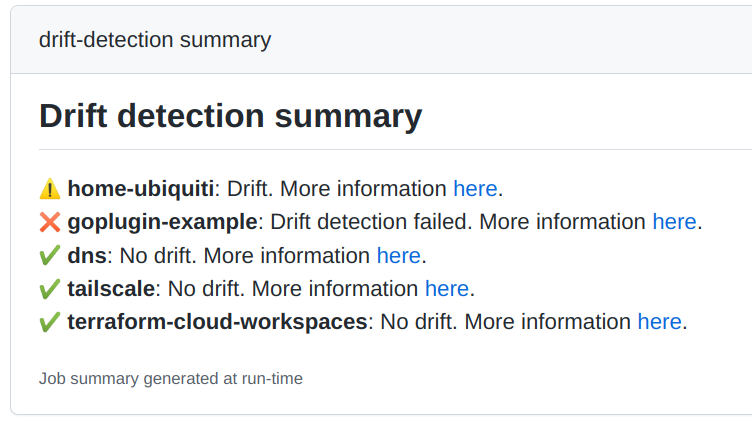
GitHub Action 会将执行过的漂移检测结果写入作业摘要:
### 使用场景
以空运行模式执行单次运行,查看哪些工作区会受影响:
```
tfe-drift run --dry-run
```
使用安全默认值执行单次运行,并以 JSON 格式获取结果输出:
```
tfe-drift run -o json
```
限制最多执行 2 个计划的单次运行,忽略过去 2 小时内已执行过漂移检测的工作区,并排除 dns 工作区:
```
tfe-drift run --exclude dns --not-before 2h --limit-max-plan 2
```
以 5 分钟为间隔执行控制器模式,限制在标记了 `enable-drift-detection` 的工作区中最多执行 1 个计划:
```
tfe-drift controller --detect-interval 5m --limit-max-plan 1 --include-tag enable-drift-detection
```
将控制器作为仅 Prometheus 指标导出器运行:
```
tfe-drift controller --disable-drift-detector
```
## 指标
例如,使用以下告警规则查询过去半小时内发生的漂移:
```
max by (organization_name, workspace_name, run_url) (
(
tfe_drift_workspace_drift_detection_state{state="drift"} > 0
and on (workspace_name)
(time() - tfe_drift_workspace_drift_detection_create) < 1800
)
* on (workspace_name) group_right ()
tfe_drift_workspace_info
)
```
解释:
- `tfe_drift_workspace_drift_detection_state{state="drift"} > 0`:返回处于 `drift` 状态的工作区(也可以查询 `drift_plan_error`)。
- `(time() - tfe_drift_workspace_drift_detection_create) < 1800`:返回在过去 `30m` 内有过漂移检测的工作区。
- `* on (workspace_name) group_right () tfe_drift_workspace_info`:为满足前两个查询条件(状态和近期漂移检测)的工作区添加所有标签。
- `max by (organization_name, workspace_name, run_url)`:我们只关心这 3 个标签,因此通过聚合丢弃其他标签(可以使用 `min`、`sum` 等,因为不使用值,所以无所谓)。
## 常见问题
### 漂移检测是如何执行的?
它是一个 Terraform [推测计划](https://developer.hashicorp.com/terraform/cloud-docs/run/remote-operations#speculative-plans),使用已配置的最新 Terraform 工作区源代码(通常是指定仓库和目录下的 `main` 分支)。
### 它是如何工作的?
当 tfe-drift 执行时,它会使用一个特定的标识符(`--app-id`,默认为 `tfe-drift`)。
所有通过 TFE API 运行的漂移检测,都会在计划消息中通过该 ID 进行标识。
此后,它会使用该 ID 工作区的漂移检测计划,并利用这些信息决定结果,或判断下次执行时是否需要再次运行。
如果执行的漂移检测 Terraform 计划有变更,则存在漂移!
### 为什么?Hashicorp 最近宣布了 [Drift detection][drift-detection]
Terraform Cloud 提供了自己的[漂移检测器](Looks awesome!),但该功能不适用于非 "Business" 级别的用户。
### 为什么要限制计划数量?
有时 Terraform Cloud 的执行工作节点繁忙,或者你只有少量工作节点(甚至只有 1 个!)。为了避免用漂移检测填满大量队列并阻塞 Terraform Cloud 的使用……你可以使用限制模式:
每次执行限制数量,并在一天内多次调度 tfe-drift 运行。最终效果与不限制相同,但不会长时间阻塞你的 Terraform Cloud 工作节点:一天结束时,所有工作区都已检查完毕。
### tfe-drift 如何调度漂移检测?
结合了多种策略:
- 不运行已处于运行/队列中的漂移检测。
- 不运行过去 T 时间内(例如 12h)已执行过漂移检测的工作区。
- 优先处理上次漂移检测时间最久或从未有过检测的工作区。
### 单次运行 VS 控制器模式
#### 单次运行
单次运行非常适合 CI 和定时任务,如果你没有运行时环境,或者使用场景简单(例如只有少量工作区),这是适合你的模式。但请注意,你将依赖另一个系统来调度漂移检测运行。此外,如果你按 CI 分钟付费,这种方式可能更昂贵。
- 优点:
- 不需要运行时环境,可以在 CI 中使用。
- 缺点:
- 定价(可能更贵)。
- 缺乏精细的时间调度(取决于 CI/定时任务系统)。
#### 控制器
如果你有集群或可以轻松部署长期运行应用程序的环境,控制器模式可能更合适,因为你可以更快、更精细地调度漂移检测(每 5 分钟,限制 1 个计划)。
- 优点:
- 更小的漂移检测间隔。
- 开箱即用的 Prometheus 指标。
- 缺点:
- 需要运行时环境。
#### 混合模式
关于指标,虽然控制器模式运行 Prometheus 导出器来获取漂移检测信息,但可以通过 `--disable-drift-detector` 禁用漂移检测器。因此,你可以使用单次运行在 CI 中执行漂移检测,然后设置控制器模式作为仅指标导出器运行。
这种使用场景不常见,但在某些情况下可能有用。
### 是否可以在 CI 和定时任务中使用(例如 GitHub Action)?
当然可以!:) 你甚至可以开箱即用地使用 [GitHub Action][tfe-drift-gh-actions]。
它正是为此设计的:
创建一个定时任务,定期(例如每小时)执行 tfe-drift,并限制同时执行的计划数量。
一天结束时,所有工作区都应该已被检查过。tfe-drift 将处理调度逻辑,因此可以安全地按固定间隔运行。
它会返回一个 JSON 输出摘要,你可以用于通知或与其他 CI 步骤或 Action 集成。
### 退出码?
- `0`:一切正常。
- `1`:执行 tfe-drift 时出错。
- `2`:存在漂移。
- `3`:漂移检测计划存在错误。
你可以选择禁用 2 和 3 退出码,以便通过将 JSON 摘要传递给其他应用程序或脚本自行处理漂移/检测错误。
### 输出格式?
默认情况下,仅输出日志信息。但你可以使用 `-o` 选择输出格式,可选值有:
- `json`:非缩进 JSON。
- `pretty-json`:缩进 JSON。
### 结果 JSON 格式?
参见以下示例:
```
{
"workspaces": {
"wk1": {
"name": "wk1",
"id": "ws-RAB2YhfV7mpXUTW1",
"tags": [
"t1"
],
"drift_detection_run_id": "run-BQHxAamo7pSi1iMf",
"drift_detection_run_url": "https://app.terraform.io/app/user1/workspaces/wk1/runs/run-BQHxAamo7pSi1iMf",
"drift": false,
"drift_detection_plan_error": false,
"ok": true
},
"wk2": {
"name": "wk2",
"id": "ws-vz46xzDKYWpfa5o8",
"tags": [
"t1",
"t4"
],
"drift_detection_run_id": "run-8AgmNBY2MfKeyjGt",
"drift_detection_run_url": "https://app.terraform.io/app/user1/workspaces/wk2/runs/run-8AgmNBY2MfKeyjGt",
"drift": false,
"drift_detection_plan_error": false,
"ok": true
},
"wk3": {
"name": "wk3",
"id": "ws-qaCmR6EL8fujrxxY",
"tags": [
"t2",
"t3"
],
"drift_detection_run_id": "run-ndhST1LXMh7tn3L5",
"drift_detection_run_url": "https://app.terraform.io/app/user1/workspaces/wk3/runs/run-ndhST1LXMh7tn3L5",
"drift": true,
"drift_detection_plan_error": false,
"ok": false
},
"wk4": {
"name": "wk4",
"id": "ws-df3PN4CX3grHghE9",
"tags": [
"t1",
"t3"
],
"drift_detection_run_id": "run-Nwy7911XPX4qcwWu",
"drift_detection_run_url": "https://app.terraform.io/app/user1/workspaces/wk4/runs/run-Nwy7911XPX4qcwWu",
"drift": false,
"drift_detection_plan_error": false,
"ok": true
}
},
"drift": true,
"drift_detection_plan_error": false,
"ok": false,
"created_at": "2022-11-14T17:59:55.946884748Z"
}
```
标签:EVTX分析, GitHub Action, Terraform Cloud, Terraform Enterprise, 云运维, 单次运行, 基础设施检测, 工作空间过滤, 平台工程, 度量, 异常检测, 控制器模式, 日志审计, 漂移检测, 监控, 网络调试, 自动化, 自定义请求头, 请求拦截, 配置漂移, 限流