ggml-org/whisper.cpp
GitHub: ggml-org/whisper.cpp
OpenAI Whisper 的高性能纯 C/C++ 实现,支持多平台硬件加速与模型量化,适合边缘设备离线语音识别。
Stars: 50744 | Forks: 5663
# whisper.cpp

[](https://github.com/ggml-org/whisper.cpp/actions)
[](https://opensource.org/licenses/MIT)
[](https://conan.io/center/whisper-cpp)
[](https://www.npmjs.com/package/whisper.cpp/)
稳定版: [v1.8.1](https://github.com/ggml-org/whisper.cpp/releases/tag/v1.8.1) / [路线图](https://github.com/orgs/ggml-org/projects/4/)
[OpenAI's Whisper](https://github.com/openai/whisper) 自动语音识别 (ASR) 模型的高性能推理:
- 纯 C/C++ 实现,无依赖
- Apple Silicon 一等公民 - 通过 ARM NEON, Accelerate 框架, Metal 和 [Core ML](#core-ml-support) 优化
- 支持 x86 架构的 AVX intrinsics
- [支持 POWER 架构的 VSX intrinsics](#power-vsx-intrinsics)
- 混合 F16 / F32 精度
- [整数量化支持](#quantization)
- 运行时零内存分配
- [Vulkan 支持](#vulkan-gpu-support)
- 支持纯 CPU 推理
- [NVIDIA 的高效 GPU 支持](#nvidia-gpu-support)
- [OpenVINO 支持](#openvino-support)
- [Ascend NPU 支持](#ascend-npu-support)
- [Moore Threads GPU 支持](#moore-threads-gpu-support)
- [C 风格 API](https://github.com/ggml-org/whisper.cpp/blob/master/include/whisper.h)
- [语音活动检测 (VAD)](#voice-activity-detection-vad)
支持的平台:
- [x] Mac OS (Intel 和 Arm)
- [x] [iOS](examples/whisper.objc)
- [x] [Android](examples/whisper.android)
- [x] [Java](bindings/java/README.md)
- [x] Linux / [FreeBSD](https://github.com/ggml-org/whisper.cpp/issues/56#issuecomment-1350920264)
- [x] [WebAssembly](examples/whisper.wasm)
- [x] Windows ([MSVC](https://github.com/ggml-org/whisper.cpp/blob/master/.github/workflows/build.yml#L117-L144) 和 [MinGW](https://github.com/ggml-org/whisper.cpp/issues/168))
- [x] [Raspberry Pi](https://github.com/ggml-org/whisper.cpp/discussions/166)
- [x] [Docker](https://github.com/ggml-org/whisper.cpp/pkgs/container/whisper.cpp)
模型的整个高级实现包含在 [whisper.h](include/whisper.h) 和 [whisper.cpp](src/whisper.cpp) 中。
其余代码是 [`ggml`](https://github.com/ggml-org/ggml) 机器学习库的一部分。
拥有这样一个轻量级的模型实现可以轻松地将其集成到不同的平台和应用程序中。
举个例子,这是一个在 iPhone 13 设备上运行模型的视频 - 完全离线,设备端:[whisper.objc](examples/whisper.objc)
https://user-images.githubusercontent.com/1991296/197385372-962a6dea-bca1-4d50-bf96-1d8c27b98c81.mp4
你也可以轻松制作自己的离线语音助手应用:[command](examples/command)
https://user-images.githubusercontent.com/1991296/204038393-2f846eae-c255-4099-a76d-5735c25c49da.mp4
在 Apple Silicon 上,推理通过 Metal 完全在 GPU 上运行:
https://github.com/ggml-org/whisper.cpp/assets/1991296/c82e8f86-60dc-49f2-b048-d2fdbd6b5225
## 快速开始
首先克隆仓库:
```
git clone https://github.com/ggml-org/whisper.cpp.git
```
进入目录:
```
cd whisper.cpp
```
然后,下载一个转换为 [`ggml` 格式](#ggml-format) 的 Whisper [模型](models/README.md)。例如:
```
sh ./models/download-ggml-model.sh base.en
```
现在构建 [whisper-cli](examples/cli) 示例并像这样转录音频文件:
```
# 构建项目
cmake -B build
cmake --build build -j --config Release
# 转录 audio file
./build/bin/whisper-cli -f samples/jfk.wav
```
要快速演示,只需运行 `make base.en`。
该命令下载转换为自定义 `ggml` 格式的 `base.en` 模型,并对文件夹 `samples` 中的所有 `.wav` 样本运行推理。
有关详细的使用说明,请运行:`./build/bin/whisper-cli -h`
请注意,[whisper-cli](examples/cli) 示例目前仅支持 16-bit WAV 文件,因此请确保在运行该工具之前转换您的输入。
例如,你可以像这样使用 `ffmpeg`:
```
ffmpeg -i input.mp3 -ar 16000 -ac 1 -c:a pcm_s16le output.wav
```
## 更多音频样本
如果你想要一些额外的音频样本进行测试,只需运行:
```
make -j samples
```
这将从 Wikipedia 下载更多音频文件,并通过 `ffmpeg` 将其转换为 16-bit WAV 格式。
你可以按如下方式下载并运行其他模型:
```
make -j tiny.en
make -j tiny
make -j base.en
make -j base
make -j small.en
make -j small
make -j medium.en
make -j medium
make -j large-v1
make -j large-v2
make -j large-v3
make -j large-v3-turbo
```
## 内存使用
| Model | Disk | Mem |
| ------ | ------- | ------- |
| tiny | 75 MiB | ~273 MB |
| base | 142 MiB | ~388 MB |
| small | 466 MiB | ~852 MB |
| medium | 1.5 GiB | ~2.1 GB |
| large | 2.9 GiB | ~3.9 GB |
## POWER VSX Intrinsics
`whisper.cpp` 支持 POWER 架构,并包含一些代码,可以显著加快在 POWER9/10 上运行的 Linux 的运算速度,使其能够在降频的 Raptor Talos II 上实现比实时更快的转录。确保你已安装 BLAS 包,并将标准 cmake 设置替换为:
```
# 使用 GGML_BLAS 定义构建
cmake -B build -DGGML_BLAS=1
cmake --build build -j --config Release
./build/bin/whisper-cli [ .. etc .. ]
```
## 量化
`whisper.cpp` 支持 Whisper `ggml` 模型的整数量化。
量化模型需要更少的内存和磁盘空间,并且根据硬件的不同,可以更高效地处理。
以下是创建和使用量化模型的步骤:
```
# 使用 Q5_0 方法量化模型
cmake -B build
cmake --build build -j --config Release
./build/bin/quantize models/ggml-base.en.bin models/ggml-base.en-q5_0.bin q5_0
# 像往常一样运行 examples,指定量化后的 model file
./build/bin/whisper-cli -m models/ggml-base.en-q5_0.bin ./samples/gb0.wav
```
## Core ML 支持
在 Apple Silicon 设备上,Encoder 推理可以通过 Core ML 在 Apple Neural Engine (ANE) 上执行。这可以带来显著的加速 - 与纯 CPU 执行相比快 3 倍以上。以下是生成 Core ML 模型并在 `whisper.cpp` 中使用它的说明:
- 安装创建 Core ML 模型所需的 Python 依赖:
pip install ane_transformers
pip install openai-whisper
pip install coremltools
- 为确保 `coremltools` 正常运行,请确认已安装 [Xcode](https://developer.apple.com/xcode/) 并执行 `xcode-select --install` 以安装命令行工具。
- 推荐使用 Python 3.11。
- 推荐使用 MacOS Sonoma (版本 14) 或更高版本,因为旧版本的 MacOS 可能会出现转录幻觉问题。
- [可选] 推荐使用 Python 版本管理系统,例如 [Miniconda](https://docs.conda.io/en/latest/miniconda.html) 来执行此步骤:
- 要创建环境,请使用:`conda create -n py311-whisper python=3.11 -y`
- 要激活环境,请使用:`conda activate py311-whisper`
- 生成 Core ML 模型。例如,要生成 `base.en` 模型,请使用:
./models/generate-coreml-model.sh base.en
这将生成文件夹 `models/ggml-base.en-encoder.mlmodelc`
- 启用 Core ML 支持构建 `whisper.cpp`:
# 使用 CMake
cmake -B build -DWHISPER_COREML=1
cmake --build build -j --config Release
- 像往常一样运行示例。例如:
$ ./build/bin/whisper-cli -m models/ggml-base.en.bin -f samples/jfk.wav
...
whisper_init_state: loading Core ML model from 'models/ggml-base.en-encoder.mlmodelc'
whisper_init_state: first run on a device may take a while ...
whisper_init_state: Core ML model loaded
system_info: n_threads = 4 / 10 | AVX = 0 | AVX2 = 0 | AVX512 = 0 | FMA = 0 | NEON = 1 | ARM_FMA = 1 | F16C = 0 | FP16_VA = 1 | WASM_SIMD = 0 | BLAS = 1 | SSE3 = 0 | VSX = 0 | COREML = 1 |
...
在设备上的第一次运行很慢,因为 ANE 服务将 Core ML 模型编译为某种设备特定的格式。
随后的运行会更快。
有关 Core ML 实现的更多信息,请参阅 PR [#566](https://github.com/ggml-org/whisper.cpp/pull/566)。
## OpenVINO 支持
在支持 [OpenVINO](https://github.com/openvinotoolkit/openvino) 的平台上,Encoder 推理可以在支持 OpenVINO 的设备上执行,包括 x86 CPU 和 Intel GPU(集成和独立)。
这可以显著提高 Encoder 的性能。以下是生成 OpenVINO 模型并在 `whisper.cpp` 中使用它的说明:
- 首先,设置 Python 虚拟环境并安装 Python 依赖。推荐使用 Python 3.10。
Windows:
cd models
python -m venv openvino_conv_env
openvino_conv_env\Scripts\activate
python -m pip install --upgrade pip
pip install -r requirements-openvino.txt
Linux 和 macOS:
cd models
python3 -m venv openvino_conv_env
source openvino_conv_env/bin/activate
python -m pip install --upgrade pip
pip install -r requirements-openvino.txt
- 生成 OpenVINO encoder 模型。例如,要生成 `base.en` 模型,请使用:
python convert-whisper-to-openvino.py --model base.en
这将生成 ggml-base.en-encoder-openvino.xml/.bin IR 模型文件。建议将这些文件重定位到与 `ggml` 模型相同的文件夹中,因为这是 OpenVINO 扩展在运行时搜索的默认位置。
- 启用 OpenVINO 支持构建 `whisper.cpp`:
从 [发布页面](https://github.com/openvinotoolkit/openvino/releases) 下载 OpenVINO 包。推荐使用版本 [2024.6.0](https://github.com/openvinotoolkit/openvino/releases/tag/2024.6.0)。所需库的现成二进制文件可以在 [OpenVino Archives](https://storage.openvinotoolkit.org/repositories/openvino/packages/2024.6/) 中找到
将包下载并解压到开发系统后,通过 source setupvars 脚本设置所需环境。例如:
Linux:
source /path/to/l_openvino_toolkit_ubuntu22_2023.0.0.10926.b4452d56304_x86_64/setupvars.sh
Windows (cmd):
C:\Path\To\w_openvino_toolkit_windows_2023.0.0.10926.b4452d56304_x86_64\setupvars.bat
然后使用 cmake 构建项目:
cmake -B build -DWHISPER_OPENVINO=1
cmake --build build -j --config Release
- 像往常一样运行示例。例如:
$ ./build/bin/whisper-cli -m models/ggml-base.en.bin -f samples/jfk.wav
...
whisper_ctx_init_openvino_encoder: loading OpenVINO model from 'models/ggml-base.en-encoder-openvino.xml'
whisper_ctx_init_openvino_encoder: first run on a device may take a while ...
whisper_openvino_init: path_model = models/ggml-base.en-encoder-openvino.xml, device = GPU, cache_dir = models/ggml-base.en-encoder-openvino-cache
whisper_ctx_init_openvino_encoder: OpenVINO model loaded
system_info: n_threads = 4 / 8 | AVX = 1 | AVX2 = 1 | AVX512 = 0 | FMA = 1 | NEON = 0 | ARM_FMA = 0 | F16C = 1 | FP16_VA = 0 | WASM_SIMD = 0 | BLAS = 0 | SSE3 = 1 | VSX = 0 | COREML = 0 | OPENVINO = 1 |
...
在 OpenVINO 设备上的第一次运行很慢,因为 OpenVINO 框架会将 IR (Intermediate Representation) 模型编译为设备特定的 'blob'。这个设备特定的 blob 将被缓存以供下次运行使用。
有关 OpenVINO 实现的更多信息,请参阅 PR [#1037](https://github.com/ggml-org/whisper.cpp/pull/1037)。
## NVIDIA GPU 支持
使用 NVIDIA 显卡,模型的处理通过 cuBLAS 和自定义 CUDA 核在 GPU 上高效完成。
首先,确保你已经安装了 `cuda`: https://developer.nvidia.com/cuda-downloads
现在启用 CUDA 支持构建 `whisper.cpp`:
```
cmake -B build -DGGML_CUDA=1
cmake --build build -j --config Release
```
或者对于更新的 NVIDIA GPU(RTX 5000 系列):
```
cmake -B build -DGGML_CUDA=1 -DCMAKE_CUDA_ARCHITECTURES="86"
cmake --build build -j --config Release
```
## Vulkan GPU 支持
跨供应商解决方案,允许你在 GPU 上加速工作负载。
首先,确保你的显卡驱动提供对 Vulkan API 的支持。
现在启用 Vulkan 支持构建 `whisper.cpp`:
```
cmake -B build -DGGML_VULKAN=1
cmake --build build -j --config Release
```
## 通过 OpenBLAS 的 BLAS CPU 支持
Encoder 处理可以通过 OpenBLAS 在 CPU 上加速。
首先,确保你已经安装了 `openblas`: https://www.openblas.net/
现在启用BLAS 支持构建 `whisper.cpp`:
```
cmake -B build -DGGML_BLAS=1
cmake --build build -j --config Release
```
## Ascend NPU 支持
Ascend NPU 通过 [`CANN`](https://www.hiascend.com/en/software/cann) 和 AI 核心提供推理加速。
首先,检查你的 Ascend NPU 设备是否受支持:
**已验证设备**
| Ascend NPU | Status |
|:-----------------------------:|:-------:|
| Atlas 300T A2 | Support |
| Atlas 300I Duo | Support |
然后,确保你已经安装了 [`CANN toolkit`](https://www.hiascend.com/en/software/cann/community) 。推荐使用最新版本的 CANN。
现在启用 CANN 支持构建 `whisper.cpp`:
```
cmake -B build -DGGML_CANN=1
cmake --build build -j --config Release
```
像往常一样运行推理示例,例如:
```
./build/bin/whisper-cli -f samples/jfk.wav -m models/ggml-base.en.bin -t 8
```
*注意:*
- 如果你在 Ascend NPU 设备上遇到问题,请创建一个带有 **[CANN]** 前缀/标签的 issue。
- 如果你使用 Ascend NPU 设备成功运行,请帮助更新 `Verified devices` 表格。
## Moore Threads GPU 支持
使用 Moore Threads 显卡,模型的处理通过 muBLAS 和自定义 MUDA 核在 GPU 上高效完成。
首先,确保你已经安装了 `MUSA SDK rc4.2.0`: https://developer.mthreads.com/sdk/download/musa?equipment=&os=&driverVersion=&version=4.2.0
现在启用 MUSA 支持构建 `whisper.cpp`:
```
cmake -B build -DGGML_MUSA=1
cmake --build build -j --config Release
```
或者为你的 Moore Threads GPU 指定架构。例如,如果你有 MTT S80 GPU,你可以如下指定架构:
```
cmake -B build -DGGML_MUSA=1 -DMUSA_ARCHITECTURES="21"
cmake --build build -j --config Release
```
## FFmpeg 支持 (仅限 Linux)
如果你想支持更多的音频格式(例如 Opus 和 AAC),你可以开启 `WHISPER_FFMPEG` 构建标志以启用 FFmpeg 集成。
首先,你需要安装所需的库:
```
# Debian/Ubuntu
sudo apt install libavcodec-dev libavformat-dev libavutil-dev
# RHEL/Fedora
sudo dnf install libavcodec-free-devel libavformat-free-devel libavutil-free-devel
```
然后你可以如下构建项目:
```
cmake -B build -D WHISPER_FFMPEG=yes
cmake --build build
```
运行以下示例以确认其正常工作:
```
# 将 audio file 转换为 Opus 格式
ffmpeg -i samples/jfk.wav jfk.opus
# 转录 audio file
./build/bin/whisper-cli --model models/ggml-base.en.bin --file jfk.opus
```
## Docker
### 前置条件
- Docker 必须安装并在你的系统上运行。
- 创建一个文件夹来存储大模型和中间文件(例如 /whisper/models)
### 镜像
我们为该项目提供了多个 Docker 镜像:
1. `ghcr.io/ggml-org/whisper.cpp:main`: 此镜像包含主可执行文件以及 `curl` 和 `ffmpeg`。(平台:`linux/amd64`, `linux/arm64`)
2. `ghcr.io/ggml-org/whisper.cpp:main-cuda`: 与 `main` 相同,但编译了 CUDA 支持。(平台:`linux/amd64`)
3. `ghcr.io/ggml-org/whisper.cpp:main-musa`: 与 `main` 相同,但编译了 MUSA 支持。(平台:`linux/amd64`)
4. `ghcr.io/ggml-org/whisper.cpp:main-vulkan`: 与 `main` 相同,但编译了 Vulkan 支持。(平台:`linux/amd64`)
### 使用
```
# 下载 model 并将其持久化到本地文件夹
docker run -it --rm \
-v path/to/models:/models \
whisper.cpp:main "./models/download-ggml-model.sh base /models"
# 转录 audio file
docker run -it --rm \
-v path/to/models:/models \
-v path/to/audios:/audios \
whisper.cpp:main "whisper-cli -m /models/ggml-base.bin -f /audios/jfk.wav"
# 转录 samples 文件夹中的 audio file
docker run -it --rm \
-v path/to/models:/models \
whisper.cpp:main "whisper-cli -m /models/ggml-base.bin -f ./samples/jfk.wav"
# 运行 web server
docker run -it --rm -p "8080:8080" \
-v path/to/models:/models \
whisper.cpp:main "whisper-server --host 127.0.0.1 -m /models/ggml-base.bin"
# 使用 4 个线程在 small.en model 上运行 bench
docker run -it --rm \
-v path/to/models:/models \
whisper.cpp:main "whisper-bench -m /models/ggml-small.en.bin -t 4"
```
## 使用 Conan 安装
你可以使用 [Conan](https://conan.io/) 安装 whisper.cpp 的预构建二进制文件或从源码构建。使用以下命令:
```
conan install --requires="whisper-cpp/[*]" --build=missing
```
有关如何使用 Conan 的详细说明,请参阅 [Conan 文档](https://docs.conan.io/2/)。
## 限制
- 仅限推理
## 实时音频输入示例
这是一个对麦克风音频执行实时推理的简单示例。
[stream](examples/stream) 工具每半秒对音频进行采样并连续运行转录。
更多信息请参见 [issue #10](https://github.com/ggml-org/whisper.cpp/issues/10)。
你需要安装 [sdl2](https://wiki.libsdl.org/SDL2/Installation) 才能使其正常工作。
```
cmake -B build -DWHISPER_SDL2=ON
cmake --build build -j --config Release
./build/bin/whisper-stream -m ./models/ggml-base.en.bin -t 8 --step 500 --length 5000
```
https://user-images.githubusercontent.com/1991296/194935793-76afede7-cfa8-48d8-a80f-28ba83be7d09.mp4
## 置信度颜色编码
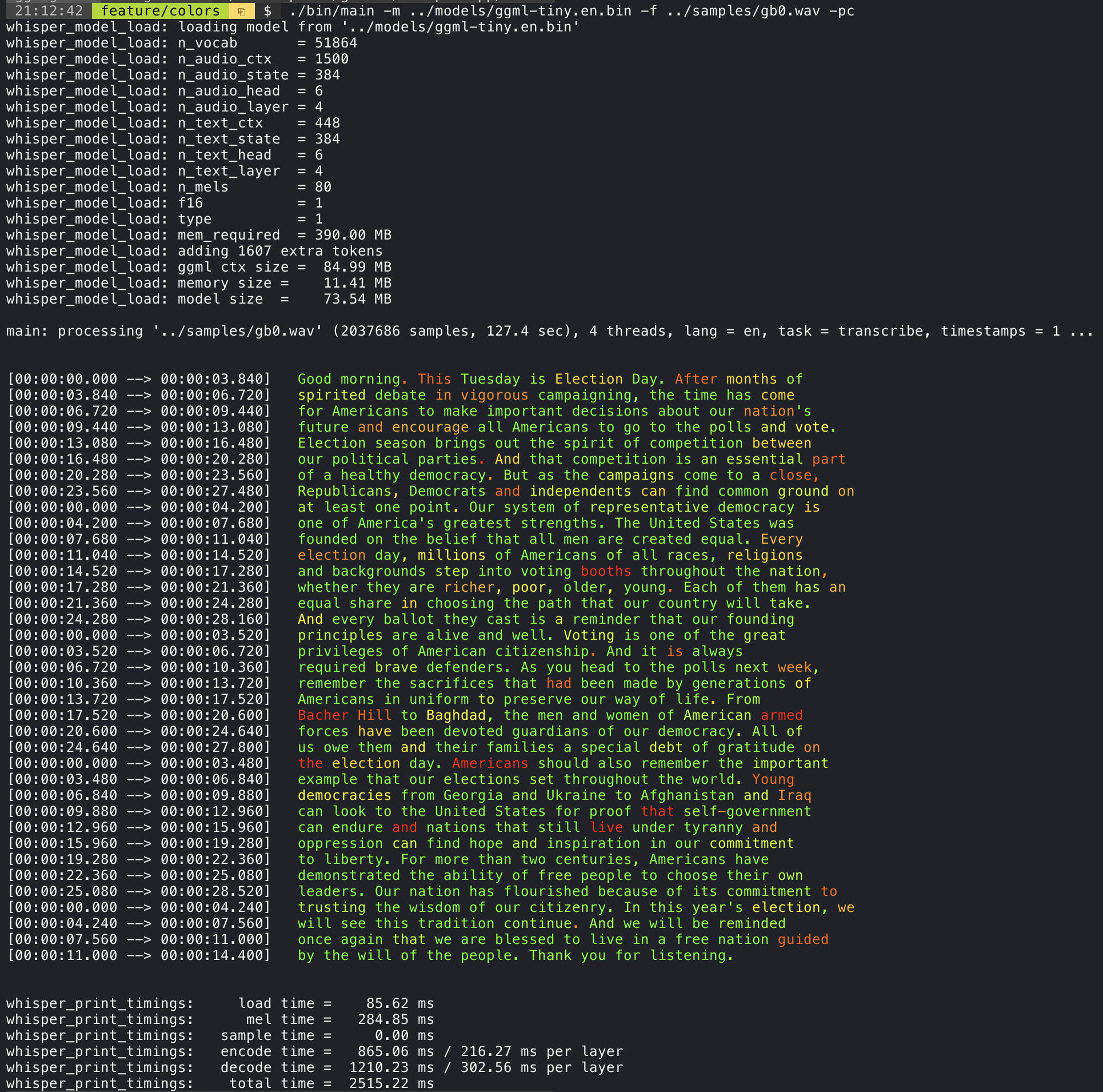
添加 `--print-colors` 参数将使用实验性的颜色编码策略打印转录文本,
以突出显示高或低置信度的单词:
```
./build/bin/whisper-cli -m models/ggml-base.en.bin -f samples/gb0.wav --print-colors
```
 ## 控制生成文本片段的长度(实验性)
例如,要将行长度限制为最多 16 个字符,只需添加 `-ml 16`:
```
$ ./build/bin/whisper-cli -m ./models/ggml-base.en.bin -f ./samples/jfk.wav -ml 16
whisper_model_load: loading model from './models/ggml-base.en.bin'
...
system_info: n_threads = 4 / 10 | AVX2 = 0 | AVX512 = 0 | NEON = 1 | FP16_VA = 1 | WASM_SIMD = 0 | BLAS = 1 |
main: processing './samples/jfk.wav' (176000 samples, 11.0 sec), 4 threads, 1 processors, lang = en, task = transcribe, timestamps = 1 ...
[00:00:00.000 --> 00:00:00.850] And so my
[00:00:00.850 --> 00:00:01.590] fellow
[00:00:01.590 --> 00:00:04.140] Americans, ask
[00:00:04.140 --> 00:00:05.660] not what your
[00:00:05.660 --> 00:00:06.840] country can do
[00:00:06.840 --> 00:00:08.430] for you, ask
[00:00:08.430 --> 00:00:09.440] what you can do
[00:00:09.440 --> 00:00:10.020] for your
[00:00:10.020 --> 00:00:11.000] country.
```
## 单词级时间戳(实验性)
`--max-len` 参数可用于获取单词级时间戳。只需使用 `-ml 1`:
```
$ ./build/bin/whisper-cli -m ./models/ggml-base.en.bin -f ./samples/jfk.wav -ml 1
whisper_model_load: loading model from './models/ggml-base.en.bin'
...
system_info: n_threads = 4 / 10 | AVX2 = 0 | AVX512 = 0 | NEON = 1 | FP16_VA = 1 | WASM_SIMD = 0 | BLAS = 1 |
main: processing './samples/jfk.wav' (176000 samples, 11.0 sec), 4 threads, 1 processors, lang = en, task = transcribe, timestamps = 1 ...
[00:00:00.000 --> 00:00:00.320]
[00:00:00.320 --> 00:00:00.370] And
[00:00:00.370 --> 00:00:00.690] so
[00:00:00.690 --> 00:00:00.850] my
[00:00:00.850 --> 00:00:01.590] fellow
[00:00:01.590 --> 00:00:02.850] Americans
[00:00:02.850 --> 00:00:03.300] ,
[00:00:03.300 --> 00:00:04.140] ask
[00:00:04.140 --> 00:00:04.990] not
[00:00:04.990 --> 00:00:05.410] what
[00:00:05.410 --> 00:00:05.660] your
[00:00:05.660 --> 00:00:06.260] country
[00:00:06.260 --> 00:00:06.600] can
[00:00:06.600 --> 00:00:06.840] do
[00:00:06.840 --> 00:00:07.010] for
[00:00:07.010 --> 00:00:08.170] you
[00:00:08.170 --> 00:00:08.190] ,
[00:00:08.190 --> 00:00:08.430] ask
[00:00:08.430 --> 00:00:08.910] what
[00:00:08.910 --> 00:00:09.040] you
[00:00:09.040 --> 00:00:09.320] can
[00:00:09.320 --> 00:00:09.440] do
[00:00:09.440 --> 00:00:09.760] for
[00:00:09.760 --> 00:00:10.020] your
[00:00:10.020 --> 00:00:10.510] country
[00:00:10.510 --> 00:00:11.000] .
```
## 通过 tinydiarize 进行说话人分割(实验性)
有关此方法的更多信息,请访问:https://github.com/ggml-org/whisper.cpp/pull/1058
示例用法:
```
# 下载 tinydiarize 兼容 model
./models/download-ggml-model.sh small.en-tdrz
# 照常运行,添加 "-tdrz" 命令行参数
./build/bin/whisper-cli -f ./samples/a13.wav -m ./models/ggml-small.en-tdrz.bin -tdrz
...
main: processing './samples/a13.wav' (480000 samples, 30.0 sec), 4 threads, 1 processors, lang = en, task = transcribe, tdrz = 1, timestamps = 1 ...
...
[00:00:00.000 --> 00:00:03.800] Okay Houston, we've had a problem here. [SPEAKER_TURN]
[00:00:03.800 --> 00:00:06.200] This is Houston. Say again please. [SPEAKER_TURN]
[00:00:06.200 --> 00:00:08.260] Uh Houston we've had a problem.
[00:00:08.260 --> 00:00:11.320] We've had a main beam up on a volt. [SPEAKER_TURN]
[00:00:11.320 --> 00:00:13.820] Roger main beam interval. [SPEAKER_TURN]
[00:00:13.820 --> 00:00:15.100] Uh uh [SPEAKER_TURN]
[00:00:15.100 --> 00:00:18.020] So okay stand, by thirteen we're looking at it. [SPEAKER_TURN]
[00:00:18.020 --> 00:00:25.740] Okay uh right now uh Houston the uh voltage is uh is looking good um.
[00:00:27.620 --> 00:00:29.940] And we had a a pretty large bank or so.
```
## 卡拉OK风格视频生成(实验性)
[whisper-cli](examples/cli) 示例支持输出卡拉OK风格的视频,其中
当前发音的单词会被高亮显示。使用 `-owts` 参数并运行生成的 bash 脚本。
这需要安装 `ffmpeg`。
以下是几个“典型”示例:
```
./build/bin/whisper-cli -m ./models/ggml-base.en.bin -f ./samples/jfk.wav -owts
source ./samples/jfk.wav.wts
ffplay ./samples/jfk.wav.mp4
```
https://user-images.githubusercontent.com/1991296/199337465-dbee4b5e-9aeb-48a3-b1c6-323ac4db5b2c.mp4
```
./build/bin/whisper-cli -m ./models/ggml-base.en.bin -f ./samples/mm0.wav -owts
source ./samples/mm0.wav.wts
ffplay ./samples/mm0.wav.mp4
```
https://user-images.githubusercontent.com/1991296/199337504-cc8fd233-0cb7-4920-95f9-4227de3570aa.mp4
```
./build/bin/whisper-cli -m ./models/ggml-base.en.bin -f ./samples/gb0.wav -owts
source ./samples/gb0.wav.wts
ffplay ./samples/gb0.wav.mp4
```
https://user-images.githubusercontent.com/1991296/199337538-b7b0c7a3-2753-4a88-a0cd-f28a317987ba.mp4
## 不同模型的视频比较
使用 [scripts/bench-wts.sh](https://github.com/ggml-org/whisper.cpp/blob/master/scripts/bench-wts.sh) 脚本生成以下格式的视频:
```
./scripts/bench-wts.sh samples/jfk.wav
ffplay ./samples/jfk.wav.all.mp4
```
https://user-images.githubusercontent.com/1991296/223206245-2d36d903-cf8e-4f09-8c3b-eb9f9c39d6fc.mp4
## 基准测试
为了客观比较不同系统配置下的推理性能,
请使用 [whisper-bench](examples/bench) 工具。该工具仅运行模型的 Encoder 部分,并打印执行所需的时间。结果汇总在以下 Github issue 中:
[Benchmark results](https://github.com/ggml-org/whisper.cpp/issues/89)
此外,还提供了一个脚本 [bench.py](scripts/bench.py),用于使用不同的模型和音频文件运行 whisper.cpp。
你可以使用以下命令运行它,默认情况下它将针对 models 文件夹中的任何标准模型运行。
```
python3 scripts/bench.py -f samples/jfk.wav -t 2,4,8 -p 1,2
```
它是用 Python 编写的,旨在便于根据你的基准测试用例进行修改和扩展。
它输出一个包含基准测试结果的 csv 文件。
## `ggml` 格式
原始模型被转换为自定义二进制格式。这允许将所有需要的内容打包到一个文件中:
- model parameters
- mel filters
- vocabulary
- weights
你可以使用 [models/download-ggml-model.sh](models/download-ggml-model.sh) 脚本下载转换后的模型
或从这里手动下载:
- https://huggingface.co/ggerganov/whisper.cpp
有关更多详细信息,请参阅转换脚本 [models/convert-pt-to-ggml.py](models/convert-pt-to-ggml.py) 或 [models/README.md](models/README.md)。
## [Bindings](https://github.com/ggml-org/whisper.cpp/discussions/categories/bindings)
- [x] Rust: [tazz4843/whisper-rs](https://github.com/tazz4843/whisper-rs) | [#310](https://github.com/ggml-org/whisper.cpp/discussions/310)
- [x] JavaScript: [bindings/javascript](bindings/javascript) | [#309](https://github.com/ggml-org/whisper.cpp/discussions/309)
- React Native (iOS / Android): [whisper.rn](https://github.com/mybigday/whisper.rn)
- [x] Go: [bindings/go](bindings/go) | [#312](https://github.com/ggml-org/whisper.cpp/discussions/312)
- [x] Java:
- [GiviMAD/whisper-jni](https://github.com/GiviMAD/whisper-jni)
- [x] Ruby: [bindings/ruby](bindings/ruby) | [#507](https://github.com/ggml-org/whisper.cpp/discussions/507)
- [x] Objective-C / Swift: [ggml-org/whisper.spm](https://github.com/ggml-org/whisper.spm) | [#313](https://github.com/ggml-org/whisper.cpp/discussions/313)
- [exPHAT/SwiftWhisper](https://github.com/exPHAT/SwiftWhisper)
- [x] .NET: | [#422](https://github.com/ggml-org/whisper.cpp/discussions/422)
- [sandrohanea/whisper.net](https://github.com/sandrohanea/whisper.net)
- [NickDarvey/whisper](https://github.com/NickDarvey/whisper)
- [x] Python: | [#9](https://github.com/ggml-org/whisper.cpp/issues/9)
- [stlukey/whispercpp.py](https://github.com/stlukey/whispercpp.py) (Cython)
- [AIWintermuteAI/whispercpp](https://github.com/AIWintermuteAI/whispercpp) (Updated fork of aarnphm/whispercpp)
- [aarnphm/whispercpp](https://github.com/aarnphm/whispercpp) (Pybind11)
- [abdeladim-s/pywhispercpp](https://github.com/abdeladim-s/pywhispercpp) (Pybind11)
- [x] R: [bnosac/audio.whisper](https://github.com/bnosac/audio.whisper)
- [x] Unity: [macoron/whisper.unity](https://github.com/Macoron/whisper.unity)
## XCFramework
XCFramework 是用于 iOS, visionOS, tvOS 和 macOS 的库预编译版本。
它可以在 Swift 项目中使用,而无需从源代码编译库。例如,v1.7.5 版本的 XCFramework
可以按如下方式使用:
```
// swift-tools-version: 5.10
// The swift-tools-version declares the minimum version of Swift required to build this package.
import PackageDescription
let package = Package(
name: "Whisper",
targets: [
.executableTarget(
name: "Whisper",
dependencies: [
"WhisperFramework"
]),
.binaryTarget(
name: "WhisperFramework",
url: "https://github.com/ggml-org/whisper.cpp/releases/download/v1.7.5/whisper-v1.7.5-xcframework.zip",
checksum: "c7faeb328620d6012e130f3d705c51a6ea6c995605f2df50f6e1ad68c59c6c4a"
)
]
)
```
## 语音活动检测 (VAD)
可以使用 `--vad` 参数为 `whisper-cli` 启用语音活动检测 (VAD) 支持。
除了此选项外,还需要一个 VAD 模型。
其工作方式是首先将音频样本通过 VAD 模型,该模型将检测语音片段。
利用此信息,仅从原始音频输入中提取检测到的语音片段并传递给 whisper 进行处理。
这减少了 whisper 需要处理的音频数据量,并可以显著加快转录过程。
目前支持以下 VAD 模型:
### Silero-VAD
[Silero-vad](https://github.com/snakers4/silero-vad) 是一个用 Python 编写的轻量级 VAD 模型,
速度快且准确。
可以在 Linux 或 MacOS 上运行以下命令来下载模型:
```
$ ./models/download-vad-model.sh silero-v6.2.0
Downloading ggml model silero-v6.2.0 from 'https://huggingface.co/ggml-org/whisper-vad' ...
ggml-silero-v6.2.0.bin 100%[==============================================>] 864.35K --.-KB/s in 0.04s
Done! Model 'silero-v6.2.0' saved in '/path/models/ggml-silero-v6.2.0.bin'
You can now use it like this:
$ ./build/bin/whisper-cli -vm /path/models/ggml-silero-v6.2.0.bin --vad -f samples/jfk.wav -m models/ggml-base.en.bin
```
以及在 Windows 上运行以下命令:
```
> .\models\download-vad-model.cmd silero-v6.2.0
Downloading vad model silero-v6.2.0...
Done! Model silero-v6.2.0 saved in C:\Users\danie\work\ai\whisper.cpp\ggml-silero-v6.2.0.bin
You can now use it like this:
C:\path\build\bin\Release\whisper-cli.exe -vm C:\path\ggml-silero-v6.2.0.bin --vad -m models/ggml-base.en.bin -f samples\jfk.wav
```
要查看所有可用模型的列表,请运行上述命令而不带任何
参数。
也可以使用以下命令将此模型手动转换为 ggml:
```
$ python3 -m venv venv && source venv/bin/activate
$ (venv) pip install silero-vad
$ (venv) $ python models/convert-silero-vad-to-ggml.py --output models/silero.bin
Saving GGML Silero-VAD model to models/silero-v6.2.0-ggml.bin
```
然后可以按如下方式与 whisper 一起使用:
```
$ ./build/bin/whisper-cli \
--file ./samples/jfk.wav \
--model ./models/ggml-base.en.bin \
--vad \
--vad-model ./models/silero-v6.2.0-ggml.bin
```
### VAD 选项
* --vad-threshold: 语音检测的阈值概率。语音片段/帧的概率
高于此阈值将被视为语音。
* --vad-min-speech-duration-ms: 最小语音持续时间(以毫秒为单位)。短于此值的语音
片段将被丢弃,以过滤掉短暂的噪音或
误报。
* --vad-min-silence-duration-ms: 最小静音持续时间(以毫秒为单位)。静音
期间必须至少持续这么长时间才能结束语音片段。较短的静音
期间将被忽略并作为语音的一部分包含在内。
* --vad-max-speech-duration-s: 最大语音持续时间(以秒为单位)。超过此长度的语音片段
将在超过 98ms 的静音点自动分割成多个片段,以防止片段过长。
* --vad-speech-pad-ms: 语音填充(以毫秒为单位)。在每个检测到的语音片段
前后添加此数量的填充,以避免切断语音边缘。
* --vad-samples-overlap: 从每个语音片段延伸到
下一个片段的音频量,以秒为单位(例如,0.10 = 100ms 重叠)。这确保语音在
片段连接在一起时不会突然切断。
## 示例
在 [examples](examples) 文件夹中,有在各种不同项目中使用该库的各种示例。
有些示例甚至被移植为使用 WebAssembly 在浏览器中运行。快去看看吧!
| Example | Web | Description |
| --------------------------------------------------- | ------------------------------------- | ------------------------------------------------------------------------------------------------------------------------------- |
| [whisper-cli](examples/cli) | [whisper.wasm](examples/whisper.wasm) | 使用 Whisper 翻译和转录音频的工具 |
| [whisper-bench](examples/bench) | [bench.wasm](examples/bench.wasm) | 在你的机器上对 Whisper 性能进行基准测试 |
| [whisper-stream](examples/stream) | [stream.wasm](examples/stream.wasm) | 原始麦克风捕获的实时转录 |
| [whisper-command](examples/command) | [command.wasm](examples/command.wasm) | 从麦克风接收语音命令的基本语音助手示例 |
| [whisper-server](examples/server) | | 具有 OAI 类似 API 的 HTTP 转录服务器 |
| [whisper-talk-llama](examples/talk-llama) | | 与 LLaMA 机器人交谈 |
| [whisper.objc](examples/whisper.objc) | | 使用 whisper.cpp 的 iOS 移动应用 |
| [whisper.swiftuiexamples/whisper.swiftui) | | 使用 whisper.cpp 的 SwiftUI iOS / macOS 应用 |
| [whisper.android](examples/whisper.android) | | 使用 whisper.cpp 的 Android 移动应用 |
| [whisper.nvim](examples/whisper.nvim) | | Neovim 的语音转文本插件 |
| [generate-karaoke.sh](examples/generate-karaoke.sh) | | 轻松[生成卡拉OK视频](https://youtu.be/uj7hVta4blM)的助手脚本 |
| [livestream.sh](examples/livestream.sh) | | [直播音频转录](https://github.com/ggml-org/whisper.cpp/issues/185) |
| [yt-wsp.sh](examples/yt-wsp.sh) | | 下载 + 转录和/或翻译任何 VOD [(原版)](https://gist.github.com/DaniruKun/96f763ec1a037cc92fe1a059b643b818) |
| [wchess](examples/wchess) | [wchess.wasm](examples/wchess) | 语音控制国际象棋 |
## [讨论](https://github.com/ggml-org/whisper.cpp/discussions)
如果你对这个项目有任何反馈,请随时使用讨论部分并开辟新话题。
你可以使用 [展示与讲述](https://github.com/ggml-org/whisper.cpp/discussions/categories/show-and-tell) 分类
分享你自己使用 `whisper.cpp` 的项目。如果你有问题,请务必查看
[常见问题 (#126)](https://github.com/ggml-org/whisper.cpp/discussions/126) 讨论。
## 控制生成文本片段的长度(实验性)
例如,要将行长度限制为最多 16 个字符,只需添加 `-ml 16`:
```
$ ./build/bin/whisper-cli -m ./models/ggml-base.en.bin -f ./samples/jfk.wav -ml 16
whisper_model_load: loading model from './models/ggml-base.en.bin'
...
system_info: n_threads = 4 / 10 | AVX2 = 0 | AVX512 = 0 | NEON = 1 | FP16_VA = 1 | WASM_SIMD = 0 | BLAS = 1 |
main: processing './samples/jfk.wav' (176000 samples, 11.0 sec), 4 threads, 1 processors, lang = en, task = transcribe, timestamps = 1 ...
[00:00:00.000 --> 00:00:00.850] And so my
[00:00:00.850 --> 00:00:01.590] fellow
[00:00:01.590 --> 00:00:04.140] Americans, ask
[00:00:04.140 --> 00:00:05.660] not what your
[00:00:05.660 --> 00:00:06.840] country can do
[00:00:06.840 --> 00:00:08.430] for you, ask
[00:00:08.430 --> 00:00:09.440] what you can do
[00:00:09.440 --> 00:00:10.020] for your
[00:00:10.020 --> 00:00:11.000] country.
```
## 单词级时间戳(实验性)
`--max-len` 参数可用于获取单词级时间戳。只需使用 `-ml 1`:
```
$ ./build/bin/whisper-cli -m ./models/ggml-base.en.bin -f ./samples/jfk.wav -ml 1
whisper_model_load: loading model from './models/ggml-base.en.bin'
...
system_info: n_threads = 4 / 10 | AVX2 = 0 | AVX512 = 0 | NEON = 1 | FP16_VA = 1 | WASM_SIMD = 0 | BLAS = 1 |
main: processing './samples/jfk.wav' (176000 samples, 11.0 sec), 4 threads, 1 processors, lang = en, task = transcribe, timestamps = 1 ...
[00:00:00.000 --> 00:00:00.320]
[00:00:00.320 --> 00:00:00.370] And
[00:00:00.370 --> 00:00:00.690] so
[00:00:00.690 --> 00:00:00.850] my
[00:00:00.850 --> 00:00:01.590] fellow
[00:00:01.590 --> 00:00:02.850] Americans
[00:00:02.850 --> 00:00:03.300] ,
[00:00:03.300 --> 00:00:04.140] ask
[00:00:04.140 --> 00:00:04.990] not
[00:00:04.990 --> 00:00:05.410] what
[00:00:05.410 --> 00:00:05.660] your
[00:00:05.660 --> 00:00:06.260] country
[00:00:06.260 --> 00:00:06.600] can
[00:00:06.600 --> 00:00:06.840] do
[00:00:06.840 --> 00:00:07.010] for
[00:00:07.010 --> 00:00:08.170] you
[00:00:08.170 --> 00:00:08.190] ,
[00:00:08.190 --> 00:00:08.430] ask
[00:00:08.430 --> 00:00:08.910] what
[00:00:08.910 --> 00:00:09.040] you
[00:00:09.040 --> 00:00:09.320] can
[00:00:09.320 --> 00:00:09.440] do
[00:00:09.440 --> 00:00:09.760] for
[00:00:09.760 --> 00:00:10.020] your
[00:00:10.020 --> 00:00:10.510] country
[00:00:10.510 --> 00:00:11.000] .
```
## 通过 tinydiarize 进行说话人分割(实验性)
有关此方法的更多信息,请访问:https://github.com/ggml-org/whisper.cpp/pull/1058
示例用法:
```
# 下载 tinydiarize 兼容 model
./models/download-ggml-model.sh small.en-tdrz
# 照常运行,添加 "-tdrz" 命令行参数
./build/bin/whisper-cli -f ./samples/a13.wav -m ./models/ggml-small.en-tdrz.bin -tdrz
...
main: processing './samples/a13.wav' (480000 samples, 30.0 sec), 4 threads, 1 processors, lang = en, task = transcribe, tdrz = 1, timestamps = 1 ...
...
[00:00:00.000 --> 00:00:03.800] Okay Houston, we've had a problem here. [SPEAKER_TURN]
[00:00:03.800 --> 00:00:06.200] This is Houston. Say again please. [SPEAKER_TURN]
[00:00:06.200 --> 00:00:08.260] Uh Houston we've had a problem.
[00:00:08.260 --> 00:00:11.320] We've had a main beam up on a volt. [SPEAKER_TURN]
[00:00:11.320 --> 00:00:13.820] Roger main beam interval. [SPEAKER_TURN]
[00:00:13.820 --> 00:00:15.100] Uh uh [SPEAKER_TURN]
[00:00:15.100 --> 00:00:18.020] So okay stand, by thirteen we're looking at it. [SPEAKER_TURN]
[00:00:18.020 --> 00:00:25.740] Okay uh right now uh Houston the uh voltage is uh is looking good um.
[00:00:27.620 --> 00:00:29.940] And we had a a pretty large bank or so.
```
## 卡拉OK风格视频生成(实验性)
[whisper-cli](examples/cli) 示例支持输出卡拉OK风格的视频,其中
当前发音的单词会被高亮显示。使用 `-owts` 参数并运行生成的 bash 脚本。
这需要安装 `ffmpeg`。
以下是几个“典型”示例:
```
./build/bin/whisper-cli -m ./models/ggml-base.en.bin -f ./samples/jfk.wav -owts
source ./samples/jfk.wav.wts
ffplay ./samples/jfk.wav.mp4
```
https://user-images.githubusercontent.com/1991296/199337465-dbee4b5e-9aeb-48a3-b1c6-323ac4db5b2c.mp4
```
./build/bin/whisper-cli -m ./models/ggml-base.en.bin -f ./samples/mm0.wav -owts
source ./samples/mm0.wav.wts
ffplay ./samples/mm0.wav.mp4
```
https://user-images.githubusercontent.com/1991296/199337504-cc8fd233-0cb7-4920-95f9-4227de3570aa.mp4
```
./build/bin/whisper-cli -m ./models/ggml-base.en.bin -f ./samples/gb0.wav -owts
source ./samples/gb0.wav.wts
ffplay ./samples/gb0.wav.mp4
```
https://user-images.githubusercontent.com/1991296/199337538-b7b0c7a3-2753-4a88-a0cd-f28a317987ba.mp4
## 不同模型的视频比较
使用 [scripts/bench-wts.sh](https://github.com/ggml-org/whisper.cpp/blob/master/scripts/bench-wts.sh) 脚本生成以下格式的视频:
```
./scripts/bench-wts.sh samples/jfk.wav
ffplay ./samples/jfk.wav.all.mp4
```
https://user-images.githubusercontent.com/1991296/223206245-2d36d903-cf8e-4f09-8c3b-eb9f9c39d6fc.mp4
## 基准测试
为了客观比较不同系统配置下的推理性能,
请使用 [whisper-bench](examples/bench) 工具。该工具仅运行模型的 Encoder 部分,并打印执行所需的时间。结果汇总在以下 Github issue 中:
[Benchmark results](https://github.com/ggml-org/whisper.cpp/issues/89)
此外,还提供了一个脚本 [bench.py](scripts/bench.py),用于使用不同的模型和音频文件运行 whisper.cpp。
你可以使用以下命令运行它,默认情况下它将针对 models 文件夹中的任何标准模型运行。
```
python3 scripts/bench.py -f samples/jfk.wav -t 2,4,8 -p 1,2
```
它是用 Python 编写的,旨在便于根据你的基准测试用例进行修改和扩展。
它输出一个包含基准测试结果的 csv 文件。
## `ggml` 格式
原始模型被转换为自定义二进制格式。这允许将所有需要的内容打包到一个文件中:
- model parameters
- mel filters
- vocabulary
- weights
你可以使用 [models/download-ggml-model.sh](models/download-ggml-model.sh) 脚本下载转换后的模型
或从这里手动下载:
- https://huggingface.co/ggerganov/whisper.cpp
有关更多详细信息,请参阅转换脚本 [models/convert-pt-to-ggml.py](models/convert-pt-to-ggml.py) 或 [models/README.md](models/README.md)。
## [Bindings](https://github.com/ggml-org/whisper.cpp/discussions/categories/bindings)
- [x] Rust: [tazz4843/whisper-rs](https://github.com/tazz4843/whisper-rs) | [#310](https://github.com/ggml-org/whisper.cpp/discussions/310)
- [x] JavaScript: [bindings/javascript](bindings/javascript) | [#309](https://github.com/ggml-org/whisper.cpp/discussions/309)
- React Native (iOS / Android): [whisper.rn](https://github.com/mybigday/whisper.rn)
- [x] Go: [bindings/go](bindings/go) | [#312](https://github.com/ggml-org/whisper.cpp/discussions/312)
- [x] Java:
- [GiviMAD/whisper-jni](https://github.com/GiviMAD/whisper-jni)
- [x] Ruby: [bindings/ruby](bindings/ruby) | [#507](https://github.com/ggml-org/whisper.cpp/discussions/507)
- [x] Objective-C / Swift: [ggml-org/whisper.spm](https://github.com/ggml-org/whisper.spm) | [#313](https://github.com/ggml-org/whisper.cpp/discussions/313)
- [exPHAT/SwiftWhisper](https://github.com/exPHAT/SwiftWhisper)
- [x] .NET: | [#422](https://github.com/ggml-org/whisper.cpp/discussions/422)
- [sandrohanea/whisper.net](https://github.com/sandrohanea/whisper.net)
- [NickDarvey/whisper](https://github.com/NickDarvey/whisper)
- [x] Python: | [#9](https://github.com/ggml-org/whisper.cpp/issues/9)
- [stlukey/whispercpp.py](https://github.com/stlukey/whispercpp.py) (Cython)
- [AIWintermuteAI/whispercpp](https://github.com/AIWintermuteAI/whispercpp) (Updated fork of aarnphm/whispercpp)
- [aarnphm/whispercpp](https://github.com/aarnphm/whispercpp) (Pybind11)
- [abdeladim-s/pywhispercpp](https://github.com/abdeladim-s/pywhispercpp) (Pybind11)
- [x] R: [bnosac/audio.whisper](https://github.com/bnosac/audio.whisper)
- [x] Unity: [macoron/whisper.unity](https://github.com/Macoron/whisper.unity)
## XCFramework
XCFramework 是用于 iOS, visionOS, tvOS 和 macOS 的库预编译版本。
它可以在 Swift 项目中使用,而无需从源代码编译库。例如,v1.7.5 版本的 XCFramework
可以按如下方式使用:
```
// swift-tools-version: 5.10
// The swift-tools-version declares the minimum version of Swift required to build this package.
import PackageDescription
let package = Package(
name: "Whisper",
targets: [
.executableTarget(
name: "Whisper",
dependencies: [
"WhisperFramework"
]),
.binaryTarget(
name: "WhisperFramework",
url: "https://github.com/ggml-org/whisper.cpp/releases/download/v1.7.5/whisper-v1.7.5-xcframework.zip",
checksum: "c7faeb328620d6012e130f3d705c51a6ea6c995605f2df50f6e1ad68c59c6c4a"
)
]
)
```
## 语音活动检测 (VAD)
可以使用 `--vad` 参数为 `whisper-cli` 启用语音活动检测 (VAD) 支持。
除了此选项外,还需要一个 VAD 模型。
其工作方式是首先将音频样本通过 VAD 模型,该模型将检测语音片段。
利用此信息,仅从原始音频输入中提取检测到的语音片段并传递给 whisper 进行处理。
这减少了 whisper 需要处理的音频数据量,并可以显著加快转录过程。
目前支持以下 VAD 模型:
### Silero-VAD
[Silero-vad](https://github.com/snakers4/silero-vad) 是一个用 Python 编写的轻量级 VAD 模型,
速度快且准确。
可以在 Linux 或 MacOS 上运行以下命令来下载模型:
```
$ ./models/download-vad-model.sh silero-v6.2.0
Downloading ggml model silero-v6.2.0 from 'https://huggingface.co/ggml-org/whisper-vad' ...
ggml-silero-v6.2.0.bin 100%[==============================================>] 864.35K --.-KB/s in 0.04s
Done! Model 'silero-v6.2.0' saved in '/path/models/ggml-silero-v6.2.0.bin'
You can now use it like this:
$ ./build/bin/whisper-cli -vm /path/models/ggml-silero-v6.2.0.bin --vad -f samples/jfk.wav -m models/ggml-base.en.bin
```
以及在 Windows 上运行以下命令:
```
> .\models\download-vad-model.cmd silero-v6.2.0
Downloading vad model silero-v6.2.0...
Done! Model silero-v6.2.0 saved in C:\Users\danie\work\ai\whisper.cpp\ggml-silero-v6.2.0.bin
You can now use it like this:
C:\path\build\bin\Release\whisper-cli.exe -vm C:\path\ggml-silero-v6.2.0.bin --vad -m models/ggml-base.en.bin -f samples\jfk.wav
```
要查看所有可用模型的列表,请运行上述命令而不带任何
参数。
也可以使用以下命令将此模型手动转换为 ggml:
```
$ python3 -m venv venv && source venv/bin/activate
$ (venv) pip install silero-vad
$ (venv) $ python models/convert-silero-vad-to-ggml.py --output models/silero.bin
Saving GGML Silero-VAD model to models/silero-v6.2.0-ggml.bin
```
然后可以按如下方式与 whisper 一起使用:
```
$ ./build/bin/whisper-cli \
--file ./samples/jfk.wav \
--model ./models/ggml-base.en.bin \
--vad \
--vad-model ./models/silero-v6.2.0-ggml.bin
```
### VAD 选项
* --vad-threshold: 语音检测的阈值概率。语音片段/帧的概率
高于此阈值将被视为语音。
* --vad-min-speech-duration-ms: 最小语音持续时间(以毫秒为单位)。短于此值的语音
片段将被丢弃,以过滤掉短暂的噪音或
误报。
* --vad-min-silence-duration-ms: 最小静音持续时间(以毫秒为单位)。静音
期间必须至少持续这么长时间才能结束语音片段。较短的静音
期间将被忽略并作为语音的一部分包含在内。
* --vad-max-speech-duration-s: 最大语音持续时间(以秒为单位)。超过此长度的语音片段
将在超过 98ms 的静音点自动分割成多个片段,以防止片段过长。
* --vad-speech-pad-ms: 语音填充(以毫秒为单位)。在每个检测到的语音片段
前后添加此数量的填充,以避免切断语音边缘。
* --vad-samples-overlap: 从每个语音片段延伸到
下一个片段的音频量,以秒为单位(例如,0.10 = 100ms 重叠)。这确保语音在
片段连接在一起时不会突然切断。
## 示例
在 [examples](examples) 文件夹中,有在各种不同项目中使用该库的各种示例。
有些示例甚至被移植为使用 WebAssembly 在浏览器中运行。快去看看吧!
| Example | Web | Description |
| --------------------------------------------------- | ------------------------------------- | ------------------------------------------------------------------------------------------------------------------------------- |
| [whisper-cli](examples/cli) | [whisper.wasm](examples/whisper.wasm) | 使用 Whisper 翻译和转录音频的工具 |
| [whisper-bench](examples/bench) | [bench.wasm](examples/bench.wasm) | 在你的机器上对 Whisper 性能进行基准测试 |
| [whisper-stream](examples/stream) | [stream.wasm](examples/stream.wasm) | 原始麦克风捕获的实时转录 |
| [whisper-command](examples/command) | [command.wasm](examples/command.wasm) | 从麦克风接收语音命令的基本语音助手示例 |
| [whisper-server](examples/server) | | 具有 OAI 类似 API 的 HTTP 转录服务器 |
| [whisper-talk-llama](examples/talk-llama) | | 与 LLaMA 机器人交谈 |
| [whisper.objc](examples/whisper.objc) | | 使用 whisper.cpp 的 iOS 移动应用 |
| [whisper.swiftuiexamples/whisper.swiftui) | | 使用 whisper.cpp 的 SwiftUI iOS / macOS 应用 |
| [whisper.android](examples/whisper.android) | | 使用 whisper.cpp 的 Android 移动应用 |
| [whisper.nvim](examples/whisper.nvim) | | Neovim 的语音转文本插件 |
| [generate-karaoke.sh](examples/generate-karaoke.sh) | | 轻松[生成卡拉OK视频](https://youtu.be/uj7hVta4blM)的助手脚本 |
| [livestream.sh](examples/livestream.sh) | | [直播音频转录](https://github.com/ggml-org/whisper.cpp/issues/185) |
| [yt-wsp.sh](examples/yt-wsp.sh) | | 下载 + 转录和/或翻译任何 VOD [(原版)](https://gist.github.com/DaniruKun/96f763ec1a037cc92fe1a059b643b818) |
| [wchess](examples/wchess) | [wchess.wasm](examples/wchess) | 语音控制国际象棋 |
## [讨论](https://github.com/ggml-org/whisper.cpp/discussions)
如果你对这个项目有任何反馈,请随时使用讨论部分并开辟新话题。
你可以使用 [展示与讲述](https://github.com/ggml-org/whisper.cpp/discussions/categories/show-and-tell) 分类
分享你自己使用 `whisper.cpp` 的项目。如果你有问题,请务必查看
[常见问题 (#126)](https://github.com/ggml-org/whisper.cpp/discussions/126) 讨论。
## 控制生成文本片段的长度(实验性)
例如,要将行长度限制为最多 16 个字符,只需添加 `-ml 16`:
```
$ ./build/bin/whisper-cli -m ./models/ggml-base.en.bin -f ./samples/jfk.wav -ml 16
whisper_model_load: loading model from './models/ggml-base.en.bin'
...
system_info: n_threads = 4 / 10 | AVX2 = 0 | AVX512 = 0 | NEON = 1 | FP16_VA = 1 | WASM_SIMD = 0 | BLAS = 1 |
main: processing './samples/jfk.wav' (176000 samples, 11.0 sec), 4 threads, 1 processors, lang = en, task = transcribe, timestamps = 1 ...
[00:00:00.000 --> 00:00:00.850] And so my
[00:00:00.850 --> 00:00:01.590] fellow
[00:00:01.590 --> 00:00:04.140] Americans, ask
[00:00:04.140 --> 00:00:05.660] not what your
[00:00:05.660 --> 00:00:06.840] country can do
[00:00:06.840 --> 00:00:08.430] for you, ask
[00:00:08.430 --> 00:00:09.440] what you can do
[00:00:09.440 --> 00:00:10.020] for your
[00:00:10.020 --> 00:00:11.000] country.
```
## 单词级时间戳(实验性)
`--max-len` 参数可用于获取单词级时间戳。只需使用 `-ml 1`:
```
$ ./build/bin/whisper-cli -m ./models/ggml-base.en.bin -f ./samples/jfk.wav -ml 1
whisper_model_load: loading model from './models/ggml-base.en.bin'
...
system_info: n_threads = 4 / 10 | AVX2 = 0 | AVX512 = 0 | NEON = 1 | FP16_VA = 1 | WASM_SIMD = 0 | BLAS = 1 |
main: processing './samples/jfk.wav' (176000 samples, 11.0 sec), 4 threads, 1 processors, lang = en, task = transcribe, timestamps = 1 ...
[00:00:00.000 --> 00:00:00.320]
[00:00:00.320 --> 00:00:00.370] And
[00:00:00.370 --> 00:00:00.690] so
[00:00:00.690 --> 00:00:00.850] my
[00:00:00.850 --> 00:00:01.590] fellow
[00:00:01.590 --> 00:00:02.850] Americans
[00:00:02.850 --> 00:00:03.300] ,
[00:00:03.300 --> 00:00:04.140] ask
[00:00:04.140 --> 00:00:04.990] not
[00:00:04.990 --> 00:00:05.410] what
[00:00:05.410 --> 00:00:05.660] your
[00:00:05.660 --> 00:00:06.260] country
[00:00:06.260 --> 00:00:06.600] can
[00:00:06.600 --> 00:00:06.840] do
[00:00:06.840 --> 00:00:07.010] for
[00:00:07.010 --> 00:00:08.170] you
[00:00:08.170 --> 00:00:08.190] ,
[00:00:08.190 --> 00:00:08.430] ask
[00:00:08.430 --> 00:00:08.910] what
[00:00:08.910 --> 00:00:09.040] you
[00:00:09.040 --> 00:00:09.320] can
[00:00:09.320 --> 00:00:09.440] do
[00:00:09.440 --> 00:00:09.760] for
[00:00:09.760 --> 00:00:10.020] your
[00:00:10.020 --> 00:00:10.510] country
[00:00:10.510 --> 00:00:11.000] .
```
## 通过 tinydiarize 进行说话人分割(实验性)
有关此方法的更多信息,请访问:https://github.com/ggml-org/whisper.cpp/pull/1058
示例用法:
```
# 下载 tinydiarize 兼容 model
./models/download-ggml-model.sh small.en-tdrz
# 照常运行,添加 "-tdrz" 命令行参数
./build/bin/whisper-cli -f ./samples/a13.wav -m ./models/ggml-small.en-tdrz.bin -tdrz
...
main: processing './samples/a13.wav' (480000 samples, 30.0 sec), 4 threads, 1 processors, lang = en, task = transcribe, tdrz = 1, timestamps = 1 ...
...
[00:00:00.000 --> 00:00:03.800] Okay Houston, we've had a problem here. [SPEAKER_TURN]
[00:00:03.800 --> 00:00:06.200] This is Houston. Say again please. [SPEAKER_TURN]
[00:00:06.200 --> 00:00:08.260] Uh Houston we've had a problem.
[00:00:08.260 --> 00:00:11.320] We've had a main beam up on a volt. [SPEAKER_TURN]
[00:00:11.320 --> 00:00:13.820] Roger main beam interval. [SPEAKER_TURN]
[00:00:13.820 --> 00:00:15.100] Uh uh [SPEAKER_TURN]
[00:00:15.100 --> 00:00:18.020] So okay stand, by thirteen we're looking at it. [SPEAKER_TURN]
[00:00:18.020 --> 00:00:25.740] Okay uh right now uh Houston the uh voltage is uh is looking good um.
[00:00:27.620 --> 00:00:29.940] And we had a a pretty large bank or so.
```
## 卡拉OK风格视频生成(实验性)
[whisper-cli](examples/cli) 示例支持输出卡拉OK风格的视频,其中
当前发音的单词会被高亮显示。使用 `-owts` 参数并运行生成的 bash 脚本。
这需要安装 `ffmpeg`。
以下是几个“典型”示例:
```
./build/bin/whisper-cli -m ./models/ggml-base.en.bin -f ./samples/jfk.wav -owts
source ./samples/jfk.wav.wts
ffplay ./samples/jfk.wav.mp4
```
https://user-images.githubusercontent.com/1991296/199337465-dbee4b5e-9aeb-48a3-b1c6-323ac4db5b2c.mp4
```
./build/bin/whisper-cli -m ./models/ggml-base.en.bin -f ./samples/mm0.wav -owts
source ./samples/mm0.wav.wts
ffplay ./samples/mm0.wav.mp4
```
https://user-images.githubusercontent.com/1991296/199337504-cc8fd233-0cb7-4920-95f9-4227de3570aa.mp4
```
./build/bin/whisper-cli -m ./models/ggml-base.en.bin -f ./samples/gb0.wav -owts
source ./samples/gb0.wav.wts
ffplay ./samples/gb0.wav.mp4
```
https://user-images.githubusercontent.com/1991296/199337538-b7b0c7a3-2753-4a88-a0cd-f28a317987ba.mp4
## 不同模型的视频比较
使用 [scripts/bench-wts.sh](https://github.com/ggml-org/whisper.cpp/blob/master/scripts/bench-wts.sh) 脚本生成以下格式的视频:
```
./scripts/bench-wts.sh samples/jfk.wav
ffplay ./samples/jfk.wav.all.mp4
```
https://user-images.githubusercontent.com/1991296/223206245-2d36d903-cf8e-4f09-8c3b-eb9f9c39d6fc.mp4
## 基准测试
为了客观比较不同系统配置下的推理性能,
请使用 [whisper-bench](examples/bench) 工具。该工具仅运行模型的 Encoder 部分,并打印执行所需的时间。结果汇总在以下 Github issue 中:
[Benchmark results](https://github.com/ggml-org/whisper.cpp/issues/89)
此外,还提供了一个脚本 [bench.py](scripts/bench.py),用于使用不同的模型和音频文件运行 whisper.cpp。
你可以使用以下命令运行它,默认情况下它将针对 models 文件夹中的任何标准模型运行。
```
python3 scripts/bench.py -f samples/jfk.wav -t 2,4,8 -p 1,2
```
它是用 Python 编写的,旨在便于根据你的基准测试用例进行修改和扩展。
它输出一个包含基准测试结果的 csv 文件。
## `ggml` 格式
原始模型被转换为自定义二进制格式。这允许将所有需要的内容打包到一个文件中:
- model parameters
- mel filters
- vocabulary
- weights
你可以使用 [models/download-ggml-model.sh](models/download-ggml-model.sh) 脚本下载转换后的模型
或从这里手动下载:
- https://huggingface.co/ggerganov/whisper.cpp
有关更多详细信息,请参阅转换脚本 [models/convert-pt-to-ggml.py](models/convert-pt-to-ggml.py) 或 [models/README.md](models/README.md)。
## [Bindings](https://github.com/ggml-org/whisper.cpp/discussions/categories/bindings)
- [x] Rust: [tazz4843/whisper-rs](https://github.com/tazz4843/whisper-rs) | [#310](https://github.com/ggml-org/whisper.cpp/discussions/310)
- [x] JavaScript: [bindings/javascript](bindings/javascript) | [#309](https://github.com/ggml-org/whisper.cpp/discussions/309)
- React Native (iOS / Android): [whisper.rn](https://github.com/mybigday/whisper.rn)
- [x] Go: [bindings/go](bindings/go) | [#312](https://github.com/ggml-org/whisper.cpp/discussions/312)
- [x] Java:
- [GiviMAD/whisper-jni](https://github.com/GiviMAD/whisper-jni)
- [x] Ruby: [bindings/ruby](bindings/ruby) | [#507](https://github.com/ggml-org/whisper.cpp/discussions/507)
- [x] Objective-C / Swift: [ggml-org/whisper.spm](https://github.com/ggml-org/whisper.spm) | [#313](https://github.com/ggml-org/whisper.cpp/discussions/313)
- [exPHAT/SwiftWhisper](https://github.com/exPHAT/SwiftWhisper)
- [x] .NET: | [#422](https://github.com/ggml-org/whisper.cpp/discussions/422)
- [sandrohanea/whisper.net](https://github.com/sandrohanea/whisper.net)
- [NickDarvey/whisper](https://github.com/NickDarvey/whisper)
- [x] Python: | [#9](https://github.com/ggml-org/whisper.cpp/issues/9)
- [stlukey/whispercpp.py](https://github.com/stlukey/whispercpp.py) (Cython)
- [AIWintermuteAI/whispercpp](https://github.com/AIWintermuteAI/whispercpp) (Updated fork of aarnphm/whispercpp)
- [aarnphm/whispercpp](https://github.com/aarnphm/whispercpp) (Pybind11)
- [abdeladim-s/pywhispercpp](https://github.com/abdeladim-s/pywhispercpp) (Pybind11)
- [x] R: [bnosac/audio.whisper](https://github.com/bnosac/audio.whisper)
- [x] Unity: [macoron/whisper.unity](https://github.com/Macoron/whisper.unity)
## XCFramework
XCFramework 是用于 iOS, visionOS, tvOS 和 macOS 的库预编译版本。
它可以在 Swift 项目中使用,而无需从源代码编译库。例如,v1.7.5 版本的 XCFramework
可以按如下方式使用:
```
// swift-tools-version: 5.10
// The swift-tools-version declares the minimum version of Swift required to build this package.
import PackageDescription
let package = Package(
name: "Whisper",
targets: [
.executableTarget(
name: "Whisper",
dependencies: [
"WhisperFramework"
]),
.binaryTarget(
name: "WhisperFramework",
url: "https://github.com/ggml-org/whisper.cpp/releases/download/v1.7.5/whisper-v1.7.5-xcframework.zip",
checksum: "c7faeb328620d6012e130f3d705c51a6ea6c995605f2df50f6e1ad68c59c6c4a"
)
]
)
```
## 语音活动检测 (VAD)
可以使用 `--vad` 参数为 `whisper-cli` 启用语音活动检测 (VAD) 支持。
除了此选项外,还需要一个 VAD 模型。
其工作方式是首先将音频样本通过 VAD 模型,该模型将检测语音片段。
利用此信息,仅从原始音频输入中提取检测到的语音片段并传递给 whisper 进行处理。
这减少了 whisper 需要处理的音频数据量,并可以显著加快转录过程。
目前支持以下 VAD 模型:
### Silero-VAD
[Silero-vad](https://github.com/snakers4/silero-vad) 是一个用 Python 编写的轻量级 VAD 模型,
速度快且准确。
可以在 Linux 或 MacOS 上运行以下命令来下载模型:
```
$ ./models/download-vad-model.sh silero-v6.2.0
Downloading ggml model silero-v6.2.0 from 'https://huggingface.co/ggml-org/whisper-vad' ...
ggml-silero-v6.2.0.bin 100%[==============================================>] 864.35K --.-KB/s in 0.04s
Done! Model 'silero-v6.2.0' saved in '/path/models/ggml-silero-v6.2.0.bin'
You can now use it like this:
$ ./build/bin/whisper-cli -vm /path/models/ggml-silero-v6.2.0.bin --vad -f samples/jfk.wav -m models/ggml-base.en.bin
```
以及在 Windows 上运行以下命令:
```
> .\models\download-vad-model.cmd silero-v6.2.0
Downloading vad model silero-v6.2.0...
Done! Model silero-v6.2.0 saved in C:\Users\danie\work\ai\whisper.cpp\ggml-silero-v6.2.0.bin
You can now use it like this:
C:\path\build\bin\Release\whisper-cli.exe -vm C:\path\ggml-silero-v6.2.0.bin --vad -m models/ggml-base.en.bin -f samples\jfk.wav
```
要查看所有可用模型的列表,请运行上述命令而不带任何
参数。
也可以使用以下命令将此模型手动转换为 ggml:
```
$ python3 -m venv venv && source venv/bin/activate
$ (venv) pip install silero-vad
$ (venv) $ python models/convert-silero-vad-to-ggml.py --output models/silero.bin
Saving GGML Silero-VAD model to models/silero-v6.2.0-ggml.bin
```
然后可以按如下方式与 whisper 一起使用:
```
$ ./build/bin/whisper-cli \
--file ./samples/jfk.wav \
--model ./models/ggml-base.en.bin \
--vad \
--vad-model ./models/silero-v6.2.0-ggml.bin
```
### VAD 选项
* --vad-threshold: 语音检测的阈值概率。语音片段/帧的概率
高于此阈值将被视为语音。
* --vad-min-speech-duration-ms: 最小语音持续时间(以毫秒为单位)。短于此值的语音
片段将被丢弃,以过滤掉短暂的噪音或
误报。
* --vad-min-silence-duration-ms: 最小静音持续时间(以毫秒为单位)。静音
期间必须至少持续这么长时间才能结束语音片段。较短的静音
期间将被忽略并作为语音的一部分包含在内。
* --vad-max-speech-duration-s: 最大语音持续时间(以秒为单位)。超过此长度的语音片段
将在超过 98ms 的静音点自动分割成多个片段,以防止片段过长。
* --vad-speech-pad-ms: 语音填充(以毫秒为单位)。在每个检测到的语音片段
前后添加此数量的填充,以避免切断语音边缘。
* --vad-samples-overlap: 从每个语音片段延伸到
下一个片段的音频量,以秒为单位(例如,0.10 = 100ms 重叠)。这确保语音在
片段连接在一起时不会突然切断。
## 示例
在 [examples](examples) 文件夹中,有在各种不同项目中使用该库的各种示例。
有些示例甚至被移植为使用 WebAssembly 在浏览器中运行。快去看看吧!
| Example | Web | Description |
| --------------------------------------------------- | ------------------------------------- | ------------------------------------------------------------------------------------------------------------------------------- |
| [whisper-cli](examples/cli) | [whisper.wasm](examples/whisper.wasm) | 使用 Whisper 翻译和转录音频的工具 |
| [whisper-bench](examples/bench) | [bench.wasm](examples/bench.wasm) | 在你的机器上对 Whisper 性能进行基准测试 |
| [whisper-stream](examples/stream) | [stream.wasm](examples/stream.wasm) | 原始麦克风捕获的实时转录 |
| [whisper-command](examples/command) | [command.wasm](examples/command.wasm) | 从麦克风接收语音命令的基本语音助手示例 |
| [whisper-server](examples/server) | | 具有 OAI 类似 API 的 HTTP 转录服务器 |
| [whisper-talk-llama](examples/talk-llama) | | 与 LLaMA 机器人交谈 |
| [whisper.objc](examples/whisper.objc) | | 使用 whisper.cpp 的 iOS 移动应用 |
| [whisper.swiftuiexamples/whisper.swiftui) | | 使用 whisper.cpp 的 SwiftUI iOS / macOS 应用 |
| [whisper.android](examples/whisper.android) | | 使用 whisper.cpp 的 Android 移动应用 |
| [whisper.nvim](examples/whisper.nvim) | | Neovim 的语音转文本插件 |
| [generate-karaoke.sh](examples/generate-karaoke.sh) | | 轻松[生成卡拉OK视频](https://youtu.be/uj7hVta4blM)的助手脚本 |
| [livestream.sh](examples/livestream.sh) | | [直播音频转录](https://github.com/ggml-org/whisper.cpp/issues/185) |
| [yt-wsp.sh](examples/yt-wsp.sh) | | 下载 + 转录和/或翻译任何 VOD [(原版)](https://gist.github.com/DaniruKun/96f763ec1a037cc92fe1a059b643b818) |
| [wchess](examples/wchess) | [wchess.wasm](examples/wchess) | 语音控制国际象棋 |
## [讨论](https://github.com/ggml-org/whisper.cpp/discussions)
如果你对这个项目有任何反馈,请随时使用讨论部分并开辟新话题。
你可以使用 [展示与讲述](https://github.com/ggml-org/whisper.cpp/discussions/categories/show-and-tell) 分类
分享你自己使用 `whisper.cpp` 的项目。如果你有问题,请务必查看
[常见问题 (#126)](https://github.com/ggml-org/whisper.cpp/discussions/126) 讨论。标签:AI工具, Android, Apple Silicon, ARM NEON, ASR, AVX, C, C++, Core ML, CUDA, DNS解析, DSL, GGML, iOS, Metal, MIT许可, OpenAI, OpenVINO, UML, Vectored Exception Handling, Vulkan, WebAssembly, Whisper, 人工智能, 内存规避, 开源项目, 数据擦除, 无依赖, 机器学习推理, 模型量化, 用户模式Hook绕过, 离线语音识别, 自动语音识别, 语音转文字, 边缘计算, 高性能计算