praetorian-inc/fingerprintx
GitHub: praetorian-inc/fingerprintx
一款专注于开放端口的服务发现与指纹识别工具,支持自动识别多种应用层协议并提取服务元数据。
Stars: 758 | Forks: 78




功能 • 安装 • 用法 • 运行 fingerprintx • 作为库使用 • 为什么不用 nmap? • 注意事项 • 致谢
`fingerprintx` 是一个类似于 [httpx](https://github.com/projectdiscovery/httpx) 的实用工具,同时也支持对 RDP、SSH、MySQL、PostgreSQL、Kafka 等服务进行指纹识别。`fingerprintx` 可以与 [Naabu](https://github.com/projectdiscovery/naabu) 等端口扫描器配合使用,对端口扫描期间发现的一组端口进行指纹识别。例如,工程师可能希望扫描一个 IP 范围,然后快速对所有发现的端口上运行的服务进行指纹识别。 # 功能 * 快速对暴露的服务进行指纹识别 * 应用层服务发现 * 与其他命令行工具良好协作 * 自动从识别的服务中收集元数据 https://user-images.githubusercontent.com/69640071/193334167-8405dd50-f9bf-4386-b7b8-83255af41a8b.mov 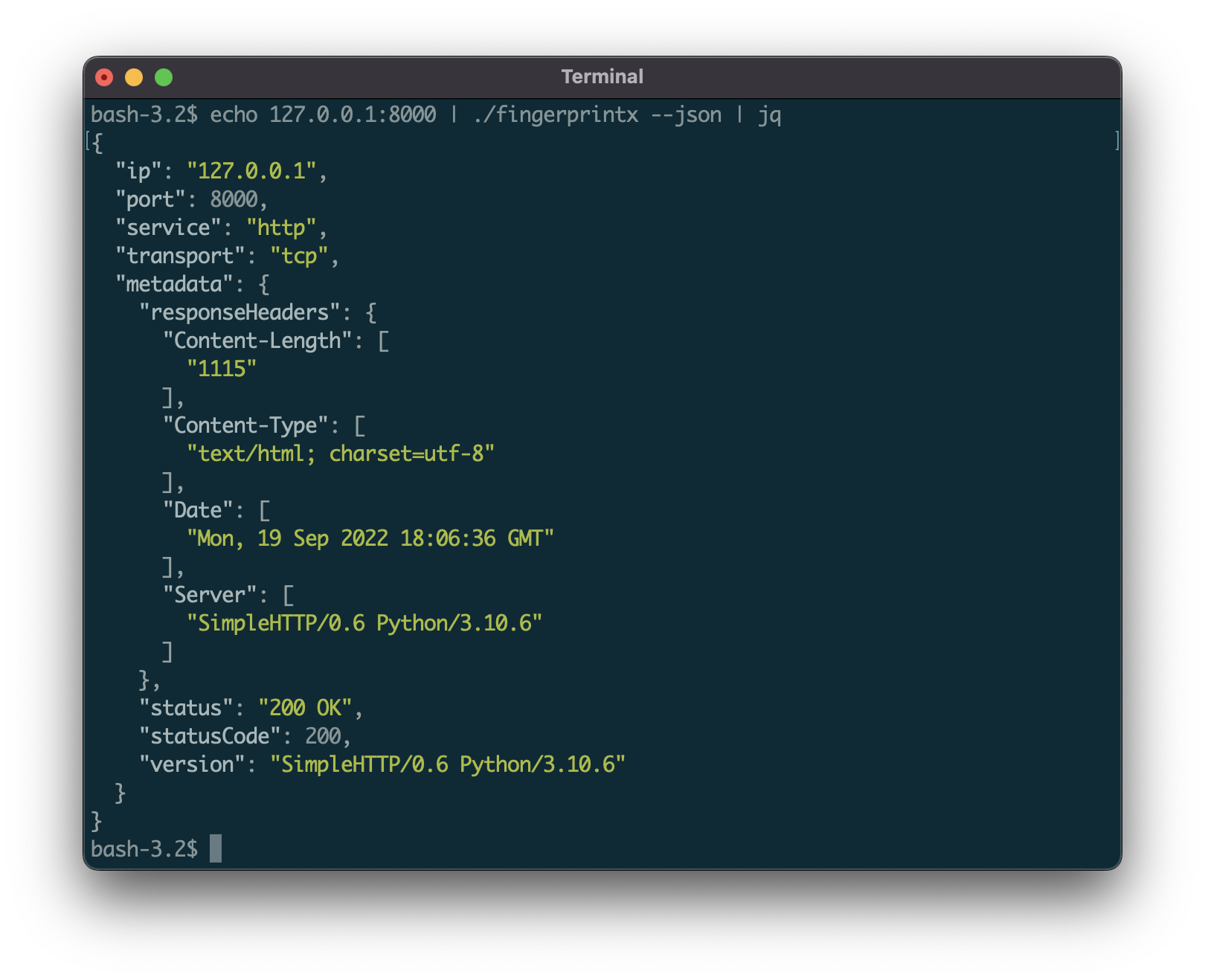 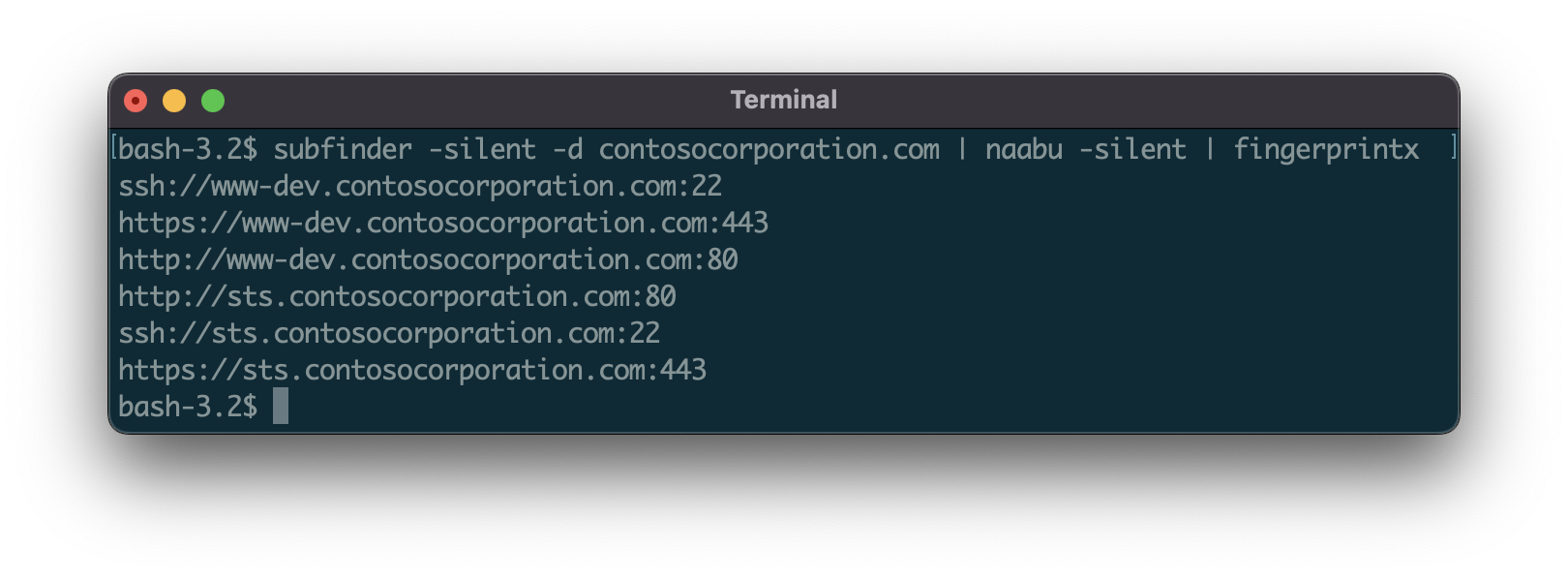 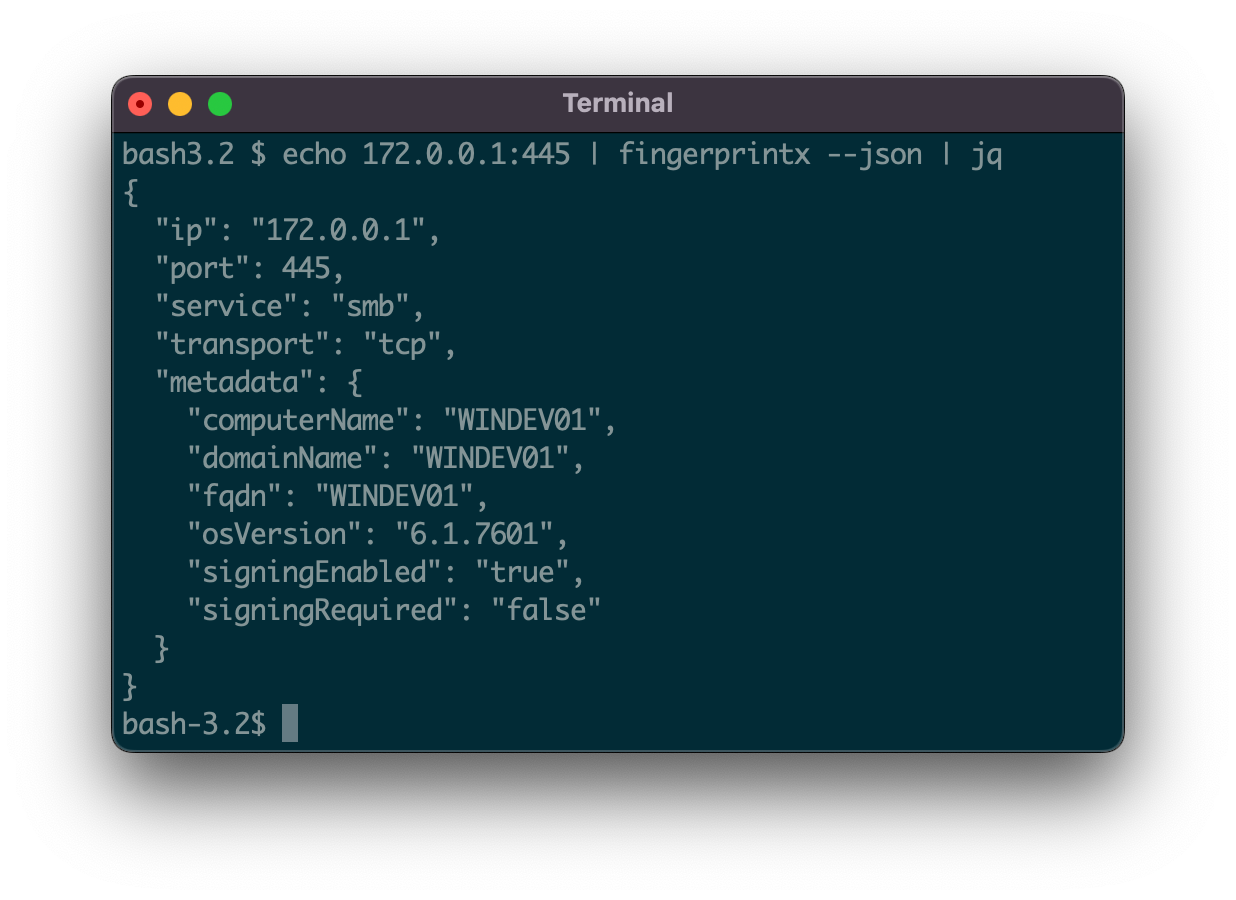 ## 支持的协议: **51 个服务检测插件**,支持 TCP 和 UDP 协议:
|SERVICE |TRANSPORT|
|--------------|---------|
|Cassandra |TCP |
|ChromaDB |TCP |
|CouchDB |TCP |
|DB2 |TCP |
|DHCP |UDP |
|Diameter |TCP |
|DNS |TCP/UDP |
|Echo |TCP |
|Elasticsearch |TCP |
|Firebird |TCP |
|FTP |TCP |
|HTTP/HTTPS |TCP |
|IMAP |TCP |
|InfluxDB |TCP |
|IPMI |TCP |
|IPSEC |UDP |
|Java RMI |TCP |
|JDWP |TCP |
|Kafka |TCP |
|LDAP |TCP |
|Linux RPC |TCP |
|Memcached |TCP |
|Milvus |TCP |
|Modbus |TCP |
|MongoDB |TCP |
|MQTT |TCP |
|MSSQL |TCP |
|MySQL |TCP |
|Neo4j |TCP |
|NetBIOS-NS |UDP |
|NTP |UDP |
|OpenVPN |UDP |
|OracleDB |TCP |
|Pinecone |TCP |
|POP3 |TCP |
|PostgreSQL |TCP |
|RDP |TCP |
|Redis |TCP |
|Rsync |TCP |
|RTSP |TCP |
|SMB |TCP |
|SMPP |TCP |
|SMTP |TCP |
|SNMP |UDP |
|SNPP |TCP |
|SSH |TCP |
|STUN |UDP |
|Sybase |TCP |
|Telnet |TCP |
|VNC |TCP |
### 显著特性:
- **向量数据库 (Vector Databases)**: ChromaDB, Milvus, Pinecone
- **关系型数据库 (Relational Databases)**: PostgreSQL, MySQL, MSSQL, OracleDB, DB2, Sybase, Firebird
- **NoSQL 数据库 (NoSQL Databases)**: MongoDB, CouchDB, Cassandra, Redis, Elasticsearch, InfluxDB, Neo4j
- **开发者工具**: JDWP (Java Debug Wire Protocol), Java RMI
- **工业协议**: Modbus, IPMI
- **消息传递**: Kafka, MQTT, SMTP
- **远程访问**: SSH, RDP, Telnet, VNC
- **文件传输**: FTP, SMB, Rsync
- **电信/AAA (Telecom/AAA)**: Diameter (3GPP networks, LTE/5G), SMPP (SMS gateways)
# 安装
从 Github 安装
```
go install github.com/praetorian-inc/fingerprintx/cmd/fingerprintx@latest
```
从源码安装 (go version > 1.18)
```
$ git clone git@github.com:praetorian-inc/fingerprintx.git
$ cd fingerprintx
# 使用 go 版本 > 1.18
$ go build ./cmd/fingerprintx
$ ./fingerprintx -h
```
Docker
```
$ git clone git@github.com:praetorian-inc/fingerprintx.git
$ cd fingerprintx
# build
docker build -t fingerprintx .
# 并运行它
docker run --rm fingerprintx -h
docker run --rm fingerprintx -t praetorian.com:80 --json
```
# 用法
```
fingerprintx -h
```
`-h` 选项将显示 `fingerprintx` 支持的所有标志。
```
Usage:
fingerprintx [flags]
TARGET SPECIFICATION:
Requires a host and port number or ip and port number. The port is assumed to be open.
HOST:PORT or IP:PORT
EXAMPLES:
fingerprintx -t praetorian.com:80
fingerprintx -l input-file.txt
fingerprintx --json -t praetorian.com:80,127.0.0.1:8000
Flags:
--csv output format in csv
-f, --fast fast mode
-h, --help help for fingerprintx
--json output format in json
-l, --list string input file containing targets
-o, --output string output file
-t, --targets strings target or comma separated target list
-w, --timeout int timeout (milliseconds) (default 500)
-U, --udp run UDP plugins
-v, --verbose verbose mode
```
`fast` 模式只会尝试对每个目标端口关联的默认服务进行指纹识别。例如,如果输入是 `praetorian.com:8443`,则只会运行 `https` 插件。如果 `praetorian.com:8443` 上没有运行 `https`,将不会有任何输出。为什么要这样做?这是对大量主机列表中的大多数服务进行指纹识别的一种快速方法(想想 [80/20 法则](https://en.wikipedia.org/wiki/Pareto_principle))。
# 运行 Fingerprintx
针对单个目标:
```
$ fingerprintx -t 127.0.0.1:8000
http://127.0.0.1:8000
```
默认情况下,输出格式为:`SERVICE://HOST:PORT`。要获取更详细的服务输出,请使用 `--json` 标志指定 JSON 格式:
```
$ fingerprintx -t 127.0.0.1:8000 --json
{"ip":"127.0.0.1","port":8000,"service":"http","transport":"tcp","metadata":{"responseHeaders":{"Content-Length":["1154"],"Content-Type":["text/html; charset=utf-8"],"Date":["Mon, 19 Sep 2022 18:23:18 GMT"],"Server":["SimpleHTTP/0.6 Python/3.10.6"]},"status":"200 OK","statusCode":200,"version":"SimpleHTTP/0.6 Python/3.10.6"}}
```
通过管道输入来自另一个程序的输出(例如 [naabu](https://github.com/projectdiscovery/naabu)):
```
$ naabu 127.0.0.1 -silent 2>/dev/null | fingerprintx
http://127.0.0.1:8000
ftp://127.0.0.1:21
```
使用输入文件运行:
```
$ cat input.txt | fingerprintx
http://praetorian.com:80
telnet://telehack.com:23
# 或者如果你更愿意
$ fingerprintx -l input.txt
http://praetorian.com:80
telnet://telehack.com:23
```
包含更多元数据输出:
```
$ cat input.txt | fingerprintx --json
{"host":"praetorian.com","ip":"146.148.61.165","port":80,"service":"http","transport":"tcp","metadata":{"responseHeaders":{"Connection":["keep-alive"],"Content-Type":["text/html"],"Date":["Mon, 19 Sep 2022 18:37:55 GMT"],"Etag":["W/\"5e3e263f-1703\""],"Keep-Alive":["timeout=20"],"Server":["nginx"],"Vary":["Accept-Encoding"]},"status":"404 Not Found","statusCode":404,"version":"nginx"}}
{"host":"telehack.com","ip":"64.13.139.230","port":23,"service":"telnet","transport":"tcp","metadata":{"serverData":"fffb03"}}
```
# 作为库使用
`fingerprintx` 可以导入到您的项目中,以扫描开放端口上的服务。有关如何执行此操作的示例代码在 [examples 目录中](examples/scan.go)提供。使用 `go build scan.go` 进行构建。在将 `fingerprintx` 导入您自己的项目时,另一个可能有用的参考文件是 [命令行运行器](pkg/runner/root.go)。
# 为什么不用 Nmap?
[Nmap](https://nmap.org/) 是网络扫描的标准。为什么要使用 `fingerprintx` 而不是 nmap?主要的原因有两个:
* `fingerprintx` 工作更聪明,而不是更费力:针对开放了 8080 端口的服务器,第一个运行的插件是 http 插件。默认服务方法在最佳情况下减少了扫描时间。大多数情况下,运行在端口 80、443、22 上的服务分别是 http、https 和 ssh —— 这就是 `fingerprintx` 首先检查的内容。
* `fingerprintx` 通过 `--json` 标志支持 json 输出。Nmap 支持多种输出选项(normal, xml, grep),但通常难以正确解析和编写脚本。`fingerprintx` 支持 json 输出,这简化了与处理管道中其他工具的集成。
# 注意事项
* 为什么有一个导入了 Go 密码学库的 `third_party` 文件夹?
* 问得好!`ssh` 指纹识别模块在握手过程中收集元数据时,会识别服务器支持的各种加密选项。这使用了一些未导出的函数,这就是为什么这里包含了一个带有 [export.go 文件](third_party/cryptolib/ssh/export.go)的 Go 密码学库。
* Fingerprintx 并非设计用于识别目标系统上的开放端口,并假定每个 `target:port` 输入都是开放的。如果没有端口开放,将不会有输出,因为目标上没有运行服务。
* 这与 [zgrab2](https://github.com/zmap/zgrab2) 相比如何?
* `zgrab2` 的命令行用法(以及用例)与 `fingerprintx` 略有不同。对于 `zgrab2`,必须提前指定协议:`echo praetorian.com | zgrab2 http -p 8000`,这假设您已经知道那里运行的是什么。对于 `fingerprintx`,情况并非如此:`echo praetorian.com:8000 | fingerprintx`。“应用层”协议扫描方法非常相似。
# 致谢
`fingerprintx` 是许多人的工作成果,包括我们优秀的 2022 届实习生。以下是目前的贡献者名单:
* [Soham Roy][praetorian-sohamroy](https://github.com/praetorian-sohamroy)
* [Jue Huang] (https://github.com/jue-huang)
* [Henry Jung] (https://github.com/henryjung64)
* [Tristan Wiesepape][qwetboy10] (https://github.com/qwetboy10)
* [Joseph Henry][jwhenry28] (https://github.com/jwhenry28)
* [Noah Tutt][noahtutt] (https://github.com/noahtutt)
* [Nathan Sportsman][nsportsman] (https://github.com/nsportsman)标签:C2日志可视化, EVTX分析, EVTX分析, Fingerprintx, Go语言, Kafka, PostgreSQL, RDP, Scrypt密钥派生, SMB, SonarQube插件, SSH, 二进制发布, 协议分析, 开源工具, 批量查询, 指纹识别, 插件系统, 数据展示, 数据统计, 日志审计, 服务发现, 服务指纹识别, 权限提升, 程序破解, 端口扫描, 红队, 网络安全, 请求拦截, 资产探测, 错误配置检测, 防御绕过, 隐私保护