asv-soft/asv-mavlink
GitHub: asv-soft/asv-mavlink
面向 .NET 的 MAVLink 协议库与 CLI 工具集,支持无人机通信、遥测接收、文件访问、协议仿真与消息路由。
Stars: 28 | Forks: 6

# 🧊 Asv.Mavlink
## 简介
[`asv-mavlink`](https://github.com/asv-soft/asv-mavlink) 库为与 MAVLink 兼容的飞行器和载荷通信提供了健壮的接口。该库旨在促进与无人机及其他使用 MAVLink 协议设备的交互,使用户能够发送指令、接收遥测数据并执行各种操作。
此外,该库还包含一个 CLI 实用工具 [Asv.Mavlink.Shell](https://github.com/asv-soft/asv-mavlink/tree/main/src/Asv.Mavlink.Shell),用于模拟、测试和代码生成。
该库是无人机开源跨平台应用程序 [Asv Drones](https://github.com/asv-soft/asv-drones) 的一部分。
## 安装
要安装 [`asv-mavlink`](https://github.com/asv-soft/asv-mavlink) 库,您可以使用以下命令:
```
dotnet add package Asv.Mavlink --version
```
## 文档
文档可以在[这里](https://docs.asv.me/libraries/asv-mavlink)找到
## 示例:模拟 ADSB 接收器
此命令启动一个虚拟 ADS-B 接收器,该接收器以指定的速率发送配置文件中定义的每个飞行器的 [ADSB\_VEHICLE](https://mavlink.io/en/messages/common.html#ADSB\_VEHICLE) 数据包。
```
Asv.Mavlink.Shell.exe adsb --cfg=adsb.json
```
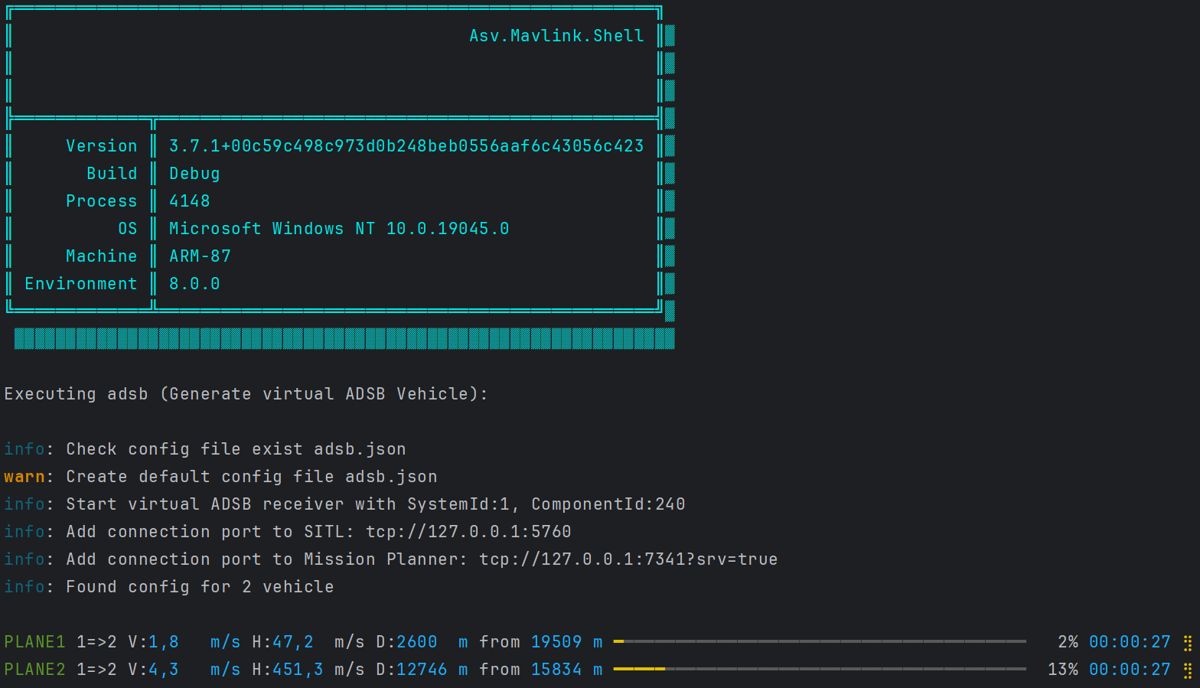
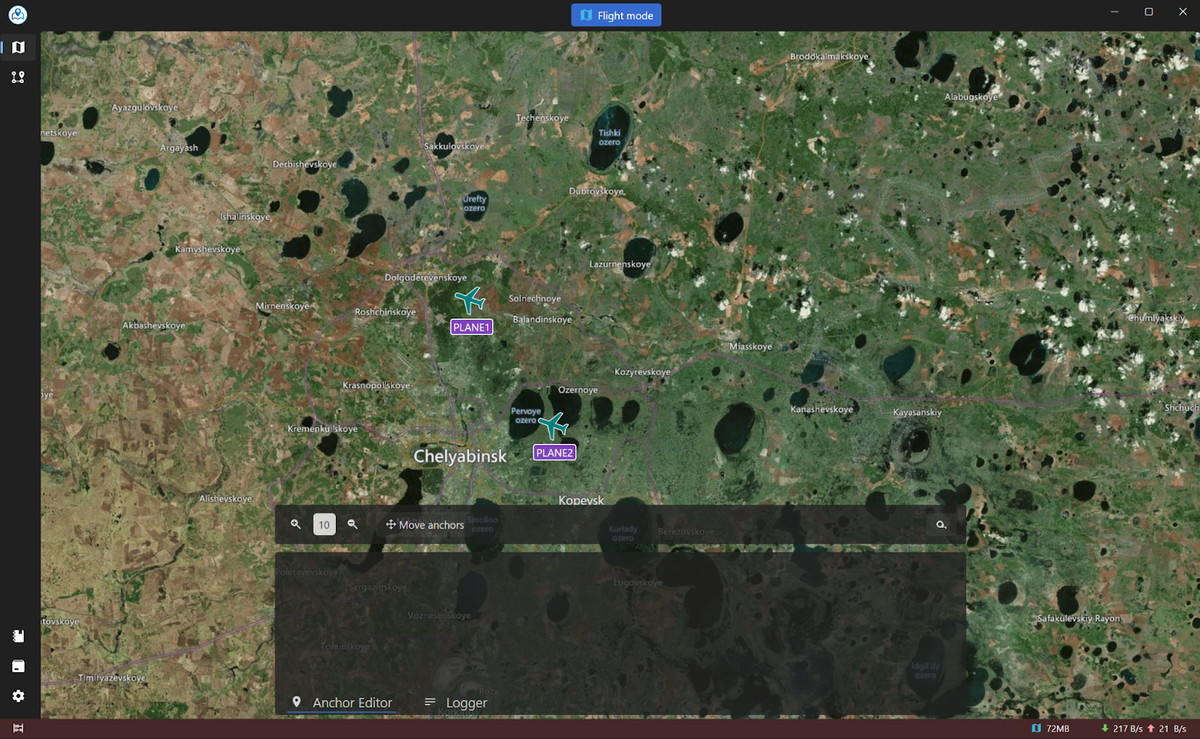
这是与 [Asv.Drones](https://github.com/asv-soft/asv-drones) 配合使用的 ADSB 实用工具示例。
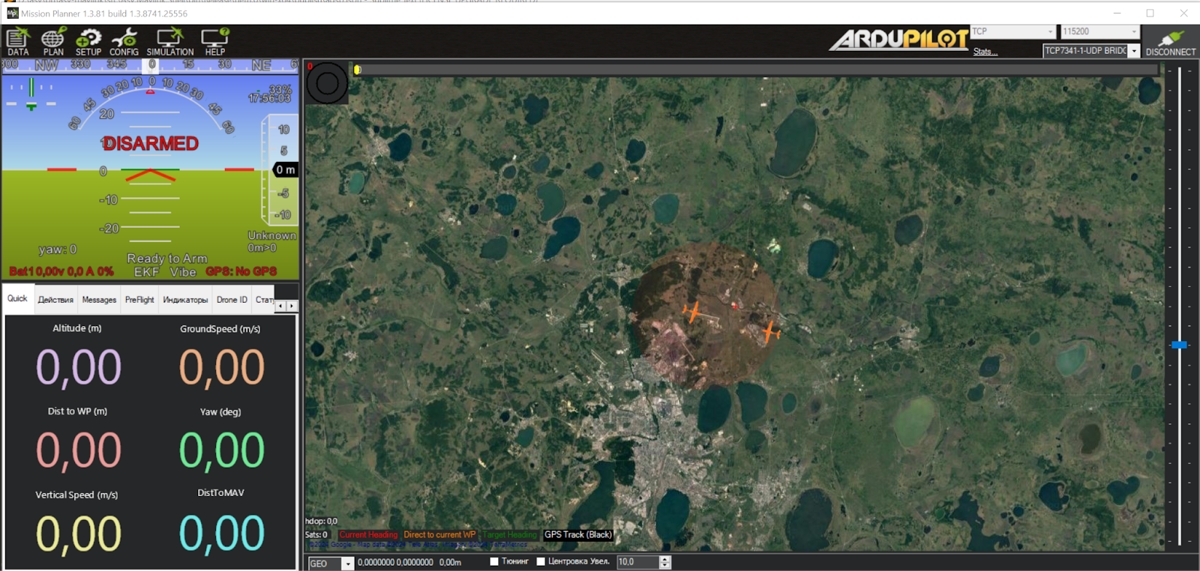
这是与 [Mission Planner](https://ardupilot.org/planner/) 配合使用的 ADSB 实用工具示例
## 示例:数据包代码生成
生成用于数据包序列化\反序列化的 C# 代码
```
Asv.Mavlink.Shell.exe gen -t=[mavlink-xml-file] -i=[mavlink-xml-folder] -o=[output-folder] -e=cs [path-to-liquid-template]/csharp.tpl
```
```
///
/// HEARTBEAT
///
public class HeartbeatPayload : IPayload
{
public byte GetMaxByteSize() => 9; // Sum of byte sized of all fields (include extended)
public byte GetMinByteSize() => 9; // of byte sized of fields (exclude extended)
public int GetByteSize()
{
var sum = 0;
sum+=4; //CustomMode
sum+= 1; // Type
sum+= 1; // Autopilot
sum+= 1; // BaseMode
sum+= 1; // SystemStatus
sum+=1; //MavlinkVersion
return (byte)sum;
}
public void Deserialize(ref ReadOnlySpan buffer)
{
CustomMode = BinSerialize.ReadUInt(ref buffer);
Type = (MavType)BinSerialize.ReadByte(ref buffer);
Autopilot = (MavAutopilot)BinSerialize.ReadByte(ref buffer);
BaseMode = (MavModeFlag)BinSerialize.ReadByte(ref buffer);
SystemStatus = (MavState)BinSerialize.ReadByte(ref buffer);
MavlinkVersion = (byte)BinSerialize.ReadByte(ref buffer);
}
public void Serialize(ref Span buffer)
{
BinSerialize.WriteUInt(ref buffer,CustomMode);
BinSerialize.WriteByte(ref buffer,(byte)Type);
BinSerialize.WriteByte(ref buffer,(byte)Autopilot);
BinSerialize.WriteByte(ref buffer,(byte)BaseMode);
BinSerialize.WriteByte(ref buffer,(byte)SystemStatus);
BinSerialize.WriteByte(ref buffer,(byte)MavlinkVersion);
/* PayloadByteSize = 9 */;
}
...
}
```
## CLI:Ftp tree
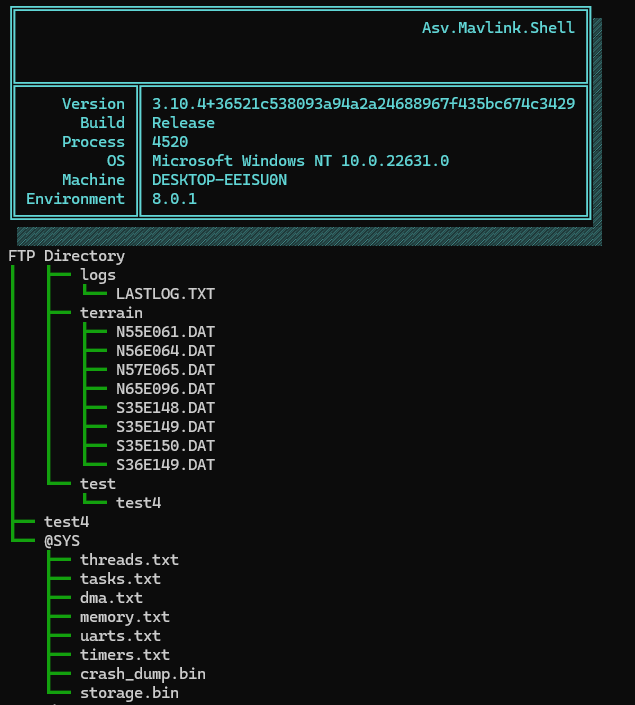
此命令以树状形式展示无人机 FTP 服务器上所有可用文件和目录。它允许用户以分层格式查看整个文件结构,无需逐个打开文件夹即可轻松浏览和理解文件布局。
```
Asv.Mavlink.Shell.exe ftp-tree -cs tcp://127.0.0.1:5760
```
### 功能:
- 以树状格式显示无人机文件系统的完整目录结构。
- 自动刷新并加载 / 和 @SYS 目录。
- 带有视觉指引显示目录和文件,更清晰直观。
您也可以在命令中使用一些参数。
```
Usage: ftp-tree [options...] [-h|--help] [--version]
Tree representation of all available files and directories on the drones FTP server
Options:
-cs|--connection The address of the connection to the mavlink device (Required)
```
## CLI:Ftp browser
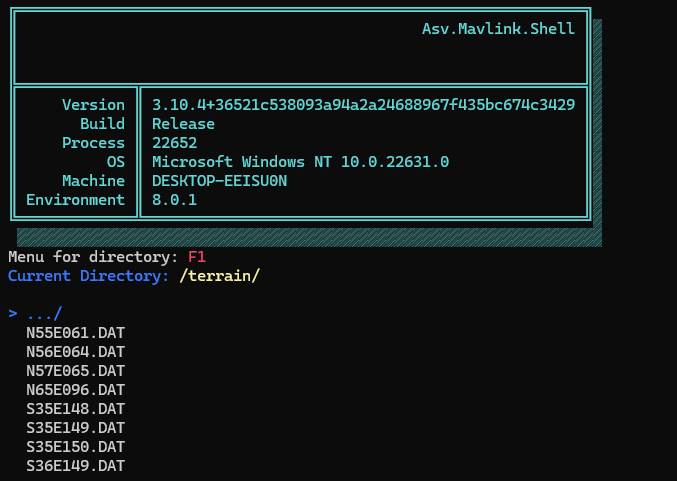
此命令是一个文件管理器,用于通过 FTP 与无人机的文件系统进行交互。它允许用户在交互式控制台环境中浏览目录、查看文件并执行各种文件操作(例如:下载、重命名、删除等)。该工具专为基于 MAVLink 的系统设计,提供了一种直观的方式来管理无人机的文件和目录。
```
Asv.Mavlink.Shell.exe ftp-browser -cs tcp://127.0.0.1:5760
```
### 功能:
- FTP 连接:该命令通过 TCP 使用指定的连接字符串连接到无人机,建立 FTP 客户端以进行文件交互。
- 树状导航:文件系统使用树状模型以分层结构呈现。用户可以交互式地浏览目录。
- 文件和目录操作:用户可以:
- 打开目录。
- 删除、重命名或创建目录。
- 执行文件操作,如下载、删除、截断、重命名和计算 CRC32。
```
Usage: ftp-browser [options...] [-h|--help] [--version]
File manager for interacting with a drones file system via FTP
Options:
-cs|--connection The address of the connection to the mavlink device (Required)
```
## CLI:Export sdr data
此命令从二进制文件中提取 SDR (Software Defined Radio) 数据并将其导出为 CSV 格式。SDR 数据使用 AsvSdrRecordDataLlzPayload 类进行反序列化,每条记录作为一行写入 CSV 文件,包含高度、信号强度和功率级别等特定数据字段。
### 功能:
- 从输入文件读取二进制 SDR 数据。
- 将数据导出到 CSV 文件以供进一步分析或存储。
- 提供了一种简单且自动化的方式将 SDR 日志转换为人类可读的表格数据。
```
Asv.Mavlink.Shell.exe export-sdr
```
您也可以在命令中使用一些参数。
```
Usage: export-sdr [options...] [-h|--help] [--version]
Export sdt data to csv format
Options:
-i|--input-file Input file (Required)
-o|--output-file Output file (Default: @"out.csv")
```
## CLI:Mavlink
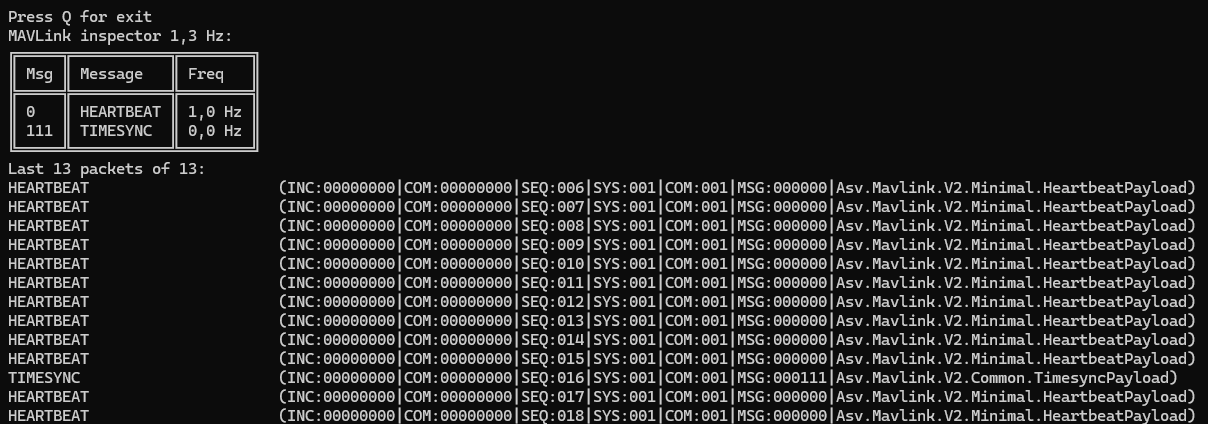
此命令监听传入的 MAVLink 数据包并显示接收消息的统计信息。它允许监控地面站与无人飞行器之间的通信,显示各种信息,如每种消息类型的频率以及最后接收到的几个数据包。
### 功能:
- 通过提供的连接字符串连接到 MAVLink 流。
- 显示统计信息,如消息 ID、消息频率和最后接收的数据包
- 持续使用实时数据更新显示,并允许用户通过按 'Q' 停止进程。
```
Asv.Mavlink.Shell.exe mavlink
```
您也可以在命令中使用一些参数。
```
Usage: mavlink [options...] [-h|--help] [--version]
Listen MAVLink packages and print statistic
Options:
-cs|--connection Connection string. Default "tcp://127.0.0.1:5760" (Default: null)
```
## CLI:Proxy
此命令用于将飞行器与多个地面站连接,创建一个在它们之间路由 MAVLink 消息的集线器。它提供了灵活的过滤选项来记录特定的 MAVLink 消息,并可以将过滤后的数据输出到文件。它支持多种连接方式(UDP 或串口),并可以在静默模式下运行(不打印到控制台)。
### 功能:
- 连接到多个 MAVLink 流,允许您在不同系统之间路由消息(例如,飞行器和多个地面站)。
- 支持按系统 ID、消息 ID、消息名称(使用正则表达式)和消息内容(JSON 文本)进行过滤。
- 可以将过滤后的 MAVLink 消息记录到文件中。
- 允许禁用控制台输出以进行静默操作。
- 自动在已连接的链路之间传播 MAVLink 消息。
```
Asv.Mavlink.Shell.exe proxy -l tcp://127.0.0.1:5762 -l tcp://127.0.0.1:7341 -o out.txt
```
您也可以在命令中使用一些参数。
```
Usage: proxy [options...] [-h|--help] [--version]
Used for connecting vehicle and several ground station
Example: proxy -l udp://192.168.0.140:14560 -l udp://192.168.0.140:14550 -o out.txt
Options:
-l|--links Add connection to hub. Can be used multiple times. Example: udp://192.168.0.140:45560 or serial://COM5?br=57600 (Required)
-o|--output-file Write filtered message to file (Default: null)
-silent|--silent Disable print filtered message to screen (Optional)
-sys|--sys-ids Filter for logging: system id field (Example: -sys 1 -sys 255) (Default: null)
-id|--msg-ids Filter for logging: message id field (Example: -id 1 -mid 255) (Default: null)
-name|--name-pattern Filter for logging: regex message name filter (Example: -name MAV_CMD_D) (Default: null)
-txt|--text-pattern Filter for logging: regex json text filter (Example: -txt MAV_CMD_D) (Default: null)
-from|--directions Filter for packet direction: select only input packets from the specified direction (Default: null)
```
## CLI:Benchmark-serialization
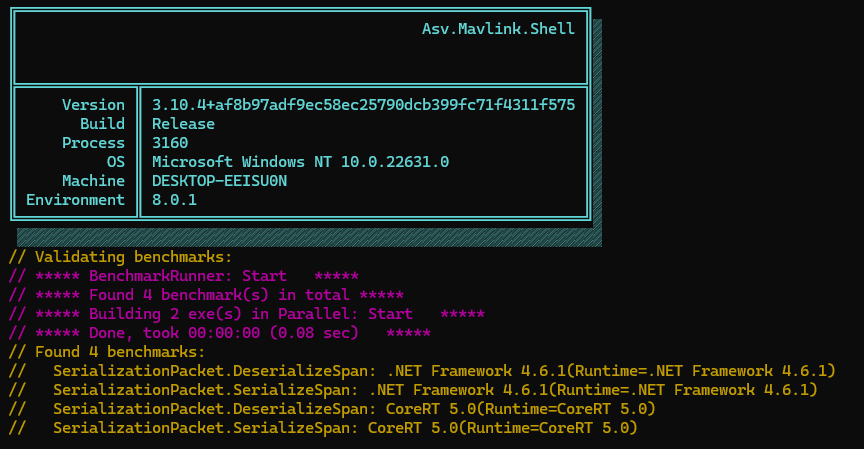
此命令对 MAVLink 数据包的序列化和反序列化性能进行基准测试。它使用 BenchmarkDotNet 来测量序列化过程的效率,重点关注如何使用 span 对 MAVLink 数据包进行序列化和反序列化。### 功能:
- 连接到多个 MAVLink 流,允许您在不同系统之间路由消息(例如,飞行器和多个地面站)。
- 支持按系统 ID、消息 ID、消息名称(使用正则表达式)和消息内容(JSON 文本)进行过滤。
- 可以将过滤后的 MAVLink 消息记录到文件中。
- 允许禁用控制台输出以进行静默操作。
- 自动在已连接的链路之间传播 MAVLink 消息。
```
Asv.Mavlink.Shell.exe benchmark-serialization
```
## CLI:Devices info
此命令显示有关 mavlink 设备以及连接到它的所有其他 mavlink 设备的信息。
```
Asv.Mavlink.Shell.exe devices-info -cs "tcp://127.0.0.1:7341"
```
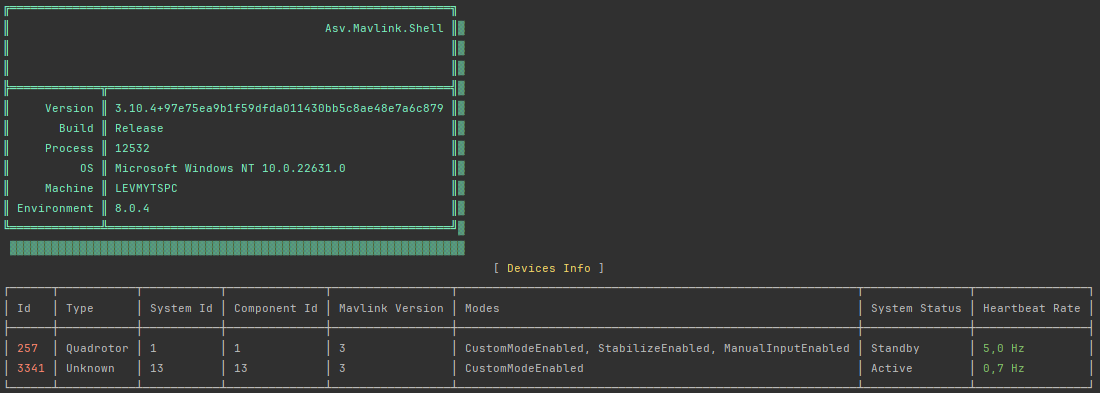
您也可以在命令中使用一些参数来自定义输出
```
Usage: devices-info [options...] [-h|--help] [--version]
Command that shows info about devices in the mavlink network
Options:
-cs|--connection-string The address of the connection to the mavlink device (Required)
-i|--iterations States how many iterations should the program work through (Default: null)
-dt|--devices-timeout (in seconds) States the lifetime of a mavlink device that shows no Heartbeat (Default: 10)
-r|--refresh-rate (in ms) States how fast should the console be refreshed (Default: 3000)
```
包含所有参数的完整命令
```
Asv.Mavlink.Shell.exe devices-info -cs "tcp://127.0.0.1:7341" -i 400 -dt 20 -r 1000
```
## CLI:Packet Viewer
```
Asv.Mavlink.Shell.exe packetviewer --connection tcp://127.0.0.1:5762
```
此命令启动 packet viewer 的控制台实现。
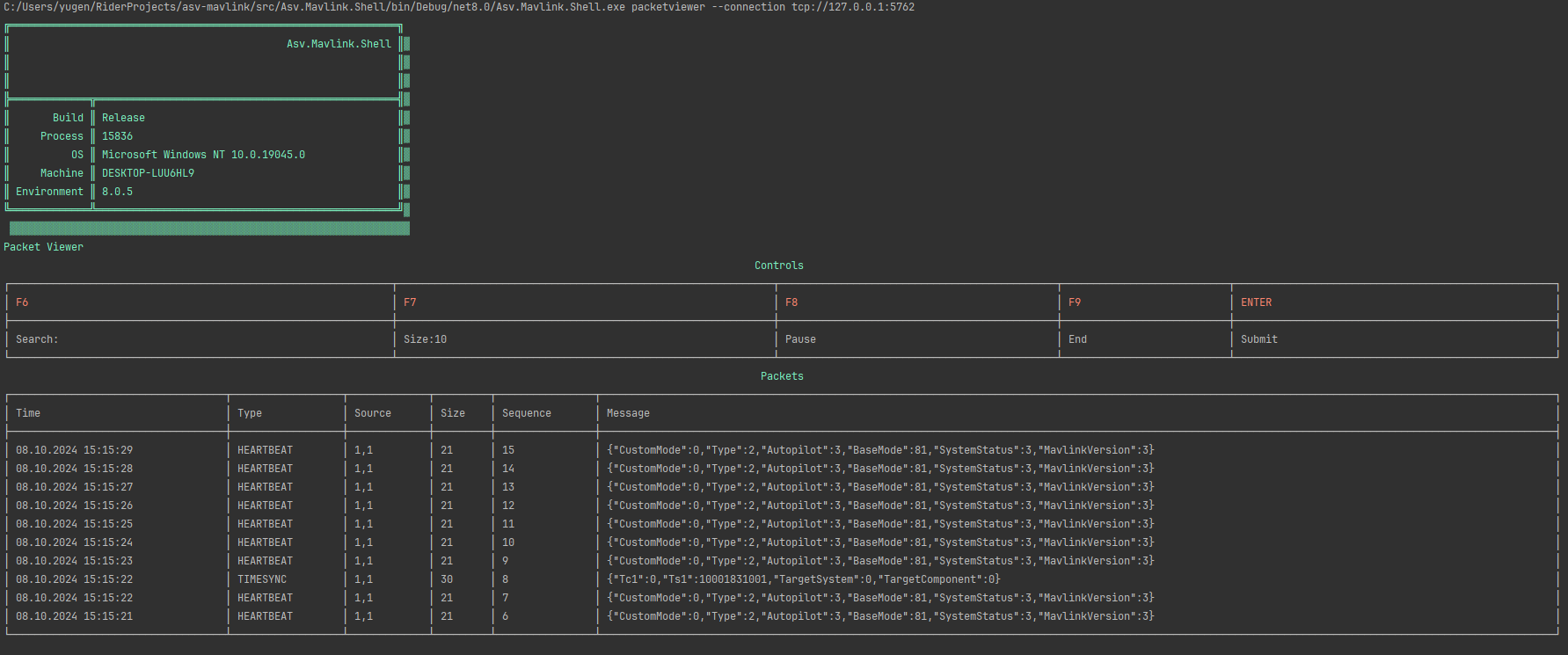
Packet Viewer 设置 Mavlink 路由器,并使用命令行中提供的参数等待连接。
启动真实的无人机或模拟器以连接并开始从中接收数据包。一旦建立连接,数据包将显示在下方的“Packets”部分。
它提供以下操作:
- 搜索您需要的数据包;
- 调整输出大小;
- 暂停输出;
- 安全终止执行;
默认情况下,查看器未启用任何过滤器,并显示所有接收到的数据包。
## CLI:Generate fake diagnostic data
此命令生成具有可自定义频率的虚假诊断数据。
```
Asv.Mavlink.Shell.exe generate-diagnostics
```
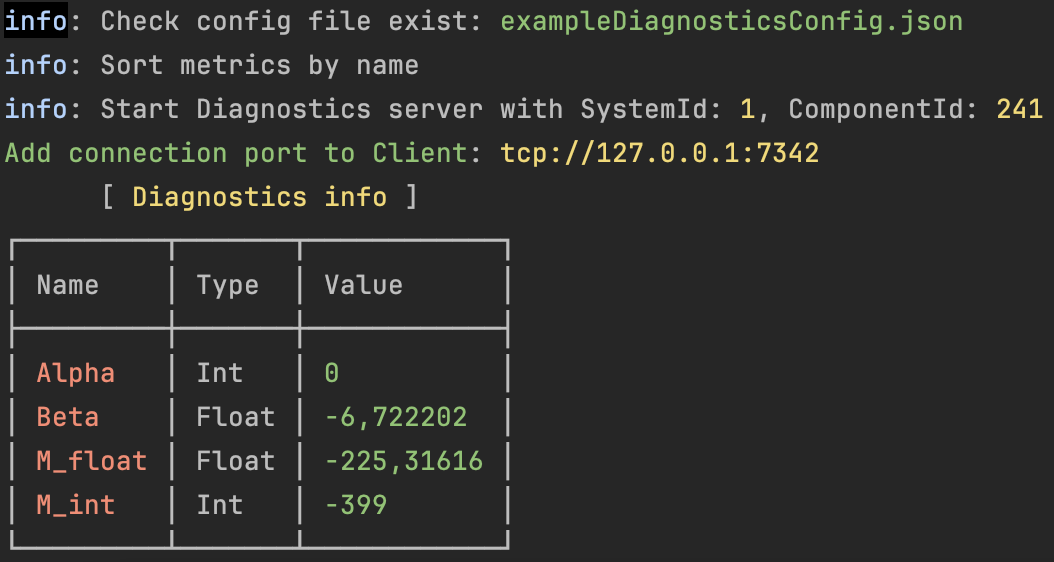
程序默认会生成一个默认配置文件,但您可以提供自定义配置。
只需将配置文件的路径作为命令行参数传递即可。
*注意:config 是一个 json 文件。*
```
Asv.Mavlink.Shell.exe generate-diagnostics -cfg "path/to/your/cfg.json"
```
该命令的所有可能参数:
```
Usage: generate-diagnostics [options...] [-h|--help] [--version]
Command creates fake diagnostics data from file and opens a mavlink connection.
Options:
-cfg|--cfg-path location of the config file for the generator (Default: null)
-r|--refresh-rate (in ms) States how fast should the console be refreshed (Default: 2000)
```
包含所有参数的完整命令
```
Asv.Mavlink.Shell.exe generate-diagnostics -cfg "path/to/your/cfg.json" -r 3000
```
## CLI:Test diagnostic data
此命令创建 Diagnostic 客户端并打印客户端检索到的所有诊断信息。
```
Asv.Mavlink.Shell.exe test-diagnostics -cs tcp://127.0.0.1:7342?srv=true -tsid 1 -tcid 241 -r 3000
```
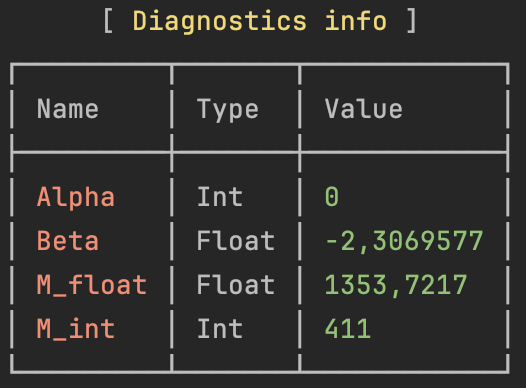
该命令的所有可能参数:
```
Command creates diagnostic client that retrieves diagnostic data.
Options:
-cs|--connection-string The address of the connection to the mavlink diagnostic server (Required)
-tsid|--target-system-id Server's system id (Required)
-tcid|--target-component-id Server's component id (Required)
-r|--refresh-rate (in ms) States how fast should the console be refreshed (Default: 1000)
```
## CLI:Create Virtual Ftp server
此命令创建 ftp 服务器并打开与其的连接。
```
Asv.Mavlink.Shell.exe run-ftp-server
```

程序默认会生成一个默认配置文件,但您可以提供自定义配置。
只需将配置文件的路径作为命令行参数传递即可。
*注意:config 是一个 json 文件。*
```
Asv.Mavlink.Shell.exe run-ftp-server -cfg "path/to/your/cfg.json"
```
该命令的所有可能参数:
```
Usage: run-ftp-server [options...] [-h|--help] [--version]
Command creates virtual ftp server.
Options:
-cfg|--cfg-path location of the config file (Default: null)
```
标签:ADS-B, ArduPilot, MAVLink, NuGet, PX4, UAV, 串口通信, 代码生成, 任务规划, 仿真测试, 命令控制, 地面站, 多人体追踪, 开源库, 搜索引擎爬虫, 数据采集, 文档结构分析, 无人机, 无人载具, 渗透测试工具, 物联网, 自动驾驶仪, 通信协议, 遥测数据, 飞控