YoungHaKim7/Arm64_Assembly_Language
GitHub: YoungHaKim7/Arm64_Assembly_Language
一个系统性的 ARM64 汇编语言学习资源集合,整合了教程文档、工具配置和 macOS 开发环境排障指南。
Stars: 0 | Forks: 0
# 通过网页查看汇编 Assembly(ARM binutils)
https://assembly.godbolt.org/
# ARMv8-A Reference Manual | 来源: ARM - https://developer.arm.com/documentation/ddi0487/ak/ - Arm Examples ARM汇编示例 - https://armasm.com/ - Arm汇编基础 - https://github.com/kangtegong/self-learning-cs/blob/main/registers/registers.md - https://kyuhyuk.kr/article/raspberry-pi/2019/05/15/ARM-Assembly - ARM汇编指南(ARM Assembly Guide 嵌入式(2011. 12. 15. 14:12) - https://blog.naver.com/gangst11/145839687 - ARM汇编指南(ARM Assembly Guide) - 本文档以 ARM Cortex A8 为基础,介绍如何使用 ARM Assembly 语言。假设您基本上了解C语言,为了帮助理解 ARM 汇编,我们将结合C语言的语法进行说明。 - [来源] ARM汇编指南(ARM Assembly Guide|作者 权课长11 https://blog.naver.com/gangst11/145839687 ## 汇编器比较 - https://ko.wikipedia.org/wiki/%EC%96%B4%EC%85%88%EB%B8%94%EB%9F%AC%EC%9D%98_%EB%B9%84%EA%B5%90
# macOS 版本历史 - https://en.wikipedia.org/wiki/MacOS_version_history - https://github.com/fxcoudert/gfortran-for-macOS/releases - Darwin(Operating System) - https://en.wikipedia.org/wiki/Darwin_(operating_system) - AT&T Unix System V - https://unix.org/what_is_unix/history_timeline.html
# 解决 xcrun 错误 (必须安装 XCode) - https://www.bpetersen.dk/post/how-to-fix-mac-os-xcrun-error-invalid-active-developer-path-missing-xcrun ``` xcrun: error: invalid active developer path (/Library/Developer/CommandLineTools), missing xcrun at: /Library/Developer/CommandLineTools/usr/bin/xcrun ``` - 幸运的是,有一个简单的解决方案——只需安装或重新配置 Xcode toolkit。你可以从 Appstore、Apple Developer 下载专区下载,或者通过 Terminal 安装: ``` $ xcode-select --install ``` - 如果你已经安装了它并需要重置,可以执行以下操作(你可能需要 sudo 权限才能执行此操作): ``` $ sudo xcode-select --reset ``` # macOS c-linking error 与文件夹 - Clang linking error MacOS Big Sur - https://forums.developer.apple.com/forums/thread/666700 ``` export LDFLAGS=-L/Library/Developer/CommandLineTools/SDKs/MacOSX.sdk/usr/lib make # or cmake . ```
# macOS dev.论坛:解决你的疑问 - https://forums.developer.apple.com/forums/tags/compiler
# 适用于 vim 的 ARMv4 到 7 语法高亮 - https://github.com/ARM9/arm-syntax-vim # VSCode Extension(Visual Studio Code 的 Arm® 汇编高亮) - https://marketplace.visualstudio.com/items?itemName=dan-c-underwood.arm - ASM Code Lens - https://marketplace.visualstudio.com/items?itemName=maziac.asm-code-lens # NeoVimassembly(asm-lsp) - NeoVim(TSInstall) ``` :TSInstall asm ``` - Vim \_ Assembly Highlight Syntax ``` :set ft=nasm " assembly highlight syntax ``` - NeoVim(asm-lsp) - https://www.reddit.com/r/neovim/s/XAuQM98VY6 - https://github.com/bergercookie/asm-lsp - Using cargo - 使用 cargo 包管理器安装,可以从 crates.io 或从 github 安装: ``` cargo install asm-lsp # 或者从 github 获取最新版本 cargo install --git https://github.com/bergercookie/asm-lsp ``` # Vim - https://github.com/ARM9/arm-syntax-vim - Installation - 将 syntax 文件夹复制到你的 ```~/.vim``` 文件夹中 - with Plug ``` Plug 'ARM9/arm-syntax-vim' ``` - or with Pathogen - 将此仓库克隆到你的 ```~/.vim/bundle``` 目录中。 ``` git clone https://github.com/ARM9/arm-syntax-vim.git ``` - Using - 在你的 .vimrc 中: ``` au BufNewFile,BufRead *.s,*.S set filetype=arm " arm = armv6/7 au BufNewFile,BufRead *.s,*.S, *.asm set filetype=arm " arm = armv6/7 ``` - 或者在你的汇编文件顶部或底部添加以下行: ``` @ vim:ft=armv5 ```
- Discord 使用的 Markdown 代码块关键字 - https://gist.github.com/alexislours/c7b12c630625db98afbfdf08f7a4ec17
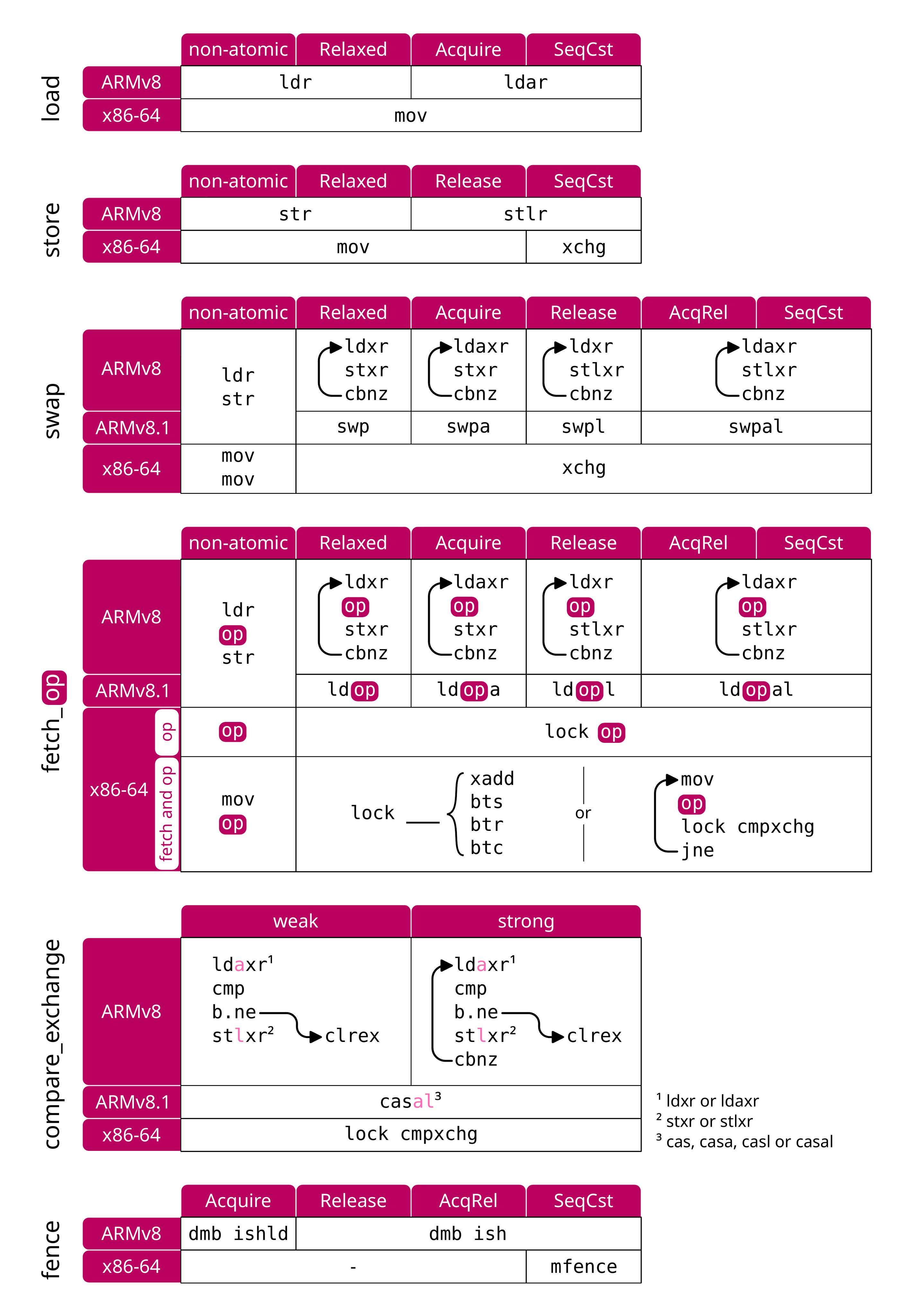
# Mara Bos @m_ou_se ⚛️📋 我制作了 ARMv8 和 x86-64 机器指令的概述,涵盖所有常见的原子操作:
# 超简单的 ARM Assembly 学习法 | you can learn assembly FAST with this technique (arm64 breakdown) | Low Level Learning https://youtu.be/vhyettT7sdA?si=LQ2AN5XeS5M8kJJ_
# [Armv7] 确认 CPSR 条件位调试实战 (TRACE32) https://youtu.be/CTu7aBbnZyA # 《通过调试学习 Linux 内核的结构与原理》书籍课程视频 https://www.youtube.com/playlist?list=PLRrUisvYoUw9-cTYgkbTbr9f9CpbGdq4F
# rust_通过网页查看汇编 Assembly https://rust.godbolt.org/ # Arm64_Assembly_Language 为了自己学习而制作的学习视频 韩语讲解Assembly语言001_ld_as_C语言\_Assembly语言转换 #assembly [https://youtu.be/9yt1Enp4EwU](https://youtu.be/9yt1Enp4EwU) 视频合集 https://youtube.com/playlist?list=PLcMveqN_07mY7DpIaeGGXfnctSwzZSOgG
## arm64 assembly 速成课 https://github.com/Siguza/ios-resources/blob/master/bits/arm64.md
How register is encoded in an ARM64 mov instruction? 转换时需要注意的事项 [https://stackoverflow.com/questions/65233207/how-register-is-encoded-in-an-arm64-mov-instruction](https://stackoverflow.com/questions/65233207/how-register-is-encoded-in-an-arm64-mov-instruction) GNU and LLVM tools get this right: aarch64-linux-gnu-objdump -d shows 528c4102, the 32-bit integer interpretation of the 4 bytes. llvm-objdump -d shows 02 41 8c 52, the raw byte sequence. Both of those are equivalent and not misleading. But https://armconverter.com/ stupidly groups it up into 02418C52 (in its default "GDB" mode). This is bad. If you wanted to manually encode some AArch64 shellcode, you'd use .long 0x528c4102 (on a little-endian assembler targeting e.g. like x86, AArch64, or whatever) to get a representation of MOVZ W2, #0x6208. By convention, a single string of digits without spaces has place-values that increase from right to left, and represent a single integer value of some width. It's not you, it's https://armconverter.com/ that's the problem. armconverter has a "GDB/LLDB" toggle that fixes it to 528C4102 in LLDB mode, which it calls "big endian". But it's not a "big endian" byte sequence, there are no spaces so it's the 32-bit integer value. 02418C52 is the integer you'd get if you interpret the 4 bytes as big-endian (opposite of what an AArch64 CPU does), 528C4102 is the correct little-endian interpretation of those 4 bytes. I think armconverter is using "big endian" to actually mean "byte reverse before removing spaces between bytes". This is braindead misuse of terminology. Again, both GNU binutils and LLVM disassemblers get this right, the problem is purely armconverter
# 如何阅读 ARM64 Assembly Language [https://wolchok.org/posts/how-to-read-arm64-assembly-language/](https://wolchok.org/posts/how-to-read-arm64-assembly-language/)
# C 到 Assembly - MIT 视频 MIT OpenCourseWare [https://youtu.be/wt7a5BOztuM](https://youtu.be/wt7a5BOztuM)
### 使用 clang 首先转换为 LLVM IR Code ``` $ clang -S -emit-llvm fib.c ``` fib.c 被转换为 fib.ll
### 将转换后的 fib.ll 文件重新转换为 fib.s 汇编文件 ``` $ clang fib.ll -S ``` ``` // 링크로 연결해서 실행 파일 만들기 $ ld -macosx_version_min 12.0.0 -o fib fib.o -lSystem -syslibroot `xcrun -sdk macosx --show-sdk-path` -e _main -arch arm64 ```
# 以不同方式将 C 语言转换为 Assembly Basic Structure of C Program in Hindi: C Tutorial In Hindi #4 [https://youtu.be/5SIBB589fAg](https://youtu.be/5SIBB589fAg) main.s --> Assembly file
``` $ gcc -Wall -save-temps main.c $ ls a.out main.bc main.c main.i main.o main.s ```
otool 使用方法 macOS 使用的工具 ``` // otool 을 이용해 Assembly 코드를 볼 수 있다. $ otool -tv fib ```
### otool 使用方法(macOS) Comparing C to machine language https://www.youtube.com/watch?v=yOyaJXpAYZQ
# ❤️❤️❤️ M1 芯片 macOS 的 Shellcode - 第 1 部分:ARM64 assembly language 快速概览 ❤️ Shellcode for macOS on M1 chips - Part 1: Quick overview of ARM64 assembly language [https://youtu.be/rg6kU42LQcY](https://youtu.be/rg6kU42LQcY) ### objdump 使用方法 生成 .o object 文件后 ``` objdump -d fib.o ``` ### objdump 示例文件 ``` objdump -d fib.o fib.o: file format mach-o arm64 Disassembly of section __TEXT,__text: 0000000000000000:
0: ff 83 00 d1 sub sp, sp, #32
4: fd 7b 01 a9 stp x29, x30, [sp, #16]
8: fd 43 00 91 add x29, sp, #16
c: e0 0b 00 b9 str w0, [sp, #8]
10: e8 0b 40 b9 ldr w8, [sp, #8]
14: 08 09 00 71 subs w8, w8, #2
18: aa 00 00 54 b.ge 0x2c
1c: 01 00 00 14 b 0x20
20: e8 0b 40 b9 ldr w8, [sp, #8]
24: a8 c3 1f b8 stur w8, [x29, #-4]
28: 0e 00 00 14 b 0x60
2c: e8 0b 40 b9 ldr w8, [sp, #8]
30: 00 05 00 71 subs w0, w8, #1
34: f3 ff ff 97 bl 0x0
38: e0 07 00 b9 str w0, [sp, #4]
3c: e8 0b 40 b9 ldr w8, [sp, #8]
40: 00 09 00 71 subs w0, w8, #2
44: ef ff ff 97 bl 0x0
48: e0 03 00 b9 str w0, [sp]
4c: e8 07 40 b9 ldr w8, [sp, #4]
50: e9 03 40 b9 ldr w9, [sp]
54: 08 01 09 0b add w8, w8, w9
58: a8 c3 1f b8 stur w8, [x29, #-4]
5c: 01 00 00 14 b 0x60
60: a0 c3 5f b8 ldur w0, [x29, #-4]
64: fd 7b 41 a9 ldp x29, x30, [sp, #16]
68: ff 83 00 91 add sp, sp, #32
6c: c0 03 5f d6 ret
0000000000000070 <_main>:
70: ff 03 01 d1 sub sp, sp, #64
74: fd 7b 03 a9 stp x29, x30, [sp, #48]
78: fd c3 00 91 add x29, sp, #48
7c: 08 00 80 52 mov w8, #0
80: a8 43 1f b8 stur w8, [x29, #-12]
84: bf c3 1f b8 stur wzr, [x29, #-4]
88: 08 05 80 52 mov w8, #40
8c: a8 83 1f b8 stur w8, [x29, #-8]
90: a9 83 5f b8 ldur w9, [x29, #-8]
94: e8 03 09 aa mov x8, x9
98: e8 0f 00 f9 str x8, [sp, #24]
9c: a0 83 5f b8 ldur w0, [x29, #-8]
a0: 00 00 00 94 bl 0xa0 <_main+0x30>
a4: e8 0f 40 f9 ldr x8, [sp, #24]
a8: ea 03 00 aa mov x10, x0
ac: 00 00 00 90 adrp x0, 0x0 <_main+0x3c>
b0: 00 00 00 91 add x0, x0, #0
b4: e9 03 00 91 mov x9, sp
b8: 28 01 00 f9 str x8, [x9]
bc: e8 03 0a aa mov x8, x10
c0: 28 05 00 f9 str x8, [x9, #8]
c4: 00 00 00 94 bl 0xc4 <_main+0x54>
c8: a0 43 5f b8 ldur w0, [x29, #-12]
cc: fd 7b 43 a9 ldp x29, x30, [sp, #48]
d0: ff 03 01 91 add sp, sp, #64
d4: c0 03 5f d6 ret
```
### 通过生成可执行文件进行操作的方法 ./fib 生成可执行文件后 执行命令 ``` $ otool -tv fib ``` ``` $ otool -tv fib fib: (__TEXT,__text) section _fib: 0000000100003ec4 sub sp, sp, #0x20 0000000100003ec8 stp x29, x30, [sp, #0x10] 0000000100003ecc add x29, sp, #0x10 0000000100003ed0 str w0, [sp, #0x8] 0000000100003ed4 ldr w8, [sp, #0x8] 0000000100003ed8 subs w8, w8, #0x2 0000000100003edc b.ge 0x100003ef0 0000000100003ee0 b 0x100003ee4 0000000100003ee4 ldr w8, [sp, #0x8] 0000000100003ee8 stur w8, [x29, #-0x4] 0000000100003eec b 0x100003f24 0000000100003ef0 ldr w8, [sp, #0x8] 0000000100003ef4 subs w0, w8, #0x1 0000000100003ef8 bl _fib 0000000100003efc str w0, [sp, #0x4] 0000000100003f00 ldr w8, [sp, #0x8] 0000000100003f04 subs w0, w8, #0x2 0000000100003f08 bl _fib 0000000100003f0c str w0, [sp] 0000000100003f10 ldr w8, [sp, #0x4] 0000000100003f14 ldr w9, [sp] 0000000100003f18 add w8, w8, w9 0000000100003f1c stur w8, [x29, #-0x4] 0000000100003f20 b 0x100003f24 0000000100003f24 ldur w0, [x29, #-0x4] 0000000100003f28 ldp x29, x30, [sp, #0x10] 0000000100003f2c add sp, sp, #0x20 0000000100003f30 ret _main: 0000000100003f34 sub sp, sp, #0x40 0000000100003f38 stp x29, x30, [sp, #0x30] 0000000100003f3c add x29, sp, #0x30 0000000100003f40 mov w8, #0x0 0000000100003f44 stur w8, [x29, #-0xc] 0000000100003f48 stur wzr, [x29, #-0x4] 0000000100003f4c mov w8, #0x28 0000000100003f50 stur w8, [x29, #-0x8] 0000000100003f54 ldur w9, [x29, #-0x8] 0000000100003f58 mov x8, x9 0000000100003f5c str x8, [sp, #0x18] 0000000100003f60 ldur w0, [x29, #-0x8] 0000000100003f64 bl _fib 0000000100003f68 ldr x8, [sp, #0x18] 0000000100003f6c mov x10, x0 0000000100003f70 adrp x0, 0 ; 0x100003000 0000000100003f74 add x0, x0, #0xfa8 ; literal pool for: "fib(%d) %d \n" 0000000100003f78 mov x9, sp 0000000100003f7c str x8, [x9] 0000000100003f80 mov x8, x10 0000000100003f84 str x8, [x9, #0x8] 0000000100003f88 bl 0x100003f9c ; symbol stub for: _printf 0000000100003f8c ldur w0, [x29, #-0xc] 0000000100003f90 ldp x29, x30, [sp, #0x30] 0000000100003f94 add sp, sp, #0x40 0000000100003f98 ret ```
## God-Tier 开发者路线图 God-Tier Developer Roadmap | Fireship [https://youtu.be/pEfrdAtAmqk](https://youtu.be/pEfrdAtAmqk)
### 整理的资料 将 C 代码转换为 ll 后❤️变成 Assembly 的方法(LLVM&Assembly代码基于 M1pro arm64 机器 macOS)使用 otool 来源: https://economiceco.tistory.com/14882 [经济PLUS: tistory]
# ARMv8-A Reference Manual | 来源: ARM - https://developer.arm.com/documentation/ddi0487/ak/ - Arm Examples ARM汇编示例 - https://armasm.com/ - Arm汇编基础 - https://github.com/kangtegong/self-learning-cs/blob/main/registers/registers.md - https://kyuhyuk.kr/article/raspberry-pi/2019/05/15/ARM-Assembly - ARM汇编指南(ARM Assembly Guide 嵌入式(2011. 12. 15. 14:12) - https://blog.naver.com/gangst11/145839687 - ARM汇编指南(ARM Assembly Guide) - 本文档以 ARM Cortex A8 为基础,介绍如何使用 ARM Assembly 语言。假设您基本上了解C语言,为了帮助理解 ARM 汇编,我们将结合C语言的语法进行说明。 - [来源] ARM汇编指南(ARM Assembly Guide|作者 权课长11 https://blog.naver.com/gangst11/145839687 ## 汇编器比较 - https://ko.wikipedia.org/wiki/%EC%96%B4%EC%85%88%EB%B8%94%EB%9F%AC%EC%9D%98_%EB%B9%84%EA%B5%90
# macOS 版本历史 - https://en.wikipedia.org/wiki/MacOS_version_history - https://github.com/fxcoudert/gfortran-for-macOS/releases - Darwin(Operating System) - https://en.wikipedia.org/wiki/Darwin_(operating_system) - AT&T Unix System V - https://unix.org/what_is_unix/history_timeline.html
# 解决 xcrun 错误 (必须安装 XCode) - https://www.bpetersen.dk/post/how-to-fix-mac-os-xcrun-error-invalid-active-developer-path-missing-xcrun ``` xcrun: error: invalid active developer path (/Library/Developer/CommandLineTools), missing xcrun at: /Library/Developer/CommandLineTools/usr/bin/xcrun ``` - 幸运的是,有一个简单的解决方案——只需安装或重新配置 Xcode toolkit。你可以从 Appstore、Apple Developer 下载专区下载,或者通过 Terminal 安装: ``` $ xcode-select --install ``` - 如果你已经安装了它并需要重置,可以执行以下操作(你可能需要 sudo 权限才能执行此操作): ``` $ sudo xcode-select --reset ``` # macOS c-linking error 与文件夹 - Clang linking error MacOS Big Sur - https://forums.developer.apple.com/forums/thread/666700 ``` export LDFLAGS=-L/Library/Developer/CommandLineTools/SDKs/MacOSX.sdk/usr/lib make # or cmake . ```
# macOS dev.论坛:解决你的疑问 - https://forums.developer.apple.com/forums/tags/compiler
# 适用于 vim 的 ARMv4 到 7 语法高亮 - https://github.com/ARM9/arm-syntax-vim # VSCode Extension(Visual Studio Code 的 Arm® 汇编高亮) - https://marketplace.visualstudio.com/items?itemName=dan-c-underwood.arm - ASM Code Lens - https://marketplace.visualstudio.com/items?itemName=maziac.asm-code-lens # NeoVimassembly(asm-lsp) - NeoVim(TSInstall) ``` :TSInstall asm ``` - Vim \_ Assembly Highlight Syntax ``` :set ft=nasm " assembly highlight syntax ``` - NeoVim(asm-lsp) - https://www.reddit.com/r/neovim/s/XAuQM98VY6 - https://github.com/bergercookie/asm-lsp - Using cargo - 使用 cargo 包管理器安装,可以从 crates.io 或从 github 安装: ``` cargo install asm-lsp # 或者从 github 获取最新版本 cargo install --git https://github.com/bergercookie/asm-lsp ``` # Vim - https://github.com/ARM9/arm-syntax-vim - Installation - 将 syntax 文件夹复制到你的 ```~/.vim``` 文件夹中 - with Plug ``` Plug 'ARM9/arm-syntax-vim' ``` - or with Pathogen - 将此仓库克隆到你的 ```~/.vim/bundle``` 目录中。 ``` git clone https://github.com/ARM9/arm-syntax-vim.git ``` - Using - 在你的 .vimrc 中: ``` au BufNewFile,BufRead *.s,*.S set filetype=arm " arm = armv6/7 au BufNewFile,BufRead *.s,*.S, *.asm set filetype=arm " arm = armv6/7 ``` - 或者在你的汇编文件顶部或底部添加以下行: ``` @ vim:ft=armv5 ```
- Discord 使用的 Markdown 代码块关键字 - https://gist.github.com/alexislours/c7b12c630625db98afbfdf08f7a4ec17
# Mara Bos @m_ou_se ⚛️📋 我制作了 ARMv8 和 x86-64 机器指令的概述,涵盖所有常见的原子操作:
# 超简单的 ARM Assembly 学习法 | you can learn assembly FAST with this technique (arm64 breakdown) | Low Level Learning https://youtu.be/vhyettT7sdA?si=LQ2AN5XeS5M8kJJ_
# [Armv7] 确认 CPSR 条件位调试实战 (TRACE32) https://youtu.be/CTu7aBbnZyA # 《通过调试学习 Linux 内核的结构与原理》书籍课程视频 https://www.youtube.com/playlist?list=PLRrUisvYoUw9-cTYgkbTbr9f9CpbGdq4F
# rust_通过网页查看汇编 Assembly https://rust.godbolt.org/ # Arm64_Assembly_Language 为了自己学习而制作的学习视频 韩语讲解Assembly语言001_ld_as_C语言\_Assembly语言转换 #assembly [https://youtu.be/9yt1Enp4EwU](https://youtu.be/9yt1Enp4EwU) 视频合集 https://youtube.com/playlist?list=PLcMveqN_07mY7DpIaeGGXfnctSwzZSOgG
## arm64 assembly 速成课 https://github.com/Siguza/ios-resources/blob/master/bits/arm64.md
How register is encoded in an ARM64 mov instruction? 转换时需要注意的事项 [https://stackoverflow.com/questions/65233207/how-register-is-encoded-in-an-arm64-mov-instruction](https://stackoverflow.com/questions/65233207/how-register-is-encoded-in-an-arm64-mov-instruction) GNU and LLVM tools get this right: aarch64-linux-gnu-objdump -d shows 528c4102, the 32-bit integer interpretation of the 4 bytes. llvm-objdump -d shows 02 41 8c 52, the raw byte sequence. Both of those are equivalent and not misleading. But https://armconverter.com/ stupidly groups it up into 02418C52 (in its default "GDB" mode). This is bad. If you wanted to manually encode some AArch64 shellcode, you'd use .long 0x528c4102 (on a little-endian assembler targeting e.g. like x86, AArch64, or whatever) to get a representation of MOVZ W2, #0x6208. By convention, a single string of digits without spaces has place-values that increase from right to left, and represent a single integer value of some width. It's not you, it's https://armconverter.com/ that's the problem. armconverter has a "GDB/LLDB" toggle that fixes it to 528C4102 in LLDB mode, which it calls "big endian". But it's not a "big endian" byte sequence, there are no spaces so it's the 32-bit integer value. 02418C52 is the integer you'd get if you interpret the 4 bytes as big-endian (opposite of what an AArch64 CPU does), 528C4102 is the correct little-endian interpretation of those 4 bytes. I think armconverter is using "big endian" to actually mean "byte reverse before removing spaces between bytes". This is braindead misuse of terminology. Again, both GNU binutils and LLVM disassemblers get this right, the problem is purely armconverter
# 如何阅读 ARM64 Assembly Language [https://wolchok.org/posts/how-to-read-arm64-assembly-language/](https://wolchok.org/posts/how-to-read-arm64-assembly-language/)
# C 到 Assembly - MIT 视频 MIT OpenCourseWare [https://youtu.be/wt7a5BOztuM](https://youtu.be/wt7a5BOztuM)
### 使用 clang 首先转换为 LLVM IR Code ``` $ clang -S -emit-llvm fib.c ``` fib.c 被转换为 fib.ll
### 将转换后的 fib.ll 文件重新转换为 fib.s 汇编文件 ``` $ clang fib.ll -S ``` ``` // 링크로 연결해서 실행 파일 만들기 $ ld -macosx_version_min 12.0.0 -o fib fib.o -lSystem -syslibroot `xcrun -sdk macosx --show-sdk-path` -e _main -arch arm64 ```
# 以不同方式将 C 语言转换为 Assembly Basic Structure of C Program in Hindi: C Tutorial In Hindi #4 [https://youtu.be/5SIBB589fAg](https://youtu.be/5SIBB589fAg) main.s --> Assembly file
``` $ gcc -Wall -save-temps main.c $ ls a.out main.bc main.c main.i main.o main.s ```
otool 使用方法 macOS 使用的工具 ``` // otool 을 이용해 Assembly 코드를 볼 수 있다. $ otool -tv fib ```
### otool 使用方法(macOS) Comparing C to machine language https://www.youtube.com/watch?v=yOyaJXpAYZQ
# ❤️❤️❤️ M1 芯片 macOS 的 Shellcode - 第 1 部分:ARM64 assembly language 快速概览 ❤️ Shellcode for macOS on M1 chips - Part 1: Quick overview of ARM64 assembly language [https://youtu.be/rg6kU42LQcY](https://youtu.be/rg6kU42LQcY) ### objdump 使用方法 生成 .o object 文件后 ``` objdump -d fib.o ``` ### objdump 示例文件 ``` objdump -d fib.o fib.o: file format mach-o arm64 Disassembly of section __TEXT,__text: 0000000000000000
### 通过生成可执行文件进行操作的方法 ./fib 生成可执行文件后 执行命令 ``` $ otool -tv fib ``` ``` $ otool -tv fib fib: (__TEXT,__text) section _fib: 0000000100003ec4 sub sp, sp, #0x20 0000000100003ec8 stp x29, x30, [sp, #0x10] 0000000100003ecc add x29, sp, #0x10 0000000100003ed0 str w0, [sp, #0x8] 0000000100003ed4 ldr w8, [sp, #0x8] 0000000100003ed8 subs w8, w8, #0x2 0000000100003edc b.ge 0x100003ef0 0000000100003ee0 b 0x100003ee4 0000000100003ee4 ldr w8, [sp, #0x8] 0000000100003ee8 stur w8, [x29, #-0x4] 0000000100003eec b 0x100003f24 0000000100003ef0 ldr w8, [sp, #0x8] 0000000100003ef4 subs w0, w8, #0x1 0000000100003ef8 bl _fib 0000000100003efc str w0, [sp, #0x4] 0000000100003f00 ldr w8, [sp, #0x8] 0000000100003f04 subs w0, w8, #0x2 0000000100003f08 bl _fib 0000000100003f0c str w0, [sp] 0000000100003f10 ldr w8, [sp, #0x4] 0000000100003f14 ldr w9, [sp] 0000000100003f18 add w8, w8, w9 0000000100003f1c stur w8, [x29, #-0x4] 0000000100003f20 b 0x100003f24 0000000100003f24 ldur w0, [x29, #-0x4] 0000000100003f28 ldp x29, x30, [sp, #0x10] 0000000100003f2c add sp, sp, #0x20 0000000100003f30 ret _main: 0000000100003f34 sub sp, sp, #0x40 0000000100003f38 stp x29, x30, [sp, #0x30] 0000000100003f3c add x29, sp, #0x30 0000000100003f40 mov w8, #0x0 0000000100003f44 stur w8, [x29, #-0xc] 0000000100003f48 stur wzr, [x29, #-0x4] 0000000100003f4c mov w8, #0x28 0000000100003f50 stur w8, [x29, #-0x8] 0000000100003f54 ldur w9, [x29, #-0x8] 0000000100003f58 mov x8, x9 0000000100003f5c str x8, [sp, #0x18] 0000000100003f60 ldur w0, [x29, #-0x8] 0000000100003f64 bl _fib 0000000100003f68 ldr x8, [sp, #0x18] 0000000100003f6c mov x10, x0 0000000100003f70 adrp x0, 0 ; 0x100003000 0000000100003f74 add x0, x0, #0xfa8 ; literal pool for: "fib(%d) %d \n" 0000000100003f78 mov x9, sp 0000000100003f7c str x8, [x9] 0000000100003f80 mov x8, x10 0000000100003f84 str x8, [x9, #0x8] 0000000100003f88 bl 0x100003f9c ; symbol stub for: _printf 0000000100003f8c ldur w0, [x29, #-0xc] 0000000100003f90 ldp x29, x30, [sp, #0x30] 0000000100003f94 add sp, sp, #0x40 0000000100003f98 ret ```
## God-Tier 开发者路线图 God-Tier Developer Roadmap | Fireship [https://youtu.be/pEfrdAtAmqk](https://youtu.be/pEfrdAtAmqk)
### 整理的资料 将 C 代码转换为 ll 后❤️变成 Assembly 的方法(LLVM&Assembly代码基于 M1pro arm64 机器 macOS)使用 otool 来源: https://economiceco.tistory.com/14882 [经济PLUS: tistory]
标签:ARM汇编, SOC Prime, Subfinder, 可视化界面, 学习资源, 安全报告生成, 开发工具, 操作系统