AUTOMATIC1111/stable-diffusion-webui
GitHub: AUTOMATIC1111/stable-diffusion-webui
功能最全面的Stable Diffusion Web界面,支持文生图、图生图、图像修复放大及模型微调训练的一站式本地部署方案。
Stars: 163737 | Forks: 30369
# Stable Diffusion web UI
一个用于 Stable Diffusion 的 Web 界面,使用 Gradio 库实现。
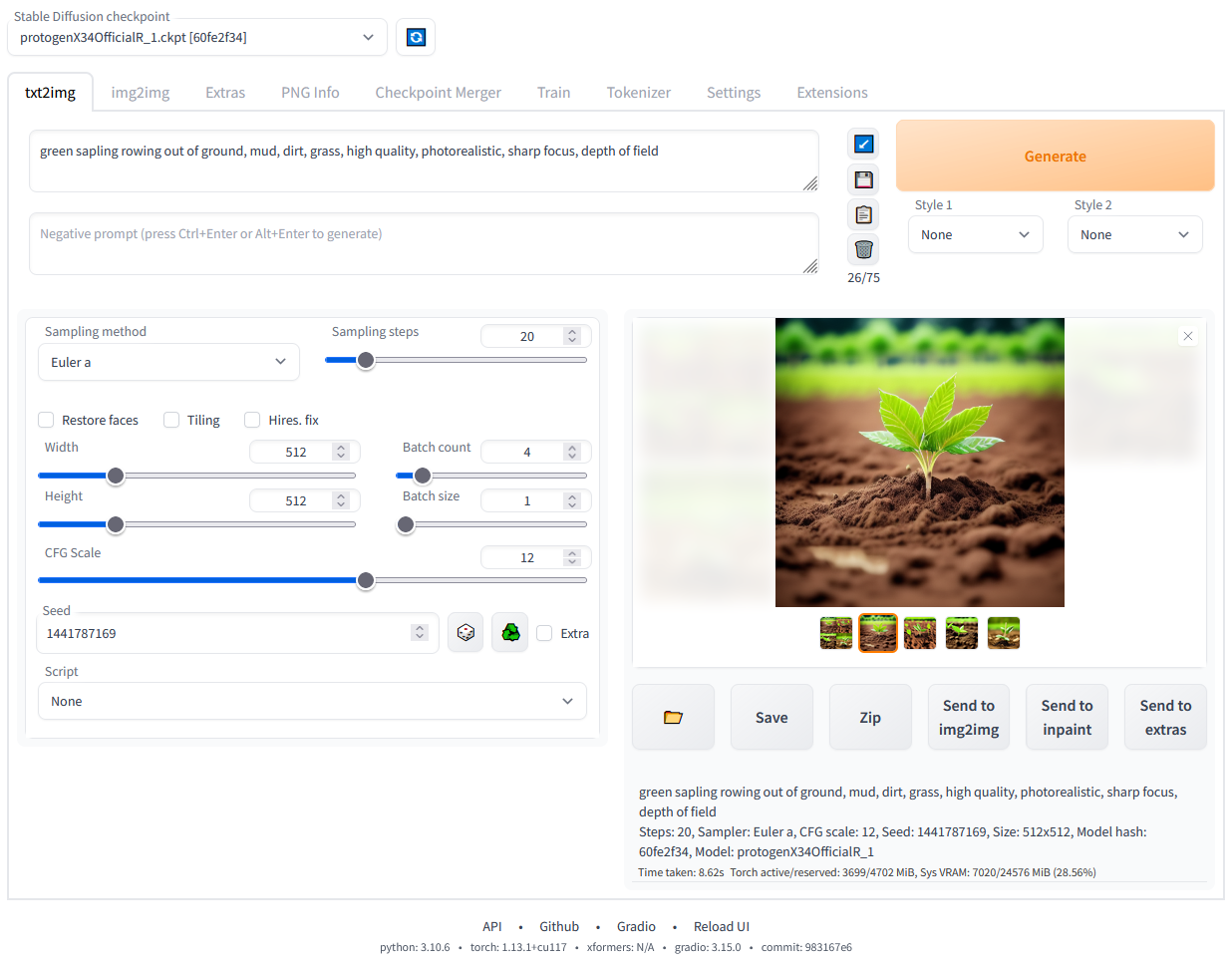
## 功能特性
[带图片的详细功能展示](https://github.com/AUTOMATIC1111/stable-diffusion-webui/wiki/Features):
- 原始 txt2img 和 img2img 模式
- 一键安装和运行脚本(但您仍然必须安装 python 和 git)
- Outpainting(外绘)
- Inpainting(内绘)
- 颜色草图
- 提示词矩阵
- Stable Diffusion 放大
- Attention(注意力机制),指定模型应更多关注的文本部分
- 一个穿着 `((tuxedo))` 的男人 - 将会更加关注 tuxedo
- 一个穿着 `(tuxedo:1.21)` 的男人 - 替代语法
- 选中文本并按 `Ctrl+Up` 或 `Ctrl+Down`(如果您使用的是 MacOS,则按 `Command+Up` 或 `Command+Down`)以自动调整选中文本的注意力(代码由匿名用户贡献)
- Loopback(回环),多次运行 img2img 处理
- X/Y/Z 图表,一种使用不同参数绘制 3 维图像图表的方法
- Textual Inversion(文本反转)
- 拥有任意数量的 embedding,并可以为它们使用任何您喜欢的名称
- 使用具有不同向量数的多个 embedding
- 支持半精度浮点数
- 在 8GB 显存上训练 embedding(也有报告称 6GB 可用)
- 附加功能选项卡,包含:
- GFPGAN,修复人脸的神经网络
- CodeFormer,作为 GFPGAN 替代方案的人脸修复工具
- RealESRGAN,神经网络放大器
- ESRGAN,拥有大量第三方模型的神经网络放大器
- SwinIR 和 Swin2SR([见此处](https://github.com/AUTOMATIC1111/stable-diffusion-webui/pull/2092)),神经网络放大器
- LDSR,Latent diffusion 超分辨率放大
- 调整宽高比选项
- 采样方法选择
- 调整采样器 eta 值(噪声倍数)
- 更多高级噪声设置选项
- 随时中断处理
- 支持 4GB 显卡(也有报告称 2GB 可用)
- 批次生成正确的种子
- 实时提示词 token 长度验证
- 生成参数
- 您用于生成图像的参数会随该图像一起保存
- PNG 格式保存在 PNG chunks 中,JPEG 格式保存在 EXIF 中
- 可以将图像拖放到 PNG 信息选项卡以恢复生成参数并自动将其复制到 UI 中
- 可以在设置中禁用
- 将图像/文本参数拖放到提示词输入框
- 读取生成参数按钮,将提示词输入框中的参数加载到 UI
- 设置页面
- 从 UI 运行任意 python 代码(必须使用 `--allow-code` 运行以启用)
- 大多数 UI 元素的鼠标悬停提示
- 可以通过文本配置更改 UI 元素的默认值/最小值/最大值/步长值
- 平铺支持,一个用于创建可像纹理一样平铺的图像的复选框
- 进度条和实时图像生成预览
- 可以使用独立的神经网络来生成预览,几乎不需要 VRAM 或计算资源
- 负面提示词,一个额外的文本字段,允许您列出不想在生成的图像中看到的内容
- 风格,一种保存部分提示词并稍后通过下拉菜单轻松应用的方法
- 变体,一种生成相同图像但有微小差异的方法
- 种子调整大小,一种以略微不同的分辨率生成相同图像的方法
- CLIP interrogator,一个尝试从图像猜测提示词的按钮
- 提示词编辑,一种在生成中途更改提示词的方法,例如开始生成西瓜并在中途切换到动漫女孩
- 批处理,使用 img2img 处理一组文件
- Img2img Alternative,交叉注意力控制的反向 Euler 方法
- Highres Fix,一个便捷选项,用于一键生成高分辨率图片而没有通常的失真
- 动态重载 checkpoint
- Checkpoint 合并,一个允许您将最多 3 个 checkpoint 合并为一个的选项卡
- [自定义脚本](https://github.com/AUTOMATIC1111/stable-diffusion-webui/wiki/Custom-Scripts),包含来自社区的许多扩展
- [Composable-Diffusion](https://energy-based-model.github.io/Compositional-Visual-Generation-with-Composable-Diffusion-Models/),一种同时使用多个提示词的方法
- 使用大写 `AND` 分隔提示词
- 也支持提示词权重:`a cat :1.2 AND a dog AND a penguin :2.2`
- 提示词无 token 限制(原始 stable diffusion 最多允许使用 75 个 token)
- DeepDanbooru 集成,为动漫提示词创建 danbooru 风格的标签
- [xformers](https://github.com/AUTOMATIC1111/stable-diffusion-webui/wiki/Xformers),针对特定显卡大幅提升速度:(添加 `--xformers` 到命令行参数)
- 通过扩展:[历史记录选项卡](https://github.com/yfszzx/stable-diffusion-webui-images-browser):在 UI 中方便地查看、指引和删除图像
- 无限生成选项
- 训练选项卡
- hypernetworks 和 embeddings 选项
- 图像预处理:裁剪、镜像、使用 BLIP 或 deepdanbooru(用于动漫)自动标记
- Clip skip
- Hypernetworks
- Loras(与 Hypernetworks 相同但更漂亮)
- 独立的 UI,您可以在其中选择(带预览)要添加到提示词中的 embeddings、hypernetworks 或 Loras
- 可以从设置屏幕选择加载不同的 VAE
- 进度条中的预计完成时间
- API
- 支持 RunwayML 的专用 [inpainting 模型](https://github.com/runwayml/stable-diffusion#inpainting-with-stable-diffusion)
- 通过扩展:[美学梯度](https://github.com/AUTOMATIC1111/stable-diffusion-webui-aesthetic-gradients),一种通过使用 clip 图像 embeds 生成具有特定美学风格图像的方法([https://github.com/vicgalle/stable-diffusion-aesthetic-gradients](https://github.com/vicgalle/stable-diffusion-aesthetic-gradients) 的实现)
- [Stable Diffusion 2.0](https://github.com/Stability-AI/stablediffusion) 支持 - 说明见 [wiki](https://github.com/AUTOMATIC1111/stable-diffusion-webui/wiki/Features#stable-diffusion-20)
- [Alt-Diffusion](https://arxiv.org/abs/2211.06679) 支持 - 说明见 [wiki](https://github.com/AUTOMATIC1111/stable-diffusion-webui/wiki/Features#alt-diffusion)
- 现在没有任何坏字母!
- 加载 safetensors 格式的 checkpoint
- 放宽分辨率限制:生成图像的尺寸必须是 8 的倍数,而不是 64
- 现在有许可证了!
- 从设置屏幕重新排序 UI 中的元素
- [Segmind Stable Diffusion](https://huggingface.co/segmind/SSD-1B) 支持
## 安装与运行
确保满足所需的 [依赖项](https://github.com/AUTOMATIC1111/stable-diffusion-webui/wiki/Dependencies),并按照以下说明操作:
- [NVidia](https://github.com/AUTOMATIC1111/stable-diffusion-webui/wiki/Install-and-Run-on-NVidia-GPUs)(推荐)
- [AMD](https://github.com/AUTOMATIC1111/stable-diffusion-webui/wiki/Install-and-Run-on-AMD-GPUs) GPU。
- [Intel CPU, Intel GPU(集成和独立)](https://github.com/openvinotoolkit/stable-diffusion-webui/wiki/Installation-on-Intel-Silicon)(外部 wiki 页面)
- [Ascend NPU](https://github.com/wangshuai09/stable-diffusion-webui/wiki/Install-and-run-on-Ascend-NPUs)(外部 wiki 页面)
或者,使用在线服务(如 Google Colab):
- [在线服务列表](https://github.com/AUTOMATIC1111/stable-diffusion-webui/wiki/Online-Services)
### 使用发布包在带有 NVidia-GPU 的 Windows 10/11 上安装
1. 从 [v1.0.0-pre](https://github.com/AUTOMATIC1111/stable-diffusion-webui/releases/tag/v1.0.0-pre) 下载 `sd.webui.zip` 并解压其内容。
2. 运行 `update.bat`。
3. 运行 `run.bat`。
### Windows 自动安装
1. 安装 [Python 3.10.6](https://www.python.org/downloads/release/python-3106/)(新版本的 Python 不支持 torch),勾选 "Add Python to PATH"。
2. 安装 [git](https://git-scm.com/download/win)。
3. 下载 stable-diffusion-webui 仓库,例如通过运行 `git clone https://github.com/AUTOMATIC1111/stable-diffusion-webui.git`。
4. 从 Windows 资源管理器以普通、非管理员用户身份运行 `webui-user.bat`。
### Linux 自动安装
1. 安装依赖项:
```
# 基于 Debian:
sudo apt install wget git python3 python3-venv libgl1 libglib2.0-0
# 基于 Red Hat:
sudo dnf install wget git python3 gperftools-libs libglvnd-glx
# 基于 openSUSE:
sudo zypper install wget git python3 libtcmalloc4 libglvnd
# 基于 Arch:
sudo pacman -S wget git python3
```
如果您的系统非常新,您需要安装 python3.11 或 python3.10:
```
# Ubuntu 24.04
sudo add-apt-repository ppa:deadsnakes/ppa
sudo apt update
sudo apt install python3.11
# Manjaro/Arch
sudo pacman -S yay
yay -S python311 # do not confuse with python3.11 package
# 仅适用于 3.11
# 然后在 launch script 中设置 env variable
export python_cmd="python3.11"
# 或在 webui-user.sh 中
python_cmd="python3.11"
```
2. 导航到您希望安装 webui 的目录并执行以下命令:
```
wget -q https://raw.githubusercontent.com/AUTOMATIC1111/stable-diffusion-webui/master/webui.sh
```
或者只是在任何您想要的地方克隆仓库:
```
git clone https://github.com/AUTOMATIC1111/stable-diffusion-webui
```
3. 运行 `webui.sh`。
4. 查看 `webui-user.sh` 以了解选项。
### Apple Silicon 安装
在[此处](https://github.com/AUTOMATIC1111/stable-diffusion-webui/wiki/Installation-on-Apple-Silicon)查找说明。
## 文档
文档已从此 README 移至项目的 [wiki](https://github.com/AUTOMATIC1111/stable-diffusion-webui/wiki)。
为了让 Google 和其他搜索引擎抓取 wiki,这里有一个链接指向(非人类阅读用的)[可抓取 wiki](https://github-wiki-see.page/m/AUTOMATIC1111/stable-diffusion-webui/wiki)。
## 致谢
借用代码的许可证可以在 `Settings -> Licenses` 屏幕中找到,也可以在 `html/licenses.html` 文件中找到。
- Stable Diffusion - https://github.com/Stability-AI/stablediffusion, https://github.com/CompVis/taming-transformers, https://github.com/mcmonkey4eva/sd3-ref
- k-diffusion - https://github.com/crowsonkb/k-diffusion.git
- Spandrel - https://github.com/chaiNNer-org/spandrel implementing
- GFPGAN - https://github.com/TencentARC/GFPGAN.git
- CodeFormer - https://github.com/sczhou/CodeFormer
- ESRGAN - https://github.com/xinntao/ESRGAN
- SwinIR - https://github.com/JingyunLiang/SwinIR
- Swin2SR - https://github.com/mv-lab/swin2sr
- LDSR - https://github.com/Hafiidz/latent-diffusion
- MiDaS - https://github.com/isl-org/MiDaS
- Ideas for optimizations - https://github.com/basujindal/stable-diffusion
- Cross Attention layer optimization - Doggettx - https://github.com/Doggettx/stable-diffusion, original idea for prompt editing.
- Cross Attention layer optimization - InvokeAI, lstein - https://github.com/invoke-ai/InvokeAI (originally http://github.com/lstein/stable-diffusion)
- Sub-quadratic Cross Attention layer optimization - Alex Birch (https://github.com/Birch-san/diffusers/pull/1), Amin Rezaei (https://github.com/AminRezaei0x443/memory-efficient-attention)
- Textual Inversion - Rinon Gal - https://github.com/rinongal/textual_inversion (we're not using his code, but we are using his ideas).
- Idea for SD upscale - https://github.com/jquesnelle/txt2imghd
- Noise generation for outpainting mk2 - https://github.com/parlance-zz/g-diffuser-bot
- CLIP interrogator idea and borrowing some code - https://github.com/pharmapsychotic/clip-interrogator
- Idea for Composable Diffusion - https://github.com/energy-based-model/Compositional-Visual-Generation-with-Composable-Diffusion-Models-PyTorch
- xformers - https://github.com/facebookresearch/xformers
- DeepDanbooru - interrogator for anime diffusers https://github.com/KichangKim/DeepDanbooru
- Sampling in float32 precision from a float16 UNet - marunine for the idea, Birch-san for the example Diffusers implementation (https://github.com/Birch-san/diffusers-play/tree/92feee6)
- Instruct pix2pix - Tim Brooks (star), Aleksander Holynski (star), Alexei A. Efros (no star) - https://github.com/timothybrooks/instruct-pix2pix
- Security advice - RyotaK
- UniPC sampler - Wenliang Zhao - https://github.com/wl-zhao/UniPC
- TAESD - Ollin Boer Bohan - https://github.com/madebyollin/taesd
- LyCORIS - KohakuBlueleaf
- Restart sampling - lambertae - https://github.com/Newbeeer/diffusion_restart_sampling
- Hypertile - tfernd - https://github.com/tfernd/HyperTile
- Initial Gradio script - posted on 4chan by an Anonymous user. Thank you Anonymous user.
- (You)
标签:AIGC, AI绘画, AUTOMATIC1111, CodeFormer, DNS解析, ESRGAN, GFPGAN, Gradio, LoRA, Python, Stable Diffusion, Textual Inversion, WebUI, 人工智能, 凭据扫描, 图像修复, 图像生成, 图像超分辨率, 图生图, 开源项目, 文生图, 无后门, 机器学习模型部署, 深度学习, 潜在扩散模型, 照片编辑, 生成式AI, 用户模式Hook绕过, 神经网络, 索引, 自动绘图, 逆向工具