JMousqueton/CTI-MSTeams-Bot
GitHub: JMousqueton/CTI-MSTeams-Bot
一款基于 Python 的威胁情报机器人,自动聚合多个网络安全数据源的更新并通过 Webhook 推送到 Microsoft Teams 频道。
Stars: 51 | Forks: 10
# 🏴☠️🤖 Threat Intelligence Teams Bot
TITB 是 [Threat Intelligence Discord Bot from vx-underground](https://github.com/vxunderground/ThreatIntelligenceDiscordBot/) 的一个分支,但针对 Microsoft Teams 进行了适配,并修改为以每小时一次的 Github-Action 运行。
[](LICENSE)  [](https://twitter.com/JMousqueton) [](.github/workflows/fetchCTI.yml) [](.github/workflows/codeql-analysis.yml)
## 描述
* 使用 Python 编写
⚠️ 要求 Python 3.10+ 版本
* 需要 Teams Webhook
Threat Intelligence Teams Bot 从各种明网域名和勒索软件威胁行为者域名获取更新。
此 Bot 将每 30 分钟检查一次更新。
我所做的更改:
* GitHub-Action:请参阅 [fetchCTI.yml](.github/workflows/fetchCTI.yml) 文件。
* Feed 列表已从源代码外部化到 [Feed.csv](Feed.csv) 文件中
* 使用 JSON 库从 [Ransomwatch](https://ransomwatch.mousqueton.io) 获取勒索软件攻击列表
* 在与某些源相关的 MS Teams 卡片前添加了表情符号
* 仅使用一个 MS Teams 频道
* 基于最佳实践进行了重构
* 无需在 [Config.txt](Config.txt) 中添加任何条目(会自动添加)
* 检查是否存在 python 3.10+(某些功能需要)
* 添加了 [requirements.txt](requirements.txt)
* 添加了 [feedCheck.py](checkFeed.py) 脚本,用于从 [Feed.csv](Feed.csv) 文件检查 Feed 的健康状况
* 添加了命令行 [usage](#usage) 选项
* 检查是否有可用的新版本
* 添加了 [new sources](#sources)
* 回退支持多个 Webhook
我决定移除 TelegramBot,因为它不符合我的需求。
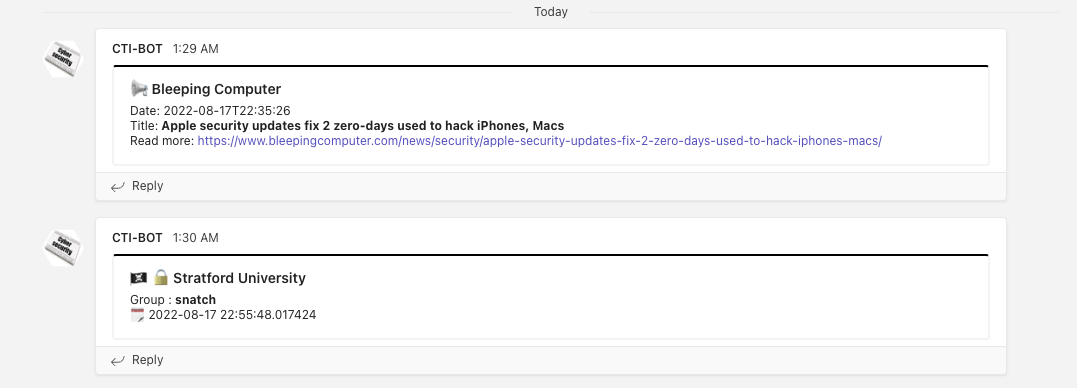
## 安装
克隆仓库或下载 [latest release](https://github.com/JMousqueton/CTI-MSTeams-Bot/releases/latest)
```
git clone https://github.com/JMousqueton/CTI-MSTeams-Bot
```
安装 ```requirements.txt``` 中的所有模块
```
pip3 install -r requirements.txt
```
## 配置
### Github Action
* 创建一个 MS-Teams WebHook
* 在一个你将命名为 `CI` 的环境中,将创建的 webhook url 粘贴到 `MSTEAMS_WEBHOOK_*` 变量中。
### 在服务器上 (Windows, MacOS, Linux)
* 创建一个名为 ```MSTEAMS_WEBHOOK_*``` 的变量,值为 webhook URL
示例:
```
MSTEAMS_WEBHOOK_FEED=https://mousqueton.webhook.office.com/webhookb2/08589F1C-EEA2-4C92-A08B-66E59692FDE3/IncomingWebhook/3DEFFDD9-F3A8-4351-BDA7-142FAFB7473A
MSTEAMS_WEBHOOK_RANSOMWARE=https://mousqueton.webhook.office.com/webhookb2/08589F1C-EEA2-4C92-A08B-66E59692FDE3/IncomingWebhook/3DEFFDD9-F3A8-4351-BDA7-142FAFB7473A
MSTEAMS_WEBHOOK_IOC=https://mousqueton.webhook.office.com/webhookb2/08589F1C-EEA2-4C92-A08B-66E59692FDE3/IncomingWebhook/3DEFFDD9-F3A8-4351-BDA7-142FAFB7473A
python3 TeamIntelBot.py -r -d
```
* 通过 crontab 安排脚本执行,例如每小时一次
*注意:这些 ID 是用 uuidgen 生成的,仅作示例用途* 😛
## 使用方法
```
python3 TeamsIntelBot.py -h
Usage: TeamsIntelBot.py [options]
Options:
--version show program's version number and exit
-h, --help show this help message and exit
-q, --quiet Quiet mode
-D, --debug Debug mode : only output on screen nothing send to MS Teams
-d, --domain Enable Red Flag Domains source
-r, --reminder Enable monthly reminder of Feeds
```
- 对于法国用户,我建议使用 -d 和 -r 标志
```python3 TeamIntelBot.py -r -d```
- 对于其他用户,仅使用 -r 标志
```python3 TeamIntelBot.py -r```
### 代理
如果你使用代理,请不要忘记使用代理变量:
```
set https_proxy=http://x.x.x.x:port
set http_proxy=http://x.x.x.x:port
```
我还添加了一个名为 ```checkFeed.py``` 的脚本,用于检查 Feed 是否有效以及最后发布日期是什么时候。此脚本读取 ```Feed.csv``` 文件。
```
python3 checkFeed.py
✅ Modexp (Sun, 31 Jul 2022 00:01:53 +0000)
✅ James Forshaw (2022-07-16T21:49:00.000-07:00)
✅ Adam Chester (Sat, 09 Jul 2022 23:00:00 GMT)
✅ Microsoft Security (Thu, 11 Aug 2022 16:00:00 +0000)
✅ Recorded Future (Thu, 18 Aug 2022 00:00:00 GMT)
✅ SentinelOne (Wed, 11 May 2022 14:56:53 +0000)
✅ RedCanary (Thu, 18 Aug 2022 21:53:55 +0000)
✅ Cyber-News (Fri, 19 Aug 2022 15:14:56 +0000)
✅ Leak-Lookup (Fri, 19 Aug 2022 04:00:02 +0200)
✅ ATT (2022-08-17T10:00:00+00:00)
✅ US-CERT CISA (Tue, 16 Aug 2022 15:38:42 +0000)
✅ NCSC (Thu, 18 Aug 2022 23:00:00 GMT)
✅ Center of Internet Security (Thu, 18 Aug 2022 01:43:07 -0400)
✅ FR-CERT Alertes (Tue, 31 May 2022 11:12:01 +0000)
✅ FR-CERT Avis (Fri, 19 Aug 2022 11:22:29 +0000)
✅ EU-ENISA Publications (2022-07-27T10:00:00Z)
✅ Microsoft Sentinel (Thu, 18 Aug 2022 08:31:51 PDT)
```
## 添加或移除要监控的 RSS Feed
所有监控的 RSS Feed 都在 [Feed.csv](Feed.csv) 文件中。要添加一个新的 RSS Feed,只需追加一个新条目。例如:
在 ```Feed.csv``` 文件中:
```
https://grahamcluley.com/feed/,Graham Cluley
https://1337WebsiteIWannaFollow.com/feed/,1337Website
```
## 来源
我添加了以下来源:
* 🇫🇷 FR-CERT Avis (aka [ANSSI](https://www.ssi.gouv.fr/)) :法国政府 CERT 的通知
* 🇫🇷 FR-CERT Alertes (aka [ANSSI](https://www.ssi.gouv.fr/)) :法国政府 CERT 的警报
* [Leak-lookup](https://leak-lookup.com/) :泄露通知
* [Cyber-News](https://www.cyber-news.fr)
* ATT CyberSecurity Blog
* 🇪🇺 ENSIA Publications
* NCC Group
* Microsoft Sentinel
* SANS
* [Red Flag Domains](https://red.flag.domains/) ⚠️ 你应该使用 -d 标志来启用这个专门针对法国的源
* [Google TAG](https://blog.google/threat-analysis-group/)
## 待办事项
* ~~创建一个标志来激活或停用 Red Flag Domains 源,因为它仅适用于法国~~(已在版本 2.3 中发布)
* ~~在 [Feed.csv](Feed.csv) 中用 # 禁用行~~(在版本 2.4 中,尚未发布)
## 致谢
这是由 smelly__vx 在一个缓慢而无聊的周末制作的。我们希望它能为你的频道和/或组织提供一些价值。
感谢 [🏴☠️ Ecole 2600](https://www.ecole2600.com) 的同学们在深夜提供的支持和建议 😛
感谢此 Bot 的当前用户,他们帮助我改进了它
感谢 Olivier 提供的代理文档 🍻
标签:DNS解析, Github-Actions, Homebrew安装, Python, Ransomwatch, SecOps, vx-underground, Webhook, 云安全架构, 力导向图, 勒索软件, 团队协作工具, 威胁情报, 安全资讯, 安全运营, 开发者工具, 开源项目, 微软Teams, 恶意软件, 扫描框架, 数据源, 无后门, 机器人, 漏洞预警, 网络安全, 网络调试, 自动化, 逆向工具, 隐私保护