astral-sh/ruff
GitHub: astral-sh/ruff
Ruff 是一款用 Rust 编写的极速 Python 代码检查和格式化工具,旨在以单一工具替代 Flake8、Black、isort 等多个工具并实现数量级的性能提升。
Stars: 47986 | Forks: 2155
# Ruff
[](https://github.com/astral-sh/ruff)
[](https://pypi.python.org/pypi/ruff)
[](https://github.com/astral-sh/ruff/blob/main/LICENSE)
[](https://pypi.python.org/pypi/ruff)
[](https://github.com/astral-sh/ruff/actions)
[](https://discord.com/invite/astral-sh)
[**文档**](https://docs.astral.sh/ruff/) | [**演练场**](https://play.ruff.rs/)
一个用 Rust 编写的极快 Python linter 和代码格式化工具。

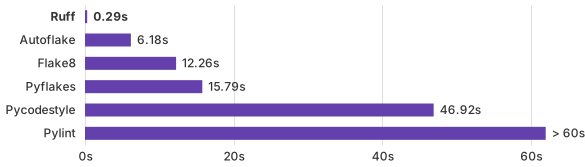
从零开始对 CPython 代码库进行 Lint。
- ⚡️ 比现有的 linter(如 Flake8)和格式化工具(如 Black)快 10-100 倍 - 🐍 可通过 `pip` 安装 - 🛠️ 支持 `pyproject.toml` - 🤝 兼容 Python 3.14 - ⚖️ 与 [Flake8](https://docs.astral.sh/ruff/faq/#how-does-ruffs-linter-compare-to-flake8)、isort 和 [Black](https://docs.astral.sh/ruff/faq/#how-does-ruffs-formatter-compare-to-black) 保持对等替换(Drop-in parity) - 📦 内置缓存,以避免重新分析未更改的文件 - 🔧 支持修复,用于自动纠正错误(例如,自动删除未使用的导入) - 📏 超过 [800 条内置规则](https://docs.astral.sh/ruff/rules/),并原生重新实现了流行的 Flake8 插件,如 flake8-bugbear - ⌨️ 为 [VS Code](https://github.com/astral-sh/ruff-vscode) 和[更多编辑器](https://docs.astral.sh/ruff/editors/setup)提供第一方[编辑器集成](https://docs.astral.sh/ruff/editors) - 🌎 对 Monorepo 友好,支持[分层和级联配置](https://docs.astral.sh/ruff/configuration/#config-file-discovery) Ruff 的目标是在通过单一、通用的接口集成更多功能的同时,在速度上比替代工具快几个数量级。 Ruff 可用于取代 [Flake8](https://pypi.org/project/flake8/)(加上数十个插件)、[Black](https://github.com/psf/black)、[isort](https://pypi.org/project/isort/)、[pydocstyle](https://pypi.org/project/pydocstyle/)、[pyupgrade](https://pypi.org/project/pyupgrade/)、[autoflake](https://pypi.org/project/autoflake/) 等,且执行速度比任何单个工具快上数十倍甚至数百倍。 Ruff 正处于极度活跃的开发中,并被以下主要开源项目使用: - [Apache Airflow](https://github.com/apache/airflow) - [Apache Superset](https://github.com/apache/superset) - [FastAPI](https://github.com/tiangolo/fastapi) - [Hugging Face](https://github.com/huggingface/transformers) - [Pandas](https://github.com/pandas-dev/pandas) - [SciPy](https://github.com/scipy/scipy) ……以及[更多](#whos-using-ruff)。 Ruff 由 [Astral](https://astral.sh)([uv](https://github.com/astral-sh/uv) 和 [ty](https://github.com/astral-sh/ty) 的创造者)支持。 阅读[发布文章](https://astral.sh/blog/announcing-astral-the-company-behind-ruff),或最初的[项目公告](https://notes.crmarsh.com/python-tooling-could-be-much-much-faster)。 ## 用户评价 [**Sebastián Ramírez**](https://twitter.com/tiangolo/status/1591912354882764802),[FastAPI](https://github.com/tiangolo/fastapi) 的创建者: [**Nick Schrock**](https://twitter.com/schrockn/status/1612615862904827904),[Elementl](https://www.elementl.com/) 创始人,[GraphQL](https://graphql.org/) 联合创建者: [**Bryan Van de Ven**](https://github.com/bokeh/bokeh/pull/12605),[Bokeh](https://github.com/bokeh/bokeh/) 联合创建者,[Conda](https://docs.conda.io/en/latest/) 原作者: [**Timothy Crosley**](https://twitter.com/timothycrosley/status/1606420868514877440),[isort](https://github.com/PyCQA/isort) 的创建者: [**Tim Abbott**](https://github.com/zulip/zulip/pull/23431#issuecomment-1302557034),[Zulip](https://github.com/zulip/zulip) 的首席开发者(也[在此处](https://github.com/astral-sh/ruff/issues/465#issuecomment-1317400028)): ## 目录 更多信息,请参阅[文档](https://docs.astral.sh/ruff/)。 1. [入门指南](#getting-started) 2. [配置](#configuration) 3. [规则](#rules) 4. [贡献](#contributing) 5. [支持](#support) 6. [致谢](#acknowledgements) 7. [谁在使用 Ruff?](#whos-using-ruff) 8. [许可证](#license) ## 入门指南 更多信息,请参阅[文档](https://docs.astral.sh/ruff/)。 ### 安装 Ruff 在 PyPI 上以 [`ruff`](https://pypi.org/project/ruff/) 的名称提供。 直接使用 [`uvx`](https://docs.astral.sh/uv/) 调用 Ruff: ``` uvx ruff check # Lint all files in the current directory. uvx ruff format # Format all files in the current directory. ``` 或者使用 `uv`(推荐)、`pip` 或 `pipx` 安装 Ruff: ``` # 使用 uv。 uv tool install ruff@latest # Install Ruff globally. uv add --dev ruff # Or add Ruff to your project. # 使用 pip。 pip install ruff # 使用 pipx。 pipx install ruff ``` 从 `0.5.0` 版本开始,可以使用我们的独立安装程序安装 Ruff: ``` # 在 macOS 和 Linux 上。 curl -LsSf https://astral.sh/ruff/install.sh | sh # 在 Windows 上。 powershell -c "irm https://astral.sh/ruff/install.ps1 | iex" # 针对特定版本。 curl -LsSf https://astral.sh/ruff/0.15.5/install.sh | sh powershell -c "irm https://astral.sh/ruff/0.15.5/install.ps1 | iex" ``` 你也可以通过 [Homebrew](https://formulae.brew.sh/formula/ruff)、[Conda](https://anaconda.org/conda-forge/ruff) 以及[多种其他包管理器](https://docs.astral.sh/ruff/installation/)安装 Ruff。 ### 用法 要将 Ruff 作为 linter 运行,请尝试以下任一命令: ``` ruff check # Lint all files in the current directory (and any subdirectories). ruff check path/to/code/ # Lint all files in `/path/to/code` (and any subdirectories). ruff check path/to/code/*.py # Lint all `.py` files in `/path/to/code`. ruff check path/to/code/to/file.py # Lint `file.py`. ruff check @arguments.txt # Lint using an input file, treating its contents as newline-delimited command-line arguments. ``` 或者,将 Ruff 作为格式化工具运行: ``` ruff format # Format all files in the current directory (and any subdirectories). ruff format path/to/code/ # Format all files in `/path/to/code` (and any subdirectories). ruff format path/to/code/*.py # Format all `.py` files in `/path/to/code`. ruff format path/to/code/to/file.py # Format `file.py`. ruff format @arguments.txt # Format using an input file, treating its contents as newline-delimited command-line arguments. ``` Ruff 也可以通过 [`ruff-pre-commit`](https://github.com/astral-sh/ruff-pre-commit) 作为 [pre-commit](https://pre-commit.com/) 钩子使用: ``` - repo: https://github.com/astral-sh/ruff-pre-commit # Ruff version. rev: v0.15.5 hooks: # Run the linter. - id: ruff-check args: [ --fix ] # Run the formatter. - id: ruff-format ``` Ruff 也可以作为 [VS Code 扩展](https://github.com/astral-sh/ruff-vscode)使用,或与[各种其他编辑器](https://docs.astral.sh/ruff/editors/setup)一起使用。 Ruff 还可以通过 [`ruff-action`](https://github.com/astral-sh/ruff-action) 作为 [GitHub Action](https://github.com/features/actions) 使用: ``` name: Ruff on: [ push, pull_request ] jobs: ruff: runs-on: ubuntu-latest steps: - uses: actions/checkout@v4 - uses: astral-sh/ruff-action@v3 ``` ### 配置 Ruff 可以通过 `pyproject.toml`、`ruff.toml` 或 `.ruff.toml` 文件进行配置(参见:[_配置_](https://docs.astral.sh/ruff/configuration/),或 [_设置_](https://docs.astral.sh/ruff/settings/) 以获取所有配置选项的完整列表)。 如果未指定,Ruff 的默认配置等同于以下 `ruff.toml` 文件: ``` # 排除各种通常被忽略的目录。 exclude = [ ".bzr", ".direnv", ".eggs", ".git", ".git-rewrite", ".hg", ".ipynb_checkpoints", ".mypy_cache", ".nox", ".pants.d", ".pyenv", ".pytest_cache", ".pytype", ".ruff_cache", ".svn", ".tox", ".venv", ".vscode", "__pypackages__", "_build", "buck-out", "build", "dist", "node_modules", "site-packages", "venv", ] # 与 Black 相同。 line-length = 88 indent-width = 4 # 假设 Python 3.10 target-version = "py310" [lint] # 默认启用 Pyflakes (`F`) 和 pycodestyle (`E`) 代码的子集。 select = ["E4", "E7", "E9", "F"] ignore = [] # 允许修复所有已启用的规则(当提供 `--fix` 时)。 fixable = ["ALL"] unfixable = [] # 当下划线前缀时允许未使用的变量。 dummy-variable-rgx = "^(_+|(_+[a-zA-Z0-9_]*[a-zA-Z0-9]+?))$" [format] # 与 Black 相同,对字符串使用双引号。 quote-style = "double" # 与 Black 相同,使用空格而非制表符缩进。 indent-style = "space" # 与 Black 相同,遵循 Magic Trailing Comma。 skip-magic-trailing-comma = false # 与 Black 相同,自动检测适当的行尾。 line-ending = "auto" ``` 请注意,在 `pyproject.toml` 中,每个节标题都应加上 `tool.ruff` 前缀。例如,`[lint]` 应替换为 `[tool.ruff.lint]`。 某些配置选项可以通过专用的命令行参数提供,例如与规则启用和禁用、文件发现和日志级别相关的选项: ``` ruff check --select F401 --select F403 --quiet ``` 其余的配置选项可以通过通用的 `--config` 参数提供: ``` ruff check --config "lint.per-file-ignores = {'some_file.py' = ['F841']}" ``` 要选择启用最新的 lint 规则、格式化样式更改、界面更新等,请在配置文件中设置 `preview = true` 或在命令行中传递 `--preview` 来启用[预览模式](https://docs.astral.sh/ruff/preview/)。预览模式启用了一系列在稳定前可能会发生更改的不稳定功能。 有关 Ruff 顶级命令的更多信息,请参见 `ruff help`;有关 lint 和格式化命令的更多信息,请分别参见 `ruff help check` 和 `ruff help format`。 ## 规则 **Ruff 支持 900 多条 lint 规则**,其中许多受 Flake8、isort、pyupgrade 等流行工具的启发。无论规则来源如何,Ruff 都会在 Rust 中将每条规则作为第一方功能重新实现。 默认情况下,Ruff 启用 Flake8 的 `F` 规则,以及 `E` 规则的一个子集,省略了任何与格式化工具(如 `ruff format` 或 [Black](https://github.com/psf/black))使用重叠的风格规则。 如果你刚开始使用 Ruff,**默认规则集是一个很好的起点**:它在零配置的情况下捕获各种常见错误(如未使用的导入)。 在[预览模式](https://docs.astral.sh/ruff/preview/)下,Ruff 启用了一组扩展的默认规则,包括来自 `B`、`UP` 和 `RUF` 类别的规则以及更多内容。如果你尝试了新的默认设置,请随时在 [GitHub 讨论](https://github.com/astral-sh/ruff/discussions/23203)中留下反馈,你也可以在那里找到完整列出的新规则集。 除了默认值之外,Ruff 还重新实现了一些最流行的 Flake8 插件和相关代码质量工具,包括: - [autoflake](https://pypi.org/project/autoflake/) - [eradicate](https://pypi.org/project/eradicate/) - [flake8-2020](https://pypi.org/project/flake8-2020/) - [flake8-annotations](https://pypi.org/project/flake8-annotations/) - [flake8-async](https://pypi.org/project/flake8-async) - [flake8-bandit](https://pypi.org/project/flake8-bandit/) ([#1646](https://github.com/astral-sh/ruff/issues/1646)) - [flake8-blind-except](https://pypi.org/project/flake8-blind-except/) - [flake8-boolean-trap](https://pypi.org/project/flake8-boolean-trap/) - [flake8-bugbear](https://pypi.org/project/flake8-bugbear/) - [flake8-builtins](https://pypi.org/project/flake8-builtins/) - [flake8-commas](https://pypi.org/project/flake8-commas/) - [flake8-comprehensions](https://pypi.org/project/flake8-comprehensions/) - [flake8-copyright](https://pypi.org/project/flake8-copyright/) - [flake8-datetimez](https://pypi.org/project/flake8-datetimez/) - [flake8-debugger](https://pypi.org/project/flake8-debugger/) - [flake8-django](https://pypi.org/project/flake8-django/) - [flake8-docstrings](https://pypi.org/project/flake8-docstrings/) - [flake8-eradicate](https://pypi.org/project/flake8-eradicate/) - [flake8-errmsg](https://pypi.org/project/flake8-errmsg/) - [flake8-executable](https://pypi.org/project/flake8-executable/) - [flake8-future-annotations](https://pypi.org/project/flake8-future-annotations/) - [flake8-gettext](https://pypi.org/project/flake8-gettext/) - [flake8-implicit-str-concat](https://pypi.org/project/flake8-implicit-str-concat/) - [flake8-import-conventions](https://github.com/joaopalmeiro/flake8-import-conventions) - [flake8-logging](https://pypi.org/project/flake8-logging/) - [flake8-logging-format](https://pypi.org/project/flake8-logging-format/) - [flake8-no-pep420](https://pypi.org/project/flake8-no-pep420) - [flake8-pie](https://pypi.org/project/flake8-pie/) - [flake8-print](https://pypi.org/project/flake8-print/) - [flake8-pyi](https://pypi.org/project/flake8-pyi/) - [flake8-pytest-style](https://pypi.org/project/flake8-pytest-style/) - [flake8-quotes](https://pypi.org/project/flake8-quotes/) - [flake8-raise](https://pypi.org/project/flake8-raise/) - [flake8-return](https://pypi.org/project/flake8-return/) - [flake8-self](https://pypi.org/project/flake8-self/) - [flake8-simplify](https://pypi.org/project/flake8-simplify/) - [flake8-slots](https://pypi.org/project/flake8-slots/) - [flake8-super](https://pypi.org/project/flake8-super/) - [flake8-tidy-imports](https://pypi.org/project/flake8-tidy-imports/) - [flake8-todos](https://pypi.org/project/flake8-todos/) - [flake8-type-checking](https://pypi.org/project/flake8-type-checking/) - [flake8-use-pathlib](https://pypi.org/project/flake8-use-pathlib/) - [flynt](https://pypi.org/project/flynt/) ([#2102](https://github.com/astral-sh/ruff/issues/2102)) - [isort](https://pypi.org/project/isort/) - [mccabe](https://pypi.org/project/mccabe/) - [pandas-vet](https://pypi.org/project/pandas-vet/) - [pep8-naming](https://pypi.org/project/pep8-naming/) - [pydocstyle](https://pypi.org/project/pydocstyle/) - [pygrep-hooks](https://github.com/pre-commit/pygrep-hooks) - [pylint-airflow](https://pypi.org/project/pylint-airflow/) - [pyupgrade](https://pypi.org/project/pyupgrade/) - [tryceratops](https://pypi.org/project/tryceratops/) - [yesqa](https://pypi.org/project/yesqa/) 有关支持的规则的完整枚举,请参阅[_规则_](https://docs.astral.sh/ruff/rules/)。 ## 支持 遇到问题?请在 [**GitHub**](https://github.com/astral-sh/ruff/issues) 上查看现有问题,或随时[**开启一个新问题**](https://github.com/astral-sh/ruff/issues/new)。 你也可以在 [**Discord**](https://discord.com/invite/astral-sh) 上寻求帮助。 ## 致谢 Ruff 的 linter 借鉴了 Python 生态系统中许多其他工具的 API 和实现细节,特别是 [Flake8](https://github.com/PyCQA/flake8)、[Pyflakes](https://github.com/PyCQA/pyflakes)、[pycodestyle](https://github.com/PyCQA/pycodestyle)、[pydocstyle](https://github.com/PyCQA/pydocstyle)、[pyupgrade](https://github.com/asottile/pyupgrade) 和 [isort](https://github.com/PyCQA/isort)。 在某些情况下,Ruff 包含了相应工具的“直接” Rust 移植。我们感谢这些工具的维护者的工作,以及他们为 Python 社区提供的所有价值。 Ruff 的格式化工具建立在 Rome 的 [`rome_formatter`](https://github.com/rome/tools/tree/main/crates/rome_formatter) 的分支之上,并借鉴了 [Rome](https://github.com/rome/tools)、[Prettier](https://github.com/prettier/prettier) 和 [Black](https://github.com/psf/black) 的 API 和实现细节。 Ruff 的导入解析器基于 [Pyright](https://github.com/microsoft/pyright) 的导入解析算法。 Ruff 也受到 Python 生态系统之外许多工具的影响,例如 [Clippy](https://github.com/rust-lang/rust-clippy) 和 [ESLint](https://github.com/eslint/eslint)。 Ruff 受益于大量的[贡献者](https://github.com/astral-sh/ruff/graphs/contributors)。 Ruff 在 MIT 许可证下发布。 ## 谁在使用 Ruff? Ruff 被许多主要的开源项目和公司使用,包括: - [Albumentations](https://github.com/albumentations-team/AlbumentationsX) - Amazon ([AWS SAM](https://github.com/aws/serverless-application-model)) - [Anki](https://apps.ankiweb.net/) - Anthropic ([Python SDK](https://github.com/anthropics/anthropic-sdk-python)) - [Apache Airflow](https://github.com/apache/airflow) - AstraZeneca ([Magnus](https://github.com/AstraZeneca/magnus-core)) - [Babel](https://github.com/python-babel/babel) - Benchling ([Refac](https://github.com/benchling/refac)) - [Bokeh](https://github.com/bokeh/bokeh) - Capital One ([datacompy](https://github.com/capitalone/datacompy)) - CrowdCent ([NumerBlox](https://github.com/crowdcent/numerblox)) - [Cryptography (PyCA)](https://github.com/pyca/cryptography) - CERN ([Indico](https://getindico.io/)) - [DVC](https://github.com/iterative/dvc) - [Dagger](https://github.com/dagger/dagger) - [Dagster](https://github.com/dagster-io/dagster) - Databricks ([MLflow](https://github.com/mlflow/mlflow)) - [Dify](https://github.com/langgenius/dify) - [FastAPI](https://github.com/tiangolo/fastapi) - [Godot](https://github.com/godotengine/godot) - [Gradio](https://github.com/gradio-app/gradio) - [Great Expectations](https://github.com/great-expectations/great_expectations) - [HTTPX](https://github.com/encode/httpx) - [Hatch](https://github.com/pypa/hatch) - [Home Assistant](https://github.com/home-assistant/core) - Hugging Face ([Transformers](https://github.com/huggingface/transformers), [Datasets](https://github.com/huggingface/datasets), [Diffusers](https://github.com/huggingface/diffusers)) - IBM ([Qiskit](https://github.com/Qiskit/qiskit)) - ING Bank ([popmon](https://github.com/ing-bank/popmon), [probatus](https://github.com/ing-bank/probatus)) - [Ibis](https://github.com/ibis-project/ibis) - [ivy](https://github.com/unifyai/ivy) - [JAX](https://github.com/jax-ml/jax) - [Jupyter](https://github.com/jupyter-server/jupyter_server) - [Kraken Tech](https://kraken.tech/) - [LangChain](https://github.com/hwchase17/langchain) - [Litestar](https://litestar.dev/) - [LlamaIndex](https://github.com/jerryjliu/llama_index) - Matrix ([Synapse](https://github.com/matrix-org/synapse)) - [MegaLinter](https://github.com/oxsecurity/megalinter) - Meltano ([Meltano CLI](https://github.com/meltano/meltano), [Singer SDK](https://github.com/meltano/sdk)) - Microsoft ([Semantic Kernel](https://github.com/microsoft/semantic-kernel), [ONNX Runtime](https://github.com/microsoft/onnxruntime), [LightGBM](https://github.com/microsoft/LightGBM)) - Modern Treasury ([Python SDK](https://github.com/Modern-Treasury/modern-treasury-python)) - Mozilla ([Firefox](https://github.com/mozilla/gecko-dev)) - [Mypy](https://github.com/python/mypy) - [Nautobot](https://github.com/nautobot/nautobot) - Netflix ([Dispatch](https://github.com/Netflix/dispatch)) - [Neon](https://github.com/neondatabase/neon) - [Nokia](https://nokia.com/) - [NoneBot](https://github.com/nonebot/nonebot2) - [NumPyro](https://github.com/pyro-ppl/numpyro) - [ONNX](https://github.com/onnx/onnx) - [OpenBB](https://github.com/OpenBB-finance/OpenBBTerminal) - [Open Wine Components](https://github.com/Open-Wine-Components/umu-launcher) - [PDM](https://github.com/pdm-project/pdm) - [PaddlePaddle](https://github.com/PaddlePaddle/Paddle) - [Pandas](https://github.com/pandas-dev/pandas) - [Pillow](https://github.com/python-pillow/Pillow) - [Poetry](https://github.com/python-poetry/poetry) - [Polars](https://github.com/pola-rs/polars) - [PostHog](https://github.com/PostHog/posthog) - Prefect ([Python SDK](https://github.com/PrefectHQ/prefect), [Marvin](https://github.com/PrefectHQ/marvin)) - [PyInstaller](https://github.com/pyinstaller/pyinstaller) - [PyMC](https://github.com/pymc-devs/pymc/) - [PyMC-Marketing](https://github.com/pymc-labs/pymc-marketing) - [pytest](https://github.com/pytest-dev/pytest) - [PyTorch](https://github.com/pytorch/pytorch) - [Pydantic](https://github.com/pydantic/pydantic) - [Pylint](https://github.com/PyCQA/pylint) - [PyScripter](https://github.com/pyscripter/pyscripter) - [PyVista](https://github.com/pyvista/pyvista) - [Reflex](https://github.com/reflex-dev/reflex) - [River](https://github.com/online-ml/river) - [Rippling](https://rippling.com) - [Robyn](https://github.com/sansyrox/robyn) - [Saleor](https://github.com/saleor/saleor) - Scale AI ([Launch SDK](https://github.com/scaleapi/launch-python-client)) - [SciPy](https://github.com/scipy/scipy) - Snowflake ([SnowCLI](https://github.com/Snowflake-Labs/snowcli)) - [Sphinx](https://github.com/sphinx-doc/sphinx) - [Stable Baselines3](https://github.com/DLR-RM/stable-baselines3) - [Starlette](https://github.com/encode/starlette) - [Streamlit](https://github.com/streamlit/streamlit) - [The Algorithms](https://github.com/TheAlgorithms/Python) - [Vega-Altair](https://github.com/altair-viz/altair) - [Weblate](https://weblate.org/) - WordPress ([Openverse](https://github.com/WordPress/openverse)) - [ZenML](https://github.com/zenml-io/zenml) - [Zulip](https://github.com/zulip/zulip) - [build (PyPA)](https://github.com/pypa/build) - [cibuildwheel (PyPA)](https://github.com/pypa/cibuildwheel) - [delta-rs](https://github.com/delta-io/delta-rs) - [featuretools](https://github.com/alteryx/featuretools) - [meson-python](https://github.com/mesonbuild/meson-python) - [nox](https://github.com/wntrblm/nox) - [pip](https://github.com/pypa/pip) ## 许可证 本仓库根据 [MIT 许可证](https://github.com/astral-sh/ruff/blob/main/LICENSE)授权。
标签:Black, Flake8, isort, Linter, pptx, PyPI, Python, Ruff, Rust, SOC Prime, 代码格式化, 代码规范, 可视化界面, 开发工具, 无后门, 网络流量审计, 网络调试, 自动化, 逆向工具, 通知系统, 通知系统, 通知系统, 速度优化, 错误基检测, 静态代码分析