matanolabs/matano
GitHub: matanolabs/matano
基于 AWS 的开源无服务器安全数据湖,通过检测即代码实现 PB 级日志的分析与威胁狩猎。
Stars: 1676 | Forks: 120






## 适用于 AWS 的开源安全数据湖
Matano 开源安全数据湖是一个开源的**云原生安全数据湖**,专为 AWS 上的安全团队构建。
## 功能特性
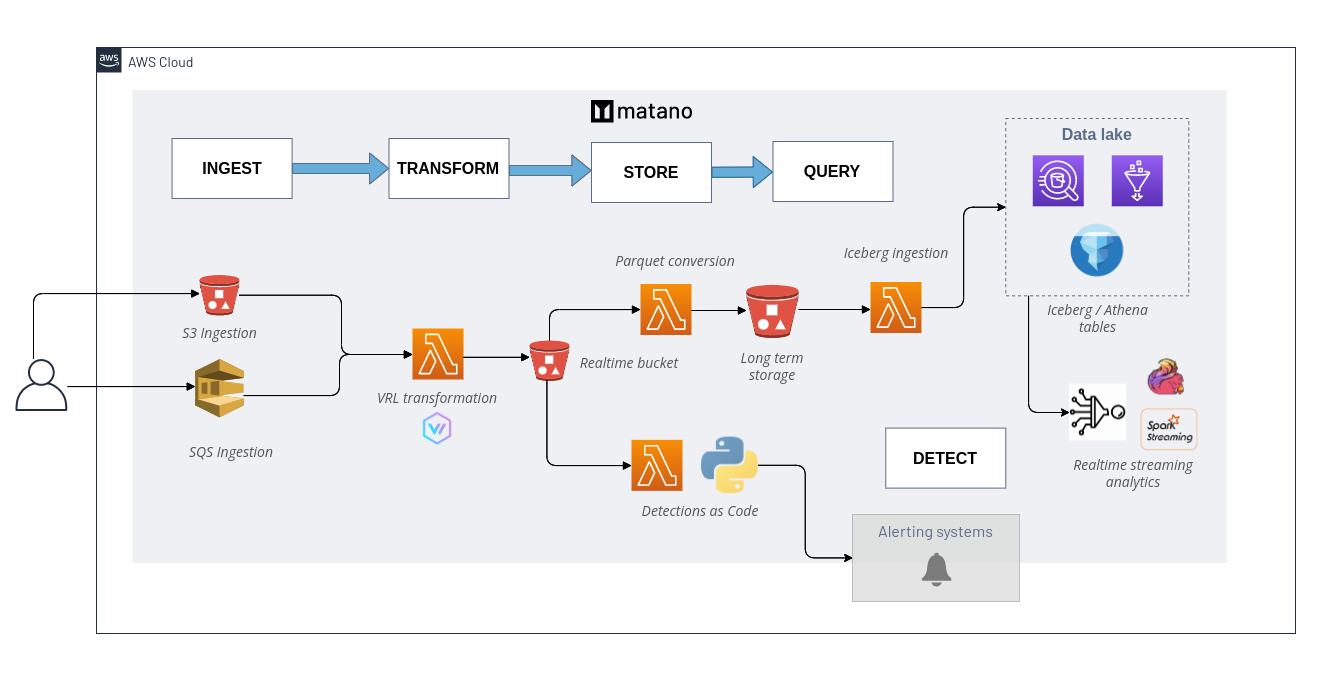
- **安全数据湖:** 将非结构化安全日志规范化为 AWS 账户中结构化的实时数据湖。
- **收集所有日志:** 开箱即用地集成了用于安全日志的 [50+ sources](https://www.matano.dev/docs/log-sources/managed-log-sources),并且可以轻松扩展自定义源。
- **检测即代码:** 使用 Python 将实时检测构建为代码。支持将 [Sigma](https://www.matano.dev/docs/detections/importing-from-sigma-rules) 检测自动导入到 Matano。
- **日志转换流水线:** 支持自定义 VRL ([Vector Remap Language](https://vector.dev/docs/reference/vrl/)) 脚本,在摄取日志时对其进行解析、丰富、规范化和转换,无需管理任何服务器。
- **无供应商锁定:** 使用开放表格式 ([Apache Iceberg](https://iceberg.apache.org/)) 和开放模式标准 ([ECS](https://github.com/elastic/ecs)),以供应商中立的格式为您提供安全数据的完全所有权。
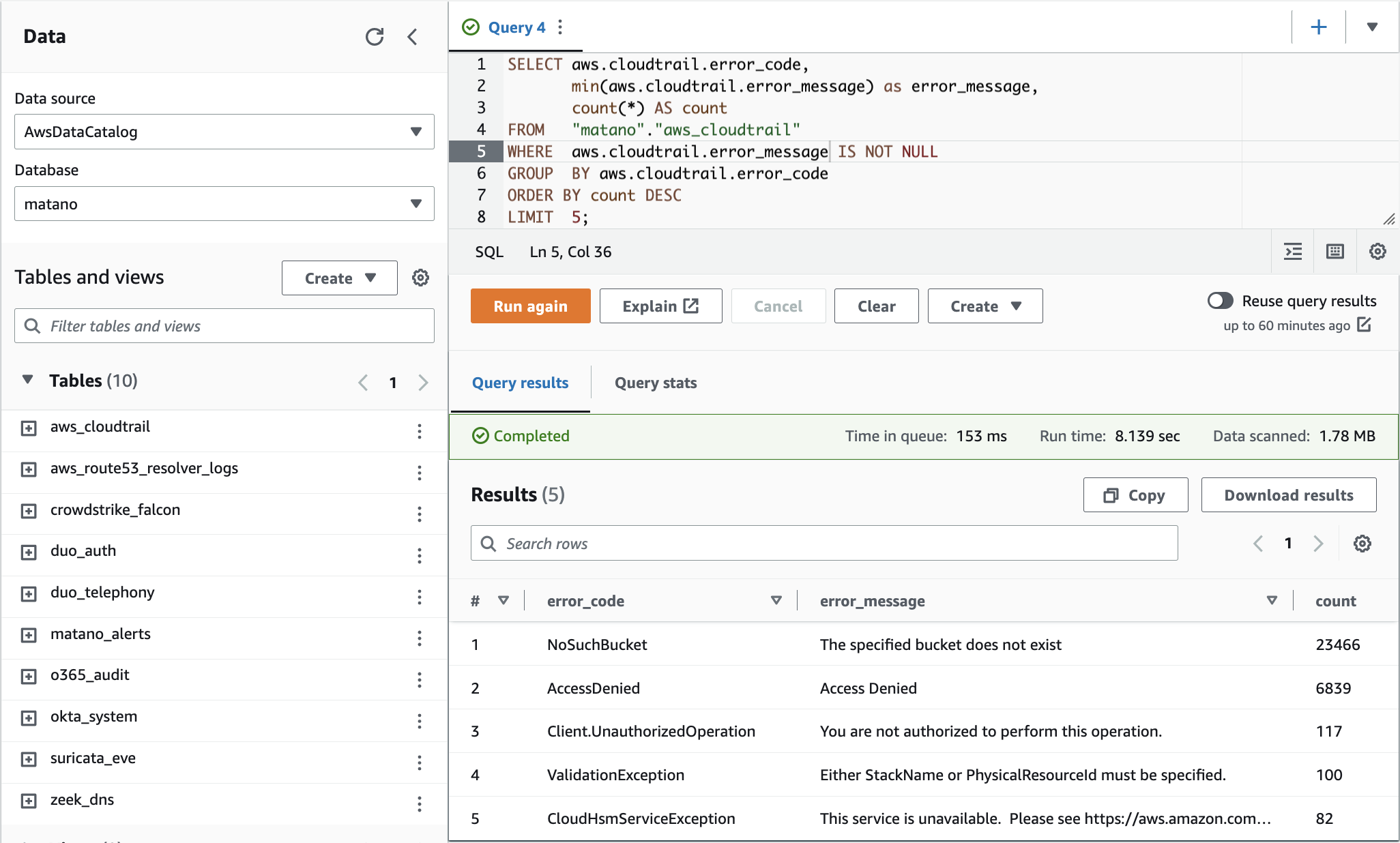
- **自带分析工具:** 直接从任何兼容 Iceberg 的引擎(AWS Athena、Snowflake、Spark、Trino 等)查询您的安全湖,无需复制数据。
- **无服务器:** 完全无服务器,专为 AWS 设计,专注于实现高规模、低成本和零运维。
## 架构
## 👀 使用场景
- 降低 SIEM 成本。
- 通过安全数据湖增强您的 SIEM,以便在调查期间提供额外的上下文。
- 使用 Python 编写检测即代码,以检测可疑行为并创建情境化告警。
- ELK / Elastic Security 堆栈的 ECS 兼容无服务器替代方案。
## ✨ 集成
#### 托管日志源
- [**AWS CloudTrail**](https://www.matano.dev/docs/log-sources/managed-log-sources/aws/cloudtrail)
- [**AWS Route53**](https://www.matano.dev/docs/log-sources/managed-log-sources/aws/route53-resolver-logs)
- [**AWS VPC Flow**](https://www.matano.dev/docs/log-sources/managed-log-sources/aws/vpcflow)
- [**AWS Config**](https://www.matano.dev/docs/log-sources/managed-log-sources/aws/aws-config)
- [**AWS ELB**](https://www.matano.dev/docs/log-sources/managed-log-sources/aws/aws-elb)
- [**Amazon S3 Server Access**](https://www.matano.dev/docs/log-sources/managed-log-sources/aws/amazon-s3-server-access-logs)
- [**Amazon S3 Inventory Reports**](https://www.matano.dev/docs/log-sources/managed-log-sources/aws/s3-inventory-report)
- [**Amazon Inspector**](https://www.matano.dev/docs/log-sources/managed-log-sources/aws/amazon-inspector)
- [**Amazon WAF**](https://www.matano.dev/docs/log-sources/managed-log-sources/aws/amazon-waf)
- [**Cloudflare**](https://www.matano.dev/docs/log-sources/managed-log-sources/cloudflare)
- [**Crowdstrike**](https://www.matano.dev/docs/log-sources/managed-log-sources/crowdstrike)
- [**Duo**](https://www.matano.dev/docs/log-sources/managed-log-sources/duo)
- [**Okta**](https://www.matano.dev/docs/log-sources/managed-log-sources/okta)
- [**GitHub**](https://www.matano.dev/docs/log-sources/managed-log-sources/github)
- [**Google Workspace**](https://www.matano.dev/docs/log-sources/managed/google-workspace)
- [**Office 365**](https://www.matano.dev/docs/log-sources/managed-log-sources/office365)
- [**Snyk**](https://www.matano.dev/docs/log-sources/managed-log-sources/snyk)
- [**Suricata**](https://www.matano.dev/docs/log-sources/managed-log-sources/suricata)
- [**Zeek**](https://www.matano.dev/docs/log-sources/managed-log-sources/zeek)
- [**Custom 🔧**](#-log-transformation--data-normalization)
#### 告警目的地
- [**Amazon SNS**](https://www.matano.dev/docs/detections/alerting)
- [**Slack**](https://www.matano.dev/docs/detections/alerting/slack)
#### 查询引擎
- [**Amazon Athena**](https://docs.aws.amazon.com/athena/latest/ug/querying-iceberg.html) (默认)
- [**Snowflake**](https://www.snowflake.com/blog/iceberg-tables-powering-open-standards-with-snowflake-innovations/) (预览版)
- [**Spark**](https://iceberg.apache.org/spark-quickstart/)
- [**Trino**](https://trino.io/docs/current/connector/iceberg.html)
- [**BigQuery Omni (BigLake)**](https://cloud.google.com/biglake)
- [**Dremio**](https://docs.dremio.com/software/data-formats/apache-iceberg/)
## 快速开始
[**View the complete installation instructions**](https://www.matano.dev/docs/getting-started#installation)
### 安装
安装 matano CLI 以将 Matano 部署到您的 AWS 账户并管理您的部署。
**Linux**
```
curl -OL https://github.com/matanolabs/matano/releases/download/nightly/matano-linux-x64.sh
chmod +x matano-linux-x64.sh
sudo ./matano-linux-x64.sh
```
**macOS**
```
curl -OL https://github.com/matanolabs/matano/releases/download/nightly/matano-macos-x64.sh
chmod +x matano-macos-x64.sh
sudo ./matano-macos-x64.sh
```
### 部署
[**Read the complete docs on getting started**](https://www.matano.dev/docs/getting-started)
要开始使用,请运行 `matano init` 命令。
- 确保您的环境中(或 AWS CLI 配置文件中)具有 AWS 凭证。
- 交互式 CLI 向导将引导您开始,为您生成初始的 [Matano directory](https://www.matano.dev/docs/matano-directory),初始化您的 AWS 账户,并部署到您的 AWS 账户中。
- 初始部署需要几分钟时间。

### 目录结构
初始化后,您的 [Matano directory](https://www.matano.dev/docs/matano-directory) 将用于控制和管理项目中的所有资源,例如日志源、检测和其他配置。其结构如下:
```
➜ example-matano-dir git:(main) tree
├── detections
│ └── aws_root_credentials
│ ├── detect.py
│ └── detection.yml
├── log_sources
│ ├── cloudtrail
│ │ ├── log_source.yml
│ │ └── tables
│ │ └── default.yml
│ └── zeek
│ ├── log_source.yml
│ └── tables
│ └── dns.yml
├── matano.config.yml
└── matano.context.json
```
在载入新的日志源或编写检测时,请在项目中的任何位置运行 `matano deploy` 以将更改部署到您的账户。
## 🔧 日志转换与数据规范化
[**Read the complete docs on configuring custom log sources**](https://www.matano.dev/docs/log-sources/configuration)
[Vector Remap Language (VRL)](https://vector.dev/docs/reference/vrl/) 允许您轻松载入自定义日志源,并鼓励您根据 [Elastic Common Schema (ECS)](https://www.elastic.co/guide/en/ecs/current/ecs-reference.html) 规范化字段,从而在安全数据湖中实现增强的透视和对 IOC 的批量搜索。
用户可以定义自定义 VRL 程序,以便在通过日志源支持的机制(例如 S3、SQS)摄取非结构化日志时对其进行解析和转换。
VRL 是一种面向表达式的语言,旨在以安全且高性能的方式转换可观测性数据(例如日志)。它具有简单的语法和一套专门为可观测性用例量身定制的丰富内置函数。
### 示例:解析 JSON
让我们看一个简单的例子。假设您正在处理如下所示的 HTTP 日志事件:
```
{
"line": "{\"status\":200,\"srcIpAddress\":\"1.1.1.1\",\"message\":\"SUCCESS\",\"username\":\"ub40fan4life\"}"
}
```
您希望对每个事件应用以下更改:
- 将原始 `line` 字符串解析为 JSON,并将字段展开到顶层
- 将 `srcIpAddress` 重命名为 `source.ip` ECS 字段
- 删除 `username` 字段
- 将 `message` 转换为小写
将此 VRL 程序作为 `transform` 步骤添加到您的日志源中即可完成所有这些操作:
###### 日志源.yml
```
transform: |
. = object!(parse_json!(string!(.json.line)))
.source.ip = del(.srcIpAddress)
del(.username)
.message = downcase(string!(.message))
schema:
ecs_field_names:
- source.ip
- http.status
```
生成的事件 🎉:
```
{
"message": "success",
"status": 200,
"source": {
"ip": "1.1.1.1"
}
}
```
## 📝 编写检测
[**Read the complete docs on detections**](https://www.matano.dev/docs/detections)
使用检测来定义可以对安全日志中的威胁发出告警
标签:AWS, CVE防护, C语言, DPI, IPS, OISF, PB级数据处理, Rust, SecOps, SIEM, SOC, Suricata, 云原生安全, 云安全架构, 云计算, 入侵检测系统, 入侵防御系统, 可视化界面, 多线程, 大数据, 威胁检测与响应, 威胁猎捕, 安全数据湖, 安全运维, 开源, 恶意软件检测, 日志管理, 深度包检测, 漏洞利用检测, 现代安全运营, 目录扫描, 网络安全分析, 网络流量审计, 网络防御, 规则引擎, 逆向工具, 通知系统, 通知系统