JamesWoolfenden/pike
GitHub: JamesWoolfenden/pike
Pike 通过静态扫描 Terraform/OpenTofu 基础设施代码,自动计算并生成部署所需的最小 IAM 权限策略,帮助实现云环境下的最小特权管理。
Stars: 916 | Forks: 46
# Pike

[](https://GitHub.com/jameswoolfenden/pike/graphs/commit-activity)
[](https://github.com/JamesWoolfenden/pike/actions/workflows/ci.yml)
[](https://github.com/JamesWoolfenden/pike/releases/latest)
[](https://github.com/JamesWoolfenden/pike/releases/latest)

[](https://github.com/pre-commit/pre-commit)
[](https://www.checkov.io/)
[](https://github.com/JamesWoolfenden/pike/releases)
[](https://codecov.io/gh/JamesWoolfenden/pike)
[](https://www.bestpractices.dev/projects/7032)
Pike 是一款用于确定运行 OpenTofu/Terraform 基础设施代码所需最小 IAM 权限的工具。
**最新动态?**
- 支持 JSON 模块。
- GCP 权限比较,检查 IAC 所需权限与已部署角色的差异。
- S3 和 GCP 后端检测。
Pike 目前支持 OpenTofu/Terraform,并支持多个提供商(AWS、GCP 和 AZURE);
Azure 是最新支持的,而 AWS 支持的资源最多
。
如果您发现问题,欢迎提交 PR 或 Issue;如果能添加新资源就更好了,我会尽快
审查并合并。
**关于占位符资源的说明:** 查找映射表中的某些资源(特别是 GCP 组织、文件夹和账单级别的资源)被标记为 `placeholder` 条目。Pike 能够识别这些资源,但由于它们需要组织级别的访问权限或难以测试的特殊账户类型,因此没有经过经验验证的 IAM 权限。当 Pike 遇到这些资源时,不会报错,但这些权限并未通过实际的资源生命周期测试进行验证。
**注意事项** 此工具的输出只是您的第一步,如果您使用的是 AWS,您现在可以部分生成资源,
目前不支持条件,甚至部分资源也会使用通配符。
适用于 AWS 的最小权限
**最佳实践** 会更进一步(我也正在努力实现),您需要通过添加限制来修改这些权限,
使其符合您所在环境的要求,您还可以使用短期凭证进行部署(使用此工具或 Vault)(目前支持 AWS),
为您的构建生成
短期凭证,然后远程 (REMOTE) 提供并调用您的构建 (INVOKE)。
理想情况下,我希望能为您自动完成这些操作,但这些策略目前是静态确定的(速度更快),
并且未记录的意图可能是无法推断的。
## 快速开始
通过 3 个步骤开始使用 Pike:
1. **安装 Pike**
# macOS
brew tap jameswoolfenden/homebrew-tap
brew install jameswoolfenden/tap/pike
# Windows (使用 Scoop)
scoop bucket add iac https://github.com/JamesWoolfenden/scoop.git
scoop install pike
# 或者从源码安装
go install github.com/jameswoolfenden/pike@latest
2. **扫描您的 OpenTofu/Terraform 代码**
pike scan -d ./path/to/your/terraform
这将以 JSON 格式输出所需的最小 IAM 权限。
3. **生成为 Terraform/OpenTofu 代码**
pike scan -o terraform -d ./path/to/your/terraform
这将创建一个您可以部署的 `aws_iam_policy` 资源。
**后续步骤:** 使用 `pike make` 直接部署策略,或使用 `pike compare` 根据现有策略进行验证。有关所有命令,请参见[用法](#usage)。
## 目录
- [Pike](#pike)
- [快速开始](#quick-start)
- [目录](#table-of-contents)
- [安装](#install)
- [MacOS](#macos)
- [Windows](#windows)
- [Docker](#docker)
- [用法](#usage)
- [扫描](#scan)
- [输出](#output)
- [创建](#make)
- [调用](#invoke)
- [应用](#apply)
- [远程](#remote)
- [自述文件](#readme)
- [拉取](#pull)
- [运行时](#runtime)
- [监视](#watch)
- [解析](#parse)
- [比较](#compare)
- [帮助](#help)
- [构建](#building)
- [检查](#inspect)
- [扩展](#extending)
- [添加 Import 映射文件](#add-import-mapping-file)
- [添加到 provider 扫描](#add-to-provider-scan)
- [相关工具](#related-tools)
## 安装
在此处下载最新的二进制文件:
从源码安装:
- 克隆仓库
- 运行 `go install`
远程安装:
```
go install github.com/jameswoolfenden/pike@latest
```
### MacOS
```
brew tap jameswoolfenden/homebrew-tap
brew install jameswoolfenden/tap/pike
```
### Windows
我现在使用 Scoop 来分发发布版本,它比以前的方法更新更快、管理更方便,
您可以从
## 用法
### 扫描
要扫描包含 OpenTofu/Terraform 文件的目录:
```
./pike scan -d .\terraform\
{
"Version": "2012-10-17",
"Statement": {
"Effect": "Allow",
"Action": [
"ec2:MonitorInstances",
"ec2:UnmonitorInstances",
"ec2:DescribeInstances",
"ec2:DescribeTags",
"ec2:DescribeInstanceAttribute",
"ec2:DescribeVolumes",
"ec2:DescribeInstanceTypes",
"ec2:RunInstances",
"ec2:DescribeInstanceCreditSpecifications",
"ec2:StopInstances",
"ec2:StartInstances",
"ec2:ModifyInstanceAttribute",
"ec2:TerminateInstances",
"ec2:AuthorizeSecurityGroupIngress",
"ec2:AuthorizeSecurityGroupEgress",
"ec2:CreateSecurityGroup",
"ec2:DescribeSecurityGroups",
"ec2:DescribeAccountAttributes",
"ec2:DescribeNetworkInterfaces",
"ec2:DeleteSecurityGroup",
"ec2:RevokeSecurityGroupEgress"
],
"Resource": "*"
}
}
```
您还可以将策略生成为 OpenTofu/Terraform 格式:
```
$pike scan -o terraform -d ../modules/aws/terraform-aws-activemq
resource "aws_iam_policy" "terraformXVlBzgba" {
name = "terraformXVlBzgba"
path = "/"
description = "Add Description"
policy = jsonencode({
"Version": "2012-10-17",
"Statement": [
{
"Sid": "VisualEditor0",
"Effect": "Allow",
"Action": [
"ec2:AuthorizeSecurityGroupEgress",
"ec2:AuthorizeSecurityGroupIngress",
"ec2:CreateNetworkInterface",
"ec2:CreateNetworkInterfacePermission",
"ec2:CreateSecurityGroup",
"ec2:CreateTags",
"ec2:DeleteNetworkInterface",
"ec2:DeleteNetworkInterfacePermission",
"ec2:DeleteSecurityGroup",
"ec2:DeleteTags",
"ec2:DescribeAccountAttributes",
"ec2:DescribeInternetGateways",
"ec2:DescribeNetworkInterfaces",
"ec2:DescribeSecurityGroups",
"ec2:DescribeSubnets",
"ec2:DescribeVpcs",
"ec2:DetachNetworkInterface",
"ec2:RevokeSecurityGroupEgress",
"ec2:RevokeSecurityGroupIngress"
],
"Resource": "*"
},
{
"Sid": "VisualEditor1",
"Effect": "Allow",
"Action": [
"kms:CreateKey",
"kms:DescribeKey",
"kms:EnableKeyRotation",
"kms:GetKeyPolicy",
"kms:GetKeyRotationStatus",
"kms:ListResourceTags",
"kms:ScheduleKeyDeletion",
"kms:TagResource",
"kms:UntagResource"
],
"Resource": "*"
},
{
"Sid": "VisualEditor2",
"Effect": "Allow",
"Action": [
"mq:CreateBroker",
"mq:CreateConfiguration",
"mq:CreateTags",
"mq:CreateUser",
"mq:DeleteBroker",
"mq:DeleteTags",
"mq:DeleteUser",
"mq:DescribeBroker",
"mq:DescribeConfiguration",
"mq:DescribeConfigurationRevision",
"mq:DescribeUser",
"mq:RebootBroker",
"mq:UpdateBroker",
"mq:UpdateConfiguration",
"mq:UpdateUser"
],
"Resource": "*"
}
]
})
}
```
我正在进一步完善策略生成功能,如果您已安装 AWS 身份验证:
```
e:\pike scan -d . -i -e
9:13AM DBG terraform init at E:\Code\modules\aws\terraform-aws-activemq
9:13AM DBG downloaded ip
resource "aws_iam_policy" "terraform_pike" {
name_prefix = "terraform_pike"
path = "/"
description = "Pike Autogenerated policy from IAC"
policy = jsonencode({
"Version": "2012-10-17",
"Statement": [
{
"Sid": "VisualEditor0",
"Effect": "Allow",
"Action": [
"ec2:AuthorizeSecurityGroupEgress",
"ec2:AuthorizeSecurityGroupIngress",
"ec2:CreateNetworkInterface",
"ec2:CreateNetworkInterfacePermission",
"ec2:CreateSecurityGroup",
"ec2:CreateTags",
"ec2:DeleteNetworkInterface",
"ec2:DeleteNetworkInterfacePermission",
"ec2:DeleteSecurityGroup",
"ec2:DeleteTags",
"ec2:DescribeAccountAttributes",
"ec2:DescribeInternetGateways",
"ec2:DescribeNetworkInterfaces",
"ec2:DescribeSecurityGroups",
"ec2:DescribeSubnets",
"ec2:DescribeVpcs",
"ec2:DetachNetworkInterface",
"ec2:RevokeSecurityGroupEgress",
"ec2:RevokeSecurityGroupIngress"
],
"Resource": [
"arn:aws:ec2:eu-west-2:680235478471:*"
]
},
{
"Sid": "VisualEditor1",
"Effect": "Allow",
"Action": [
"kms:CreateGrant"
],
"Resource": [
"arn:aws:kms:eu-west-2:680235478471:*"
]
},
{
"Sid": "VisualEditor2",
"Effect": "Allow",
"Action": [
"mq:CreateBroker",
"mq:CreateConfiguration",
"mq:CreateTags",
"mq:CreateUser",
"mq:DeleteBroker",
"mq:DeleteTags",
"mq:DeleteUser",
"mq:DescribeBroker",
"mq:DescribeConfiguration",
"mq:DescribeConfigurationRevision",
"mq:DescribeUser",
"mq:RebootBroker",
"mq:UpdateBroker",
"mq:UpdateConfiguration",
"mq:UpdateUser"
],
"Resource": [
"arn:aws:mq:eu-west-2:680235478471:*"
]
}
]
})
}
```
### 输出
如果您选择 -w 标志,pike 将把构建项目所需的角色/策略写入 .pike 文件夹:
```
$pike scan -w -i -d .
2022/09/17 13:50:51 terraform init at .
2022/09/17 13:50:51 downloaded ip
```
.pike 文件夹将包含:
```
aws_iam_role.terraform_pike.tf
pike.generated_policy.tf
```
您可以使用 OpenTofu/Terraform 部署它,以创建用于构建基础设施项目的角色/策略。
### 创建
您现在可以直接部署所需的策略(目前仅支持 AWS):
```
$pike make -d ../modules/aws/terraform-aws-apigateway/
2022/09/18 08:53:41 terraform init at ..\modules\aws\terraform-aws-apigateway\
2022/09/18 08:53:41 modules not found at ..\modules\aws\terraform-aws-apigateway\
2022/09/18 08:53:49 aws role create/updated arn:aws:iam::680235478471:role/terraform_pike_20220918071439382800000002
arn:aws:iam::680235478471:role/terraform_pike_20220918071439382800000002
```
这个新动词返回创建的角色的 ARN,您可以在 .pike 文件夹中找到所使用的 Terraform 代码。
### 调用
Invoke 目前用于触发 GitHub Actions,如果提供了 workflow(默认为 main.yaml)、repository 和 branch(默认为 main)标志,它将触发 dispatch 事件。
您需要在工作流中包含 dispatch 事件:
```
on:
workflow_dispatch:
push:
branches:
- master
```
要使用 GitHub API 进行身份验证,您需要设置您的 GitHub 个人访问令牌,即环境变量
*GITHUB_TOKEN*
要调用工作流,请执行:
```
pike invoke -workflow master.yml -branch master -repository JamesWoolfenden/terraform-aws-s3
```
我创建 Invoke 是为了与新的 remote 命令配合使用,该命令可向工作流提供临时凭证。
**注意 GitHub API 有速率限制,通常为每小时 5000 次调用。
```
pike make -d ./module/aws/terraform-aws-s3/example/examplea
```
### 应用
Apply 是 make 的扩展,它将应用策略和角色,并使用该角色创建您的基础设施:
```
pike apply -d ./module/aws/terraform-aws-s3/example/examplea -region eu-west-2
```
它旨在用于测试和开发 Pike 本身的权限
### 远程
Remote 使用 make 和 apply 的核心代码,将临时 AWS 凭证(目前仅支持)写入您的工作流中。
```
pike remote -d ./module/aws/terraform-aws-s3/example/examplea -region eu-west-2 -repository terraform-aws-s3
```
### 自述文件
Pike 现在可用于更新项目的 README.md 文件:
./pike readme -o terraform -d ..\modules\aws\terraform-aws-activemq\
这会在 README 中查找分隔符:
```
```
并将其替换为 JSON 或 Terraform,如下所示:
```
This is the policy required to build this project:
The Policy required is
{
"Version": "2012-10-17",
"Statement": {
"Effect": "Allow",
"Action": [
"mq:CreateTags",
"mq:DeleteTags",
"ec2:DescribeInternetGateways",
"ec2:DescribeAccountAttributes",
"ec2:DescribeVpcs",
"ec2:DescribeSubnets",
"ec2:DescribeSecurityGroups",
"ec2:CreateNetworkInterface",
"ec2:CreateNetworkInterfacePermission",
"ec2:DeleteNetworkInterfacePermission",
"ec2:DetachNetworkInterface",
"ec2:DeleteNetworkInterface",
"mq:CreateBroker",
"mq:DescribeBroker",
"mq:DescribeUser",
"mq:UpdateBroker",
"mq:DeleteBroker",
"mq:CreateConfiguration",
"mq:UpdateConfiguration",
"mq:DescribeConfiguration",
"mq:DescribeConfigurationRevision",
"mq:RebootBroker",
"ec2:CreateTags",
"ec2:DeleteTags",
"ec2:CreateSecurityGroup",
"ec2:DescribeNetworkInterfaces",
"ec2:DeleteSecurityGroup",
"ec2:RevokeSecurityGroupEgress",
"kms:TagResource",
"kms:UntagResource",
"kms:EnableKeyRotation",
"kms:CreateKey",
"kms:DescribeKey",
"kms:GetKeyPolicy",
"kms:GetKeyRotationStatus",
"kms:ListResourceTags",
"kms:ScheduleKeyDeletion"
],
"Resource": "*"
}
}
```
您可以在此处查看示例 。
## 比较
想要检查您部署的 IAM 策略与基础设施代码要求的差异吗?
这适用于 AWS 和 GCP。
```
IAM Policy arn:aws:iam::680235478471:policy/basic versus Infrastructure Code ../modules/aws/terraform-aws-appsync
{
"Statement": [
0: {
"Action": [
- 0: "kinesisvideo:CreateStream"
+ 0: "firehose:CreateDeliveryStream"
+ 0: "firehose:CreateDeliveryStream"
+ 1: "firehose:DeleteDeliveryStream"
+ 2: "firehose:DescribeDeliveryStream"
+ 3: "firehose:ListTagsForDeliveryStream"
+ 4: "iam:AttachRolePolicy"
+ 5: "iam:CreateRole"
+ 6: "iam:DeleteRole"
+ 7: "iam:DetachRolePolicy"
+ 8: "iam:GetRole"
+ 9: "iam:ListAttachedRolePolicies"
+ 10: "iam:ListInstanceProfilesForRole"
+ 11: "iam:ListRolePolicies"
+ 12: "iam:PassRole"
+ 13: "iam:TagRole"
+ 14: "kms:CreateKey"
+ 15: "kms:DescribeKey"
+ 16: "kms:EnableKeyRotation"
+ 17: "kms:GetKeyPolicy"
+ 18: "kms:GetKeyRotationStatus"
+ 19: "kms:ListResourceTags"
+ 20: "kms:ScheduleKeyDeletion"
+ 21: "logs:AssociateKmsKey"
+ 22: "logs:CreateLogGroup"
+ 23: "logs:DeleteLogGroup"
+ 24: "logs:DeleteRetentionPolicy"
+ 25: "logs:DescribeLogGroups"
+ 26: "logs:DisassociateKmsKey"
+ 27: "logs:ListTagsLogGroup"
+ 28: "logs:PutRetentionPolicy"
+ 29: "s3:CreateBucket"
+ 30: "s3:DeleteBucket"
+ 31: "s3:GetAccelerateConfiguration"
+ 32: "s3:GetBucketAcl"
+ 33: "s3:GetBucketCORS"
+ 34: "s3:GetBucketLogging"
+ 35: "s3:GetBucketObjectLockConfiguration"
+ 36: "s3:GetBucketPolicy"
+ 37: "s3:GetBucketPublicAccessBlock"
+ 38: "s3:GetBucketRequestPayment"
+ 39: "s3:GetBucketTagging"
+ 40: "s3:GetBucketVersioning"
+ 41: "s3:GetBucketWebsite"
+ 42: "s3:GetEncryptionConfiguration"
+ 43: "s3:GetLifecycleConfiguration"
+ 44: "s3:GetObject"
+ 45: "s3:GetObjectAcl"
+ 46: "s3:GetReplicationConfiguration"
+ 47: "s3:ListAllMyBuckets"
+ 48: "s3:ListBucket"
+ 49: "s3:PutBucketAcl"
+ 50: "s3:PutBucketPublicAccessBlock"
+ 51: "s3:PutEncryptionConfiguration"
+ 52: "wafv2:CreateWebACL"
+ 53: "wafv2:DeleteWebACL"
+ 54: "wafv2:GetWebACL"
],
"Effect": "Allow",
"Resource": "*",
- "Sid": ""
+ "Sid": "VisualEditor0"
}
],
"Version": "2012-10-17"
}
```
## 拉取
Pull 增加了使用 Git 仓库的功能(感谢 **go-git**),
可以 JSON 或 OpenTofu/Terraform 格式输出所需的权限:
```
./pike pull
NAME:
pike pull - Clones remote repo and scans it using pike
USAGE:
pike pull [command options] [arguments...]
OPTIONS:
--directory value, -d value Directory to scan (defaults to .) (default: ".")
--destination value, --dest value Where to clone repository (default: ".destination")
--output json, -o json Policy Output types e.g. json terraform (default: "terraform") [%OUTPUT%]
--repository value, -r value Repository url
--init, -i Run Terraform init to download modules (default: false)
--write, -w Write the policy output to a file at .pike (default: false)
--help, -h show help
```
如下所示:
```
$ ./pike.exe pull -r https://github.com/JamesWoolfenden/terraform-aws-codebuild -i -d .
10:31PM INF .destination was not empty, removing
10:31PM INF git clone https://github.com/JamesWoolfenden/terraform-aws-codebuild .destination --recursive
10:31PM DBG terraform init at E:\Code\pike\.destination
10:31PM DBG modules not found at .destination
resource "aws_iam_policy" "terraform_pike" {
name_prefix = "terraform_pike"
path = "/"
description = "Pike Autogenerated policy from IAC"
policy = jsonencode({
"Version": "2012-10-17",
"Statement": [
{
"Sid": "VisualEditor0",
"Effect": "Allow",
"Action": [
"codebuild:BatchGetProjects",
"codebuild:CreateProject",
"codebuild:DeleteProject",
"codebuild:UpdateProject"
],
"Resource": [
"*"
]
},
{
"Sid": "VisualEditor1",
"Effect": "Allow",
"Action": [
"events:DeleteRule",
"events:DescribeRule",
"events:ListTagsForResource",
"events:ListTargetsByRule",
"events:PutRule",
"events:PutTargets",
"events:RemoveTargets"
],
"Resource": [
"*"
]
},
{
"Sid": "VisualEditor2",
"Effect": "Allow",
"Action": [
"iam:AttachRolePolicy",
"iam:CreatePolicy",
"iam:CreateRole",
"iam:DeletePolicy",
"iam:DeleteRole",
"iam:DeleteRolePolicy",
"iam:DetachRolePolicy",
"iam:GetPolicy",
"iam:GetPolicyVersion",
"iam:GetRole",
"iam:GetRolePolicy",
"iam:ListAttachedRolePolicies",
"iam:ListInstanceProfilesForRole",
"iam:ListPolicyVersions",
"iam:ListRolePolicies",
"iam:PassRole",
"iam:PutRolePolicy",
"iam:TagRole"
],
"Resource": [
"*"
]
},
{
"Sid": "VisualEditor3",
"Effect": "Allow",
"Action": [
"kms:Decrypt"
],
"Resource": [
"*"
]
},
{
"Sid": "VisualEditor4",
"Effect": "Allow",
"Action": [
"s3:CreateBucket",
"s3:DeleteBucket",
"s3:GetAccelerateConfiguration",
"s3:GetBucketAcl",
"s3:GetBucketCORS",
"s3:GetBucketLogging",
"s3:GetBucketObjectLockConfiguration",
"s3:GetBucketPolicy",
"s3:GetBucketPublicAccessBlock",
"s3:GetBucketRequestPayment",
"s3:GetBucketTagging",
"s3:GetBucketVersioning",
"s3:GetBucketWebsite",
"s3:GetEncryptionConfiguration",
"s3:GetLifecycleConfiguration",
"s3:GetObject",
"s3:GetObjectAcl",
"s3:GetReplicationConfiguration",
"s3:ListAllMyBuckets",
"s3:ListBucket",
"s3:PutBucketAcl",
"s3:PutBucketLogging",
"s3:PutBucketPublicAccessBlock",
"s3:PutBucketVersioning",
"s3:PutEncryptionConfiguration",
"s3:PutLifecycleConfiguration"
],
"Resource": [
"*"
]
},
{
"Sid": "VisualEditor5",
"Effect": "Allow",
"Action": [
"ssm:AddTagsToResource",
"ssm:DeleteParameter",
"ssm:DescribeParameters",
"ssm:GetParameter",
"ssm:GetParameters",
"ssm:ListTagsForResource",
"ssm:PutParameter"
],
"Resource": [
"*"
]
}
]
})
}
```
### 运行时
`runtime` 会检查 IAC 中仅运行时相关的权限——例如,GCP Cloud Run 服务账户需要在请求时(而不是在 `terraform apply` 时)从 Pub/Sub topic 读取数据。
```
pike runtime -d ./path/to/your/terraform -p gcp
```
目前仅支持 GCP。传入 `--provider aws` 或 `--provider azure` 将返回“not yet implemented”错误,而不是误导性的存根输出。
### 监视
`watch` 轮询 IAM 以阻塞等待,直到指定策略的更改传播完毕——这在 `pike make` 或 `pike apply` 之后立即使用非常有用,否则 AWS 的最终一致性会迫使您在 CI 中添加临时的 sleep。
```
pike watch --arn arn:aws:iam::ACCOUNT_ID:policy/my-policy --wait 100
```
`--wait` 的单位是十分之一秒。
### 解析
`parse` 遍历一个克隆的 Terraform provider 仓库,并将其资源和数据源提取到一个 `-members.json` 查找文件中。这是 Pike 重新生成 provider 映射表的方式(参见 `.github/workflows/resources.yml`),主要对于添加 provider 覆盖率的贡献者有用。
```
pike parse -d /path/to/terraform-provider-aws -name aws
```
目前支持的名称有:`aws`、`azurerm`、`google`。
### 已弃用
`deprecated` 会列出在 Pike 内置的最新 provider schema 中被标记为已弃用的资源和数据源。这是一种在提升 provider 主版本号之前审计您的 Terraform 的快捷方式——此处列出的任何内容要么已经会在 `pike scan` 时发出警告,要么已排队在未来的 provider 版本中被移除。
```
pike deprecated # all providers, text output
pike deprecated -n google # google only
pike deprecated -o json # machine-readable
```
数据每周由 `Resources` GitHub 工作流刷新,并内置于每个发布二进制文件中;在离线状态下运行 `pike deprecated` 是可行的,因为它不需要进行网络调用。
## 帮助
```
./pike -h
NAME:
pike - Generate IAM policy from your IAC code
USAGE:
pike [global options] command [command options]
VERSION:
9.9.9
AUTHOR:
James Woolfenden
COMMANDS:
apply, a Create a policy and use it to instantiate the IAC
compare, c policy comparison of deployed versus IAC
inspect, x policy comparison of environment versus IAC
invoke, i Triggers a gitHub action specified with the workflow flag
make, m make the policy/role required for this IAC to deploy
parse, p Triggers a gitHub action specified with the workflow flag
pull, l Clones remote repo and scans it using pike
readme, r Looks in dir for a README.md and updates it with the Policy required to build the code
remote, o Create/Update the Policy and set credentials/secret for Github Action
scan, s scan a directory for IAM code
version, v Outputs the application version
watch, w Waits for policy update
help, h Shows a list of commands or help for one command
GLOBAL OPTIONS:
--help, -h show help
--version, -v print the version
```
## 构建
```
go build
```
或者
```
Make build
```
## 检查
此新功能处于 *测试阶段*,尚未完全支持,且目前仅适用于 AWS。
当使用 inspect 运行 Pike 时,它会像往常一样扫描您的代码并输出部署代码所需的策略,
但它同时也会检测运行时的 IAM 凭证。
然后它会报告运行时凭证与最小策略之间的重叠情况。
这适用于 AWS IAM 用户、组和角色/代入角色凭证。
```
./pike inspect -d terraform/aws
The following are over-permissive:
s3:*
s3-object-lambda:*
*
account:GetAccountInformation
aws-portal:*Billing
aws-portal:*PaymentMethods
aws-portal:*Usage
billing:GetBillingData
billing:GetBillingDetails
billing:GetBillingNotifications
billing:GetBillingPreferences
```
`inspect` 使用现有的 AWS 会话(即 `aws sts get-caller-identity` 将解析出的任何内容——环境变量、`AWS_PROFILE`、实例角色等),因此它不需要专用的配置文件。该身份需要具有 IAM 的读取权限,以便它可以枚举附加的策略:
```
statement {
effect = "Allow"
actions = [
"iam:ListUserPolicies",
"iam:ListAttachedUserPolicies",
"iam:ListRolePolicies",
"iam:ListAttachedRolePolicies",
"iam:ListGroupPolicies",
"iam:ListAttachedGroupPolicies",
"iam:GetPolicy",
"iam:GetPolicyVersion",
"iam:GetUserPolicy",
"iam:GetRolePolicy",
"iam:GetGroupPolicy",
"iam:ListGroupsForUser",
]
resources = ["*"]
}
```
## 扩展
通过计算您的资源所需的权限,来确定并创建 IAM 映射文件("./src/mapping")。
例如,*aws_security_group.json*:
```
[
{
"apply": [
"ec2:CreateSecurityGroup",
"ec2:DescribeSecurityGroups",
"ec2:DescribeAccountAttributes",
"ec2:DescribeNetworkInterfaces",
"ec2:DeleteSecurityGroup",
"ec2:RevokeSecurityGroupEgress"
],
"attributes": {
"ingress": [
"ec2:AuthorizeSecurityGroupIngress",
"ec2:AuthorizeSecurityGroupEgress"
],
"tags": [
"ec2:CreateTags",
"ec2:DeleteTags"
]
},
"destroy": [
"ec2:DeleteSecurityGroup"
],
"modify": [],
"plan": []
}
]
```
### 如何做
数据源是最容易着手的地方。有一个脚本 (resource.ps1 - 需要 pwsh:**brew install --cask powershell**)
可以创建一个空白的映射文件和 .tf 资源文件,但您已经看到了示例 JSON 文件——可以创建一个不带任何条目的文件。
您还需要创建一个您试图确定其权限的最小资源/数据源,并将其
放置在正确的目录中(例如,../terraform/aws)。role 目录中有一个用于创建配置文件的脚本。
然后,您可以针对没有任何权限的资源/数据源,使用空角色运行 OpenTofu/Terraform。
运行的调试输出将帮助您找出需要添加到基本角色的权限。
然后更新您的“基本”角色。
有问题吗?
Provider 并不总是告诉您需要添加什么,
您需要查阅 IAM 文档和在线 IAM 策略制定工具。
并非所有资源都像其他资源那样简单,任何在内部创建/编写 CF 的东西都是如此。
某些角色需要 *Passrole* 和 *CreateLinkedRole*,但它们不会明说。需要反复试验
#### 那么 "属性" 呢?
某些云提供商需要额外的权限,具体取决于您添加的属性;以下是处理此问题的方式。
构建您的 .tf 资源以涵盖所有合理的场景。
#### 最终一致性
某些云提供商遵循此模型,这意味着您的测试 IAM 角色在更改后需要时间才能
生效,需要多长时间?这似乎因一天中的时间和资源而异。而像 Azure 这样的其他提供商
仅仅是因为 TF 变更需要很长时间。
### 添加 Import 映射文件
使用以下内容更新 **files.go**:
```
//go:embed aws_security_group.json
var securityGroup []byte
```
### 到 provider 扫描
添加 JSON 导入后(如上所述),您需要更新查找表,
以便我们能够读取它并获取权限:
```
func GetAWSResourcePermissions(result template) []interface{} {
TFLookup := map[string]interface{}{
"aws_s3_bucket": awsS3Bucket,
"aws_s3_bucket_acl": awsS3BucketACL,
+ "aws_security_group": awsSecurityGroup,
```
还要将一个示例 .tf 文件添加到 **terraform//backups** 文件夹中。这有助于测试您的
所有新代码是否被 pike 识别。
## 相关工具
## Star 历史
[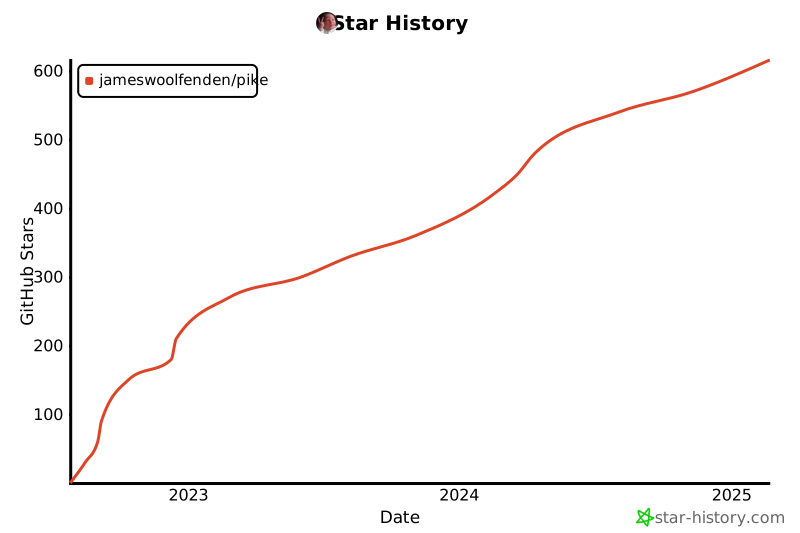](https://star-history.com/#jameswoolfenden/pike&Date)
标签:AWS, Azure, DevSecOps, DPI, EC2, ECS, GCP, IaC, IAM, OpenTofu, Terraform, 上游代理, 二进制发布, 多云, 安全合规, 开源工具, 日志审计, 最小权限, 权限管理, 模型越狱, 策略生成, 网络代理, 网络调试, 自动化, 请求拦截