CybercentreCanada/assemblyline-service-urldownloader
GitHub: CybercentreCanada/assemblyline-service-urldownloader
Assemblyline 的 URLDownloader 服务,用于下载并分析潜在恶意 URL。
Stars: 1 | Forks: 4
[](https://discord.gg/GUAy9wErNu)
[](https://discord.gg/GUAy9wErNu)
[](https://github.com/CybercentreCanada/assemblyline)
[](https://github.com/CybercentreCanada/assemblyline-service-urldownloader)
[](https://github.com/CybercentreCanada/assemblyline/issues?q=is:issue+is:open+label:service-urldownloader)
[](./LICENSE)
# URLDownloader 服务
此服务下载潜在的恶意 URL。它使用 Java 程序 [Kangooroo](https://github.com/CybercentreCanada/kangooroo)。
## 镜像版本与标签
Assemblyline 服务基于 [Assemblyline 服务基础镜像](https://hub.docker.com/r/cccs/assemblyline-v4-service-base) 构建,
该镜像基于 Debian 11 并附带 Python 3.11。
Assemblyline 服务使用以下标签定义:
| **标签类型** | **描述** | **示例标签** |
| :----------: | :----------------------------------------------------------------------------------------------- | :------------------------: |
| latest | 最新构建(可能不稳定)。 | `latest` |
| build_type | 构建类型。`dev` 为最新不稳定构建。`stable` 为最新稳定构建。 | `stable` 或 `dev` |
| series | 完整的构建详情,包括版本和构建类型:`version.buildType`。 | `4.5.stable`, `4.5.1.dev3` |
## 运行此服务
这是一个 Assemblyline 服务。它设计为作为 Assemblyline 框架的一部分运行。
如果您希望在本机测试此服务,可以直接从 Shell 运行 Docker 镜像:
```
docker run \
--name URLDownloader \
--env SERVICE_API_HOST=http://`ip addr show docker0 | grep "inet " | awk '{print $2}' | cut -f1 -d"/"`:5003 \
--network=host \
cccs/assemblyline-service-urldownloader
```
要将此服务添加到您的 Assemblyline 部署,请遵循以下
[指南](https://cybercentrecanada.github.io/assemblyline4_docs/developer_manual/services/run_your_service/#add-the-container-to-your-deployment)。
## URLDownloader 服务配置
管理员可以通过前往 **管理 > 服务** 页面找到 URLDownloader 的配置页面,并点击 **URLDownloader**(或直接访问 `/admin/services/URLDownloader`)。
_服务变量_ 和 _用户指定参数_ 可在 **参数** 选项卡中找到。
有关服务管理的更多信息,请查阅我们的文档,更具体地了解[服务变量](https://cybercentrecanada.github.io/assemblyline4_docs/administration/service_management/#service-variables)。
## 如何配置代理
URLDownloader 服务可以配置为使用零到多个代理,并允许用户从其 URL 提交中选择代理列表。
管理员可以通过在代理列表中配置单个条目来强制所有提交使用一个代理。
URLDownloader 不会根据系统配置自动检测代理。
您可以从 URLDownloader 配置页面的 **服务变量** 部分使用 `proxies [json]` 和 `proxy [list]` 配置代理设置。
您可以根据以下模式创建新条目:
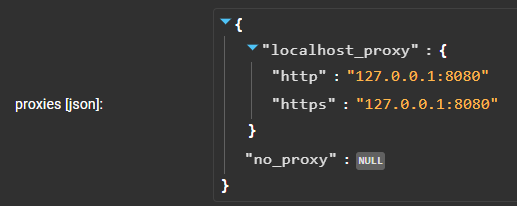
要在网页界面中编辑 JSON,可以将鼠标悬停在 JSON 上,顶部会出现一个蓝色加号:
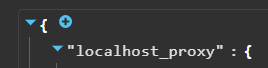
这将允许您创建一个新键。将鼠标悬停在新键上,您应该可以编辑它:
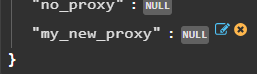
然后您可以输入 `{}` 并点击新字典按钮(下一张截图的右下角):

现在您应该能够添加两个新键,分别用于 http 和 https。

提示:如果您希望所有方案(http/https)使用相同的代理,可以使用简单字符串:

配置完服务代理后,您可以查看顶部,在用户指定参数下,应有 `proxy [list]`。

您将能够添加您添加的键的名称(本例中为 `my_new_proxy`),以便用户可以选择它。
带星号的条目将在用户未配置时成为默认选择。您可以从此处删除所有其他条目以强制使用单个条目。
## 修改浏览器设置
您可以在 URLDownloader 中配置以下浏览器设置:
- 用户代理(`user_agent`):这是请求头中的 `User-Agent` 值。
- 窗口大小(`window_size`):浏览器的屏幕分辨率。
- 请求头(`headers`/`request_headers`):用于获取 URL 的请求头。
管理员可以在 URLDownloader 配置页面的 **服务变量** 部分为这些设置设置默认值。
这些设置将用于发送到 URLDownloader 的每个提交。
以下是 `default_browser_settings [json]` 服务变量的示例:
```
# iPhone 11 Pro configuration:
{
"window_size": "375x812",
"user_agent": "Mozilla/5.0 (iPhone; CPU iPhone OS 14_6 like Mac OS X) AppleWebKit/605.1.15 (KHTML, like Gecko) Version/14.0.3 Mobile/15E148 Safari/604.1",
"request_headers":
{
"Sec-CH-UA-Mobile": "?1"
}
}
```
用户还可以通过提交 Assemblyline URI 文件来按提交修改这些设置。
以下是示例文件 **Assemblyline URI 文件 1**:
```
# Assemblyline URI file
uri: https://sample_webpage.com/
browser_settings:
window_size: 1280x720
user_agent: Mozilla/5.0 (Windows NT 10.0; Win64; x64) AppleWebKit/537.36 (KHTML, like Gecko) Chrome/80.0.3987.163 Safari/537.36
# request headers
headers:
test-platform: Windows
```
URI 文件设置的值将覆盖 `default_browser_settings` 中设置的值。
如果 URI 文件中设置了 `headers`,其值将覆盖 `default_browser_settings.request_headers` 中设置的服务参数值。
使用上述 `default_browser_settings` 和 _Assemblyline URI 文件 1_ 作为示例,URLDownloader 将使用以下设置:
```
uri: https://sample_webpage.com/
# Using settings from Assemblyline URI file 1
window_size: 1280x720
user_agent: Mozilla/5.0 (Windows NT 10.0; Win64; x64) AppleWebKit/537.36 (KHTML, like Gecko) Chrome/80.0.3987.163 Safari/537.36
request_headers:
test-platform: Windows
```
用户可以选择仅更改与他们相关的设置,URLDownloader 将为其余设置使用 `default_browser_settings` 中的值。
例如,给定此 **Assemblyline URI 文件 2**:
```
# Assemblyline URI file
uri: https://sample_webpage.com/
browser_settings:
window_size: 2000x2000
```
结合 _Assemblyline URI 文件 2_ 与上述 `default_browser_settings`,这些将是 URLDownloader 使用的设置:
```
uri: https://sample_webpage.com/
window_size: 2000x2000 # from URI file
user_agent: Mozilla/5.0 (iPhone; CPU iPhone OS 14_6 like Mac OS X) AppleWebKit/605.1.15 (KHTML, like Gecko) Version/14.0.3 Mobile/15E148 Safari/604.1 # from default settings
request_headers: # from default settings
Sec-CH-UA-Mobile: ?1
```
用户可以通过查看文件 `服务结果 > URLDownloader > 补充文件 > results.json (kangooroo 结果输出)` 来检查每个提交使用的设置。
#### 注意:
- 如果在 Assemblyline URI 文件中未指定或 `headers` 为空,则将使用 `default_browser_settings.request_headers` 的值。
- 如果在 Assemblyline URI 文件中定义了 `headers`,则仅使用 `headers` 中的值作为请求头。
- URI 文件中定义的一切将优先于 `default_browser_settings` 中定义的值。
- Assemblyline URI 文件中定义的任何额外字段都将被忽略。
- 如果同时在 `headers` 中定义了 `browser_settings.user_agent` 和 “User-Agent” 字段,则仅使用 `headers` 中的 “User-Agent” 值作为请求头。
## 使用 Python Requests
URLDownloader 服务使用 Kangooroo 来处理 GET 请求,利用一个完整的 Chrome 实例来更贴近人类行为并获取尽可能多的信息。如果用户知道某个 URL 仅需被获取,他们可以使用提交参数 `force_requests`。这将使用 Requests 库对指定 URL 进行一次直接获取,而不包含完整 Kangooroo 执行的开销和分析。
## 文档
Assemblyline 通用文档可在以下地址找到:https://cybercentrecanada.github.io/assemblyline4_docs/
# 服务 URLDownloader
此服务下载潜在的恶意 URL。它使用 Java 程序 [Kangooroo](https://github.com/CybercentreCanada/kangooroo)。
## 镜像版本与标签
Assemblyline 服务基于 [Assemblyline 服务基础镜像](https://hub.docker.com/r/cccs/assemblyline-v4-service-base) 构建,
该镜像基于 Debian 11 并附带 Python 3.11。
Assemblyline 服务使用以下标签定义:
| **标签类型** | **描述** | **示例标签** |
| :------------------: | :------------------------------------------------------------------------------------------------------------- | :----------------: |
| dernière version | 最新版本(可能不稳定)。 | `latest` |
| build_type | 构建类型。`dev` 为最新不稳定版本。`stable` 为最新稳定版本。 | `stable` 或 `dev` |
| série | 完整的构建详情,包括版本和构建类型: `version.buildType`。 | `4.5.stable`, `4.5.1.dev3` |
## 执行此服务
此服务专门用于在 Assemblyline 部署中运行。
如果您希望在本机测试此服务,可以直接在终端中运行 Docker 镜像:
```
docker run \
--name URLDownloader \
--env SERVICE_API_HOST=http://`ip addr show docker0 | grep "inet " | awk '{print $2}' | cut -f1 -d"/"`:5003 \
--network=host \
cccs/assemblyline-service-urldownloader
```
要将此服务添加到您的 Assemblyline 部署,请遵循
[指南](
标签:Assemblyline服务, CCCS, DAST, Debian 11, Java服务, JS文件枚举, Kangooroo, NIDS, Python 3.11, URL下载器, 云安全监控, 云资产清单, 后端开发, 威胁情报, 容器化, 开发者工具, 恶意URL下载, 恶意软件分析, 服务基镜像, 网络安全, 请求拦截, 逆向工具, 逆向工程, 隐私保护, 静态分析