grafana/oncall
GitHub: grafana-cold-storage/oncall
开源的 OnCall 值班与事件响应管理工具,具备出色的 Slack 集成和多渠道告警通知能力,目前处于维护模式。
Stars: 3887 | Forks: 411
# 🚨 更新:Grafana OnCall OSS 🚨
自 2025-03-11 起,Grafana OnCall (OSS) 已进入维护模式,并将于 2026-03-24 被归档。
虽然您可以继续按当前状态使用 OnCall OSS,但不会再引入任何更新或新功能。
不过,对于 CVSS 评分为 7.0 或更高的严重 Bug 和有效 CVE,我们仍将提供修复。
对于寻求完全受支持且积极维护的替代方案的用户,
**Grafana Cloud IRM** 提供了一种现代化的 incident response 和 on-call 管理方法。
- [Grafana OnCall OSS 更新博客](https://grafana.com/blog/2025/03/11/grafana-oncall-maintenance-mode/)
- [Grafana Cloud IRM 公告博客文章](https://grafana.com/blog/2025/03/11/oncall-management-incident-response-grafana-cloud-irm/)
- [迁移指南](https://grafana.com/docs/oncall/latest/set-up/migration-from-other-tools/)
## Grafana OnCall
 [](https://github.com/grafana/oncall/releases)
[](https://github.com/grafana/oncall/blob/dev/LICENSE)
[](https://hub.docker.com/r/grafana/oncall/tags)
[](https://slack.grafana.com/)
[](https://github.com/grafana/oncall/actions/workflows/on-commits-to-dev.yml)
开发者友好的 incident response,具备出色的 Slack 集成。
[](https://github.com/grafana/oncall/releases)
[](https://github.com/grafana/oncall/blob/dev/LICENSE)
[](https://hub.docker.com/r/grafana/oncall/tags)
[](https://slack.grafana.com/)
[](https://github.com/grafana/oncall/actions/workflows/on-commits-to-dev.yml)
开发者友好的 incident response,具备出色的 Slack 集成。
- 收集并分析来自多个监控系统的告警
- 基于时间表的 On-call 轮换
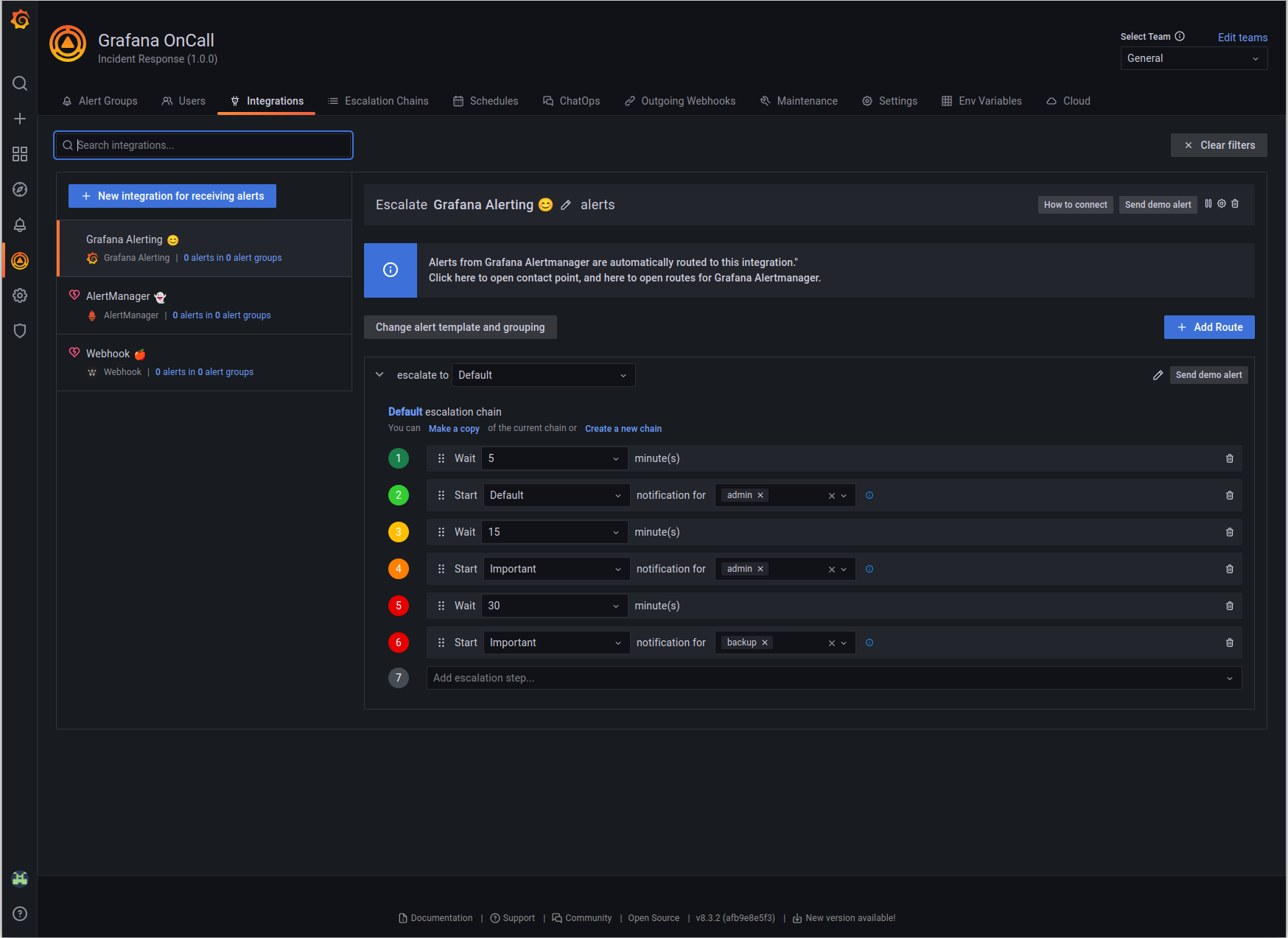
- 自动升级
- 电话、短信、Slack、Telegram 通知
## 快速入门
我们准备了多种环境:
- [生产环境](https://grafana.com/docs/oncall/latest/open-source/#production-environment)
- [开发环境](./dev/README.md)
- 个人爱好(以下步骤中描述)
1. 下载 [`docker-compose.yml`](docker-compose.yml):
curl -fsSL https://raw.githubusercontent.com/grafana/oncall/dev/docker-compose.yml -o docker-compose.yml
2. 设置变量:
echo "DOMAIN=http://localhost:8080
# 如果你想使用现有的 grafana,请删除下面的 'with_grafana'
# 在下面添加 'with_prometheus' 以可选地为 oncall 指标启用本地 prometheus
# 例如:COMPOSE_PROFILES=with_grafana,with_prometheus
COMPOSE_PROFILES=with_grafana
# 为 prometheus exporter 指标设置 auth token:
# PROMETHEUS_EXPORTER_SECRET=my_random_prometheus_secret
# 另外,请确保启用 /metrics 端点:
# FEATURE_PROMETHEUS_EXPORTER_ENABLED=True
SECRET_KEY=my_random_secret_must_be_more_than_32_characters_long" > .env
3. (可选)如果您想启用/设置 prometheus 指标导出器
(除了上面的更改之外),在您的 `docker-compose.yml` 旁边创建一个 `prometheus.yml` 文件(相应地替换
`my_random_prometheus_secret`):
echo "global:
scrape_interval: 15s
evaluation_interval: 15s
scrape_configs:
- job_name: prometheus
metrics_path: /metrics/
authorization:
credentials: my_random_prometheus_secret
static_configs:
- targets: [\"host.docker.internal:8080\"]" > prometheus.yml
注意:您需要在 Grafana UI 中使用 `http://prometheus:9090` 作为 URL 设置一个 Prometheus 数据源。
4. 启动服务:
docker-compose pull && docker-compose up -d
5. 配置插件(如果您在包含的 docker 文件之外运行 Grafana,请在此步骤之前安装插件):
如果您使用包含的 docker compose 文件,请使用 `admin`/`admin` 凭据和 `localhost:3000` 来
执行此任务。如果您以不同方式配置了 Grafana,请相应调整您的凭据和主机名。
# 注意:onCallApiUrl 'engine' 和 grafanaUrl 'grafana' 使用 docker compose 文件中的名称。如果您
# 使用另一个主机名运行您的 grafana 或 oncall engine 实例,请相应调整。
curl -X POST 'http://admin:admin@localhost:3000/api/plugins/grafana-oncall-app/settings' -H "Content-Type: application/json" -d '{"enabled":true, "jsonData":{"stackId":5, "orgId":100, "onCallApiUrl":"http://engine:8080", "grafanaUrl":"http://grafana:3000"}}'
curl -X POST 'http://admin:admin@localhost:3000/api/plugins/grafana-oncall-app/resources/plugin/install'
6. 开始使用 OnCall,使用上述定义的凭据
登录 Grafana:`admin`/`admin`
7. 享受吧!如果您想通过 Grafana Cloud 设置
Slack、Telegram、Twilio 或短信/电话,请查看我们的 [OSS 文档](https://grafana.com/docs/oncall/latest/open-source/)。
## 故障排除
这里有一些 API 调用,如果您在连接 Grafana 和 OnCall 时遇到困难,它们可能会有所帮助。
(修改参数以匹配您的凭据和环境)
```
# 使用此选项获取有关 Grafana 与 OnCall 之间连接的更多信息
curl -X GET 'http://admin:admin@localhost:3000/api/plugins/grafana-oncall-app/resources/plugin/status'
```
```
# 如果您添加了用户或更改了权限,但未在 OnCall 中显示,您可以手动触发同步。
# 注意:加载应用时(页面加载/刷新)会自动调用此功能,但设有 5 分钟超时,以便
# 它不会产生不必要的活动。
curl -X POST 'http://admin:admin@localhost:3000/api/plugins/grafana-oncall-app/resources/plugin/sync'
```
## 更新版本
要更新您的 Grafana OnCall 个人爱好环境:
```
# 更新 Docker 镜像
docker-compose pull engine
# 重新部署
docker-compose up -d
```
更新 engine 后,您还需要点击 [插件版本页面](http://localhost:3000/plugins/grafana-oncall-app?page=version-history) 上的“Update”按钮。
有关更新 Grafana 插件的更多信息,请参阅
[Grafana 文档](https://grafana.com/docs/grafana/latest/administration/plugin-management/#update-a-plugin)。
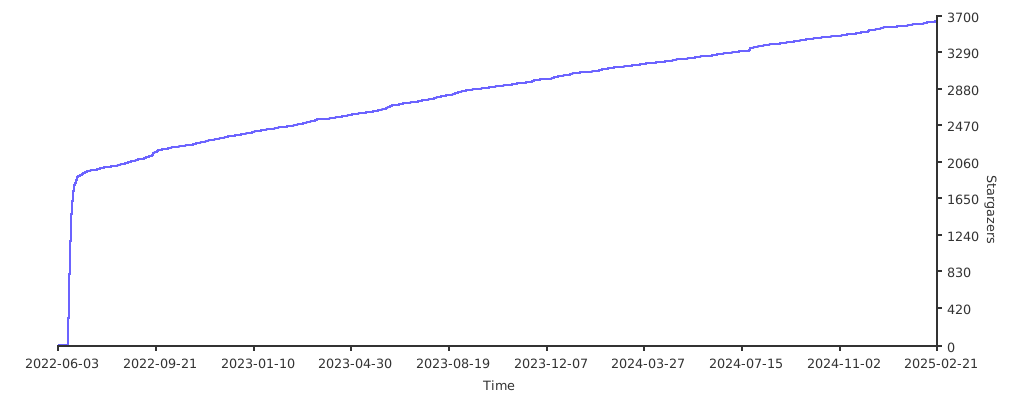
## 随时间变化的 Stargazers
[](https://starchart.cc/grafana/oncall)
## 延伸阅读
- _从其他 on-call 工具自动迁移_ - [Migrator](https://github.com/grafana/oncall/tree/dev/tools/migrators)
- _文档_ - [Grafana OnCall](https://grafana.com/docs/oncall/latest/)
- _概述网络研讨会_ - [YouTube](https://www.youtube.com/watch?v=7uSe1pulgs8)
- _如何添加集成_ - [How to Add Integration](https://github.com/grafana/oncall/tree/dev/engine/config_integrations/README.md)
- _博客文章_ - [Announcing Grafana OnCall, the easiest way to do on-call management](https://grafana.com/blog/2021/11/09/announcing-grafana-oncall/)
- _演示_ - [Deep dive into the Grafana, Prometheus, and Alertmanager stack for alerting and on-call management](https://grafana.com/go/observabilitycon/2021/alerting/?pg=blog)
[](https://github.com/grafana/oncall/releases)
[](https://github.com/grafana/oncall/blob/dev/LICENSE)
[](https://hub.docker.com/r/grafana/oncall/tags)
[](https://slack.grafana.com/)
[](https://github.com/grafana/oncall/actions/workflows/on-commits-to-dev.yml)
开发者友好的 incident response,具备出色的 Slack 集成。
 |
标签:API集成, DNS解析, Docker, Grafana, Grafana OnCall, incident-response, IRM, On-Call管理, Slack集成, SRE, 值班轮换, 偏差过滤, 可观测性, 告警升级, 告警管理, 团队协作, 多云环境, 安全防御评估, 开源项目, 移动端应用, 维护模式, 网络调试, 自动化, 自定义请求头, 请求拦截, 运维监控, 逆向工具