ZingerLittleBee/netop
GitHub: ZingerLittleBee/netop
一个基于 BPF 规则进行网络流量过滤和实时监控的命令行工具。
Stars: 267 | Forks: 10
语言:🇺🇸 English | [🇨🇳 简体中文](./README.zh-CN.md)
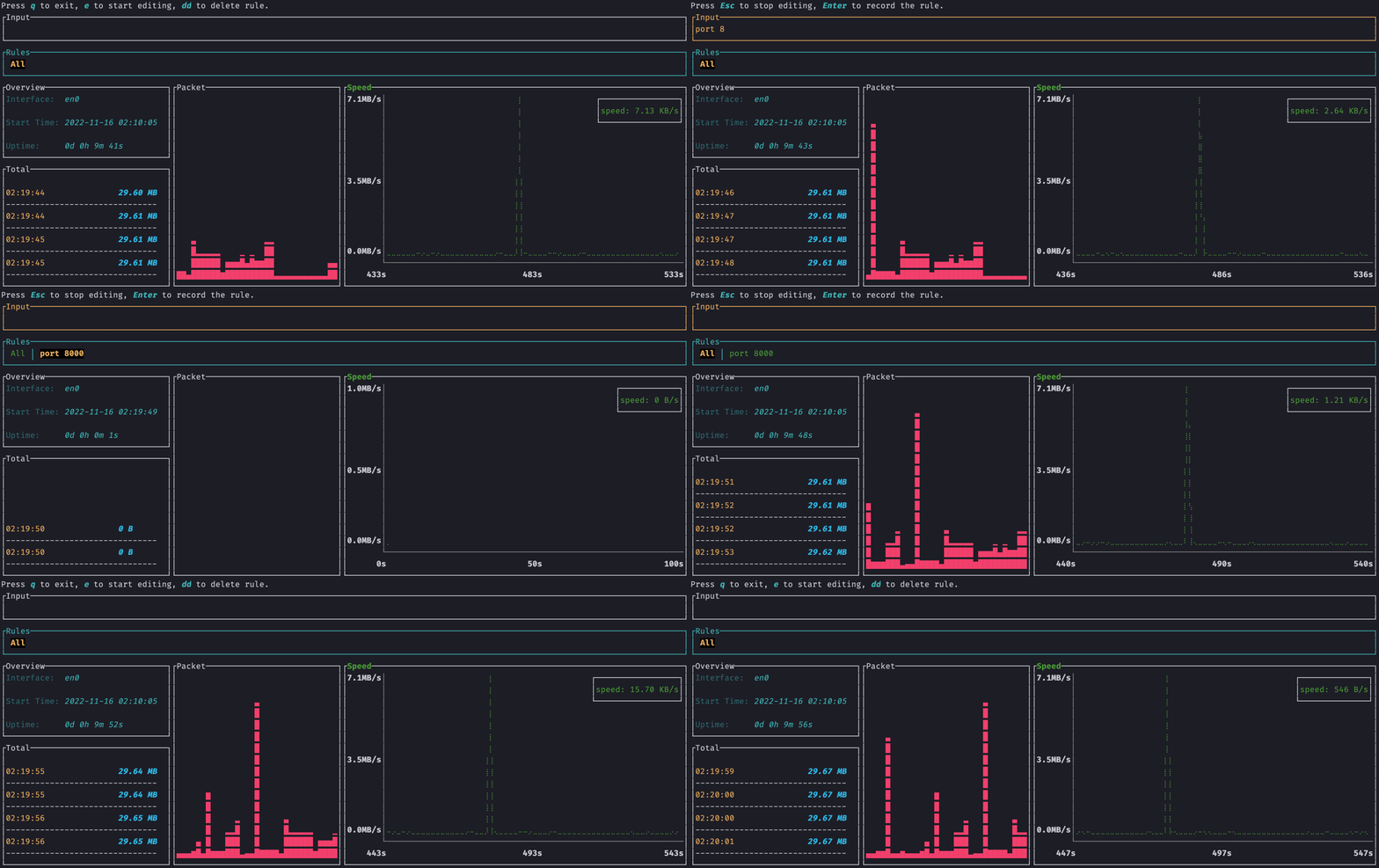 ## 概述
`netop` 是一个终端命令行界面,可以自定义过滤**网络流量**规则 🎯
### 功能
- 使用 `bpf` 规则过滤
- 多规则切换
- 实时速率
- 总流量
- 响应式 UI
- 资源占用小,用 `rust` 编写
- 支持 `docker` 部署
## 安装说明
### Docker
```
docker run -it --rm --net=host zingerbee/netop
```
### Cargo
需要 `rust` 和 `pcap`,详情请参阅[如何构建](#How-to-build-from-source)
```
# 安装
sudo cargo install netop
# 然后运行
netop
# 或指定网络接口卡运行
netop -n eth0
```
### NetBSD
在 NetBSD 上有一个官方可用的包。
要安装预编译的二进制文件,只需运行
```
pkgin install netop
```
或者,如果你更喜欢从源代码构建,
```
cd /usr/pkgsrc/net/netop
make install
```
### Arch Linux
[AUR](https://aur.archlinux.org/packages/netop)
## 使用方法
- 按 `e` **进入编辑模式**,输入 [bpf 规则](https://biot.com/capstats/bpf.html),然后按 `enter`
- 按 `Esc` **退出编辑模式**
- 使用 `<-` 或 `->` 在不同规则之间切换
- 非编辑模式下,按 `dd` 删除当前规则
- 非编辑模式下,按 `q` 退出
### 查看帮助
```
netop -h
# docker
docker run -it --rm --net=host zingerbee/netop -h
```
输出如下
```
netop 0.1.4
USAGE:
netop [OPTIONS]
OPTIONS:
-h, --help Print help information
-n, --name
## 概述
`netop` 是一个终端命令行界面,可以自定义过滤**网络流量**规则 🎯
### 功能
- 使用 `bpf` 规则过滤
- 多规则切换
- 实时速率
- 总流量
- 响应式 UI
- 资源占用小,用 `rust` 编写
- 支持 `docker` 部署
## 安装说明
### Docker
```
docker run -it --rm --net=host zingerbee/netop
```
### Cargo
需要 `rust` 和 `pcap`,详情请参阅[如何构建](#How-to-build-from-source)
```
# 安装
sudo cargo install netop
# 然后运行
netop
# 或指定网络接口卡运行
netop -n eth0
```
### NetBSD
在 NetBSD 上有一个官方可用的包。
要安装预编译的二进制文件,只需运行
```
pkgin install netop
```
或者,如果你更喜欢从源代码构建,
```
cd /usr/pkgsrc/net/netop
make install
```
### Arch Linux
[AUR](https://aur.archlinux.org/packages/netop)
## 使用方法
- 按 `e` **进入编辑模式**,输入 [bpf 规则](https://biot.com/capstats/bpf.html),然后按 `enter`
- 按 `Esc` **退出编辑模式**
- 使用 `<-` 或 `->` 在不同规则之间切换
- 非编辑模式下,按 `dd` 删除当前规则
- 非编辑模式下,按 `q` 退出
### 查看帮助
```
netop -h
# docker
docker run -it --rm --net=host zingerbee/netop -h
```
输出如下
```
netop 0.1.4
USAGE:
netop [OPTIONS]
OPTIONS:
-h, --help Print help information
-n, --name Name of Network Interface Card
-V, --version Print version information
```
### 指定网卡运行
```
netop -n eth0
# docker
docker run -it --rm --net=host zingerbee/netop -n eth0
```
## 如何从源代码构建
开发环境
- 最好使用 `root` 用户,`pcap` 需要权限
- `rust` >= 1.40.0
- `pcap`
- Ubuntu、Debian:`apt install libpcap-dev`
- MacOS:默认已安装
- Windows:下载 [WinPcap](https://www.winpcap.org/install/default.htm) 开发者包。将 /Lib 或 /Lib/x64 文件夹添加到你的 LIB 环境变量中。
```
sudo cargo install --path .
# 或
sudo cargo run
```
## 发现问题或有建议
[创建 issue](https://github.com/ZingerLittleBee/netop/issues)
## 发布说明
参见 [CHANGELOG](./CHANGELOG.md)
netop
[](https://hub.docker.com/r/zingerbee/netop)
[](https://hub.docker.com/r/zingerbee/netop/tags)
[](https://hub.docker.com/r/zingerbee/netop/tags)
[](https://github.com/ZingerLittleBee/netop/actions)
[](https://github.com/ZingerLittleBee/netop/commits/main)
[](./LICENSE)
标签:BPF过滤, Docker容器化, pcap库, Rust编程语言, 可视化界面, 实时速率监控, 性能监控, 总流量统计, 目录遍历, 终端命令行工具, 网络接口监控, 自定义过滤规则, 请求拦截, 资源占用优化, 通知系统, 部署工具