projectdiscovery/tlsx
GitHub: projectdiscovery/tlsx
tlsx 是一款快速可配置的 TLS 抓取与分析工具,帮助安全团队收集并审计目标的 TLS 配置和指纹。
Stars: 1109 | Forks: 151





功能 • 安装 • 用法 • 运行 tlsx • 加入 Discord
一个快速且可配置的 TLS 抓取工具,专注于基于 TLS 的 **数据收集和分析**。 # 功能 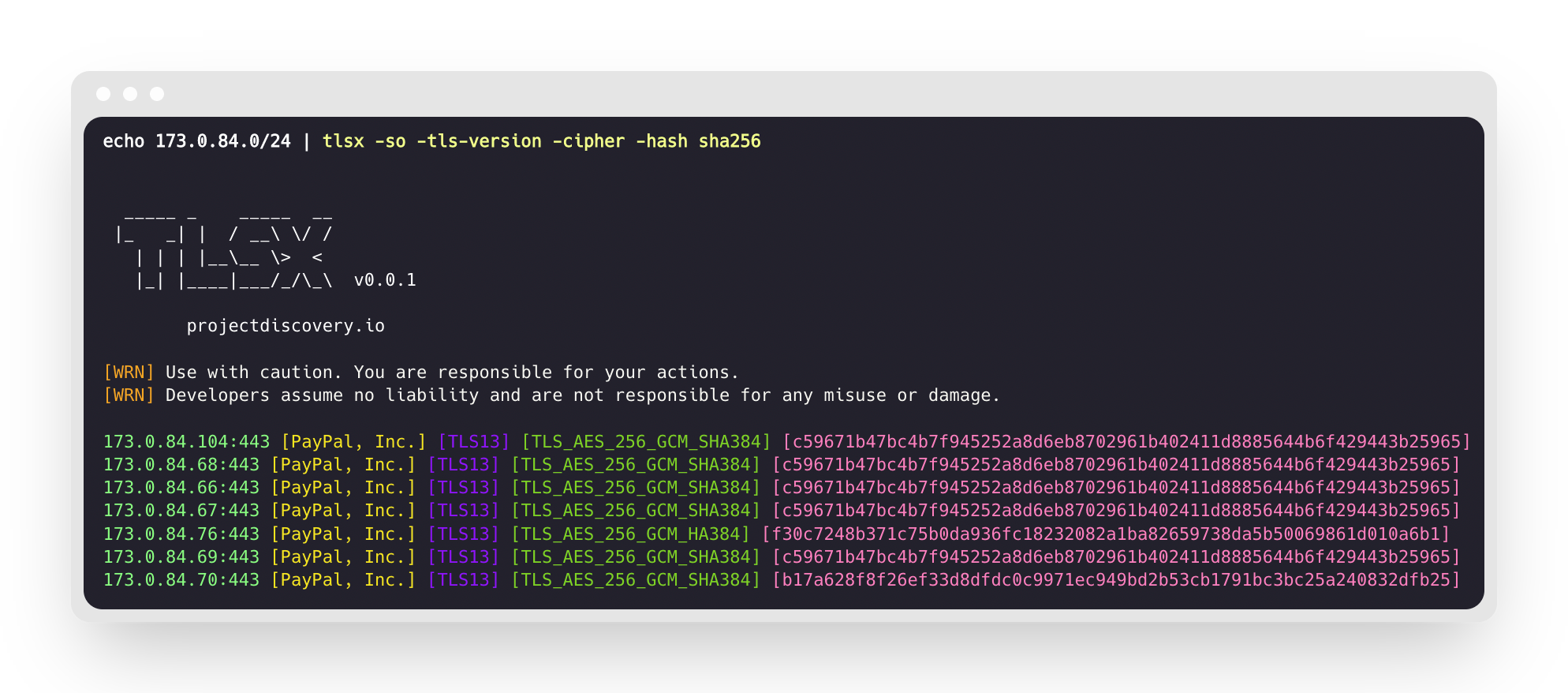 - 快速且完全可配置的 TLS 连接 - 多种 **TLS 连接模式** - 多种 **TLS 探针** - 对旧版 TLS 的 **自动回退** - **预握手** TLS 连接(提前终止) - 可自定义的 **密码套件 / SNI / TLS** 选择 - **JARM/JA3** TLS 指纹 - **TLS 配置错误** - **ASN、CIDR、IP、HOST** 和 **URL** 输入 - 标准 **IN/OUT** 和 **TXT/JSON** 输出 ## 安装 tlsx 需要 **Go 1.24** 才能成功安装。要安装,只需运行以下命令或从 [release page](https://github.com/projectdiscovery/tlsx/releases) 下载预编译二进制。 ``` go install github.com/projectdiscovery/tlsx/cmd/tlsx@latest ``` ## 用法 ``` tlsx -h ``` 这将显示工具的帮助信息。以下是它支持的所有开关。 ``` TLSX is a tls data gathering and analysis toolkit. Usage: tlsx [flags] Flags: INPUT: -u, -host string[] target host to scan (-u INPUT1,INPUT2) -l, -list string target list to scan (-l INPUT_FILE) -p, -port string[] target port to connect (default 443) SCAN-MODE: -sm, -scan-mode string tls connection mode to use (ctls, ztls, openssl, auto) (default "auto") -ps, -pre-handshake enable pre-handshake tls connection (early termination) using ztls -sa, -scan-all-ips scan all ips for a host (default false) -iv, -ip-version string[] ip version to use (4, 6) (default 4) PROBES: -san display subject alternative names -cn display subject common names -so display subject organization name -tv, -tls-version display used tls version -cipher display used cipher -hash string display certificate fingerprint hashes (md5,sha1,sha256) -jarm display jarm fingerprint hash -ja3 display ja3 fingerprint hash (using ztls) -wc, -wildcard-cert display host with wildcard ssl certificate -tps, -probe-status display tls probe status -ve, -version-enum enumerate and display supported tls versions -ce, -cipher-enum enumerate and display supported cipher -ct, -cipher-type value ciphers types to enumerate. possible values: all/secure/insecure/weak (comma-separated) (default all) -ch, -client-hello include client hello in json output (ztls mode only) -sh, -server-hello include server hello in json output (ztls mode only) -se, -serial display certificate serial number MISCONFIGURATIONS: -ex, -expired display host with host expired certificate -ss, -self-signed display host with self-signed certificate -mm, -mismatched display host with mismatched certificate -re, -revoked display host with revoked certificate -un, -untrusted display host with untrusted certificate CONFIGURATIONS: -config string path to the tlsx configuration file -r, -resolvers string[] list of resolvers to use -cc, -cacert string client certificate authority file -ci, -cipher-input string[] ciphers to use with tls connection -sni string[] tls sni hostname to use -rs, -random-sni use random sni when empty -rps, -rev-ptr-sni perform reverse PTR to retrieve SNI from IP -min-version string minimum tls version to accept (ssl30,tls10,tls11,tls12,tls13) -max-version string maximum tls version to accept (ssl30,tls10,tls11,tls12,tls13) -cert, -certificate include certificates in json output (PEM format) -tc, -tls-chain include certificates chain in json output -vc, -verify-cert enable verification of server certificate -ob, -openssl-binary string OpenSSL Binary Path -hf, -hardfail strategy to use if encountered errors while checking revocation status -proxy string socks5 proxy to use for tlsx OPTIMIZATIONS: -c, -concurrency int number of concurrent threads to process (default 300) -cec, -cipher-concurrency int cipher enum concurrency for each target (default 10) -timeout int tls connection timeout in seconds (default 5) -retry int number of retries to perform for failures (default 3) -delay string duration to wait between each connection per thread (eg: 200ms, 1s) UPDATE: -up, -update update tlsx to latest version -duc, -disable-update-check disable automatic tlsx update check OUTPUT: -o, -output string file to write output to -j, -json display output in jsonline format -dns display unique hostname from SSL certificate response -ro, -resp-only display tls response only -silent display silent output -nc, -no-color disable colors in cli output -v, -verbose display verbose output -version display project version PDCP: -pd, -dashboard upload or view output in the PDCP UI dashboard -pdu, -dashboard-upload string upload tlsx output file (JSONL format) to the PDCP UI dashboard -auth string PDCP API key for authentication -tid, -team-id string upload asset results to a specified team ID -aid, -asset-id string upload new assets to an existing asset ID -aname, -asset-name string asset group name DEBUG: -health-check, -hc run diagnostic check up ``` ## 将 tlsx 用作库 使用 tlsx 作为库的示例位于 [examples](examples/) 文件夹中。 ## 运行 tlsx ### tlsx 输入 **tlsx** 需要 **ip** 来建立 TLS 连接,并接受以下列出的多种格式: ``` AS1449 # ASN input 173.0.84.0/24 # CIDR input 93.184.216.34 # IP input example.com # DNS input example.com:443 # DNS input with port https://example.com:443 # URL input port ``` 可以使用 `-host / -u` 标志提供输入主机,多个值可以使用逗号分隔,同样支持使用 `-list / -l` 标志的 **文件** 输入。 逗号分隔的主机输入示例: ``` $ tlsx -u 93.184.216.34,example.com,example.com:443,https://example.com:443 -silent ``` 基于文件的主机输入示例: ``` $ tlsx -list host_list.txt ``` **端口输入:** **tlsx** 默认在 **443** 端口连接,可使用 `-port / -p` 标志自定义,单个或多个端口可使用逗号分隔的输入或换行分隔的文件指定。 逗号分隔的端口输入示例: ``` $ tlsx -u hackerone.com -p 443,8443 ``` 基于文件的端口输入示例: ``` $ tlsx -u hackerone.com -p port_list.txt ``` **注意:** ### TLS 探针(默认运行) 这将在给定的 CIDR 范围内运行工具,并返回接受 443 端口 TLS 连接的主机。 ``` $ echo 173.0.84.0/24 | tlsx _____ _ _____ __ |_ _| | / __\ \/ / | | | |__\__ \> < |_| |____|___/_/\_\ v0.0.1 projectdiscovery.io [WRN] Use with caution. You are responsible for your actions. [WRN] Developers assume no liability and are not responsible for any misuse or damage. 173.0.84.69:443 173.0.84.67:443 173.0.84.68:443 173.0.84.66:443 173.0.84.76:443 173.0.84.70:443 173.0.84.72:443 ``` ### SAN/CN 探针 TLS 证书在 **主题备用名称** 和 **通用名称** 字段下包含 DNS 名称,可使用 `-san`、`-cn` 标志提取。 ``` $ echo 173.0.84.0/24 | tlsx -san -cn -silent 173.0.84.104:443 [uptycspay.paypal.com] 173.0.84.104:443 [api-3t.paypal.com] 173.0.84.104:443 [api-m.paypal.com] 173.0.84.104:443 [payflowpro.paypal.com] 173.0.84.104:443 [pointofsale-s.paypal.com] 173.0.84.104:443 [svcs.paypal.com] 173.0.84.104:443 [uptycsven.paypal.com] 173.0.84.104:443 [api-aa.paypal.com] 173.0.84.104:443 [pilot-payflowpro.paypal.com] 173.0.84.104:443 [pointofsale.paypal.com] 173.0.84.104:443 [uptycshon.paypal.com] 173.0.84.104:443 [api.paypal.com] 173.0.84.104:443 [adjvendor.paypal.com] 173.0.84.104:443 [zootapi.paypal.com] 173.0.84.104:443 [api-aa-3t.paypal.com] 173.0.84.104:443 [uptycsize.paypal.com] ``` 为便于自动化,可选地使用 `-resp-only` 标志仅列出 CLI 输出中的 DNS 名称。 ``` $ echo 173.0.84.0/24 | tlsx -san -cn -silent -resp-only api-aa-3t.paypal.com pilot-payflowpro.paypal.com pointofsale-s.paypal.com uptycshon.paypal.com a.paypal.com adjvendor.paypal.com zootapi.paypal.com api-aa.paypal.com payflowpro.paypal.com pointofsale.paypal.com uptycspay.paypal.com api-3t.paypal.com uptycsize.paypal.com api.paypal.com api-m.paypal.com svcs.paypal.com uptycsven.paypal.com uptycsven.paypal.com a.paypal.com api.paypal.com pointofsale-s.paypal.com pilot-payflowpro.paypal.com ``` **从 TLS 证书获取的子域名** 可以进一步管道传递给其他 PD 工具进行进一步检查,这里是一个示例,将 TLS 子域名管道传递给 **[dnsx](https://github.com/projectdiscovery/dnsx)** 过滤被动子域名,再传递给 **[httpx](https://github.com/projectdiscovery/httpx)** 列出运行主动 Web 服务的主机。 ``` $ echo 173.0.84.0/24 | tlsx -san -cn -silent -resp-only | dnsx -silent | httpx __ __ __ _ __ / /_ / /_/ /_____ | |/ / / __ \/ __/ __/ __ \| / / / / / /_/ /_/ /_/ / | /_/ /_/\__/\__/ .___/_/|_| /_/ v1.2.2 projectdiscovery.io Use with caution. You are responsible for your actions. Developers assume no liability and are not responsible for any misuse or damage. https://api-m.paypal.com https://uptycsize.paypal.com https://api.paypal.com https://uptycspay.paypal.com https://svcs.paypal.com https://adjvendor.paypal.com https://uptycshap.paypal.com https://uptycshon.paypal.com https://pilot-payflowpro.paypal.com https://slc-a-origin-pointofsale.paypal.com https://uptycsven.paypal.com https://api-aa.paypal.com https://api-aa-3t.paypal.com https://uptycsbrt.paypal.com https://payflowpro.paypal.com http://pointofsale-s.paypal.com http://slc-b-origin-pointofsale.paypal.com http://api-3t.paypal.com http://zootapi.paypal.com http://pointofsale.paypal.com ``` ### TLS / 密码套件 探针 ``` $ subfinder -d hackerone.com | tlsx -tls-version -cipher mta-sts.hackerone.com:443 [TLS1.3] [TLS_AES_128_GCM_SHA256] hackerone.com:443 [TLS1.3] [TLS_AES_128_GCM_SHA256] api.hackerone.com:443 [TLS1.3] [TLS_AES_128_GCM_SHA256] mta-sts.managed.hackerone.com:443 [TLS1.3] [TLS_AES_128_GCM_SHA256] mta-sts.forwarding.hackerone.com:443 [TLS1.3] [TLS_AES_128_GCM_SHA256] www.hackerone.com:443 [TLS1.3] [TLS_AES_128_GCM_SHA256] support.hackerone.com:443 [TLS1.2] [TLS_ECDHE_RSA_WITH_AES_128_GCM_SHA256] ``` # TLS 配置错误 ### 已过期 / 自签名 / 不匹配 / 撤销 / 不受信任的证书 可以向 tlsx 提供主机列表,以检测 **已过期 / 自签名 / 不匹配 / 撤销 / 不受信任** 的证书。 ``` $ tlsx -l hosts.txt -expired -self-signed -mismatched -revoked -untrusted _____ _ _____ __ |_ _| | / __\ \/ / | | | |__\__ \> < |_| |____|___/_/\_\ v0.0.1 projectdiscovery.io [WRN] Use with caution. You are responsible for your actions. [WRN] Developers assume no liability and are not responsible for any misuse or damage. wrong.host.badssl.com:443 [mismatched] self-signed.badssl.com:443 [self-signed] expired.badssl.com:443 [expired] revoked.badssl.com:443 [revoked] untrusted-root.badssl.com:443 [untrusted] ``` ### [JARM](https://engineering.salesforce.com/easily-identify-malicious-servers-on-the-internet-with-jarm-e095edac525a/) TLS 指纹 ``` $ echo hackerone.com | tlsx -jarm -silent hackerone.com:443 [29d3dd00029d29d00042d43d00041d5de67cc9954cc85372523050f20b5007] ``` ### [JA3](https://github.com/salesforce/ja3) TLS 指纹 ``` $ echo hackerone.com | tlsx -ja3 -silent hackerone.com:443 [20c9baf81bfe96ff89722899e75d0190] ``` ### JSON 输出 **tlsx** 支持多个探针标志以查询特定数据,但所有信息始终以 JSON 格式提供,使用 `-json` 输出进行自动化和后处理是最方便的选项。 ``` echo example.com | tlsx -json -silent | jq . ``` ``` { "timestamp": "2022-08-22T21:22:59.799053+05:30", "host": "example.com", "ip": "93.184.216.34", "port": "443", "probe_status": true, "tls_version": "tls13", "cipher": "TLS_AES_256_GCM_SHA384", "not_before": "2022-03-14T00:00:00Z", "not_after": "2023-03-14T23:59:59Z", "subject_dn": "CN=www.example.org, O=Internet Corporation for Assigned Names and Numbers, L=Los Angeles, ST=California, C=US", "subject_cn": "www.example.org", "subject_org": [ "Internet Corporation for Assigned Names and Numbers" ], "subject_an": [ "www.example.org", "example.net", "example.edu", "example.com", "example.org", "www.example.com", "www.example.edu", "www.example.net" ], "issuer_dn": "CN=DigiCert TLS RSA SHA256 2020 CA1, O=DigiCert Inc, C=US", "issuer_cn": "DigiCert TLS RSA SHA256 2020 CA1", "issuer_org": [ "DigiCert Inc" ], "fingerprint_hash": { "md5": "c5208a47259d540a6e3404dddb85af91", "sha1": "df81dfa6b61eafdffffe1a250240db5d2e6cee25", "sha256": "7f2fe8d6b18e9a47839256cd97938daa70e8515750298ddba2f3f4b8440113fc" }, "tls_connection": "ctls", "sni": "example.com" } ``` ### PDCP 仪表盘集成 **tlsx** 支持将扫描结果上传到 ProjectDiscovery 云平台(PDCP)仪表盘,以便可视化和分析。 #### 实时上传结果 启用仪表盘上传,可在发现结果时自动上传: ``` $ tlsx -u example.com -pd -json ``` 结果将自动上传至 PDCP,您将收到用于查看结果的仪表盘 URL。 #### 上传已有文件 将先前保存的 JSONL 输出文件上传至 PDCP: ``` $ tlsx -pdu results.jsonl -tid your-team-id -aname "My Scan" ``` #### 配置选项 - `-pd, --dashboard`:启用实时上传至 PDCP 仪表盘 - `-pdu, --dashboard-upload| ### 预握手(提前终止) **tlsx** 支持提前终止 SSL 连接,从而实现更快的扫描和更少的连接请求(在收集到 TLS `serverhello` 和证书数据后断开)。 更多细节请参阅 [Hunting-Certificates-And-Servers](https://github.com/erbbysam/Hunting-Certificates-And-Servers/blob/master/Hunting%20Certificates%20%26%20Servers.pdf) 和 [@erbbysam](https://twitter.com/erbbysam) 使用 `-pre-handshake` 模式的示例: ``` $ tlsx -u example.com -pre-handshake _____ _ _____ __ |_ _| | / __\ \/ / | | | |__\__ \> < |_| |____|___/_/\_\ v0.0.1 projectdiscovery.io [WRN] Use with caution. You are responsible for your actions. [WRN] Developers assume no liability and are not responsible for any misuse or damage. example.com:443 ``` |
标签:API安全, DNS解析, EVTX分析, EVTX分析, Go语言, JA3, JARM, JSON输出, Radare2, Snort, STDIN/STDOUT, TLS抓取, TLS指纹, TLS配置检查, TXT输出, 二进制修改, 代码生成, 低级处理, 内存分析, 可配置连接, 多架构支持, 多模式TLS, 安全测试工具, 开源项目, 快速连接, 日志审计, 汇编语言, 渗透测试工具, 程序分析, 程序破解, 网络入侵检测, 网络安全, 软件安全, 隐私保护, 项目发现工具