sigoden/dufs
GitHub: sigoden/dufs
一个基于 Rust 的高性能轻量级文件服务器,集静态托管、上传下载、WebDAV、访问控制于一体,开箱即用。
Stars: 10520 | Forks: 574
# Dufs
[](https://github.com/sigoden/dufs/actions/workflows/ci.yaml)
[](https://crates.io/crates/dufs)
[](https://hub.docker.com/r/sigoden/dufs)
Dufs 是一个独特的实用文件服务器,支持静态文件服务、上传、搜索、访问控制、WebDAV 等功能...
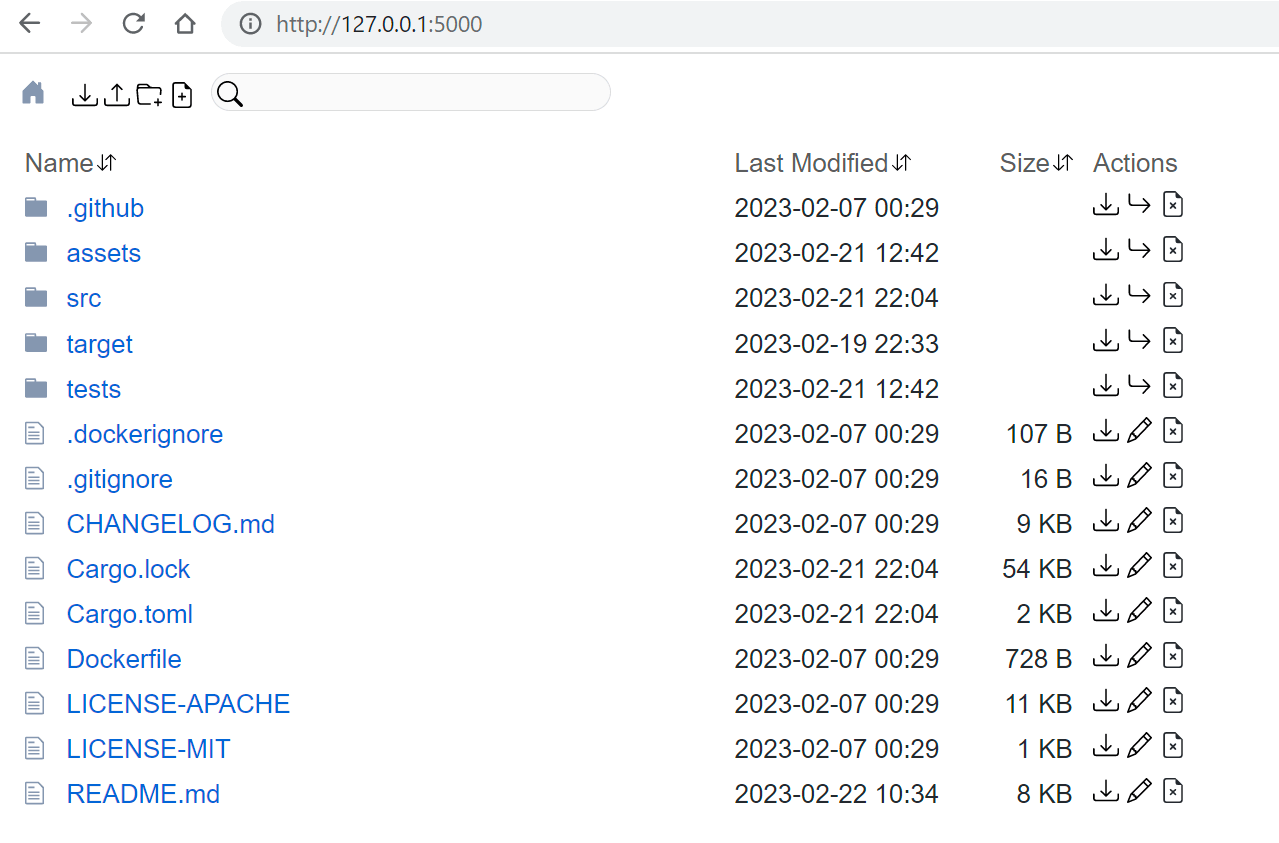
## 功能特性
- 提供静态文件服务
- 将文件夹下载为 zip 文件
- 上传文件和文件夹(拖放)
- 创建/编辑/搜索文件
- 支持断点续传/部分上传与下载
- 访问控制
- 支持 HTTPS
- 支持 WebDAV
- 易于配合 curl 使用
## 安装
### 使用 cargo
```
cargo install dufs
```
### 使用 Docker
```
docker run -v `pwd`:/data -p 5000:5000 --rm sigoden/dufs /data -A
```
### 使用 [Homebrew](https://brew.sh)
```
brew install dufs
```
### macOS、Linux、Windows 二进制文件
从 [Github Releases](https://github.com/sigoden/dufs/releases) 下载,解压缩并将 dufs 添加到您的 $PATH 中。
## 命令行界面
```
Dufs is a distinctive utility file server - https://github.com/sigoden/dufs
Usage: dufs [OPTIONS] [serve-path]
Arguments:
[serve-path] Specific path to serve [default: .]
Options:
-c, --config Specify configuration file
-b, --bind Specify bind address or unix socket
-p, --port Specify port to listen on [default: 5000]
--path-prefix Specify a path prefix
--hidden Hide paths from directory listings, e.g. tmp,*.log,*.lock
-a, --auth Add auth roles, e.g. user:pass@/dir1:rw,/dir2
-A, --allow-all Allow all operations
--allow-upload Allow upload files/folders
--allow-delete Allow delete files/folders
--allow-search Allow search files/folders
--allow-symlink Allow symlink to files/folders outside root directory
--allow-archive Allow download folders as archive file
--allow-hash Allow ?hash query to get file sha256 hash
--enable-cors Enable CORS, sets `Access-Control-Allow-Origin: *`
--render-index Serve index.html when requesting a directory, returns 404 if not found index.html
--render-try-index Serve index.html when requesting a directory, returns directory listing if not found index.html
--render-spa Serve SPA(Single Page Application)
--assets Set the path to the assets directory for overriding the built-in assets
--log-format Customize http log format
--log-file Specify the file to save logs to, other than stdout/stderr
--compress Set zip compress level [default: low] [possible values: none, low, medium, high]
--completions Print shell completion script for [possible values: bash, elvish, fish, powershell, zsh]
--tls-cert Path to an SSL/TLS certificate to serve with HTTPS
--tls-key Path to the SSL/TLS certificate's private key
-h, --help Print help
-V, --version Print version
```
## 示例
以只读模式提供当前工作目录服务
```
dufs
```
允许所有操作,如上传/删除/搜索/创建/编辑...
```
dufs -A
```
仅允许上传操作
```
dufs --allow-upload
```
提供特定目录服务
```
dufs Downloads
```
提供单个文件服务
```
dufs linux-distro.iso
```
提供像 react/vue 这样的单页应用服务
```
dufs --render-spa
```
提供带有 index.html 的静态网站服务
```
dufs --render-index
```
要求用户名/密码验证
```
dufs -a admin:123@/:rw
```
监听特定的 host:ip
```
dufs -b 127.0.0.1 -p 80
```
监听 unix socket
```
dufs -b /tmp/dufs.socket
```
使用 HTTPS
```
dufs --tls-cert my.crt --tls-key my.key
```
## API
上传文件
```
curl -T path-to-file http://127.0.0.1:5000/new-path/path-to-file
```
下载文件
```
curl http://127.0.0.1:5000/path-to-file # download the file
curl http://127.0.0.1:5000/path-to-file?hash # retrieve the sha256 hash of the file
```
将文件夹下载为 zip 文件
```
curl -o path-to-folder.zip http://127.0.0.1:5000/path-to-folder?zip
```
删除文件/文件夹
```
curl -X DELETE http://127.0.0.1:5000/path-to-file-or-folder
```
创建目录
```
curl -X MKCOL http://127.0.0.1:5000/path-to-folder
```
将文件/文件夹移动到新路径
```
curl -X MOVE http://127.0.0.1:5000/path -H "Destination: http://127.0.0.1:5000/new-path"
```
列出/搜索目录内容
```
curl http://127.0.0.1:5000?q=Dockerfile # search for files, similar to `find -name Dockerfile`
curl http://127.0.0.1:5000?simple # output names only, similar to `ls -1`
curl http://127.0.0.1:5000?json # output paths in json format
```
使用身份验证(Basic 或 Digest 认证均可)
```
curl http://127.0.0.1:5000/file --user user:pass # basic auth
curl http://127.0.0.1:5000/file --user user:pass --digest # digest auth
```
可续传下载
```
curl -C- -o file http://127.0.0.1:5000/file
```
可续传上传
```
upload_offset=$(curl -I -s http://127.0.0.1:5000/file | tr -d '\r' | sed -n 's/content-length: //p')
dd skip=$upload_offset if=file status=none ibs=1 | \
curl -X PATCH -H "X-Update-Range: append" --data-binary @- http://127.0.0.1:5000/file
```
健康检查
```
curl http://127.0.0.1:5000/__dufs__/health
```
### 访问控制
Dufs 支持基于账户的访问控制。您可以使用 `--auth`/`-a` 控制谁能在哪个路径上执行什么操作。
```
dufs -a admin:admin@/:rw -a guest:guest@/
dufs -a user:pass@/:rw,/dir1 -a @/
```
1. 使用 `@` 分隔账户和路径。没有账户表示匿名用户。
2. 使用 `:` 分隔账户的用户名和密码。
3. 使用 `,` 分隔路径。
4. 使用路径后缀 `:rw`/`:ro` 设置权限:`read-write`(读写)/`read-only`(只读)。`:ro` 可以省略。
- `-a admin:admin@/:rw`:`admin` 对所有路径拥有完整权限。
- `-a guest:guest@/`:`guest` 对所有路径拥有只读权限。
- `-a user:pass@/:rw,/dir1`:`user` 对 `/*` 拥有读写权限,对 `/dir1/*` 拥有只读权限。
- `-a @/`:所有路径公开可访问,每个人都可以查看/下载它。
**身份验证权限受 dufs 全局权限限制。** 如果 dufs 没有通过 `--allow-upload` 启用上传权限,那么即使账户被授予了 `read-write`(`:rw`) 权限,也不会拥有上传权限。
#### 哈希密码
DUFS 支持使用 sha-512 哈希密码。
创建哈希密码:
```
$ openssl passwd -6 123456 # or `mkpasswd -m sha-512 123456`
$6$tWMB51u6Kb2ui3wd$5gVHP92V9kZcMwQeKTjyTRgySsYJu471Jb1I6iHQ8iZ6s07GgCIO69KcPBRuwPE5tDq05xMAzye0NxVKuJdYs/
```
使用哈希密码:
```
dufs -a 'admin:$6$tWMB51u6Kb2ui3wd$5gVHP92V9kZcMwQeKTjyTRgySsYJu471Jb1I6iHQ8iZ6s07GgCIO69KcPBRuwPE5tDq05xMAzye0NxVKuJdYs/@/:rw'
```
哈希密码的两个重要事项:
1. Dufs 仅支持 sha-512 哈希密码,因此请确保密码字符串始终以 `$6$` 开头。
2. Digest 认证无法与哈希密码一起正常使用。
### 隐藏路径
Dufs 支持通过选项 `--hidden ,...` 从目录列表中隐藏路径。
```
dufs --hidden .git,.DS_Store,tmp
```
```
dufs --hidden '.*' # hidden dotfiles
dufs --hidden '*/' # hidden all folders
dufs --hidden '*.log,*.lock' # hidden by exts
dufs --hidden '*.log' --hidden '*.lock'
```
### 日志格式
Dufs 支持通过选项 `--log-format` 自定义 http 日志格式。
日志格式可以使用以下变量。
| 变量 | 描述 |
| ------------ | ------------------------------------------------------------------------ |
| $remote_addr | 客户端地址 |
| $remote_user | 身份验证提供的用户名 |
| $request | 完整的原始请求行 |
| $status | 响应状态 |
| $http_ | 任意请求头字段。例如:$http_user_agent, $http_referer |
默认的日志格式为 `'$remote_addr "$request" $status'`。
```
2022-08-06T06:59:31+08:00 INFO - 127.0.0.1 "GET /" 200
```
禁用 http 日志
```
dufs --log-format=''
```
记录 user-agent
```
dufs --log-format '$remote_addr "$request" $status $http_user_agent'
```
```
2022-08-06T06:53:55+08:00 INFO - 127.0.0.1 "GET /" 200 Mozilla/5.0 (Windows NT 10.0; Win64; x64) AppleWebKit/537.36 (KHTML, like Gecko) Chrome/104.0.0.0 Safari/537.36
```
记录 remote-user
```
dufs --log-format '$remote_addr $remote_user "$request" $status' -a /@admin:admin -a /folder1@user1:pass1
```
```
2022-08-06T07:04:37+08:00 INFO - 127.0.0.1 admin "GET /" 200
```
## 环境变量
所有选项都可以使用带有 `DUFS_` 前缀的环境变量来设置。
```
[serve-path] DUFS_SERVE_PATH="."
--config DUFS_CONFIG=config.yaml
-b, --bind DUFS_BIND=0.0.0.0
-p, --port DUFS_PORT=5000
--path-prefix DUFS_PATH_PREFIX=/dufs
--hidden DUFS_HIDDEN=tmp,*.log,*.lock
-a, --auth DUFS_AUTH="admin:admin@/:rw|@/"
-A, --allow-all DUFS_ALLOW_ALL=true
--allow-upload DUFS_ALLOW_UPLOAD=true
--allow-delete DUFS_ALLOW_DELETE=true
--allow-search DUFS_ALLOW_SEARCH=true
--allow-symlink DUFS_ALLOW_SYMLINK=true
--allow-archive DUFS_ALLOW_ARCHIVE=true
--allow-hash DUFS_ALLOW_HASH=true
--enable-cors DUFS_ENABLE_CORS=true
--render-index DUFS_RENDER_INDEX=true
--render-try-index DUFS_RENDER_TRY_INDEX=true
--render-spa DUFS_RENDER_SPA=true
--assets DUFS_ASSETS=./assets
--log-format DUFS_LOG_FORMAT=""
--log-file DUFS_LOG_FILE=./dufs.log
--compress DUFS_COMPRESS=low
--tls-cert DUFS_TLS_CERT=cert.pem
--tls-key DUFS_TLS_KEY=key.pem
```
## 配置文件
您可以通过选择 `--config ` 选项来指定并使用配置文件。
以下是配置项:
```
serve-path: '.'
bind: 0.0.0.0
port: 5000
path-prefix: /dufs
hidden:
- tmp
- '*.log'
- '*.lock'
auth:
- admin:admin@/:rw
- user:pass@/src:rw,/share
- '@/' # According to the YAML spec, quoting is required.
allow-all: false
allow-upload: true
allow-delete: true
allow-search: true
allow-symlink: true
allow-archive: true
allow-hash: true
enable-cors: true
render-index: true
render-try-index: true
render-spa: true
assets: ./assets/
log-format: '$remote_addr "$request" $status $http_user_agent'
log-file: ./dufs.log
compress: low
tls-cert: tests/data/cert.pem
tls-key: tests/data/key_pkcs1.pem
```
### 自定义 UI
Dufs 允许用户使用自己的 assets 自定义 UI。
```
dufs --assets my-assets-dir/
```
您的 assets 文件夹必须包含一个 `index.html` 文件。
`index.html` 可以使用以下占位符变量来获取内部数据。
- `__INDEX_DATA__`:目录列表数据
- `__ASSETS_PREFIX__`:assets url 前缀
## 许可证
Copyright (c) 2022-2024 dufs-developers.
dufs 根据 MIT 许可证或 Apache 许可证 2.0 的条款提供,您可任选其一。
有关许可证的详细信息,请参阅 LICENSE-APACHE 和 LICENSE-MIT 文件。
进阶主题
### 访问控制
Dufs 支持基于账户的访问控制。您可以使用 `--auth`/`-a` 控制谁能在哪个路径上执行什么操作。
```
dufs -a admin:admin@/:rw -a guest:guest@/
dufs -a user:pass@/:rw,/dir1 -a @/
```
1. 使用 `@` 分隔账户和路径。没有账户表示匿名用户。
2. 使用 `:` 分隔账户的用户名和密码。
3. 使用 `,` 分隔路径。
4. 使用路径后缀 `:rw`/`:ro` 设置权限:`read-write`(读写)/`read-only`(只读)。`:ro` 可以省略。
- `-a admin:admin@/:rw`:`admin` 对所有路径拥有完整权限。
- `-a guest:guest@/`:`guest` 对所有路径拥有只读权限。
- `-a user:pass@/:rw,/dir1`:`user` 对 `/*` 拥有读写权限,对 `/dir1/*` 拥有只读权限。
- `-a @/`:所有路径公开可访问,每个人都可以查看/下载它。
**身份验证权限受 dufs 全局权限限制。** 如果 dufs 没有通过 `--allow-upload` 启用上传权限,那么即使账户被授予了 `read-write`(`:rw`) 权限,也不会拥有上传权限。
#### 哈希密码
DUFS 支持使用 sha-512 哈希密码。
创建哈希密码:
```
$ openssl passwd -6 123456 # or `mkpasswd -m sha-512 123456`
$6$tWMB51u6Kb2ui3wd$5gVHP92V9kZcMwQeKTjyTRgySsYJu471Jb1I6iHQ8iZ6s07GgCIO69KcPBRuwPE5tDq05xMAzye0NxVKuJdYs/
```
使用哈希密码:
```
dufs -a 'admin:$6$tWMB51u6Kb2ui3wd$5gVHP92V9kZcMwQeKTjyTRgySsYJu471Jb1I6iHQ8iZ6s07GgCIO69KcPBRuwPE5tDq05xMAzye0NxVKuJdYs/@/:rw'
```
哈希密码的两个重要事项:
1. Dufs 仅支持 sha-512 哈希密码,因此请确保密码字符串始终以 `$6$` 开头。
2. Digest 认证无法与哈希密码一起正常使用。
### 隐藏路径
Dufs 支持通过选项 `--hidden 标签:Docker, HTTPS, HTTP服务器, Rust, Streamlit, WebDAV, 可视化界面, 安全防御评估, 开源文件管理, 搜索, 文件上传下载, 文件共享, 文件服务器, 网络流量审计, 自托管, 访问控制, 请求拦截, 轻量级服务器, 通知系统, 静态文件服务