DanielKirshner/MacSpoofer
GitHub: DanielKirshner/MacSpoofer
一款运行于 Linux 的 MAC 地址欺骗命令行工具,支持随机地址生成和主流厂商 OUI 伪装,帮助用户保护网络隐私或绕过 MAC 过滤限制。
Stars: 11 | Forks: 0
# MAC 地址欺骗工具



一款用于在 Linux 系统上欺骗网络接口 MAC 地址的命令行工具。
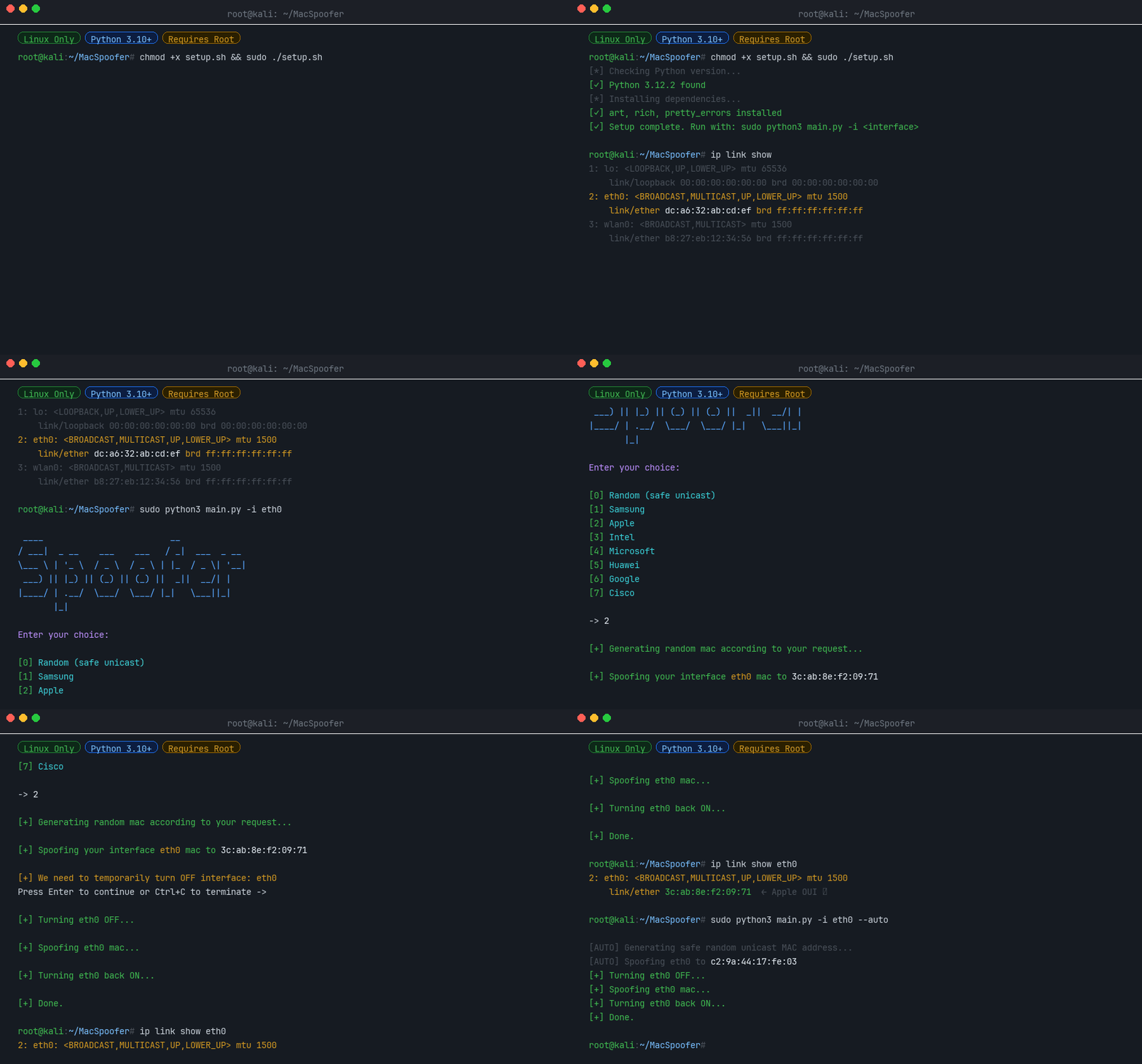
## 什么是 MAC 地址?
**媒体访问控制 (MAC) 地址** 是分配给网络接口控制器 (NIC) 的唯一标识符,用作网络网段内通信的网络地址。此标识符用于大多数 IEEE 802 网络技术,包括 Ethernet、Wi-Fi 和 Bluetooth。
更改 MAC 地址可用于:
- **隐私保护** - 防止在不同网络之间被追踪
- **测试** - 模拟不同的网络设备
- **绕过限制** - 某些网络会通过 MAC 地址进行过滤
## MAC 地址结构
MAC 地址是一个 **12 位十六进制数字**(6 个字节),通常以冒号分隔的十六进制格式表示(例如,`00:1A:2B:3C:4D:5E`)。
| 字节 | 名称 | 描述 |
|-------|------|-------------|
| 前 3 个字节 | **OUI** (Organizationally Unique Identifier) | 标识制造商 |
| 后 3 个字节 | **NIC** (Network Interface Controller) | 特定设备的标识符 |
## 功能
- 🎲 **随机 MAC 生成** - 生成安全的、本地管理的单播地址
- 🏭 **厂商欺骗** - 模仿 Samsung、Apple、Intel、Microsoft、Huawei、Google 或 Cisco 的设备
- 🖥️ **交互式 TUI** - 易于使用的文本界面
- ⚡ **自动模式** - 适用于脚本的非交互式操作
- 🔧 **CI 模式** - 为自动化测试流水线设计
## 安装说明
### 通过 pip 安装(推荐)
```
pip install macspoofer
```
### 从源码安装
```
chmod +x setup.sh
sudo ./setup.sh
```
### 从 CI 构建产物安装
每次运行的 [MacSpoofer CI workflow](https://github.com/DanielKirshner/MacSpoofer/actions/workflows/linux-ci.yml) 都会构建该软件包,并将生成的 wheel 作为名为 `macspoofer-wheel` 的 GitHub Actions 产物上传。要安装预发布版本:
1. 在 Actions 选项卡中打开相应的工作流运行记录。
2. 下载 `macspoofer-wheel` 产物并解压缩。
3. 使用 `pip` 安装该 wheel:
```
pip install ./macspoofer-*.whl
```
## 使用方法
### 查找您的接口名称
```
ifconfig -a
# or
ip link show
```
### 交互模式 (TUI)
```
sudo -E macspoofer -i
# or
sudo -E python3 main.py -i
```
### 自动模式(非交互式)
```
sudo -E macspoofer -i --auto
# or
sudo -E python3 main.py -i --auto
```
### 命令行选项
| 选项 | 描述 |
|--------|-------------|
| `-i ` | 网络接口名称(例如,`wlan0`、`eth0`) **[必填]** |
| `--auto` | 非交互模式:生成并应用一个随机的单播 MAC 地址 |
| `--ci` | CI 模式:用于自动化测试 |
| `--help` | 显示帮助信息和用法示例 |
| `--version` | 显示版本信息 |
### 编程式用法
您也可以将 `macspoofer` 作为 Python 库使用:
#### 生成随机 MAC 地址
```
from macspoofer.utils.random_utils import generate_safe_unicast_mac
mac = generate_safe_unicast_mac()
print(mac) # e.g. "a6:3f:12:cb:90:01"
```
#### 搜索和浏览厂商
```
from macspoofer.utils.vendors import VendorRegistry
# 数据库中的供应商总数
print(VendorRegistry.vendor_count())
# 按名称搜索(不区分大小写)
results = VendorRegistry.search("Raspberry")
print(results)
# 获取特定供应商的 OUI 前缀
ouis = VendorRegistry.get_ouis_for_vendor("Apple")
print(ouis[:3]) # ['58:e6:ba', '8c:98:6b', ...]
```
#### 生成特定厂商的 MAC 地址
```
from macspoofer.spoofer import generate_mac_for_vendor
mac = generate_mac_for_vendor("Samsung")
print(mac) # e.g. "e4:7a:11:2f:c8:5d"
```
#### 欺骗接口(需要 root 权限)
```
import asyncio
from macspoofer.modules.interface import NetworkInterface
from macspoofer.spoofer import spoof_mac_address
from macspoofer.utils.random_utils import generate_safe_unicast_mac
async def main():
interface = NetworkInterface("wlan0")
mac = generate_safe_unicast_mac()
await spoof_mac_address(interface, mac, require_confirmation=False)
asyncio.run(main())
```
## 许可证
[MIT License](LICENSE)
**© 2022-2026 Daniel Kirshner. All rights reserved.**
标签:CI, DNS枚举, MacSpoofer, MAC地址, MAC地址欺骗, OUI, PE 加载器, pip, Python, TUI, 厂商伪装, 无后门, 物理地址, 网络安全, 网络安全, 网络安全工具, 网络隐私, 逆向工具, 随机MAC地址, 隐私保护, 隐私保护