CervantesSec/cervantes
GitHub: CervantesSec/cervantes
Cervantes 是一个 OWASP 基金会旗下的开源渗透测试协作管理平台,帮助红队和安全团队集中管理客户、项目、漏洞并自动化生成合规报告。
Stars: 441 | Forks: 69

[](https://github.com/CervantesSec)
[](https://twitter.com/Cervantes_Sec)
[](https://www.cervantessec.org)
[](https://discord.gg/BvzNjT3Qzc)
[](https://docs.cervantessec.org/)
Cervantes 是一个专为渗透测试人员和红队设计的开源协作平台。它作为一个综合管理工具,在单一集中的位置简化了项目、客户、漏洞和报告的组织工作。
通过促进高效的数据管理并提供统一的工作区,Cervantes 旨在显著减少协调和执行渗透测试活动所需的时间和精力。
## 支持
Cervantes 是一个 [OWASP Foundation](https://owasp.org/www-project-cervantes/) 项目
 ## 技术





## 功能特性
* 开源
* 跨平台
* 多语言
* 团队协作
* 检查清单
* OWASP 合规报告
* 内置仪表板和分析
* 管理您的客户端和攻击性安全项目
* 一键生成报告
* 以及更多
## 运行要求
- Docker
- Docker compose
## 如何使用 Docker compose 在本地运行
* 首先,您需要克隆此代码库
```
git clone https://github.com/CervantesSec/docker.git
```
* 之后,您需要启动 Docker 容器:
```
docker-compose -p cervantes -f docker-compose.yml up -d
```
* 完成此操作后,在浏览器中打开 http://localhost 或 https://localhost,您将看到 Cervantes 登录页面。
### 默认用户和密码
当您首次启动 Cervantes 应用程序时,系统会为您创建一个默认用户。默认用户名为 `admin@cervantes.local`。
该用户的密码是在创建应用程序容器及首次启动应用程序时随机生成的。这意味着每个应用程序实例的密码都是唯一的,从而提供了额外的安全层。
## 技术





## 功能特性
* 开源
* 跨平台
* 多语言
* 团队协作
* 检查清单
* OWASP 合规报告
* 内置仪表板和分析
* 管理您的客户端和攻击性安全项目
* 一键生成报告
* 以及更多
## 运行要求
- Docker
- Docker compose
## 如何使用 Docker compose 在本地运行
* 首先,您需要克隆此代码库
```
git clone https://github.com/CervantesSec/docker.git
```
* 之后,您需要启动 Docker 容器:
```
docker-compose -p cervantes -f docker-compose.yml up -d
```
* 完成此操作后,在浏览器中打开 http://localhost 或 https://localhost,您将看到 Cervantes 登录页面。
### 默认用户和密码
当您首次启动 Cervantes 应用程序时,系统会为您创建一个默认用户。默认用户名为 `admin@cervantes.local`。
该用户的密码是在创建应用程序容器及首次启动应用程序时随机生成的。这意味着每个应用程序实例的密码都是唯一的,从而提供了额外的安全层。
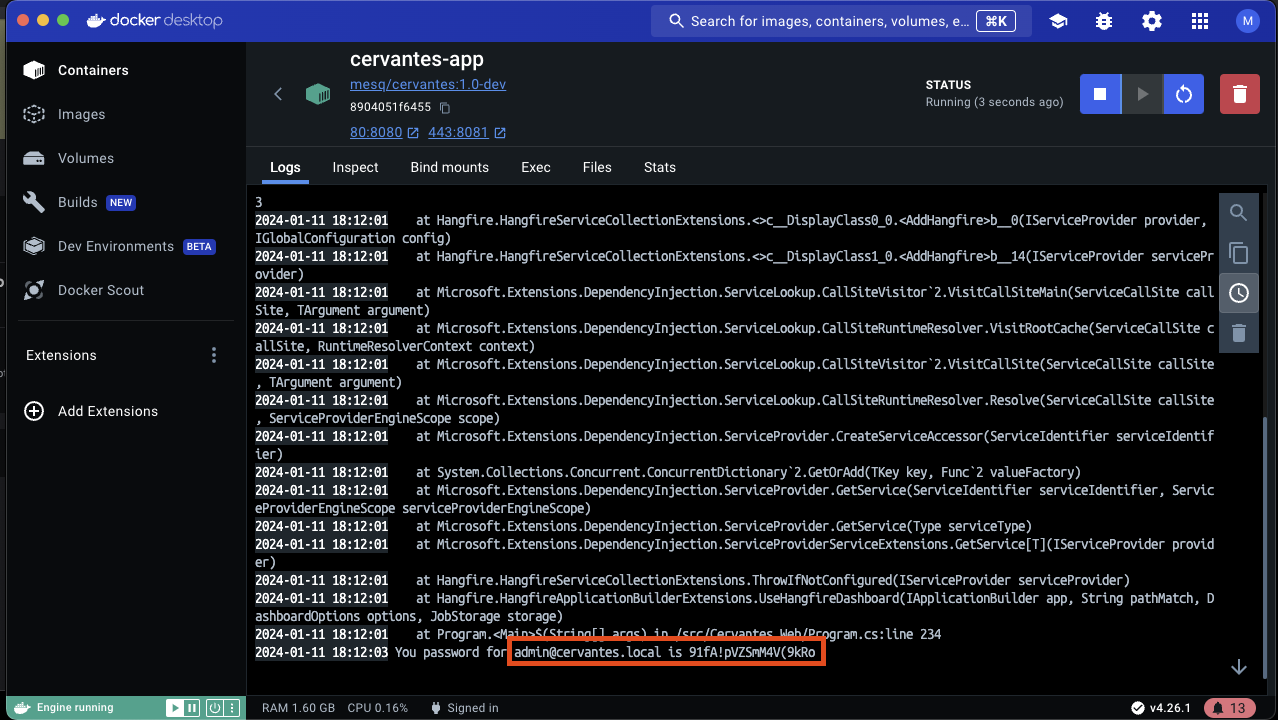 请注意,务必尽快更改默认密码,以确保应用程序的安全。您可以通过使用默认用户登录并导航至用户设置页面来完成此操作。
请记住,应用程序的安全至关重要。请始终使用强大且唯一的密码,并定期进行更改。
## 如何从源码在本地运行
### 要求
- [.NET 8](https://dotnet.microsoft.com/en-us/download/dotnet/8.0)
- [PostgresSQL](https://www.postgresql.org/)
- [Atlassian Jira Server](https://www.atlassian.com/es/software/jira) (可选,仅当您想要使用 Jira 集成时)
#### 如何在本地运行
要从源代码安装 Cervantes 应用程序,您可以按照以下步骤操作:
* **克隆代码库**:首先,您需要从 GitHub 克隆代码库。您可以在终端中运行以下命令来完成此操作:
```
git clone https://github.com/CervantesSec/cervantes.git
```
* **导航至项目目录**:代码库克隆完成后,导航至项目目录:
```
cd Cervantes
```
* **编辑 appsettings.json**:要使用该应用程序,您需要编辑 Cervantes.Web 文件夹中的 appsettings.json 文件。
**数据库连接字符串**
数据库连接字符串用于将您的应用程序连接到您的数据库。它通常包含服务器名称、数据库名称和身份验证详细信息。以下是它在您的 `appsettings.json` 中的示例:
```
{
"ConnectionStrings": {
"DefaultConnection": "Server=myServerAddress;Database=myDataBase;Username=myUsername;Password=myPassword"
}
}
```
将 `myServerAddress`、`myDataBase`、`myUsername` 和 `myPassword` 替换为您实际的数据库详细信息。
* **安装依赖项**:该项目使用 .NET 8.0,因此您需要在计算机上安装它。如果尚未安装,可以从 [.NET 官方网站](https://dotnet.microsoft.com/en-us/download/dotnet/8.0) 下载。安装 .NET 后,您可以通过运行以下命令来安装项目依赖项:
```
dotnet restore
```
* **构建项目**:依赖项安装完成后,您可以构建项目:
```
dotnet build
```
* **运行项目**:最后,您可以运行项目:
```
dotnet run --project Cervantes.Web/Cervantes.Web.csproj
```
应用程序现在应该在 `http://localhost:5235` 上运行。
请注意,这是一个基本的安装指南,实际过程可能会因项目的具体配置和要求而异。例如,如果项目使用数据库,您可能需要设置数据库并更新配置文件中的连接字符串。
## 安全
请通过我们的[披露政策](https://github.com/CervantesSec/cervantes/blob/main/SECURITY.md)报告安全问题。
## 如何报告 Bug
如果您有 Bug 需要报告,请使用 GitHub 上的 [issues](https://github.com/CervantesSec/cervantes/issues) 选项卡提交详细信息。
## 许可证
本项目根据 GNU Affero General Public License (AGPL-3.0) 获得许可,但特定组件仍根据 Apache License 2.0 获得许可。
[](https://www.gnu.org/licenses/agpl-3.0.html)
[](https://www.apache.org/licenses/LICENSE-2.0.html)
### 总结:
AGPL-3.0 适用于项目的大部分内容。
Apache License 2.0 适用于 NOTICE 文件中列出的组件。
有关更多详细信息,请参阅本代码库中包含的完整 LICENSE 和 NOTICE 文件。
## 版权声明
Copyright (C) 2025 Ruben Mesquida Gomila
OWASP Cervantes 及所有贡献均受其各自许可证的保护。有关许可证条款的更多信息,请访问:
- https://www.gnu.org/licenses/agpl-3.0.html
- https://www.apache.org/licenses/LICENSE-2.0.html
请注意,务必尽快更改默认密码,以确保应用程序的安全。您可以通过使用默认用户登录并导航至用户设置页面来完成此操作。
请记住,应用程序的安全至关重要。请始终使用强大且唯一的密码,并定期进行更改。
## 如何从源码在本地运行
### 要求
- [.NET 8](https://dotnet.microsoft.com/en-us/download/dotnet/8.0)
- [PostgresSQL](https://www.postgresql.org/)
- [Atlassian Jira Server](https://www.atlassian.com/es/software/jira) (可选,仅当您想要使用 Jira 集成时)
#### 如何在本地运行
要从源代码安装 Cervantes 应用程序,您可以按照以下步骤操作:
* **克隆代码库**:首先,您需要从 GitHub 克隆代码库。您可以在终端中运行以下命令来完成此操作:
```
git clone https://github.com/CervantesSec/cervantes.git
```
* **导航至项目目录**:代码库克隆完成后,导航至项目目录:
```
cd Cervantes
```
* **编辑 appsettings.json**:要使用该应用程序,您需要编辑 Cervantes.Web 文件夹中的 appsettings.json 文件。
**数据库连接字符串**
数据库连接字符串用于将您的应用程序连接到您的数据库。它通常包含服务器名称、数据库名称和身份验证详细信息。以下是它在您的 `appsettings.json` 中的示例:
```
{
"ConnectionStrings": {
"DefaultConnection": "Server=myServerAddress;Database=myDataBase;Username=myUsername;Password=myPassword"
}
}
```
将 `myServerAddress`、`myDataBase`、`myUsername` 和 `myPassword` 替换为您实际的数据库详细信息。
* **安装依赖项**:该项目使用 .NET 8.0,因此您需要在计算机上安装它。如果尚未安装,可以从 [.NET 官方网站](https://dotnet.microsoft.com/en-us/download/dotnet/8.0) 下载。安装 .NET 后,您可以通过运行以下命令来安装项目依赖项:
```
dotnet restore
```
* **构建项目**:依赖项安装完成后,您可以构建项目:
```
dotnet build
```
* **运行项目**:最后,您可以运行项目:
```
dotnet run --project Cervantes.Web/Cervantes.Web.csproj
```
应用程序现在应该在 `http://localhost:5235` 上运行。
请注意,这是一个基本的安装指南,实际过程可能会因项目的具体配置和要求而异。例如,如果项目使用数据库,您可能需要设置数据库并更新配置文件中的连接字符串。
## 安全
请通过我们的[披露政策](https://github.com/CervantesSec/cervantes/blob/main/SECURITY.md)报告安全问题。
## 如何报告 Bug
如果您有 Bug 需要报告,请使用 GitHub 上的 [issues](https://github.com/CervantesSec/cervantes/issues) 选项卡提交详细信息。
## 许可证
本项目根据 GNU Affero General Public License (AGPL-3.0) 获得许可,但特定组件仍根据 Apache License 2.0 获得许可。
[](https://www.gnu.org/licenses/agpl-3.0.html)
[](https://www.apache.org/licenses/LICENSE-2.0.html)
### 总结:
AGPL-3.0 适用于项目的大部分内容。
Apache License 2.0 适用于 NOTICE 文件中列出的组件。
有关更多详细信息,请参阅本代码库中包含的完整 LICENSE 和 NOTICE 文件。
## 版权声明
Copyright (C) 2025 Ruben Mesquida Gomila
OWASP Cervantes 及所有贡献均受其各自许可证的保护。有关许可证条款的更多信息,请访问:
- https://www.gnu.org/licenses/agpl-3.0.html
- https://www.apache.org/licenses/LICENSE-2.0.html
## 技术





## 功能特性
* 开源
* 跨平台
* 多语言
* 团队协作
* 检查清单
* OWASP 合规报告
* 内置仪表板和分析
* 管理您的客户端和攻击性安全项目
* 一键生成报告
* 以及更多
## 运行要求
- Docker
- Docker compose
## 如何使用 Docker compose 在本地运行
* 首先,您需要克隆此代码库
```
git clone https://github.com/CervantesSec/docker.git
```
* 之后,您需要启动 Docker 容器:
```
docker-compose -p cervantes -f docker-compose.yml up -d
```
* 完成此操作后,在浏览器中打开 http://localhost 或 https://localhost,您将看到 Cervantes 登录页面。
### 默认用户和密码
当您首次启动 Cervantes 应用程序时,系统会为您创建一个默认用户。默认用户名为 `admin@cervantes.local`。
该用户的密码是在创建应用程序容器及首次启动应用程序时随机生成的。这意味着每个应用程序实例的密码都是唯一的,从而提供了额外的安全层。
请注意,务必尽快更改默认密码,以确保应用程序的安全。您可以通过使用默认用户登录并导航至用户设置页面来完成此操作。
请记住,应用程序的安全至关重要。请始终使用强大且唯一的密码,并定期进行更改。
## 如何从源码在本地运行
### 要求
- [.NET 8](https://dotnet.microsoft.com/en-us/download/dotnet/8.0)
- [PostgresSQL](https://www.postgresql.org/)
- [Atlassian Jira Server](https://www.atlassian.com/es/software/jira) (可选,仅当您想要使用 Jira 集成时)
#### 如何在本地运行
要从源代码安装 Cervantes 应用程序,您可以按照以下步骤操作:
* **克隆代码库**:首先,您需要从 GitHub 克隆代码库。您可以在终端中运行以下命令来完成此操作:
```
git clone https://github.com/CervantesSec/cervantes.git
```
* **导航至项目目录**:代码库克隆完成后,导航至项目目录:
```
cd Cervantes
```
* **编辑 appsettings.json**:要使用该应用程序,您需要编辑 Cervantes.Web 文件夹中的 appsettings.json 文件。
**数据库连接字符串**
数据库连接字符串用于将您的应用程序连接到您的数据库。它通常包含服务器名称、数据库名称和身份验证详细信息。以下是它在您的 `appsettings.json` 中的示例:
```
{
"ConnectionStrings": {
"DefaultConnection": "Server=myServerAddress;Database=myDataBase;Username=myUsername;Password=myPassword"
}
}
```
将 `myServerAddress`、`myDataBase`、`myUsername` 和 `myPassword` 替换为您实际的数据库详细信息。
* **安装依赖项**:该项目使用 .NET 8.0,因此您需要在计算机上安装它。如果尚未安装,可以从 [.NET 官方网站](https://dotnet.microsoft.com/en-us/download/dotnet/8.0) 下载。安装 .NET 后,您可以通过运行以下命令来安装项目依赖项:
```
dotnet restore
```
* **构建项目**:依赖项安装完成后,您可以构建项目:
```
dotnet build
```
* **运行项目**:最后,您可以运行项目:
```
dotnet run --project Cervantes.Web/Cervantes.Web.csproj
```
应用程序现在应该在 `http://localhost:5235` 上运行。
请注意,这是一个基本的安装指南,实际过程可能会因项目的具体配置和要求而异。例如,如果项目使用数据库,您可能需要设置数据库并更新配置文件中的连接字符串。
## 安全
请通过我们的[披露政策](https://github.com/CervantesSec/cervantes/blob/main/SECURITY.md)报告安全问题。
## 如何报告 Bug
如果您有 Bug 需要报告,请使用 GitHub 上的 [issues](https://github.com/CervantesSec/cervantes/issues) 选项卡提交详细信息。
## 许可证
本项目根据 GNU Affero General Public License (AGPL-3.0) 获得许可,但特定组件仍根据 Apache License 2.0 获得许可。
[](https://www.gnu.org/licenses/agpl-3.0.html)
[](https://www.apache.org/licenses/LICENSE-2.0.html)
### 总结:
AGPL-3.0 适用于项目的大部分内容。
Apache License 2.0 适用于 NOTICE 文件中列出的组件。
有关更多详细信息,请参阅本代码库中包含的完整 LICENSE 和 NOTICE 文件。
## 版权声明
Copyright (C) 2025 Ruben Mesquida Gomila
OWASP Cervantes 及所有贡献均受其各自许可证的保护。有关许可证条款的更多信息,请访问:
- https://www.gnu.org/licenses/agpl-3.0.html
- https://www.apache.org/licenses/LICENSE-2.0.html标签:ASN信息, CMS安全, GPT, HTML5, HTTPX, IPv6支持, JavaScript, Linux 内核安全, meg, PPID欺骗, 信息安全, 协作平台, 反取证, 团队协作, 多模态安全, 安全评估, 客户管理, 开源, 攻击模拟, 数据可视化, 数据展示, 测试用例, 漏洞管理, 红队, 网络安全, 自动化报告, 请求拦截, 隐私保护, 项目管理, 驱动签名利用