brexhq/substation
GitHub: brexhq/substation
一个云原生的安全日志处理工具包,用于路由、规范化和丰富安全事件与审计日志。
Stars: 402 | Forks: 33
# Substation

## 路由数据
Substation 可以从单个进程将数据路由到多个目的地,并且与大多数其他数据管道系统不同,数据转换和路由在功能上是等效的 —— 这意味着数据可以按任何顺序进行转换或路由。
在此配置中,数据被:
- 写入 AWS S3
- 打印到 stdout
- 有条件地丢弃(过滤、移除)
- 发送到 HTTPS 端点
```
// The input is a JSON array of objects, such as:
// [
// { "field1": "a", "field2": 1, "field3": true },
// { "field1": "b", "field2": 2, "field3": false },
// ...
// ]
local sub = import 'substation.libsonnet';
// This filters events based on the value of field3.
local is_false = sub.cnd.str.eq({ object: { source_key: 'field3' }, value: 'false' });
{
transforms: [
// Pre-transformed data is written to an object in AWS S3 for long-term storage.
sub.tf.send.aws.s3({ aws: { arn: 'arn:aws:s3:::example-bucket-name' } }),
// The JSON array is split into individual events that go through
// the remaining transforms. Each event is printed to stdout.
sub.tf.agg.from.array(),
sub.tf.send.stdout(),
// Events where field3 is false are removed from the pipeline.
sub.pattern.tf.conditional(condition=is_false, transform=sub.tf.util.drop()),
// The remaining events are sent to an HTTPS endpoint.
sub.tf.send.http.post({ url: 'https://example-http-endpoint.com' }),
],
}
```
或者,数据可以有条件地路由到不同的目的地:
```
local sub = import 'substation.libsonnet';
{
transforms: [
// If field3 is false, then the event is sent to an HTTPS endpoint; otherwise,
// the event is written to an object in AWS S3.
sub.tf.meta.switch({ cases: [
{
condition: sub.cnd.str.eq({ object: { source_key: 'field3' }, value: 'false' }),
transforms: [
sub.tf.send.http.post({ url: 'https://example-http-endpoint.com' }),
],
},
{
transforms: [
sub.tf.send.aws.s3({ aws: { arn: 'arn:aws:s3:::example-bucket-name' } }),
],
},
] }),
// The event is always available to any remaining transforms.
sub.tf.send.stdout(),
],
}
```
## 配置应用程序
Substation 应用程序几乎可以在任何地方运行(笔记本电脑、服务器、容器、无服务器函数),并且所有转换函数无论在何处运行都表现一致。这使得在本地开发配置更改、在构建 (CI/CD) pipeline 中验证它们、在部署到生产之前在 staging 环境中运行集成测试变得容易。
配置使用 Jsonnet 编写,可以表示为功能代码,简化了版本控制并使构建自定义数据处理库变得容易。对于高级用户,配置还具有缩写形式,使其更易于编写。将下面的配置与 Logstash 和 Fluentd 的类似配置进行比较:
## 部署到 AWS
Substation 包含用于在 AWS 中安全部署数据管道和微服务的 Terraform 模块。这些模块设计易于使用,但也足够灵活以支持管理复杂系统。此配置部署一个数据管道,能够从 API Gateway 接收数据并将其存储在 S3 bucket 中:
## 入门指南
您可以在以下平台上运行 Substation:
- [Docker](https://substation.readme.io/docs/try-substation-on-docker)
- [macOS / Linux](https://substation.readme.io/docs/try-substation-on-macos-linux)
- [AWS](https://substation.readme.io/docs/try-substation-on-aws)
### 测试
使用 Substation CLI 工具运行[示例](examples/)并对配置进行单元测试:
```
substation test -h
```
可以通过从项目根目录运行此命令来测试示例。例如:
```
% substation test -R examples/transform/time/str_conversion
{"time":"2024-01-01T01:02:03.123Z"}
{"time":"2024-01-01T01:02:03"}
ok examples/transform/time/str_conversion/config.jsonnet 133µs
```
### 开发
[VS Code](https://code.visualstudio.com/docs/devcontainers/containers) 是 Substation 的推荐开发环境。该项目包含一个[开发容器](.devcontainer/Dockerfile),应用于开发和测试系统。有关更多信息,请参阅[开发指南](CONTRIBUTING.md)。
如果您不使用 VS Code,则应从命令行运行开发容器:
```
git clone https://github.com/brexhq/substation.git && cd substation && \
docker build -t substation-dev .devcontainer/ && \
docker run -v $(pwd):/workspaces/substation/ -w /workspaces/substation -v /var/run/docker.sock:/var/run/docker.sock -it substation-dev
```
### 部署
[Terraform 文档](build/terraform/aws/)包含将 Substation 部署到 AWS 的指南。
## 许可证
Substation 及其相关代码根据 [MIT License](LICENSE) 的条款发布。
Substation 是一个用于路由、规范化和丰富安全事件及审计日志的工具包。
[Releases][releases] | [Documentation][docs] | [Adopters][adopters] | [Announcement (2022)][announcement] | [v1.0 Release (2024)][v1_release]
[](https://scorecard.dev/viewer/?uri=github.com/brexhq/substation)

[](https://github.com/brexhq/substation/releases)

[](https://github.com/brexhq/substation/blob/main/LICENSE)
## 快速开始
想在深入阅读文档之前先看个演示吗?运行此命令:
```
export PATH=$PATH:$(go env GOPATH)/bin && \
go install github.com/brexhq/substation/v2/cmd/substation@latest && \
substation demo
```
## 概览
Substation 的灵感来源于 Logstash 和 Fluentd 等数据管道系统,但它是为现代安全团队构建的:
- **可扩展的数据处理**:使用开箱即用的应用程序和 100 多种数据转换函数构建数据处理管道系统和微服务,或者用 Go 编写创建您自己的组件。
- **云端数据路由**:有条件地将数据路由到 AWS 云服务、从 AWS 云服务路由或在 AWS 云服务之间路由,包括 S3、Kinesis、SQS 和 Lambda,或路由到任何 HTTP 端点。
- **自带 Schema**:格式化、规范化和丰富事件日志,以符合 Elastic Common Schema (ECS)、Open Cybersecurity Schema Framework (OCSF) 或任何其他 Schema。
- **无限数据丰富**:使用外部 API 以低成本和大规模的方式,利用企业和威胁情报丰富事件日志,或者构建微服务以减少昂贵的安全 API 支出。
- **无服务器,无维护**:作为无服务器应用程序部署在您的 AWS 账户中,使用 Terraform 在几分钟内启动,部署后无需维护。
- **几乎可在任何地方运行**:创建可在 Go 支持的大多数平台上运行的应用程序,并在笔记本电脑、服务器、容器和无服务器函数之间一致地转换数据。
- **高性能,低成本**:每秒转换 100,000+ 个事件,同时将云成本保持在每 GB 几美分的低水平。供应商解决方案,如 [Cribl](https://cribl.io/cribl-pricing/) 和 [Datadog](https://www.datadoghq.com/pricing/?product=observability-pipelines#products),成本可能高出 10 倍。
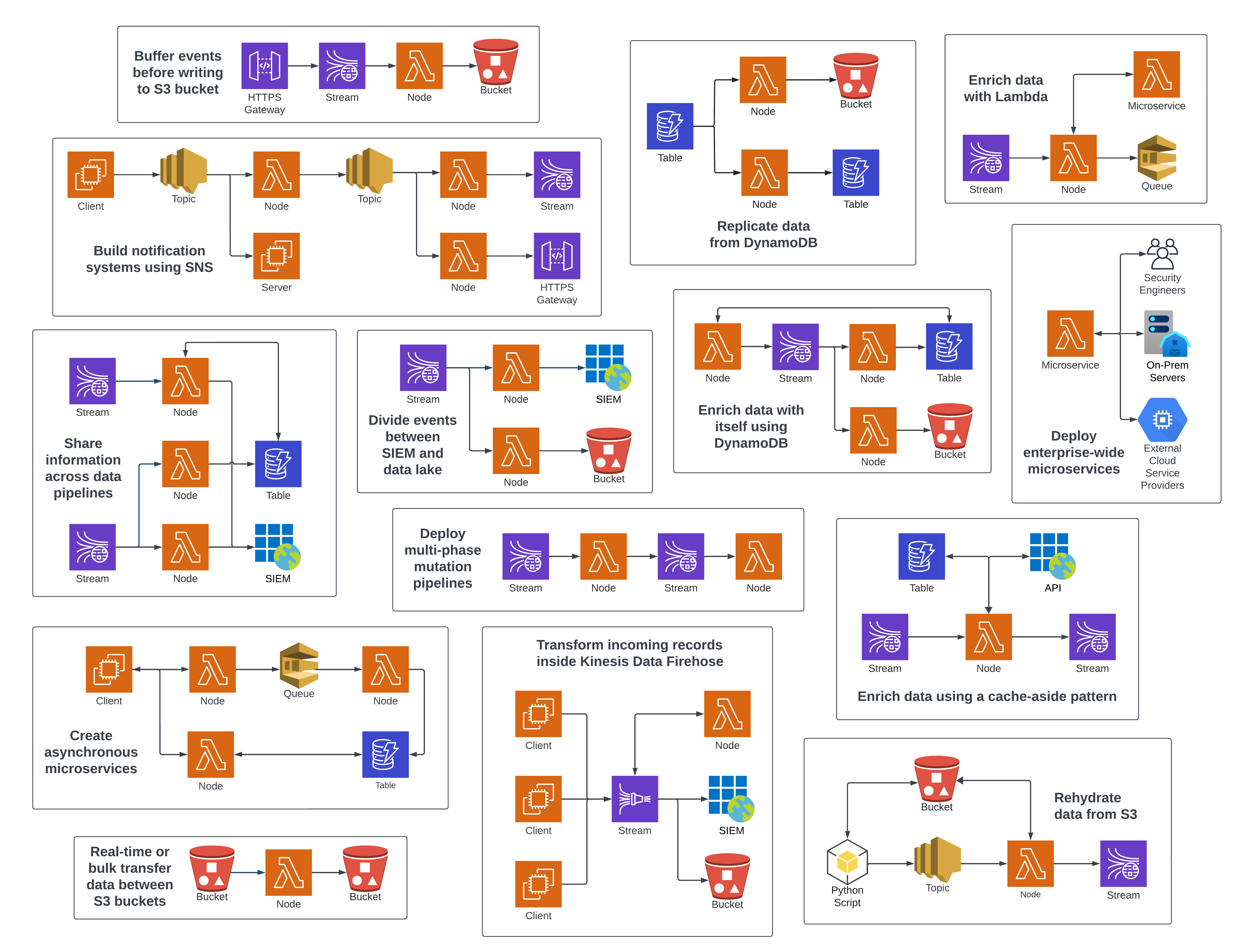
所有这些数据管道和微服务系统,以及更多,都可以使用 Substation 构建:
## 转换事件日志
Substation 擅长格式化、规范化和丰富事件日志。例如,Zeek 连接日志可以转换为符合 Elastic Common Schema:
Original Event |
Transformed Event |
|---|---|
| ``` { "ts": 1591367999.430166, "uid": "C5bLoe2Mvxqhawzqqd", "id.orig_h": "192.168.4.76", "id.orig_p": 46378, "id.resp_h": "31.3.245.133", "id.resp_p": 80, "proto": "tcp", "service": "http", "duration": 0.25411510467529297, "orig_bytes": 77, "resp_bytes": 295, "conn_state": "SF", "missed_bytes": 0, "history": "ShADadFf", "orig_pkts": 6, "orig_ip_bytes": 397, "resp_pkts": 4, "resp_ip_bytes": 511 } ``` | ``` { "event": { "original": { "ts": 1591367999.430166, "uid": "C5bLoe2Mvxqhawzqqd", "id.orig_h": "192.168.4.76", "id.orig_p": 46378, "id.resp_h": "31.3.245.133", "id.resp_p": 80, "proto": "tcp", "service": "http", "duration": 0.25411510467529297, "orig_bytes": 77, "resp_bytes": 295, "conn_state": "SF", "missed_bytes": 0, "history": "ShADadFf", "orig_pkts": 6, "orig_ip_bytes": 397, "resp_pkts": 4, "resp_ip_bytes": 511 }, "hash": "af70ea0b38e1fb529e230d3eca6badd54cd6a080d7fcb909cac4ee0191bb788f", "created": "2022-12-30T17:20:41.027505Z", "id": "C5bLoe2Mvxqhawzqqd", "kind": "event", "category": [ "network" ], "action": "network-connection", "outcome": "success", "duration": 254115104.675293 }, "@timestamp": "2020-06-05T14:39:59.430166Z", "client": { "address": "192.168.4.76", "ip": "192.168.4.76", "port": 46378, "packets": 6, "bytes": 77 }, "server": { "address": "31.3.245.133", "ip": "31.3.245.133", "port": 80, "packets": 4, "bytes": 295, "domain": "h31-3-245-133.host.redstation.co.uk", "top_level_domain": "co.uk", "subdomain": "h31-3-245-133.host", "registered_domain": "redstation.co.uk", "as": { "number": 20860, "organization": { "name": "Iomart Cloud Services Limited" } }, "geo": { "continent_name": "Europe", "country_name": "United Kingdom", "city_name": "Manchester", "location": { "latitude": 53.5039, "longitude": -2.1959 }, "accuracy": 1000 } }, "network": { "protocol": "tcp", "bytes": 372, "packets": 10, "direction": "outbound" } } ``` |
Substation |
Logstash |
Fluentd |
|---|---|---|
| ``` local sub = import 'substation.libsonnet'; { transforms: [ sub.tf.obj.cp({ object: { source_key: 'src_field_1', target_key: 'dest_field_1' } }), sub.tf.obj.cp({ obj: { src: 'src_field_2', trg: 'dest_field_2' } }), sub.tf.send.stdout(), sub.tf.send.http.post({ url: 'https://example-http-endpoint.com' }), ], } ``` | ``` input { file { path => "/path/to/your/file.log" start_position => "beginning" sincedb_path => "/dev/null" codec => "json" } } filter { json { source => "message" } mutate { copy => { "src_field_1" => "dest_field_1" } copy => { "src_field_2" => "dest_field_2" } } } output { stdout { codec => rubydebug } http { url => "https://example-http-endpoint.com" http_method => "post" format => "json" } } ``` |
```
|
resources.tf |
node.tf |
|---|---|
| ``` # These resources are deployed once and are used by all Substation infrastructure. # Substation resources can be encrypted using a customer-managed KMS key. module "kms" { source = "build/terraform/aws/kms" config = { name = "alias/substation" } } # Substation typically uses AppConfig to manage configuration files, but # configurations can also be loaded from an S3 URI or an HTTP endpoint. module "appconfig" { source = "build/terraform/aws/appconfig" config = { name = "substation" environments = [{ name = "example" }] } } module "ecr" { source = "build/terraform/aws/ecr" kms = module.kms config = { name = "substation" force_delete = true } } resource "random_uuid" "s3" {} module "s3" { source = "build/terraform/aws/s3" kms = module.kms config = { # Bucket name is randomized to avoid collisions. name = "${random_uuid.s3.result}-substation" } # Access is granted by providing the role name of a # resource. This access applies least privilege and # grants access to dependent resources, such as KMS. access = [ # Lambda functions create unique roles that are # used to access resources. module.node.role.name, ] } ``` | ``` # Deploys an unauthenticated API Gateway that forwards data to the node. module "node_gateway" { source = "build/terraform/aws/api_gateway/lambda" lambda = module.node config = { name = "node_gateway" } depends_on = [ module.node ] } module "node" { source = "build/terraform/aws/lambda" kms = module.kms # Optional appconfig = module.appconfig # Optional config = { name = "node" description = "Substation node that writes data to S3." image_uri = "${module.ecr.url}:latest" image_arm = true env = { "SUBSTATION_CONFIG" : "https://localhost:2772/applications/substation/environments/example/configurations/node" "SUBSTATION_DEBUG" : true # This Substation node will ingest data from API Gateway. More nodes can be # deployed to ingest data from other sources, such as Kinesis or SQS. "SUBSTATION_LAMBDA_HANDLER" : "AWS_API_GATEWAY" } } depends_on = [ module.appconfig.name, module.ecr.url, ] } ``` |
标签:AWS, DevSecOps, DPI, EVTX分析, GO语言, Kinesis, PB级数据处理, S3, 上游代理, 安全运维, 数据管道, 数据转换, 日志处理, 日志审计, 日志富化, 日志路由, 漏洞利用检测, 漏洞探索, 请求拦截, 软件工程