GreptimeTeam/greptimedb
GitHub: GreptimeTeam/greptimedb
GreptimeDB 是一个开源的 Observability 2.0 数据库,旨在通过统一的数据模型和对象存储整合指标、日志与链路追踪,替代传统监控栈以降低成本并提升查询性能。
Stars: 6483 | Forks: 507

一个用于指标、日志和链路追踪的数据库
替代 Prometheus、Loki 和 Elasticsearch
- [简介](#introduction)
- [⭐ 核心功能](#features)
- [GreptimeDB 对比](#how-greptimedb-compares)
- [架构](#architecture)
- [试用 GreptimeDB](#try-greptimedb)
- [快速入门](#getting-started)
- [从源码构建](#build-from-source)
- [工具与扩展](#tools--extensions)
- [项目状态](#project-status)
- [社区](#community)
- [许可证](#license)
- [商业支持](#commercial-support)
- [贡献](#contributing)
- [致谢](#acknowledgement)
## 简介
**GreptimeDB** 是一个为 [Observability 2.0](https://docs.greptime.com/user-guide/concepts/observability-2/) 构建的开源可观测性数据库 — 它将指标、日志和链路追踪视为一个统一的数据模型(wide events),而不是三个独立的支柱。
将其用作单一的 OpenTelemetry 后端 — 用一个基于对象存储构建的数据库替代 Prometheus、Loki 和 Elasticsearch。使用 SQL 和 PromQL 进行查询,轻松扩展,最高可降低 50 倍成本。
## 功能
| 功能 | 描述 |
| --------- | ----------- |
| 无缝替代 | [PromQL](https://docs.greptime.com/user-guide/query-data/promql/)、[Prometheus remote write](https://docs.greptime.com/user-guide/ingest-data/for-observability/prometheus/)、[Jaeger](https://docs.greptime.com/user-guide/query-data/jaeger/) 和 [OpenTelemetry](https://docs.greptime.com/user-guide/ingest-data/for-observability/opentelemetry/) 原生支持。将其用作所有三种信号的单一后端,或逐个迁移。|
| 低 50 倍成本 | 以对象存储(S3、GCS、Azure Blob 等)作为[主要存储](https://docs.greptime.com/user-guide/deployments-administration/configuration/#storage-options)。计算存储分离,轻松扩展。|
| SQL + PromQL | 使用 [PromQL](https://docs.greptime.com/user-guide/query-data/promql) 进行监控,使用 [SQL](https://docs.greptime.com/user-guide/query-data/sql) 进行分析。一个数据库替代 Prometheus + 您的数据仓库。|
| PB-EB 级别的亚秒级性能 | 具备[全文、倒排和跳过索引](https://docs.greptime.com/user-guide/manage-data/data-index)的列式引擎。用 Rust 编写。|
✅ **完美适用于:**
* 用一个数据库替代 Prometheus + Loki + Elasticsearch
* 超越 Prometheus 的扩展 — 高基数、长期存储,无 Thanos/Mimir 开销
* 利用对象存储降低可观测性成本(链路追踪节省高达 50 倍,日志节省 30%)
* AI/LLM 可观测性 — 通过 [OpenTelemetry GenAI conventions](https://opentelemetry.io/docs/specs/semconv/gen-ai/) 存储和分析大量对话数据、Agent 追踪和 token 指标
* 通过资源受限设备上的统一 API 实现边缘到云的可观测性
了解更多信息,请参阅 [为什么选择 GreptimeDB](https://docs.greptime.com/user-guide/concepts/why-greptimedb)。
## GreptimeDB 对比
| 功能 | GreptimeDB | Prometheus / Thanos / Mimir | Grafana Loki | Elasticsearch |
|---|---|---|---|---|
| 数据类型 | 指标、日志、链路追踪 | 仅指标 | 仅日志 | 日志、链路追踪 |
| 查询语言 | SQL + PromQL | PromQL | LogQL | Query DSL |
| 存储 | 原生对象存储(S3 等) | 本地磁盘 + 对象存储(Thanos/Mimir) | 对象存储(chunks) | 本地磁盘 |
| 扩展 | 计算存储分离,无状态节点 | Federation / Thanos / Mimir — 多组件,运维繁重 | 无状态 + 对象存储 | 基于分片,运维繁重 |
| 成本效益 | 存储成本最高降低 50 倍 | 大规模时成本高 | 中等 | 高(倒排索引开销) |
| OpenTelemetry | 原生(指标 + 日志 + 链路追踪) | 部分(仅指标) | 部分(仅日志) | 通过 instrumentation |
**基准测试:**
* [GreptimeDB 在 JSONBench 十亿记录冷运行测试中名列前茅](https://greptime.com/blogs/2025-03-18-jsonbench-greptimedb-performance)
* [TSBS 基准测试](https://github.com/GreptimeTeam/greptimedb/tree/main/docs/benchmarks/tsbs)
* [更多基准测试报告](https://docs.greptime.com/user-guide/concepts/features-that-you-concern#how-is-greptimedbs-performance-compared-to-other-solutions)
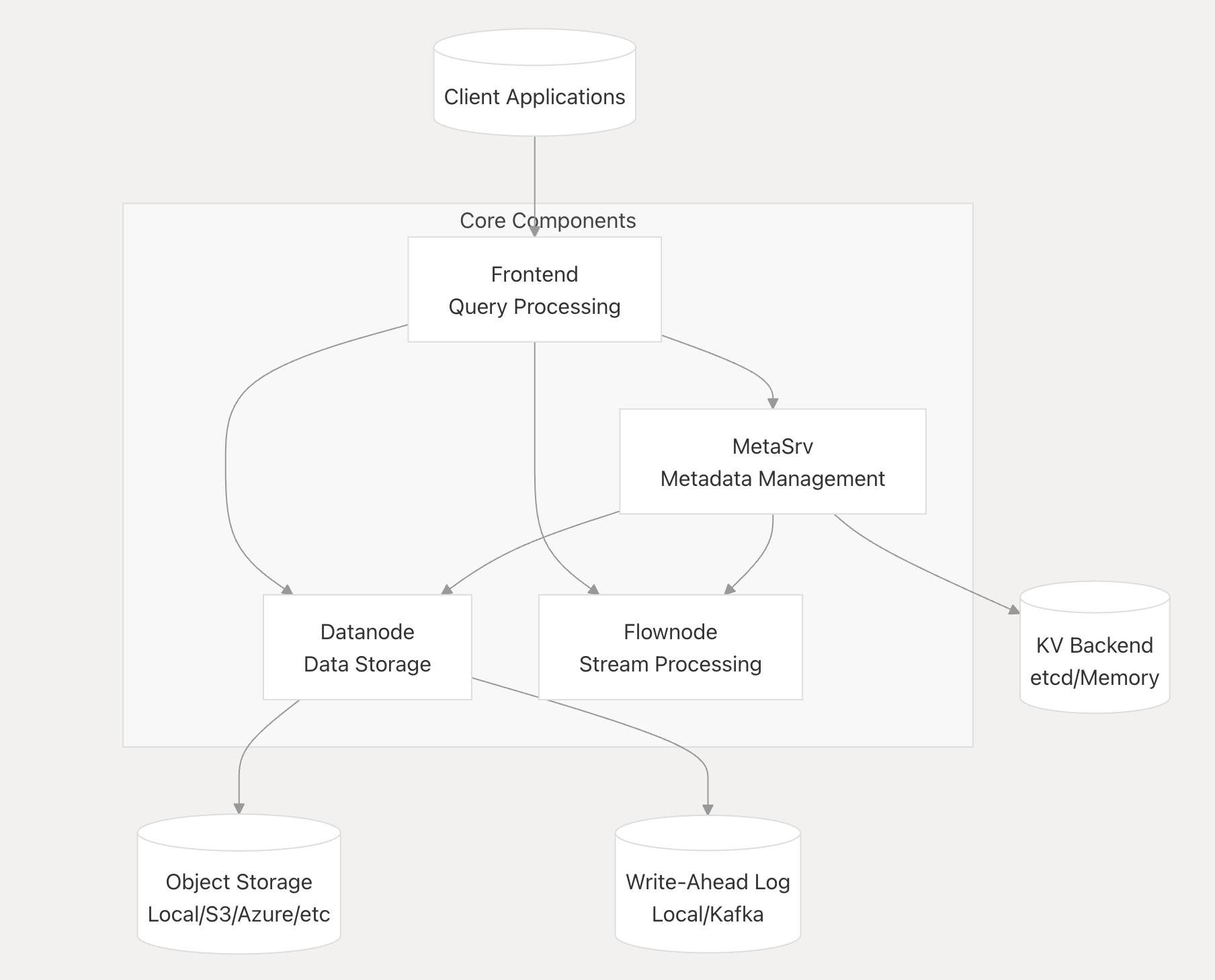
## 架构
GreptimeDB 可以运行在两种模式下:
* **单机模式 (Standalone Mode)** - 用于开发和小规模部署的单一二进制文件
* **分布式模式 (Distributed Mode)** - 用于生产规模的独立组件:
- Frontend:查询处理和协议处理
- Datanode:数据存储和检索
- Metasrv:元数据管理和协调
阅读[架构](https://docs.greptime.com/contributor-guide/overview/#architecture)文档。[DeepWiki](https://deepwiki.com/GreptimeTeam/greptimedb/1-overview) 提供了对 GreptimeDB 的深入剖析:









 ## 试用 GreptimeDB
```
docker pull greptime/greptimedb
```
```
docker run -p 127.0.0.1:4000-4003:4000-4003 \
-v "$(pwd)/greptimedb_data:/greptimedb_data" \
--name greptime --rm \
greptime/greptimedb:latest standalone start \
--http-addr 0.0.0.0:4000 \
--rpc-bind-addr 0.0.0.0:4001 \
--mysql-addr 0.0.0.0:4002 \
--postgres-addr 0.0.0.0:4003
```
Dashboard: [http://localhost:4000/dashboard](http://localhost:4000/dashboard)
在[完整安装指南](https://docs.greptime.com/getting-started/installation/overview)中阅读更多信息。
**故障排除:**
* 无法连接到数据库?请确保端口 `4000`、`4001`、`4002` 和 `4003` 未被防火墙阻止或未被其他服务占用。
* 启动失败?使用 `docker logs greptime` 检查容器日志以获取更多详细信息。
## 快速入门
- [快速开始](https://docs.greptime.com/getting-started/quick-start)
- [用户指南](https://docs.greptime.com/user-guide/overview)
- [演示场景](https://github.com/GreptimeTeam/demo-scene)
- [常见问题](https://docs.greptime.com/faq-and-others/faq)
## 从源码构建
**前置条件:**
* [Rust 工具链](https://www.rust-lang.org/tools/install) (nightly)
* [Protobuf 编译器](https://grpc.io/docs/protoc-installation/) (>= 3.15)
* C/C++ 构建必备工具,包括 `gcc`/`g++`/`autoconf` 和 glibc 库(例如 Ubuntu 上的 `libc6-dev` 和 Fedora 上的 `glibc-devel`)
* Python 工具链(可选):仅在使用某些测试脚本时才需要。
**构建和运行:**
```
make
cargo run -- standalone start
```
## 工具与扩展
- **Kubernetes**: [GreptimeDB Operator](https://github.com/GrepTimeTeam/greptimedb-operator)
- **Helm Charts**: [Greptime Helm Charts](https://github.com/GreptimeTeam/helm-charts)
- **Dashboard**: [Web UI](https://github.com/GreptimeTeam/dashboard)
- **gRPC Ingester**: [Go](https://github.com/GreptimeTeam/greptimedb-ingester-go), [Java](https://github.com/GreptimeTeam/greptimedb-ingester-java), [C++](https://github.com/GreptimeTeam/greptimedb-ingester-cpp), [Erlang](https://github.com/GreptimeTeam/greptimedb-ingester-erl), [Rust](https://github.com/GreptimeTeam/greptimedb-ingester-rust), [.NET](https://github.com/GreptimeTeam/greptimedb-ingester-dotnet)
- **Grafana Data Source**: [GreptimeDB Grafana data source plugin](https://github.com/GreptimeTeam/greptimedb-grafana-datasource)
- **Grafana Dashboard**: [用于监控的官方 Dashboard](https://github.com/GreptimeTeam/greptimedb/blob/main/grafana/README.md)
## 项目状态
- 已部署在生产环境中,每天处理数十亿个数据点
- 稳定的 API,积极维护,定期发布 ([版本信息](https://docs.greptime.com/nightly/reference/about-greptimedb-version))
GreptimeDB v1.0 代表了走向成熟的一个重要里程碑 — 标志着 API 稳定、生产就绪和经过验证的性能。
**路线图:** [v1.0 亮点和发布计划](https://greptime.com/blogs/2025-11-05-greptimedb-v1-highlights) 和 [2026 路线图](https://greptime.com/blogs/2026-02-11-greptimedb-roadmap-2026)。
对于生产使用,我们建议使用最新的稳定版本。
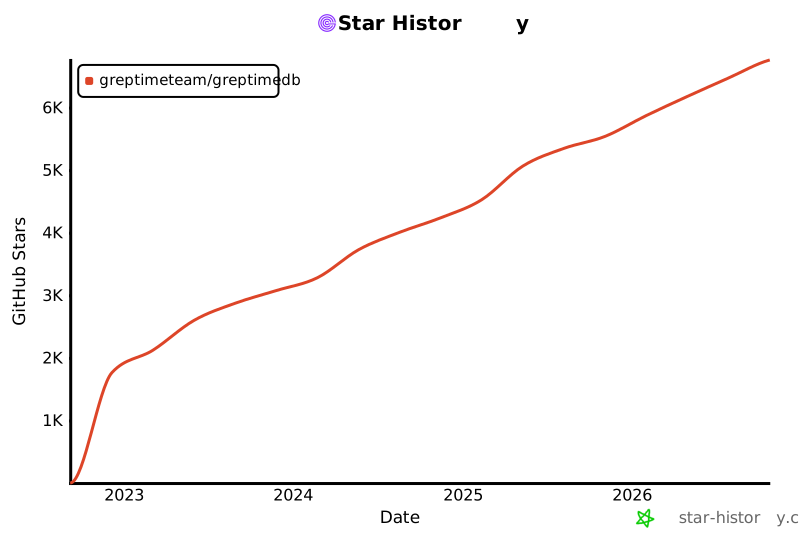
如果您觉得这个项目有用,请给我们一个 ⭐,这对我们意义重大!
[](https://www.star-history.com/#GreptimeTeam/GreptimeDB&Date)
## 试用 GreptimeDB
```
docker pull greptime/greptimedb
```
```
docker run -p 127.0.0.1:4000-4003:4000-4003 \
-v "$(pwd)/greptimedb_data:/greptimedb_data" \
--name greptime --rm \
greptime/greptimedb:latest standalone start \
--http-addr 0.0.0.0:4000 \
--rpc-bind-addr 0.0.0.0:4001 \
--mysql-addr 0.0.0.0:4002 \
--postgres-addr 0.0.0.0:4003
```
Dashboard: [http://localhost:4000/dashboard](http://localhost:4000/dashboard)
在[完整安装指南](https://docs.greptime.com/getting-started/installation/overview)中阅读更多信息。
**故障排除:**
* 无法连接到数据库?请确保端口 `4000`、`4001`、`4002` 和 `4003` 未被防火墙阻止或未被其他服务占用。
* 启动失败?使用 `docker logs greptime` 检查容器日志以获取更多详细信息。
## 快速入门
- [快速开始](https://docs.greptime.com/getting-started/quick-start)
- [用户指南](https://docs.greptime.com/user-guide/overview)
- [演示场景](https://github.com/GreptimeTeam/demo-scene)
- [常见问题](https://docs.greptime.com/faq-and-others/faq)
## 从源码构建
**前置条件:**
* [Rust 工具链](https://www.rust-lang.org/tools/install) (nightly)
* [Protobuf 编译器](https://grpc.io/docs/protoc-installation/) (>= 3.15)
* C/C++ 构建必备工具,包括 `gcc`/`g++`/`autoconf` 和 glibc 库(例如 Ubuntu 上的 `libc6-dev` 和 Fedora 上的 `glibc-devel`)
* Python 工具链(可选):仅在使用某些测试脚本时才需要。
**构建和运行:**
```
make
cargo run -- standalone start
```
## 工具与扩展
- **Kubernetes**: [GreptimeDB Operator](https://github.com/GrepTimeTeam/greptimedb-operator)
- **Helm Charts**: [Greptime Helm Charts](https://github.com/GreptimeTeam/helm-charts)
- **Dashboard**: [Web UI](https://github.com/GreptimeTeam/dashboard)
- **gRPC Ingester**: [Go](https://github.com/GreptimeTeam/greptimedb-ingester-go), [Java](https://github.com/GreptimeTeam/greptimedb-ingester-java), [C++](https://github.com/GreptimeTeam/greptimedb-ingester-cpp), [Erlang](https://github.com/GreptimeTeam/greptimedb-ingester-erl), [Rust](https://github.com/GreptimeTeam/greptimedb-ingester-rust), [.NET](https://github.com/GreptimeTeam/greptimedb-ingester-dotnet)
- **Grafana Data Source**: [GreptimeDB Grafana data source plugin](https://github.com/GreptimeTeam/greptimedb-grafana-datasource)
- **Grafana Dashboard**: [用于监控的官方 Dashboard](https://github.com/GreptimeTeam/greptimedb/blob/main/grafana/README.md)
## 项目状态
- 已部署在生产环境中,每天处理数十亿个数据点
- 稳定的 API,积极维护,定期发布 ([版本信息](https://docs.greptime.com/nightly/reference/about-greptimedb-version))
GreptimeDB v1.0 代表了走向成熟的一个重要里程碑 — 标志着 API 稳定、生产就绪和经过验证的性能。
**路线图:** [v1.0 亮点和发布计划](https://greptime.com/blogs/2025-11-05-greptimedb-v1-highlights) 和 [2026 路线图](https://greptime.com/blogs/2026-02-11-greptimedb-roadmap-2026)。
对于生产使用,我们建议使用最新的稳定版本。
如果您觉得这个项目有用,请给我们一个 ⭐,这对我们意义重大!
[](https://www.star-history.com/#GreptimeTeam/GreptimeDB&Date)
 ## 许可证
GreptimeDB 采用 [Apache License 2.0](https://apache.org/licenses/LICENSE-2.0.txt) 许可。
## 商业支持
在您的组织中运行 GreptimeDB?
我们提供企业级附加组件、服务、培训和咨询。
[联系我们](https://greptime.com/contactus) 了解详情。
## 贡献
- 阅读我们的[贡献指南](https://github.com/GreptimeTeam/greptimedb/blob/main/CONTRIBUTING.md)。
- 探索[内部概念](https://docs.greptime.com/contributor-guide/overview.html) 和 [DeepWiki](https://deepwiki.com/GreptimeTeam/greptimedb)。
- 选择一个[适合新手的问题](https://github.com/GreptimeTeam/greptimedb/issues?q=is%3Aissue+is%3Aopen+label%3A%22good+first+issue%22) 并加入 #contributors [Slack](https://greptime.com/slack) 频道。
## 致谢
特别感谢所有贡献者!请参阅 [AUTHORS.md](https://github.com/GreptimeTeam/greptimedb/blob/main/AUTHOR.md)。
- 使用 [Apache Arrow™](https://arrow.apache.org/) (内存模型)
- [Apache Parquet™](https://parquet.apache.org/) (文件存储)
- [Apache DataFusion™](https://arrow.apache.org/datafusion/) (查询引擎)
- [Apache OpenDAL™](https://opendal.apache.org/) (数据访问抽象)
## 许可证
GreptimeDB 采用 [Apache License 2.0](https://apache.org/licenses/LICENSE-2.0.txt) 许可。
## 商业支持
在您的组织中运行 GreptimeDB?
我们提供企业级附加组件、服务、培训和咨询。
[联系我们](https://greptime.com/contactus) 了解详情。
## 贡献
- 阅读我们的[贡献指南](https://github.com/GreptimeTeam/greptimedb/blob/main/CONTRIBUTING.md)。
- 探索[内部概念](https://docs.greptime.com/contributor-guide/overview.html) 和 [DeepWiki](https://deepwiki.com/GreptimeTeam/greptimedb)。
- 选择一个[适合新手的问题](https://github.com/GreptimeTeam/greptimedb/issues?q=is%3Aissue+is%3Aopen+label%3A%22good+first+issue%22) 并加入 #contributors [Slack](https://greptime.com/slack) 频道。
## 致谢
特别感谢所有贡献者!请参阅 [AUTHORS.md](https://github.com/GreptimeTeam/greptimedb/blob/main/AUTHOR.md)。
- 使用 [Apache Arrow™](https://arrow.apache.org/) (内存模型)
- [Apache Parquet™](https://parquet.apache.org/) (文件存储)
- [Apache DataFusion™](https://arrow.apache.org/datafusion/) (查询引擎)
- [Apache OpenDAL™](https://opendal.apache.org/) (数据访问抽象)标签:API集成, APM, Elasticsearch, GET参数, GreptimeDB, Loki, OLAP, OpenTelemetry, Prometheus 替代品, Rust, Traces, 云原生数据库, 全栈监控, 可观测性, 可视化界面, 基础设施, 多线程, 子域名突变, 存储引擎, 实时分析, 指标, 数据库, 数据聚合, 日志, 日志数据库, 时间序列, 用户代理, 网络流量审计, 请求拦截, 通知系统, 链路追踪