stratosphereips/StratosphereLinuxIPS
GitHub: stratosphereips/StratosphereLinuxIPS
Slips 是一个基于机器学习的行为分析网络入侵防御系统,通过行为模式识别而非签名匹配来检测恶意流量和攻击行为。
Stars: 871 | Forks: 202
Slips v1.1.18
[](./LICENSE) [](https://github.com/stratosphereips/StratosphereLinuxIPS)      [](https://GitHub.com/stratosphereips/StratosphereLinuxIPS/issues/) [](https://GitHub.com/stratosphereips/StratosphereLinuxIPS/issues?q=is%3Aissue+is%3Aclosed) [](https://github.com/stratosphereips/StratosphereLinuxIPS/pulls?q=is%3Aopen) [](https://github.com/stratosphereips/StratosphereLinuxIPS/pulls?q=is%3Aclosed) [](https://GitHub.com/stratosphereips/StratosphereLinuxIPS/contributors/)   [](https://GitHub.com/stratosphereips/StratosphereLinuxIPS/watchers/) [](https://www.stratosphereips.org/blog/tag/slips) [](https://discord.gg/zu5HwMFy5C) # 目录 - [简介](#introduction) - [使用](#usage) - [GUI](#graphical-user-interface) - [需求](#requirements) - [安装](#installation) - [配置](#configuration) - [功能](#features) - [贡献](#contributing) - [文档](#documentation) - [故障排除](#troubleshooting) - [许可证](#license) - [致谢](#credits) - [更新日志](#changelog) - [路线图](#roadmap) - [演示](#demos) - [资助](#funding) # Slips:基于行为机器学习的入侵防御系统 Slips 是一个强大的端点行为入侵防御和检测系统,它使用机器学习来检测网络流量中的恶意行为。Slips 可以处理实时网络流量、PCAP 文件,以及来自 Suricata、Zeek/Bro 和 Argus 等流行工具的网络流。Slips 的威胁检测基于经过训练以检测恶意行为的机器学习模型、40 多个威胁情报源以及专家启发法。Slips 收集恶意行为的证据,并使用经过广泛训练的阈值,在积累足够证据时触发警报。
 # 简介
Slips 是第一个面向端点的免费软件行为机器学习 IDS/IPS。它由布拉格捷克技术大学 AIC、FEE 的 Stratosphere 实验室的 Sebastian Garcia 于 2012 年创建。其目标是提供一个利用机器学习通过行为分析来检测网络攻击的本地 IDS/IPS。
Slips 仅支持 Linux、MacOS 和 Windows Docker。Slips 的阻断功能仅在 Linux 上受支持。
Slips 基于 Python,依赖于 [Zeek network analysis framework](https://zeek.org/get-zeek/) 来捕获实时流量和分析 PCAP。并依赖于
Redis >= 7.0.4 进行进程间通信。
# 使用
推荐在 Docker 上使用 Slips。
#### Linux 和 Windows 主机
```
docker run --rm -it -p 55000:55000 --cpu-shares "700" --memory="8g" --memory-swap="8g" --net=host --cap-add=NET_ADMIN --name slips stratosphereips/slips:latest
```
```
./slips.py -f dataset/test7-malicious.pcap -o output_dir
```
```
cat output_dir/alerts.log
```
#### Macos
在 MacOS 中,如果您想从主机访问内部容器的端口,请不要使用 --net=host。
```
docker run --rm -it -p 55000:55000 --platform linux/amd64 --cpu-shares "700" --memory="8g" --memory-swap="8g" --cap-add=NET_ADMIN --name slips stratosphereips/slips_macos_m1:latest
```
```
./slips.py -f dataset/test7-malicious.pcap -o output_dir
```
```
cat output_dir/alerts.log
```
[更多安装选项](https://stratospherelinuxips.readthedocs.io/en/develop/installation.html#installation)
[Slips 参数的详细说明](https://stratospherelinuxips.readthedocs.io/en/develop/usage.html#slips-parameters)
# 图形用户界面
要使用 GUI 查看 Slips 输出,您可以使用 Web 界面
或我们的命令行界面 Kalipso
##### Web 界面
```
./webinterface.sh
```
然后在浏览器中访问 ```http://localhost:55000/```。
# 简介
Slips 是第一个面向端点的免费软件行为机器学习 IDS/IPS。它由布拉格捷克技术大学 AIC、FEE 的 Stratosphere 实验室的 Sebastian Garcia 于 2012 年创建。其目标是提供一个利用机器学习通过行为分析来检测网络攻击的本地 IDS/IPS。
Slips 仅支持 Linux、MacOS 和 Windows Docker。Slips 的阻断功能仅在 Linux 上受支持。
Slips 基于 Python,依赖于 [Zeek network analysis framework](https://zeek.org/get-zeek/) 来捕获实时流量和分析 PCAP。并依赖于
Redis >= 7.0.4 进行进程间通信。
# 使用
推荐在 Docker 上使用 Slips。
#### Linux 和 Windows 主机
```
docker run --rm -it -p 55000:55000 --cpu-shares "700" --memory="8g" --memory-swap="8g" --net=host --cap-add=NET_ADMIN --name slips stratosphereips/slips:latest
```
```
./slips.py -f dataset/test7-malicious.pcap -o output_dir
```
```
cat output_dir/alerts.log
```
#### Macos
在 MacOS 中,如果您想从主机访问内部容器的端口,请不要使用 --net=host。
```
docker run --rm -it -p 55000:55000 --platform linux/amd64 --cpu-shares "700" --memory="8g" --memory-swap="8g" --cap-add=NET_ADMIN --name slips stratosphereips/slips_macos_m1:latest
```
```
./slips.py -f dataset/test7-malicious.pcap -o output_dir
```
```
cat output_dir/alerts.log
```
[更多安装选项](https://stratospherelinuxips.readthedocs.io/en/develop/installation.html#installation)
[Slips 参数的详细说明](https://stratospherelinuxips.readthedocs.io/en/develop/usage.html#slips-parameters)
# 图形用户界面
要使用 GUI 查看 Slips 输出,您可以使用 Web 界面
或我们的命令行界面 Kalipso
##### Web 界面
```
./webinterface.sh
```
然后在浏览器中访问 ```http://localhost:55000/```。
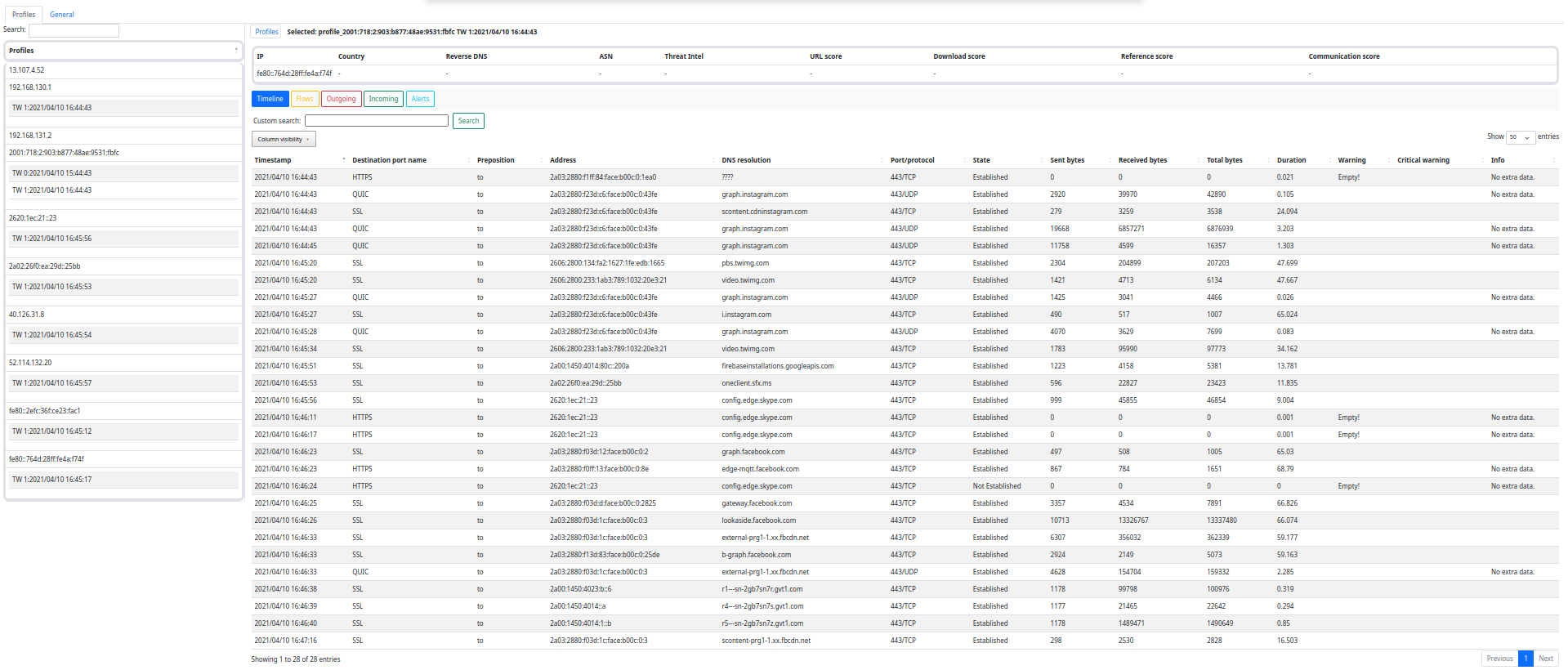 有关 Web 界面的更多信息,请查看文档:https://stratospherelinuxips.readthedocs.io/en/develop/usage.html#the-web-interface
##### Kalipso (CLI-Interface)
```
./kalipso.sh
```
有关 Web 界面的更多信息,请查看文档:https://stratospherelinuxips.readthedocs.io/en/develop/usage.html#the-web-interface
##### Kalipso (CLI-Interface)
```
./kalipso.sh
```
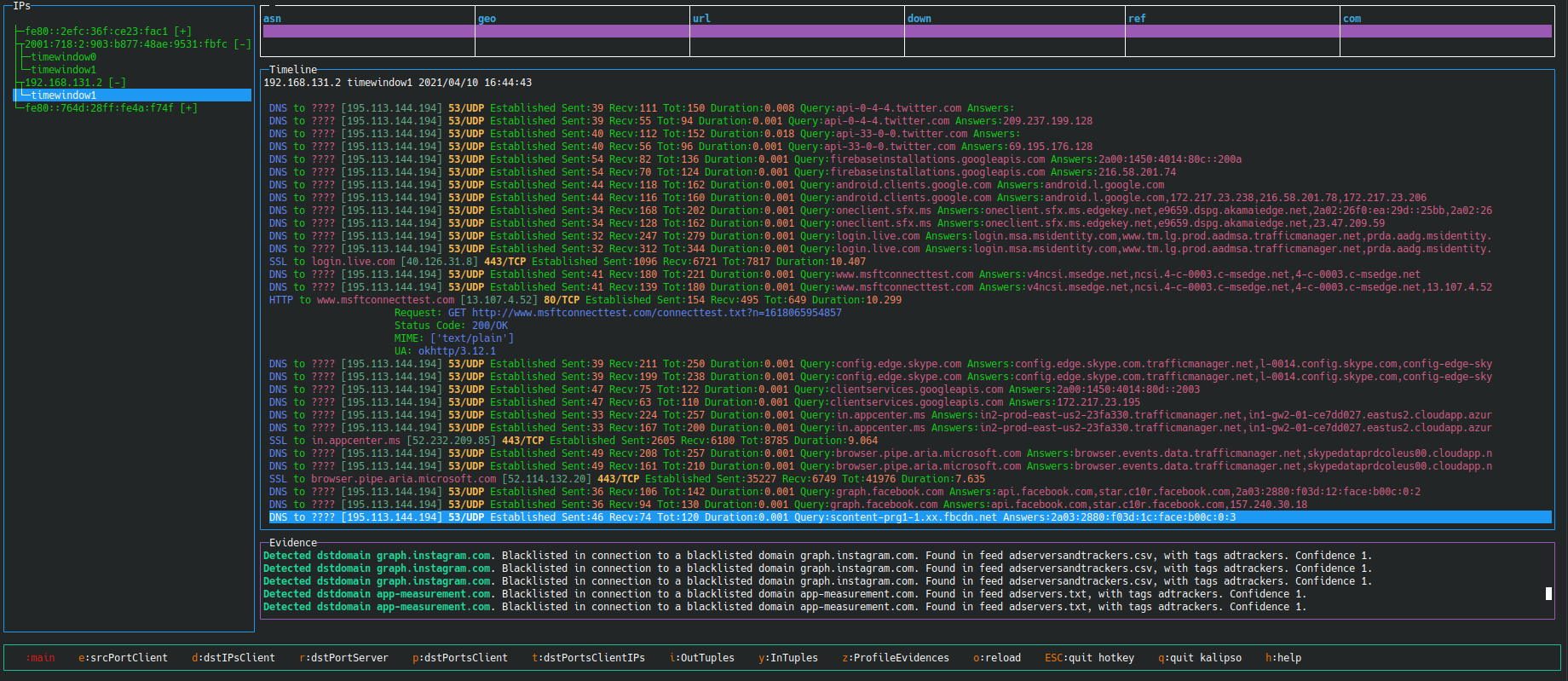 有关 Kalipso 界面的更多信息,请查看文档:https://stratospherelinuxips.readthedocs.io/en/develop/usage.html#kalipso
# 需求
Slips 需要 Python 3.10.12 和至少 4 GB 内存才能流畅运行。
# 安装
Slips 可以在不同平台上运行,如果您是 Linux 用户,最简单且最推荐的方式是在 Docker 上运行 Slips。
* [Docker](https://stratospherelinuxips.readthedocs.io/en/develop/installation.html#slips-in-docker)
* Dockerhub (推荐)
* [Linux 和 Windows 主机](https://stratospherelinuxips.readthedocs.io/en/develop/installation.html#linux-and-windows-hosts)
* [MacOS 主机](https://stratospherelinuxips.readthedocs.io/en/develop/installation.html#macos-hosts)
* [Docker-compose](https://stratospherelinuxips.readthedocs.io/en/develop/installation.html#running-slips-using-docker-compose)
* [Dockerfile](https://stratospherelinuxips.readthedocs.io/en/develop/installation.html#building-slips-from-the-dockerfile)
* 原生安装
* [使用 install.sh](https://stratospherelinuxips.readthedocs.io/en/develop/installation.html#install-slips-using-shell-script)
* [手动安装](https://stratospherelinuxips.readthedocs.io/en/develop/installation.html#installing-slips-manually)
* [在 RPI 上 (Beta)](https://stratospherelinuxips.readthedocs.io/en/develop/installation.html#installing-slips-on-a-raspberry-pi)
# 配置
Slips 有一个 [config/slips.yaml](https://github.com/stratosphereips/StratosphereLinuxIPS/blob/develop/config/slips.yaml),其中包含不同模块的配置和常规执行设置。
* 您可以通过修改 ```time_window_width``` 参数来更改时间窗口宽度
* 如果您想查看来自和发往您计算机的攻击,可以将分析方向更改为 ```all```
* 您还可以指定是 ```train```(训练)还是 ```test```(测试)ML 模型
* 您可以启用证据的[弹出通知](https://stratospherelinuxips.readthedocs.io/en/develop/usage.html#popup-notifications)、启用[阻断](https://stratospherelinuxips.readthedocs.io/en/develop/usage.html#slips-permissions)、[插入您自己的 zeek 脚本](https://stratospherelinuxips.readthedocs.io/en/develop/usage.html#plug-in-a-zeek-script)等。
[有关配置文件选项的更多详情请点击这里]( https://stratospherelinuxips.readthedocs.io/en/develop/usage.html#modifying-the-configuration-file)
# 功能
Slips 的主要功能包括:
* **行为入侵防御**:Slips 作为一个强大的系统,基于使用机器学习检测网络流量中的恶意行为来防御入侵。
* **模块化**:Slips 使用 Python 编写,高度模块化,不同的模块在网络流量中执行特定的检测。
* **针对性攻击与命令与控制检测**:重点在于识别网络流量中的针对性攻击和命令与控制通道。
* **流量分析灵活性**:Slips 可以分析实时网络流量、PCAP 文件,以及来自 Suricata、Zeek/Bro 和 Argus 等流行工具的网络流。
* **威胁情报更新**:Slips 持续更新威胁情报文件和数据库,在更新发生时提供相关的检测。
* **HTTPS 异常检测**:自适应 TLS/HTTPS 异常检测,具备漂移处理和用于深入分析的本地 HTML 报告生成器。
* **与外部平台集成**:Slips 中的模块可以在 VirusTotal 和 RiskIQ 等外部平台上查找 IP 地址。
* **图形用户界面**:Slips 提供控制台图形用户界面 (Kalipso) 和 Web 界面,用于通过图形和表格显示检测结果。
* **P2P 模块**:Slips 包含一个复杂的自动系统,用于在网络中查找其他节点并以平衡、可信的方式自动共享 IoC 数据。P2P 模块可以根据需要启用。
* **Docker 实现**:在 Linux 系统上通过 Docker 运行 Slips 非常简单,允许进行实时流量分析。
* **详细文档**:Slips 提供详细的文档,指导用户通过使用说明高效利用其功能。
* **联邦学习**:使用 feel_project 子模块。更多信息请[查看文档](https://github.com/stratosphereips/feel_project/blob/main/docs/Federated_Learning.md)
# 文档
[用户文档](https://stratospherelinuxips.readthedocs.io/en/develop/)
[代码文档](https://stratospherelinuxips.readthedocs.io/en/develop/code_documentation.html )
# 故障排除
如果您无法在没有 sudo 的情况下监听接口,例如当 zeek 抛出以下错误时:
```
fatal error: problem with interface wlan0 (pcap_error: socket: Operation not permitted (pcap_activate))
```
您可以使用以下命令调整 zeek 权限
```
sudo setcap cap_net_raw,cap_net_admin=eip /
有关 Kalipso 界面的更多信息,请查看文档:https://stratospherelinuxips.readthedocs.io/en/develop/usage.html#kalipso
# 需求
Slips 需要 Python 3.10.12 和至少 4 GB 内存才能流畅运行。
# 安装
Slips 可以在不同平台上运行,如果您是 Linux 用户,最简单且最推荐的方式是在 Docker 上运行 Slips。
* [Docker](https://stratospherelinuxips.readthedocs.io/en/develop/installation.html#slips-in-docker)
* Dockerhub (推荐)
* [Linux 和 Windows 主机](https://stratospherelinuxips.readthedocs.io/en/develop/installation.html#linux-and-windows-hosts)
* [MacOS 主机](https://stratospherelinuxips.readthedocs.io/en/develop/installation.html#macos-hosts)
* [Docker-compose](https://stratospherelinuxips.readthedocs.io/en/develop/installation.html#running-slips-using-docker-compose)
* [Dockerfile](https://stratospherelinuxips.readthedocs.io/en/develop/installation.html#building-slips-from-the-dockerfile)
* 原生安装
* [使用 install.sh](https://stratospherelinuxips.readthedocs.io/en/develop/installation.html#install-slips-using-shell-script)
* [手动安装](https://stratospherelinuxips.readthedocs.io/en/develop/installation.html#installing-slips-manually)
* [在 RPI 上 (Beta)](https://stratospherelinuxips.readthedocs.io/en/develop/installation.html#installing-slips-on-a-raspberry-pi)
# 配置
Slips 有一个 [config/slips.yaml](https://github.com/stratosphereips/StratosphereLinuxIPS/blob/develop/config/slips.yaml),其中包含不同模块的配置和常规执行设置。
* 您可以通过修改 ```time_window_width``` 参数来更改时间窗口宽度
* 如果您想查看来自和发往您计算机的攻击,可以将分析方向更改为 ```all```
* 您还可以指定是 ```train```(训练)还是 ```test```(测试)ML 模型
* 您可以启用证据的[弹出通知](https://stratospherelinuxips.readthedocs.io/en/develop/usage.html#popup-notifications)、启用[阻断](https://stratospherelinuxips.readthedocs.io/en/develop/usage.html#slips-permissions)、[插入您自己的 zeek 脚本](https://stratospherelinuxips.readthedocs.io/en/develop/usage.html#plug-in-a-zeek-script)等。
[有关配置文件选项的更多详情请点击这里]( https://stratospherelinuxips.readthedocs.io/en/develop/usage.html#modifying-the-configuration-file)
# 功能
Slips 的主要功能包括:
* **行为入侵防御**:Slips 作为一个强大的系统,基于使用机器学习检测网络流量中的恶意行为来防御入侵。
* **模块化**:Slips 使用 Python 编写,高度模块化,不同的模块在网络流量中执行特定的检测。
* **针对性攻击与命令与控制检测**:重点在于识别网络流量中的针对性攻击和命令与控制通道。
* **流量分析灵活性**:Slips 可以分析实时网络流量、PCAP 文件,以及来自 Suricata、Zeek/Bro 和 Argus 等流行工具的网络流。
* **威胁情报更新**:Slips 持续更新威胁情报文件和数据库,在更新发生时提供相关的检测。
* **HTTPS 异常检测**:自适应 TLS/HTTPS 异常检测,具备漂移处理和用于深入分析的本地 HTML 报告生成器。
* **与外部平台集成**:Slips 中的模块可以在 VirusTotal 和 RiskIQ 等外部平台上查找 IP 地址。
* **图形用户界面**:Slips 提供控制台图形用户界面 (Kalipso) 和 Web 界面,用于通过图形和表格显示检测结果。
* **P2P 模块**:Slips 包含一个复杂的自动系统,用于在网络中查找其他节点并以平衡、可信的方式自动共享 IoC 数据。P2P 模块可以根据需要启用。
* **Docker 实现**:在 Linux 系统上通过 Docker 运行 Slips 非常简单,允许进行实时流量分析。
* **详细文档**:Slips 提供详细的文档,指导用户通过使用说明高效利用其功能。
* **联邦学习**:使用 feel_project 子模块。更多信息请[查看文档](https://github.com/stratosphereips/feel_project/blob/main/docs/Federated_Learning.md)
# 文档
[用户文档](https://stratospherelinuxips.readthedocs.io/en/develop/)
[代码文档](https://stratospherelinuxips.readthedocs.io/en/develop/code_documentation.html )
# 故障排除
如果您无法在没有 sudo 的情况下监听接口,例如当 zeek 抛出以下错误时:
```
fatal error: problem with interface wlan0 (pcap_error: socket: Operation not permitted (pcap_activate))
```
您可以使用以下命令调整 zeek 权限
```
sudo setcap cap_net_raw,cap_net_admin=eip /标签:AMSI绕过, Apex, CIDR扫描, Docker, IPS, Python, Slips, StratosphereLinuxIPS, 入侵检测系统, 入侵防御系统, 威胁检测, 威胁检测与响应, 威胁猎捕, 安全数据湖, 安全防御评估, 异常检测, 恶意行为检测, 搜索引擎查询, 无后门, 机器学习, 网络安全, 请求拦截, 逆向工具, 隐私保护