murphysecurity/murphysec
GitHub: murphysecurity/murphysec
墨菲安全是一款开源的软件成分分析(SCA)工具,专注于检测项目依赖中的已知安全漏洞,助力软件供应链安全防护。
Stars: 1746 | Forks: 179
[中文](README_ZH.md) | EN
**MurphySec CLI** 用于在命令行中检测存在漏洞的依赖项,也可以集成到您的 CI/CD 流水线中。
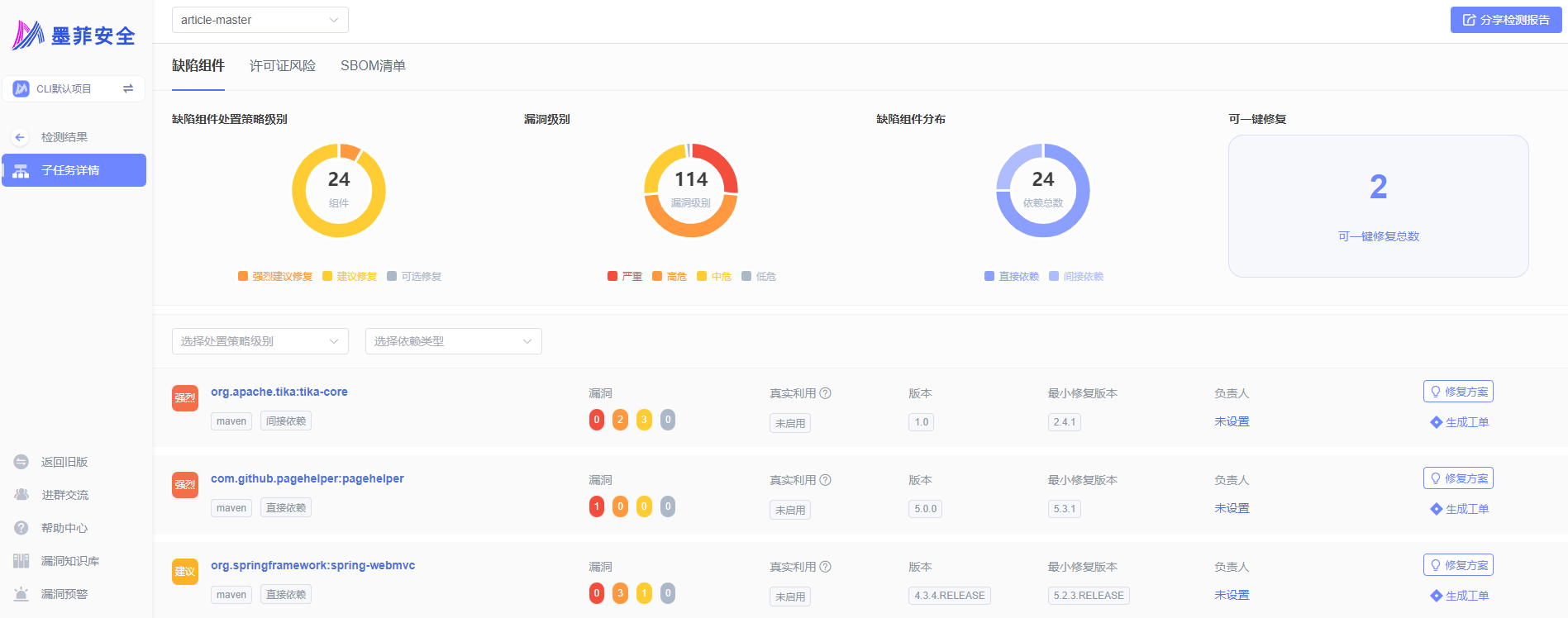
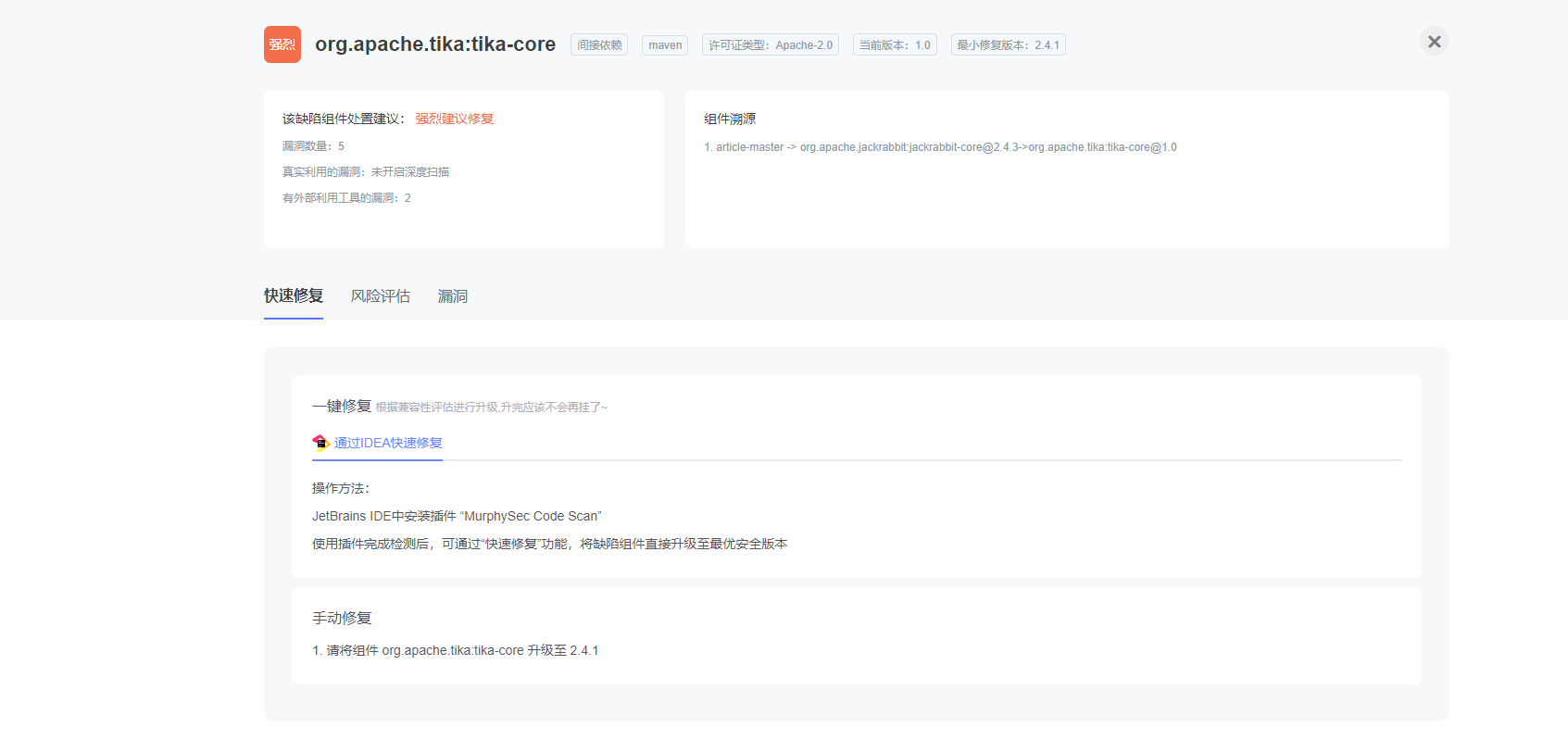
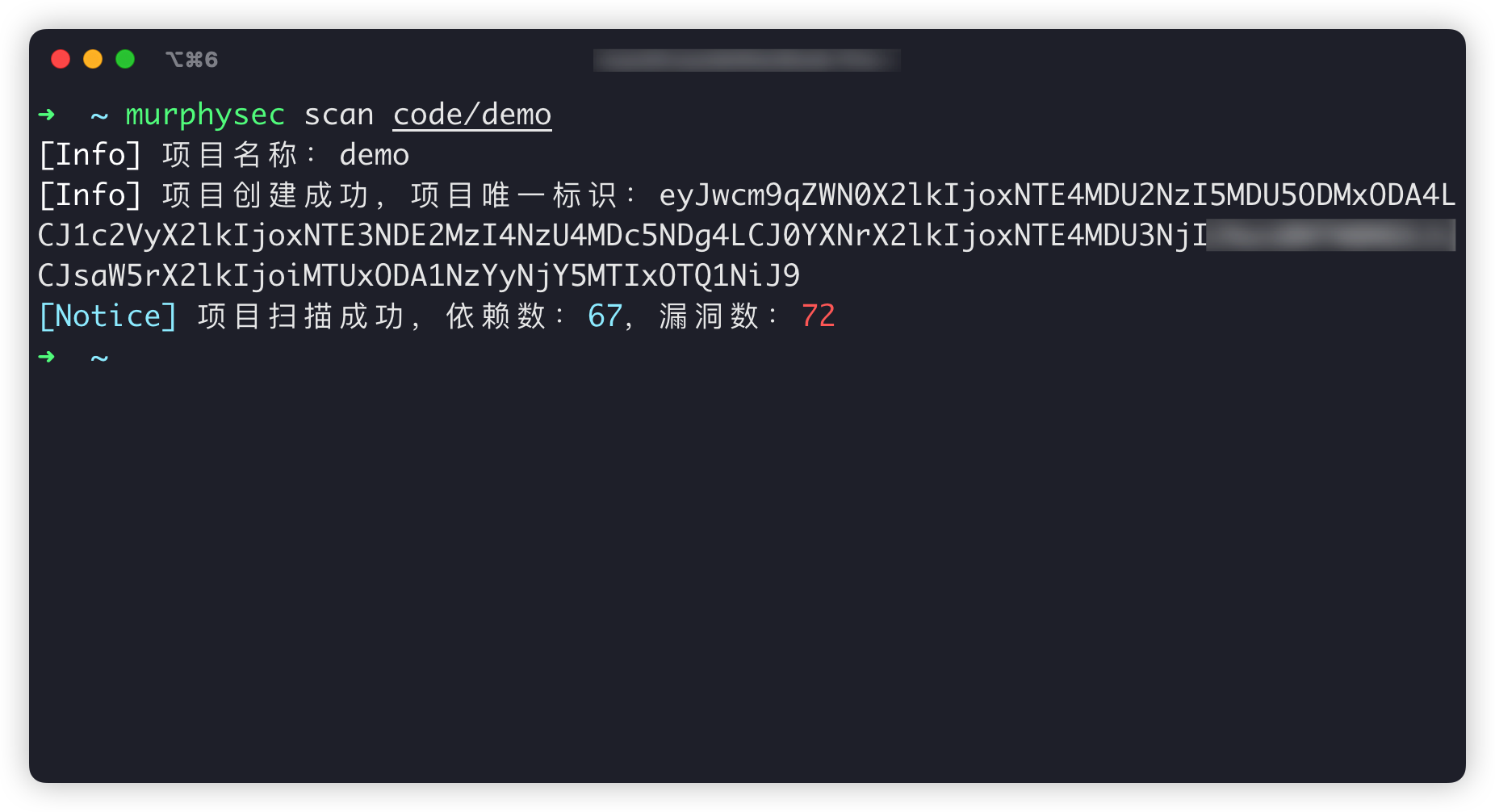 - 扫描结果页面
 ## 目录
1. [支持的编程语言](#supported-languages)
2. [工作原理](#how-it-works)
3. [应用场景](#working-scenarios)
4. [快速开始](#getting-started)
5. [命令介绍](#command-introduction)
6. [交流群](#communication)
7. [开源许可证](#license)
## 支持的编程语言
目前支持 Java、JavaScript、Golang。未来将逐步支持其他开发语言。
想了解更多关于语言支持的信息?[查看我们的文档](https://www.murphysec.com/docs/faqs/quick-start-for-beginners/programming-language-supported.html)
## 工作原理
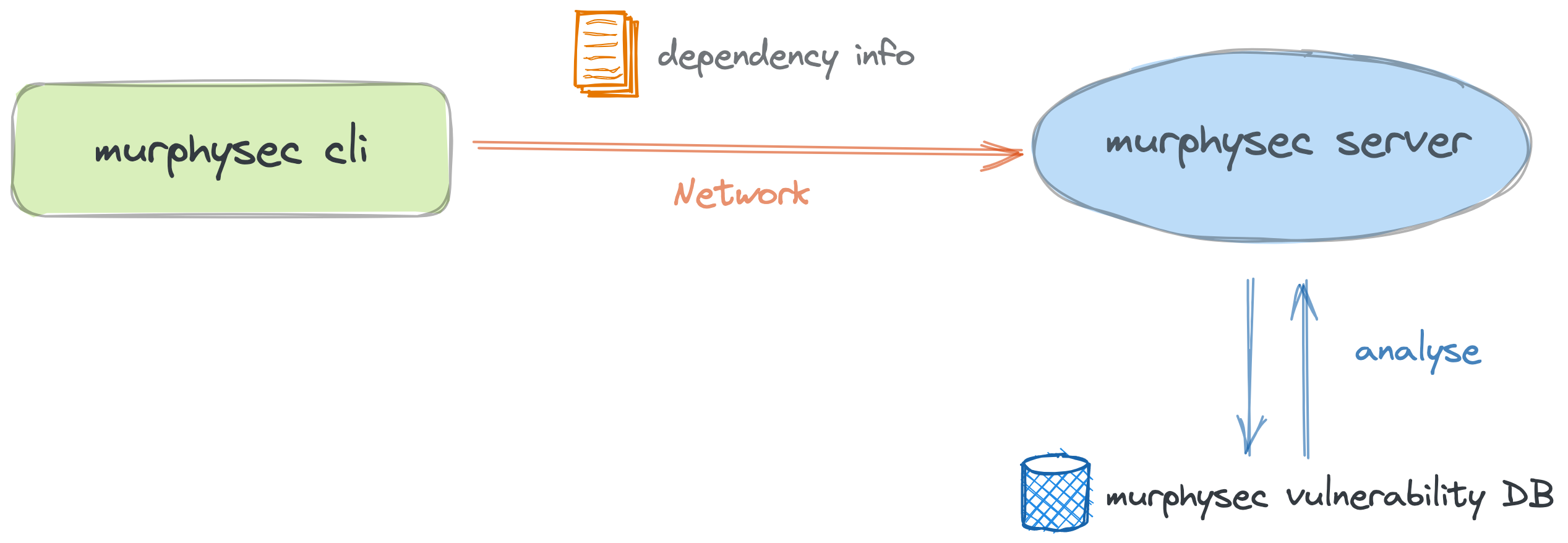
1. MurphySec CLI 主要通过构建项目或解析包管理文件来获取您项目的依赖信息。
2. 项目的依赖信息将被上传到服务器,并通过 MurphySec 维护的漏洞知识库来识别项目中存在安全问题的依赖项。
## 应用场景
1. 在本地检测代码中的安全问题
2. 在 CI/CD 流水线中检测安全问题
[了解如何在 Jenkins 中集成 MurphySec CLI](https://www.murphysec.com/docs/faqs/integration/jenkins.html)
## 快速开始
### 1. 安装 MurphySec CLI
访问 [GitHub Releases](https://github.com/murphysecurity/murphysec/releases/latest) 页面下载最新版本的 MurphySec CLI,或者通过运行以下命令进行安装:
#### Linux
```
wget -q https://s.murphysec.com/release/install.sh -O - | /bin/bash
```
#### OSX
```
curl -fsSL https://s.murphysec.com/release/install.sh | /bin/bash
```
#### WINDOWS
```
powershell -Command "iwr -useb https://s.murphysec.com/release/install.ps1 | iex"
```
### 2. 获取访问令牌
前往 [MurphySec 平台 - 访问令牌](https://www.murphysec.com/console/set/token),点击 Token 后的复制按钮,访问令牌即会被复制到剪贴板。
### 3. 认证
提供两种认证方式:`交互式认证` 和 `参数认证`
#### 交互式认证
执行 `murphysec auth login` 命令并粘贴访问令牌。
#### 参数认证
通过添加 `--token` 参数指定访问令牌进行认证
### 4. 扫描检测
使用 `murphysec scan` 命令执行检测,您可以运行以下命令。
```
murphysec scan [your-project-path]
```
可用参数
- `--token`:指定访问令牌
- `--log-level`:指定在命令行输出流中打印的日志级别,默认不打印日志,可选参数为 `silent`、`error`、`warn`、`info`、`debug`
- `--json`:指定将结果以 JSON 格式输出,默认不显示结果详情
### 5. 查看结果
MurphySec CLI 默认不显示结果详情,您可以在 [MurphySec 平台](https://www.murphysec.com/console) 中查看结果。
## 命令介绍
### murphysec auth
主要用于管理认证
```
Usage:
murphysec auth [command]
Available Commands:
login
logout
```
### murphysec scan
主要用于运行检测
```
Usage:
murphysec scan DIR [flags]
Flags:
-h, --help help for scan
--json json output
Global Flags:
--log-level string specify log level, must be silent|error|warn|info|debug
--no-log-file do not write log file
--server string specify server address
--token string specify API token
-v, --version show version and exit
--write-log-to string specify log file path
```
## 交流群
联系我们的微信公众号,我们会将您添加至交流群中。
## 目录
1. [支持的编程语言](#supported-languages)
2. [工作原理](#how-it-works)
3. [应用场景](#working-scenarios)
4. [快速开始](#getting-started)
5. [命令介绍](#command-introduction)
6. [交流群](#communication)
7. [开源许可证](#license)
## 支持的编程语言
目前支持 Java、JavaScript、Golang。未来将逐步支持其他开发语言。
想了解更多关于语言支持的信息?[查看我们的文档](https://www.murphysec.com/docs/faqs/quick-start-for-beginners/programming-language-supported.html)
## 工作原理
1. MurphySec CLI 主要通过构建项目或解析包管理文件来获取您项目的依赖信息。
2. 项目的依赖信息将被上传到服务器,并通过 MurphySec 维护的漏洞知识库来识别项目中存在安全问题的依赖项。

## 应用场景
1. 在本地检测代码中的安全问题
2. 在 CI/CD 流水线中检测安全问题
[了解如何在 Jenkins 中集成 MurphySec CLI](https://www.murphysec.com/docs/faqs/integration/jenkins.html)
## 快速开始
### 1. 安装 MurphySec CLI
访问 [GitHub Releases](https://github.com/murphysecurity/murphysec/releases/latest) 页面下载最新版本的 MurphySec CLI,或者通过运行以下命令进行安装:
#### Linux
```
wget -q https://s.murphysec.com/release/install.sh -O - | /bin/bash
```
#### OSX
```
curl -fsSL https://s.murphysec.com/release/install.sh | /bin/bash
```
#### WINDOWS
```
powershell -Command "iwr -useb https://s.murphysec.com/release/install.ps1 | iex"
```
### 2. 获取访问令牌
前往 [MurphySec 平台 - 访问令牌](https://www.murphysec.com/console/set/token),点击 Token 后的复制按钮,访问令牌即会被复制到剪贴板。
### 3. 认证
提供两种认证方式:`交互式认证` 和 `参数认证`
#### 交互式认证
执行 `murphysec auth login` 命令并粘贴访问令牌。
#### 参数认证
通过添加 `--token` 参数指定访问令牌进行认证
### 4. 扫描检测
使用 `murphysec scan` 命令执行检测,您可以运行以下命令。
```
murphysec scan [your-project-path]
```
可用参数
- `--token`:指定访问令牌
- `--log-level`:指定在命令行输出流中打印的日志级别,默认不打印日志,可选参数为 `silent`、`error`、`warn`、`info`、`debug`
- `--json`:指定将结果以 JSON 格式输出,默认不显示结果详情
### 5. 查看结果
MurphySec CLI 默认不显示结果详情,您可以在 [MurphySec 平台](https://www.murphysec.com/console) 中查看结果。
## 命令介绍
### murphysec auth
主要用于管理认证
```
Usage:
murphysec auth [command]
Available Commands:
login
logout
```
### murphysec scan
主要用于运行检测
```
Usage:
murphysec scan DIR [flags]
Flags:
-h, --help help for scan
--json json output
Global Flags:
--log-level string specify log level, must be silent|error|warn|info|debug
--no-log-file do not write log file
--server string specify server address
--token string specify API token
-v, --version show version and exit
--write-log-to string specify log file path
```
## 交流群
联系我们的微信公众号,我们会将您添加至交流群中。
 ## 开源许可证
[Apache 2.0](LICENSE)
## 开源许可证
[Apache 2.0](LICENSE)





- 扫描结果页面
## 目录
1. [支持的编程语言](#supported-languages)
2. [工作原理](#how-it-works)
3. [应用场景](#working-scenarios)
4. [快速开始](#getting-started)
5. [命令介绍](#command-introduction)
6. [交流群](#communication)
7. [开源许可证](#license)
## 支持的编程语言
目前支持 Java、JavaScript、Golang。未来将逐步支持其他开发语言。
想了解更多关于语言支持的信息?[查看我们的文档](https://www.murphysec.com/docs/faqs/quick-start-for-beginners/programming-language-supported.html)
## 工作原理
1. MurphySec CLI 主要通过构建项目或解析包管理文件来获取您项目的依赖信息。
2. 项目的依赖信息将被上传到服务器,并通过 MurphySec 维护的漏洞知识库来识别项目中存在安全问题的依赖项。

## 应用场景
1. 在本地检测代码中的安全问题
2. 在 CI/CD 流水线中检测安全问题
[了解如何在 Jenkins 中集成 MurphySec CLI](https://www.murphysec.com/docs/faqs/integration/jenkins.html)
## 快速开始
### 1. 安装 MurphySec CLI
访问 [GitHub Releases](https://github.com/murphysecurity/murphysec/releases/latest) 页面下载最新版本的 MurphySec CLI,或者通过运行以下命令进行安装:
#### Linux
```
wget -q https://s.murphysec.com/release/install.sh -O - | /bin/bash
```
#### OSX
```
curl -fsSL https://s.murphysec.com/release/install.sh | /bin/bash
```
#### WINDOWS
```
powershell -Command "iwr -useb https://s.murphysec.com/release/install.ps1 | iex"
```
### 2. 获取访问令牌
前往 [MurphySec 平台 - 访问令牌](https://www.murphysec.com/console/set/token),点击 Token 后的复制按钮,访问令牌即会被复制到剪贴板。
### 3. 认证
提供两种认证方式:`交互式认证` 和 `参数认证`
#### 交互式认证
执行 `murphysec auth login` 命令并粘贴访问令牌。
#### 参数认证
通过添加 `--token` 参数指定访问令牌进行认证
### 4. 扫描检测
使用 `murphysec scan` 命令执行检测,您可以运行以下命令。
```
murphysec scan [your-project-path]
```
可用参数
- `--token`:指定访问令牌
- `--log-level`:指定在命令行输出流中打印的日志级别,默认不打印日志,可选参数为 `silent`、`error`、`warn`、`info`、`debug`
- `--json`:指定将结果以 JSON 格式输出,默认不显示结果详情
### 5. 查看结果
MurphySec CLI 默认不显示结果详情,您可以在 [MurphySec 平台](https://www.murphysec.com/console) 中查看结果。
## 命令介绍
### murphysec auth
主要用于管理认证
```
Usage:
murphysec auth [command]
Available Commands:
login
logout
```
### murphysec scan
主要用于运行检测
```
Usage:
murphysec scan DIR [flags]
Flags:
-h, --help help for scan
--json json output
Global Flags:
--log-level string specify log level, must be silent|error|warn|info|debug
--no-log-file do not write log file
--server string specify server address
--token string specify API token
-v, --version show version and exit
--write-log-to string specify log file path
```
## 交流群
联系我们的微信公众号,我们会将您添加至交流群中。
## 开源许可证
[Apache 2.0](LICENSE)标签:CMS安全, DevSecOps, EVTX分析, Golang, JavaScript, MurphySec, WebSocket, 上游代理, 专业漏洞库, 代码安全, 依赖分析, 墨菲安全, 安全编程, 日志审计, 漏洞枚举, 网络安全, 软件供应链安全, 远程方法调用, 隐私保护