klauspost/asmfmt
GitHub: klauspost/asmfmt
Go 汇编代码自动格式化工具,类似 gofmt 但专门处理 `.s` 文件,统一汇编代码风格。
Stars: 310 | Forks: 20
# asmfmt
Go 汇编格式化工具
它会格式化你的汇编代码,就像 `gofmt` 格式化你的 Go 代码一样。
阅读介绍:[asmfmt:Go 汇编格式化工具](https://blog.klauspost.com/asmfmt-assembler-formatter/)
[](https://pkg.go.dev/klauspost/asmfmt)
[](https://github.com/klauspost/asmfmt/actions/workflows/go.yml)
查看 [示例 1](https://files.klauspost.com/diff.html)、[示例 2](https://files.klauspost.com/diff2.html)、[示例 3](https://files.klauspost.com/diff3.html),或者对比 [testdata 文件夹](https://github.com/klauspost/asmfmt/tree/master/testdata) 中的文件。
状态:稳定。除非发现 bug,否则格式不会再改变。请在 issue 区反馈任何意见。
# 安装
可以从 [Releases](https://github.com/klauspost/asmfmt/releases) 下载二进制文件。将文件解压到你的可执行文件路径下。
要使用 Go 框架从源码安装独立的格式化工具,请运行:`go install github.com/klauspost/asmfmt/cmd/asmfmt@latest`。
# 更新日志
* 2021年4月8日:添加 modules 信息,并移除除 main 以外的其他工具。
* 2021年1月6日:修复行注释之前的 C 语言风格注释,例如 `VPCMPEQB Y8/*(DI)*/, Y0, Y1 // comment...`
* 2016年8月8日:不对未缩进指令之前的注释进行缩进。
* 2016年6月10日:修复了行尾注释中包含块结尾 `/*` 部分导致的崩溃问题。
* 2016年4月14日:修复宏定义中多行注释的结尾。
* 2016年4月14日:将工具更新至 Go 1.5+
* 2015年12月21日:现在会修剪宏定义中分号前的空格。
* 2015年12月21日:修复宏定义中的行注释(仅在 Go 1.5 中有效)。
* 2015年12月17日:注释更好地与后面的部分对齐。
* 2015年12月17日:清理每行多指令情况下的分号。
# goland
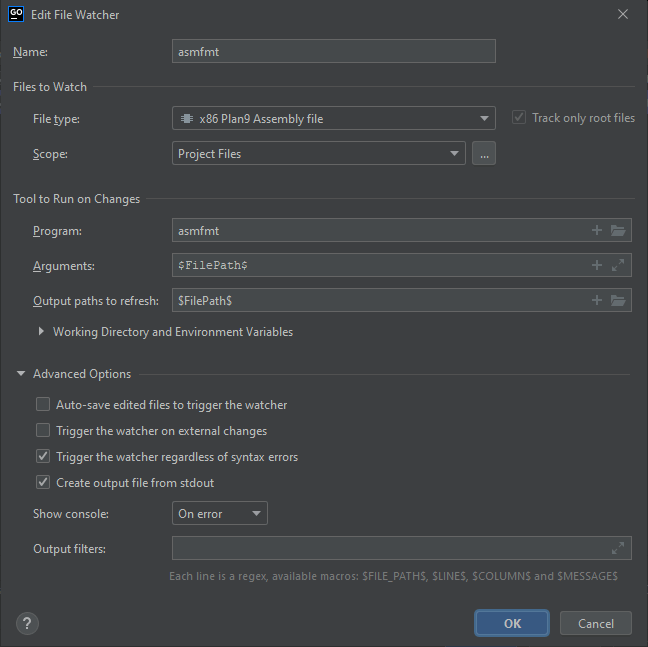
要在 Goland 中设置自定义 File Watcher,
* 进入 Settings -> Tools -> File Watchers
* 按下 **+** 并选择 `` 模板。
* 将其命名为 `asmfmt`
* File Type,选择 `x86 Plan 9 Assembly file`(这将应用于所有平台)
* Scope:`Project Files`
* Arguments:`$FilePath$`。
* Output Paths to Refresh:`$FilePath$`
* Working Directory:`$ProjectFileDir$`
高级选项,启用:
* [x] 无论是否有语法错误都触发 watcher(重要)
* [x] 从 stdout 创建输出文件
禁用其余选项。
# emacs
要自动格式化汇编代码,请在 `.emacs` 中添加:
```
(defun asm-mode-setup ()
(set (make-local-variable 'gofmt-command) "asmfmt")
(add-hook 'before-save-hook 'gofmt nil t)
)
(add-hook 'asm-mode-hook 'asm-mode-setup)
```
# 用法
`asmfmt [flags] [path ...]`
标志与 `gofmt` 类似,但它只会处理 `.s` 文件:
```
-d
Do not print reformatted sources to standard output.
If a file's formatting is different than asmfmt's, print diffs
to standard output.
-e
Print all (including spurious) errors.
-l
Do not print reformatted sources to standard output.
If a file's formatting is different from asmfmt's, print its name
to standard output.
-w
Do not print reformatted sources to standard output.
If a file's formatting is different from asmfmt's, overwrite it
with asmfmt's version.
```
你应该只对汇编文件运行 `asmfmt`。由于无法明确识别汇编文件,它会破坏非汇编文件的内容。
# 格式化
* 自动缩进。
* 使用制表符(tabs)进行缩进,使用空格(blanks)进行对齐。
* 移除行尾空格。
* 对齐第一个参数。
* 对齐块中的所有注释。
* 消除多余的连续空行。
* 移除行尾的 `;`。
* 注释前强制换行,除非前面是标签或另一条注释。
* 标签前强制换行,除非前面是注释。
* 标签位于单独的行上,注释除外。
* 保留块分隔(块之间的换行)。
* 将单行块注释转换为行注释。
* 行注释在 `//` 后有一个空格,除非注释以 `+` 开头。
* 参数之间始终有空格。
* 跟踪同一文件中的宏(Macros),并且不将其计入参数缩进。
* `TEXT`、`DATA` 和 `GLOBL`、`FUNCDATA`、`PCDATA` 以及标签使用第 0 级缩进。
* 对齐多行宏中的 `\`。
* 移除分隔符 `;` 之前的空格。如果后面跟着另一条指令,则在 `;` 之后插入空格。
标签:EVTX分析, Go, Ruby工具, SOC Prime, SSH爆破, 代码格式化, 开发工具, 快速连接, 日志审计, 汇编语言, 编译器工具链