gojue/ecapture
GitHub: gojue/ecapture
基于 eBPF 技术的 SSL/TLS 明文捕获工具,无需 CA 证书即可在 Linux/Android 上抓取加密通信内容,并支持 Bash 命令与数据库 SQL 审计。
Stars: 15266 | Forks: 1621

[简体中文](./README_CN.md) | English | [日本語](./README_JA.md)
[](https://github.com/gojue/ecapture)
[](https://github.com/gojue/ecapture)
[](https://github.com/gojue/ecapture/actions/workflows/code-analysis.yml)
[](https://github.com/gojue/ecapture/releases)
[](https://deepwiki.com/gojue/ecapture)
### eCapture(旁观者): 使用 eBPF 技术,在无需 CA 证书的情况下捕获 SSL/TLS 文本内容。
- [简介](#introduction)
- [快速开始](#getting-started)
- [下载](#download)
- [ELF 二进制文件](#elf-binary-file)
- [Docker 镜像](#docker-image)
- [捕获 openssl 文本内容](#capture-openssl-text-content)
- [模块](#modules)
- [OpenSSL 模块](#openssl-module)
- [GoTLS 模块](#gotls-module)
- [其他模块](#bash-module)
- [视频](#videos)
- [贡献](#contributing)
- [编译](#compilation)
# 简介
* SSL/TLS 明文捕获,支持 openssl\libressl\boringssl\gnutls\nspr(nss) 库。
* GoTLS 明文支持 go tls 库,指的是用 golang 语言编写的 https/tls 程序中的加密通信。
* Bash 审计,捕获 bash 命令以进行主机安全审计。
* Zsh 审计,捕获 zsh 命令以进行主机安全审计。
* MySQL 查询 SQL 审计,支持 mysqld 5.6\5.7\8.0 以及 MariaDB。
# 快速开始
## 下载
### ELF 二进制文件
下载 ELF zip 文件 [release](https://github.com/gojue/ecapture/releases) ,解压后使用命令 `sudo ecapture --help`。
### Docker 镜像
```
# 拉取 docker image
docker pull gojue/ecapture:latest
# 运行
docker run --rm --privileged=true --net=host -v ${HOST_PATH}:${CONTAINER_PATH} gojue/ecapture ARGS
```
更多信息请参阅 [Docker Hub](https://hub.docker.com/r/gojue/ecapture)。
## 捕获 openssl 文本内容。
```
sudo ecapture tls
2024-09-15T11:51:31Z INF AppName="eCapture(旁观者)"
2024-09-15T11:51:31Z INF HomePage=https://ecapture.cc
2024-09-15T11:51:31Z INF Repository=https://github.com/gojue/ecapture
2024-09-15T11:51:31Z INF Author="CFC4N
"
2024-09-15T11:51:31Z INF Description="Capturing SSL/TLS plaintext without a CA certificate using eBPF. Supported on Linux/Android kernels for amd64/arm64."
2024-09-15T11:51:31Z INF Version=linux_arm64:0.8.6-20240915-d87ae48:5.15.0-113-generic
2024-09-15T11:51:31Z INF Listen=localhost:28256
2024-09-15T11:51:31Z INF eCapture running logs logger=
2024-09-15T11:51:31Z INF the file handler that receives the captured event eventCollector=
2024-09-15T11:51:31Z INF listen=localhost:28256
2024-09-15T11:51:31Z INF https server starting...You can update the configuration file via the HTTP interface.
2024-09-15T11:51:31Z WRN ========== module starting. ==========
2024-09-15T11:51:31Z INF Kernel Info=5.15.152 Pid=233698
2024-09-15T11:51:31Z INF BTF bytecode mode: CORE. btfMode=0
2024-09-15T11:51:31Z INF master key keylogger has been set. eBPFProgramType=Text keylogger=
2024-09-15T11:51:31Z INF module initialization. isReload=false moduleName=EBPFProbeOPENSSL
2024-09-15T11:51:31Z INF Module.Run()
2024-09-15T11:51:31Z WRN OpenSSL/BoringSSL version not found from shared library file, used default version OpenSSL Version=linux_default_3_0
2024-09-15T11:51:31Z INF Hook masterKey function ElfType=2 Functions=["SSL_get_wbio","SSL_in_before","SSL_do_handshake"] binrayPath=/usr/lib/aarch64-linux-gnu/libssl.so.3
2024-09-15T11:51:31Z INF target all process.
2024-09-15T11:51:31Z INF target all users.
2024-09-15T11:51:31Z INF setupManagers eBPFProgramType=Text
2024-09-15T11:51:31Z INF BPF bytecode file is matched. bpfFileName=user/bytecode/openssl_3_0_0_kern_core.o
2024-09-15T11:51:32Z INF perfEventReader created mapSize(MB)=4
2024-09-15T11:51:32Z INF perfEventReader created mapSize(MB)=4
2024-09-15T11:51:32Z INF module started successfully. isReload=false moduleName=EBPFProbeOPENSSL
2024-09-15T11:51:53Z ??? UUID:233851_233851_curl_5_1_172.16.71.1:51837, Name:HTTP2Request, Type:2, Length:304
Frame Type => SETTINGS
Frame Type => WINDOW_UPDATE
Frame Type => HEADERS
header field ":method" = "GET"
header field ":path" = "/"
header field ":scheme" = "https"
header field ":authority" = "google.com"
header field "user-agent" = "curl/7.81.0"
header field "accept" = "*/*"
Frame Type => SETTINGS
2024-09-15T11:51:53Z ??? UUID:233851_233851_curl_5_0_172.16.71.1:51837, Name:HTTP2Response, Type:4, Length:1160
Frame Type => SETTINGS
Frame Type => WINDOW_UPDATE
Frame Type => SETTINGS
Frame Type => HEADERS
header field ":status" = "301"
header field "location" = "https://www.google.com/"
header field "content-type" = "text/html; charset=UTF-8"
header field "content-security-policy-report-only" = "object-src 'none';base-uri 'self';script-src 'nonce-qvZZ0XreBfeqRnUEV1WoYw' 'strict-dynamic' 'report-sample' 'unsafe-eval' 'unsafe-inline' https: http:;report-uri https://csp.withgoogle.com/csp/gws/other-hp"
header field "date" = "Sun, 15 Sep 2024 11:51:52 GMT"
header field "expires" = "Tue, 15 Oct 2024 11:51:52 GMT"
header field "cache-control" = "public, max-age=2592000"
header field "server" = "gws"
header field "content-length" = "220"
header field "x-xss-protection" = "0"
header field "x-frame-options" = "SAMEORIGIN"
header field "alt-svc" = "h3=\":443\"; ma=2592000,h3-29=\":443\"; ma=2592000"
Frame Type => PING
Frame Type => DATA
301 Moved
301 Moved
The document has moved
here.
```
## 模块
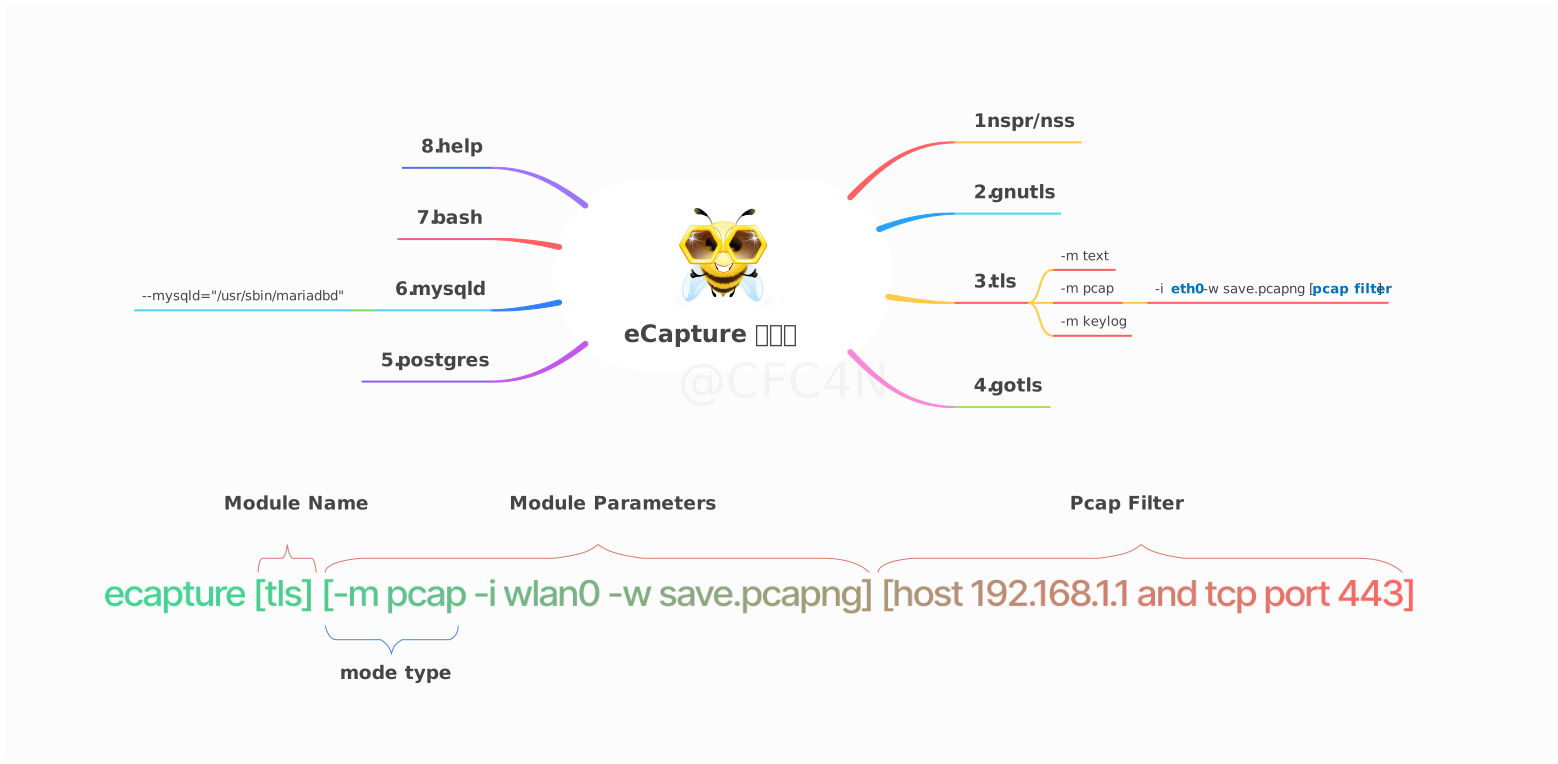
eCapture 工具包含 8 个模块,分别支持 OpenSSL, GnuTLS, NSPR, BoringSSL 和 GoTLS 等 TLS/SSL 加密库的明文捕获。此外,它还协助对 Bash, MySQL 和 PostgreSQL 应用程序进行审计。
* bash 捕获 bash 命令
* zsh 捕获 zsh 命令
* gnutls 捕获 gnutls 库的文本内容,无需 CA 证书。
* gotls 捕获使用 TLS/HTTPS 加密的 Golang 程序的明文通信。
* mysqld 捕获 mysqld 5.6/5.7/8.0 的 SQL 查询。
* nss 捕获 nss/nspr 库的加密文本内容,无需 CA 证书。
* postgres 捕获 postgres 10+ 的 SQL 查询。
* tls 用于在无 CA 证书的情况下捕获 tls/ssl 文本内容。(支持 openssl 1.0.x/1.1.x/3.0.x 或更新版本)。
您可以使用 `ecapture -h` 查看子命令列表。
### OpenSSL 模块
eCapture 默认搜索 `/etc/ld.so.conf` 文件,以查找 `SO` 文件的加载目录,并搜索 `openssl` 共享库的位置。或者您可以使用 `--libssl` 标志来设置共享库路径。
如果目标程序是静态编译的,您可以直接将程序路径设置为 `--libssl` 标志值。
OpenSSL 模块支持三种捕获模式:
- `pcap`/`pcapng` 模式将捕获的明文数据存储为 `pcap-NG` 格式。
- `keylog`/`key` 模式将 TLS 握手密钥保存到文件中。
- `text` 模式直接捕获明文数据,要么输出到指定文件,要么打印到命令行。
#### Pcap 模式
支持基于 TCP 的 TLS 加密 http `1.0/1.1/2.0`,以及基于 UDP 的 http3 `QUIC` 协议。
您可以指定 `-m pcap` 或 `-m pcapng`,并结合 `--pcapfile` 和 `-i` 参数使用。`--pcapfile` 的默认值为 `ecapture_openssl.pcapng`。
```
sudo ecapture tls -m pcap -i eth0 --pcapfile=ecapture.pcapng tcp port 443
```
此命令将捕获的明文数据包保存为 pcapng 文件,可以使用 `Wireshark` 查看。
```
sudo ecapture tls -m pcap -w ecap.pcapng -i ens160
2024-09-15T06:54:12Z INF AppName="eCapture(旁观者)"
2024-09-15T06:54:12Z INF HomePage=https://ecapture.cc
2024-09-15T06:54:12Z INF Repository=https://github.com/gojue/ecapture
2024-09-15T06:54:12Z INF Author="CFC4N "
2024-09-15T06:54:12Z INF Description="Capturing SSL/TLS plaintext without a CA certificate using eBPF. Supported on Linux/Android kernels for amd64/arm64."
2024-09-15T06:54:12Z INF Version=linux_arm64:0.8.6-20240915-d87ae48:5.15.0-113-generic
2024-09-15T06:54:12Z INF Listen=localhost:28256
2024-09-15T06:54:12Z INF eCapture running logs logger=
2024-09-15T06:54:12Z INF the file handler that receives the captured event eventCollector=
2024-09-15T06:54:12Z WRN ========== module starting. ==========
2024-09-15T06:54:12Z INF Kernel Info=5.15.152 Pid=230440
2024-09-15T06:54:12Z INF BTF bytecode mode: CORE. btfMode=0
2024-09-15T06:54:12Z INF listen=localhost:28256
2024-09-15T06:54:12Z INF module initialization. isReload=false moduleName=EBPFProbeOPENSSL
2024-09-15T06:54:12Z INF Module.Run()
2024-09-15T06:54:12Z INF https server starting...You can update the configuration file via the HTTP interface.
2024-09-15T06:54:12Z WRN OpenSSL/BoringSSL version not found from shared library file, used default version OpenSSL Version=linux_default_3_0
2024-09-15T06:54:12Z INF HOOK type:Openssl elf ElfType=2 IFindex=2 IFname=ens160 PcapFilter= binrayPath=/usr/lib/aarch64-linux-gnu/libssl.so.3
2024-09-15T06:54:12Z INF Hook masterKey function Functions=["SSL_get_wbio","SSL_in_before","SSL_do_handshake"]
2024-09-15T06:54:12Z INF target all process.
2024-09-15T06:54:12Z INF target all users.
2024-09-15T06:54:12Z INF setupManagers eBPFProgramType=PcapNG
2024-09-15T06:54:12Z INF BPF bytecode file is matched. bpfFileName=user/bytecode/openssl_3_0_0_kern_core.o
2024-09-15T06:54:12Z INF packets saved into pcapng file. pcapng path=/home/ecapture/ecap.pcapng
2024-09-15T06:54:12Z INF perfEventReader created mapSize(MB)=4
2024-09-15T06:54:12Z INF perfEventReader created mapSize(MB)=4
2024-09-15T06:54:12Z INF module started successfully. isReload=false moduleName=EBPFProbeOPENSSL
2024-09-15T06:54:14Z INF packets saved into pcapng file. count=4
2024-09-15T06:54:16Z INF non-TLSv1.3 cipher suite found CLientRandom=f08e8d784962d1693c042f9fe266345507ccfaba58b823904a357f30dbfa1e71 CipherId=0
2024-09-15T06:54:16Z INF non-TLSv1.3 cipher suite found CLientRandom=f08e8d784962d1693c042f9fe266345507ccfaba58b823904a357f30dbfa1e71 CipherId=0
2024-09-15T06:54:16Z INF packets saved into pcapng file. count=183
2024-09-15T06:54:16Z INF CLIENT_RANDOM save success CLientRandom=f08e8d784962d1693c042f9fe266345507ccfaba58b823904a357f30dbfa1e71 TlsVersion=TLS1_2_VERSION bytes=176
2024-09-15T06:54:18Z INF packets saved into pcapng file. count=65
^C2024-09-15T06:54:18Z INF module close.
2024-09-15T06:54:18Z INF packets saved into pcapng file. count=3
2024-09-15T06:54:18Z INF packets saved into pcapng file. count=255
2024-09-15T06:54:18Z INF Module closed,message recived from Context
2024-09-15T06:54:18Z INF iModule module close
2024-09-15T06:54:18Z INF bye bye.
```
使用 `Wireshark` 打开 `ecap.pcapng` 文件以查看明文数据包。
#### Keylog 模式
您可以指定 `-m keylog` 或 `-m key`,并结合 `--keylogfile` 参数使用,该参数默认为 `ecapture_masterkey.log`。
捕获的 OpenSSL TLS `Master Secret` 信息将保存到 `--keylogfile`。您也可以同时开启 `tcpdump` 抓包,然后使用 `Wireshark` 打开文件并设置 `Master Secret` 路径来查看明文数据包。
```
sudo ecapture tls -m keylog -keylogfile=openssl_keylog.log
```
您也可以直接使用 `tshark` 软件进行实时解密和显示:
```
tshark -o tls.keylog_file:ecapture_masterkey.log -Y http -T fields -e http.file_data -f "port 443" -i eth0
```
#### Text 模式
`sudo ecapture tls -m text` 将输出所有明文数据包。(从 v0.7.0 版本开始,不再捕获 SSLKEYLOG 信息。)
### GoTLS 模块
类似于 OpenSSL 模块。
#### gotls 命令
捕获 tls 文本内容。
步骤 1:
```
sudo ecapture gotls --elfpath=/home/cfc4n/go_https_client --hex
```
步骤 2:
```
/home/cfc4n/go_https_client
```
#### 更多帮助
```
sudo ecapture gotls -h
```
### 其他模块
例如 `bash\mysqld\postgres` 模块,您可以使用 `ecapture -h` 查看子命令列表。
## 视频
* Youtube 视频:[如何使用 eCapture v0.1.0](https://www.youtube.com/watch?v=CoDIjEQCvvA "eCapture User Manual")
* [eCapture:支持捕获 Golang TLS/HTTPS 流量的明文](https://medium.com/@cfc4ncs/ecapture-supports-capturing-plaintext-of-golang-tls-https-traffic-f16874048269)
## eCaptureQ GUI 应用程序
[eCaptureQ](https://github.com/gojue/ecaptureq) 是 eCapture 的跨平台图形用户界面客户端,
可视化 eBPF TLS 捕获
能力。采用 Rust + Tauri + React 技术栈构建,提供了实时、响应式的界面,
无需 CA 证书即可轻松分析加密流量。它简化了复杂的 eBPF 捕获
技术,使其易于使用。支持两种模式:
* 集成模式:统一的 Linux/Android 执行
* 远程模式:Windows/macOS/Linux 客户端连接到远程 eCapture 服务
### 事件转发
[事件转发项目](./EVENT_FORWARD.md)
### 视频演示
https://github.com/user-attachments/assets/c8b7a84d-58eb-4fdb-9843-f775c97bdbfb
🔗 [GitHub 仓库](https://github.com/gojue/ecaptureq)
### Protobuf 协议
关于 eCapture/eCaptureQ 使用的 Protobuf 日志架构详情,请参阅:
- [protobuf/PROTOCOLS.md](./protobuf/PROTOCOLS.md)
# 编译
## 自定义编译
您可以自定义所需的功能,例如设置 `uprobe` 的偏移地址以支持静态编译的 OpenSSL 库。编译说明请参考 [COMPILATION](./COMPILATION.md) 介绍。
## 配置远程更新
eCapture 运行后,您可以通过 HTTP 接口动态修改配置。详情请参考 [HTTP API 文档](./docs/remote-config-update-api.md)。
## 事件转发
eCapture 支持多种事件转发方法。您可以将事件转发到诸如 Burp Suite 之类的抓包软件。详情请参考 [事件转发 API 文档](./docs/event-forward-api.md)。
## 致谢
本项目获得了 [JetBrains IDE](https://www.jetbrains.com) 许可证的支持。我们感谢 JetBrains 对
开源社区的贡献。
标签:Bash 命令记录, DevSecOps, Docker镜像, eCapture, GoTLS, HTTP工具, HTTP 明文, IP 地址批量处理, Linux 内核监控, MySQL 审计, openssl, SSL/TLS 解密, Zsh 审计, 上游代理, 内核级钩子, 安全渗透, 安卓安全, 客户端加密, 客户端加密, 数据捕获, 无 CA 证书, 日志审计, 流量抓包, 网络安全, 请求拦截, 防御绕过, 隐私保护