isaaclyman/novel-word-count-obsidian
GitHub: isaaclyman/novel-word-count-obsidian
Obsidian 插件,实时在文件侧边栏显示字数、阅读时长等多维统计。
Stars: 143 | Forks: 14
# Obsidian 的 Novel Word Count
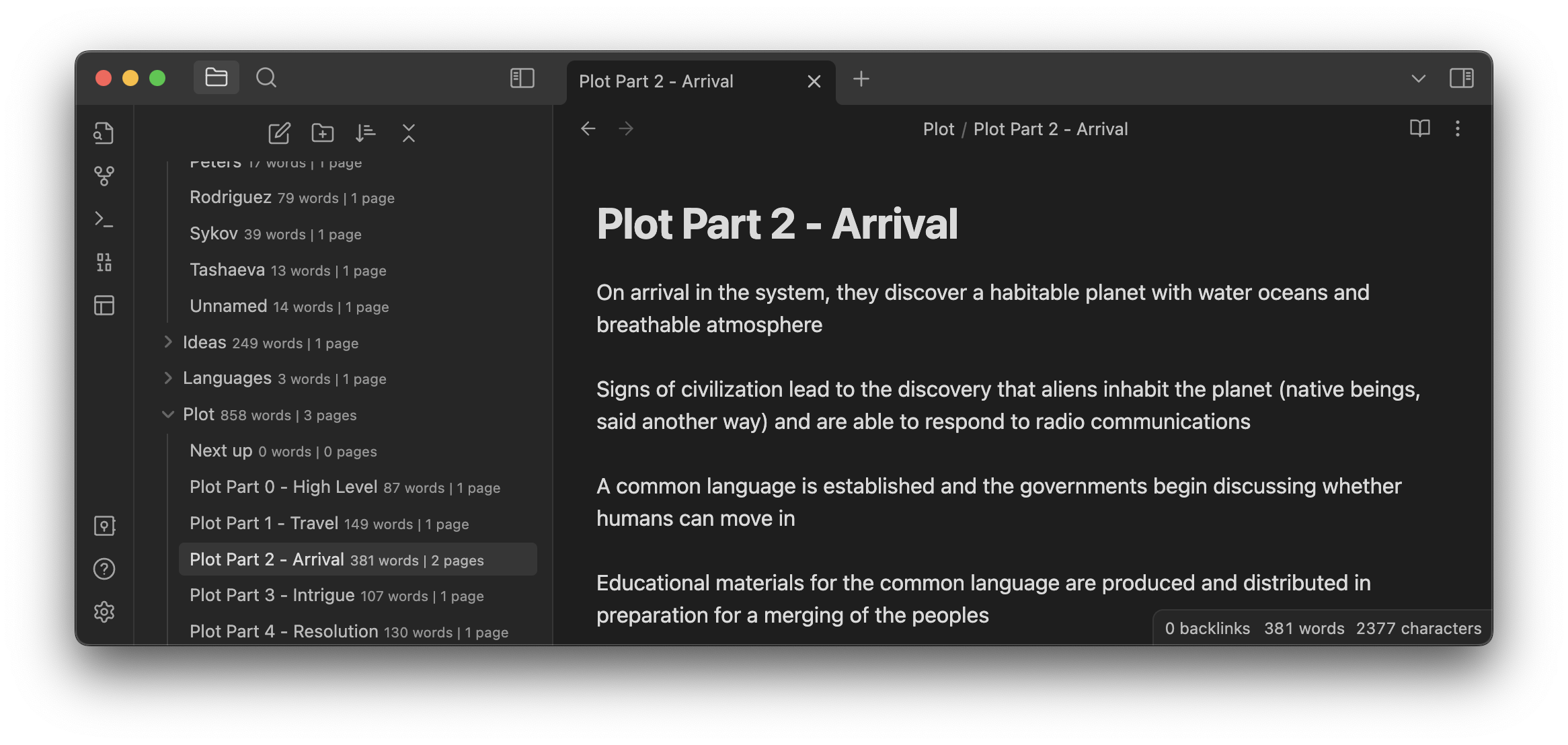
此插件会在文件浏览器窗格中每个文件、文件夹和库的旁边显示您选择的统计数据。它会在您写作时实时更新。
### 设置
**要显示的数据。** 您可以选择最多三种数据类型并排显示。可从以下选项中进行选择:
| 数据类型 | 描述 | 备注 |
| --------- | ----------- | ----- |
| **字数统计** | 总字数。 | 默认情况下,“字词”是任何非空白字符序列。要更改此设置,请参阅高级 > 字数统计方法。 |
| **页数统计** | 总页数,向上取整。 | 默认情况下,一页为 300 字。要更改此设置,请参阅高级 > 页数统计方法。 |
| **页数统计(小数)** | 总页数,精确到小数点后 2 位。 | 适用于页数统计的任何设置也适用于页数统计(小数)。 |
| **阅读时间** | 阅读每条笔记的估计时间。 | 默认情况下,此计算标准为每分钟 265 字(欧洲语言)或每分钟 500 字符(CJK)。要更改此设置,请参阅高级 > 每分钟字数/每分钟字符数。 |
| **% 字数目标** | 每条笔记字数目标的百分比。 | 请参阅下方的[*设置目标*](#setting-goals)。 |
| **字符数统计** | 总字符数(字母、符号和数字)。 | 默认情况下包含空白字符。要更改此设置,请参阅高级 > 字符数统计方法。 |
| **笔记数量** | 总笔记数。 | 许多人更喜欢仅在文件夹上显示此信息;为此,请关闭“在文件夹上显示相同数据”并将其配置为文件夹的数据类型。 |
| **换行数** | 总行数。 | 按换行符或 Markdown 代码行数计算;不等于您在书中计算行数的方式。 |
| **链接数量** | 指向其他笔记的[链接](https://help.obsidian.md/Getting+started/Link+notes)总数。 | 仅计算内部链接;Obsidian 不计算指向网页的链接。 |
| **嵌入数量** | [嵌入](https://help.obsidian.md/Linking+notes+and+files/Embedding+files)的图像、文件和笔记总数。 | |
| **首个别名** | 每条笔记的第一个[别名](https://help.obsidian.md/Linking+notes+and+files/Aliases)。 | 如果笔记没有别名,则不显示任何内容。由于文件夹没有别名,因此它们也不显示任何内容。 |
| **创建日期** | 笔记创建的日期。 | 在文件夹上,这会显示该文件夹中所有笔记的最早创建日期。 |
| **最后更新日期** | 笔记最后一次更新的日期。 | 在文件夹上,这会显示该文件夹中所有笔记的最新编辑日期。 |
| **文件大小** | 硬盘上的总大小。 | |
| **Frontmatter 键** | 笔记 [Properties](https://help.obsidian.md/Editing+and+formatting/Properties) 中的任何指定键。 | 此数据类型没有自动前缀、后缀、缩写或格式化。您可以按照自己喜欢的格式排版 frontmatter,或者[考虑使用插件](https://obsidian.md/plugins?search=frontmatter)来生成它。 |
**缩写描述。** 启用此选项可显示缩短的计数:
| 完整描述 | 缩写 |
| ---------------- | ----------- |
| 3,250 words | 3,250w |
| 30 pages | 30p |
| 45% of 2,000 | 45% |
| 23,800 characters | 23,800ch |
| 12 notes | 12n |
| 18 lines | 18¶ |
| 25s read | 25s |
| 5m read | 5m |
| 2h5m read | 2h5m |
| 3 links | 3x |
| 5 embeds | 5em |
| alias: july +3 | july |
| Created 1/22/2022 | 1/22/2022/c |
| Updated 1/22/2022 | 1/22/2022/u |
| 13.39 KB | 13.39kb |
*注意:* 通过启用“使用高级格式”开关,您可以为大多数计数类型设置自己的后缀(或完全隐藏后缀)。
**对齐方式。** 选择相对于文件/文件夹名称显示数据的位置:内联、右对齐或下方。所有对齐方式均与原生 Obsidian 配合良好,但内联方式与自定义主题和插件的兼容性最佳。
**文件夹:与笔记数据相同。** 默认情况下,笔记和文件夹上会显示相同的数据类型。您可以关闭此设置,以选择仅在文件夹上显示的不同数据类型。
**根目录:与笔记数据相同。** 默认情况下,笔记和库本身会显示相同的数据类型。您可以关闭此设置,以选择仅在库上显示的不同数据类型。
**标签透明度。** 默认情况下,计数数据以 0.75 的透明度值(即 25% 透明)显示。您可以分别调高或调低此值,以使文件浏览器中的标签更加可见或更不可见。
**包含文件/文件夹名称。** 仅计算路径与指定词汇匹配的笔记文本。此设置区分大小写,并以逗号分隔。任何以 `!` 开头的词汇将被_排除_而非包含。必须至少匹配到一个文件,否则该设置将被忽略。_例如:_ 如果您将其设置为 `Included, CountMe`,它将匹配名为 `Included`、`Included Folder`、`CountMe Please`、`My Included CountMe` 等的文件夹,以及名为 `Included.md`、`CountMe Note.md` 等的笔记,但_不_匹配名为 `included`、`countme` 或 `somethingelse` 的文件夹或笔记。如果您的库中没有包含 `Included` 或 `CountMe` 词汇的文件夹或笔记,该设置将被忽略,并计算所有笔记。如果您将其设置为 `!Excluded, CountMe`,它将匹配包含词汇 `CountMe` 的文件夹和文件,_除非_它们的路径中也包含词汇 `Excluded`。
**排除注释。** 从字符数、字数和页数中排除任何被 `%%` [注释标记](https://help.obsidian.md/Editing+and+formatting/Basic+formatting+syntax#Comments) `%%` 或 `` 包围的内容。这可能会降低在超大笔记或库中的性能。
**排除代码块。** 从字符数、字数和页数中排除任何被 `` ``` `` 反引号包围的内容。包含 DataView 片段。这可能会降低在超大笔记或库中的性能。
**排除链接的不可见部分。** (从所有计数中)排除您在阅读视图中看不到的任何链接部分。对于外部链接(例如 `[see example](https://uri)`),这将排除 URI。对于具有别名的内部链接(例如 `[[note name|alias]]`),这将排除笔记名称。
**字符数统计方法。** 选择是计算所有字符还是排除空白字符(空格和换行符)。
**字数统计方法。** _此设置已被移除。_ 在最新版本的插件中,空格分隔和 CJK 计数已合并。任何语言的笔记都应能正确计数,包括混合语言笔记。
**页数统计方法。** 选择是按字数(默认:300)还是字符数(默认:1500)来计算页数。您可以更改所使用的字数/字符数。
**每分钟字数/CJK 每分钟字符数。** 设置每分钟的字数(默认:265)和 CJK 字符数(默认:500)。阅读时间的计算方式为 \[字数除以每分钟字数\] 加上 \[CJK 字符数除以每分钟字符数\]。
**每页字数/每页字符数。** 根据所选的 _页数统计方法_,设置每页的字数或字符数。
**重新分析所有文档。** 触发对库中所有文档的重新计数。如果您在 Obsidian 之外进行了更改,此功能非常有用。(此命令可绑定快捷键。)
**Debug 模式。** 向开发者控制台启用调试输出,如果您需要报告问题,这可能会有所帮助。
### 设置目标
要为笔记设置字数目标,请添加 `word-goal` 属性:
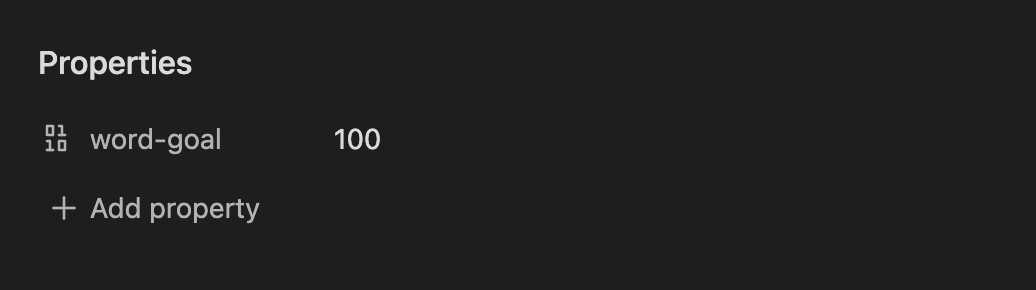 不允许使用逗号分隔符——该值只能包含数字。
在文件夹上,_所有设置了目标的笔记_的总字数将与所有字数目标的总和进行比较。
### 排除笔记
要将笔记从所有计数中排除(_除了_笔记数量、创建日期、最后更新日期和文件大小),请将 `exclude-from-word-count` [标签](https://help.obsidian.md/Editing+and+formatting/Tags)添加到 [properties](https://help.obsidian.md/Editing+and+formatting/Properties) 中。
不允许使用逗号分隔符——该值只能包含数字。
在文件夹上,_所有设置了目标的笔记_的总字数将与所有字数目标的总和进行比较。
### 排除笔记
要将笔记从所有计数中排除(_除了_笔记数量、创建日期、最后更新日期和文件大小),请将 `exclude-from-word-count` [标签](https://help.obsidian.md/Editing+and+formatting/Tags)添加到 [properties](https://help.obsidian.md/Editing+and+formatting/Properties) 中。
 (插件可以识别任何大小写、带或不带连字符/下划线的标签,因此您可以遵循自己喜欢的标签语法,例如 `ExcludeFromWordCount`、`Exclude_from_word_count` 等。)
或者,您可以将 `wordcount` 属性设置为 `false`。此属性必须始终为小写,且不能包含连字符或下划线。
有关包含/排除某些笔记的另一种方法,请参阅“包含文件/文件夹名称”的设置说明。
(插件可以识别任何大小写、带或不带连字符/下划线的标签,因此您可以遵循自己喜欢的标签语法,例如 `ExcludeFromWordCount`、`Exclude_from_word_count` 等。)
或者,您可以将 `wordcount` 属性设置为 `false`。此属性必须始终为小写,且不能包含连字符或下划线。
有关包含/排除某些笔记的另一种方法,请参阅“包含文件/文件夹名称”的设置说明。
 ### 安全性
Novel Word Count 完全兼容 Obsidian 1.4+。
此插件将您的库视为只读。它从不修改、删除或重命名任何文件或文件夹。它使用所有文件的缓存读取来提高性能。
Obsidian 的 API 不提供对文件浏览器窗格的契约式访问,因此此插件使用 duck typing 来查找它。这从技术上讲是无文档记录的,因此 Obsidian 的重大更新有可能会暂时导致错误。如果且当这种情况发生时,此插件被设计为优雅地失败。在这种不太可能发生的情况下,您可能希望禁用该插件,直到它被更新。
此插件对文件浏览器 DOM 的影响极其微小,仅包含一个自定义 HTML 属性和一些 CSS 规则。样式修改仅在插件开启时生效。
Novel Word Count 不会通过 Internet 传输任何数据。所有数据均存储在本地。
### 安装插件
在社区插件浏览器中搜索“novel word count”,或使用[此链接](https://obsidian.md/plugins?id=novel-word-count)。
## 面向开发者
### 开发设置
- Clone 此 repo。
- `npm i` 或 `yarn` 安装依赖。
- `npm run dev` 以在 watch 模式下启动编译。
- `npm run dev-style` 以在 watch 模式下启动样式表编译。
### 创建新版本
- 运行 `npm run build` 以确保 main.js 和 styles.css 是最新的。
- Commit 更改。
- 运行 `npm version {major|minor|patch}` 更新 manifest 和 package.json。
- 将 commit Push 到远程。
- 在 GitHub 上创建新的 release 和 tag,两者均以版本号命名,例如 `2.4.1`,不带“v”。附加文件 main.js、styles.css 和 manifest.json。
### 在本地运行插件
访问 [Releases 页面](https://github.com/isaaclyman/novel-word-count-obsidian/releases)。将 `main.js`、`styles.css` 和 `manifest.json` 下载到您的库的 `VaultFolder/.obsidian/plugins/novel-word-count/` 目录下。
### 安全性
Novel Word Count 完全兼容 Obsidian 1.4+。
此插件将您的库视为只读。它从不修改、删除或重命名任何文件或文件夹。它使用所有文件的缓存读取来提高性能。
Obsidian 的 API 不提供对文件浏览器窗格的契约式访问,因此此插件使用 duck typing 来查找它。这从技术上讲是无文档记录的,因此 Obsidian 的重大更新有可能会暂时导致错误。如果且当这种情况发生时,此插件被设计为优雅地失败。在这种不太可能发生的情况下,您可能希望禁用该插件,直到它被更新。
此插件对文件浏览器 DOM 的影响极其微小,仅包含一个自定义 HTML 属性和一些 CSS 规则。样式修改仅在插件开启时生效。
Novel Word Count 不会通过 Internet 传输任何数据。所有数据均存储在本地。
### 安装插件
在社区插件浏览器中搜索“novel word count”,或使用[此链接](https://obsidian.md/plugins?id=novel-word-count)。
## 面向开发者
### 开发设置
- Clone 此 repo。
- `npm i` 或 `yarn` 安装依赖。
- `npm run dev` 以在 watch 模式下启动编译。
- `npm run dev-style` 以在 watch 模式下启动样式表编译。
### 创建新版本
- 运行 `npm run build` 以确保 main.js 和 styles.css 是最新的。
- Commit 更改。
- 运行 `npm version {major|minor|patch}` 更新 manifest 和 package.json。
- 将 commit Push 到远程。
- 在 GitHub 上创建新的 release 和 tag,两者均以版本号命名,例如 `2.4.1`,不带“v”。附加文件 main.js、styles.css 和 manifest.json。
### 在本地运行插件
访问 [Releases 页面](https://github.com/isaaclyman/novel-word-count-obsidian/releases)。将 `main.js`、`styles.css` 和 `manifest.json` 下载到您的库的 `VaultFolder/.obsidian/plugins/novel-word-count/` 目录下。
不允许使用逗号分隔符——该值只能包含数字。
在文件夹上,_所有设置了目标的笔记_的总字数将与所有字数目标的总和进行比较。
### 排除笔记
要将笔记从所有计数中排除(_除了_笔记数量、创建日期、最后更新日期和文件大小),请将 `exclude-from-word-count` [标签](https://help.obsidian.md/Editing+and+formatting/Tags)添加到 [properties](https://help.obsidian.md/Editing+and+formatting/Properties) 中。
(插件可以识别任何大小写、带或不带连字符/下划线的标签,因此您可以遵循自己喜欢的标签语法,例如 `ExcludeFromWordCount`、`Exclude_from_word_count` 等。)
或者,您可以将 `wordcount` 属性设置为 `false`。此属性必须始终为小写,且不能包含连字符或下划线。
有关包含/排除某些笔记的另一种方法,请参阅“包含文件/文件夹名称”的设置说明。
### 安全性
Novel Word Count 完全兼容 Obsidian 1.4+。
此插件将您的库视为只读。它从不修改、删除或重命名任何文件或文件夹。它使用所有文件的缓存读取来提高性能。
Obsidian 的 API 不提供对文件浏览器窗格的契约式访问,因此此插件使用 duck typing 来查找它。这从技术上讲是无文档记录的,因此 Obsidian 的重大更新有可能会暂时导致错误。如果且当这种情况发生时,此插件被设计为优雅地失败。在这种不太可能发生的情况下,您可能希望禁用该插件,直到它被更新。
此插件对文件浏览器 DOM 的影响极其微小,仅包含一个自定义 HTML 属性和一些 CSS 规则。样式修改仅在插件开启时生效。
Novel Word Count 不会通过 Internet 传输任何数据。所有数据均存储在本地。
### 安装插件
在社区插件浏览器中搜索“novel word count”,或使用[此链接](https://obsidian.md/plugins?id=novel-word-count)。
## 面向开发者
### 开发设置
- Clone 此 repo。
- `npm i` 或 `yarn` 安装依赖。
- `npm run dev` 以在 watch 模式下启动编译。
- `npm run dev-style` 以在 watch 模式下启动样式表编译。
### 创建新版本
- 运行 `npm run build` 以确保 main.js 和 styles.css 是最新的。
- Commit 更改。
- 运行 `npm version {major|minor|patch}` 更新 manifest 和 package.json。
- 将 commit Push 到远程。
- 在 GitHub 上创建新的 release 和 tag,两者均以版本号命名,例如 `2.4.1`,不带“v”。附加文件 main.js、styles.css 和 manifest.json。
### 在本地运行插件
访问 [Releases 页面](https://github.com/isaaclyman/novel-word-count-obsidian/releases)。将 `main.js`、`styles.css` 和 `manifest.json` 下载到您的库的 `VaultFolder/.obsidian/plugins/novel-word-count/` 目录下。标签:Obsidian插件, 写作辅助, 字数统计, 效率工具, 笔记统计, 自动化攻击