nbauma109/ecd
GitHub: nbauma109/ecd
一款增强型 Eclipse 反编译插件,集成多个主流 Java 反编译器,支持无源码 class 文件的直接调试和源码自动附加。
Stars: 15 | Forks: 2
[](https://github.com/nbauma109/ecd/network/updates)
[](https://jitpack.io/#nbauma109/ecd)
[](https://jitci.com/gh/nbauma109/ecd)
[](https://github.com/nbauma109/ecd/actions/workflows/codeql-analysis.yml)
[](https://github.com/nbauma109/ecd/actions/workflows/update-version.yml)
[](https://github.com/nbauma109/ecd/actions/workflows/release.yml)
[](https://app.codecov.io/gh/nbauma109/ecd)
[](https://sonarcloud.io/summary/new_code?id=nbauma109_ecd)
Github 发布版的下载量:
[]()
[]()
Jitpack 的下载量:
[](https://jitpack.io/#nbauma109/ecd)
[](https://jitpack.io/#nbauma109/ecd)
 Sourceforge 的下载量:
[](https://sourceforge.net/projects/ecdfork/files/latest/download)
[](https://sourceforge.net/projects/ecdfork/files/latest/download)
[](https://sourceforge.net/projects/ecdfork/files/latest/download)
[](https://sourceforge.net/projects/ecdfork/files/latest/download)
[](https://sourceforge.net/projects/ecdfork/files/latest/download)
Eclipse Marketplace 的下载量:
[](https://marketplace.eclipse.org/content/ecd-fork-enhanced-class-decompiler)
[](https://marketplace.eclipse.org/content/ecd-fork-enhanced-class-decompiler)
[](https://marketplace.eclipse.org/content/ecd-fork-enhanced-class-decompiler)
[](https://marketplace.eclipse.org/content/ecd-fork-enhanced-class-decompiler)
[](https://marketplace.eclipse.org/content/ecd-fork-enhanced-class-decompiler)
Sourceforge 的下载量:
[](https://sourceforge.net/projects/ecdfork/files/latest/download)
[](https://sourceforge.net/projects/ecdfork/files/latest/download)
[](https://sourceforge.net/projects/ecdfork/files/latest/download)
[](https://sourceforge.net/projects/ecdfork/files/latest/download)
[](https://sourceforge.net/projects/ecdfork/files/latest/download)
Eclipse Marketplace 的下载量:
[](https://marketplace.eclipse.org/content/ecd-fork-enhanced-class-decompiler)
[](https://marketplace.eclipse.org/content/ecd-fork-enhanced-class-decompiler)
[](https://marketplace.eclipse.org/content/ecd-fork-enhanced-class-decompiler)
[](https://marketplace.eclipse.org/content/ecd-fork-enhanced-class-decompiler)
[](https://marketplace.eclipse.org/content/ecd-fork-enhanced-class-decompiler)
 # ECD++ - Enhanced Class Decompiler 的分支 ([ECD](https://github.com/ecd-plugin/ecd))
ECD++ 集成了由 [transformer-api](https://github.com/nbauma109/transformer-api) 提供的多个反编译器:
- Fernflower
- Vineflower(Fernflower 的分支)
- Procyon
- CFR
- JD-Core V0 和 V1
- JADX
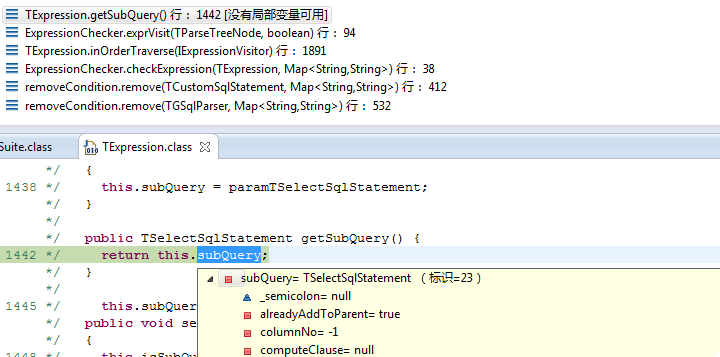
它还允许 Java 开发者**直接调试没有源代码的 class 文件**。与原始的 [ECD](https://github.com/cpupk/ecd) 相反,它使用 [jd-util](https://github.com/nbauma109/jd-util) 的 [JAVACC](https://javacc.github.io/javacc/) 解析器将反编译代码解析为其自有模型,并利用其代码展示技术栈来重新对齐代码。它还与 Eclipse 类编辑器、m2e 插件集成,支持 **Javadoc**、**引用搜索**、**库源码附加**,以及 JDK8 **lambda** 表达式语法。
## 描述
ECD++ - Enhanced Class Decompiler 的分支是 Eclipse 平台的一个插件。它将多个反编译器与 Eclipse 无缝集成,允许您在调试过程中显示所有的 Java 源码,即使您并没有全部源码,您也可以直接调试这些没有源代码的 class 文件。
## 为什么创建分支?
* 兼容最新版本的 Eclipse 优先于向后兼容:上游项目旨在支持所有版本的 Eclipse,在我看来这是无法维护的([2b13e85](https://github.com/ecd-plugin/ecd/commit/2b13e856e0e557b155d658e5077c05efa8218e9c)、[b518dd3](https://github.com/ecd-plugin/ecd/commit/b518dd30c4a045621f7a7e8c3b38ebedefb4cd09)、[f2b6022](https://github.com/ecd-plugin/ecd/commit/f2b6022063dec1b4e15d9ddc7a31524240da1481)、[8538745](https://github.com/ecd-plugin/ecd/commit/8538745e48485482bb8e0abc3fecc00f62527ca0)、[8b47e95](https://github.com/ecd-plugin/ecd/commit/8b47e959916c337991c8ff4fe4637538df339565))
* 使用反编译器的分支版本:我需要这种自由来提供错误修复,因为一些反编译器已经不再维护,或者极少维护(另见此[为什么创建分支?](https://github.com/nbauma109/procyon/tree/master?tab=readme-ov-file#why-a-fork-)部分)
* 源码附加插件附带了一些增强功能(见下文),但它已在上游项目中被移除([#103](https://github.com/ecd-plugin/ecd/issues/103)、[5a9a574](https://github.com/ecd-plugin/ecd/commit/5a9a5747159e43fe07c0f8b9ad2698bd3acad2fa))
* 损坏的“显示字节码”和“显示反汇编程序”功能已被移除(在 Eclipse 的菜单 `Window -> Show View -> Bytecode` 中原生提供了字节码视图),但在上游项目中仍然存在
* 上游项目中进行的一些重大重构使得变基几乎变得不可能,这不仅是因为冲突,还因为回归的风险([e3d0e4e](https://github.com/ecd-plugin/ecd/commit/e3d0e4e29035807b6ce5bb46bf8607d9cd5162f6)、[94a317a](https://github.com/ecd-plugin/ecd/commit/94a317aa4bcc9300befe3bc9a3ffd8924b1a9075)、[6c3710c](https://github.com/ecd-plugin/ecd/commit/6c3710c4333d01bd45c70aa42e3c2fae15f0f250))
* 分支项目拥有其自身的治理方式、重大更改(例如引入 [transformer-api](https://github.com/nbauma109/transformer-api))以及自己的发布节奏
## 为什么这个插件是“增强的”?
这是一个无广告的 Eclipse Decompiler 插件分支。因此,我们通过移除所有可能损害您隐私或安全的代码来增强它(据我们所知)。
## 如何安装 ECD++?
_如果您目前安装了“Eclipse” Class Decompiler,建议先卸载该插件,并从您的 Eclipse 安装中移除相应的更新站点。_
使用以下选项之一进行安装:
### 通过 Eclipse Marketplace 安装
在 Eclipse 中,点击 _"Help > Eclipse Marketplace..."_,搜索并安装 ecd++
### 通过更新站点 URL 安装
1. 启动 _Eclipse_,
2. 点击 _"Help > Install New Software..."_,
3. 使用更新站点 URL https://nbauma109.github.io/ecd/updates/latest/
4. 勾选要安装的组件,
5. 点击“Next”和“Finish”按钮。
6. 因为插件未签名,会出现一个警告对话框。点击“Install anyway”按钮。
### 拖放安装:
1. 启动 _Eclipse_,
2. 点击 _"Help > Install New Software..."_,
3. 拖放 enhanced-class-decompiler-x.y.z.zip 文件
4. 勾选要安装的组件,
5. 点击“Next”和“Finish”按钮。
6. 因为插件未签名,会出现一个警告对话框。点击“Install anyway”按钮。
/!\ 在某些企业环境中,拖放操作会被阻止。在这种情况下,在 _"Help > Install New Software..."_ 中,点击 _"Add.."_,然后点击 _"Archive.."_ 以选择 enhanced-class-decompiler-x.y.z.zip
## 如何检查文件关联?
1. 点击 _"Window > Preferences > General > Editors > File Associations"_
2. _"*.class"_:默认选中 _"Class Decompiler Viewer"_。
3. _"*.class without source"_:默认选中 _"Class Decompiler Viewer"_。
## 如何配置 ECD++?
1. 点击 _"Window > Preferences > Java > Decompiler"_
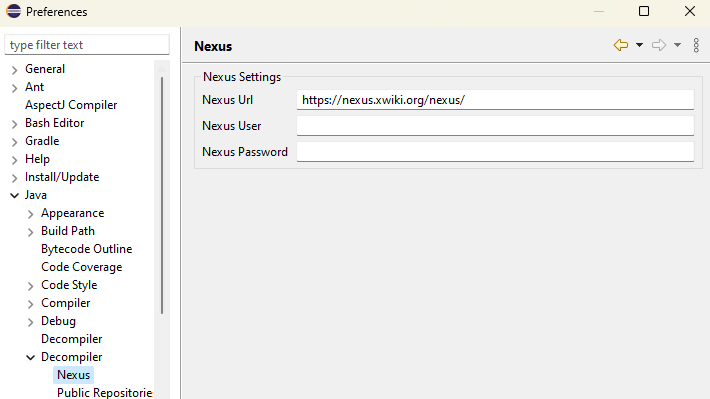
源码附加:
您可以配置带有凭据(用户名/密码)的私有 Nexus 仓库,以自动下载并附加源码:
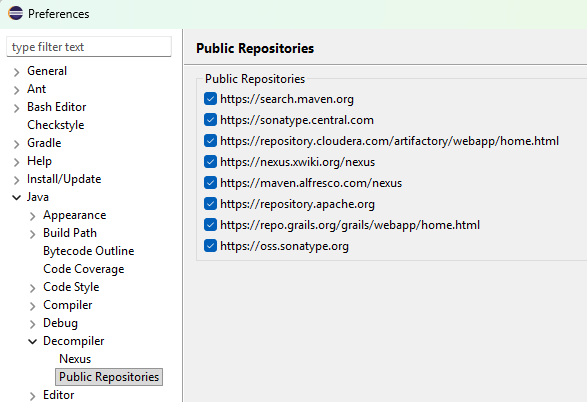
您可以从可用的公共仓库列表中进行选择:
您可以使用此选项“Wait for sources to be downloaded before trying to decompile”,以避免对已有源码的代码进行反编译。
还可以列出在找不到源码时排除源码查找的包。
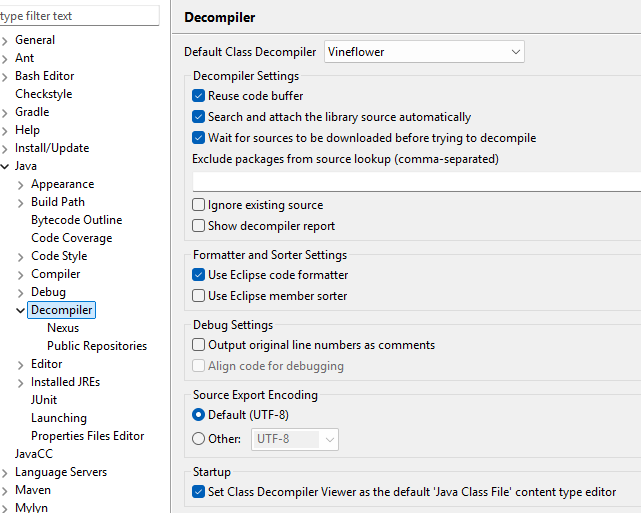
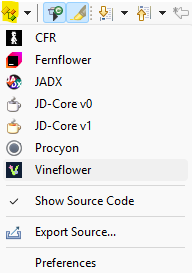
在 class 文件仍处于打开状态时,使用此图标切换反编译器。一旦文件关闭并重新打开,源码就会被缓存,此时将无法再切换反编译器。
## 功能特性
### 导出源码
您可以使用“导出源码”操作将反编译后的源代码导出到文件中。此功能提供两种使用方式:
- 从工具栏:在查看反编译的 class 文件时,点击编辑器工具栏中的  `Export Source...` 图标。
- 从上下文菜单:在 Package Explorer 或 Project Explorer 中右键点击 Java 类、包或 JAR 文件,然后选择“Export Source”。
导出的源文件将使用配置的编码保存(请参阅首选项设置)。
### 标记出现位置
通过点击工具栏中的  `Toggle Mark Occurrences` 图标,可以切换在反编译代码中高亮显示当前所选标识符的所有出现位置。这有助于您快速识别变量、方法或类在整个反编译源码中的使用位置。
### 面包屑导航
通过点击工具栏中的  `Toggle Breadcrumb` 图标,可以启用或禁用面包屑导航。面包屑显示当前代码位置(包、类、方法)的结构路径,并允许在代码层次结构中进行快速导航。
### 打开类文件
在 Package Explorer 或 Project Explorer 中右键点击任何 Java 类文件,然后选择“Open Class With”,以选择用于打开该 class 文件的特定反编译器。这允许您比较不同反编译器对同一个类的输出结果。
### GitHub 项目主页
通过点击工具栏中的  `Project Home Page` 图标,可以直接从 Eclipse 访问该项目的 GitHub 仓库。这提供了对文档、问题和更新的快速访问。
### 附加库源码
自动下载源代码并附加到库的 JAR 文件。在 Package Explorer 或 Project Explorer 中右键点击任何 JAR 文件或类,然后选择  `Attach Library Source`,以从配置的仓库下载相应的源代码。
此功能可与私有 Nexus 仓库(通过凭据配置)和公共仓库(Maven Central、Sonatype、JitPack 等)集成,以查找并附加合适的源文件。
### 显示源码
使用编辑器上下文菜单或反编译器菜单中的“Show Source Code”选项,在查看反编译代码和原始源代码(如果可用)之间进行切换。这允许您在不关闭和重新打开文件的情况下快速切换视图。
### 反编译器选择
通过工具栏中的反编译器下拉菜单访问所有可用反编译器的完整列表。您可以从 Fernflower、Vineflower、Procyon、CFR、JD-Core V0、JD-Core V1 和 JADX 中进行选择。每个反编译器可能会产生不同的输出,因此您可以选择最适合您需求的那个。
### 切换断点
通过点击编辑器左侧边距(标尺)直接在反编译代码中设置和移除断点。这使您能够调试没有源代码的 class 文件,反编译器会在反编译代码和实际字节码之间提供必要的映射。
### JVM 指令文档
通过导航到“Help > Help Contents > JVM Instruction Reference”访问全面的 JVM 指令参考文档。此内置文档提供了有关所有 JVM 操作码和字节码指令的详细信息,有助于在分析反编译代码或理解字节码行为时提供参考。
### 键盘快捷键
在处理反编译的 class 文件时,可使用以下键盘快捷键:
- **Ctrl+Alt+,** - 触发反编译
- **Ctrl+Alt+.** - 切换调试模式
## 如何卸载 ECD++?
1. 点击 _"Help > About Eclipse > Installation Details > Installation Software"_,
2. 选择 _"ECD++"_,
3. 点击 _"Uninstall..."_。
## 如何从源码构建?
要求:JDK 21(确保 `JAVA_HOME` 环境变量指向合适的 JDK)
如果您想测试此插件的最新功能,您必须从源码构建它。为此,请按以下步骤操作:
1. `git clone https://github.com/nbauma109/ecd`
2. 在 Linux 上使用 ./build.sh 或在 Windows 上使用 build.bat 进行构建
如果您想使用 Eclipse 并协助开发,请继续执行以下操作3. 安装 _Eclipse for RCP and RAP Developers_
4. 通过选择 _File_ > _Import_ > _General_ > _Existing Projects into Workspace_ > _Next_ 并输入克隆目录的父目录作为“root directory”,将所有项目导入 Eclipse。
## 许可证
主插件采用 [GPL 3](https://www.gnu.org/licenses/gpl-3.0-standalone.html) 许可,其他功能插件采用 [Eclipse Public License v1.0](https://www.eclipse.org/legal/epl-v10.html) 许可。
代码部分基于:
* JD-Eclipse:版权所有 Emmanuel Dupuy,[GPL 3](https://www.gnu.org/licenses/gpl-3.0-standalone.html)
* Java Source Attacher:版权所有 Thai Ha,[Apache License V2.0](https://www.apache.org/licenses/LICENSE-2.0.html)
使用的库:
* Apache commons:版权所有 (c) Apache Software Foundation,[Apache License V2.0](https://www.apache.org/licenses/LICENSE-2.0.html)
* Fernflower:版权所有 (c) JetBrains,[Apache License V2.0](https://www.apache.org/licenses/LICENSE-2.0.html)
* Minimal JSON:版权所有 (c) 2013, 2014 EclipseSource,[MIT License](https://opensource.org/licenses/MIT)
* CFR:版权所有 Lee Benfield,[MIT License](https://opensource.org/licenses/MIT)
* Procyon:版权所有 Mike Strobel,[Apache License V2.0](https://www.apache.org/licenses/LICENSE-2.0.html)
* Nexus Indexer:[Apache License V2.0](https://www.apache.org/licenses/LICENSE-2.0.html)
* Nexus Restlet1x Model:[Eclipse Public License v1.0](https://www.eclipse.org/legal/epl-v10.html)
* Plexus Utils:版权所有 The Codehaus Foundation,[Apache License V2.0](https://www.apache.org/licenses/LICENSE-2.0.html)
* JD-Core:版权所有 Emmanuel Dupuy,[GPL 3](https://www.gnu.org/licenses/gpl-3.0-standalone.html)
* Vineflower:[Apache License V2.0](https://www.apache.org/licenses/LICENSE-2.0.html)
## 贡献者
* Chen Chao (cnfree2000@hotmail.com) - 初始 API 和实现
* Robert Zenz
* Pascal Bihler
* Nick Lombard
* Jan Peter Stotz
* Nicolas Baumann (@nbauma109)
# ECD++ - Enhanced Class Decompiler 的分支 ([ECD](https://github.com/ecd-plugin/ecd))
ECD++ 集成了由 [transformer-api](https://github.com/nbauma109/transformer-api) 提供的多个反编译器:
- Fernflower
- Vineflower(Fernflower 的分支)
- Procyon
- CFR
- JD-Core V0 和 V1
- JADX
它还允许 Java 开发者**直接调试没有源代码的 class 文件**。与原始的 [ECD](https://github.com/cpupk/ecd) 相反,它使用 [jd-util](https://github.com/nbauma109/jd-util) 的 [JAVACC](https://javacc.github.io/javacc/) 解析器将反编译代码解析为其自有模型,并利用其代码展示技术栈来重新对齐代码。它还与 Eclipse 类编辑器、m2e 插件集成,支持 **Javadoc**、**引用搜索**、**库源码附加**,以及 JDK8 **lambda** 表达式语法。

## 描述
ECD++ - Enhanced Class Decompiler 的分支是 Eclipse 平台的一个插件。它将多个反编译器与 Eclipse 无缝集成,允许您在调试过程中显示所有的 Java 源码,即使您并没有全部源码,您也可以直接调试这些没有源代码的 class 文件。
## 为什么创建分支?
* 兼容最新版本的 Eclipse 优先于向后兼容:上游项目旨在支持所有版本的 Eclipse,在我看来这是无法维护的([2b13e85](https://github.com/ecd-plugin/ecd/commit/2b13e856e0e557b155d658e5077c05efa8218e9c)、[b518dd3](https://github.com/ecd-plugin/ecd/commit/b518dd30c4a045621f7a7e8c3b38ebedefb4cd09)、[f2b6022](https://github.com/ecd-plugin/ecd/commit/f2b6022063dec1b4e15d9ddc7a31524240da1481)、[8538745](https://github.com/ecd-plugin/ecd/commit/8538745e48485482bb8e0abc3fecc00f62527ca0)、[8b47e95](https://github.com/ecd-plugin/ecd/commit/8b47e959916c337991c8ff4fe4637538df339565))
* 使用反编译器的分支版本:我需要这种自由来提供错误修复,因为一些反编译器已经不再维护,或者极少维护(另见此[为什么创建分支?](https://github.com/nbauma109/procyon/tree/master?tab=readme-ov-file#why-a-fork-)部分)
* 源码附加插件附带了一些增强功能(见下文),但它已在上游项目中被移除([#103](https://github.com/ecd-plugin/ecd/issues/103)、[5a9a574](https://github.com/ecd-plugin/ecd/commit/5a9a5747159e43fe07c0f8b9ad2698bd3acad2fa))
* 损坏的“显示字节码”和“显示反汇编程序”功能已被移除(在 Eclipse 的菜单 `Window -> Show View -> Bytecode` 中原生提供了字节码视图),但在上游项目中仍然存在
* 上游项目中进行的一些重大重构使得变基几乎变得不可能,这不仅是因为冲突,还因为回归的风险([e3d0e4e](https://github.com/ecd-plugin/ecd/commit/e3d0e4e29035807b6ce5bb46bf8607d9cd5162f6)、[94a317a](https://github.com/ecd-plugin/ecd/commit/94a317aa4bcc9300befe3bc9a3ffd8924b1a9075)、[6c3710c](https://github.com/ecd-plugin/ecd/commit/6c3710c4333d01bd45c70aa42e3c2fae15f0f250))
* 分支项目拥有其自身的治理方式、重大更改(例如引入 [transformer-api](https://github.com/nbauma109/transformer-api))以及自己的发布节奏
## 为什么这个插件是“增强的”?
这是一个无广告的 Eclipse Decompiler 插件分支。因此,我们通过移除所有可能损害您隐私或安全的代码来增强它(据我们所知)。
## 如何安装 ECD++?
_如果您目前安装了“Eclipse” Class Decompiler,建议先卸载该插件,并从您的 Eclipse 安装中移除相应的更新站点。_
使用以下选项之一进行安装:
### 通过 Eclipse Marketplace 安装
在 Eclipse 中,点击 _"Help > Eclipse Marketplace..."_,搜索并安装 ecd++
### 通过更新站点 URL 安装
1. 启动 _Eclipse_,
2. 点击 _"Help > Install New Software..."_,
3. 使用更新站点 URL https://nbauma109.github.io/ecd/updates/latest/
4. 勾选要安装的组件,
5. 点击“Next”和“Finish”按钮。
6. 因为插件未签名,会出现一个警告对话框。点击“Install anyway”按钮。
### 拖放安装:
1. 启动 _Eclipse_,
2. 点击 _"Help > Install New Software..."_,
3. 拖放 enhanced-class-decompiler-x.y.z.zip 文件
4. 勾选要安装的组件,
5. 点击“Next”和“Finish”按钮。
6. 因为插件未签名,会出现一个警告对话框。点击“Install anyway”按钮。
/!\ 在某些企业环境中,拖放操作会被阻止。在这种情况下,在 _"Help > Install New Software..."_ 中,点击 _"Add.."_,然后点击 _"Archive.."_ 以选择 enhanced-class-decompiler-x.y.z.zip
## 如何检查文件关联?
1. 点击 _"Window > Preferences > General > Editors > File Associations"_
2. _"*.class"_:默认选中 _"Class Decompiler Viewer"_。
3. _"*.class without source"_:默认选中 _"Class Decompiler Viewer"_。
## 如何配置 ECD++?
1. 点击 _"Window > Preferences > Java > Decompiler"_
源码附加:
您可以配置带有凭据(用户名/密码)的私有 Nexus 仓库,以自动下载并附加源码:

您可以从可用的公共仓库列表中进行选择:

您可以使用此选项“Wait for sources to be downloaded before trying to decompile”,以避免对已有源码的代码进行反编译。
还可以列出在找不到源码时排除源码查找的包。

在 class 文件仍处于打开状态时,使用此图标切换反编译器。一旦文件关闭并重新打开,源码就会被缓存,此时将无法再切换反编译器。

## 功能特性
### 导出源码
您可以使用“导出源码”操作将反编译后的源代码导出到文件中。此功能提供两种使用方式:
- 从工具栏:在查看反编译的 class 文件时,点击编辑器工具栏中的  `Export Source...` 图标。
- 从上下文菜单:在 Package Explorer 或 Project Explorer 中右键点击 Java 类、包或 JAR 文件,然后选择“Export Source”。
导出的源文件将使用配置的编码保存(请参阅首选项设置)。
### 标记出现位置
通过点击工具栏中的  `Toggle Mark Occurrences` 图标,可以切换在反编译代码中高亮显示当前所选标识符的所有出现位置。这有助于您快速识别变量、方法或类在整个反编译源码中的使用位置。
### 面包屑导航
通过点击工具栏中的  `Toggle Breadcrumb` 图标,可以启用或禁用面包屑导航。面包屑显示当前代码位置(包、类、方法)的结构路径,并允许在代码层次结构中进行快速导航。
### 打开类文件
在 Package Explorer 或 Project Explorer 中右键点击任何 Java 类文件,然后选择“Open Class With”,以选择用于打开该 class 文件的特定反编译器。这允许您比较不同反编译器对同一个类的输出结果。
### GitHub 项目主页
通过点击工具栏中的  `Project Home Page` 图标,可以直接从 Eclipse 访问该项目的 GitHub 仓库。这提供了对文档、问题和更新的快速访问。
### 附加库源码
自动下载源代码并附加到库的 JAR 文件。在 Package Explorer 或 Project Explorer 中右键点击任何 JAR 文件或类,然后选择  `Attach Library Source`,以从配置的仓库下载相应的源代码。
此功能可与私有 Nexus 仓库(通过凭据配置)和公共仓库(Maven Central、Sonatype、JitPack 等)集成,以查找并附加合适的源文件。
### 显示源码
使用编辑器上下文菜单或反编译器菜单中的“Show Source Code”选项,在查看反编译代码和原始源代码(如果可用)之间进行切换。这允许您在不关闭和重新打开文件的情况下快速切换视图。
### 反编译器选择
通过工具栏中的反编译器下拉菜单访问所有可用反编译器的完整列表。您可以从 Fernflower、Vineflower、Procyon、CFR、JD-Core V0、JD-Core V1 和 JADX 中进行选择。每个反编译器可能会产生不同的输出,因此您可以选择最适合您需求的那个。
### 切换断点
通过点击编辑器左侧边距(标尺)直接在反编译代码中设置和移除断点。这使您能够调试没有源代码的 class 文件,反编译器会在反编译代码和实际字节码之间提供必要的映射。
### JVM 指令文档
通过导航到“Help > Help Contents > JVM Instruction Reference”访问全面的 JVM 指令参考文档。此内置文档提供了有关所有 JVM 操作码和字节码指令的详细信息,有助于在分析反编译代码或理解字节码行为时提供参考。
### 键盘快捷键
在处理反编译的 class 文件时,可使用以下键盘快捷键:
- **Ctrl+Alt+,** - 触发反编译
- **Ctrl+Alt+.** - 切换调试模式
## 如何卸载 ECD++?
1. 点击 _"Help > About Eclipse > Installation Details > Installation Software"_,
2. 选择 _"ECD++"_,
3. 点击 _"Uninstall..."_。
## 如何从源码构建?
要求:JDK 21(确保 `JAVA_HOME` 环境变量指向合适的 JDK)
如果您想测试此插件的最新功能,您必须从源码构建它。为此,请按以下步骤操作:
1. `git clone https://github.com/nbauma109/ecd`
2. 在 Linux 上使用 ./build.sh 或在 Windows 上使用 build.bat 进行构建
如果您想使用 Eclipse 并协助开发,请继续执行以下操作3. 安装 _Eclipse for RCP and RAP Developers_
4. 通过选择 _File_ > _Import_ > _General_ > _Existing Projects into Workspace_ > _Next_ 并输入克隆目录的父目录作为“root directory”,将所有项目导入 Eclipse。
## 许可证
主插件采用 [GPL 3](https://www.gnu.org/licenses/gpl-3.0-standalone.html) 许可,其他功能插件采用 [Eclipse Public License v1.0](https://www.eclipse.org/legal/epl-v10.html) 许可。
代码部分基于:
* JD-Eclipse:版权所有 Emmanuel Dupuy,[GPL 3](https://www.gnu.org/licenses/gpl-3.0-standalone.html)
* Java Source Attacher:版权所有 Thai Ha,[Apache License V2.0](https://www.apache.org/licenses/LICENSE-2.0.html)
使用的库:
* Apache commons:版权所有 (c) Apache Software Foundation,[Apache License V2.0](https://www.apache.org/licenses/LICENSE-2.0.html)
* Fernflower:版权所有 (c) JetBrains,[Apache License V2.0](https://www.apache.org/licenses/LICENSE-2.0.html)
* Minimal JSON:版权所有 (c) 2013, 2014 EclipseSource,[MIT License](https://opensource.org/licenses/MIT)
* CFR:版权所有 Lee Benfield,[MIT License](https://opensource.org/licenses/MIT)
* Procyon:版权所有 Mike Strobel,[Apache License V2.0](https://www.apache.org/licenses/LICENSE-2.0.html)
* Nexus Indexer:[Apache License V2.0](https://www.apache.org/licenses/LICENSE-2.0.html)
* Nexus Restlet1x Model:[Eclipse Public License v1.0](https://www.eclipse.org/legal/epl-v10.html)
* Plexus Utils:版权所有 The Codehaus Foundation,[Apache License V2.0](https://www.apache.org/licenses/LICENSE-2.0.html)
* JD-Core:版权所有 Emmanuel Dupuy,[GPL 3](https://www.gnu.org/licenses/gpl-3.0-standalone.html)
* Vineflower:[Apache License V2.0](https://www.apache.org/licenses/LICENSE-2.0.html)
## 贡献者
* Chen Chao (cnfree2000@hotmail.com) - 初始 API 和实现
* Robert Zenz
* Pascal Bihler
* Nick Lombard
* Jan Peter Stotz
* Nicolas Baumann (@nbauma109)
Sourceforge 的下载量:
[](https://sourceforge.net/projects/ecdfork/files/latest/download)
[](https://sourceforge.net/projects/ecdfork/files/latest/download)
[](https://sourceforge.net/projects/ecdfork/files/latest/download)
[](https://sourceforge.net/projects/ecdfork/files/latest/download)
[](https://sourceforge.net/projects/ecdfork/files/latest/download)
Eclipse Marketplace 的下载量:
[](https://marketplace.eclipse.org/content/ecd-fork-enhanced-class-decompiler)
[](https://marketplace.eclipse.org/content/ecd-fork-enhanced-class-decompiler)
[](https://marketplace.eclipse.org/content/ecd-fork-enhanced-class-decompiler)
[](https://marketplace.eclipse.org/content/ecd-fork-enhanced-class-decompiler)
[](https://marketplace.eclipse.org/content/ecd-fork-enhanced-class-decompiler)
# ECD++ - Enhanced Class Decompiler 的分支 ([ECD](https://github.com/ecd-plugin/ecd))
ECD++ 集成了由 [transformer-api](https://github.com/nbauma109/transformer-api) 提供的多个反编译器:
- Fernflower
- Vineflower(Fernflower 的分支)
- Procyon
- CFR
- JD-Core V0 和 V1
- JADX
它还允许 Java 开发者**直接调试没有源代码的 class 文件**。与原始的 [ECD](https://github.com/cpupk/ecd) 相反,它使用 [jd-util](https://github.com/nbauma109/jd-util) 的 [JAVACC](https://javacc.github.io/javacc/) 解析器将反编译代码解析为其自有模型,并利用其代码展示技术栈来重新对齐代码。它还与 Eclipse 类编辑器、m2e 插件集成,支持 **Javadoc**、**引用搜索**、**库源码附加**,以及 JDK8 **lambda** 表达式语法。

## 描述
ECD++ - Enhanced Class Decompiler 的分支是 Eclipse 平台的一个插件。它将多个反编译器与 Eclipse 无缝集成,允许您在调试过程中显示所有的 Java 源码,即使您并没有全部源码,您也可以直接调试这些没有源代码的 class 文件。
## 为什么创建分支?
* 兼容最新版本的 Eclipse 优先于向后兼容:上游项目旨在支持所有版本的 Eclipse,在我看来这是无法维护的([2b13e85](https://github.com/ecd-plugin/ecd/commit/2b13e856e0e557b155d658e5077c05efa8218e9c)、[b518dd3](https://github.com/ecd-plugin/ecd/commit/b518dd30c4a045621f7a7e8c3b38ebedefb4cd09)、[f2b6022](https://github.com/ecd-plugin/ecd/commit/f2b6022063dec1b4e15d9ddc7a31524240da1481)、[8538745](https://github.com/ecd-plugin/ecd/commit/8538745e48485482bb8e0abc3fecc00f62527ca0)、[8b47e95](https://github.com/ecd-plugin/ecd/commit/8b47e959916c337991c8ff4fe4637538df339565))
* 使用反编译器的分支版本:我需要这种自由来提供错误修复,因为一些反编译器已经不再维护,或者极少维护(另见此[为什么创建分支?](https://github.com/nbauma109/procyon/tree/master?tab=readme-ov-file#why-a-fork-)部分)
* 源码附加插件附带了一些增强功能(见下文),但它已在上游项目中被移除([#103](https://github.com/ecd-plugin/ecd/issues/103)、[5a9a574](https://github.com/ecd-plugin/ecd/commit/5a9a5747159e43fe07c0f8b9ad2698bd3acad2fa))
* 损坏的“显示字节码”和“显示反汇编程序”功能已被移除(在 Eclipse 的菜单 `Window -> Show View -> Bytecode` 中原生提供了字节码视图),但在上游项目中仍然存在
* 上游项目中进行的一些重大重构使得变基几乎变得不可能,这不仅是因为冲突,还因为回归的风险([e3d0e4e](https://github.com/ecd-plugin/ecd/commit/e3d0e4e29035807b6ce5bb46bf8607d9cd5162f6)、[94a317a](https://github.com/ecd-plugin/ecd/commit/94a317aa4bcc9300befe3bc9a3ffd8924b1a9075)、[6c3710c](https://github.com/ecd-plugin/ecd/commit/6c3710c4333d01bd45c70aa42e3c2fae15f0f250))
* 分支项目拥有其自身的治理方式、重大更改(例如引入 [transformer-api](https://github.com/nbauma109/transformer-api))以及自己的发布节奏
## 为什么这个插件是“增强的”?
这是一个无广告的 Eclipse Decompiler 插件分支。因此,我们通过移除所有可能损害您隐私或安全的代码来增强它(据我们所知)。
## 如何安装 ECD++?
_如果您目前安装了“Eclipse” Class Decompiler,建议先卸载该插件,并从您的 Eclipse 安装中移除相应的更新站点。_
使用以下选项之一进行安装:
### 通过 Eclipse Marketplace 安装
在 Eclipse 中,点击 _"Help > Eclipse Marketplace..."_,搜索并安装 ecd++
### 通过更新站点 URL 安装
1. 启动 _Eclipse_,
2. 点击 _"Help > Install New Software..."_,
3. 使用更新站点 URL https://nbauma109.github.io/ecd/updates/latest/
4. 勾选要安装的组件,
5. 点击“Next”和“Finish”按钮。
6. 因为插件未签名,会出现一个警告对话框。点击“Install anyway”按钮。
### 拖放安装:
1. 启动 _Eclipse_,
2. 点击 _"Help > Install New Software..."_,
3. 拖放 enhanced-class-decompiler-x.y.z.zip 文件
4. 勾选要安装的组件,
5. 点击“Next”和“Finish”按钮。
6. 因为插件未签名,会出现一个警告对话框。点击“Install anyway”按钮。
/!\ 在某些企业环境中,拖放操作会被阻止。在这种情况下,在 _"Help > Install New Software..."_ 中,点击 _"Add.."_,然后点击 _"Archive.."_ 以选择 enhanced-class-decompiler-x.y.z.zip
## 如何检查文件关联?
1. 点击 _"Window > Preferences > General > Editors > File Associations"_
2. _"*.class"_:默认选中 _"Class Decompiler Viewer"_。
3. _"*.class without source"_:默认选中 _"Class Decompiler Viewer"_。
## 如何配置 ECD++?
1. 点击 _"Window > Preferences > Java > Decompiler"_
源码附加:
您可以配置带有凭据(用户名/密码)的私有 Nexus 仓库,以自动下载并附加源码:

您可以从可用的公共仓库列表中进行选择:

您可以使用此选项“Wait for sources to be downloaded before trying to decompile”,以避免对已有源码的代码进行反编译。
还可以列出在找不到源码时排除源码查找的包。

在 class 文件仍处于打开状态时,使用此图标切换反编译器。一旦文件关闭并重新打开,源码就会被缓存,此时将无法再切换反编译器。

## 功能特性
### 导出源码
您可以使用“导出源码”操作将反编译后的源代码导出到文件中。此功能提供两种使用方式:
- 从工具栏:在查看反编译的 class 文件时,点击编辑器工具栏中的  `Export Source...` 图标。
- 从上下文菜单:在 Package Explorer 或 Project Explorer 中右键点击 Java 类、包或 JAR 文件,然后选择“Export Source”。
导出的源文件将使用配置的编码保存(请参阅首选项设置)。
### 标记出现位置
通过点击工具栏中的  `Toggle Mark Occurrences` 图标,可以切换在反编译代码中高亮显示当前所选标识符的所有出现位置。这有助于您快速识别变量、方法或类在整个反编译源码中的使用位置。
### 面包屑导航
通过点击工具栏中的  `Toggle Breadcrumb` 图标,可以启用或禁用面包屑导航。面包屑显示当前代码位置(包、类、方法)的结构路径,并允许在代码层次结构中进行快速导航。
### 打开类文件
在 Package Explorer 或 Project Explorer 中右键点击任何 Java 类文件,然后选择“Open Class With”,以选择用于打开该 class 文件的特定反编译器。这允许您比较不同反编译器对同一个类的输出结果。
### GitHub 项目主页
通过点击工具栏中的  `Project Home Page` 图标,可以直接从 Eclipse 访问该项目的 GitHub 仓库。这提供了对文档、问题和更新的快速访问。
### 附加库源码
自动下载源代码并附加到库的 JAR 文件。在 Package Explorer 或 Project Explorer 中右键点击任何 JAR 文件或类,然后选择  `Attach Library Source`,以从配置的仓库下载相应的源代码。
此功能可与私有 Nexus 仓库(通过凭据配置)和公共仓库(Maven Central、Sonatype、JitPack 等)集成,以查找并附加合适的源文件。
### 显示源码
使用编辑器上下文菜单或反编译器菜单中的“Show Source Code”选项,在查看反编译代码和原始源代码(如果可用)之间进行切换。这允许您在不关闭和重新打开文件的情况下快速切换视图。
### 反编译器选择
通过工具栏中的反编译器下拉菜单访问所有可用反编译器的完整列表。您可以从 Fernflower、Vineflower、Procyon、CFR、JD-Core V0、JD-Core V1 和 JADX 中进行选择。每个反编译器可能会产生不同的输出,因此您可以选择最适合您需求的那个。
### 切换断点
通过点击编辑器左侧边距(标尺)直接在反编译代码中设置和移除断点。这使您能够调试没有源代码的 class 文件,反编译器会在反编译代码和实际字节码之间提供必要的映射。
### JVM 指令文档
通过导航到“Help > Help Contents > JVM Instruction Reference”访问全面的 JVM 指令参考文档。此内置文档提供了有关所有 JVM 操作码和字节码指令的详细信息,有助于在分析反编译代码或理解字节码行为时提供参考。
### 键盘快捷键
在处理反编译的 class 文件时,可使用以下键盘快捷键:
- **Ctrl+Alt+,** - 触发反编译
- **Ctrl+Alt+.** - 切换调试模式
## 如何卸载 ECD++?
1. 点击 _"Help > About Eclipse > Installation Details > Installation Software"_,
2. 选择 _"ECD++"_,
3. 点击 _"Uninstall..."_。
## 如何从源码构建?
要求:JDK 21(确保 `JAVA_HOME` 环境变量指向合适的 JDK)
如果您想测试此插件的最新功能,您必须从源码构建它。为此,请按以下步骤操作:
1. `git clone https://github.com/nbauma109/ecd`
2. 在 Linux 上使用 ./build.sh 或在 Windows 上使用 build.bat 进行构建
如果您想使用 Eclipse 并协助开发,请继续执行以下操作3. 安装 _Eclipse for RCP and RAP Developers_
4. 通过选择 _File_ > _Import_ > _General_ > _Existing Projects into Workspace_ > _Next_ 并输入克隆目录的父目录作为“root directory”,将所有项目导入 Eclipse。
## 许可证
主插件采用 [GPL 3](https://www.gnu.org/licenses/gpl-3.0-standalone.html) 许可,其他功能插件采用 [Eclipse Public License v1.0](https://www.eclipse.org/legal/epl-v10.html) 许可。
代码部分基于:
* JD-Eclipse:版权所有 Emmanuel Dupuy,[GPL 3](https://www.gnu.org/licenses/gpl-3.0-standalone.html)
* Java Source Attacher:版权所有 Thai Ha,[Apache License V2.0](https://www.apache.org/licenses/LICENSE-2.0.html)
使用的库:
* Apache commons:版权所有 (c) Apache Software Foundation,[Apache License V2.0](https://www.apache.org/licenses/LICENSE-2.0.html)
* Fernflower:版权所有 (c) JetBrains,[Apache License V2.0](https://www.apache.org/licenses/LICENSE-2.0.html)
* Minimal JSON:版权所有 (c) 2013, 2014 EclipseSource,[MIT License](https://opensource.org/licenses/MIT)
* CFR:版权所有 Lee Benfield,[MIT License](https://opensource.org/licenses/MIT)
* Procyon:版权所有 Mike Strobel,[Apache License V2.0](https://www.apache.org/licenses/LICENSE-2.0.html)
* Nexus Indexer:[Apache License V2.0](https://www.apache.org/licenses/LICENSE-2.0.html)
* Nexus Restlet1x Model:[Eclipse Public License v1.0](https://www.eclipse.org/legal/epl-v10.html)
* Plexus Utils:版权所有 The Codehaus Foundation,[Apache License V2.0](https://www.apache.org/licenses/LICENSE-2.0.html)
* JD-Core:版权所有 Emmanuel Dupuy,[GPL 3](https://www.gnu.org/licenses/gpl-3.0-standalone.html)
* Vineflower:[Apache License V2.0](https://www.apache.org/licenses/LICENSE-2.0.html)
## 贡献者
* Chen Chao (cnfree2000@hotmail.com) - 初始 API 和实现
* Robert Zenz
* Pascal Bihler
* Nick Lombard
* Jan Peter Stotz
* Nicolas Baumann (@nbauma109)标签:Android开发, ECD++, Eclipse插件, GitHub开源, IDE插件, Java反编译, JitPack, JS文件枚举, VPS部署, 云资产清单, 代码阅读, 反编译器, 域名枚举, 增强型类反编译器, 开发工作流, 漏洞分析, 程序理解, 路径探测, 软件分析, 逆向工程